2023 FORD SUPER DUTY lights
[x] Cancel search: lightsPage 177 of 738
SWITCHING THE HEATED SEATSON AND OFF
The vehicle must be running to use thisfeature.
The rear seat heat controls are on the rearof the center console.
Press the heated seat symbol to cyclethrough the various heat settings and off.More indicator lights indicate warmersettings.
The heated seats turn off when you switchoff the vehicle.
173
2023 Super Duty (TFH) Canada/United States of America, enUSA, Edition date: 202211, DOMRear SeatsE146322
Page 245 of 738
SELECTING A FOUR-WHEEL
DRIVE MODE
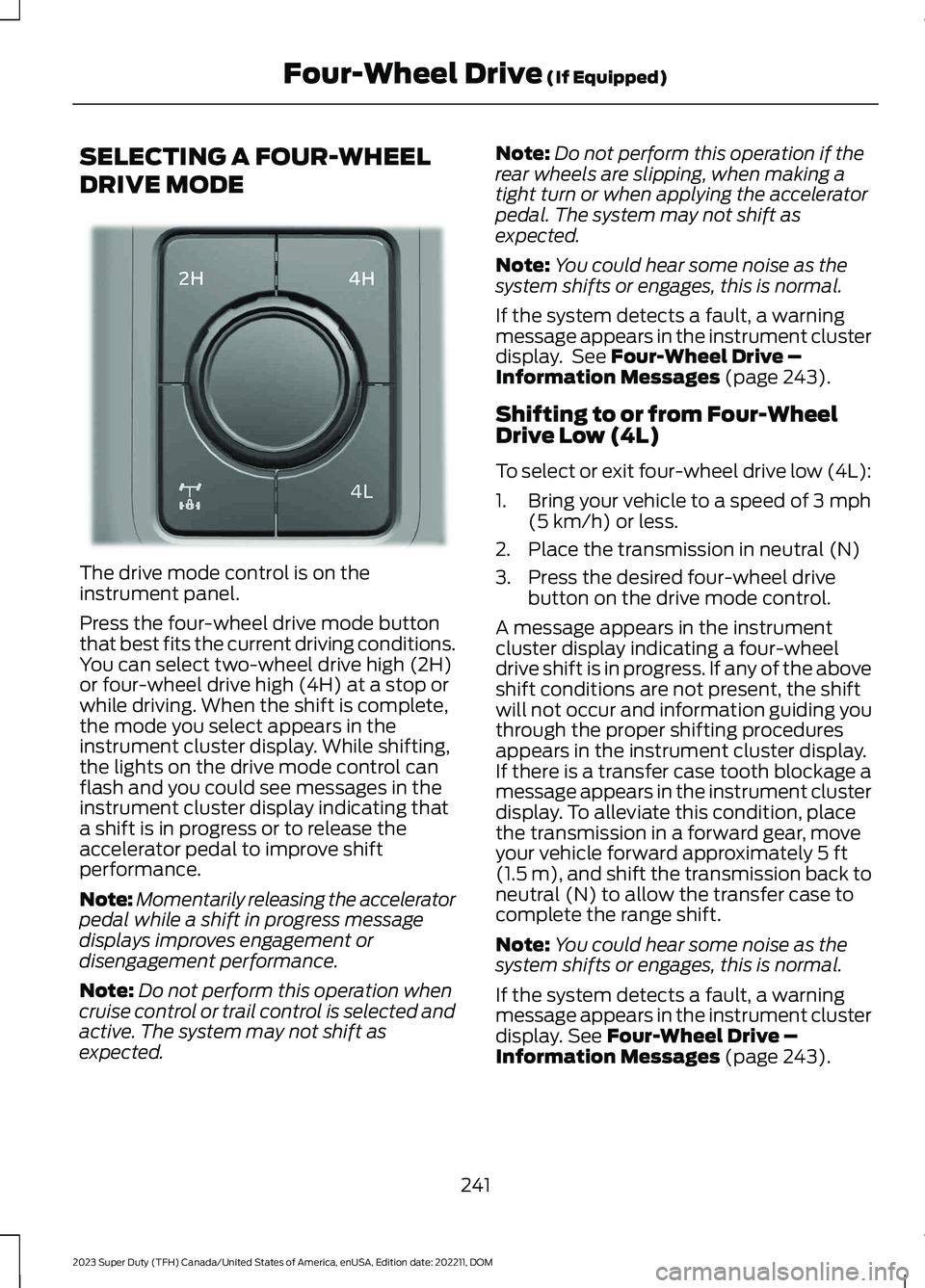
The drive mode control is on theinstrument panel.
Press the four-wheel drive mode buttonthat best fits the current driving conditions.You can select two-wheel drive high (2H)or four-wheel drive high (4H) at a stop orwhile driving. When the shift is complete,the mode you select appears in theinstrument cluster display. While shifting,the lights on the drive mode control canflash and you could see messages in theinstrument cluster display indicating thata shift is in progress or to release theaccelerator pedal to improve shiftperformance.
Note:Momentarily releasing the acceleratorpedal while a shift in progress messagedisplays improves engagement ordisengagement performance.
Note:Do not perform this operation whencruise control or trail control is selected andactive. The system may not shift asexpected.
Note:Do not perform this operation if therear wheels are slipping, when making atight turn or when applying the acceleratorpedal. The system may not shift asexpected.
Note:You could hear some noise as thesystem shifts or engages, this is normal.
If the system detects a fault, a warningmessage appears in the instrument clusterdisplay. See Four-Wheel Drive –Information Messages (page 243).
Shifting to or from Four-WheelDrive Low (4L)
To select or exit four-wheel drive low (4L):
1.Bring your vehicle to a speed of 3 mph(5 km/h) or less.
2.Place the transmission in neutral (N)
3.Press the desired four-wheel drivebutton on the drive mode control.
A message appears in the instrumentcluster display indicating a four-wheeldrive shift is in progress. If any of the aboveshift conditions are not present, the shiftwill not occur and information guiding youthrough the proper shifting proceduresappears in the instrument cluster display.If there is a transfer case tooth blockage amessage appears in the instrument clusterdisplay. To alleviate this condition, placethe transmission in a forward gear, moveyour vehicle forward approximately 5 ft(1.5 m), and shift the transmission back toneutral (N) to allow the transfer case tocomplete the range shift.
Note:You could hear some noise as thesystem shifts or engages, this is normal.
If the system detects a fault, a warningmessage appears in the instrument clusterdisplay. See Four-Wheel Drive –Information Messages (page 243).
241
2023 Super Duty (TFH) Canada/United States of America, enUSA, Edition date: 202211, DOMFour-Wheel Drive (If Equipped)E383456
Page 302 of 738

Note:You cannot see the sensor. It isbehind a fascia panel.
Note:Keep the front of your vehicle free ofdirt, metal badges or objects. Vehicle frontprotectors, aftermarket lights, additionalpaint or plastic coatings could also degradesensor performance.
A message displays if something obstructsthe camera or the sensor. When somethingblocks the sensor, the system cannotdetect a vehicle ahead and does notfunction. See Adaptive Cruise Control– Information Messages (page 309).
The radar sensor has a limited field of view.It may not detect vehicles at all or detecta vehicle later than expected in somesituations. The lead vehicle image doesnot illuminate if the system does notdetect a vehicle in front of you.
Detection Issues Can Occur:
When driving on a different linethan the vehicle in front.A
With vehicles that edge into yourlane. The system can only detectthese vehicles once they movefully into your lane.
B
There may be issues with thedetection of vehicles in frontwhen driving into and coming outof a bend or curve in the road.
C
In these cases, the system may brake lateor unexpectedly.
If something hits the front end of yourvehicle or damage occurs, theradar-sensing zone may change. This couldcause missed or false vehicle detection.
298
2023 Super Duty (TFH) Canada/United States of America, enUSA, Edition date: 202211, DOMAdaptive Cruise Control (If Equipped)E71621
Page 311 of 738
The system only applies limited braking.You can override the system with theaccelerator pedal or cancel the system byapplying the brakes.
The system may adapt to various factorssuch as time of day, lane width. This couldinfluence speed adjustments andaccelerations.
The system may adapt to various drivemodes. See Drive Mode Control (page311).This could influence speedadjustments and accelerations.
Note:The system does not activate theturn signal automatically.
PREDICTIVE SPEED ASSISTLIMITATIONS
WARNING: The system may notalways adjust vehicle speed in certainroad or weather conditions such ascrossing traffic, yield or stop signs, rightof way, traffic lights, speed bumps, rain,snow, fog. You must always apply thebrake or accelerator pedal whennecessary.
The road geometry and speed limitinformation provided by the navigationmap data could be inaccurate or out ofdate.
The system may not detect and readspeed limit signs with conditionalinformation, for example, when a sign isflashing, during specific time ranges, orwhen children are present.
Note:The system does not set the vehiclespeed to speed limits shown with asupplementary traffic sign.
Under certain conditions, the system maynot adjust the vehicle speed until after yourvehicle passes the speed limit.
Detection of road geometry operates onlywhere related information is available.Road geometry information may not beavailable in some areas.
SWITCHING PREDICTIVE SPEEDASSIST MODE ON AND OFF
1.Press Features on the touchscreen.
2.Press Driver Assistance.
3.Press Cruise Control.
4.Press Adaptive Cruise Control.
5.Switch Predictive Speed Assist on oroff.
ADJUSTING THE SET SPEEDTOLERANCE
1.Press Features on the touchscreen.
2.Press Driver Assistance.
3.Press Cruise Control.
4.Press Adaptive Cruise Control.
5.Switch Predictive Speed Assist on.
6.Press Tolerance.
7.Adjust the slider to set the tolerance.
Note:You can set tolerance for vehiclespeed adjustment based on speed signrecognition only.
PREDICTIVE SPEED ASSISTALERTS
If the speed sign recognition systemdetects a speed limit below the minimumadaptive cruise control set speed, a tonesounds and the system returns to standbymode.
307
2023 Super Duty (TFH) Canada/United States of America, enUSA, Edition date: 202211, DOMAdaptive Cruise Control (If Equipped)
Page 343 of 738

WARNING: The system mayoperate with reduced function duringcold and inclement weather conditions.Snow, ice, rain, spray and fog canadversely affect the system. Keep thefront camera and radar free of snow andice. Failure to follow this instruction mayresult in the loss of control of yourvehicle, serious personal injury or death.
WARNING: Take additional care ifyour vehicle is heavily loaded or you aretowing a trailer. These conditions couldresult in reduced performance of thissystem. Failure to follow this instructioncould result in the loss of control of yourvehicle, personal injury or death.
WARNING: The system cannothelp prevent all crashes. Do not rely onthis system to replace driver judgmentand the need to maintain a safe distanceand speed.
WARNING: System performancecould be reduced in situations where thevehicle camera has limited detectioncapability. These situations include butare not limited to direct or low sunlight,vehicles at night without tail lights,unconventional vehicle types, andpedestrians and cyclists with complex,partially obscured backgrounds. Failureto take care may result in the loss ofcontrol of your vehicle, personal injury ordeath.
PRE-COLLISION ASSIST
LIMITATIONS
Pre-collision assist depends on thedetection ability of its camera and sensors.Any obstructions or damage to these areascan limit detection or prevent the systemfrom functioning. See Locating thePre-Collision Assist Sensors (page 341).
The system is active at 3 mph (5 km/h)and above.
Note:The pre-collision assist systemautomatically disables when you manuallydisable AdvanceTrac™, 4X4 low, and RockCrawl (if available).
Note:Brake support and automaticemergency braking are active up to themaximum speed of the vehicle.
Pedestrian Detection Limitations
Pedestrian detection is active at speedsup to 50 mph (80 km/h).
Pedestrian detection operates optimallywhen detected hazards are clearlyidentifiable. System performance mayreduce in situations where pedestrians arerunning, partly obscured, have a complexbackground, or cannot be distinguishedfrom a group.
Cyclist Detection Limitations
Cyclist detection is active at speeds up to50 mph (80 km/h).
Cyclist detection functions optimally whendetected hazards are clearly identifiable.System performance may reduce insituations where cyclists are fast-moving,partly obscured, have a complexbackground, or cannot be distinguishedfrom a group.
339
2023 Super Duty (TFH) Canada/United States of America, enUSA, Edition date: 202211, DOMPre-Collision Assist (If Equipped)
Page 366 of 738
When attaching the trailer wiring connectorto your vehicle, only use a proper fittingconnector that works with the vehicle andtrailer functions.
Trailer Light Check
WARNING: Never connect anytrailer lamp wiring to the vehicle's taillamp wiring; this may damage theelectrical system resulting in fire. Contactyour authorized dealer as soon aspossible for assistance in proper trailertow wiring installation. Additionalelectrical equipment may be required.
Most towed vehicles require trailer lamps.Make sure all running lights, brake lights,turn signals and hazard lights are working.
Safety Chains
Install trailer safety chains to the trailerhitch as recommended by themanufacturer. Cross the chains under thetrailer coupler and allow enough slack forturning tight corners. Do not allow thechains to drag on the ground.
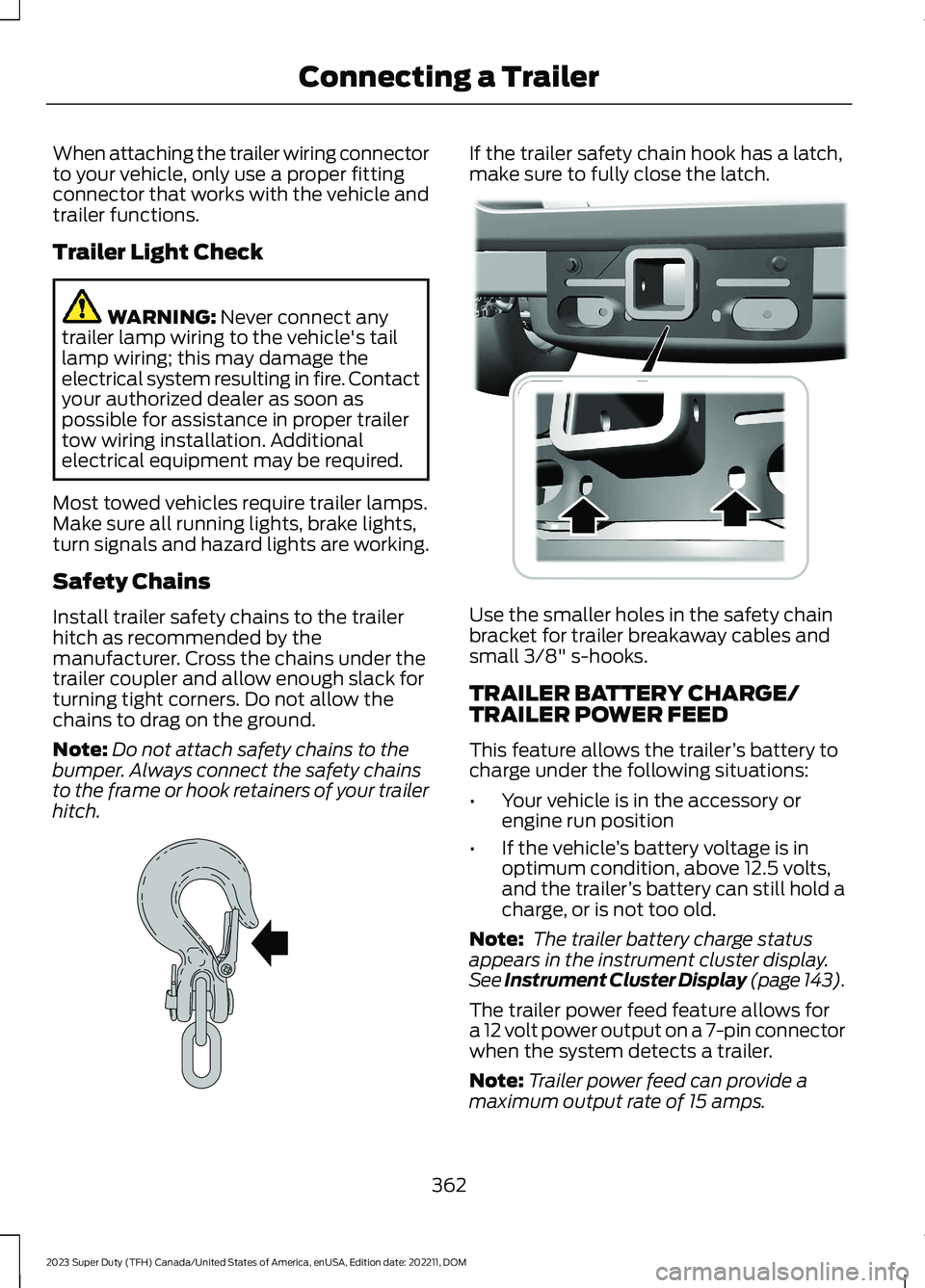
Note:Do not attach safety chains to thebumper. Always connect the safety chainsto the frame or hook retainers of your trailerhitch.
If the trailer safety chain hook has a latch,make sure to fully close the latch.
Use the smaller holes in the safety chainbracket for trailer breakaway cables andsmall 3/8" s-hooks.
TRAILER BATTERY CHARGE/TRAILER POWER FEED
This feature allows the trailer’s battery tocharge under the following situations:
•Your vehicle is in the accessory orengine run position
•If the vehicle’s battery voltage is inoptimum condition, above 12.5 volts,and the trailer’s battery can still hold acharge, or is not too old.
Note: The trailer battery charge statusappears in the instrument cluster display.See Instrument Cluster Display (page 143).
The trailer power feed feature allows fora 12 volt power output on a 7-pin connectorwhen the system detects a trailer.
Note:Trailer power feed can provide amaximum output rate of 15 amps.
362
2023 Super Duty (TFH) Canada/United States of America, enUSA, Edition date: 202211, DOMConnecting a TrailerE265060 E376302
Page 367 of 738
Note:Never place more demand than 15amps of power on the trailer power feed,this may damage the trailer lighting.
TRAILER LIGHTING CHECK
WARNING: Never connect anytrailer lamp wiring to the vehicle's taillamp wiring; this may damage theelectrical system resulting in fire. Contactyour authorized dealer as soon aspossible for assistance in proper trailertow wiring installation. Additionalelectrical equipment may be required.
Trailer light check feature allows oneperson to confirm that all taillights arefunctioning.
Perform a trailer light illuminationsequence to confirm that all lights arefunctioning using the SYNC screen in thevehicle or the FordPass app.
Performing the Trailer Light Checkusing the SYNC screen in vehicle
1.Press Features on the touchscreen.
2.Press Towing.
3.Press Trailer Light Check.
4.Press Start.
5.Follow the instructions until the lightssequence completes.
Performing the Trailer Light Checkusing the FordPass app
1.Create or sign-in to the FordPass appand add the vehicle identificationnumber to your account.
2.Once you add the vehicle identificationnumber, follow the prompts in theFordPass app to complete the SyncConnect Authorization process.
3.After the authorization is complete,navigate to Vehicle Details screen andselect Trailer Light Check.
4.Press Start.
5.Follow the instructions until the lightssequence completes.
Note:Trailer light check feature is availableonly in vehicles with trailer capability andtrailer must be electrically connected forfeature to function.
363
2023 Super Duty (TFH) Canada/United States of America, enUSA, Edition date: 202211, DOMConnecting a Trailer
Page 418 of 738
Maximum WadingCapabilityModel
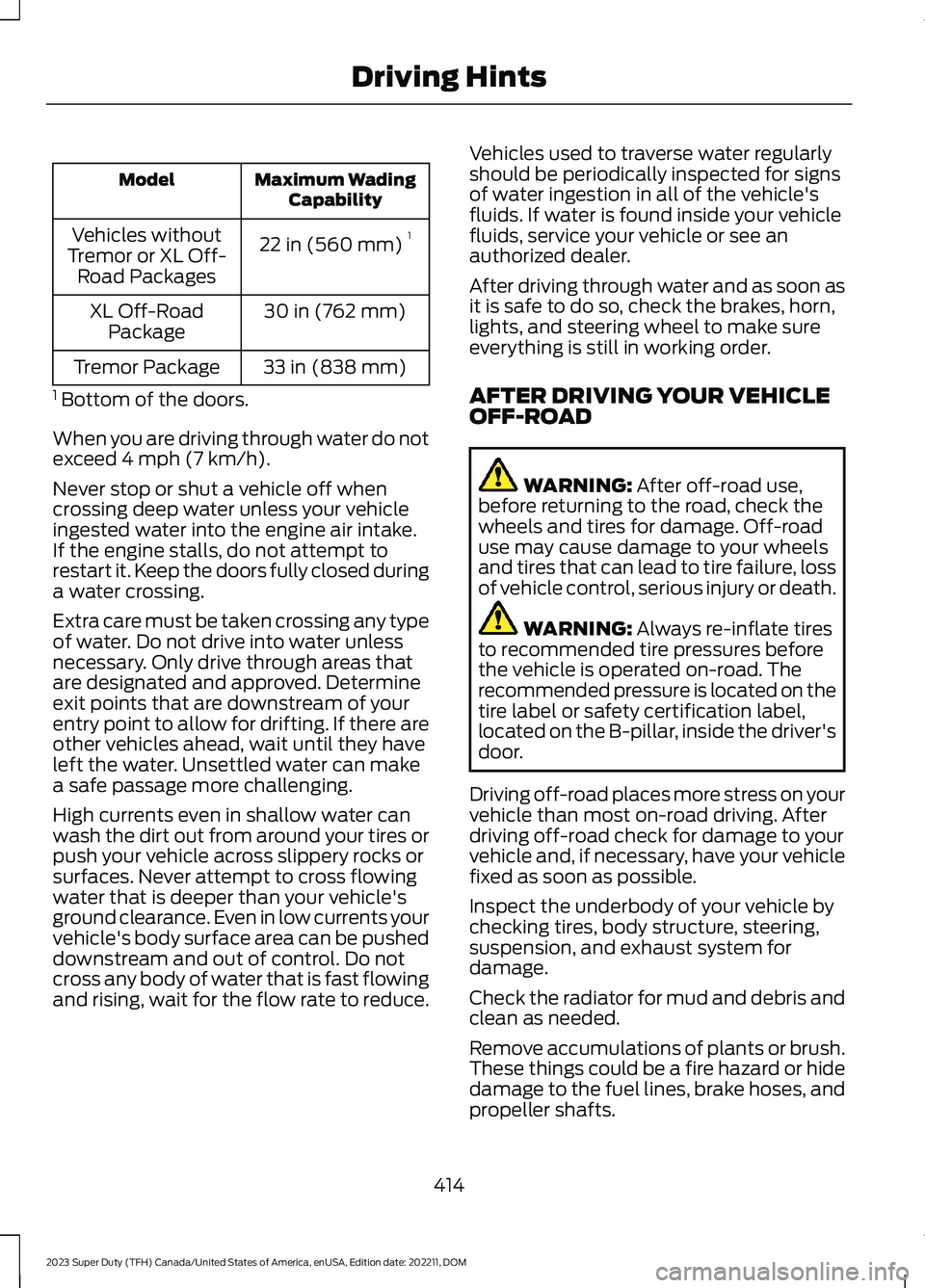
22 in (560 mm)1Vehicles withoutTremor or XL Off-Road Packages
30 in (762 mm)XL Off-RoadPackage
33 in (838 mm)Tremor Package
1 Bottom of the doors.
When you are driving through water do notexceed 4 mph (7 km/h).
Never stop or shut a vehicle off whencrossing deep water unless your vehicleingested water into the engine air intake.If the engine stalls, do not attempt torestart it. Keep the doors fully closed duringa water crossing.
Extra care must be taken crossing any typeof water. Do not drive into water unlessnecessary. Only drive through areas thatare designated and approved. Determineexit points that are downstream of yourentry point to allow for drifting. If there areother vehicles ahead, wait until they haveleft the water. Unsettled water can makea safe passage more challenging.
High currents even in shallow water canwash the dirt out from around your tires orpush your vehicle across slippery rocks orsurfaces. Never attempt to cross flowingwater that is deeper than your vehicle'sground clearance. Even in low currents yourvehicle's body surface area can be pusheddownstream and out of control. Do notcross any body of water that is fast flowingand rising, wait for the flow rate to reduce.
Vehicles used to traverse water regularlyshould be periodically inspected for signsof water ingestion in all of the vehicle'sfluids. If water is found inside your vehiclefluids, service your vehicle or see anauthorized dealer.
After driving through water and as soon asit is safe to do so, check the brakes, horn,lights, and steering wheel to make sureeverything is still in working order.
AFTER DRIVING YOUR VEHICLEOFF-ROAD
WARNING: After off-road use,before returning to the road, check thewheels and tires for damage. Off-roaduse may cause damage to your wheelsand tires that can lead to tire failure, lossof vehicle control, serious injury or death.
WARNING: Always re-inflate tiresto recommended tire pressures beforethe vehicle is operated on-road. Therecommended pressure is located on thetire label or safety certification label,located on the B-pillar, inside the driver'sdoor.
Driving off-road places more stress on yourvehicle than most on-road driving. Afterdriving off-road check for damage to yourvehicle and, if necessary, have your vehiclefixed as soon as possible.
Inspect the underbody of your vehicle bychecking tires, body structure, steering,suspension, and exhaust system fordamage.
Check the radiator for mud and debris andclean as needed.
Remove accumulations of plants or brush.These things could be a fire hazard or hidedamage to the fuel lines, brake hoses, andpropeller shafts.
414
2023 Super Duty (TFH) Canada/United States of America, enUSA, Edition date: 202211, DOMDriving Hints