2023 FORD SUPER DUTY charging
[x] Cancel search: chargingPage 379 of 738
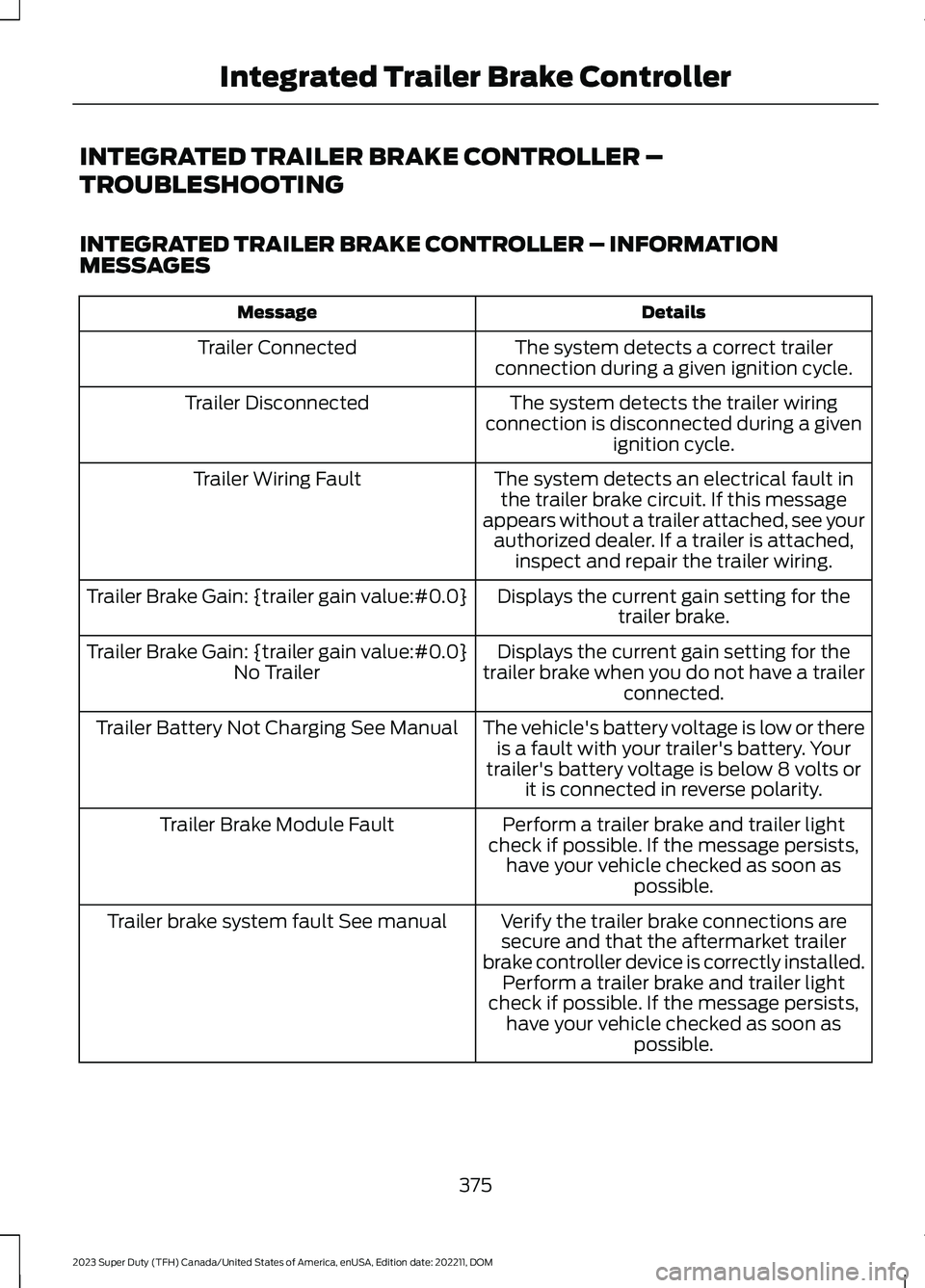
INTEGRATED TRAILER BRAKE CONTROLLER –
TROUBLESHOOTING
INTEGRATED TRAILER BRAKE CONTROLLER – INFORMATIONMESSAGES
DetailsMessage
The system detects a correct trailerconnection during a given ignition cycle.Trailer Connected
The system detects the trailer wiringconnection is disconnected during a givenignition cycle.
Trailer Disconnected
The system detects an electrical fault inthe trailer brake circuit. If this messageappears without a trailer attached, see yourauthorized dealer. If a trailer is attached,inspect and repair the trailer wiring.
Trailer Wiring Fault
Displays the current gain setting for thetrailer brake.Trailer Brake Gain: {trailer gain value:#0.0}
Displays the current gain setting for thetrailer brake when you do not have a trailerconnected.
Trailer Brake Gain: {trailer gain value:#0.0}No Trailer
The vehicle's battery voltage is low or thereis a fault with your trailer's battery. Yourtrailer's battery voltage is below 8 volts orit is connected in reverse polarity.
Trailer Battery Not Charging See Manual
Perform a trailer brake and trailer lightcheck if possible. If the message persists,have your vehicle checked as soon aspossible.
Trailer Brake Module Fault
Verify the trailer brake connections aresecure and that the aftermarket trailerbrake controller device is correctly installed.Perform a trailer brake and trailer lightcheck if possible. If the message persists,have your vehicle checked as soon aspossible.
Trailer brake system fault See manual
375
2023 Super Duty (TFH) Canada/United States of America, enUSA, Edition date: 202211, DOMIntegrated Trailer Brake Controller
Page 461 of 738
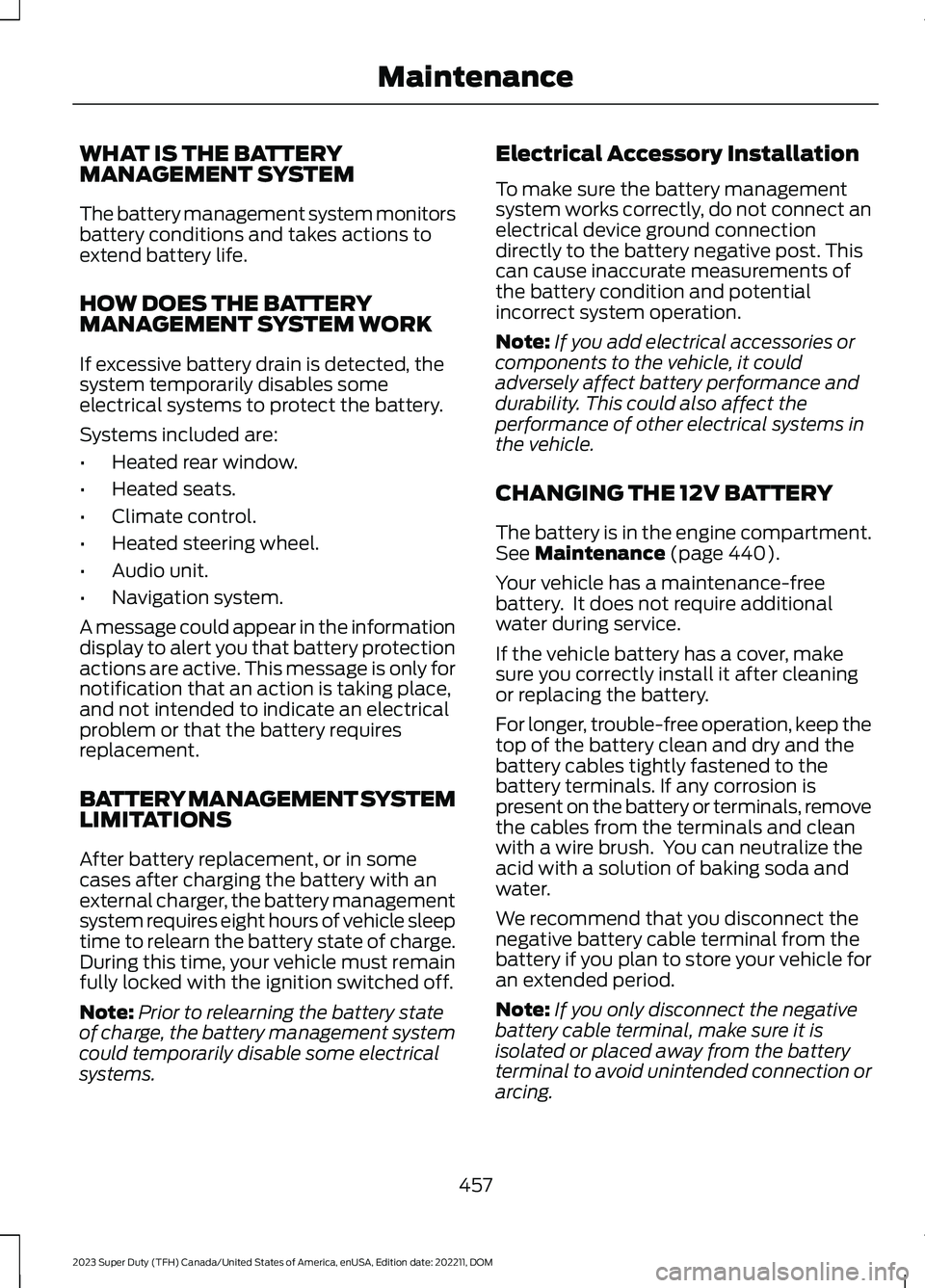
WHAT IS THE BATTERYMANAGEMENT SYSTEM
The battery management system monitorsbattery conditions and takes actions toextend battery life.
HOW DOES THE BATTERYMANAGEMENT SYSTEM WORK
If excessive battery drain is detected, thesystem temporarily disables someelectrical systems to protect the battery.
Systems included are:
•Heated rear window.
•Heated seats.
•Climate control.
•Heated steering wheel.
•Audio unit.
•Navigation system.
A message could appear in the informationdisplay to alert you that battery protectionactions are active. This message is only fornotification that an action is taking place,and not intended to indicate an electricalproblem or that the battery requiresreplacement.
BATTERY MANAGEMENT SYSTEMLIMITATIONS
After battery replacement, or in somecases after charging the battery with anexternal charger, the battery managementsystem requires eight hours of vehicle sleeptime to relearn the battery state of charge.During this time, your vehicle must remainfully locked with the ignition switched off.
Note:Prior to relearning the battery stateof charge, the battery management systemcould temporarily disable some electricalsystems.
Electrical Accessory Installation
To make sure the battery managementsystem works correctly, do not connect anelectrical device ground connectiondirectly to the battery negative post. Thiscan cause inaccurate measurements ofthe battery condition and potentialincorrect system operation.
Note:If you add electrical accessories orcomponents to the vehicle, it couldadversely affect battery performance anddurability. This could also affect theperformance of other electrical systems inthe vehicle.
CHANGING THE 12V BATTERY
The battery is in the engine compartment.See Maintenance (page 440).
Your vehicle has a maintenance-freebattery. It does not require additionalwater during service.
If the vehicle battery has a cover, makesure you correctly install it after cleaningor replacing the battery.
For longer, trouble-free operation, keep thetop of the battery clean and dry and thebattery cables tightly fastened to thebattery terminals. If any corrosion ispresent on the battery or terminals, removethe cables from the terminals and cleanwith a wire brush. You can neutralize theacid with a solution of baking soda andwater.
We recommend that you disconnect thenegative battery cable terminal from thebattery if you plan to store your vehicle foran extended period.
Note:If you only disconnect the negativebattery cable terminal, make sure it isisolated or placed away from the batteryterminal to avoid unintended connection orarcing.
457
2023 Super Duty (TFH) Canada/United States of America, enUSA, Edition date: 202211, DOMMaintenance
Page 463 of 738
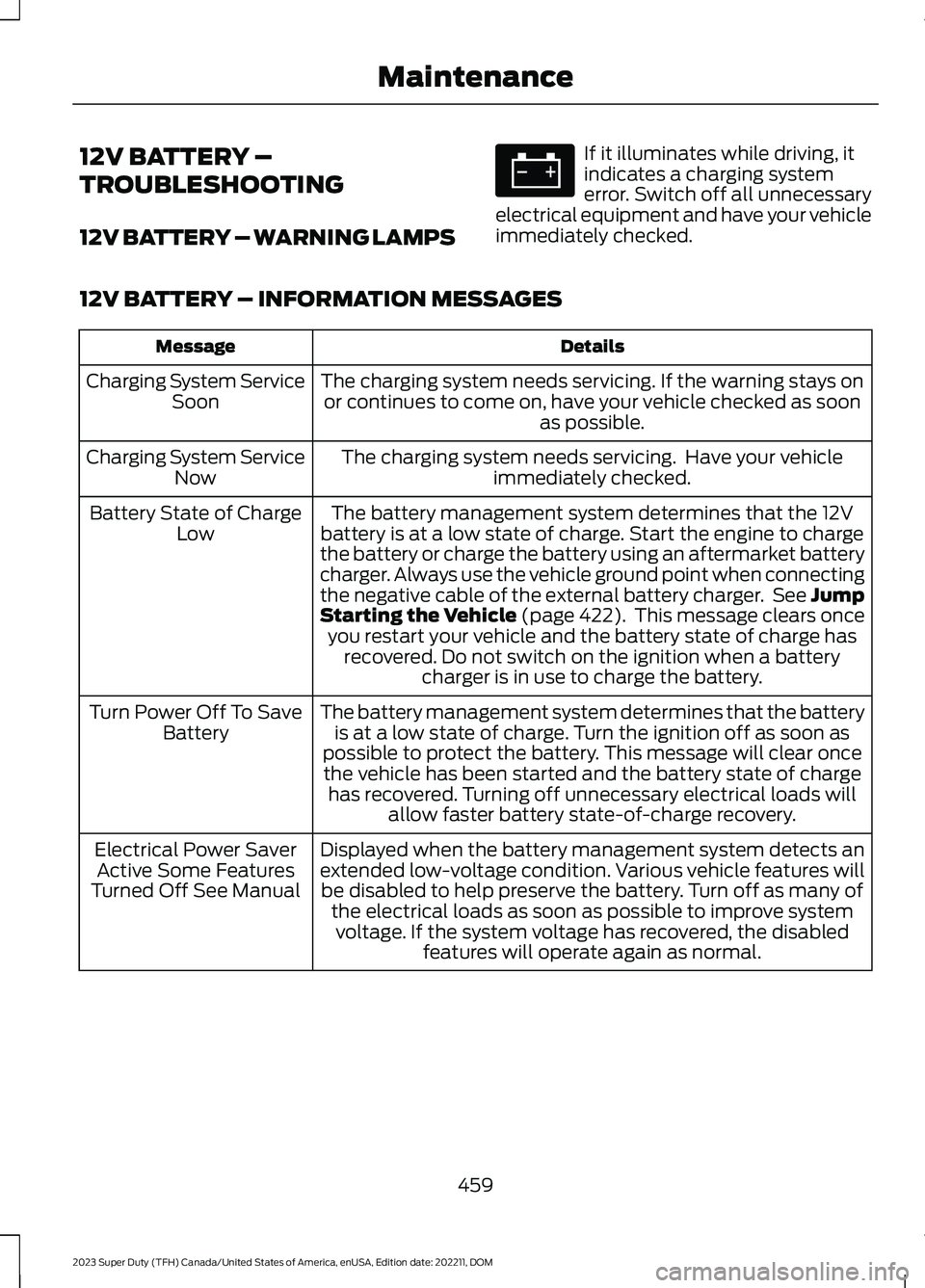
12V BATTERY –
TROUBLESHOOTING
12V BATTERY – WARNING LAMPS
If it illuminates while driving, itindicates a charging systemerror. Switch off all unnecessaryelectrical equipment and have your vehicleimmediately checked.
12V BATTERY – INFORMATION MESSAGES
DetailsMessage
The charging system needs servicing. If the warning stays onor continues to come on, have your vehicle checked as soonas possible.
Charging System ServiceSoon
The charging system needs servicing. Have your vehicleimmediately checked.Charging System ServiceNow
The battery management system determines that the 12Vbattery is at a low state of charge. Start the engine to chargethe battery or charge the battery using an aftermarket batterycharger. Always use the vehicle ground point when connectingthe negative cable of the external battery charger. See JumpStarting the Vehicle (page 422). This message clears onceyou restart your vehicle and the battery state of charge hasrecovered. Do not switch on the ignition when a batterycharger is in use to charge the battery.
Battery State of ChargeLow
The battery management system determines that the batteryis at a low state of charge. Turn the ignition off as soon aspossible to protect the battery. This message will clear oncethe vehicle has been started and the battery state of chargehas recovered. Turning off unnecessary electrical loads willallow faster battery state-of-charge recovery.
Turn Power Off To SaveBattery
Displayed when the battery management system detects anextended low-voltage condition. Various vehicle features willbe disabled to help preserve the battery. Turn off as many ofthe electrical loads as soon as possible to improve systemvoltage. If the system voltage has recovered, the disabledfeatures will operate again as normal.
Electrical Power SaverActive Some FeaturesTurned Off See Manual
459
2023 Super Duty (TFH) Canada/United States of America, enUSA, Edition date: 202211, DOMMaintenanceE67021
Page 586 of 738
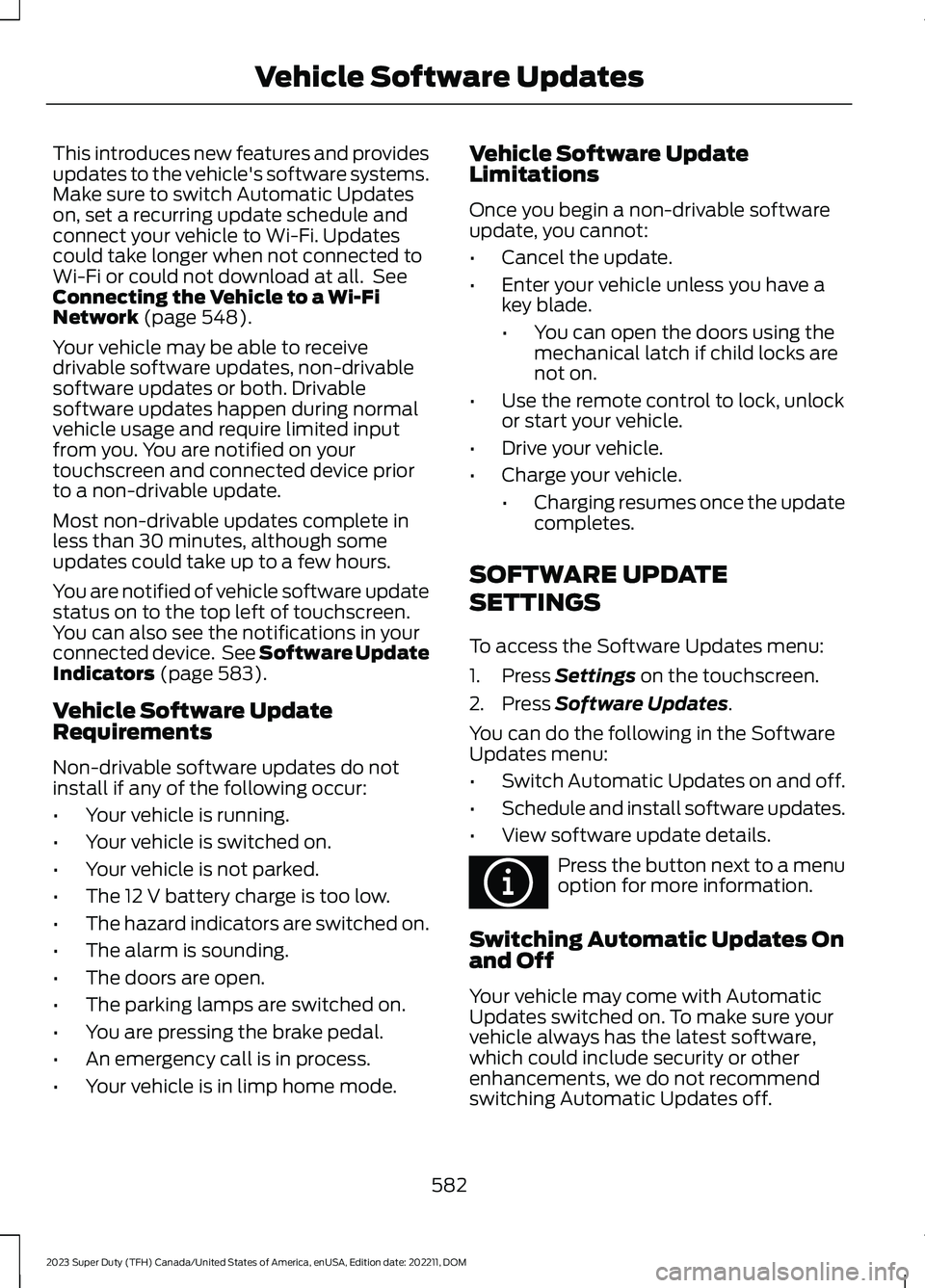
This introduces new features and providesupdates to the vehicle's software systems.Make sure to switch Automatic Updateson, set a recurring update schedule andconnect your vehicle to Wi-Fi. Updatescould take longer when not connected toWi-Fi or could not download at all. SeeConnecting the Vehicle to a Wi-FiNetwork (page 548).
Your vehicle may be able to receivedrivable software updates, non-drivablesoftware updates or both. Drivablesoftware updates happen during normalvehicle usage and require limited inputfrom you. You are notified on yourtouchscreen and connected device priorto a non-drivable update.
Most non-drivable updates complete inless than 30 minutes, although someupdates could take up to a few hours.
You are notified of vehicle software updatestatus on to the top left of touchscreen.You can also see the notifications in yourconnected device. See Software UpdateIndicators (page 583).
Vehicle Software UpdateRequirements
Non-drivable software updates do notinstall if any of the following occur:
•Your vehicle is running.
•Your vehicle is switched on.
•Your vehicle is not parked.
•The 12 V battery charge is too low.
•The hazard indicators are switched on.
•The alarm is sounding.
•The doors are open.
•The parking lamps are switched on.
•You are pressing the brake pedal.
•An emergency call is in process.
•Your vehicle is in limp home mode.
Vehicle Software UpdateLimitations
Once you begin a non-drivable softwareupdate, you cannot:
•Cancel the update.
•Enter your vehicle unless you have akey blade.
•You can open the doors using themechanical latch if child locks arenot on.
•Use the remote control to lock, unlockor start your vehicle.
•Drive your vehicle.
•Charge your vehicle.
•Charging resumes once the updatecompletes.
SOFTWARE UPDATE
SETTINGS
To access the Software Updates menu:
1.Press Settings on the touchscreen.
2.Press Software Updates.
You can do the following in the SoftwareUpdates menu:
•Switch Automatic Updates on and off.
•Schedule and install software updates.
•View software update details.
Press the button next to a menuoption for more information.
Switching Automatic Updates Onand Off
Your vehicle may come with AutomaticUpdates switched on. To make sure yourvehicle always has the latest software,which could include security or otherenhancements, we do not recommendswitching Automatic Updates off.
582
2023 Super Duty (TFH) Canada/United States of America, enUSA, Edition date: 202211, DOMVehicle Software UpdatesE366956
Page 670 of 738
United States and Canada
WARNING: Changes ormodifications not expressively approvedby the party responsible for compliancecould void the user's authority to operatethe equipment. The term "IC:" before theradio certification number only signifiesthat Industry Canada technicalspecifications were met.
FCC ID: MRXFP4
IC: 2546A-FP4
This device complies with Part 15 of theFCC Rules and with Innovation, Scienceand Economic Development Canada’slicence-exempt RSS(s). Operation issubject to the following two conditions:
1.This device may not cause harmfulinterference, and
2.This device must accept anyinterference received, includinginterference that may cause undesiredoperation.
WIRELESS ACCESSORYCHARGING MODULE
Argentina
Brazil
666
2023 Super Duty (TFH) Canada/United States of America, enUSA, Edition date: 202211, DOMCustomer InformationE368925 E368926 E368927 E367123
Page 714 of 738
Blind Spot Information System With TrailerCoverage..........................................................328Blind Spot Information SystemIndicators.....................................................330Blind Spot Information SystemLimitations...................................................327Blind Spot Information SystemPrecautions..................................................327Blind Spot Information SystemRequirements.............................................327Blind Spot Information System –Troubleshooting.........................................331Blind Spot Information System –Information Messages.................................331Blind Spot Information SystemVideos............................................................331Blind Spot Information System WithTrailer Coverage.........................................328Blind Spot Information System With TrailerCoverage Limitations..................................328Selecting a Trailer..............................................330Setting a Trailer Length...................................329What Is Blind Spot Information System withTrailer Coverage.............................................328Bluetooth®.....................................................574Bonnet LockSee: Opening and Closing the Hood.........440Booster Seats...................................................47Brake Fluid Specification..........................250Brake Over Accelerator..............................249Brake Precautions.......................................249Brakes..............................................................249Anti-Lock Braking System..............................249Brakes – Troubleshooting..............................250Brakes – Troubleshooting........................250Brakes – Frequently AskedQuestions.........................................................252Brakes – Information Messages....................251Brakes – Warning Lamps...............................250Breaking-In.....................................................416
C
Calculating Payload....................................353Calculating the Load Limit.......................353Canceling the Set Speed...........................273Canceling the Set Speed Limit................316Capacities and Specifications................520
Catalytic Converter.....................................233Catalytic Converter –Troubleshooting............................................233Catalytic Converter Precautions............233Catalytic Converter –Troubleshooting........................................233Catalytic Converter – WarningLamps................................................................233Center Console..............................................198Opening the Center Console..........................198Center Console Work Surface.................193Center Console Work Surface –Troubleshooting.............................................194Center Console Work Surface –Troubleshooting.........................................194Center Console Work Surface – InformationMessages..........................................................194Center Display Limitations.......................563Center Display Overview..........................563Center Display Overview Videos...........564Center Display Precautions.....................563Changing a Flat Tire...................................509Changing a Road Wheel...........................509Changing the Fuel Filter - Diesel............453Changing the Fuel Filter -Gasoline.......................................................453Changing the Language.............................145Changing the Measurement Unit...........145Changing the Remote Control Battery -Vehicles With: Flip Key...............................74Changing the Remote Control Battery -Vehicles With: Push Button Start..........75Changing the Set Speed Limit................316Changing the Temperature Unit.............145Changing the Tire Pressure Unit.............145Changing the Vehicle Wi-Fi HotspotName or Password....................................551Charging a Device.........................................183Charging a Wireless Device......................195Checking the Brake Fluid..........................249Checking the Seatbelts...............................56Checking the Selective CatalyticReduction System Status.....................230Checking the Tire Pressures...................490Checking the Wiper Blades........................114Children and Airbags....................................64
710
2023 Super Duty (TFH) Canada/United States of America, enUSA, Edition date: 202211, DOMIndex
Page 727 of 738

Switching Predictive Speed Assist ModeOn and Off.......................................................307Predictive Speed Assist –Troubleshooting.......................................308Predictive Speed Assist – InformationMessages........................................................308Preparing Your Vehicle forStorage.........................................................476Programming the Garage DoorOpener..........................................................180Programming the Remote Control -Vehicles With: Flip Key...............................77Programming the Remote Control -Vehicles With: Push Button Start..........78Properly Adjusting the Driver and FrontPassenger Seats..........................................64Protecting the Environment......................30PunctureSee: Changing a Flat Tire...............................509Push Button Ignition Switch....................203
R
Radio Frequency CertificationLabels...........................................................626Blind Spot Information SystemSensors.............................................................626Body Control Module.......................................629Cruise Control Module......................................631Garage Door Opener........................................635Keys and Remote Controls............................636Near Field Communication...........................638Passive Anti-Theft System............................639Radio Transceiver Module..............................643SYNC......................................................................644Telematics Control Unit..................................650Tire Pressure Monitoring SystemSensors.............................................................652Wireless Accessory ChargingModule.............................................................666Rear Axle Fluid Capacity andSpecification..............................................542Rear Cross Traffic BrakingSee: Cross Traffic Braking...............................262Rear Exterior.....................................................35Rear Occupant Alert System AudibleWarnings.......................................................176
Rear Occupant Alert SystemIndicators.......................................................175Rear Occupant Alert SystemLimitations....................................................174Rear Occupant Alert SystemPrecautions..................................................174Rear Occupant Alert System....................174Rear Occupant Alert SystemSettings..........................................................175Rear Parking Aid...........................................283Locating the Rear Parking AidSensors.............................................................283Rear Parking Aid Audible Warnings............284Rear Parking Aid Limitations.........................283What is the Rear Parking Aid.........................283Rear Seats.......................................................170Heated Seats........................................................172Manual Seats.......................................................170Rear View Camera Guide Lines.............288Rear View Camera Precautions..............287Rear View Camera.......................................287Rear View Camera Settings..........................288Rear View Camera Settings....................288Switching Rear View Camera Delay On andOff......................................................................289Zooming the Rear View Camera In andOut.....................................................................288Rear View Camera Videos.......................289Rebooting the Center Display................564Recalling a Preset Position........................177Recovery Towing..........................................423Accessing the Front Towing Point...............423Recreationally Towing Your Vehicle -4x2.................................................................429Recreationally Towing Your Vehicle -4x4..................................................................427Refueling..........................................................218Refueling System Overview............................218Refueling Your Vehicle......................................218Releasing the Electric Parking Brake ifthe Vehicle Battery Has Run Out ofCharge...........................................................254Remote Control Limitations......................69Remotely Starting and Stopping theVehicle...........................................................149Remote Start Limitations..........................149Remote Start Precautions........................149
723
2023 Super Duty (TFH) Canada/United States of America, enUSA, Edition date: 202211, DOMIndex