2023 FORD SUPER DUTY ESP
[x] Cancel search: ESPPage 569 of 738
FORD ASSISTANT
USING FORD ASSISTANT
The digital assistant allows you to controlvehicle features using conversationalrequests.
To begin a voice interaction using the wakeword, say the selected wake word, thensay your command.
Press the voice interactionbutton on the steering wheel. Atone sounds before you can sayyour command.
Note:You may need to enable yourvehicle's modem to use certain voicecommands. See Enabling and Disablingthe Modem (page 548).
Note:When you are not driving, additionalcommands are available by using popularchat applications. Use FordPass to setup aconversation with your Ford assistant.
Voice Command Examples
To see examples of what voice commandsyou can use with different features:
Press the button on thetouchscreen.
1.Press Ford Assistant.
2.Press Voice Command Help.
3.Select a feature.
FORD ASSISTANT SETTINGS
To access the settings menu:
Press the button on thetouchscreen.
1.Press Ford Assistant.
From the settings menu you can do thefollowing:
•Switch listen for wake word on or off.
•Set the preferred wake word.
•Switch advance mode on or off.
•Switch phone confirmation on or off.
•Switch the commands list on or off.
•View the commands help menu.
Press the button next to a menuoption for more information.
FORD ASSISTANT – FREQUENTLYASKED QUESTIONS
Why does the system notunderstand what I am saying?
•You are speaking too soon. When usingthe button of the steering wheel, waitfor the tone before you speak.
Why does the system notunderstand the name of a track orartist?
•Bluetooth® does not support voicecommands.Connect your device to aUSB port.
•You are not saying the name exactlyas it appears on your device. Say thename of the track or artist exactly as itappears on your device. Spell out anyabbreviations in the name.
•The system does not recognize somespecial characters contained in thename of a song or artist, for example*, - or +. Rename the files on yourdevice or use the touchscreen to selectand play the track.
565
2023 Super Duty (TFH) Canada/United States of America, enUSA, Edition date: 202211, DOMVoice InteractionE142599 E280315 E280315 E366956
Page 573 of 738
PHONE PRECAUTIONS
WARNING: Driving while distractedcan result in loss of vehicle control, crashand injury. We strongly recommend thatyou use extreme caution when using anydevice that may take your focus off theroad. Your primary responsibility is thesafe operation of your vehicle. Werecommend against the use of anyhand-held device while driving andencourage the use of voice-operatedsystems when possible. Make sure youare aware of all applicable local lawsthat may affect the use of electronicdevices while driving.
CONNECTING YOUR PHONE
Go to the settings menu on your device andswitch Bluetooth® on.
Press the phone option on thefeature bar.
1.Press Add Phone.
Note:A prompt alerts you to search for yourvehicle on your cell phone.
2.Select your vehicle on your cell phone.
Note:A number appears on your cell phoneand on the touchscreen.
3.Confirm the number on your cell phonematches the number on thetouchscreen.
Note:The touchscreen indicates that youhave successfully paired your cell phone.
4.Approve phonebook download requeston your cell phone.
PHONE MENU
This menu becomes available after pairinga phone.
Recent Call List
Display and select an entry from a list ofprevious calls.
Contacts
Display a smart search form to look up yourcontacts. Use the List button toalphabetically sort your contacts.
Favorites
Display the list of favorite contacts thatare set up on your phone.
Messaging
Displays the list of text messages to read,listen to, or respond to.
Email
Displays the list of emails to read, listen to,or respond to.
Phone List
Display the list of paired or connecteddevices that you can select.
Note:Up to 12 devices can be stored.
Do Not Disturb
Reject incoming calls and switch ring tonesand alerts off.
Phone Keypad
Directly dial a number.
569
2023 Super Duty (TFH) Canada/United States of America, enUSA, Edition date: 202211, DOMPhone
Page 578 of 738
CONNECTING A BLUETOOTH®
DEVICE
1.Make sure Bluetooth® is enabled onyour device.
2.Press Settings on the touchscreen.
3.Press Connectivity.
4.Press Bluetooth.
5.Press Add a Bluetooth Device.
Note:A prompt alerts you to search for yourvehicle on your device.
6.Select your vehicle on your device.
Note:A number appears on your device andon the touchscreen.
7.Confirm that the number on yourdevice matches the number on thetouchscreen.
Note:The touchscreen indicates that youhave successfully paired your device.
The Bluetooth® word mark and logos areregistered trademarks owned by BluetoothSIG, Inc. and any use of such marks byFord Motor Company is under license.Other trademarks and trade names arethose of their respective owners.
PLAYING MEDIA USING
BLUETOOTH®
WARNING: Driving while distractedcan result in loss of vehicle control, crashand injury. We strongly recommend thatyou use extreme caution when using anydevice that may take your focus off theroad. Your primary responsibility is thesafe operation of your vehicle. Werecommend against the use of any
hand-held device while driving andencourage the use of voice-operatedsystems when possible. Make sure youare aware of all applicable local lawsthat may affect the use of electronicdevices while driving.
Connect your device.
Press the audio button on thefeature bar.
Press Sources.
Press the Bluetooth® option.
Press to play a track. Press againto pause the track.
Press to skip to the next track.
Press and hold to fast forwardthrough the track.
Press once to return to thebeginning of a track. Repeatedlypress to return to previoustracks.
Press and hold to fast rewind through thetrack.
574
2023 Super Duty (TFH) Canada/United States of America, enUSA, Edition date: 202211, DOMBluetooth®E100027 E250655
Page 579 of 738
APP PRECAUTIONS
WARNING: Driving while distractedcan result in loss of vehicle control, crashand injury. We strongly recommend thatyou use extreme caution when using anydevice that may take your focus off theroad. Your primary responsibility is thesafe operation of your vehicle. Werecommend against the use of anyhand-held device while driving andencourage the use of voice-operatedsystems when possible. Make sure youare aware of all applicable local lawsthat may affect the use of electronicdevices while driving.
APP REQUIREMENTS
When you start an app through the systemfor the first time, you could be asked togrant certain permissions. You can reviewand change the permissions that you havegranted at any time when your vehicle isnot moving. We recommend that youcheck your data plan before using yourapps through the system. Using themcould result in additional charges. We alsorecommend that you check the appprovider's terms and conditions andprivacy policy before using their app. Makesure that you have an active account forapps that you want to use through thesystem. Some apps will work with nosetup. Others require you to configuresome personal settings before you can usethem.
ACCESSING APPS
Select the apps option on thefeature bar.
ENABLING APPS ON AN IOS
DEVICE
Select the apps option on thefeature bar.
1.Select Mobile Apps Help.
2.Follow the instructions to pair andconnect your device via Bluetooth® orwith a USB cable.
3.Start the apps on your device that youwant to use.
4.Select the app that you want to use onthe touchscreen.
Note:Some apps may run through AppleCarPlay if it is enabled.
Note:Closing an app on your device willclose it on the touchscreen.
Note:For troubleshooting assistance selectMobile Apps List under Mobile Apps Help.
ENABLING APPS ON AN
ANDROID DEVICE
Select the apps option on thefeature bar.
1.Select Mobile Apps Help.
2.Follow the instructions to pair andconnect your device via Bluetooth® orwith a USB cable.
3.Start the apps on your device that youwant to use.
4.Select Find Mobile Apps.
5.Select the app that you want to use onthe touchscreen.
Note:Some devices may lose the ability toplay music over USB when Mobile Apps areenabled.
Note:Some apps may run through AndroidAuto if it is enabled.
575
2023 Super Duty (TFH) Canada/United States of America, enUSA, Edition date: 202211, DOMApps
Page 590 of 738
LOCATING THE AUXILIARY
SWITCHES
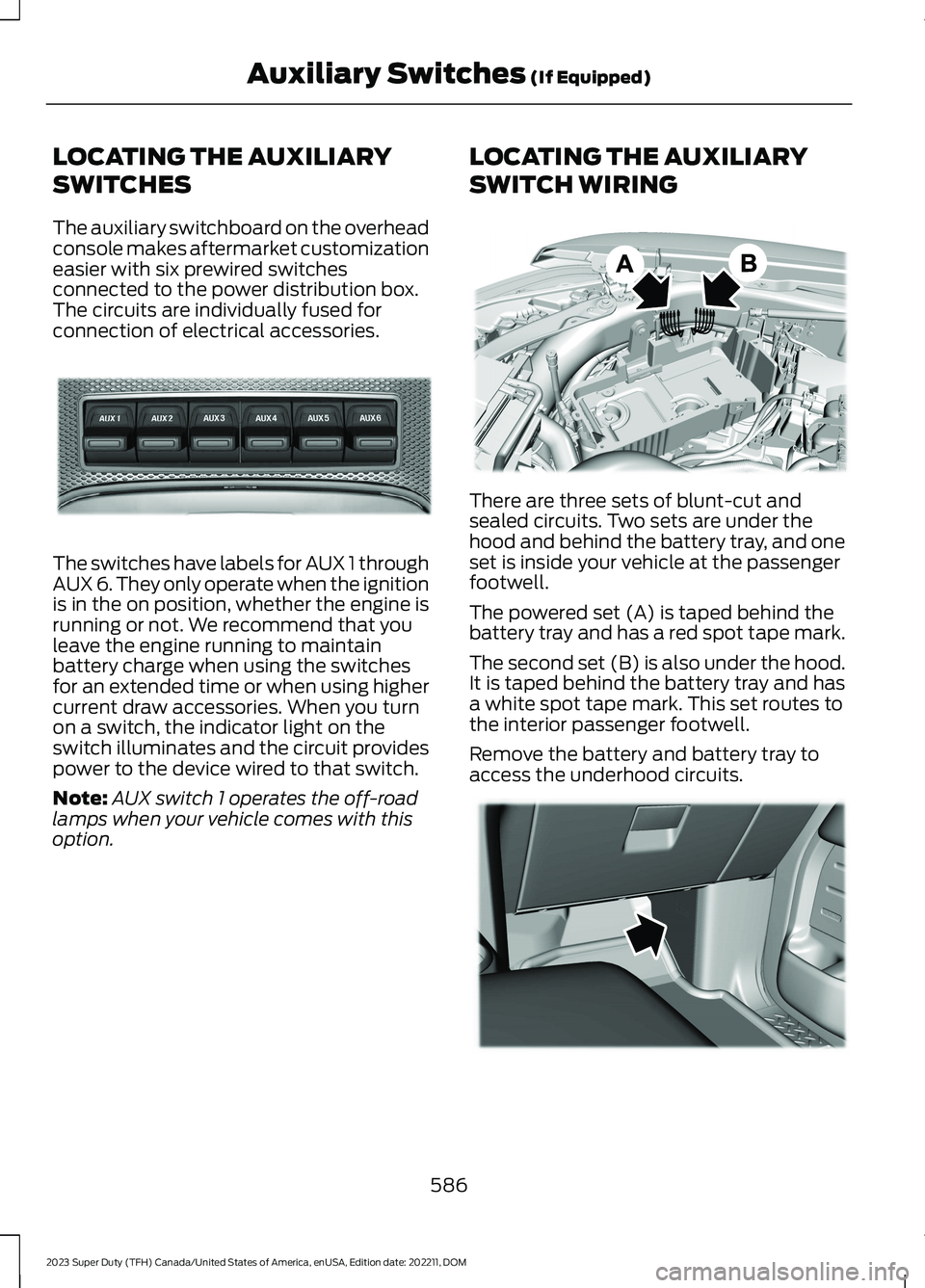
The auxiliary switchboard on the overheadconsole makes aftermarket customizationeasier with six prewired switchesconnected to the power distribution box.The circuits are individually fused forconnection of electrical accessories.
The switches have labels for AUX 1 throughAUX 6. They only operate when the ignitionis in the on position, whether the engine isrunning or not. We recommend that youleave the engine running to maintainbattery charge when using the switchesfor an extended time or when using highercurrent draw accessories. When you turnon a switch, the indicator light on theswitch illuminates and the circuit providespower to the device wired to that switch.
Note:AUX switch 1 operates the off-roadlamps when your vehicle comes with thisoption.
LOCATING THE AUXILIARY
SWITCH WIRING
There are three sets of blunt-cut andsealed circuits. Two sets are under thehood and behind the battery tray, and oneset is inside your vehicle at the passengerfootwell.
The powered set (A) is taped behind thebattery tray and has a red spot tape mark.
The second set (B) is also under the hood.It is taped behind the battery tray and hasa white spot tape mark. This set routes tothe interior passenger footwell.
Remove the battery and battery tray toaccess the underhood circuits.
586
2023 Super Duty (TFH) Canada/United States of America, enUSA, Edition date: 202211, DOMAuxiliary Switches (If Equipped)E220728 E347548 E347399
Page 595 of 738
GENERAL MAINTENANCE
INFORMATION - DIESEL
Why Maintain Your Vehicle?
Carefully following the maintenanceschedule helps protect against major repairexpenses resulting from neglect orinadequate maintenance and may help toincrease the value of your vehicle whenyou sell or trade it. Keep all receipts forcompleted maintenance with your vehicle.
It is important that you have your vehicleserviced at the proper times. Theseintervals serve two purposes: first is tomaintain the reliability of your vehicle andthe second is to keep the cost of owningyour vehicle down.
It is your responsibility to have allscheduled maintenance performed and tomake sure that the materials used meetthe specifications identified in this owner'smanual. See Capacities andSpecifications (page 520).
Failure to perform scheduled maintenanceand regularly inspect your vehicle mayresult in vehicle damage not covered bythe vehicle Warranty.
Why Maintain Your Vehicle at YourDealership?
Our Genuine Replacement Parts
Dealerships stock our parts and ourauthorized branded remanufacturedreplacement parts. These parts meet orexceed our specifications. Parts installedat your dealership carry a nationwide24-month or unlimited mile (kilometer)parts and labor limited warranty.
If you do not use our authorized parts, theymay not meet our specifications and couldaffect emissions compliance.
Protecting Your Investment
Maintenance is an investment that paysdividends in the form of improvedreliability, durability and resale value. Tomaintain the proper performance of yourvehicle and its emission control systems,make sure you have scheduledmaintenance performed at the designatedintervals.
Your vehicle comes with the IntelligentOil-Life Monitor system, a messageappears in the information display at theproper oil change interval. This intervalmay be up to one year or 15,000 mi(24,000 km) for the 6.7L Diesel.
When the oil change message appears inthe information display, it is time for an oilchange. Make sure you perform the oilchange within two weeks or 500 mi(800 km) of the message appearing. Makesure to reset the Intelligent Oil-Life Monitorafter each oil change. See NormalScheduled Maintenance (page 597).
If your information display resetsprematurely or becomes inoperative, youshould perform the oil change interval atsix months or 5,000 mi (8,000 km) fromyour last oil change. Never exceed one yearor 15,000 mi (24,000 km) between oilchange intervals.
You can drive high performance vehiclesin such a way that may lead to higher oilconsumption including extended time athigh engine speeds, high loads, enginebraking, hard cornering maneuvers, trackand off-road usage. Under theseconditions, oil consumption ofapproximately 1 quart per 500 miles (1 literper 800 km) is possible. Check the engineoil level at every refueling and adjust tomaintain proper levels to avoid enginedamage.
It is important to rely upon your dealershipto properly diagnose and repair yourvehicle.
591
2023 Super Duty (TFH) Canada/United States of America, enUSA, Edition date: 202211, DOMScheduled Maintenance
Page 598 of 738
Be sure to ask your dealership serviceadvisor or technician about the multi-pointvehicle inspection. It is a comprehensiveway to perform a thorough inspection ofyour vehicle. Your checklist gives youimmediate feedback on the overallcondition of your vehicle.
GENERAL MAINTENANCE
INFORMATION - GASOLINE
Why Maintain Your Vehicle?
Carefully following the maintenanceschedule helps protect against major repairexpenses resulting from neglect orinadequate maintenance and may help toincrease the value of your vehicle whenyou sell or trade it. Keep all receipts forcompleted maintenance with your vehicle.
It is important that you have your vehicleserviced at the proper times. Theseintervals serve two purposes: first is tomaintain the reliability of your vehicle andthe second is to keep the cost of owningyour vehicle down.
It is your responsibility to have allscheduled maintenance performed and tomake sure that the materials used meetthe specifications identified in this owner'smanual. See Capacities andSpecifications (page 520).
Failure to perform scheduled maintenanceand regularly inspect your vehicle mayresult in vehicle damage not covered bythe vehicle Warranty.
Why Maintain Your Vehicle at YourDealership?
Our Genuine Replacement Parts
Dealerships stock our parts and ourauthorized branded remanufacturedreplacement parts. These parts meet orexceed our specifications. Parts installedat your dealership carry a nationwide24-month or unlimited mile (kilometer)parts and labor limited warranty.
If you do not use our authorized parts, theymay not meet our specifications and couldaffect emissions compliance.
Protecting Your Investment
Maintenance is an investment that paysdividends in the form of improvedreliability, durability and resale value. Tomaintain the proper performance of yourvehicle and its emission control systems,make sure you have scheduledmaintenance performed at the designatedintervals.
Your vehicle comes with the IntelligentOil-Life Monitor system, a messageappears in the instrument cluster displayat the proper oil change interval. Thisinterval may be up to one year or 10,000 mi(16,000 km), hybrid vehicles could exceed10,000 mi (16,000 km).
When the oil change message appears inthe instrument cluster display, it is time foran oil change. Make sure you perform theoil change within two weeks or 500 mi(800 km) of the message appearing. Makesure to reset the Intelligent Oil-Life Monitorafter each oil change. See NormalScheduled Maintenance (page 600).
594
2023 Super Duty (TFH) Canada/United States of America, enUSA, Edition date: 202211, DOMScheduled Maintenance
Page 599 of 738
If your instrument cluster display resetsprematurely or becomes inoperative, youshould perform the oil change interval atsix months or 5,000 mi (8,000 km) fromyour last oil change. Never exceed one yearor 10,000 mi (16,000 km) between oilchange intervals.
You can drive your vehicle in such a waythat may lead to higher oil consumptionincluding extended time at high enginespeeds, high loads, engine braking, hardcornering maneuvers, track and off-roadusage. Under these conditions, oilconsumption of approximately 1 quart per500 miles (1 liter per 800 km) is possible.Check the engine oil level at every refuelingand adjust to maintain proper levels toavoid engine damage.
You can also drive your vehicle in such away that dilutes and increases the level ofoil by frequent short trips that do not allowthe engine to get to operating temperature,extended idling and low speed driving forlong periods of time.
It is important to rely upon your dealershipto properly diagnose and repair yourvehicle.
We strongly recommend only using ourgenuine or our authorized re-manufacturedreplacement parts engineered for yourvehicle.
Additives and Chemicals
We do not recommend using chemicals oradditives not approved by us as part ofyour vehicle’s normal maintenance. Pleaseconsult your warranty information.
Oils, Fluids and Flushing
In many cases, fluid discoloration is anormal operating characteristic and, byitself, does not necessarily indicate aconcern or that the fluid needs to bechanged. Have discolored fluids that alsoshow signs of overheating or foreignmaterial contamination checkedimmediately.
Make sure to change the vehicle’s oils andfluids at the specified intervals or inconjunction with a repair. Flushing is aviable way to change fluid for many vehiclesub-systems during scheduledmaintenance. It is critical that systems areflushed only with new fluid that is the sameas that required to fill and operate thesystem or using our approved flushingchemical.
Owner Checks and Services
Make sure you perform the following basicmaintenance checks and inspections.
Check Every Month
The air filter restriction gauge.1
The engine oil level.
Function of all interior and the exterior lights.
The tires including the spare for wear and proper pressure.
The windshield washer fluid level.
595
2023 Super Duty (TFH) Canada/United States of America, enUSA, Edition date: 202211, DOMScheduled Maintenance