2023 FORD RANGER reset
[x] Cancel search: resetPage 374 of 470
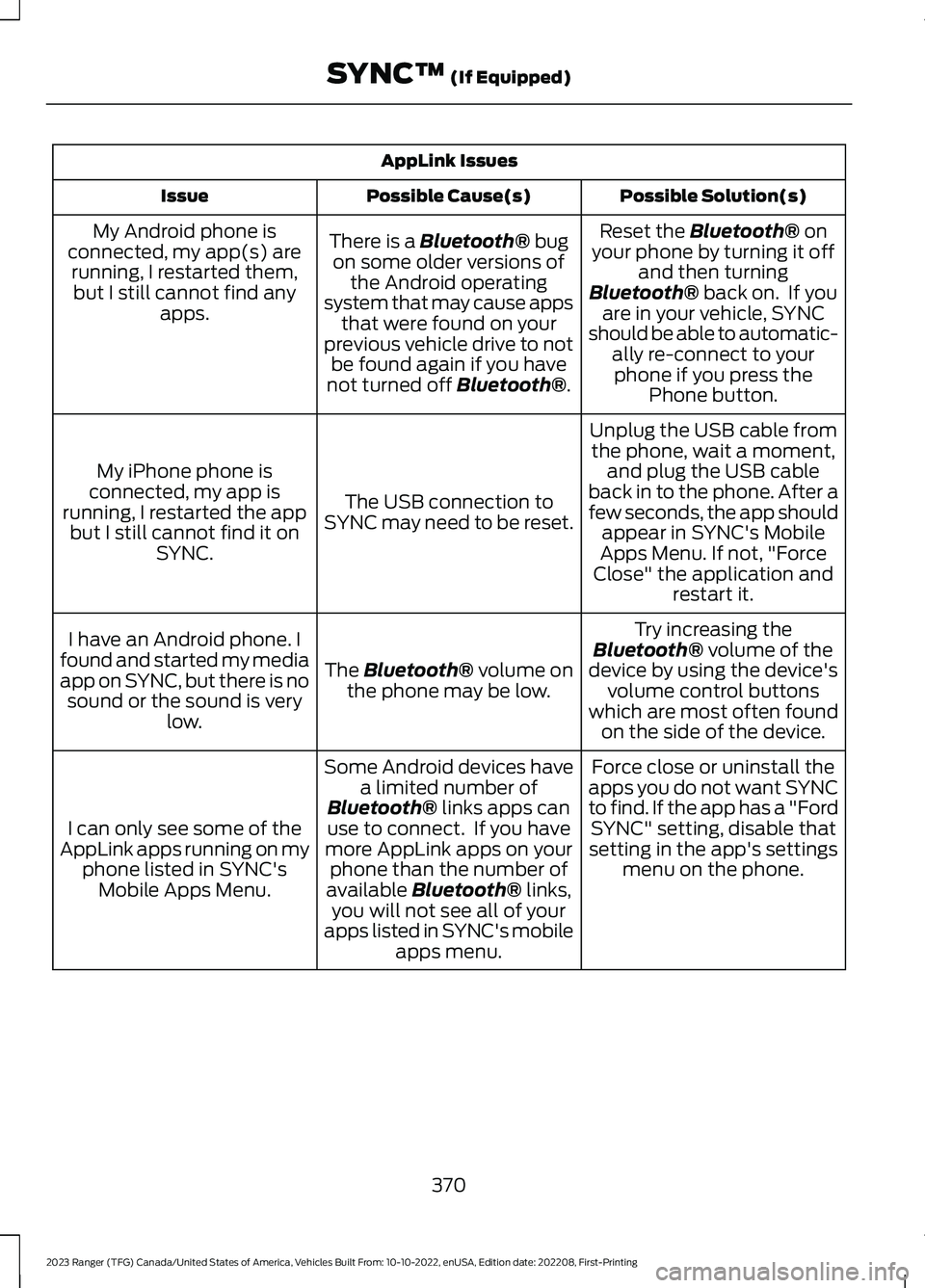
AppLink Issues
Possible Solution(s)Possible Cause(s)Issue
Reset the Bluetooth® onyour phone by turning it offand then turningBluetooth® back on. If youare in your vehicle, SYNCshould be able to automatic-ally re-connect to yourphone if you press thePhone button.
There is a Bluetooth® bugon some older versions ofthe Android operatingsystem that may cause appsthat were found on yourprevious vehicle drive to notbe found again if you havenot turned off Bluetooth®.
My Android phone isconnected, my app(s) arerunning, I restarted them,but I still cannot find anyapps.
Unplug the USB cable fromthe phone, wait a moment,and plug the USB cableback in to the phone. After afew seconds, the app shouldappear in SYNC's MobileApps Menu. If not, "ForceClose" the application andrestart it.
The USB connection toSYNC may need to be reset.
My iPhone phone isconnected, my app isrunning, I restarted the appbut I still cannot find it onSYNC.
Try increasing theBluetooth® volume of thedevice by using the device'svolume control buttonswhich are most often foundon the side of the device.
The Bluetooth® volume onthe phone may be low.
I have an Android phone. Ifound and started my mediaapp on SYNC, but there is nosound or the sound is verylow.
Force close or uninstall theapps you do not want SYNCto find. If the app has a "FordSYNC" setting, disable thatsetting in the app's settingsmenu on the phone.
Some Android devices havea limited number ofBluetooth® links apps canuse to connect. If you havemore AppLink apps on yourphone than the number ofavailable Bluetooth® links,you will not see all of yourapps listed in SYNC's mobileapps menu.
I can only see some of theAppLink apps running on myphone listed in SYNC'sMobile Apps Menu.
370
2023 Ranger (TFG) Canada/United States of America, Vehicles Built From: 10-10-2022, enUSA, Edition date: 202208, First-PrintingSYNC™ (If Equipped)
Page 375 of 470

SYNC System Reset
The SYNC system in your vehicle has System Reset feature that can be performed ifthe function of a SYNC feature is lost. This reset is intended to restore functionality andwill not erase any information previously stored in the system (Such as paired devices,phonebook, call history, text messages, or user settings). To perform a System Reset,press and hold the Seek Up (>>) button while pressing and holding the Radio Powerbutton. Release both buttons after 2-3 seconds. Please allow a few minutes for thereset to complete. After a few minutes has passed you can resume using the SYNCsystem.
371
2023 Ranger (TFG) Canada/United States of America, Vehicles Built From: 10-10-2022, enUSA, Edition date: 202208, First-PrintingSYNC™ (If Equipped)
Page 380 of 470

USB and Media Player
DescriptionVoice Command
Play your music by category.1
Play Album ___
Play Artist ___
Play Genre ___
Play Playlist ___
Play Song ___
Play Audiobook ___
Play Podcast ___
Browse music on a USB device.
Browse All Albums
Browse All Artists
Browse All Audiobooks
Browse All Genres
Browse All Playlists
Browse All Podcasts
Browse All Songs
Browse your music by category on a USB device.1
Browse Album ___
Browse Artist ___
Browse Audiobook ___
Browse Genre ___
Browse Playlist ___
Browse Podcast ___
1 Add an album name, artist name, audiobook name, genre name, playlist name, podcastname or track name to the command. Say the name exactly as it appears on your device.
Climate (If Equipped)
You can control the temperature of thevehicle using voice commands.
___ is a dynamic listing, meaning that forclimate voice commands it can be thedesired degrees for the temperaturesetting.
376
2023 Ranger (TFG) Canada/United States of America, Vehicles Built From: 10-10-2022, enUSA, Edition date: 202208, First-PrintingSYNC™ 3 (If Equipped)
Page 384 of 470

Voice Settings
DescriptionVoice Command
Go to the voice settings menu.Voice Settings
Switch long voice prompts on.Interaction Mode Novice
Switch short voice prompts on.Interaction Mode Advanced
Switch call confirmation on. The system promptsyou to confirm before making a call.Phone Confirmation On
Switch call confirmation off. The system does notprompt you to confirm before making a call.Phone Confirmation Off
Switch the display of voice commands on.Voice Command Lists On
Switch the display of voice commands off.Voice Command Lists Off
Automatic Blower Motor SpeedReduction
If necessary, the system decreases theblower motor speed when you are usingvoice commands to reduce the amount ofbackground noise in your vehicle. It returnsto normal when you are done.
Switching Automatic Blower MotorSpeed Reduction Off
Simultaneously press the A/C andrecirculated air buttons.
ENTERTAINMENT
Select the entertainment optionon the feature bar.
Audio source. Select to choosea different audio source.A
Presets. Swipe left to view morepresets.B
You can access these options using thetouchscreen or voice commands.
380
2023 Ranger (TFG) Canada/United States of America, Vehicles Built From: 10-10-2022, enUSA, Edition date: 202208, First-PrintingSYNC™ 3 (If Equipped) ABE293491
Page 385 of 470
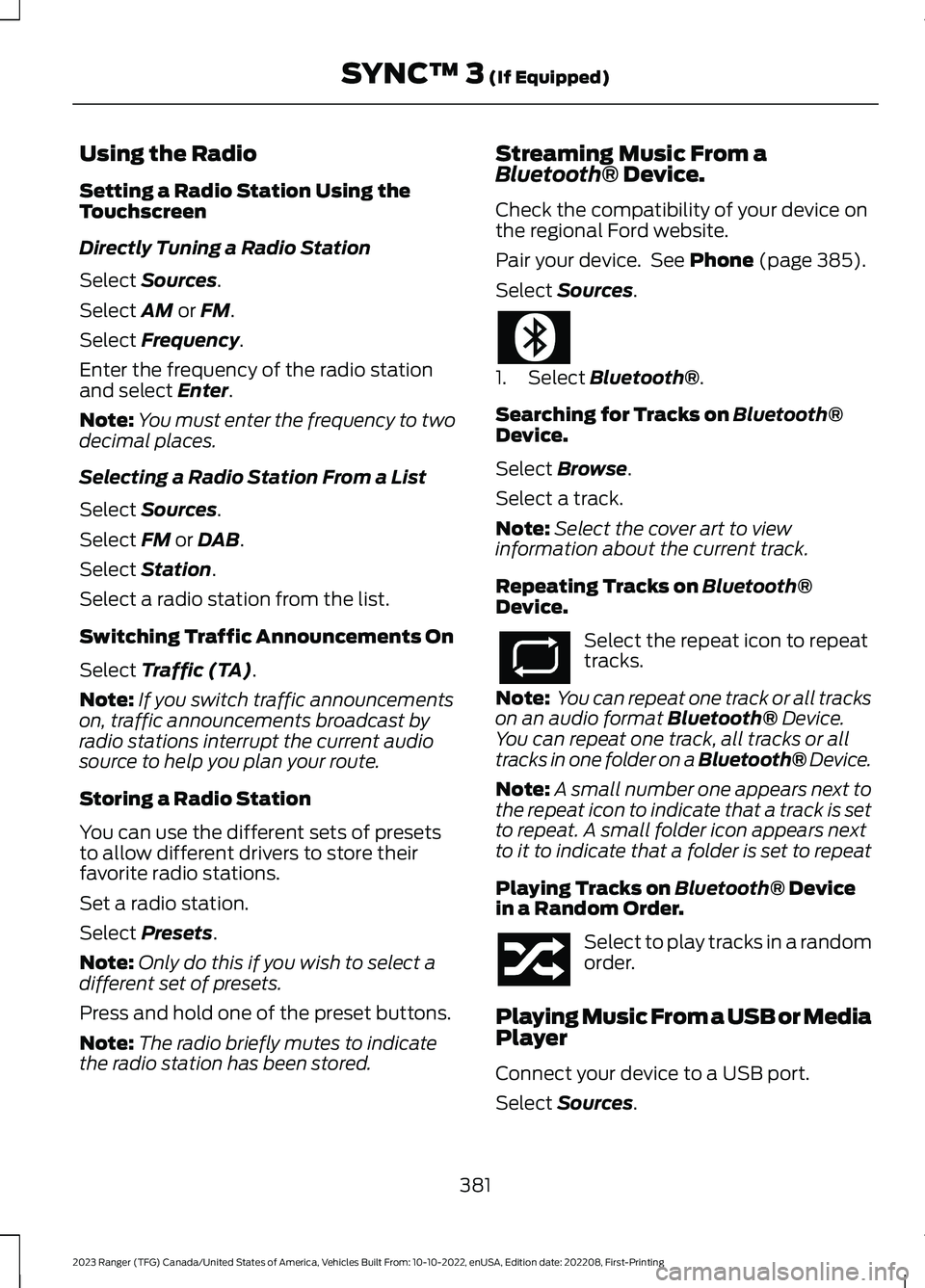
Using the Radio
Setting a Radio Station Using theTouchscreen
Directly Tuning a Radio Station
Select Sources.
Select AM or FM.
Select Frequency.
Enter the frequency of the radio stationand select Enter.
Note:You must enter the frequency to twodecimal places.
Selecting a Radio Station From a List
Select Sources.
Select FM or DAB.
Select Station.
Select a radio station from the list.
Switching Traffic Announcements On
Select Traffic (TA).
Note:If you switch traffic announcementson, traffic announcements broadcast byradio stations interrupt the current audiosource to help you plan your route.
Storing a Radio Station
You can use the different sets of presetsto allow different drivers to store theirfavorite radio stations.
Set a radio station.
Select Presets.
Note:Only do this if you wish to select adifferent set of presets.
Press and hold one of the preset buttons.
Note:The radio briefly mutes to indicatethe radio station has been stored.
Streaming Music From aBluetooth® Device.
Check the compatibility of your device onthe regional Ford website.
Pair your device. See Phone (page 385).
Select Sources.
1.Select Bluetooth®.
Searching for Tracks on Bluetooth®Device.
Select Browse.
Select a track.
Note:Select the cover art to viewinformation about the current track.
Repeating Tracks on Bluetooth®Device.
Select the repeat icon to repeattracks.
Note: You can repeat one track or all trackson an audio format Bluetooth® Device.You can repeat one track, all tracks or alltracks in one folder on a Bluetooth® Device.
Note:A small number one appears next tothe repeat icon to indicate that a track is setto repeat. A small folder icon appears nextto it to indicate that a folder is set to repeat
Playing Tracks on Bluetooth® Devicein a Random Order.
Select to play tracks in a randomorder.
Playing Music From a USB or MediaPlayer
Connect your device to a USB port.
Select Sources.
381
2023 Ranger (TFG) Canada/United States of America, Vehicles Built From: 10-10-2022, enUSA, Edition date: 202208, First-PrintingSYNC™ 3 (If Equipped)
Page 398 of 470

Vehicle
Select this tile to adjust the vehicle settingslike windows, alarm, lighting, and MyKeysettings.
FordPass (If Equipped)
Select this tile to adjust the FordPasssettings.
General
Select this tile to adjust settings likelanguage, measurement units, or to resetthe system.
Emergency Assistance
Select this tile to switch EmergencyAssistance on and off.
Automatic Updates
Select this tile to adjust automatic updatesettings.
Mobile Apps
Select this tile to adjust permissions,enable, disable, and update mobile apps.
Display
Select this tile to adjust display settingslike brightness and auto dim.
Charge Settings (If Equipped)
Select this tile to adjust the electric vehiclecharge settings.
Voice Control
Select this tile to adjust voice controlsettings like command confirmations anddisplayed lists.
Navigation (If Equipped)
Select this tile to adjust navigation settingslike map preferences and route guidance.
Multi Contour Seats (If Equipped)
Select this tile to adjust the position andmassage function of your multi-contourseats.
Seats (If Equipped)
Select this tile to adjust the lumbarfunction of your seats.
Message Center (If Equipped)
Select this tile to view vehicle messages.
Personal Profiles (If Equipped)
Select this tile to adjust recalled memoryfeatures when using Personal Profiles.
Valet Mode (If Equipped)
Select this tile to enable and disable valetmode.
394
2023 Ranger (TFG) Canada/United States of America, Vehicles Built From: 10-10-2022, enUSA, Edition date: 202208, First-PrintingSYNC™ 3 (If Equipped)
Page 400 of 470

Possible Cause and ResolutionSymptom
–You might not be saying the name exactly as it appearson your device.
•Say the first and last name of the contact exactlyas it appears on your device. The system appliesphonetic pronunciation rules of the selectedlanguage to the names of contacts in the phone-book on your device. Select the name of thecontact on the touchscreen and use the Hear itoption to get an idea of how the system expectsyou to pronounce it.
The system does not under-stand certain names ofcontacts in the phonebookon my device.
–Device limitation.
•The system uses text-to-speech technology anduses a synthetically generated voice rather thanpre-recorded human voice.
The system voice promptsand the pronunciation ofsome words do not seem tobe very accurate.
USB and Bluetooth® Audio
Possible Cause and ResolutionSymptom
I cannot connect my device.–Device malfunction.
•Disconnect your device. Switch your device off andon to reset it and try again.
–Cable connection issue.
•Correctly connect the cable to your device and thevehicle USB port.
–Incompatible cable.
•Use the cable recommended by the manufacturerof your device.
396
2023 Ranger (TFG) Canada/United States of America, Vehicles Built From: 10-10-2022, enUSA, Edition date: 202208, First-PrintingSYNC™ 3 (If Equipped)
Page 402 of 470

Possible Cause and ResolutionSymptom
–Copyright-protected files.
•Use a device that contains files that are not copy-right protected.
–Unsupported file format.
•Repair or convert the files to a supported format.See Settings (page 393).
–Device indexing required.
•Re-index your device. See Settings (page 393).
–Device lock screen enabled.
•Unlock your device before connecting it.
Sometimes I cannot hear atrack playing on my device.–Device malfunction.
•Disconnect your device. Switch your device off andon to reset it and try again.
When I disconnect my iOSdevice the audio volume isset to maximum.
–Device limitation.
•Turn the volume down on your device.
If the system does not play the tracks on your USB devicein the correct order, the following information could help:The system does not playthe tracks on my USB drivein the correct order.–If you are selecting USB as the audio source when thesystem is still indexing, SYNC plays tracks sortedalphabetically by file name in the root directory.
–If you are selecting USB as the audio source after thesystem has finished indexing, SYNC plays all trackssorted alphabetically by the title in the ID3 tagregardless of where they are located. SYNC uses thefile name if the title in the ID3 tag does not exist.
–If you are selecting the option to play all tracks fromthe browsing menu, SYNC plays all tracks sortedalphabetically by the title in the ID3 tag regardless ofwhere they are located. SYNC uses the file name if thetitle in the ID3 tag does not exist.
–If you are selecting a track when using the exploredevice option, SYNC plays tracks sorted alphabeticallyby file name in the folder you have selected. SYNCthen plays all tracks in any subfolders in the folder youhave selected.
398
2023 Ranger (TFG) Canada/United States of America, Vehicles Built From: 10-10-2022, enUSA, Edition date: 202208, First-PrintingSYNC™ 3 (If Equipped)