2023 FORD MUSTANG ECU
[x] Cancel search: ECUPage 42 of 535
warnings provided for installation anduse in conjunction with the instructionsand warnings provided by your vehiclemanufacturer. A safety seat that isimproperly installed or utilized, isinappropriate for your child's height, age,or weight or does not properly fit thechild may increase the risk of seriousinjury or death.
WARNING: Do not allow apassenger to hold a child on their lapwhen your vehicle is moving. Failure tofollow this instruction could result inpersonal injury or death in the event of asudden stop or crash.
WARNING: Do not use pillows,books or towels to boost your child'sheight. Failure to follow this instructioncould result in personal injury or death.
WARNING: Properly secure childrestraints or booster seats when they arenot in use. They could become projectilesin a sudden stop or crash. Failure tofollow this instruction could result inpersonal injury or death.
WARNING: Do not put the shouldersection of the seatbelt or allow the childto put the shoulder section of theseatbelt under their arm or behind theirback. Failure to follow this instructioncould reduce the effectiveness of theseatbelt and increase the risk of injury ordeath in a crash.
WARNING: Do not leave childrenor pets unattended in your vehicle.Failure to follow this instruction couldresult in personal injury or death.
38
2023 Mustang (CZG) Canada/United States of America, Vehicles Built From: 14-11-2022, enUSA, Edition date: 202209, First-PrintingChild Safety
Page 46 of 535
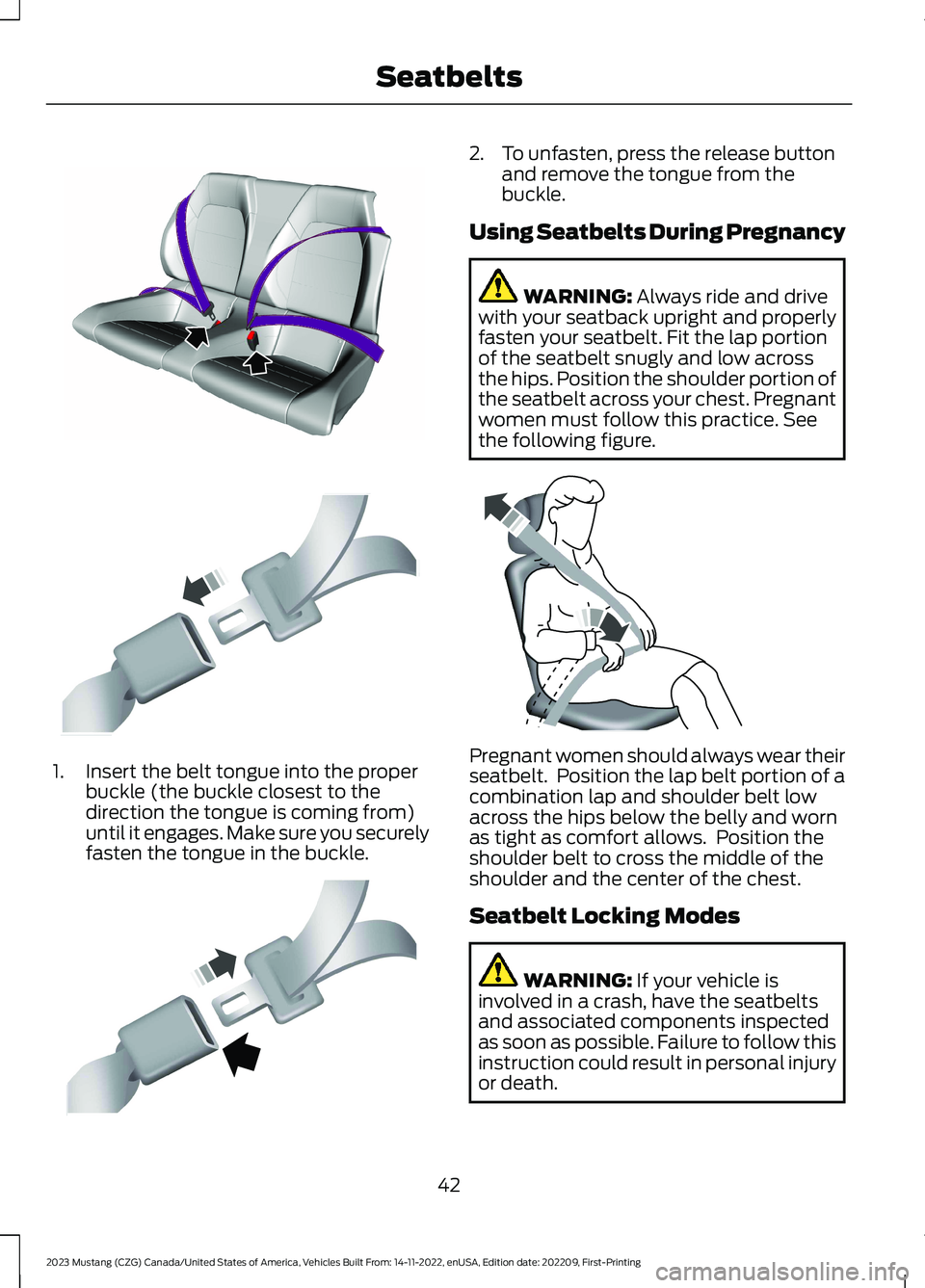
1.Insert the belt tongue into the properbuckle (the buckle closest to thedirection the tongue is coming from)until it engages. Make sure you securelyfasten the tongue in the buckle.
2.To unfasten, press the release buttonand remove the tongue from thebuckle.
Using Seatbelts During Pregnancy
WARNING: Always ride and drivewith your seatback upright and properlyfasten your seatbelt. Fit the lap portionof the seatbelt snugly and low acrossthe hips. Position the shoulder portion ofthe seatbelt across your chest. Pregnantwomen must follow this practice. Seethe following figure.
Pregnant women should always wear theirseatbelt. Position the lap belt portion of acombination lap and shoulder belt lowacross the hips below the belly and wornas tight as comfort allows. Position theshoulder belt to cross the middle of theshoulder and the center of the chest.
Seatbelt Locking Modes
WARNING: If your vehicle isinvolved in a crash, have the seatbeltsand associated components inspectedas soon as possible. Failure to follow thisinstruction could result in personal injuryor death.
42
2023 Mustang (CZG) Canada/United States of America, Vehicles Built From: 14-11-2022, enUSA, Edition date: 202209, First-PrintingSeatbeltsE204921 E142587 E142588 E142590
Page 63 of 535

Intelligent Access Key
Note:You may not be able to shift out ofpark (P) unless the remote control is insideyour vehicle.
The remote control operates the powerlocks and the remote start system. Thekey must be in your vehicle to use the pushbutton start.
Removable Key Blade
The remote control also contains aremovable key blade that you can use tounlock your vehicle.
Push the release button and pull the keyblade out.
Note: Your vehicle keys came with asecurity label that provides important keycut information. Keep the label in a safeplace for future reference.
Using the Key Blade
The key cylinder is under a cap on the driverdoor handle.
To remove the cap:
59
2023 Mustang (CZG) Canada/United States of America, Vehicles Built From: 14-11-2022, enUSA, Edition date: 202209, First-PrintingKeys and Remote ControlsE307003 E307694 E151795
Page 64 of 535

1.Insert the key blade into the slot on thebottom of the handle and applyupward pressure.
2.While maintaining upward pressure,move the cap rearward to release it.Gently remove the key while doing so.
To install the cap:
1.Place the cap just forward of the keycylinder.
2.Applying pressure to the cap, move itforward until it is in place. You mayhear a snap as it engages.
Make sure you have properly installed thecap by trying to move it rearward.
Replacing the Battery
WARNING: Keep batteries awayfrom children to prevent ingestion.Failure to follow this instruction couldresult in personal injury or death. Ifingested, immediately seek medicalattention.
WARNING: If the batterycompartment does not securely close,stop using the remote control andreplace it as soon as possible. In themeantime, keep the remote control awayfrom children. Failure to follow thisinstruction could result in personal injuryor death.
A message appears in the informationdisplay when the remote control batteryis low. See Information Messages (page112).
The remote control uses one coin-typethree-volt lithium battery CR2450 orequivalent.
60
2023 Mustang (CZG) Canada/United States of America, Vehicles Built From: 14-11-2022, enUSA, Edition date: 202209, First-PrintingKeys and Remote ControlsE151956 E151957
Page 68 of 535

Emergency Assistance
If you set emergency assistance to alwayson, you cannot switch it off with a MyKey.
Do Not Disturb
If you set do not disturb to always on, youcannot switch it off with a MyKey.
Note:If a phone is connected using AppleCarPlay or Android Auto while driving witha MyKey, the driver can receive phone callsand text messages even if the do not disturbrestriction is on. If the vehicle comes withsatellite radio, the adult content is notrestricted.
Traction Control
If you set traction control to always on, youcannot switch it off with a MyKey.
CREATING A MYKEY
1.Remove the rubber covering (A) in thecupholder.
2.Place the remote control in the backupslot (B) with the buttons facing up andthe key ring toward the front of yourvehicle.
3.Switch the ignition on.
4.Using your touchscreen, press Menu.
5.Press Settings.
6.Press Vehicle.
7.Press MyKey.
8.Press Create MyKey.
9.Press Yes if you want to create the keyas MyKey. A confirmation messageappears on the screen.
10.Switch the ignition off.
Note:We recommend that you label thiskey.
PROGRAMMING A MYKEY
You can only program each MyKey to thesame settings.
1.Switch the ignition on using an adminkey.
2.Select Settings and press the menubutton.
3.Select Settings.
4.Select MyKey.
5.Select a setting and press the OKbutton.
6.Configure the setting.
7.Switch the ignition off.
CLEARING ALL MYKEYS
When you clear all MyKeys, you remove allrestrictions and return all MyKeys to theiroriginal admin key status.
1.Switch the ignition on using an adminkey.
2.Using your touchscreen, press Menu.
3.Press Settings.
4.Press Vehicle.
5.Press MyKey.
6.Press Clearing All MyKeys.
7.Press Yes to clear all MyKeys from yourvehicle.
64
2023 Mustang (CZG) Canada/United States of America, Vehicles Built From: 14-11-2022, enUSA, Edition date: 202209, First-PrintingMyKey™E174956
Page 77 of 535

PASSIVE ANTI-THEFT
SYSTEM
Note:The system is not compatible withnon-Ford aftermarket remote start systems.Use of these systems may result in vehiclestarting problems and a loss of securityprotection.
Note:Metallic objects, electronic devicesor a second coded key on the same keychain may cause vehicle starting problemsif they are too close to the key when startingyour vehicle. Prevent these objects fromtouching the coded key while starting yourvehicle. Switch the ignition off, move allobjects on the key chain away from thecoded key and restart your vehicle if aproblem occurs.
Note:Do not leave a duplicate coded keyin your vehicle. Always take your keys andlock all doors when leaving your vehicle.
SecuriLock
The system helps prevent your vehiclefrom starting unless you use a coded keyprogrammed to your vehicle. Using thewrong key may prevent your vehicle fromstarting. A message may appear in theinformation display.
If you are unable to start your vehicle witha correctly coded key, it is not operatingproperly. A message may appear in theinformation display.
Automatic Arming
Your vehicle arms immediately afterswitching the ignition off.
Automatic Disarming
Switching the ignition on with a coded keydisarms your vehicle.
Replacement Keys
Note:Your vehicle comes equipped withtwo intelligent access keys.
The intelligent access key functions as aprogrammed key that operates the driverdoor lock and activates the intelligentaccess with push button start system, aswell as a remote control.
If your programmed transmitters are lostor stolen and you do not have an extracoded key, you need to have your vehicletowed to an authorized dealer. You needto erase the key codes from your vehicleand program new coded keys.
Store an extra programmed key away fromyour vehicle in a safe place to help preventany inconveniences. See your authorizeddealer to purchase additional spare orreplacement keys.
Programming a Spare IntelligentAccess Key
Note:You can program a maximum of fourintelligent access keys to your vehicle.
You must have two previouslyprogrammed intelligent access keys insideyour vehicle and the new unprogrammedintelligent access keys readily accessible.See an authorized dealer to have the sparekey programmed if two previouslyprogrammed keys are not available.
Make sure that your vehicle is off beforebeginning this procedure. Make sure thatyou close all the doors before beginningand that they remain closed throughoutthe procedure. Perform all steps within 30seconds of starting the sequence. Stopand wait for at least one minute beforestarting again if you perform any steps outof sequence.
Read and understand the entire procedurebefore you begin.
73
2023 Mustang (CZG) Canada/United States of America, Vehicles Built From: 14-11-2022, enUSA, Edition date: 202209, First-PrintingSecurity
Page 78 of 535

1.Remove the rubber covering (A) fromthe cupholder. Place the firstprogrammed key in the backup slot (B)at the bottom of the cupholder, thenpress the push button ignition switch.
2.Wait five seconds and then press thepush button ignition switch again.
3.Remove the intelligent access key.
4.Within 10 seconds, place a secondprogrammed intelligent access key inthe backup slot. Press the push buttonignition switch.
5.Wait five seconds and then press thepush button ignition switch again.
6.Remove the intelligent access key.
7.Place the unprogrammed intelligentaccess key in the backup slot and pressthe push button ignition switch.
Programming is now complete. Verify theremote control functions operate and yourvehicle starts with the new intelligentaccess key.
If programming was not successful, wait10 seconds and repeat Steps 1 through 7.If you are still unsuccessful, take yourvehicle to your authorized dealer.
ANTI-THEFT ALARM (IF EQUIPPED)
The system will warn you of anunauthorized entry to your vehicle.
It will be triggered if any door, the luggagecompartment or the hood is openedwithout using the key or remote control.
The direction indicators will flash and thehorn will sound if unauthorized entry isattempted while the alarm is armed.
Take all remote controls to an authorizeddealer if there is a potential alarm problemwith your vehicle.
Arming the Alarm
The alarm is ready to arm when there isnot a key in your vehicle.
Electronically lock your vehicle to arm thealarm.
Disarming the Alarm
Disarm the alarm by any of the followingactions:
•Unlock the doors or luggagecompartment with the remote control.
•Switch your vehicle on or start yourvehicle.
•Use a key in the driver door to unlockyour vehicle, then switch your vehicleon within 12 seconds.
Note:Pressing the panic button on theremote control will stop the horn and signalindicators, but will not disarm the system.
74
2023 Mustang (CZG) Canada/United States of America, Vehicles Built From: 14-11-2022, enUSA, Edition date: 202209, First-PrintingSecurityE174956
Page 81 of 535

Quick Action Menus
See Information Displays (page 98).
HORN
Press on the center of thesteering wheel near the horn iconto activate the horn.
SWITCHING THE HEATED
STEERING WHEEL ON AND OFF
(IF EQUIPPED)
Touch the button to switch theheated steering wheel on andoff.
Note:You can use the heated steeringwheel only when the engine is running.
Note:The system uses a sensor and isdesigned to control the temperature of thesteering wheel and to prevent it fromoverheating.
Note:In warm temperatures, the steeringwheel quickly reaches its maximumtemperature and the system reduces thecurrent to the heating element. This couldcause you to think that the system hasstopped working but it has not. This isnormal.
77
2023 Mustang (CZG) Canada/United States of America, Vehicles Built From: 14-11-2022, enUSA, Edition date: 202209, First-PrintingSteering WheelE248531 E270945 E256621