2023 FORD F150 stop start
[x] Cancel search: stop startPage 145 of 786

RESETTING THE STOPPING
POSITION - VEHICLES WITH:
POWER ADJUSTABLE
STEERING COLUMN
Note:The steering wheel stops when itdetects an obstruction. This sets a newstopping position.
To reset the steering column to its normalstopping position:
1.Confirm there is nothing obstructingthe motion of the steering column.
2.Press and hold the steering columncontrol until the steering column stopsmoving.
3.Press the steering column controlagain.
Note:The steering column may start tomove again.
4.When the steering column stops,continue holding the control for a fewseconds.
5.Repeat for each direction, as necessary.
HORN
Press on the center of thesteering wheel near the horn iconto activate the horn.
SWITCHING THE HEATED
STEERING WHEEL ON AND OFF
- VEHICLES WITH: HEATED
STEERING WHEEL
To activate the heated steeringwheel, press the button on theclimate control unit.
On some vehicles, an indicator on thebutton illuminates when the heatedsteering wheel is on.
Note:A sensor regulates the temperatureof the steering wheel.
141
2023 F-150 (TFD) Canada/United States of America, enUSA, Edition date: 202206, DOMSteering WheelE270945 E256621
Page 165 of 786

OPENING AND CLOSING THE
WINDOWS
WARNING: Do not leave childrenunattended in your vehicle and do notlet them play with the power windows.Failure to follow this instruction couldresult in personal injury.
WARNING: When closing thepower windows, verify they are free ofobstruction and make sure that childrenand pets are not in the proximity of thewindow openings.
Press the window control switchto open the window. Lift thewindow control switch to closethe window.
Note:The power windows operate with theignition on, and for several minutes after youswitch the ignition off or until you open afront door.
To reduce wind noise or pulsing noise whenone window is open, slightly open theopposite window.
One-Touch Open (If Equipped)
Fully press the window control switch andrelease it. Press again or lift it to stop thewindow.
One-Touch Close (If Equipped)
Fully lift the window control switch andrelease it. Press again or lift it to stop thewindow.
Resetting One-Touch Close
Carry out all steps within 30 seconds ofstarting the sequence.
1.Close the window.
2.Press and hold the window controlswitch until the window is fully open.Keep the window control switchpressed for a few seconds.
3.Lift and hold the window control switchuntil the window is fully closed. Keepthe window control switch held for afew seconds.
4.Press and hold the window controlswitch until the window is fully open.Keep the window control switchpressed for a few seconds.
5.Lift and hold the window control switchuntil the window is fully closed. Keepthe window control switch held for afew seconds.
Note:Repeat the procedure if the windowdoes not close when you use one-touch.
Accessory Delay
The window switches remain operationalfor several minutes when you switch theignition off or until you open either frontdoor.
GLOBAL OPENING
WHAT IS GLOBAL OPENING
You can use the remote control to openthe windows with the ignition off.
USING GLOBAL OPENING
1.Press and release the unlock button onthe remote control.
2.Press and hold the unlock button onthe remote control.
3.Release the button when the windowsstart to open.
Press the lock or the unlock button on theremote control to stop global opening.
161
2023 F-150 (TFD) Canada/United States of America, enUSA, Edition date: 202206, DOMWindows
Page 168 of 786
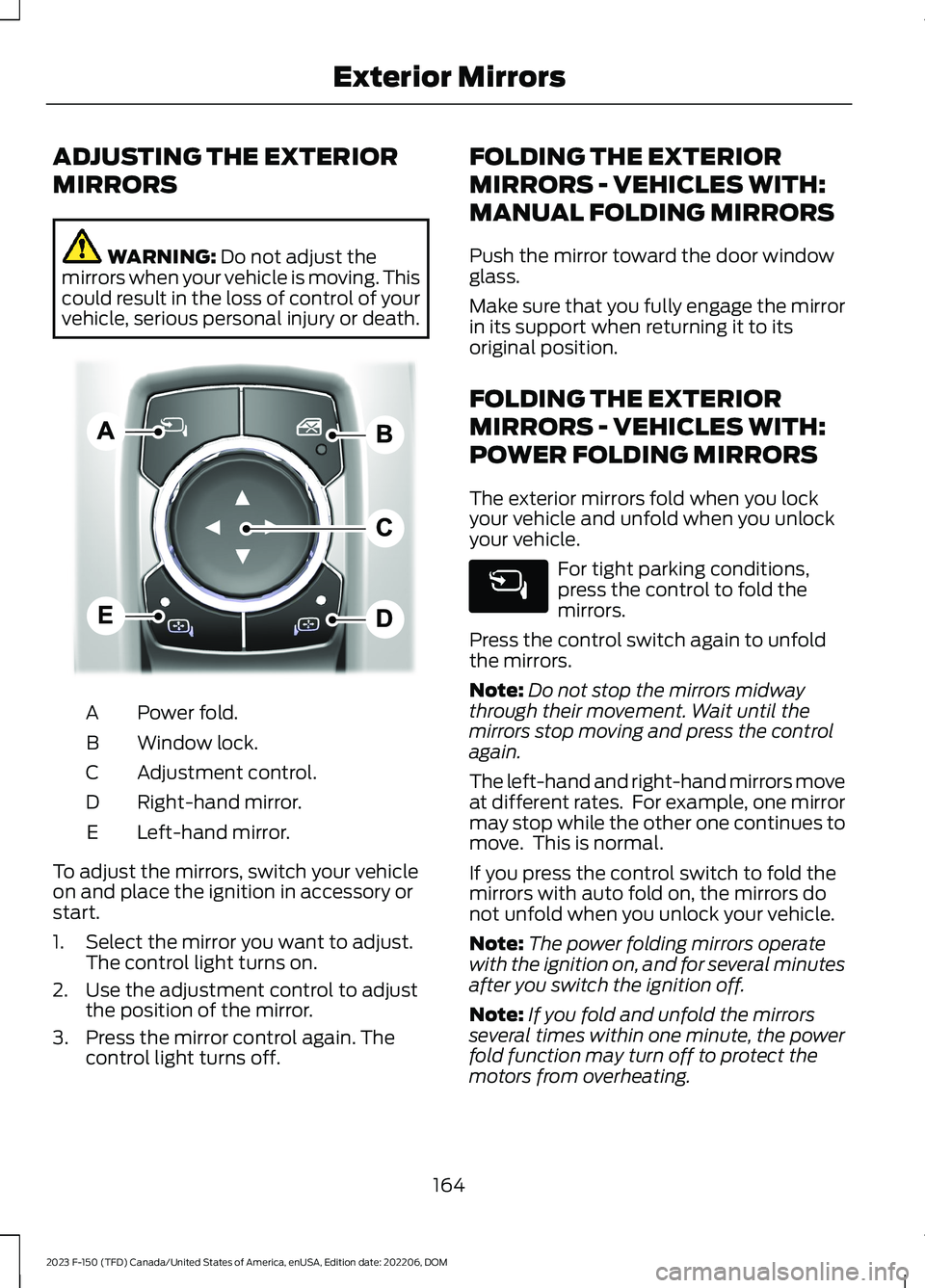
ADJUSTING THE EXTERIOR
MIRRORS
WARNING: Do not adjust themirrors when your vehicle is moving. Thiscould result in the loss of control of yourvehicle, serious personal injury or death.
Power fold.A
Window lock.B
Adjustment control.C
Right-hand mirror.D
Left-hand mirror.E
To adjust the mirrors, switch your vehicleon and place the ignition in accessory orstart.
1.Select the mirror you want to adjust.The control light turns on.
2.Use the adjustment control to adjustthe position of the mirror.
3.Press the mirror control again. Thecontrol light turns off.
FOLDING THE EXTERIOR
MIRRORS - VEHICLES WITH:
MANUAL FOLDING MIRRORS
Push the mirror toward the door windowglass.
Make sure that you fully engage the mirrorin its support when returning it to itsoriginal position.
FOLDING THE EXTERIOR
MIRRORS - VEHICLES WITH:
POWER FOLDING MIRRORS
The exterior mirrors fold when you lockyour vehicle and unfold when you unlockyour vehicle.
For tight parking conditions,press the control to fold themirrors.
Press the control switch again to unfoldthe mirrors.
Note:Do not stop the mirrors midwaythrough their movement. Wait until themirrors stop moving and press the controlagain.
The left-hand and right-hand mirrors moveat different rates. For example, one mirrormay stop while the other one continues tomove. This is normal.
If you press the control switch to fold themirrors with auto fold on, the mirrors donot unfold when you unlock your vehicle.
Note:The power folding mirrors operatewith the ignition on, and for several minutesafter you switch the ignition off.
Note:If you fold and unfold the mirrorsseveral times within one minute, the powerfold function may turn off to protect themotors from overheating.
164
2023 F-150 (TFD) Canada/United States of America, enUSA, Edition date: 202206, DOMExterior MirrorsE311081
Page 177 of 786

Powertrain Malfunction, ReducedPower, Electronic Throttle Control,Check 4X4
Illuminates when the powertrainor four-wheel drive requireservice. Have the systemchecked as soon as possible.
Malfunction Indicator Lamp
It illuminates when the ignitionis on and the engine is off, this isnormal. If it illuminates when theengine is on this indicates the emissioncontrol system requires service. If it flashes,have your vehicle checked immediately.See Emission Law (page 747). SeeStarting and Stopping the Engine –Warning Lamps (page 240).
Stop Safely
Illuminates if an electricalcomponent requires service or afailure that causes your vehicleto shutdown or enter into a limitedoperating mode.
Tailgate Ajar
It illuminates when the ignitionis on and the tailgate is notcompletely closed.
Water in Fuel
It illuminates when the fuel andwater separator has a significantquantity of water in it andrequires immediate draining.
WHAT ARE THE INSTRUMENT
CLUSTER INDICATORS
Indicators notify you of various featuresthat are active on your vehicle.
INSTRUMENT CLUSTER
INDICATORS
Adaptive Cruise Control
See Adaptive Cruise Control(page 342).
Automatic High Beam
See Automatic High BeamControl Indicators (page 154).
Auto Hold Active
See Auto Hold (page 305).
Auto Hold Unavailable
See Auto Hold (page 305).
Auto-Start-Stop
See Auto-Start-Stop (page248).
Blind Spot Monitor
See Blind Spot InformationSystem (page 382).
BlueCruise
See BlueCruise (page 356).
Cruise Control
See Cruise Control (page 340).
173
2023 F-150 (TFD) Canada/United States of America, enUSA, Edition date: 202206, DOMInstrument Cluster E67028 E332963 E311338 E144524 E146105 E323448 E323449 E121377 E151262 E297977 E332905
Page 182 of 786
BRAKE COACH - HYBRID
ELECTRIC VEHICLE (HEV)
The brake coach appears after the vehiclehas come to a stop. It coaches you to brakein a manner that maximizes the amountof energy returned through theregenerative braking system.
The percent displayed indicates theregenerative braking efficiency, with 100%representing the maximum amount ofenergy recovery.
Note:While regenerative braking works inall drive modes, brake coach display maynot be available in all drive modes.
You can switch brake coach on or off in thesettings menu on your touchscreen.
1.Press Settings.
2.Press Instrument Cluster.
3.Switch Brake Coach on or off.
TRIP SUMMARY
Displays the trip summary when you switchoff your vehicle. The values are cumulativesince you last started your vehicle.
178
2023 F-150 (TFD) Canada/United States of America, enUSA, Edition date: 202206, DOMInstrument Cluster Display
Page 185 of 786
WHAT IS REMOTE START
The system allows you to remotely startyour vehicle and to adjust the interiortemperature according to the settings thatyou chose.
REMOTE START
PRECAUTIONS
WARNING: Do not start the enginein a closed garage or in other enclosedareas. Exhaust fumes are toxic. Alwaysopen the garage door before you startthe engine. Failure to follow thisinstruction could result in personal injuryor death.
WARNING: Do not keep electricaldevices plugged in the power pointwhenever the device is not in use. Powerpoints power up during remote start.
WARNING: Do not keep electricaldevices plugged into the power outletwhenever the device is not in use. Theoutlet provides power when the vehicleis on. Failure to follow this instructioncould result in personal injury.
REMOTE START LIMITATIONS
Remote start does not work under thefollowing conditions:
•The alarm horn is sounding.
•The hood is open.
•The transmission is not in park (P).
•The ignition is on.
•The battery voltage is below theminimum operating voltage.
•Remote start is not enabled.
Note:Do not use remote start if the fuellevel is low.
ENABLING REMOTE START
1.Press Settings on the touchscreen.
2.Press Vehicle.
3.Press Remote Start Setup.
4.Switch Remote Start on or off.
Note:To remote start with FordPass, makesure that the modem is enabled. SeeConnecting FordPass to the Modem(page 621).
REMOTELY STARTING AND
STOPPING THE VEHICLE
Remotely Starting the Vehicle
Press the button on the remotecontrol.
Within three seconds, press thebutton on the remote control.
Within three seconds, press thebutton again.
Note:You can also use FordPass to startthe vehicle.
Note:The vehicle doors lock when yousuccessfully remote start your vehicle.
Note:The turn signal lamps flash twice.
Note:The parking lamps turn on when thevehicle is running.
Note:The horn sounds if the system failsto start.
Note:All other vehicle systems remain offwhen you have remotely started the vehicle.
Note:The vehicle remains secured whenyou have remotely started the vehicle. Avalid key must be inside your vehicle toswitch the ignition on and drive your vehicle.
181
2023 F-150 (TFD) Canada/United States of America, enUSA, Edition date: 202206, DOMRemote Start (If Equipped)E138623 E138625
Page 186 of 786

Remotely Stopping the Vehicle
Within three seconds, press thebutton on the remote control.
Within three seconds, press thebutton again.
EXTENDING THE REMOTE
START DURATION
To extend the remote start duration duringremote start, do the following:
Press the button on the remotecontrol.
Within three seconds, press thebutton on the remote control.
Within three seconds, press thebutton again.
If the duration is set to 15 minutes, theduration extends by another 15 minutes.This provides a total of 30 minutes.
Note:Remote start can only be extendedonce.
Note:A maximum of two remote starts, orone remote start with an extension, areallowed. To reset the restart procedureswitch the vehicle to on, then to off.
REMOTE START REMOTE
CONTROL INDICATORS
Remote Control Feedback
An LED on the remote control providesstatus feedback of remote start or stopcommands.
StatusLED
Remote startsuccessful.Solid green.
Remote stopsuccessful.Solid red.
Request failed orstatus not received.Blinking red.
Status incomplete.Blinking green.
REMOTE START SETTINGS
Climate Control Settings
1.Press Settings on the touchscreen.
2.Press Vehicle Settings.
3.Press Remote Start Setup.
4.Press Climate Control.
5.Press Auto or Last settings.
Note:If you switch the auto mode on, thesystem attempts to heat or cool the interiorto 72°F (22°C). When you switch the vehicleon, the climate control system returns tothe last used settings.
Note:If you switch the last settings on, thesystem remembers the last used settings.
Heated Seat Settings (If Equipped)
1.Press Settings on the touchscreen.
2.Press Vehicle Settings.
3.Press Remote Start Setup.
4.Press Seats.
5.Press Auto or Off.
Note:If you switch the heated seat settingson, the heated seats turn on during coldweather.
Note:You cannot adjust the heated seatsettings when you remotely start yourvehicle.
182
2023 F-150 (TFD) Canada/United States of America, enUSA, Edition date: 202206, DOMRemote Start (If Equipped)E138625 E138623 E138625
Page 205 of 786
Press this symbol on the climate controlsor the touchscreen to cycle through thevarious ventilation settings and off. Moreindicator lights indicate higher fan speeds.
Note:When you switch the climate controlfan speed and the ventilated seats to theirmaximum settings, the ventilated seatsprovide increased cooling.
If the engine falls below 350 RPM whilethe ventilated seats are on, the featureturns itself off unless the vehicle is inAuto-Start-Stop mode. You may need toreactivate the ventilated seats.
Note:The ventilated seats may remain onafter you remote start your vehicle, basedon your remote start settings. The ventilatedseats may also turn on when you start yourvehicle if they were on when you switchedyour vehicle off.
201
2023 F-150 (TFD) Canada/United States of America, enUSA, Edition date: 202206, DOMFront Seats