2023 FORD EXPEDITION ESP
[x] Cancel search: ESPPage 297 of 658
There are limitations that affect theaccuracy of the speed sign recognitionsystem and its ability to determine thecurrent speed limit. The intelligentadaptive cruise control system and itsability to determine the current speed limitshares these limitations. See Speed SignRecognition (page 341).
Note:The adaptive cruise control gapsetting operates normally when the featureis enabled.
INTELLIGENT ADAPTIVE CRUISECONTROL PRECAUTIONS
WARNING: You are responsible forcontrolling your vehicle at all times. Thesystem is designed to be an aid and doesnot relieve you of your responsibility todrive with due care and attention. Failureto follow this instruction could result inthe loss of control of your vehicle,personal injury or death.
INTELLIGENT ADAPTIVE CRUISECONTROL REQUIREMENTS
Traffic sign recognition must be enabledfor intelligent adaptive cruise control to beactive.
INTELLIGENT ADAPTIVE CRUISECONTROL LIMITATIONS
The speed limit information provided bythe navigation map data could beinaccurate or out of date.
The system may not detect and readspeed limit signs with conditionalinformation, for example, when a sign isflashing, during specific time ranges, orwhen children are present.
Note:The system does not set the vehiclespeed to speed limits shown with asupplementary traffic sign.
Under certain conditions, the system maynot adjust the vehicle speed until after yourvehicle passes the speed limit.
SWITCHING INTELLIGENT MODEON AND OFF - VEHICLES WITH: 12INCH SCREEN
1.Press Features on the touchscreen.
2.Press Driver Assistance.
3.Press Cruise Control.
4.Press Speed Sign Recognition.
SWITCHING INTELLIGENT MODEON AND OFF - VEHICLES WITH: 15INCH SCREEN
1.Access the vehicle drawer on thetouchscreen.
2.Press SETTINGS.
3.Press Driver Assistance.
4.Press Cruise Control.
5.Press Adaptive Cruise Control.
6.Press Speed Sign Recognition.
ADJUSTING THE SET SPEEDTOLERANCE - VEHICLES WITH: 12INCH SCREEN
1.Press Features on the touchscreen.
2.Press Driver Assistance.
3.Press Cruise Control.
4.Press Adaptive Cruise Control.
5.Press Speed Sign Recognition.
6.Press Tolerance.
7.Use + and - to set the tolerance.
293
2023 Expedition (TB8) Canada/United States of America, enUSA, Edition date: 202207, DOMAdaptive Cruise Control (If Equipped)
Page 298 of 658
Note:You cannot set the tolerance morethan 20 mph (30 km/h) above or below therecognized speed.
ADJUSTING THE SET SPEEDTOLERANCE - VEHICLES WITH: 15INCH SCREEN
1.Access the vehicle drawer on thetouchscreen.
2.Press SETTINGS.
3.Press Driver Assistance.
4.Press Cruise Control.
5.Press Adaptive Cruise Control.
6.Press Speed Sign Recognition.
7.Press Tolerance.
8.Use the slider bar to adjust theallowable tolerance for the system.
Note:You cannot set the tolerance morethan 20 mph (30 km/h) above or below therecognized speed.
INTELLIGENT ADAPTIVE CRUISECONTROL ALERTS
If you increase the set speed beyond thespeed limit or speed limit plus a positivetolerance value, the set speed indicatorflashes.
The warning does not occur if:
•You override the set speed using theaccelerator pedal.
•The vehicle speed exceeds the setspeed due to being on a downhill slope.
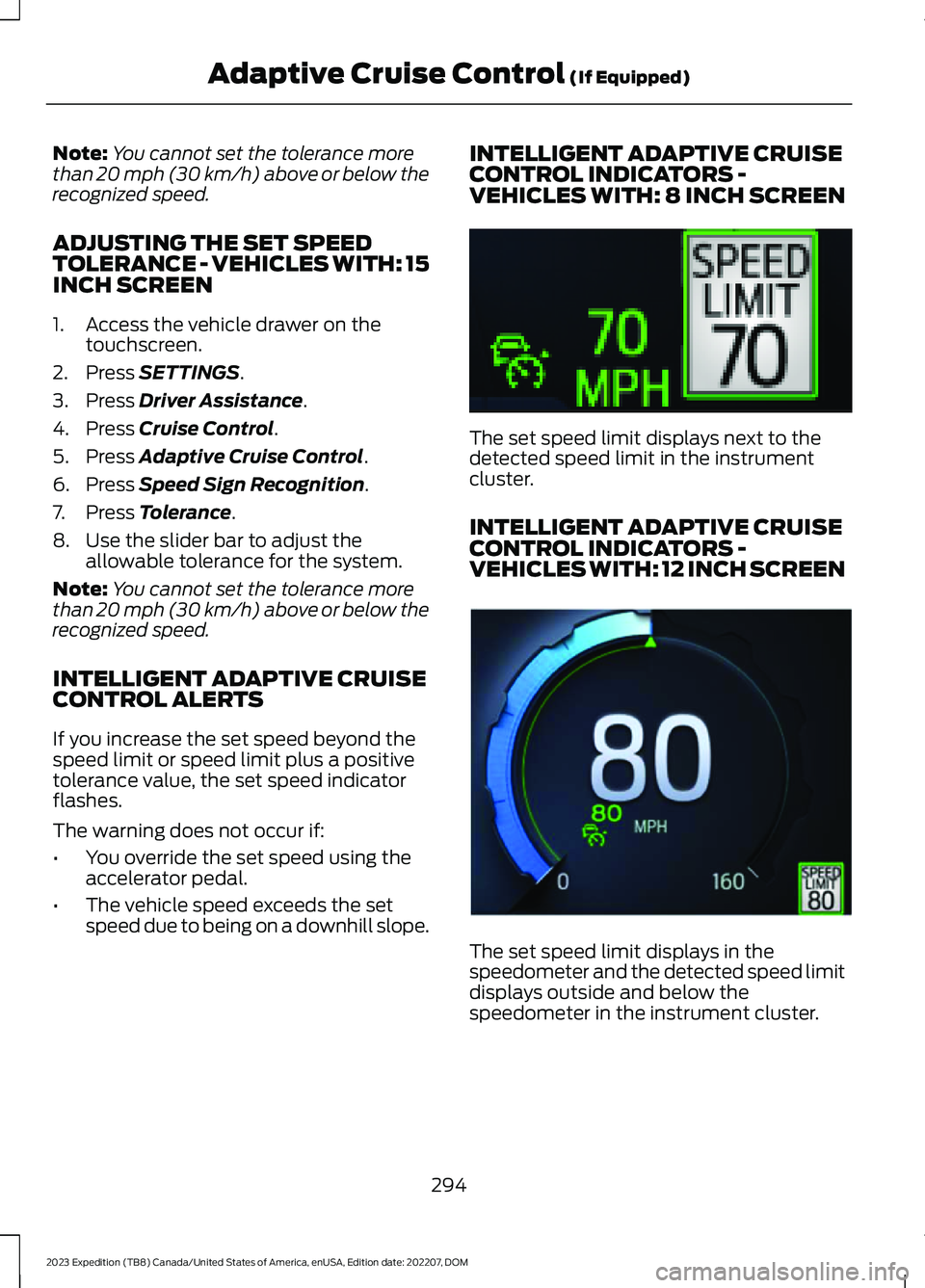
INTELLIGENT ADAPTIVE CRUISECONTROL INDICATORS -VEHICLES WITH: 8 INCH SCREEN
The set speed limit displays next to thedetected speed limit in the instrumentcluster.
INTELLIGENT ADAPTIVE CRUISECONTROL INDICATORS -VEHICLES WITH: 12 INCH SCREEN
The set speed limit displays in thespeedometer and the detected speed limitdisplays outside and below thespeedometer in the instrument cluster.
294
2023 Expedition (TB8) Canada/United States of America, enUSA, Edition date: 202207, DOMAdaptive Cruise Control (If Equipped)E354236 E354222
Page 301 of 658
WHAT IS BLUECRUISE
BlueCruise keeps your vehicle centered inthe lane and offers a hands-free drivingmode in certain situations when usingadaptive cruise control.
HOW DOES BLUECRUISE
WORK
BlueCruise uses cameras to monitor yourvehicle position within a lane and appliessteering support to keep your vehiclecentered in the lane.
Using the cameras and locationinformation, BlueCruise allows you toremove your hands from the steering wheeland offers a hands-free driving mode incertain areas.
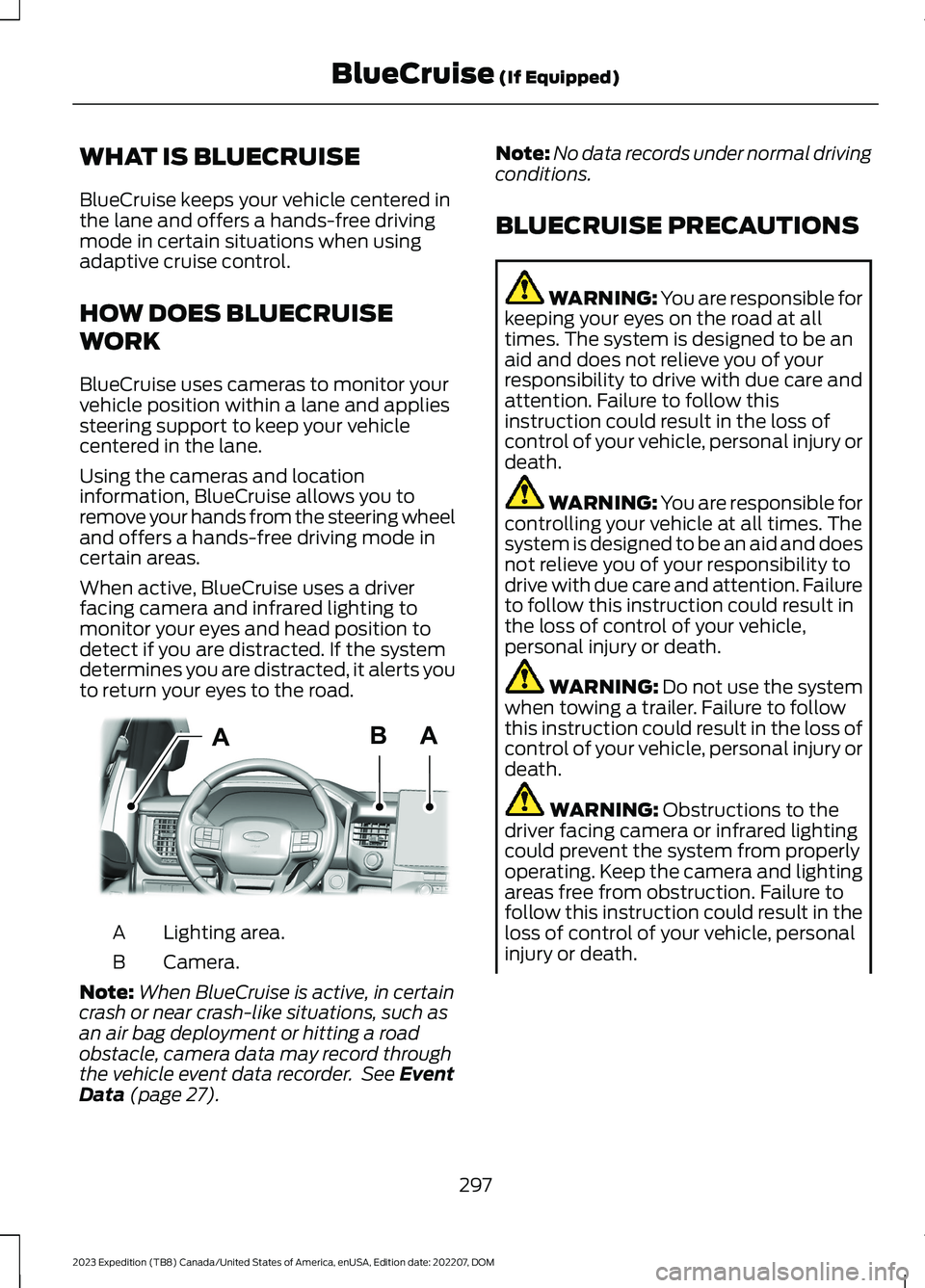
When active, BlueCruise uses a driverfacing camera and infrared lighting tomonitor your eyes and head position todetect if you are distracted. If the systemdetermines you are distracted, it alerts youto return your eyes to the road.
Lighting area.A
Camera.B
Note:When BlueCruise is active, in certaincrash or near crash-like situations, such asan air bag deployment or hitting a roadobstacle, camera data may record throughthe vehicle event data recorder. See EventData (page 27).
Note:No data records under normal drivingconditions.
BLUECRUISE PRECAUTIONS
WARNING: You are responsible forkeeping your eyes on the road at alltimes. The system is designed to be anaid and does not relieve you of yourresponsibility to drive with due care andattention. Failure to follow thisinstruction could result in the loss ofcontrol of your vehicle, personal injury ordeath.
WARNING: You are responsible forcontrolling your vehicle at all times. Thesystem is designed to be an aid and doesnot relieve you of your responsibility todrive with due care and attention. Failureto follow this instruction could result inthe loss of control of your vehicle,personal injury or death.
WARNING: Do not use the systemwhen towing a trailer. Failure to followthis instruction could result in the loss ofcontrol of your vehicle, personal injury ordeath.
WARNING: Obstructions to thedriver facing camera or infrared lightingcould prevent the system from properlyoperating. Keep the camera and lightingareas free from obstruction. Failure tofollow this instruction could result in theloss of control of your vehicle, personalinjury or death.
297
2023 Expedition (TB8) Canada/United States of America, enUSA, Edition date: 202207, DOMBlueCruise (If Equipped)ABAE351060
Page 307 of 658
WHAT IS DRIVE MODE
CONTROL
Your vehicle has various drive modes thatyou can select for different drivingconditions. Depending on the drive modethat you select, the system adjusts variousvehicle settings.
HOW DOES DRIVE MODE
CONTROL WORK
Drive mode control adjusts your vehicleconfiguration for each mode you select.
Changing the drive mode adjusts thesteering effort and feel of the steeringsystem.
The stability and traction control assistyour vehicle control in adverse conditionsor high-performance driving.
Throttle control enhances the powertrainresponse, transmission controls becomeoptimized with shift schedules, andfour-wheel drive settings are optimizedand tuned to each mode.
Changing the drive mode can engage ordisengage the electronic lockingdifferentials.
Changing the drive mode changes thefour-wheel drive mode to the defaultsetting for the selected drive mode.
Note:The system has diagnostic checksthat continuously monitor the system forproper operation. If a mode is unavailabledue to a system fault, the drive modesystem defaults to normal. When thesystem defaults to normal, the drivelinesettings remain the same as prior to thesystem fault.
Note:The system reverts to the normalmode each time you start your vehicle. Atstartup the system also displays a prompton the instrument cluster display that givesyou the option to return to the previouslyselected drive mode during the last ignitioncycle. If you select yes, the system returnsto the last selected drive mode and thedefault driveline settings associated withthat mode. If you select no, the systemremains in normal mode and the drivelinesettings remain the same as selected in theprior ignition cycle. If you do not select yesor no, the system stays in normal mode andthe driveline settings remain the same asselected in the prior ignition cycle.
SELECTING A DRIVE MODE
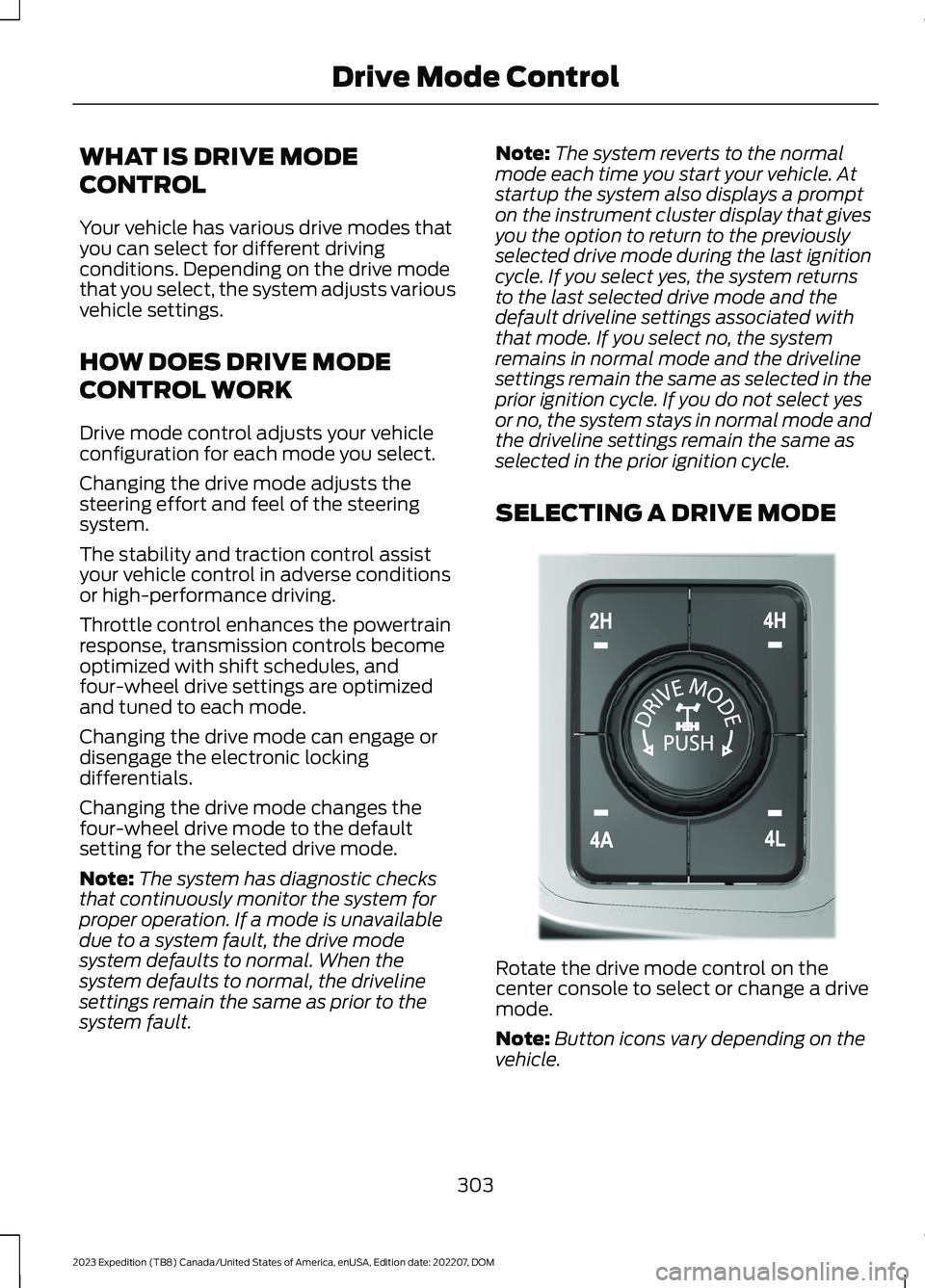
Rotate the drive mode control on thecenter console to select or change a drivemode.
Note:Button icons vary depending on thevehicle.
303
2023 Expedition (TB8) Canada/United States of America, enUSA, Edition date: 202207, DOMDrive Mode ControlE308146
Page 309 of 658
controller. Sand mode optimizes brakingfor off-road conditions, allowing quick pathcorrections and minimized stoppingdistance when on deformable surfaces.The engine sound enhances when in sandmode.
The rear differential lock feature isavailable in sand mode. When enabled itis engaged below 30 mph (48 km/h).
Note:Using sand mode on dry, hardsurfaces could produce some vibration,driveline bind up, potential excessive tirewear and vehicle wear.
Note:Do not use on firm, slippery surfaces,such as paved roads covered with snow orice or driving on packed snow. For slippery,firm surfaces use slippery mode.
SLIPPERY - 4X4
For less than ideal roadconditions such as snow or icecovered roads. Use this mode forcrossing terrain where loose or slipperymaterials cover a firm surface. Slipperymode lowers throttle response andoptimizes shifting for slippery surfaces.
Four-wheel drive auto is the defaultfour-wheel drive mode. Two-wheel drivehigh is not available in slippery mode.
The electronic locking differential isavailable below 25 mph (40 km/h). SeeLocking and Unlocking the ElectronicLimited-Slip Differential (page 227).
Note:Do not use this mode when drivingon dry pavement. This could cause drivelinebind up and damage the system dependingon the four-wheel drive mode selection.See Four-Wheel Drive (page 219).
SLIPPERY - 4X2
For less than ideal roadconditions such as snow or icecovered roads. Use this mode forcrossing terrain where loose or slipperymaterials cover a firm surface. Slipperymode lowers throttle response andoptimizes shifting for slippery surfaces.
The electronic locking differential isavailable below 25 mph (40 km/h). SeeLocking and Unlocking the ElectronicLimited-Slip Differential (page 227).
Note:Do not use this mode when drivingon dry pavement. This could cause drivelinebind up and damage the system dependingon the four-wheel drive mode selection.See Four-Wheel Drive (page 219).
Note:Depending on your vehicle options,some mode names can appear different ornot at all.
SPORT - 4X4
For sporty driving with improvedperformance handling andresponse. This mode increasesaccelerator pedal response and providesa sportier steering feel. The powertrainsystem holds onto lower gears longer,helping your vehicle accelerate faster.
Four-wheel drive auto is the defaultfour-wheel drive mode. Four-wheel drivelow is not available in sport mode.
The system tunes the steering andsuspension to provide a more connectedand spirited driving experience.
The electronic locking differential isavailable below 25 mph (40 km/h). SeeLocking and Unlocking the ElectronicLimited-Slip Differential (page 227).
305
2023 Expedition (TB8) Canada/United States of America, enUSA, Edition date: 202207, DOMDrive Mode ControlE295414 E295414 E246593
Page 310 of 658
SPORT - 4X2
For sporty driving with improvedperformance handling andresponse. This mode increasesaccelerator pedal response and providesa sportier steering feel. The powertrainsystem holds onto lower gears longer,helping your vehicle accelerate faster.
The system tunes the steering andsuspension to provide a more connectedand spirited driving experience.
The electronic locking differential isavailable below 25 mph (40 km/h). SeeLocking and Unlocking the ElectronicLimited-Slip Differential (page 227).
TOW/HAUL - 4X4
For improved transmissionoperation when towing a traileror a heavy load. This modemoves upshifts to higher engine speeds toreduce the frequency of transmissionshifting. This mode also provides enginebraking in all forward gears, which slowsyour vehicle and assists you in controllingyour vehicle when descending a slope. Theamount of downshift braking providedvaries based on the amount you press thebrake pedal.
All four-wheel drive modes are selectablein tow/haul mode. This mode does notdefault to a certain four-wheel drive modeand maintains the previous selection.
The system tunes the steering andsuspension to enhance driving comfortwhen towing or carrying heavy loads.
The electronic locking differential isavailable below 25 mph (40 km/h). SeeLocking and Unlocking the ElectronicLimited-Slip Differential (page 227).
TOW/HAUL - 4X2
For improved transmissionoperation when towing a traileror a heavy load. This modemoves upshifts to higher engine speeds toreduce the frequency of transmissionshifting. This mode also provides enginebraking in all forward gears, which slowsyour vehicle and assists you in controllingyour vehicle when descending a slope. Theamount of downshift braking providedvaries based on the amount you press thebrake pedal.
The system tunes the steering andsuspension to enhance driving comfortwhen towing or carrying heavy loads.
The electronic locking differential isavailable below 25 mph (40 km/h). SeeLocking and Unlocking the ElectronicLimited-Slip Differential (page 227).
TRAIL - 4X2 (If Equipped)
Trail mode is for off-road drivingon muddy, rutted, soft or uneventerrain. This mode lowersthrottle response to increase wheel spinto keep the tires clear and to preventgetting stuck.
The electronic locking differential isavailable below 25 mph (40 km/h). SeeLocking and Unlocking the ElectronicLimited-Slip Differential (page 227).
306
2023 Expedition (TB8) Canada/United States of America, enUSA, Edition date: 202207, DOMDrive Mode ControlE246593 E246592 E246592 E295419
Page 313 of 658

WHAT IS THE LANE KEEPING
SYSTEM
The lane keeping system alerts you byproviding temporary steering assistanceor steering wheel vibration when it detectsan unintended lane departure.
HOW DOES THE LANE
KEEPING SYSTEM WORK
The lane keeping system uses a forwardlooking camera mounted on the windshieldto monitor vehicle movement within thetravel lane.
When the camera detects a drift out of thetravel lane, the lane keeping system alertsthe driver by vibrating the steering wheel,or aids the driver by providing a smallsteering input to move the vehicle backinto the travel lane.
The driver can select one of three modes:
•Alert (If Equipped)
•Aid
•Alert + Aid
LANE KEEPING SYSTEM
PRECAUTIONS
WARNING: You are responsible forcontrolling your vehicle at all times. Thesystem is designed to be an aid and doesnot relieve you of your responsibility todrive with due care and attention. Failureto follow this instruction could result inthe loss of control of your vehicle,personal injury or death.
WARNING: The system will notoperate if the sensor cannot track theroad lane markings.
WARNING: The sensor mayincorrectly track lane markings as otherstructures or objects. This can result ina false or missed warning.
WARNING: In cold and severeweather conditions the system may notfunction. Rain, snow and spray can alllimit sensor performance.
WARNING: The system may notoperate properly if the sensor is blocked.Keep the windshield free fromobstruction.
WARNING: If damage occurs in theimmediate area surrounding the sensor,have your vehicle checked as soon aspossible.
WARNING: The system may notcorrectly operate if your vehicle is fittedwith a suspension kit not approved byus.
WARNING: Large contrasts inoutside lighting can limit sensorperformance.
LANE KEEPING SYSTEM
LIMITATIONS
The lane keeping system only operateswhen the vehicle speed is greater than40 mph (64 km/h).
The system works when the camera candetect at least one lane marking.
Note:When you select Aid or Alert and Aidmode and the system detects no steeringactivity for a short period of time, the systemalerts you to put your hands on the steeringwheel. The system may detect a light gripor touch on the steering wheel as hands-offdriving.
309
2023 Expedition (TB8) Canada/United States of America, enUSA, Edition date: 202207, DOMLane Keeping System
Page 324 of 658

WHAT IS BLIND SPOT
INFORMATION SYSTEM
Blind spot information system detectsvehicles that may have entered the blindspot zone.
HOW DOES BLIND SPOT
INFORMATION SYSTEM WORK
Blind spot information system usessensors on both sides of your vehicle,detecting rearward from the exteriormirrors to approximately 13 ft (4 m)beyond the rear bumper. The detectionarea extends to approximately 59 ft (18 m)beyond the rear bumper when the vehiclespeed is greater than 30 mph (48 km/h)to alert you of faster approaching vehicles.
BLIND SPOT INFORMATION
SYSTEM PRECAUTIONS
WARNING: Do not use the blindspot information system as areplacement for using the interior andexterior mirrors or looking over yourshoulder before changing lanes. Theblind spot information system is not areplacement for careful driving.
WARNING: The system may notoperate properly during severe weatherconditions, for example snow, ice, heavyrain and spray. Always drive with duecare and attention. Failure to take caremay result in a crash.
Note: Blind spot information system doesnot prevent contact with other vehicles. Itdoes not detect parked vehicles,pedestrians, animals or other infrastructure.
BLIND SPOT INFORMATION
SYSTEM LIMITATIONS
Blind spot information system does notoperate in park (P) or reverse (R).
The system may not alert you if a vehiclequickly passes through the detection zone.
Note:For vehicles without blind spotinformation system with trailer coverage,aftermarket trailer tow modules or tow barsmay interfere with the system. In thissituation it is recommended that you switchthe system off when you attach a trailer. Forvehicles with a trailer tow module and towbar approved by the manufacturer, thesystem automatically turns off when youattach a trailer.
BLIND SPOT INFORMATION
SYSTEM REQUIREMENTS
Blind spot information system turns onwhen all the following occur:
•You start your vehicle.
•You shift into drive (D).
•The vehicle speed is greater than6 mph (10 km/h).
320
2023 Expedition (TB8) Canada/United States of America, enUSA, Edition date: 202207, DOMBlind Spot Information SystemE255695