2023 FORD EXPEDITION battery
[x] Cancel search: batteryPage 280 of 658
Why does active park assist not offera parking space?
You recently disconnected or replacedthe battery. After you reconnect thebattery you must drive your vehicle ona straight road for a short period oftime.
Why does active park assist notcorrectly position the vehicle into aparking space?
An irregular curb along the parkingspace prevents the system fromcorrectly aligning your vehicle.
Why does active park assist notcorrectly position the vehicle into aparking space?
Vehicles or objects bordering thespace could not be correctly parked.
Why does active park assist notcorrectly position the vehicle into aparking space?
Your vehicle stopped too far past theparking space.
Why does active park assist notcorrectly position the vehicle into aparking space?
The tires are not correctly installed ormaintained. For example, using a sparetire, not inflated correctly, impropersize, or of different sizes.
Why does active park assist notcorrectly position the vehicle into aparking space?
A repair or alteration changed thedetection capabilities.
Why does active park assist notcorrectly position the vehicle into aparking space?
A parked vehicle has a highattachment. For example, a saltsprayer, snowplow or moving truckbed.
Why does active park assist notcorrectly position the vehicle into aparking space?
The parking space length, or positionof parked objects, changes after yourvehicle passes the space.
Why does active park assist notcorrectly position the vehicle into aparking space?
The temperature around your vehiclequickly changes. For example, drivingfrom a heated garage into a coldoutside temperature, or after leavinga car wash.
276
2023 Expedition (TB8) Canada/United States of America, enUSA, Edition date: 202207, DOMActive Park Assist (If Equipped)
Page 361 of 658

CONNECTING A TRAILER – TROUBLESHOOTING
CONNECTING A TRAILER – INFORMATION MESSAGES
DescriptionMessage
The system senses a trailer connectionbecomes disconnected, either intentionallyor unintentionally, during a given ignitioncycle.
Trailer Disconnected
There are certain faults in your vehiclewiring and trailer wiring or brake system.Trailer Wiring Fault
There is a fault with your trailer battery, oryour trailer battery voltage is very low.Trailer Battery Not Charging See Manual
One or more tires on your trailer is belowthe specified tire pressure.Trailer Tire Low Specified:
Displays when one or more tires on thetrailer is above the recommended temper-ature.
Trailer Tire Over Temperature
A trailer tire pressure sensor is malfunc-tioning. If the warning stays on or continuesto come on, have the system checked assoon as possible.
Trailer Tire Pressure Sensor Fault
The trailer tire pressure monitoring systemis malfunctioning. If the warning stays onor continues to come on, have the systemchecked.
Trailer Tire Pressure Monitor Fault
The system cannot detect the trailer tirepressure monitoring system.Trailer Tire Pressure Monitor Capability NotDetected
The trailer tire pressure monitoring systemis not setup.Trailer Tire Pressure Indication Not SetupSee Manual
357
2023 Expedition (TB8) Canada/United States of America, enUSA, Edition date: 202207, DOMConnecting a Trailer
Page 367 of 658
TOWING A TRAILER – TROUBLESHOOTING
TOWING A TRAILER – INFORMATION MESSAGES
DetailsMessage
The left-hand trailer turn lamp requiresservice.Trailer Left Turn Lamps Fault Check Lamps
The right-hand trailer turn lamp requiresservice.Trailer Right Turn Lamps Fault CheckLamps
The trailer battery voltage is too low tocharge. If there is no trailer attached, thevehicle battery voltage is low.
Trailer Battery Not Charging See Manual
The system detects a short created by thetrailer lamps. Inspect and repair the trailerwiring, or have the system checked as soonas possible.
Trailer Lighting Module Fault See Manual
The trailer stoplamps require service.Trailer Stop Lamps Fault Check Lamps
Verify the trailer brake connections aresecure and that the aftermarket trailerbrake controller device is correctly installed.Perform a trailer brake and trailer lightcheck if possible. If the message persists,have your vehicle checked as soon aspossible.
Trailer brake system fault See manual
Perform a trailer brake and trailer lightcheck if possible. If the message persists,have your vehicle checked as soon aspossible.
Trailer brake module fault
The trailer sway control detects trailersway. Reduce the vehicle's speed.Trailer Sway Reduce Speed
Displays when one or more tires on thetrailer is above the recommended temper-ature.
Trailer Tire Over Temperature
One or more tires on your trailer is belowthe specified tire pressure.Trailer Tire Low Specified:
363
2023 Expedition (TB8) Canada/United States of America, enUSA, Edition date: 202207, DOMTowing a Trailer
Page 384 of 658
TRAILER BACKUP ASSISTANCE– FREQUENTLY ASKEDQUESTIONS
Why does the trailer not reversestraight?
Verify the sticker is correctly applied.Other factors such as the hitchconnection, road camber, road slopeand trailer suspension could influencehow straight the system can reversethe trailer when the control knob is notturned. You can compensate for thetrailer drifting to the right or left byslowly turning the knob until the traileris following your desired path andholding the knob in that position.Check that the correct trailer isselected in the touchscreen. Verify thesticker is correctly applied and checkthat the drawbar and the trailerdimensions are within the allowedrange. If the trailer consistently doesnot reverse straight, delete the trailerfrom the system and repeat the setupprocess to calibrate the trailer.
What does it mean if the systemremains on one message for anextended time during calibration?
The camera could need to be cleaned,the sticker could be blocked, thedrawbar could be outside the allowedrange of 9–18 in (23–46 cm) or youcould need to move to a different areato change the lighting and background.Verify the sticker is in the properlocation. See Applying the TrailerReversing Aid Sticker (page 371).You can move to a different area orchange the direction you are driving orset up the system at a different timeof day. Some trailers are notcompatible with the sticker andcamera system.
What does it mean if the system pausesduring calibration?
There could be steering input or trailermovement during the straight driveportion of the calibration process.
What does it mean if the systemdisplays hold steering steady duringturn?
Part of the calibration process for thesticker setup requires a steady turn. Ifyou are continually moving thesteering wheel during the turn, thisdelays the calibration process. Toenable the calibration process, holdthe steering wheel at the sameposition when turning.
What does it mean if the systemdisplays that it is not available?
There could be a sub-system that thesystem uses that is not correctlyoperating or there could be a batteryvoltage issue. If the system continuesto display it is not available, visit yourauthorized dealer to have your vehiclechecked.
What does it mean if the systemdisplays that driving is required toinitialize steering?
The steering system needs to learninternal parameters to fully turn on thefeature. Drive your vehicle straightforward above 25 mph (40 km/h) forapproximately 5 minutes. This couldalso occur when your vehicle is new,there is a battery voltage issue or if thesteering system has been serviced.
380
2023 Expedition (TB8) Canada/United States of America, enUSA, Edition date: 202207, DOMTrailer Backup Assistance (If Equipped)
Page 392 of 658
TRAILER REVERSE GUIDANCE –FREQUENTLY ASKED QUESTIONS
What does it mean if the systemremains on one message for anextended time during calibration?
The camera could need to be cleaned,the sticker could be blocked, thedrawbar could be outside the allowedrange of 9–18 in (23–46 cm) or youcould need to move to a different areato change the lighting and background.Verify the sticker is in the properlocation. See Applying the TrailerReverse Aid Sticker (page 383). Youcan move to a different area or changethe direction you are driving or setupthe system at a different time of day.Some trailers are not compatible withthe sticker and camera system.
What does it mean if the system pausesduring calibration?
There could be steering input or trailermovement during the straight driveportion of the calibration process.
What does it mean if the systemdisplays hold steering steady duringturn?
Part of the calibration process for thesticker setup requires a steady turn. Ifyou are continually moving thesteering wheel during the turn, thisdelays the calibration process. Toenable the calibration process, holdthe steering wheel at the sameposition when turning.
What does it mean if the systemdisplays that it is not available?
There could be a sub-system that thesystem uses that is not correctlyoperating or there could be a batteryvoltage issue. If the system continuesto display it is not available, visit yourauthorized dealer to have your vehiclechecked.
What does it mean if the systemdisplays that driving is required toinitialize steering?
The steering system needs to learninternal parameters to fully turn on thefeature. Drive your vehicle straightforward above 25 mph (40 km/h) forapproximately 5 minutes. This couldalso occur when your vehicle is new,there is a battery voltage issue or if thesteering system has been serviced.
What does it mean if the system doesnot detect a trailer?
The system requires a clear view of thesticker placed on the trailer. You mustkeep the camera lens and sticker cleanfor the system to correctly operate. Ifthe system cannot initially detect thetrailer, it could be necessary for you tochange the lighting conditions bymoving your vehicle and trailer orwaiting until the conditions change.See Applying the Trailer ReverseAid Sticker (page 383). Some trailersare not compatible with the stickerand camera system.
Note:The system is designed to be usedwith the same trailer connection every timeyou choose the trailer from the touchscreen.When using a different drawbar or adifferent pin hole on drawbars with morethan one, connecting the drawbar to yourvehicle affects the trailer position and youmay need to repeat the trailer setup andcalibration process.
388
2023 Expedition (TB8) Canada/United States of America, enUSA, Edition date: 202207, DOMTrailer Reverse Guidance (If Equipped)
Page 397 of 658
ROADSIDE ASSISTANCE
Vehicles Sold in the United States:Getting Roadside Assistance
To fully assist you should you have avehicle concern, Ford Motor Companyoffers a complimentary roadsideassistance program. This program isseparate from the New Vehicle LimitedWarranty.
The service is available:
•24 hours a day, seven days a week.
•For the coverage period supplied withyour vehicle.
Roadside Assistance covers:
•A flat tire change with a good spare(except vehicles supplied with a tireinflation kit).
•Battery jump start.
•Lock-out assistance (key replacementcost is the customer's responsibility).
•Fuel delivery — independent servicecontractors, if not prohibited by state,local or municipal law, shall deliver upto 2 gal (8 L) of gasoline or 5 gal (20 L)of diesel fuel to a disabled vehicle.Roadside assistance limits fuel deliveryservice to two no-charge occurrenceswithin a 12-month period.
•Winch out — available within 100 ft(30 m) of a paved or countymaintained road, no recoveries.
•Towing — independent servicecontractors, if not prohibited by state,local or municipal law, shall tow Fordeligible vehicles to an authorized dealerwithin 35 mi (56 km) of thedisablement location or to the nearestauthorized dealer. If a memberrequests a tow to an authorized dealerthat is more than 35 mi (56 km) fromthe disablement location, the membershall be responsible for any mileagecosts in excess of 35 mi (56 km).
•Roadside Assistance includes up to$200 for a towed trailer if the disabledeligible vehicle requires service at thenearest authorized dealer. If the towingvehicle is operational but the trailer isnot, then the trailer does not qualify forany roadside services.
Vehicles Sold in the United States:Using Roadside Assistance
Complete the roadside assistanceidentification card and place it in yourwallet for quick reference. This card is inthe Owner's Manual kit.
United States vehicle customers whorequire Roadside Assistance, call1-800-241-3673.
If you need to arrange roadside assistancefor yourself, Ford Motor Companyreimburses a reasonable amount fortowing to the nearest dealership within35 mi (56 km). To obtain reimbursementinformation, United States vehiclecustomers call 1-800-241-3673.Customers need to submit their originalreceipts.
393
2023 Expedition (TB8) Canada/United States of America, enUSA, Edition date: 202207, DOMCrash and Breakdown Information
Page 398 of 658
Vehicles Sold in Canada: GettingRoadside Assistance
To fully assist you should you have avehicle concern, Ford Motor Company ofCanada, Limited offers a complimentaryroadside assistance program. Thisprogram is eligible within Canada or thecontinental United States.
The service is available 24 hours a day,seven days a week.
This program is separate from the NewVehicle Limited Warranty, but the coverageis concurrent with the powertrain coverageperiod of your vehicle. Canadian roadsidecoverage and benefits may differ from theU.S. coverage.
If you require more information, please callus in Canada at 1-800-665-2006, or visitour website at www.ford.ca.
SWITCHING THE HAZARD
FLASHERS ON AND OFF
The hazard flasher button is onthe instrument panel. Press thebutton to switch the hazardflashers on if your vehicle is creating asafety hazard for other road users.
When you switch the hazard flashers on,all front and rear direction indicators flash.
Note:The hazard flashers operate whenthe ignition is in any position, or if the key isnot in the ignition. The battery loses chargeand could have insufficient power to restartyour vehicle.
Press the button again to switch them off.
JUMP STARTING THE VEHICLE
JUMP STARTING PRECAUTIONS
WARNING: Batteries normallyproduce explosive gases which cancause personal injury. Therefore, do notallow flames, sparks or lightedsubstances to come near the battery.When working near the battery, alwaysshield your face and protect your eyes.Always provide correct ventilation.
WARNING: Keep batteries out ofreach of children. Batteries containsulfuric acid. Avoid contact with skin,eyes or clothing. Shield your eyes whenworking near the battery to protectagainst possible splashing of acidsolution. In case of acid contact with skinor eyes, flush immediately with water fora minimum of 15 minutes and get promptmedical attention. If acid is swallowed,call a physician immediately.
WARNING: Use only adequatelysized cables with insulated clamps.
WARNING: Make sure that thecables are clear of any moving parts andfuel delivery system parts.
WARNING: Connect batteries withonly the same nominal voltage.
WARNING: If the engine is runningwhile the hood is open, stay clear ofmoving engine components. Failure tofollow this warning could result in seriouspersonal injury or death.
Do not attempt to push-start an automatictransmission vehicle. This could causetransmission damage.
394
2023 Expedition (TB8) Canada/United States of America, enUSA, Edition date: 202207, DOMCrash and Breakdown InformationE75790
Page 399 of 658
Do not disconnect the battery of thedisabled vehicle. This could damage yourvehicle's electrical system.
PREPARING THE VEHICLE
Use only a 12 volt supply to start yourvehicle.
Park the booster vehicle close to the hoodof the disabled vehicle, making sure thetwo vehicles do not touch.
JUMP STARTING THE VEHICLE
Connecting the Jumper Cables
WARNING: Do not connect thenegative jumper cable to any other partof your vehicle. Use the ground point.
Note:If you are using a jump pack orbooster box, follow the manufacturer'sinstructions.
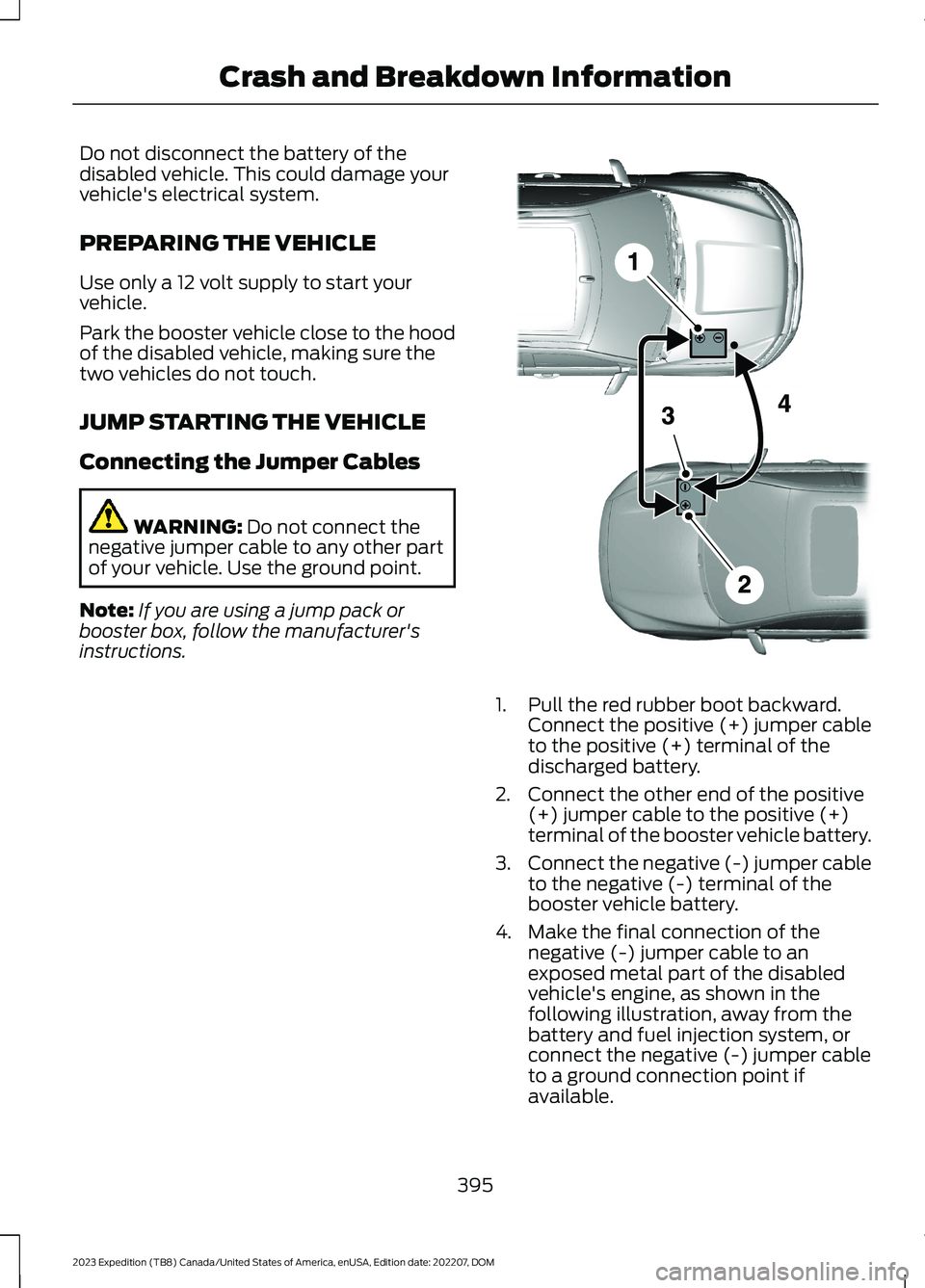
1.Pull the red rubber boot backward.Connect the positive (+) jumper cableto the positive (+) terminal of thedischarged battery.
2.Connect the other end of the positive(+) jumper cable to the positive (+)terminal of the booster vehicle battery.
3.Connect the negative (-) jumper cableto the negative (-) terminal of thebooster vehicle battery.
4.Make the final connection of thenegative (-) jumper cable to anexposed metal part of the disabledvehicle's engine, as shown in thefollowing illustration, away from thebattery and fuel injection system, orconnect the negative (-) jumper cableto a ground connection point ifavailable.
395
2023 Expedition (TB8) Canada/United States of America, enUSA, Edition date: 202207, DOMCrash and Breakdown InformationE355173