2023 FORD EXPEDITION reset
[x] Cancel search: resetPage 183 of 658

WHAT IS THE MEMORY
FUNCTION
The memory function recalls the positionof these features:
•Driver seat.
•Power mirrors.
•Optional power steering column.
•Optional power adjustable pedals.
MEMORY FUNCTION
PRECAUTIONS
WARNING: Before activating thememory seat, make sure that the areaimmediately surrounding the seat is clearof obstructions and that all occupantsare clear of moving parts.
WARNING: Do not use the memoryfunction when your vehicle is moving.
LOCATING THE MEMORY
FUNCTION BUTTONS
The memory control is on the driver door.
SAVING A PRESET POSITION
1.Adjust the memory features to yourpreferred position.
2.Press and hold the preferred presetbutton until you hear a single tone.
A confirmation message appears in theinformation display.
You can save up to three preset memorypositions at any time.
RECALLING A PRESET
POSITION
Press and release a preset button.
Note:You can recall a preset memoryposition when the ignition is off, or when youplace the transmission in park (P) or neutral(N) if the ignition is on and the vehicle is notmoving.
Note:Pressing any of the preset buttons orany memory feature control during amemory recall cancels the operation.
You can also recall a preset memoryposition by:
•Pressing the unlock button on yourremote control if you linked it to apreset position.
•Unlocking the intelligent driver doorhandle if a linked remote control ispresent.
•Recalling a personal profile in yourSYNC menu.
Using a linked remote control to recall yourmemory position when the ignition is offmoves the seat and steering column to theeasy entry position.
179
2023 Expedition (TB8) Canada/United States of America, enUSA, Edition date: 202207, DOMMemory Function (If Equipped)E142554
Page 184 of 658
Linking a Preset Position to YourRemote Control or Passive Key
Your vehicle can save the preset memorypositions for up to three remote controlsor passive keys.
1.With the ignition on, move the memorypositions to the preferred positions.
2.Press and hold the preferred presetbutton for about five seconds. A tonesounds after about two seconds.Continue holding until you hear asecond tone.
3.Within three seconds, press the lockbutton on the remote control you arelinking.
To unlink a remote control, follow thesame procedure – except in step 3, pressthe unlock button on the remote control.
Note:If more than one linked remotecontrol or passive key is in range, thememory function moves to the settings ofthe first key to recall a memory position.
180
2023 Expedition (TB8) Canada/United States of America, enUSA, Edition date: 202207, DOMMemory Function (If Equipped)
Page 192 of 658
DescriptionIndicator Status
When the indicatorlight is on, theoutlet is providingpower.
On
When the indicatorlight is off, there isno power to theoutlet.
Off
When the indicatorlight is flashing, theoutlet is in a faultmode.
Flashing
Fault mode
The power outlet temporarily turns offpower if the device exceeds the watt limit.
1.Unplug your device.
2.Switch your vehicle off to let thesystem cool and reset the fault mode.
3.Switch your vehicle back on, but do notplug your device back in.
4.With your vehicle on, make sure theindicator light remains on.
5.Make sure your device does not exceedthe power limits and then plug in yourdevice.
Note:If a fault occurs again, your devicemay exceed the capacity available from thepower outlet.
188
2023 Expedition (TB8) Canada/United States of America, enUSA, Edition date: 202207, DOMPower Outlet - Vehicles With: 110V Power Outlet
Page 202 of 658

HOW DOES AUTOMATIC ENGINESTOP WORK
Automatic engine stop turns the engineoff. The ignition also turns off in order tosave battery power. Before the engineshuts down, a message appears in theinformation display showing a timercounting down. If you do not intervenewithin 30 seconds, the engine shuts down.Another message appears in theinformation display to inform you that theengine has shut down in order to save fuel.Start your vehicle as you normally do.
SWITCHING AUTOMATIC ENGINESTOP ON AND OFF
1.Press Settings on the touchscreen.
2.Press Vehicle Settings.
3.Switch 30min Max Idle on or off.
Note:You cannot permanently switch offthe automatic shutdown. If you switch it off,it turns on each time you switch the ignitionon.
OVERRIDING AUTOMATIC ENGINESTOP
You can stop the engine shutdown, or resetthe timer, at any point before the30-second countdown has expired bydoing any of the following:
•Pressing the brake pedal or acceleratorpedal.
•Pressing the OK or RESET buttonduring the countdown.
Note: You cannot permanently switch offthe automatic engine shutdown feature.When you switch it off temporarily, it turnson at the next ignition cycle.
ACCESSING THE PASSIVE KEY
BACKUP POSITION
If you are unable to start your vehicle, dothe following:
1.Access the backup slot.
2.With the buttons facing the front ofyour vehicle, insert the passive key intothe backup slot.
3.With the key in this position, press thebrake pedal then press the push buttonignition switch to switch the ignition onand start your vehicle.
198
2023 Expedition (TB8) Canada/United States of America, enUSA, Edition date: 202207, DOMStarting and Stopping the Engine E256153
Page 215 of 658
9.Fully close the fuel filler door.
Note:The message may not immediatelyreset. If the message continues to appearand a warning lamp illuminates, have yourvehicle checked as soon as possible.
211
2023 Expedition (TB8) Canada/United States of America, enUSA, Edition date: 202207, DOMFuel and Refueling
Page 268 of 658

The side parking aid may not function if:
•Your vehicle remains stationary for overtwo minutes.
•The anti-lock brake system activates.
•The traction control system activates.
•Your vehicle is in park (P).
•The steering wheel angle informationis not available. You must drive at least492 ft (150 m) above 19 mph(30 km/h) to reset the steering wheelangle information.
Note:If you switch traction control off, theside sensing system also turns off.
To reinitialize the system, drive the lengthof your vehicle.
The side parking aid does not detect anobject that is moving toward the side ofyour vehicle, for example another vehiclemoving at a low speed, if it does not passa front or rear parking aid sensor.
If the transmission is in reverse (R), the sidesensing system provides audible warnings.When your vehicle is moving slowly,obstacles are detected within 24 in(60 cm) and are inside the driving path ofyour vehicle. If your vehicle remainsstationary for a few seconds, the audiblewarning turns off. Visual indication isalways present in reverse (R).
If your vehicle is in neutral (N), the sidesensing system provides visual indicationonly when your vehicle is moving slowlyand there is a front or rear parking aidobstacle detected, and the side obstacleis within 24 in (60 cm) from the side ofyour vehicle. If your vehicle remainsstationary for a few seconds, the visualindication turns off.
If the transmission is in drive (D) or anyother forward gear, the side sensing systemprovides audible and visual warnings.When your vehicle is moving slowly,obstacles are detected within 24 in(60 cm) and are inside the driving path ofyour vehicle. If your vehicle remainsstationary for a few seconds, the visualindication and audible warning turns off.
LOCATING THE SIDE PARKING AIDSENSORS
The side parking sensors are located in thesides of the front and rear bumpers.
SIDE PARKING AID AUDIBLEWARNINGS
When the side parking aid detects anobject within the coverage area and thedriving path of your vehicle, an audiblewarning sounds. As your vehicle movescloser to the object, the rate of the toneincreases.
264
2023 Expedition (TB8) Canada/United States of America, enUSA, Edition date: 202207, DOMParking AidsE187810
Page 296 of 658
LANE CENTERING AUTOMATICCANCELLATION
When an external condition cancels thesystem, and your hands are on the steeringwheel, a tone sounds and a messageappears in the instrument cluster display.
When an external condition cancels thesystem, and your hands are not on thesteering wheel, the system immediatelyalerts you to take control of the vehicle. Ifthis alert is ignored, the system slows thevehicle while maintaining steeringassistance when lane markings areavailable. When no lane markings areavailable, the vehicle comes to a stop.
If your vehicle starts to slowdown after system cancellation,you must take full control of thevehicle. To re-enable adaptive cruisecontrol with lane centering aftercancellation, press and release the resumebutton.
Automatic cancellation can also occur if:
•The lane becomes too wide or narrow.
•The system cannot detect valid lanemarkings.
•Lane markings cross over one another.
•The curve of the road is too sharp.
Note:If your vehicle slows down due to yourinactivity twice within a key cycle, thesystem disables. To reset the system, whenthe vehicle is stationary, return the gearselector to park (P) and turn the vehicle off.Then, restart the vehicle with your foot onthe brake pedal.
LANE CENTERING MANUALCANCELLATION
When you perform the following actions,adaptive cruise control with lane centeringwill cancel:
•The brake pedal is pressed.
•Adaptive cruise control button isswitched off on the steering wheel.
The lane centering system is momentarilysuppressed when either of the followingactions are performed:
•Turn signal indicator is latched ortapped.
•You steer the vehicle out of lane.
LANE CENTERING INDICATORS
Illuminates when you switchlane centering on. The color ofthe indicator changes to indicatethe system status.
Gray status indicates the system is on butin standby mode.
Green status indicates the system isenabled and applying steering assistanceto keep the vehicle in the center of the lane.
Amber status with an audible tone, thatthen changes to gray status, indicates asystem automatic cancellation.
INTELLIGENT ADAPTIVE
CRUISE CONTROL
HOW DOES INTELLIGENTADAPTIVE CRUISE CONTROLWORK
Intelligent adaptive cruise controlcombines speed sign recognition andnavigation map data with adaptive cruisecontrol to adjust the cruise set speed tothe speed limit detected by the speed signrecognition system. As the system detectsnew speed signs, the set speed updates.
292
2023 Expedition (TB8) Canada/United States of America, enUSA, Edition date: 202207, DOMAdaptive Cruise Control (If Equipped)E308130 E297977
Page 299 of 658
ADAPTIVE CRUISE CONTROL
– TROUBLESHOOTING
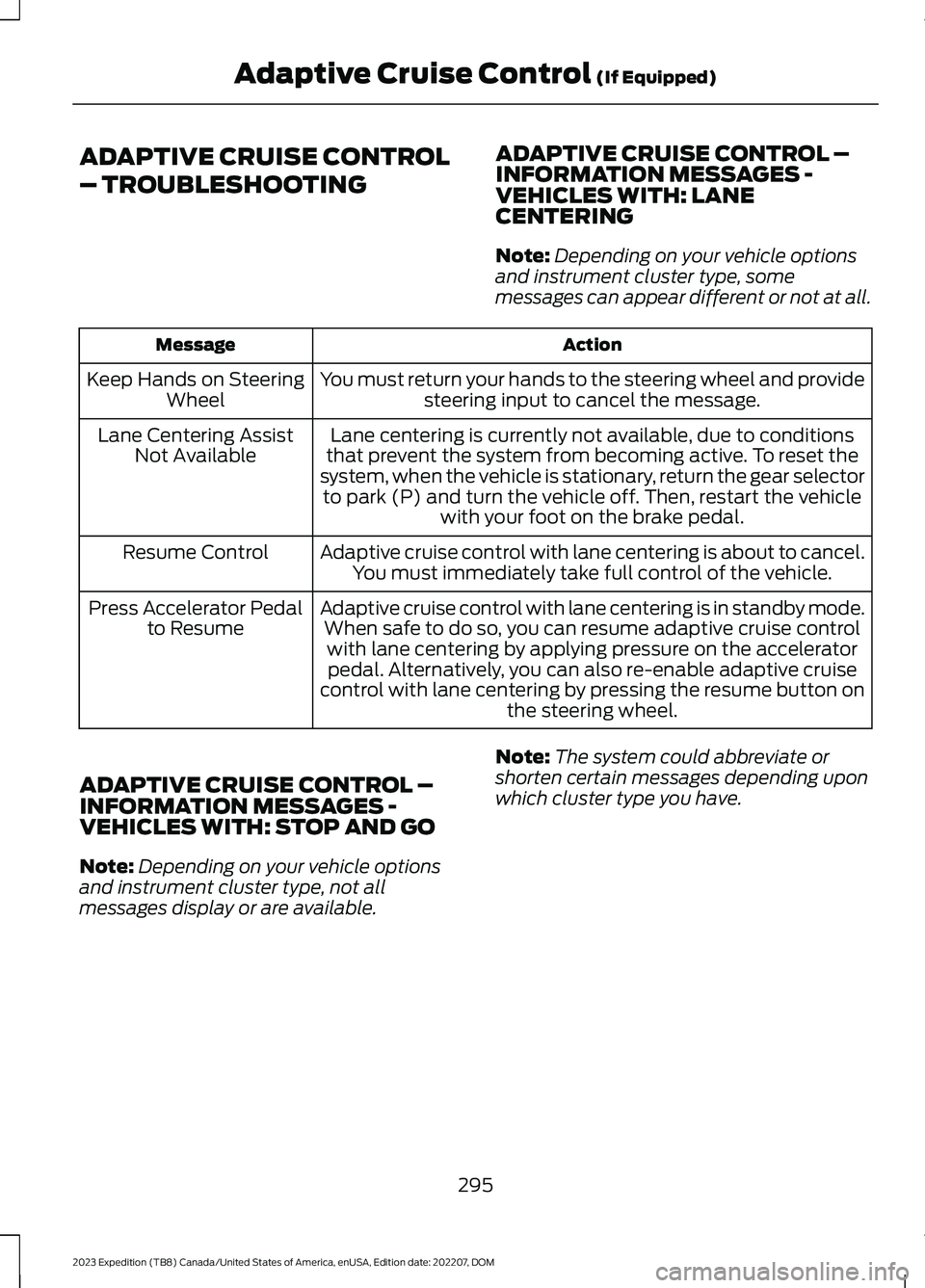
ADAPTIVE CRUISE CONTROL –INFORMATION MESSAGES -VEHICLES WITH: LANECENTERING
Note:Depending on your vehicle optionsand instrument cluster type, somemessages can appear different or not at all.
ActionMessage
You must return your hands to the steering wheel and providesteering input to cancel the message.Keep Hands on SteeringWheel
Lane centering is currently not available, due to conditionsthat prevent the system from becoming active. To reset thesystem, when the vehicle is stationary, return the gear selectorto park (P) and turn the vehicle off. Then, restart the vehiclewith your foot on the brake pedal.
Lane Centering AssistNot Available
Adaptive cruise control with lane centering is about to cancel.You must immediately take full control of the vehicle.Resume Control
Adaptive cruise control with lane centering is in standby mode.When safe to do so, you can resume adaptive cruise controlwith lane centering by applying pressure on the acceleratorpedal. Alternatively, you can also re-enable adaptive cruisecontrol with lane centering by pressing the resume button onthe steering wheel.
Press Accelerator Pedalto Resume
ADAPTIVE CRUISE CONTROL –INFORMATION MESSAGES -VEHICLES WITH: STOP AND GO
Note:Depending on your vehicle optionsand instrument cluster type, not allmessages display or are available.
Note:The system could abbreviate orshorten certain messages depending uponwhich cluster type you have.
295
2023 Expedition (TB8) Canada/United States of America, enUSA, Edition date: 202207, DOMAdaptive Cruise Control (If Equipped)