2023 FORD EXPEDITION headlamp
[x] Cancel search: headlampPage 426 of 658
3.Wait a minimum of two minutes beforedisconnecting the battery.
Note:The engine management system hasa power hold function and remains poweredfor a period of time after you switch theignition off. This is to allow the system tostore diagnostic and adaptive tables.Disconnecting the battery without waitingcan cause damage not covered by thevehicle warranty.
4.Disconnect the negative battery cableterminal.
5.Disconnect the positive battery cableterminal.
6.Remove the battery securing clamp.
7.Remove the battery.
8.To install, reverse the removalprocedure.
Note:Before reconnecting the battery,make sure the ignition remains switched off.
Note:Make sure to fully tighten the batterycables.
If you disconnect or replace the vehiclebattery, you must reset the followingfeatures:
•Window bounce-back. See Lockingthe Rear Window Controls (page 128).
•Clock Settings.
•Pre-set radio stations.
Battery Disposal
Make sure that you dispose ofold batteries in anenvironmentally friendly way.Seek advice from your local authorityabout recycling old batteries.
ADJUSTING THE HEADLAMPS
Vertical Aim Adjustment
The headlamps on your vehicle areproperly aimed at the assembly plant. Ifyour vehicle has been in an accident,contact an authorized dealer to check andrealign your headlamps.
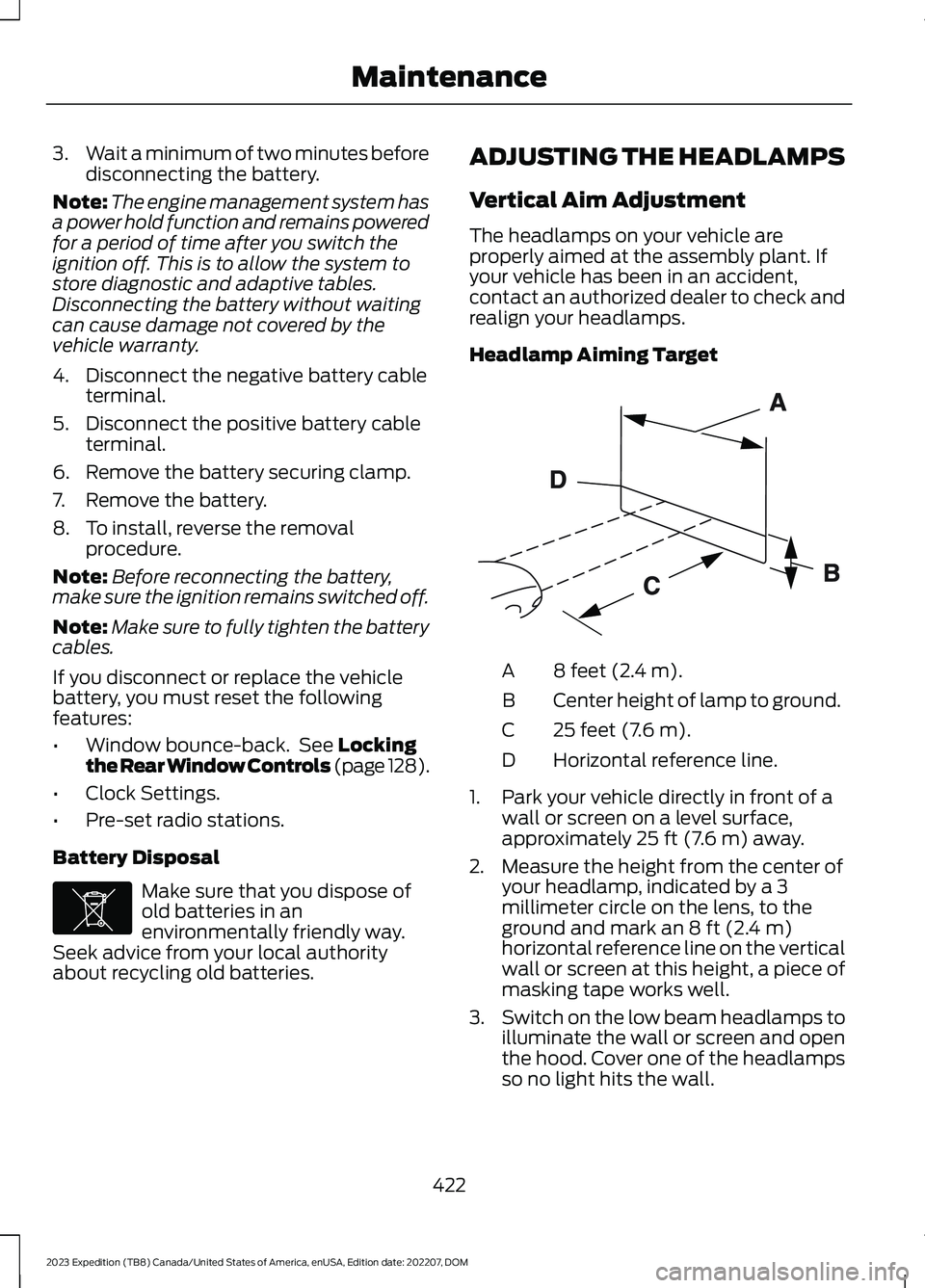
Headlamp Aiming Target
8 feet (2.4 m).A
Center height of lamp to ground.B
25 feet (7.6 m).C
Horizontal reference line.D
1.Park your vehicle directly in front of awall or screen on a level surface,approximately 25 ft (7.6 m) away.
2.Measure the height from the center ofyour headlamp, indicated by a 3millimeter circle on the lens, to theground and mark an 8 ft (2.4 m)horizontal reference line on the verticalwall or screen at this height, a piece ofmasking tape works well.
3.Switch on the low beam headlamps toilluminate the wall or screen and openthe hood. Cover one of the headlampsso no light hits the wall.
422
2023 Expedition (TB8) Canada/United States of America, enUSA, Edition date: 202207, DOMMaintenanceE107998 E142592
Page 427 of 658
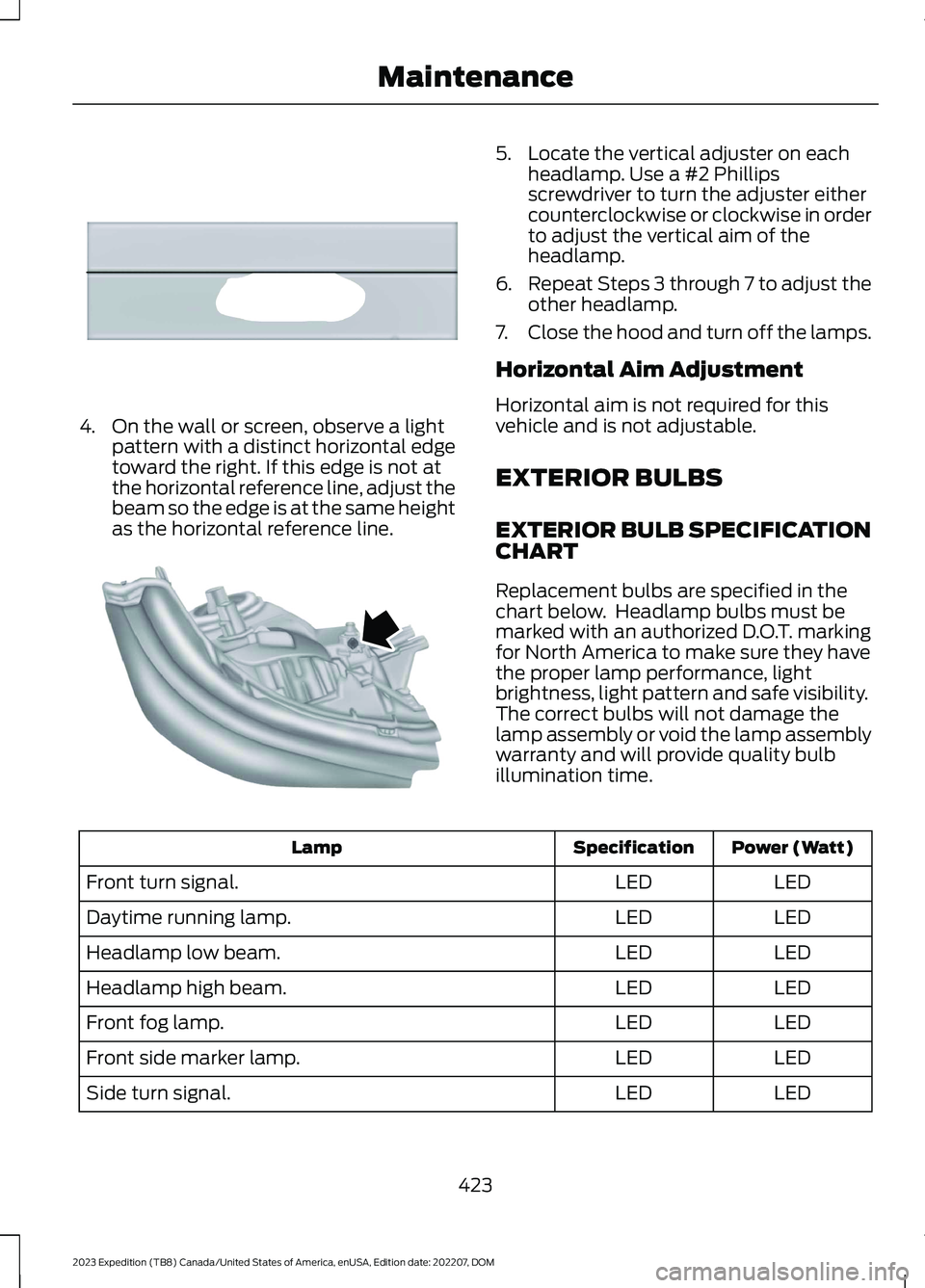
4.On the wall or screen, observe a lightpattern with a distinct horizontal edgetoward the right. If this edge is not atthe horizontal reference line, adjust thebeam so the edge is at the same heightas the horizontal reference line.
5.Locate the vertical adjuster on eachheadlamp. Use a #2 Phillipsscrewdriver to turn the adjuster eithercounterclockwise or clockwise in orderto adjust the vertical aim of theheadlamp.
6.Repeat Steps 3 through 7 to adjust theother headlamp.
7.Close the hood and turn off the lamps.
Horizontal Aim Adjustment
Horizontal aim is not required for thisvehicle and is not adjustable.
EXTERIOR BULBS
EXTERIOR BULB SPECIFICATIONCHART
Replacement bulbs are specified in thechart below. Headlamp bulbs must bemarked with an authorized D.O.T. markingfor North America to make sure they havethe proper lamp performance, lightbrightness, light pattern and safe visibility.The correct bulbs will not damage thelamp assembly or void the lamp assemblywarranty and will provide quality bulbillumination time.
Power (Watt)SpecificationLamp
LEDLEDFront turn signal.
LEDLEDDaytime running lamp.
LEDLEDHeadlamp low beam.
LEDLEDHeadlamp high beam.
LEDLEDFront fog lamp.
LEDLEDFront side marker lamp.
LEDLEDSide turn signal.
423
2023 Expedition (TB8) Canada/United States of America, enUSA, Edition date: 202207, DOMMaintenanceE167358 E163806
Page 434 of 658
CLEANING THE EXTERIOR
CLEANING THE EXTERIORPRECAUTIONS
Immediately remove fuel spillages, additiveresiduals, bird droppings, insect depositsand road tar. These may cause damage toyour vehicle’s paintwork or trim over time.Remove any exterior accessories, forexample antennas, before entering a carwash.
CLEANING HEADLAMPS ANDREAR LAMPS
We recommend that you only use cold orlukewarm water containing car shampooto clean the headlamps and the rearlamps.
Do not scrape the lamps.
Do not wipe lamps when they are dry.
CLEANING WINDOWS AND WIPERBLADES
To clean the windshield and wiper blades:
•Clean the windshield with anon-abrasive glass cleaner.
Note:When cleaning the interior of thewindshield, avoid getting any glass cleaneron the instrument panel or door panels.Wipe any glass cleaner off these surfacesimmediately.
•Clean the wiper blades with washerfluid or water applied with a softsponge or cloth.
Note: Do not use razor blades or othersharp objects to clean or remove decalsfrom the inside of the heated rear window.This can cause damage not covered by thevehicle Warranty.
CLEANING CHROME, ALUMINIUMOR STAINLESS STEEL
We recommend that you only use a carshampoo, a soft cloth and water onbumpers and other chrome, aluminium orstainless steel parts.
Note:For additional information andassistance, we recommend that you contactan authorized dealer.
Note:Rinse the area well after cleaning.
Note:Do not use abrasive materials, forexample steel wool or plastic pads, as theycan scratch these surfaces.
Note:Do not use chrome cleaner, metalcleaner or polish on wheels or wheel covers.
CLEANING WHEELS
Only use a recommended wheel and tirecleaner to clean the wheels weekly. Foradditional information and assistance, werecommend that you contact anauthorized dealer.
1.Use a sponge to remove heavydeposits of dirt and brake dust.
2.Rinse well after cleaning.
Note:Do not apply a cleaning chemical towarm or hot wheel rims and covers.
If you intend on parking your vehicle for anextended period after cleaning the wheelswith a wheel cleaner, drive your vehicle fora few minutes before parking your vehicle.This reduces the risk of corrosion of thebrake discs, brake pads and linings.
Do not clean the wheels when they are hot.
Note: Some car washes could damagewheel rims and covers.
Note: Using non-recommended cleaners,harsh cleaning products, chrome wheelcleaners or abrasive materials coulddamage wheel rims and covers.
430
2023 Expedition (TB8) Canada/United States of America, enUSA, Edition date: 202207, DOMVehicle Care
Page 633 of 658
3
360 Degree Camera...................................269360 Degree Camera Settings.........................271360 Degree Camera Guide Lines...........270360 Degree Camera Limitations...........269360 Degree Camera Precautions.........269360 Degree Camera Settings...................271Switching the 360 Degree Camera On andOff........................................................................271Switching the 360 Degree CameraView.....................................................................271
4
4WDSee: Four-Wheel Drive......................................219
9
911 Assist...........................................................65
A
A/CSee: Climate Control - Vehicles With: 12 InchScreen................................................................148See: Climate Control - Vehicles With: 15 InchScreen................................................................153About This Publication..................................21ABSSee: Brakes...........................................................229Accessing Apps............................................522Accessing Feature Drawers.....................503Accessing Navigation.................................526Accessing the Passive Key BackupPosition.........................................................198Accessories....................................................536Active Park Assist.........................................273Active Park Assist – Troubleshooting.........275Active Park Assist Precautions...............273Active Park Assist –Troubleshooting........................................275Active Park Assist – Frequently AskedQuestions.........................................................275Active Park Assist – InformationMessages..........................................................275
Adaptive Cruise Control............................279Adaptive Cruise Control –Troubleshooting............................................295Intelligent Adaptive Cruise Control.............292Lane Centering...................................................289Adaptive Cruise Control AutomaticCancellation................................................282Adaptive Cruise ControlIndicators.....................................................288Adaptive Cruise ControlLimitations..................................................280Adaptive Cruise ControlPrecautions.................................................279Adaptive Cruise Control –Troubleshooting........................................295Adaptive Cruise Control – InformationMessages.........................................................295Adjustable Pedals........................................108Adjusting the Exterior Mirrors..................130Adjusting the Headlamps.........................422Adjusting the Instrument Panel LightingBrightness....................................................126Adjusting the Integrated Trailer BrakeController Mode........................................366Adjusting the Luggage CompartmentDivider...........................................................352Adjusting the Luggage CompartmentLoad Floor.....................................................351Adjusting the Map.......................................526Changing the Format of the Map................526Zooming the Map In and Out........................526Adjusting the Pedals...................................108Adjusting the Seatbelt Height....................51Adjusting the Seatbelts DuringPregnancy.......................................................51Adjusting the Sound Settings.................482Adjusting the Steering Wheel - VehiclesWith: Manual Adjustable SteeringColumn..........................................................106Adjusting the Steering Wheel - VehiclesWith: Power Adjustable SteeringColumn..........................................................106Adjusting the Volume................................482Aid Mode..........................................................312How Does Aid Mode Work...............................312What Is Aid Mode................................................312Airbag Precautions........................................58
629
2023 Expedition (TB8) Canada/United States of America, enUSA, Edition date: 202207, DOMIndex
Page 637 of 658

Changing the Vehicle Wi-Fi HotspotName or Password - Vehicles With: 15Inch Screen................................................480Charging a Device.........................................185Charging a Wireless Device......................190Checking MyKey System Status................77Checking the Brake Fluid..........................229Checking the Coolant.................................415Checking the Seatbelts...............................54Checking the Tire Pressures....................448Checking the Wiper Blades.........................111Children and Airbags....................................60Child Restraint Anchor Points...................38Locating the Child Restraint Lower AnchorPoints...................................................................38Locating the Child Restraint Top TetherAnchor Points...................................................39What Are the Child Restraint AnchorPoints...................................................................38Child Restraints...............................................39Child Restraint Position Information............39Child Restraints Recommendation................41Child Safety.......................................................37Child Restraint Anchor Points.........................38Child Restraints.....................................................39Installing Child Restraints..................................41Child Safety Locks..........................................47Child Safety Precautions.............................37Cleaning Products.......................................429Cleaning the Exterior..................................430Cleaning Camera Lenses andSensors..............................................................431Cleaning Chrome, Aluminium or StainlessSteel..................................................................430Cleaning Headlamps and RearLamps...............................................................430Cleaning Stripes or Graphics..........................431Cleaning the Engine Compartment.............431Cleaning the Exterior Precautions..............430Cleaning the Underbody..................................431Cleaning Wheels................................................430Cleaning Windows and WiperBlades...............................................................430Cleaning the Interior....................................431Cleaning Carpets and Floor Mats................433Cleaning Displays and Screens....................432Cleaning Moonroof Tracks.............................433Cleaning Plastic..................................................432
Cleaning Seatbelts............................................433Cleaning Seats and the Headliner...............432Cleaning the Instrument Panel.....................431Clearing All MyKeys........................................77Climate Control.............................................148Auto Mode............................................................150Climate Control Hints..................................151Closing the Liftgate.......................................93Closing the Hands-Free Liftgate....................94Closing the Liftgate From Inside YourVehicle.................................................................93Closing the Liftgate From Outside YourVehicle.................................................................93Closing the Liftgate Using the RemoteControl................................................................94Cold Weather Precautions.......................389Connected Navigation...............................526Connected Vehicle......................................475Connected Vehicle –Troubleshooting............................................476Connecting the Vehicle to a MobileNetwork............................................................475Connected Vehicle Data..............................28Connected Vehicle Limitations...............475Connected Vehicle Requirements.........475Connected Vehicle –Troubleshooting........................................476Connected Vehicle – Frequently AskedQuestions.........................................................476Connecting a Bluetooth® Device..........520Connecting a Trailer....................................355Connecting a Trailer –Troubleshooting.............................................357Hitches...................................................................354Connecting a Trailer Precautions..........354Connecting a Trailer –Troubleshooting........................................357Connecting a Trailer – InformationMessages..........................................................357Connecting the Vehicle to a MobileNetwork........................................................475Connecting FordPass to the Modem..........475Enabling and Disabling the Modem...........475What Is the Modem..........................................475Connecting the Vehicle to a Wi-FiNetwork - Vehicles With: 12 InchScreen...........................................................476
633
2023 Expedition (TB8) Canada/United States of America, enUSA, Edition date: 202207, DOMIndex
Page 640 of 658
Checking the Engine Oil Level.......................414Engine Oil Capacity andSpecification...................................................415Engine Oil Dipstick Overview.........................414Resetting the Intelligent Oil LifeMonitor..............................................................415Engine Oil Pressure Gauge........................136Engine Specifications................................463Entering a Parallel Parking Space..........273Entering a Perpendicular ParkingSpace.............................................................274Evasive Steering Assist..............................336Evasive Steering Assist Limitations............336Switching Evasive Steering Assist On andOff......................................................................336What Is Evasive Steering Assist...................336Event Data.........................................................27Exiting a Parking Space.............................274Export Unique Options..............................622Extending the Remote StartDuration.........................................................145Exterior Bulbs................................................423Changing a License Plate Lamp Bulb........427Changing a Rear Lamp Bulb..........................425Changing a Rear Turn Signal LampBulb....................................................................426Changing a Reversing Lamp Bulb................427Changing a Stoplamp Bulb...........................426Exterior Bulb Specification Chart................423Removing a Rear Lamp Assembly..............425Exterior Lamps................................................117Exterior Lamp Indicators...................................119Exterior Lamps On Audible Warning............119Switching the Daytime Running Lamps Onand Off................................................................117Switching the Spot Lamps On andOff........................................................................119Using the Front Fog Lamps.............................118Using the Turn Signal Lamps...........................117Exterior Lighting Control.............................115Exterior Lighting.............................................115Autolamps..............................................................116Automatic High Beam Control.......................121Automatic High Beam Control –Troubleshooting.............................................124Exterior Lamps......................................................117Exterior Zone Lighting........................................119Headlamps.............................................................115
Headlamps – Troubleshooting......................115Exterior Mirrors..............................................130Auto-Dimming Exterior Mirror.........................131Exterior Zone Lighting..................................119Exterior Zone Lighting Settings......................121Using the Exterior Zone Lighting....................119What Is Exterior Zone Lighting.......................119
F
Fastening and Unfastening theSeatbelts........................................................49Feature Bar....................................................500Flat TireSee: Changing a Flat Tire...............................456Floor Mats.......................................................392Folding the Exterior Mirrors - VehiclesWith: Manual Folding Mirrors................130Folding the Exterior Mirrors - VehiclesWith: Power Folding Mirrors....................131Foot PedalsSee: Adjusting the Pedals...............................108Ford Assistant..............................................504Ford Assistant – Frequently AskedQuestions........................................................505Ford Assistant Settings..................................504Using Ford Assistant........................................504Ford Power-UpSee: Software Update Settings - VehiclesWith: 12 Inch Screen.....................................532See: Software Update Settings - VehiclesWith: 15 Inch Screen.....................................533See: Vehicle Software Updates....................532Ford Protect...................................................537Four-Wheel Drive Driving Hints..............222Driving In Sand....................................................222Driving on Hilly or Sloping Terrain................223Driving on Snow and Ice..................................224Driving Through Mud and Water..................223Four-Wheel Drive.........................................219Four-Wheel Drive Driving Hints....................222Four-Wheel Drive Modes.................................221Four-Wheel Drive – Troubleshooting.........224Four-Wheel Drive Indicators....................222Four-Wheel Drive Limitations.................220Four-Wheel Drive Modes...........................221Four-Wheel Drive Auto....................................222Four-Wheel Drive High.....................................222
636
2023 Expedition (TB8) Canada/United States of America, enUSA, Edition date: 202207, DOMIndex
Page 641 of 658

Four-Wheel Drive Low......................................222Two-Wheel Drive High......................................221Four-Wheel Drive Precautions................219Four-Wheel Drive –Troubleshooting........................................224Four-Wheel Drive – InformationMessages.........................................................224Four-Wheel Drive – Warning Lamps..........224Front Axle Fluid Capacity andSpecification..............................................470Front Exterior...................................................35Front Parking Aid.........................................263Front Parking Aid Audible Warnings...........263Front Parking Aid Limitations........................263Locating the Front Parking AidSensors.............................................................263What is the Front Parking Aid.......................263Front Passenger Sensing System............60Front Passenger Sensing SystemIndicators............................................................62Front Passenger Sensing SystemPrecautions.......................................................62How Does the Front Passenger SensingSystem Work....................................................60What Is the Front Passenger SensingSystem................................................................60Front Seat Precautions...............................161Front Seats.......................................................161Heated Seats........................................................167Manual Seats.......................................................162Massage Seats....................................................166Power Seats.........................................................164Ventilated Seats.................................................168Fuel and Refueling......................................205Fuel and Refueling –Troubleshooting.............................................210Fuel Quality.........................................................206Refueling..............................................................208Running Out of Fuel..........................................207Fuel and Refueling Precautions.............205Fuel and Refueling –Troubleshooting.........................................210Fuel and Refueling – InformationMessages..........................................................210Fuel and Refueling – Warning Lamps........210Fuel Gauge......................................................135Fuel Gauge Limitations....................................136Locating the Fuel Filler Door..........................136
What Is Distance to Empty.............................136What Is the Fuel Gauge....................................135What Is the Low Fuel Reminder....................136Fuel Quality...................................................206Selecting the Correct Fuel.............................206Fuel Tank Capacity......................................210Fuse Precautions.........................................403Fuses................................................................403Body Control Module Fuse Box...................408Fuses – Troubleshooting..................................411Under Hood Fuse Box......................................403Fuses – Troubleshooting............................411Fuses – Frequently Asked Questions..........411
G
Garage Door Opener AdditionalAssistance....................................................184Garage Door Opener....................................181Garage Door Opener Introduction..........181Garage Door Opener Precautions andFrequencies..................................................181General Maintenance Information.......539Global Opening..............................................127Switching Global Opening On andOff........................................................................128Using Global Opening........................................127What Is Global Opening...................................127Glossary of Tire Terminology..................443Glove Compartment....................................191Opening the Glove Compartment................191
H
Headlamp AdjustingSee: Adjusting the Headlamps.....................422Headlamps.......................................................115Headlamp Indicators..........................................115Switching Headlamp Exit Delay On andOff.........................................................................115Using the High Beam Headlamps.................115Headlamps – Troubleshooting................115Headlamps – Frequently AskedQuestions...........................................................115Heated Seats..................................................167Heated Seat Precautions.................................167Switching the Heated Seats On andOff........................................................................167
637
2023 Expedition (TB8) Canada/United States of America, enUSA, Edition date: 202207, DOMIndex