2023 FORD EXPEDITION park assist
[x] Cancel search: park assistPage 242 of 658

REVERSE BRAKING ASSIST –FREQUENTLY ASKED QUESTIONS
Why is reverse braking assist unavailable?
•Make sure the reverse braking assist ison. See Switching Reverse BrakingAssist On and Off (page 236).
•Make sure that all doors, liftgate ortailgate and hood are closed. Drive thevehicle on a straight road for a shortperiod. If the message remains, havethe system checked.
•If your vehicle has the cross traffic alertsystem, make sure it is on. SeeSwitching Cross Traffic Alert Onand Off (page 326).
•Make sure the rear parking aid systemis on. See Parking Aids (page 261).
•Make sure the traction control is on.See Switching Traction Control Onand Off (page 245).
Note:The traction control automaticallyturns off if four-wheel drive low and certaindrive modes such as mud/ruts andsnow/sand is activated.
•Your vehicle may have sustained a rearend impact. Have the sensors checkedfor proper coverage and operation.
•An anti-lock brake, traction control orstability control event may haveoccurred. Reverse braking assistresumes operation when the event iscomplete.
•Make sure the rear view camera and360 degree camera are not dirty orobstructed. If dirty, clean the camera.If the message still appears aftercleaning the camera, wait a short timefor the message to clear. If themessage does not clear, have thesystem checked.
•Make sure the cross traffic alert, rearparking aid and side parking aid sensorsare not blocked or faulty. See Locatingthe Cross Traffic Alert Sensors(page 326). See Locating the RearParking Aid Sensors (page 262). SeeLocating the Side Parking AidSensors (page 264).
•You recently had your vehicle serviced,or the battery disconnected. Drive yourvehicle a short distance to resumesystem operation.
•Reverse braking assist does notfunction when you connect a trailer.Operation resumes when youdisconnect the trailer.
Note:If the answers to why the system isunavailable do not assist in returning reversebraking assist to available, have the systemchecked as soon as possible.
238
2023 Expedition (TB8) Canada/United States of America, enUSA, Edition date: 202207, DOMReverse Braking Assist (If Equipped)
Page 244 of 658
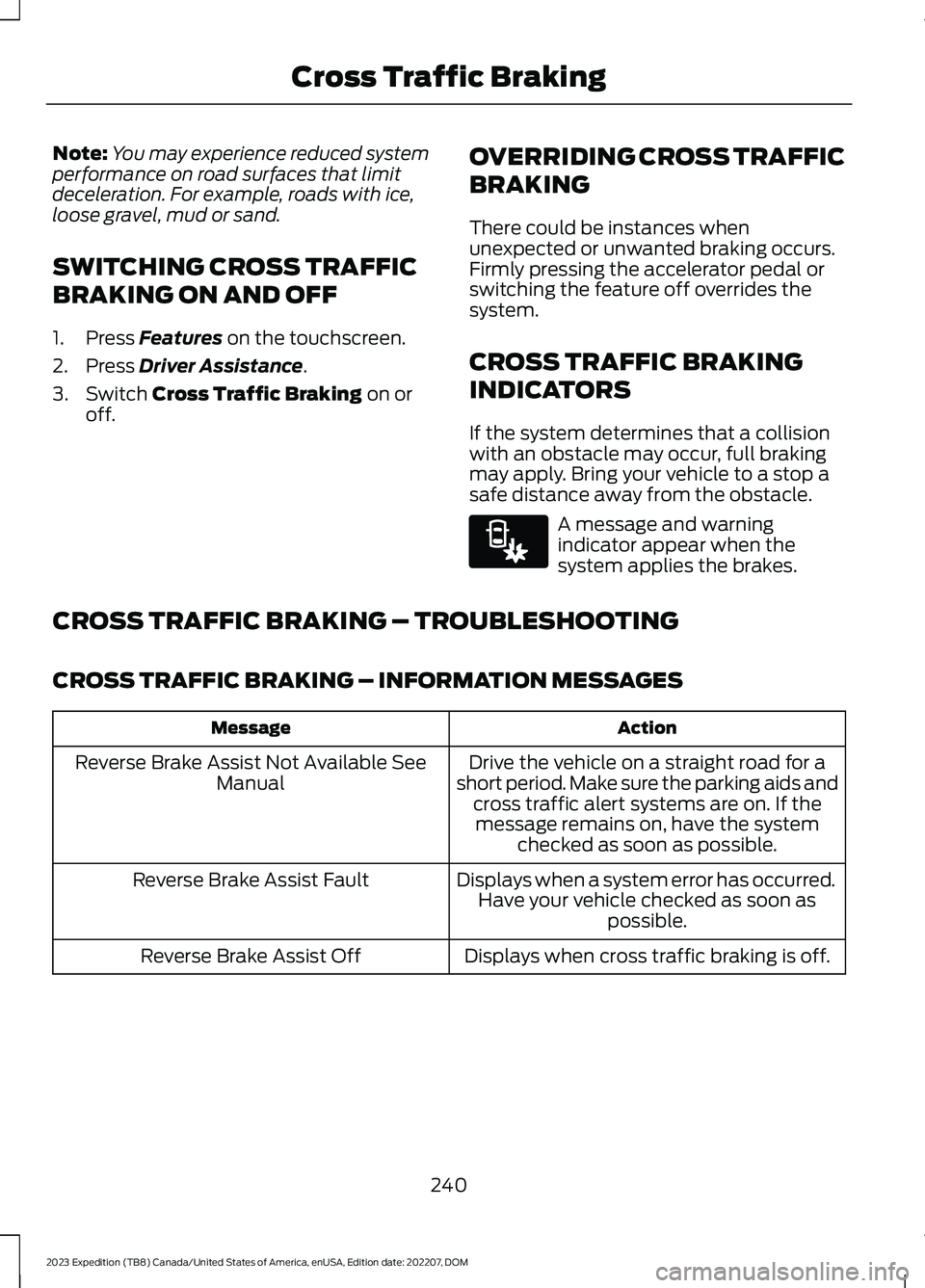
Note:You may experience reduced systemperformance on road surfaces that limitdeceleration. For example, roads with ice,loose gravel, mud or sand.
SWITCHING CROSS TRAFFIC
BRAKING ON AND OFF
1.Press Features on the touchscreen.
2.Press Driver Assistance.
3.Switch Cross Traffic Braking on oroff.
OVERRIDING CROSS TRAFFIC
BRAKING
There could be instances whenunexpected or unwanted braking occurs.Firmly pressing the accelerator pedal orswitching the feature off overrides thesystem.
CROSS TRAFFIC BRAKING
INDICATORS
If the system determines that a collisionwith an obstacle may occur, full brakingmay apply. Bring your vehicle to a stop asafe distance away from the obstacle.
A message and warningindicator appear when thesystem applies the brakes.
CROSS TRAFFIC BRAKING – TROUBLESHOOTING
CROSS TRAFFIC BRAKING – INFORMATION MESSAGES
ActionMessage
Drive the vehicle on a straight road for ashort period. Make sure the parking aids andcross traffic alert systems are on. If themessage remains on, have the systemchecked as soon as possible.
Reverse Brake Assist Not Available SeeManual
Displays when a system error has occurred.Have your vehicle checked as soon aspossible.
Reverse Brake Assist Fault
Displays when cross traffic braking is off.Reverse Brake Assist Off
240
2023 Expedition (TB8) Canada/United States of America, enUSA, Edition date: 202207, DOMCross Traffic BrakingE293490
Page 246 of 658
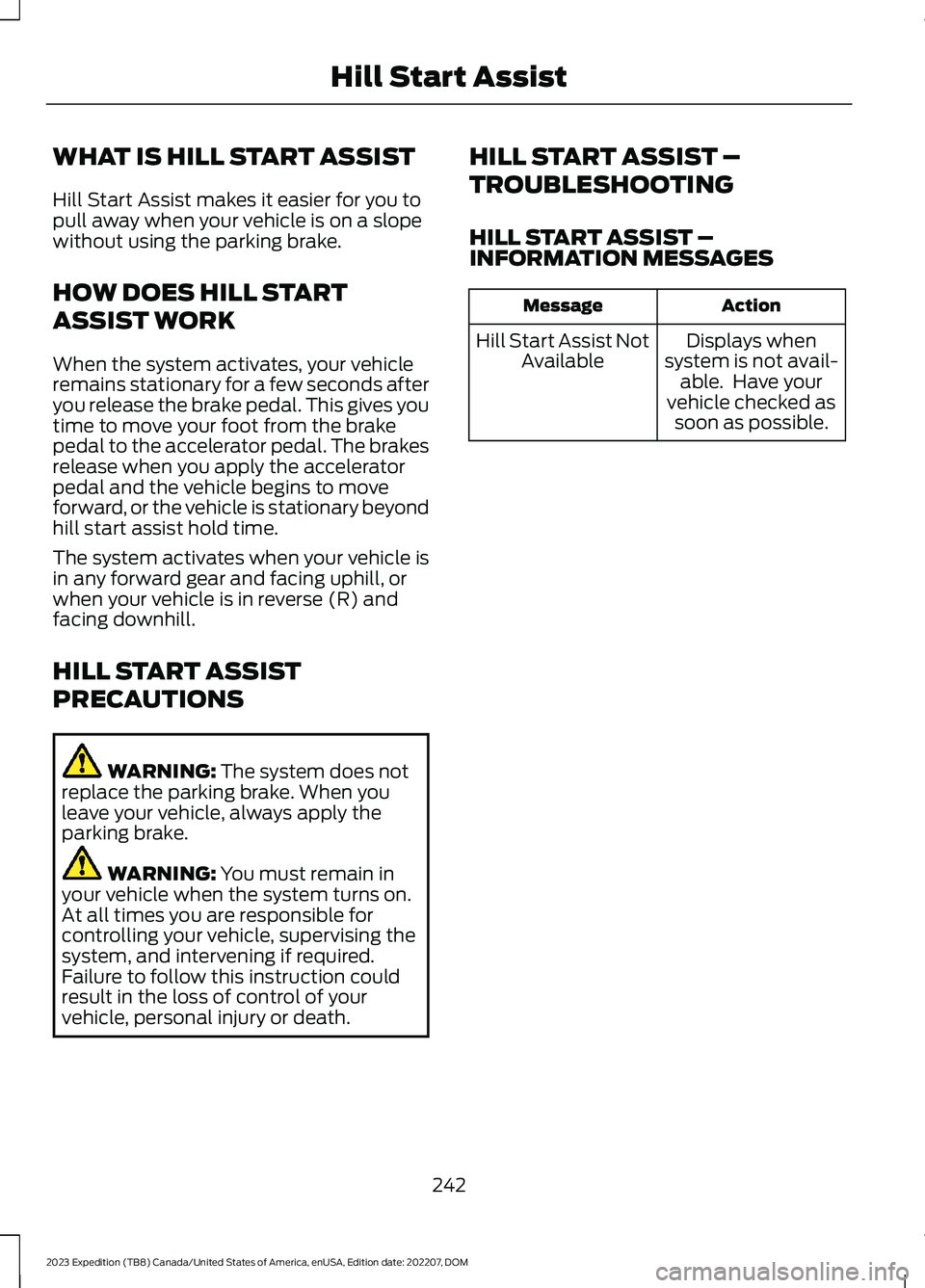
WHAT IS HILL START ASSIST
Hill Start Assist makes it easier for you topull away when your vehicle is on a slopewithout using the parking brake.
HOW DOES HILL START
ASSIST WORK
When the system activates, your vehicleremains stationary for a few seconds afteryou release the brake pedal. This gives youtime to move your foot from the brakepedal to the accelerator pedal. The brakesrelease when you apply the acceleratorpedal and the vehicle begins to moveforward, or the vehicle is stationary beyondhill start assist hold time.
The system activates when your vehicle isin any forward gear and facing uphill, orwhen your vehicle is in reverse (R) andfacing downhill.
HILL START ASSIST
PRECAUTIONS
WARNING: The system does notreplace the parking brake. When youleave your vehicle, always apply theparking brake.
WARNING: You must remain inyour vehicle when the system turns on.At all times you are responsible forcontrolling your vehicle, supervising thesystem, and intervening if required.Failure to follow this instruction couldresult in the loss of control of yourvehicle, personal injury or death.
HILL START ASSIST –
TROUBLESHOOTING
HILL START ASSIST –INFORMATION MESSAGES
ActionMessage
Displays whensystem is not avail-able. Have yourvehicle checked assoon as possible.
Hill Start Assist NotAvailable
242
2023 Expedition (TB8) Canada/United States of America, enUSA, Edition date: 202207, DOMHill Start Assist
Page 247 of 658
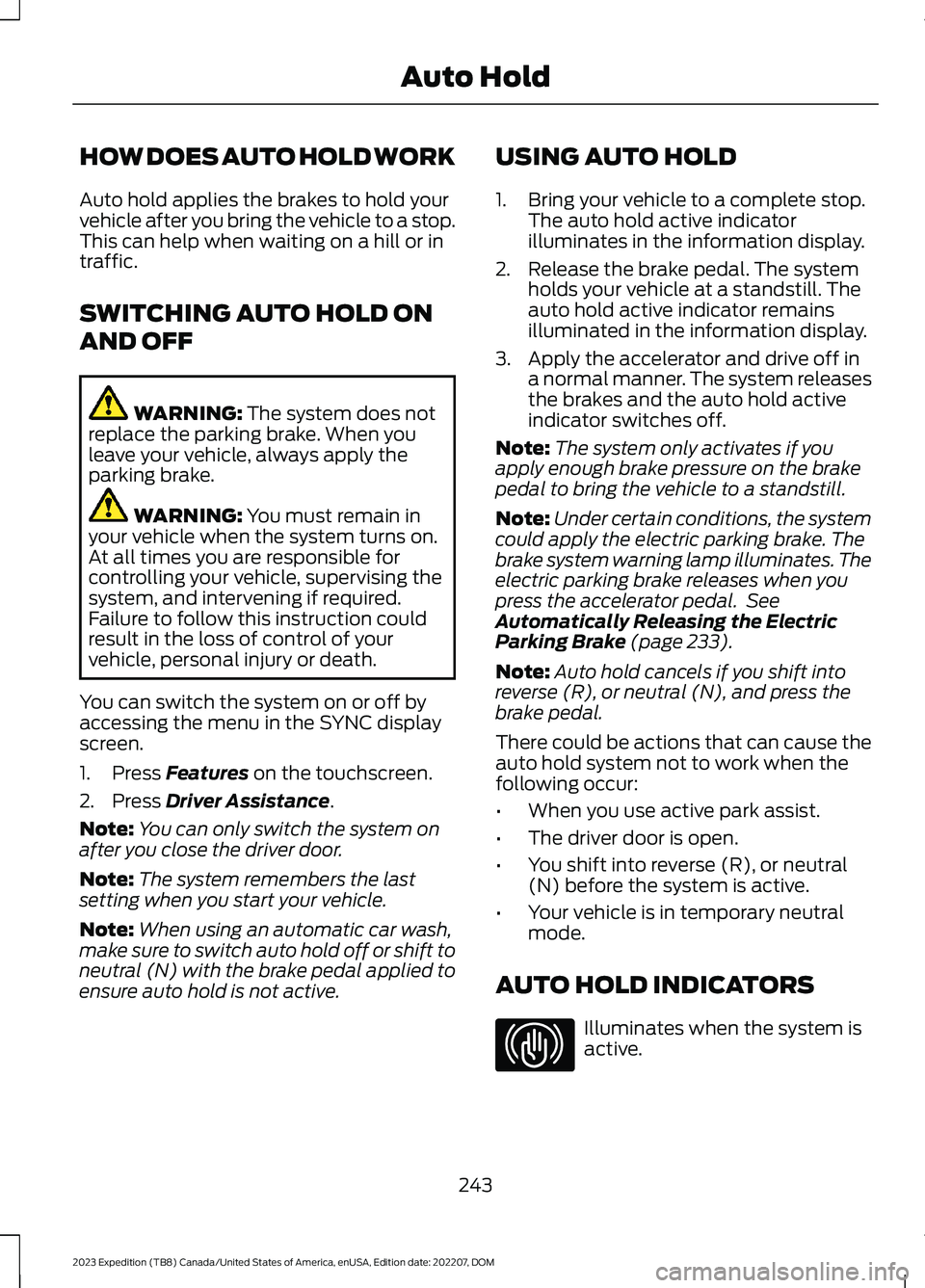
HOW DOES AUTO HOLD WORK
Auto hold applies the brakes to hold yourvehicle after you bring the vehicle to a stop.This can help when waiting on a hill or intraffic.
SWITCHING AUTO HOLD ON
AND OFF
WARNING: The system does notreplace the parking brake. When youleave your vehicle, always apply theparking brake.
WARNING: You must remain inyour vehicle when the system turns on.At all times you are responsible forcontrolling your vehicle, supervising thesystem, and intervening if required.Failure to follow this instruction couldresult in the loss of control of yourvehicle, personal injury or death.
You can switch the system on or off byaccessing the menu in the SYNC displayscreen.
1.Press Features on the touchscreen.
2.Press Driver Assistance.
Note:You can only switch the system onafter you close the driver door.
Note:The system remembers the lastsetting when you start your vehicle.
Note:When using an automatic car wash,make sure to switch auto hold off or shift toneutral (N) with the brake pedal applied toensure auto hold is not active.
USING AUTO HOLD
1.Bring your vehicle to a complete stop.The auto hold active indicatorilluminates in the information display.
2.Release the brake pedal. The systemholds your vehicle at a standstill. Theauto hold active indicator remainsilluminated in the information display.
3.Apply the accelerator and drive off ina normal manner. The system releasesthe brakes and the auto hold activeindicator switches off.
Note:The system only activates if youapply enough brake pressure on the brakepedal to bring the vehicle to a standstill.
Note:Under certain conditions, the systemcould apply the electric parking brake. Thebrake system warning lamp illuminates. Theelectric parking brake releases when youpress the accelerator pedal. SeeAutomatically Releasing the ElectricParking Brake (page 233).
Note:Auto hold cancels if you shift intoreverse (R), or neutral (N), and press thebrake pedal.
There could be actions that can cause theauto hold system not to work when thefollowing occur:
•When you use active park assist.
•The driver door is open.
•You shift into reverse (R), or neutral(N) before the system is active.
•Your vehicle is in temporary neutralmode.
AUTO HOLD INDICATORS
Illuminates when the system isactive.
243
2023 Expedition (TB8) Canada/United States of America, enUSA, Edition date: 202207, DOMAuto HoldE323448
Page 257 of 658
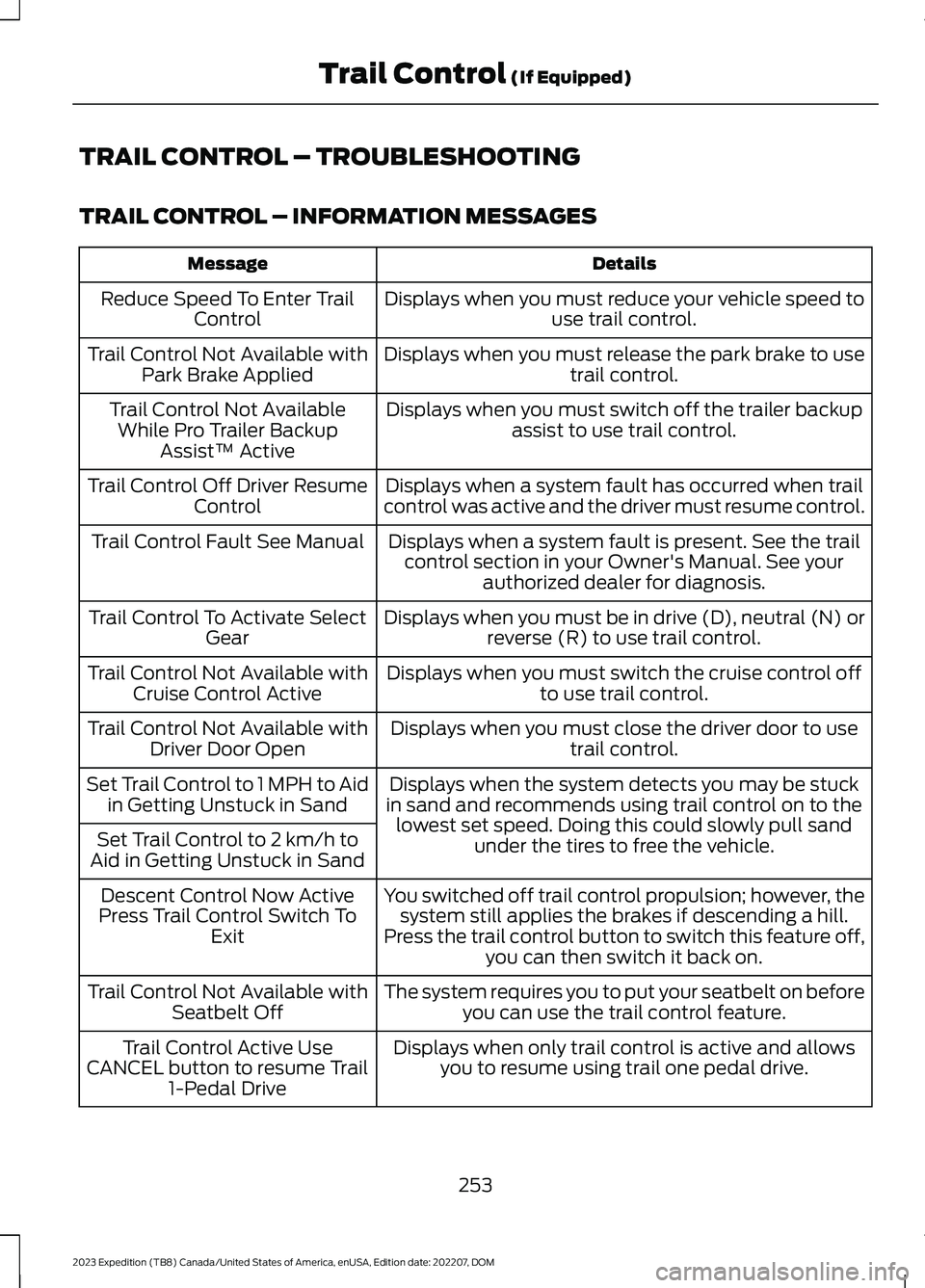
TRAIL CONTROL – TROUBLESHOOTING
TRAIL CONTROL – INFORMATION MESSAGES
DetailsMessage
Displays when you must reduce your vehicle speed touse trail control.Reduce Speed To Enter TrailControl
Displays when you must release the park brake to usetrail control.Trail Control Not Available withPark Brake Applied
Displays when you must switch off the trailer backupassist to use trail control.Trail Control Not AvailableWhile Pro Trailer BackupAssist™ Active
Displays when a system fault has occurred when trailcontrol was active and the driver must resume control.Trail Control Off Driver ResumeControl
Displays when a system fault is present. See the trailcontrol section in your Owner's Manual. See yourauthorized dealer for diagnosis.
Trail Control Fault See Manual
Displays when you must be in drive (D), neutral (N) orreverse (R) to use trail control.Trail Control To Activate SelectGear
Displays when you must switch the cruise control offto use trail control.Trail Control Not Available withCruise Control Active
Displays when you must close the driver door to usetrail control.Trail Control Not Available withDriver Door Open
Displays when the system detects you may be stuckin sand and recommends using trail control on to thelowest set speed. Doing this could slowly pull sandunder the tires to free the vehicle.
Set Trail Control to 1 MPH to Aidin Getting Unstuck in Sand
Set Trail Control to 2 km/h toAid in Getting Unstuck in Sand
You switched off trail control propulsion; however, thesystem still applies the brakes if descending a hill.Press the trail control button to switch this feature off,you can then switch it back on.
Descent Control Now ActivePress Trail Control Switch ToExit
The system requires you to put your seatbelt on beforeyou can use the trail control feature.Trail Control Not Available withSeatbelt Off
Displays when only trail control is active and allowsyou to resume using trail one pedal drive.Trail Control Active UseCANCEL button to resume Trail1-Pedal Drive
253
2023 Expedition (TB8) Canada/United States of America, enUSA, Edition date: 202207, DOMTrail Control (If Equipped)
Page 260 of 658
WHAT IS HILL DESCENT
CONTROL
Hill descent control allows the driver to setand maintain vehicle speed whiledescending steep slopes in various surfaceconditions.
HOW DOES HILL DESCENT
CONTROL WORK
Hill descent control can maintain vehiclespeeds on downhill slopes between2–20 mph (3–32 km/h). Above 20 mph(32 km/h), the system remains on but thedescent speed cannot be set ormaintained.
Note:The system does not function below2 mph (3 km/h).
The system requires a cool down intervalafter a period of sustained use. Hill descentcontrol provides a warning in the messagecenter and a tone sounds when the systemis about to disengage for cooling. At thistime, manually apply the brakes as neededto maintain descent speed.
Note:The amount of time that the systemcan remain active before cooling varies withconditions.
HILL DESCENT CONTROL
PRECAUTIONS
WARNING: The system does notcontrol speed in low traction conditionsor extremely steep slopes. The systemis designed to be an aid and does notrelieve you of your responsibility to drivewith due care and attention. Failure tofollow this instruction could result inpersonal injury.
WARNING: Hill descent controlcannot control descent in all surfaceconditions and circumstances, such asice or extremely steep grades. Hilldescent control is a driver assist systemand cannot substitute for good judgmentby the driver. Failure to do so may resultin loss of vehicle control, crash or seriousinjury.
WARNING: The system does notreplace the parking brake. When youleave your vehicle, always apply theparking brake and shift the transmissioninto park (P) for automatic transmissionor first gear for manual transmission.
SWITCHING HILL DESCENT
CONTROL ON AND OFF
Press the button on theinstrument panel or the centerconsole. A light illuminates anda tone sounds when the system is active.
SETTING THE HILL DESCENT
SPEED
To increase or decrease the descent speed,press the accelerator or brake pedal, or usethe SET + and SET - buttons on thesteering wheel. Once you reach thepreferred speed remove your feet from thepedals.
HILL DESCENT CONTROL
INDICATOR
Illuminates when you switch hilldescent control on.
256
2023 Expedition (TB8) Canada/United States of America, enUSA, Edition date: 202207, DOMHill Descent Control (If Equipped)E163171
Page 265 of 658

PARKING AID PRECAUTIONS
WARNING: To help avoid personalinjury, always use caution when inreverse (R) and when using the sensingsystem.
WARNING: The system may notdetect objects with surfaces that absorbreflection. Always drive with due careand attention. Failure to take care mayresult in a crash.
WARNING: Traffic control systems,fluorescent lamps, inclement weather,air brakes, external motors and fans mayaffect the correct operation of thesensing system. This may cause reducedperformance or false alerts.
WARNING: The system may notdetect small or moving objects,particularly those close to the ground.
WARNING: The parking aid systemcan only assist you to detect objectswhen your vehicle is moving at parkingspeeds. To help avoid personal injury youmust take care when using the parkingaid system.
WARNING: The system may notfunction if the sensor is blocked.
WARNING: In cold and severeweather conditions the system may notfunction. Rain, snow and spray can alllimit sensor performance.
WARNING: If damage occurs in theimmediate area surrounding the sensor,have your vehicle checked as soon aspossible.
Note:If your vehicle sustains damageleaving the sensors misaligned, this willcause inaccurate measurements or falsealerts.
When you connect a trailer to your vehicle,the rear parking aid detects the trailer andprovides an alert. Disable the parking aidwhen you connect a trailer to prevent thealert.
Note:Connected trailers might be detectedby the vehicle and parking aid turns offautomatically in those instances.
Note:Certain add-on devices installedaround the bumper or fascia may createfalse alerts, for example, large trailerhitches, bike or surfboard racks, license platebrackets, bumper covers or any other devicethat could block the normal detection zoneof the parking aid system. Aftermarket sparetires or spare tire covers mounted to the reartailgate could cause false alerts from thepark aid system. Remove the add-on deviceto prevent false alerts.
Note: Keep the sensors free from snow, iceand large accumulations of dirt. If thesensors are covered, the system's accuracycan be affected.
Do not clean the sensors with sharpobjects.
Note: When using a programmed MyKey,you cannot switch the parking aids off. SeeMyKey™ (page 75).
SWITCHING PARKING AID ON
AND OFF
Press the parking aid button anduse the menu to turn the systemon and off.
The system can also be turned off usingthe pop-up message that appears whenyou are in reverse (R).
261
2023 Expedition (TB8) Canada/United States of America, enUSA, Edition date: 202207, DOMParking AidsPE326188
Page 272 of 658
Note:Zooming in also engages park holdwhich applies the electric park brake whenyou shift to park (P). When you press thezoom button, the electronic park holdbutton illuminates on the touchscreen. SeeConnecting a Trailer (page 354).
Note:Manual zoom is only available whenthe transmission is in reverse (R).
Note:Only the centerline shows when youenable manual zoom.
SWITCHING REAR VIEW CAMERADELAY ON AND OFF - VEHICLESWITH: 12 INCH SCREEN
1.Press Features on the touchscreen.
2.Press Driver Assistance.
3.Press Rear View Camera.
4.Switch Rear View Camera Delay on oroff.
When shifting the transmission out ofreverse (R) and into any gear other thanpark (P), the camera image remains in thedisplay until:
•Your vehicle speed reachesapproximately 5 mph (8 km/h).
•You shift your vehicle into park (P).
SWITCHING REAR VIEW CAMERADELAY ON AND OFF - VEHICLESWITH: 15.5 INCH CENTER DISPLAYSCREEN/15 INCH SCREEN
Access the vehicle drawer on thetouchscreen.
1.Press SETTINGS.
2.Press Driver Assistance.
3.Switch Rear View Camera Delay on oroff.
When shifting the transmission out ofreverse (R) and into any gear other thanpark (P), the camera image remains in thedisplay until:
•Your vehicle speed reachesapproximately 5 mph (8 km/h).
•You shift your vehicle into park (P).
268
2023 Expedition (TB8) Canada/United States of America, enUSA, Edition date: 202207, DOMRear View Camera