2023 FORD EXPEDITION manual transmission
[x] Cancel search: manual transmissionPage 220 of 658
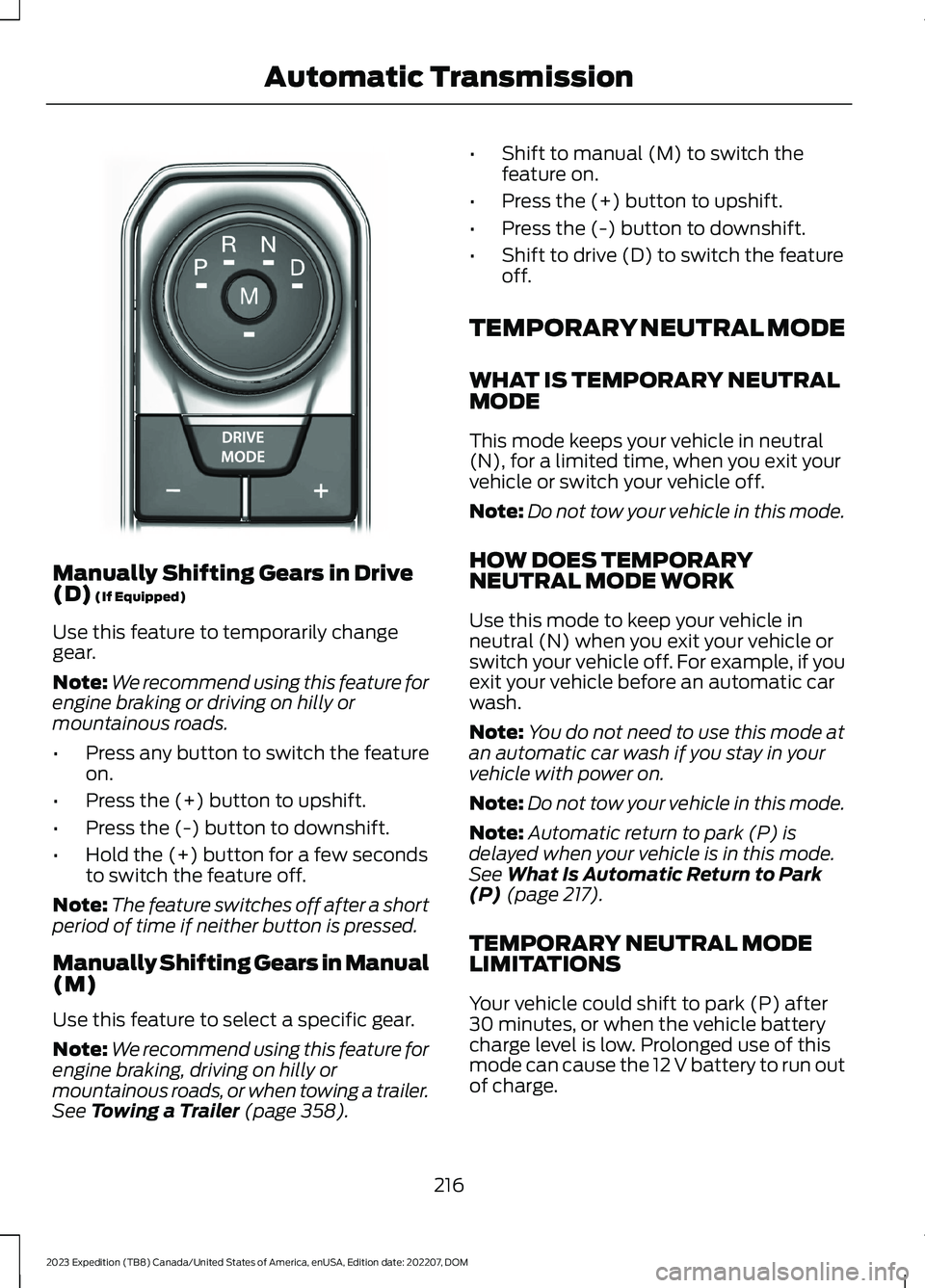
Manually Shifting Gears in Drive(D) (If Equipped)
Use this feature to temporarily changegear.
Note:We recommend using this feature forengine braking or driving on hilly ormountainous roads.
•Press any button to switch the featureon.
•Press the (+) button to upshift.
•Press the (-) button to downshift.
•Hold the (+) button for a few secondsto switch the feature off.
Note:The feature switches off after a shortperiod of time if neither button is pressed.
Manually Shifting Gears in Manual(M)
Use this feature to select a specific gear.
Note:We recommend using this feature forengine braking, driving on hilly ormountainous roads, or when towing a trailer.See Towing a Trailer (page 358).
•Shift to manual (M) to switch thefeature on.
•Press the (+) button to upshift.
•Press the (-) button to downshift.
•Shift to drive (D) to switch the featureoff.
TEMPORARY NEUTRAL MODE
WHAT IS TEMPORARY NEUTRALMODE
This mode keeps your vehicle in neutral(N), for a limited time, when you exit yourvehicle or switch your vehicle off.
Note:Do not tow your vehicle in this mode.
HOW DOES TEMPORARYNEUTRAL MODE WORK
Use this mode to keep your vehicle inneutral (N) when you exit your vehicle orswitch your vehicle off. For example, if youexit your vehicle before an automatic carwash.
Note:You do not need to use this mode atan automatic car wash if you stay in yourvehicle with power on.
Note:Do not tow your vehicle in this mode.
Note:Automatic return to park (P) isdelayed when your vehicle is in this mode.See What Is Automatic Return to Park(P) (page 217).
TEMPORARY NEUTRAL MODELIMITATIONS
Your vehicle could shift to park (P) after30 minutes, or when the vehicle batterycharge level is low. Prolonged use of thismode can cause the 12 V battery to run outof charge.
216
2023 Expedition (TB8) Canada/United States of America, enUSA, Edition date: 202207, DOMAutomatic TransmissionE252861
Page 221 of 658
Do not tow your vehicle in this mode.Failure to follow these instructions couldresult in vehicle damage not covered bythe vehicle warranty.
ENTERING TEMPORARYNEUTRAL MODE
1.Bring your vehicle to a complete stop.
2.Press and hold the brake pedal.
3.Power your vehicle on.
4.Shift into neutral (N).
Note:An instructional message appears.
5.Press the manual (M) button.
Note:A confirmation message appearswhen your vehicle enters the mode.
6.Release the brake pedal.
Note:Your vehicle is free to roll.
7.Switch your vehicle off.
Note:Do not tow your vehicle in this mode.
Note:The neutral (N) indicator on thetransmission selector may flash in thismode.
EXITING TEMPORARY NEUTRALMODE
1.Press the brake pedal.
2.Shift into park (P), or power yourvehicle on and shift into drive (D) orreverse (R).
USING PROGRESSIVE RANGE
SELECTION (IF EQUIPPED)
Progressive range selection gives you theability to lock out gears from the automaticshifting range. This could provide you withan improved driving experience by reducingtransmission shifts, for example, in slipperyconditions or steep slopes.
With the transmission in drive (D), pressthe - button to begin to switch the featureon.
Press the - button again to continue lockingout higher gears. Beginning with the highestgear, the instrument cluster will indicatethe current gear and highest gear available.For example, press the - button twice tolock out 10th and 9th gears.
Note:The instrument cluster will indicatethe current gear and highest gear available.
Press the + button to unlock gears to allowthe transmission to shift to higher gears.
Note: The transmission automaticallyshifts within the gear range you select.
AUTOMATIC RETURN TO
PARK (P)
WHAT IS AUTOMATIC RETURN TOPARK (P)
Your vehicle shifts into park (P) if youattempt to exit your vehicle without thetransmission in park (P).
HOW DOES AUTOMATIC RETURNTO PARK (P) WORK
Your vehicle shifts into park (P) when yourvehicle is stationary and any of thefollowing occur:
•You switch the vehicle off.
•You open the driver door with yourseatbelt unlatched.
•You unlatch the driver seatbelt whenthe driver door is open.
Note:Do not use automatic return to park(P) when your vehicle is moving, except inan emergency. See Starting and Stoppingthe Engine (page 193).
217
2023 Expedition (TB8) Canada/United States of America, enUSA, Edition date: 202207, DOMAutomatic Transmission
Page 260 of 658
WHAT IS HILL DESCENT
CONTROL
Hill descent control allows the driver to setand maintain vehicle speed whiledescending steep slopes in various surfaceconditions.
HOW DOES HILL DESCENT
CONTROL WORK
Hill descent control can maintain vehiclespeeds on downhill slopes between2–20 mph (3–32 km/h). Above 20 mph(32 km/h), the system remains on but thedescent speed cannot be set ormaintained.
Note:The system does not function below2 mph (3 km/h).
The system requires a cool down intervalafter a period of sustained use. Hill descentcontrol provides a warning in the messagecenter and a tone sounds when the systemis about to disengage for cooling. At thistime, manually apply the brakes as neededto maintain descent speed.
Note:The amount of time that the systemcan remain active before cooling varies withconditions.
HILL DESCENT CONTROL
PRECAUTIONS
WARNING: The system does notcontrol speed in low traction conditionsor extremely steep slopes. The systemis designed to be an aid and does notrelieve you of your responsibility to drivewith due care and attention. Failure tofollow this instruction could result inpersonal injury.
WARNING: Hill descent controlcannot control descent in all surfaceconditions and circumstances, such asice or extremely steep grades. Hilldescent control is a driver assist systemand cannot substitute for good judgmentby the driver. Failure to do so may resultin loss of vehicle control, crash or seriousinjury.
WARNING: The system does notreplace the parking brake. When youleave your vehicle, always apply theparking brake and shift the transmissioninto park (P) for automatic transmissionor first gear for manual transmission.
SWITCHING HILL DESCENT
CONTROL ON AND OFF
Press the button on theinstrument panel or the centerconsole. A light illuminates anda tone sounds when the system is active.
SETTING THE HILL DESCENT
SPEED
To increase or decrease the descent speed,press the accelerator or brake pedal, or usethe SET + and SET - buttons on thesteering wheel. Once you reach thepreferred speed remove your feet from thepedals.
HILL DESCENT CONTROL
INDICATOR
Illuminates when you switch hilldescent control on.
256
2023 Expedition (TB8) Canada/United States of America, enUSA, Edition date: 202207, DOMHill Descent Control (If Equipped)E163171
Page 271 of 658
REAR VIEW CAMERA GUIDE
LINES
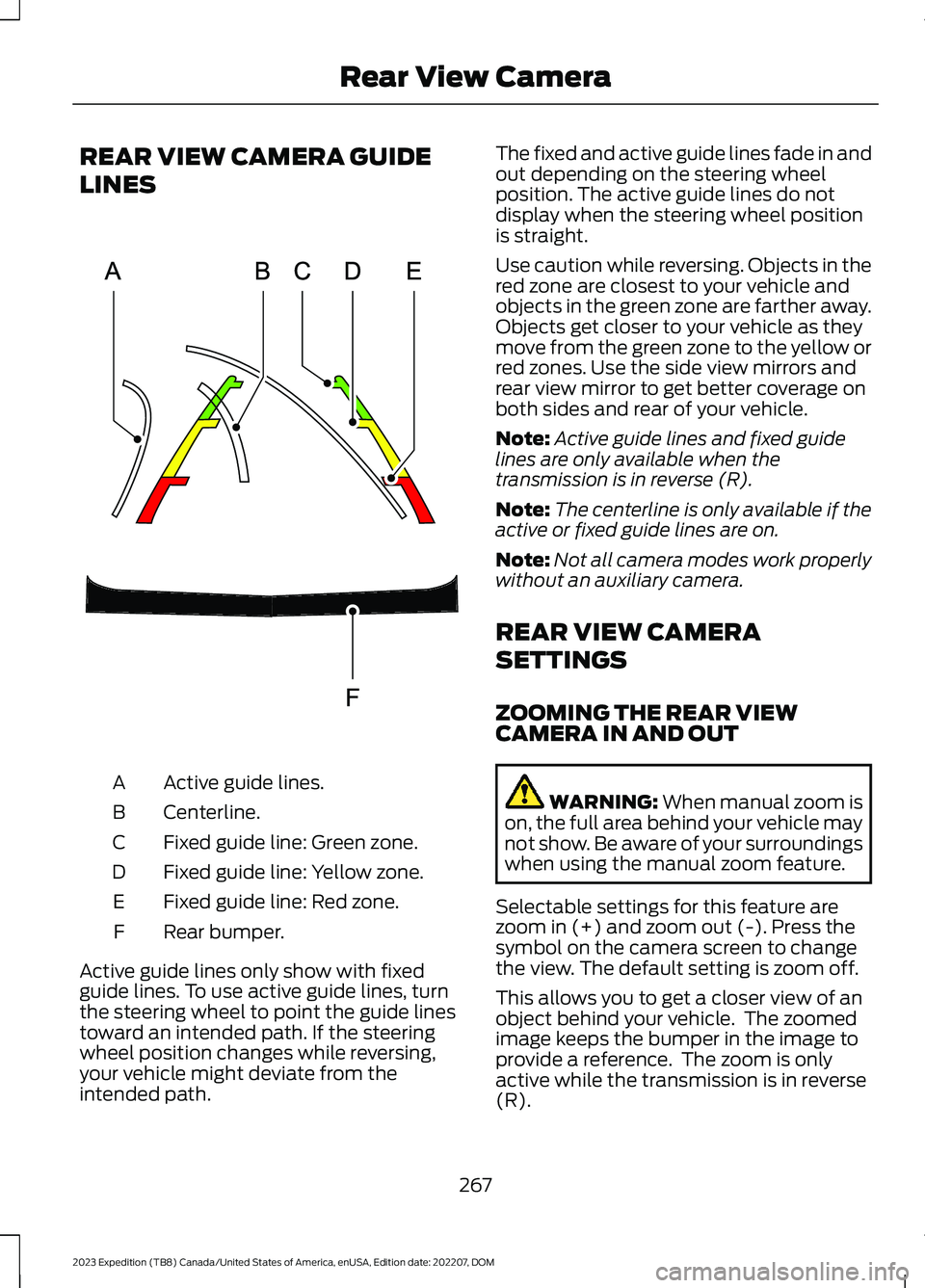
Active guide lines.A
Centerline.B
Fixed guide line: Green zone.C
Fixed guide line: Yellow zone.D
Fixed guide line: Red zone.E
Rear bumper.F
Active guide lines only show with fixedguide lines. To use active guide lines, turnthe steering wheel to point the guide linestoward an intended path. If the steeringwheel position changes while reversing,your vehicle might deviate from theintended path.
The fixed and active guide lines fade in andout depending on the steering wheelposition. The active guide lines do notdisplay when the steering wheel positionis straight.
Use caution while reversing. Objects in thered zone are closest to your vehicle andobjects in the green zone are farther away.Objects get closer to your vehicle as theymove from the green zone to the yellow orred zones. Use the side view mirrors andrear view mirror to get better coverage onboth sides and rear of your vehicle.
Note:Active guide lines and fixed guidelines are only available when thetransmission is in reverse (R).
Note:The centerline is only available if theactive or fixed guide lines are on.
Note:Not all camera modes work properlywithout an auxiliary camera.
REAR VIEW CAMERA
SETTINGS
ZOOMING THE REAR VIEWCAMERA IN AND OUT
WARNING: When manual zoom ison, the full area behind your vehicle maynot show. Be aware of your surroundingswhen using the manual zoom feature.
Selectable settings for this feature arezoom in (+) and zoom out (-). Press thesymbol on the camera screen to changethe view. The default setting is zoom off.
This allows you to get a closer view of anobject behind your vehicle. The zoomedimage keeps the bumper in the image toprovide a reference. The zoom is onlyactive while the transmission is in reverse(R).
267
2023 Expedition (TB8) Canada/United States of America, enUSA, Edition date: 202207, DOMRear View CameraE306774
Page 272 of 658
Note:Zooming in also engages park holdwhich applies the electric park brake whenyou shift to park (P). When you press thezoom button, the electronic park holdbutton illuminates on the touchscreen. SeeConnecting a Trailer (page 354).
Note:Manual zoom is only available whenthe transmission is in reverse (R).
Note:Only the centerline shows when youenable manual zoom.
SWITCHING REAR VIEW CAMERADELAY ON AND OFF - VEHICLESWITH: 12 INCH SCREEN
1.Press Features on the touchscreen.
2.Press Driver Assistance.
3.Press Rear View Camera.
4.Switch Rear View Camera Delay on oroff.
When shifting the transmission out ofreverse (R) and into any gear other thanpark (P), the camera image remains in thedisplay until:
•Your vehicle speed reachesapproximately 5 mph (8 km/h).
•You shift your vehicle into park (P).
SWITCHING REAR VIEW CAMERADELAY ON AND OFF - VEHICLESWITH: 15.5 INCH CENTER DISPLAYSCREEN/15 INCH SCREEN
Access the vehicle drawer on thetouchscreen.
1.Press SETTINGS.
2.Press Driver Assistance.
3.Switch Rear View Camera Delay on oroff.
When shifting the transmission out ofreverse (R) and into any gear other thanpark (P), the camera image remains in thedisplay until:
•Your vehicle speed reachesapproximately 5 mph (8 km/h).
•You shift your vehicle into park (P).
268
2023 Expedition (TB8) Canada/United States of America, enUSA, Edition date: 202207, DOMRear View Camera
Page 273 of 658
WHAT IS THE 360 DEGREE
CAMERA
The 360 degree camera system consistsof front, side and rear cameras whichprovide visibility around your vehicle.
HOW DOES THE 360 DEGREE
CAMERA WORK
The 360 degree camera system:
•Allows you to see what is directly infront of or behind your vehicle.
•Helps you when parallel parking andcentering in a parking space.
•Provides a cross traffic view in front ofand behind your vehicle.
•Allows you to see a top-down view ofthe area outside your vehicle, includingthe blind spots and obstacles near yourvehicle.
360 DEGREE CAMERA
PRECAUTIONS
WARNING: The 360 degreecamera system still requires the driverto use it in conjunction with looking outof the windows, and checking the interiorand exterior mirrors for maximumcoverage.
WARNING: Objects that are closeto either corner of the bumper or underthe bumper, might not be seen on thescreen due to the limited coverage of thecamera system.
WARNING: Use caution whenturning camera features on or off whenthe transmission is not in park (P). Makesure your vehicle is not moving.
WARNING: You are responsible forcontrolling your vehicle at all times. Thesystem is designed to be an aid and doesnot relieve you of your responsibility todrive with due care and attention. Failureto follow this instruction could result inthe loss of control of your vehicle,personal injury or death.
WARNING: Use caution when therear cargo door is ajar. If the rear cargodoor is ajar, the camera will be out ofposition and the video image could beincorrect. All guide lines disappear whenthe rear cargo door is ajar. Failure tofollow this instruction could result inpersonal injury.
WARNING: When manual zoom ison, the full area behind your vehicle maynot show. Be aware of your surroundingswhen using the manual zoom feature.
360 DEGREE CAMERA
LIMITATIONS
Note:Use caution if a door is ajar. The 360degree camera could be out of position andthe image could be incorrect.
LOCATING THE 360 DEGREE
CAMERAS
Rear View Camera
The rear view camera is on the liftgate. Itprovides a video image of the area behindyour vehicle.
Front View Camera
The front view camera is in the grille. Itprovides a video image of the area in frontof your vehicle.
269
2023 Expedition (TB8) Canada/United States of America, enUSA, Edition date: 202207, DOM360 Degree Camera (If Equipped)
Page 362 of 658
TOWING A TRAILER
PRECAUTIONS
WARNING: Do not exceedthe GVWR or the GAWRspecified on the certificationlabel.
WARNING: Towing trailersbeyond the maximumrecommended gross trailerweight exceeds the limit of yourvehicle and could result in enginedamage, transmission damage,structural damage, loss ofvehicle control, vehicle rolloverand personal injury.
WARNING: Do not exceedthe lowest rating capacity foryour vehicle or trailer hitch.Overloading your vehicle ortrailer hitch can impair yourvehicle stability and handling.Failure to follow this instructioncould result in the loss of controlof your vehicle, personal injury ordeath.
WARNING: Make sure thatthe vertical load on the tow ballis between the minimum andmaximum recommended weightat all times. Failure to follow thisinstruction could result in theloss of control of your vehicle,personal injury or death.
WARNING: Do not cut,drill, weld or modify the trailerhitch. Modifying the trailer hitchcould reduce the hitch rating.
WARNING: The anti-lockbrake system does not controlthe trailer brakes.
TRAILER BRAKE
PRECAUTIONS
WARNING: Do not connect atrailer's hydraulic brake system directlyto your vehicle's brake system. Yourvehicle may not have enough brakingpower and your chances of having acollision greatly increase.
WARNING: Do not tow a trailerfitted with electric trailer brakes unlessyour vehicle is fitted with a compatibleaftermarket electronic trailer brakecontroller. Failure to follow thisinstruction could result in the loss ofcontrol of your vehicle, personal injury ordeath. For additional information andassistance, we recommend that youcontact an authorized dealer.
Electric brakes and manual, automatic orsurge-type trailer brakes are safe if youinstall them properly and adjust them tothe manufacturer's specifications. Thetrailer brakes must meet local and federalregulations.
The rating for the tow vehicle's brakingsystem operation is at the gross vehicleweight rating, not the gross combinedweight rating.
358
2023 Expedition (TB8) Canada/United States of America, enUSA, Edition date: 202207, DOMTowing a Trailer
Page 402 of 658
WARNING: The recovery hook canbecome hot. Let the recovery hook cooldown before removing it. Failure to doso could result in personal injury.
Your vehicle has frame-mounted frontrecovery hooks.
Note:Do not apply a load to the recoveryhooks that is greater than the gross vehicleweight rating of your vehicle.
Before using recovery hooks:
•Make sure all attaching points aresecure and capable of withstandingthe applied load.
•Do not use chains, cables or tow strapswith metal hook ends.
•Only use recovery straps that have aminimum breaking strength two tothree times the gross vehicle weight ofthe stuck vehicle.
•Make sure the recovery strap is in goodcondition and free of visible cuts, tearsor damage.
•Use a damper device such as a tarp,heavy blanket or piece of carpet, andplace it over the recovery strap to helpabsorb the energy in the event thestrap breaks.
•Make sure the stuck vehicle is notloaded heavier than its gross vehicleweight rating specified on thecertification label.
•Align the tow vehicle and stuck vehiclein a straight line, within 10 degrees.
•Keep bystanders to the sides of thevehicle, at a distance of at least twicethe length of the recovery strap. Thishelps avoid injury from the hazard of arecovery hook or strap breaking, or avehicle lurching into their path.
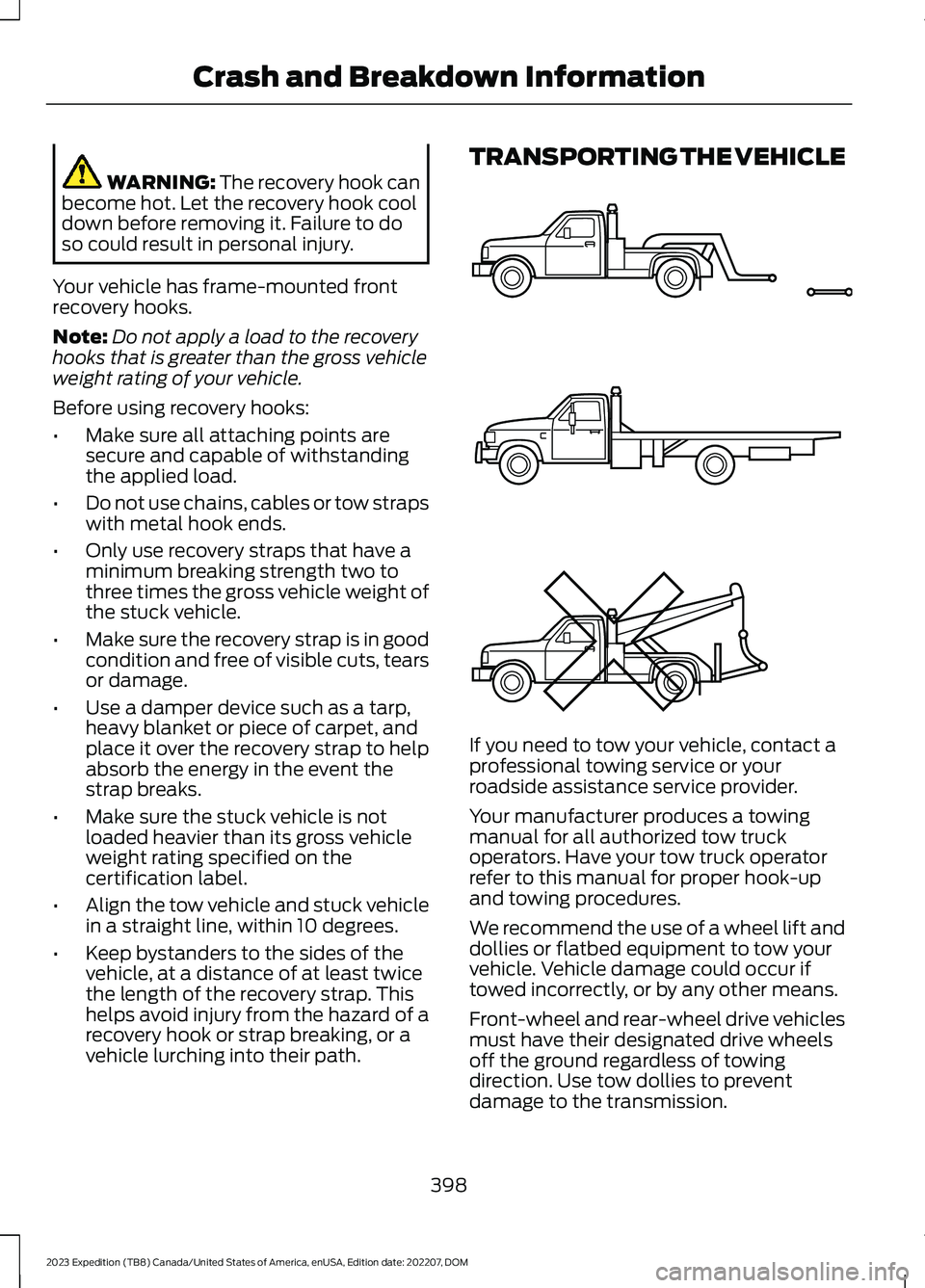
TRANSPORTING THE VEHICLE
If you need to tow your vehicle, contact aprofessional towing service or yourroadside assistance service provider.
Your manufacturer produces a towingmanual for all authorized tow truckoperators. Have your tow truck operatorrefer to this manual for proper hook-upand towing procedures.
We recommend the use of a wheel lift anddollies or flatbed equipment to tow yourvehicle. Vehicle damage could occur iftowed incorrectly, or by any other means.
Front-wheel and rear-wheel drive vehiclesmust have their designated drive wheelsoff the ground regardless of towingdirection. Use tow dollies to preventdamage to the transmission.
398
2023 Expedition (TB8) Canada/United States of America, enUSA, Edition date: 202207, DOMCrash and Breakdown InformationE143886