2023 FORD EXPEDITION trailer
[x] Cancel search: trailerPage 387 of 658
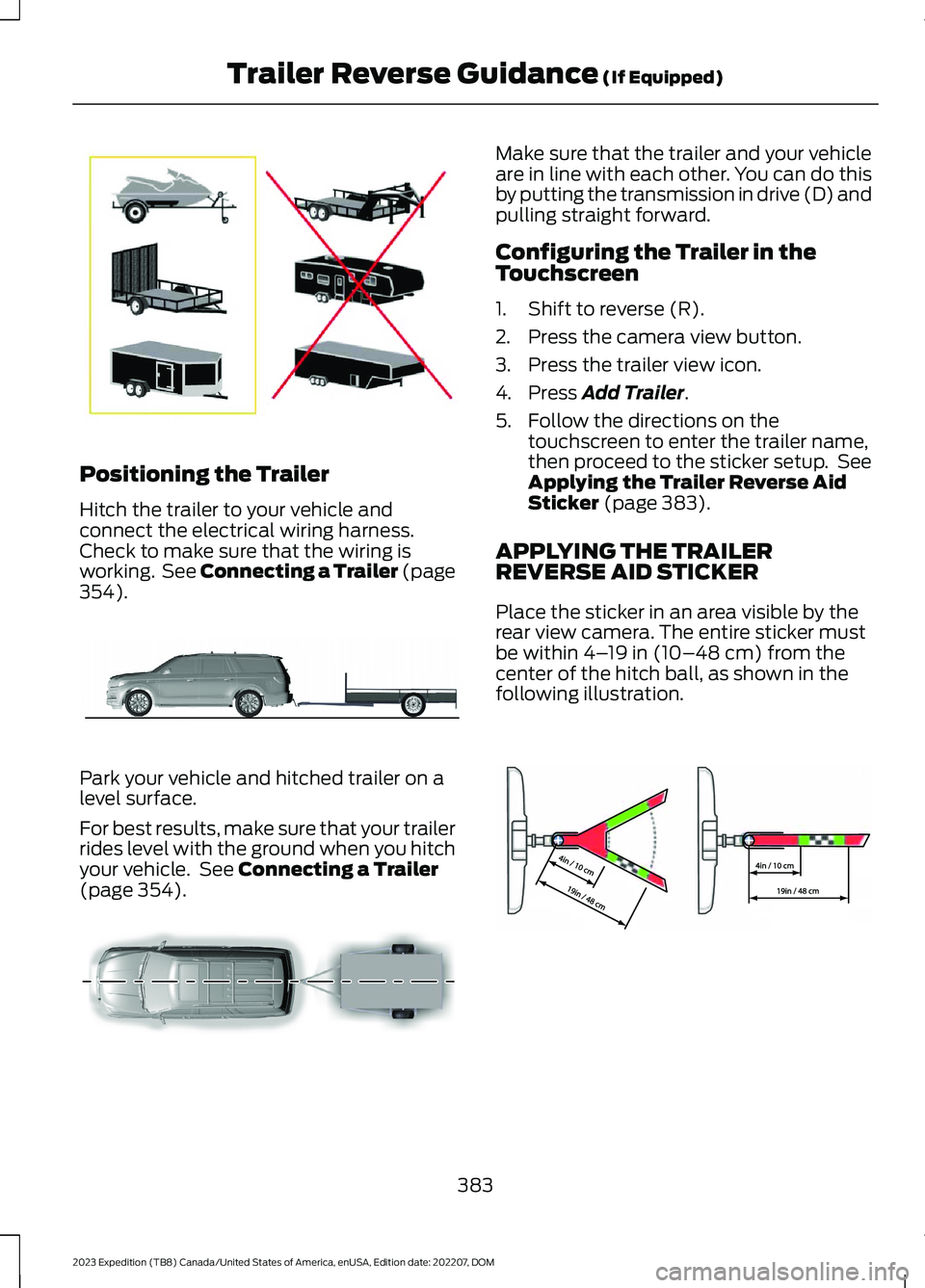
Positioning the Trailer
Hitch the trailer to your vehicle andconnect the electrical wiring harness.Check to make sure that the wiring isworking. See Connecting a Trailer (page354).
Park your vehicle and hitched trailer on alevel surface.
For best results, make sure that your trailerrides level with the ground when you hitchyour vehicle. See Connecting a Trailer(page 354).
Make sure that the trailer and your vehicleare in line with each other. You can do thisby putting the transmission in drive (D) andpulling straight forward.
Configuring the Trailer in theTouchscreen
1.Shift to reverse (R).
2.Press the camera view button.
3.Press the trailer view icon.
4.Press Add Trailer.
5.Follow the directions on thetouchscreen to enter the trailer name,then proceed to the sticker setup. SeeApplying the Trailer Reverse AidSticker (page 383).
APPLYING THE TRAILERREVERSE AID STICKER
Place the sticker in an area visible by therear view camera. The entire sticker mustbe within 4–19 in (10–48 cm) from thecenter of the hitch ball, as shown in thefollowing illustration.
383
2023 Expedition (TB8) Canada/United States of America, enUSA, Edition date: 202207, DOMTrailer Reverse Guidance (If Equipped)E209766 E247482 E247481 E333148
Page 388 of 658
Use the sticker placement card and a tapemeasure to determine the appropriate areato place the sticker. The sticker is in theback cover pocket of your quick start guide.Make sure the entire sticker is within thegreen zone between the two arcs ordistance markers on the diagram, and isalso visible in the rear view camera display.
Once you have found the correct location,place the sticker.
Note:Make sure nothing can obstruct therear view camera's view of the sticker suchas a jack handle or wiring.
Note:Position the sticker on a flat, dry andclean horizontal surface. For best results,apply the sticker when temperatures areabove 32°F (0°C).
Note:Do not move stickers after placingthem. Do not re-use any stickers if removed.
Note:You can purchase additional stickersthrough your authorized dealer.
CALIBRATING THE SYSTEM
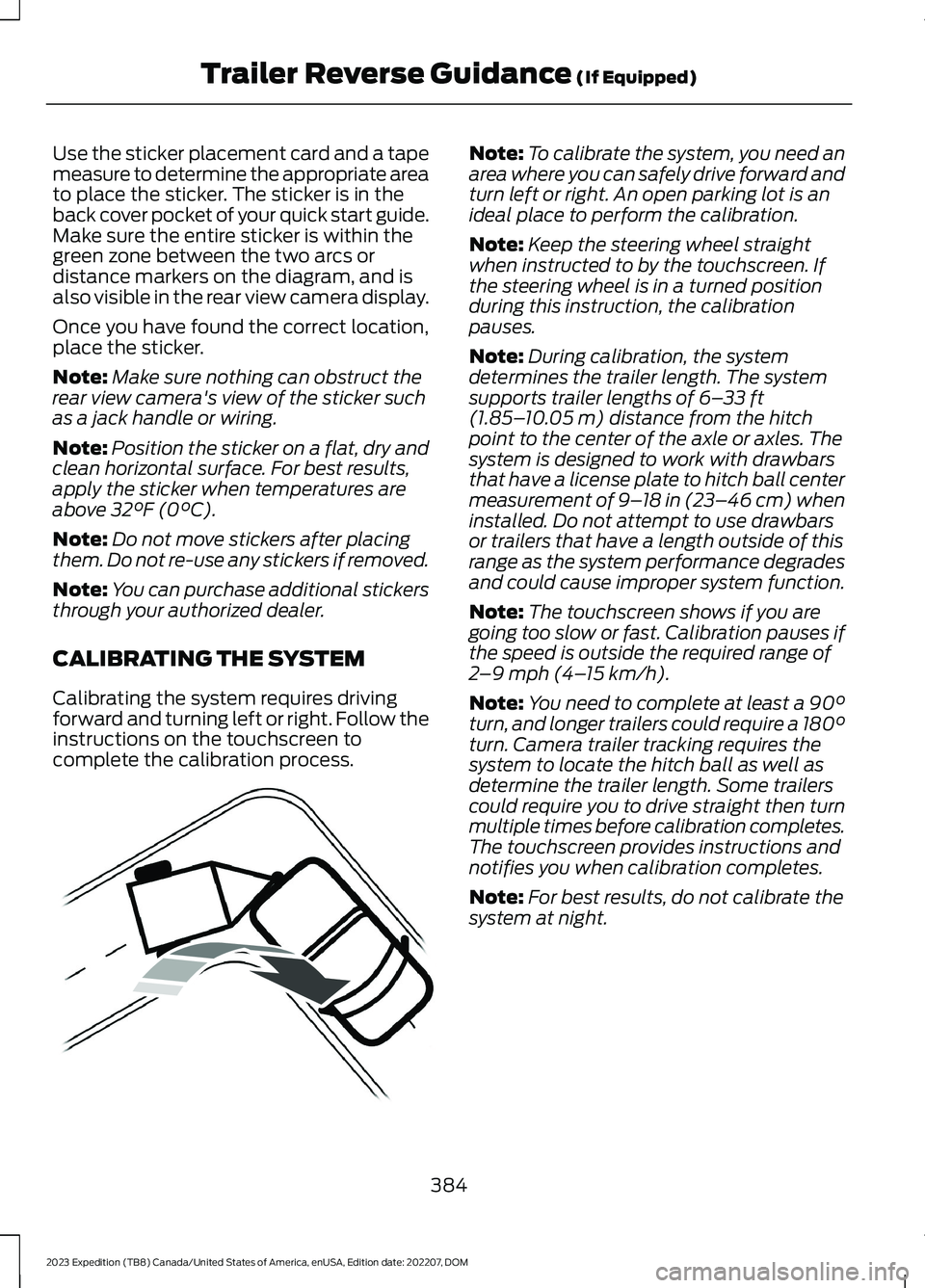
Calibrating the system requires drivingforward and turning left or right. Follow theinstructions on the touchscreen tocomplete the calibration process.
Note:To calibrate the system, you need anarea where you can safely drive forward andturn left or right. An open parking lot is anideal place to perform the calibration.
Note:Keep the steering wheel straightwhen instructed to by the touchscreen. Ifthe steering wheel is in a turned positionduring this instruction, the calibrationpauses.
Note:During calibration, the systemdetermines the trailer length. The systemsupports trailer lengths of 6–33 ft(1.85–10.05 m) distance from the hitchpoint to the center of the axle or axles. Thesystem is designed to work with drawbarsthat have a license plate to hitch ball centermeasurement of 9–18 in (23–46 cm) wheninstalled. Do not attempt to use drawbarsor trailers that have a length outside of thisrange as the system performance degradesand could cause improper system function.
Note:The touchscreen shows if you aregoing too slow or fast. Calibration pauses ifthe speed is outside the required range of2–9 mph (4–15 km/h).
Note:You need to complete at least a 90°turn, and longer trailers could require a 180°turn. Camera trailer tracking requires thesystem to locate the hitch ball as well asdetermine the trailer length. Some trailerscould require you to drive straight then turnmultiple times before calibration completes.The touchscreen provides instructions andnotifies you when calibration completes.
Note:For best results, do not calibrate thesystem at night.
384
2023 Expedition (TB8) Canada/United States of America, enUSA, Edition date: 202207, DOMTrailer Reverse Guidance (If Equipped)E352329
Page 389 of 658
SWITCHING TRAILER
REVERSE GUIDANCE ON AND
OFF
Shift into reverse (R), press the rearcamera button to expand the menu, pressthe trailer icon and use the touchscreen toselect the connected trailer.
Note:If the trailer was connected just priorto turning the system on, you may need todrive forward to initialize the system. Followthe instructions on the touchscreen toactivate the system.
USING TRAILER REVERSE
GUIDANCE VIEWS
Up to three camera views could beavailable when using trailer reverseguidance. Use the view that helps you themost when reversing your vehicle andtrailer.
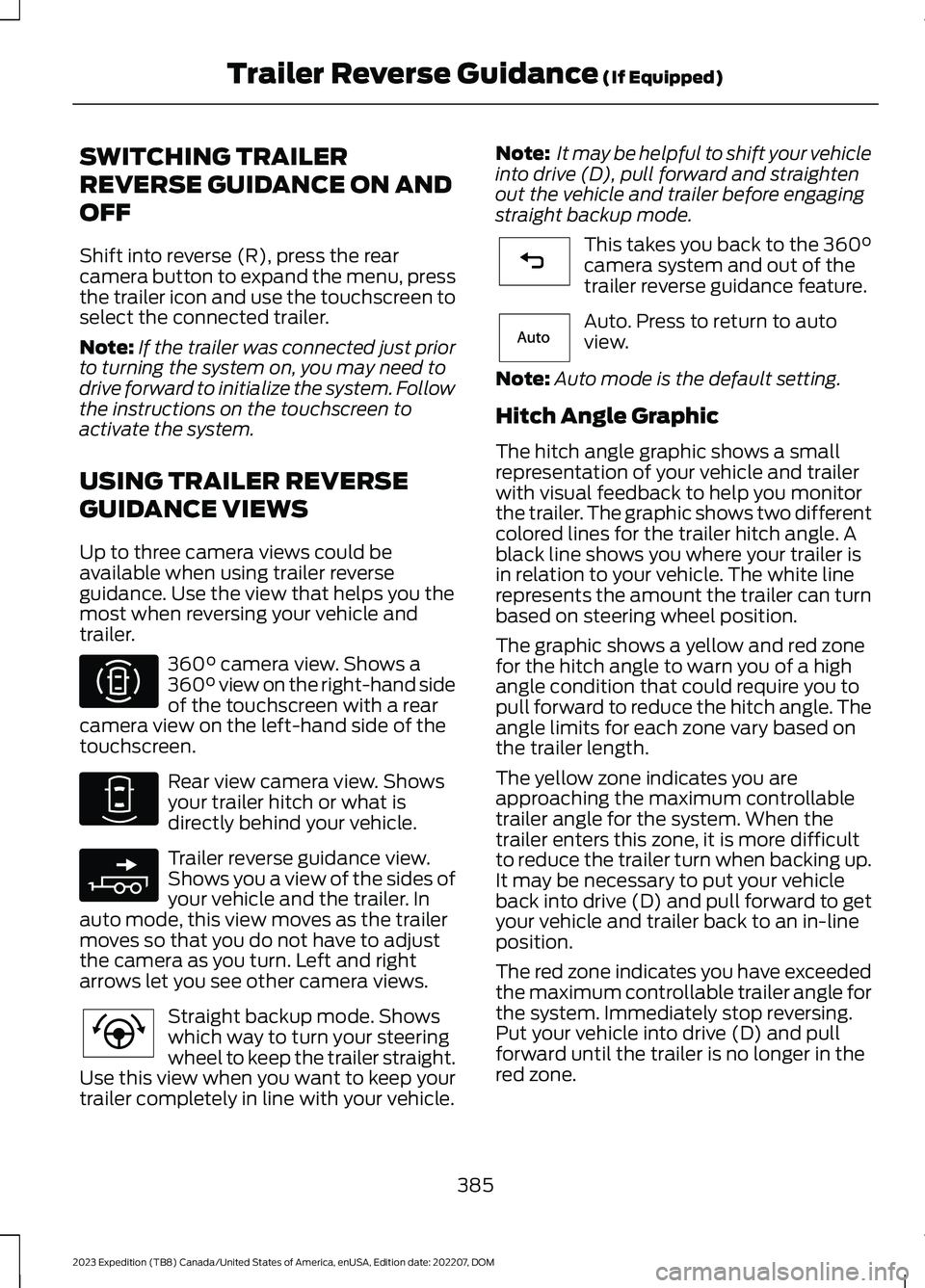
360° camera view. Shows a360° view on the right-hand sideof the touchscreen with a rearcamera view on the left-hand side of thetouchscreen.
Rear view camera view. Showsyour trailer hitch or what isdirectly behind your vehicle.
Trailer reverse guidance view.Shows you a view of the sides ofyour vehicle and the trailer. Inauto mode, this view moves as the trailermoves so that you do not have to adjustthe camera as you turn. Left and rightarrows let you see other camera views.
Straight backup mode. Showswhich way to turn your steeringwheel to keep the trailer straight.Use this view when you want to keep yourtrailer completely in line with your vehicle.
Note: It may be helpful to shift your vehicleinto drive (D), pull forward and straightenout the vehicle and trailer before engagingstraight backup mode.
This takes you back to the 360°camera system and out of thetrailer reverse guidance feature.
Auto. Press to return to autoview.
Note:Auto mode is the default setting.
Hitch Angle Graphic
The hitch angle graphic shows a smallrepresentation of your vehicle and trailerwith visual feedback to help you monitorthe trailer. The graphic shows two differentcolored lines for the trailer hitch angle. Ablack line shows you where your trailer isin relation to your vehicle. The white linerepresents the amount the trailer can turnbased on steering wheel position.
The graphic shows a yellow and red zonefor the hitch angle to warn you of a highangle condition that could require you topull forward to reduce the hitch angle. Theangle limits for each zone vary based onthe trailer length.
The yellow zone indicates you areapproaching the maximum controllabletrailer angle for the system. When thetrailer enters this zone, it is more difficultto reduce the trailer turn when backing up.It may be necessary to put your vehicleback into drive (D) and pull forward to getyour vehicle and trailer back to an in-lineposition.
The red zone indicates you have exceededthe maximum controllable trailer angle forthe system. Immediately stop reversing.Put your vehicle into drive (D) and pullforward until the trailer is no longer in thered zone.
385
2023 Expedition (TB8) Canada/United States of America, enUSA, Edition date: 202207, DOMTrailer Reverse Guidance (If Equipped)E310996 E310967 E310965 E224484 E224486 E315644
Page 390 of 658
TRAILER REVERSE GUIDANCE – TROUBLESHOOTING
TRAILER REVERSE GUIDANCE – INFORMATION MESSAGES
DescriptionMessage
Displays when the system turns on and isinitializing.Detecting Trailer Please Wait…
A condition exists that prevents the systemfrom turning on. If the message continuesto display, visit your authorized dealer tohave your vehicle checked.
Trailer Reverse Guidance System is NotAvailable
The steering system needs to learn internalparameters to fully enable the feature.Drive your vehicle straight forward above25 mph (40 km/h) for approximately 5minutes.
Trailer Reverse Guidance Driving Requiredto Initialize Steering Press OK to Exit
Displays when you exceed the maximumcontrollable trailer angle for the system.Place your vehicle in drive (D) and pullforward to get your vehicle and trailer backto an in-line position, then activate thesystem by selecting the connected trailerand following the instructions on thetouchscreen.
Stop now. Deactivated by trailer angle.
If this message consistently displays, youmay need to repeat the trailer setup andcalibration. Delete the trailer from thesystem and repeat the setup and calibra-tion process.
Displays when the system does not detectthe trailer. Check that the sticker is correctlyapplied and the trailer length is within theallowed range. You can also move thetrailer forward or backward to change thetrailer position and lighting conditions.
Trailer Reverse Guidance Trailer NotDetected. Refer to Owner's Manual. PressOK to Exit
If these messages continue to display, visityour authorized dealer to have your vehiclechecked.
386
2023 Expedition (TB8) Canada/United States of America, enUSA, Edition date: 202207, DOMTrailer Reverse Guidance (If Equipped)
Page 391 of 658
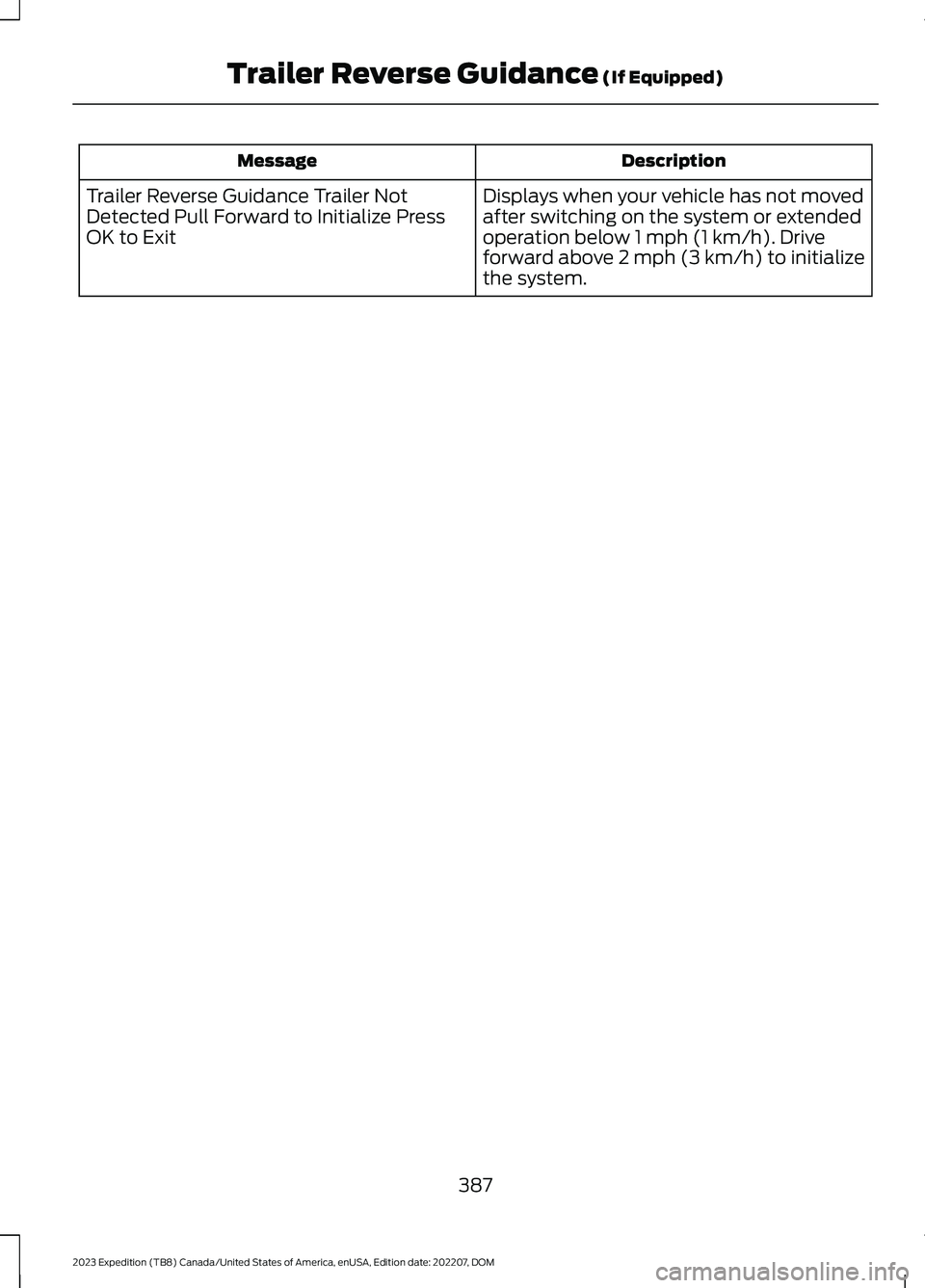
DescriptionMessage
Displays when your vehicle has not movedafter switching on the system or extendedoperation below 1 mph (1 km/h). Driveforward above 2 mph (3 km/h) to initializethe system.
Trailer Reverse Guidance Trailer NotDetected Pull Forward to Initialize PressOK to Exit
387
2023 Expedition (TB8) Canada/United States of America, enUSA, Edition date: 202207, DOMTrailer Reverse Guidance (If Equipped)
Page 392 of 658
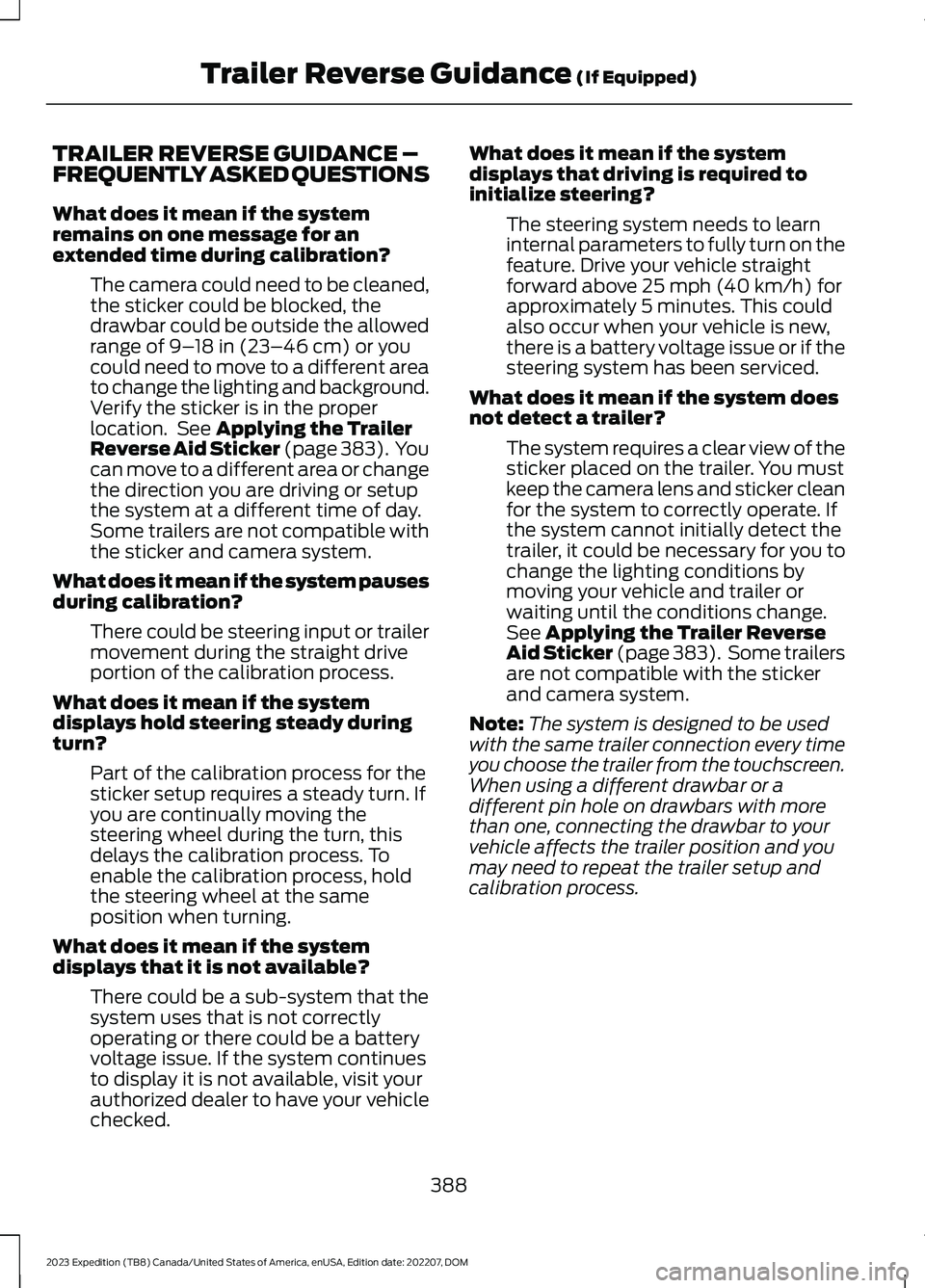
TRAILER REVERSE GUIDANCE –FREQUENTLY ASKED QUESTIONS
What does it mean if the systemremains on one message for anextended time during calibration?
The camera could need to be cleaned,the sticker could be blocked, thedrawbar could be outside the allowedrange of 9–18 in (23–46 cm) or youcould need to move to a different areato change the lighting and background.Verify the sticker is in the properlocation. See Applying the TrailerReverse Aid Sticker (page 383). Youcan move to a different area or changethe direction you are driving or setupthe system at a different time of day.Some trailers are not compatible withthe sticker and camera system.
What does it mean if the system pausesduring calibration?
There could be steering input or trailermovement during the straight driveportion of the calibration process.
What does it mean if the systemdisplays hold steering steady duringturn?
Part of the calibration process for thesticker setup requires a steady turn. Ifyou are continually moving thesteering wheel during the turn, thisdelays the calibration process. Toenable the calibration process, holdthe steering wheel at the sameposition when turning.
What does it mean if the systemdisplays that it is not available?
There could be a sub-system that thesystem uses that is not correctlyoperating or there could be a batteryvoltage issue. If the system continuesto display it is not available, visit yourauthorized dealer to have your vehiclechecked.
What does it mean if the systemdisplays that driving is required toinitialize steering?
The steering system needs to learninternal parameters to fully turn on thefeature. Drive your vehicle straightforward above 25 mph (40 km/h) forapproximately 5 minutes. This couldalso occur when your vehicle is new,there is a battery voltage issue or if thesteering system has been serviced.
What does it mean if the system doesnot detect a trailer?
The system requires a clear view of thesticker placed on the trailer. You mustkeep the camera lens and sticker cleanfor the system to correctly operate. Ifthe system cannot initially detect thetrailer, it could be necessary for you tochange the lighting conditions bymoving your vehicle and trailer orwaiting until the conditions change.See Applying the Trailer ReverseAid Sticker (page 383). Some trailersare not compatible with the stickerand camera system.
Note:The system is designed to be usedwith the same trailer connection every timeyou choose the trailer from the touchscreen.When using a different drawbar or adifferent pin hole on drawbars with morethan one, connecting the drawbar to yourvehicle affects the trailer position and youmay need to repeat the trailer setup andcalibration process.
388
2023 Expedition (TB8) Canada/United States of America, enUSA, Edition date: 202207, DOMTrailer Reverse Guidance (If Equipped)
Page 397 of 658
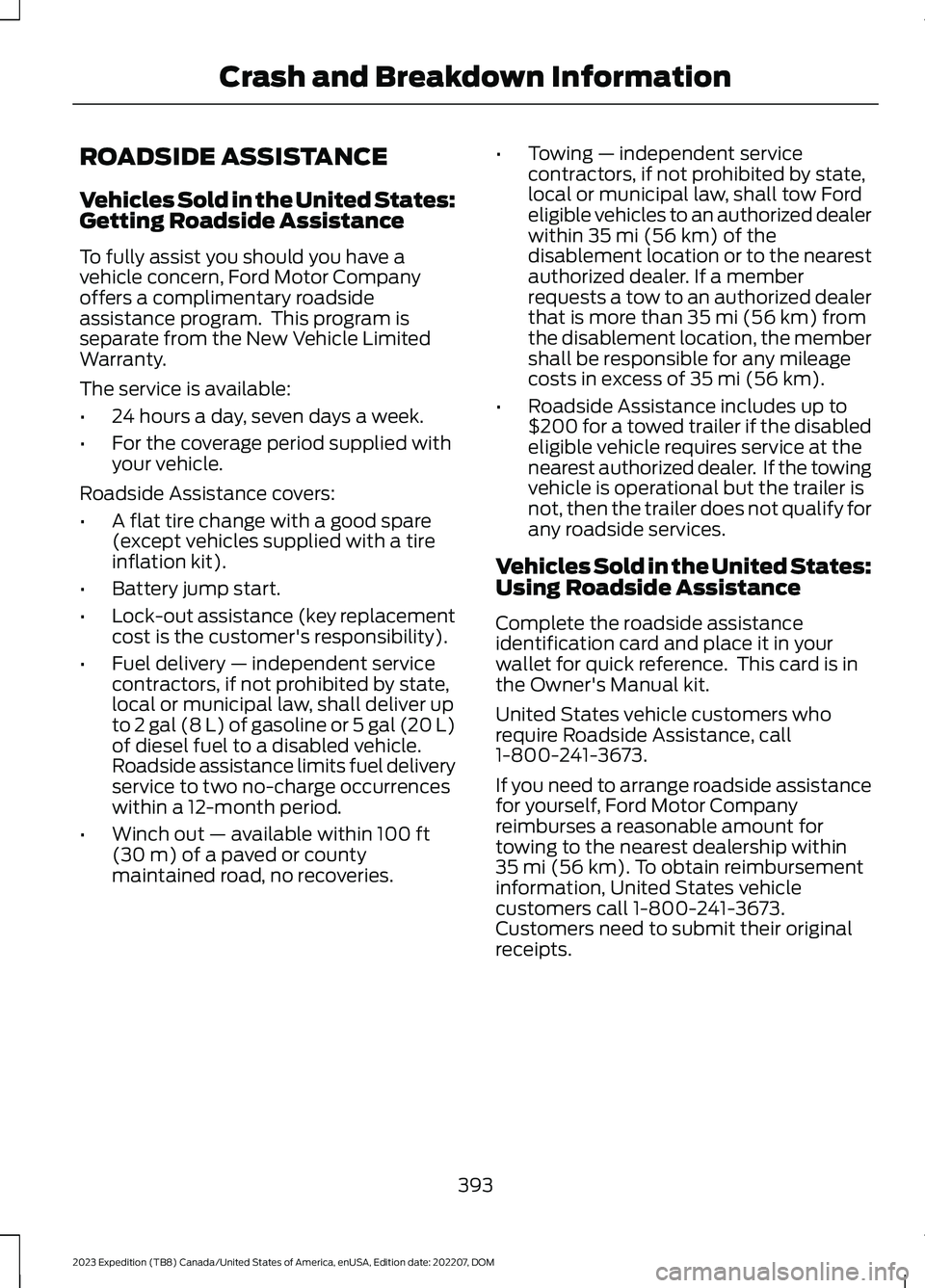
ROADSIDE ASSISTANCE
Vehicles Sold in the United States:Getting Roadside Assistance
To fully assist you should you have avehicle concern, Ford Motor Companyoffers a complimentary roadsideassistance program. This program isseparate from the New Vehicle LimitedWarranty.
The service is available:
•24 hours a day, seven days a week.
•For the coverage period supplied withyour vehicle.
Roadside Assistance covers:
•A flat tire change with a good spare(except vehicles supplied with a tireinflation kit).
•Battery jump start.
•Lock-out assistance (key replacementcost is the customer's responsibility).
•Fuel delivery — independent servicecontractors, if not prohibited by state,local or municipal law, shall deliver upto 2 gal (8 L) of gasoline or 5 gal (20 L)of diesel fuel to a disabled vehicle.Roadside assistance limits fuel deliveryservice to two no-charge occurrenceswithin a 12-month period.
•Winch out — available within 100 ft(30 m) of a paved or countymaintained road, no recoveries.
•Towing — independent servicecontractors, if not prohibited by state,local or municipal law, shall tow Fordeligible vehicles to an authorized dealerwithin 35 mi (56 km) of thedisablement location or to the nearestauthorized dealer. If a memberrequests a tow to an authorized dealerthat is more than 35 mi (56 km) fromthe disablement location, the membershall be responsible for any mileagecosts in excess of 35 mi (56 km).
•Roadside Assistance includes up to$200 for a towed trailer if the disabledeligible vehicle requires service at thenearest authorized dealer. If the towingvehicle is operational but the trailer isnot, then the trailer does not qualify forany roadside services.
Vehicles Sold in the United States:Using Roadside Assistance
Complete the roadside assistanceidentification card and place it in yourwallet for quick reference. This card is inthe Owner's Manual kit.
United States vehicle customers whorequire Roadside Assistance, call1-800-241-3673.
If you need to arrange roadside assistancefor yourself, Ford Motor Companyreimburses a reasonable amount fortowing to the nearest dealership within35 mi (56 km). To obtain reimbursementinformation, United States vehiclecustomers call 1-800-241-3673.Customers need to submit their originalreceipts.
393
2023 Expedition (TB8) Canada/United States of America, enUSA, Edition date: 202207, DOMCrash and Breakdown Information
Page 406 of 658
Note:You may hear a noise as the transfercase shifts out of its neutral position. Thisis normal.
5.Make sure the instrument clusterdisplays Neutral Tow Disabled.
RECREATIONALLY TOWING
YOUR VEHICLE - 4X2
You cannot recreational tow your vehiclewith all wheels on the ground becausevehicle or transmission damage couldoccur. You must recreational tow yourvehicle with all four wheels off the ground,such as when using a car-hauling trailer.Otherwise, you cannot recreational towyour vehicle.
EMERGENCY TOWING
If your vehicle becomes inoperable withoutaccess to wheel dollies or a vehicletransport trailer, it can be flat-towed withall wheels on the ground, regardless of thepowertrain and transmission configuration,under the following conditions:
•Your vehicle is facing forward fortowing in a forward direction.
•Use the manual park releaseprocedure. See Manually Releasingthe Electric Parking Brake (page 232).Failure to do so may result in damageto the transmission.
•Maximum speed is 35 mph (56 km/h).
•Maximum distance is 50 mi (80 km).
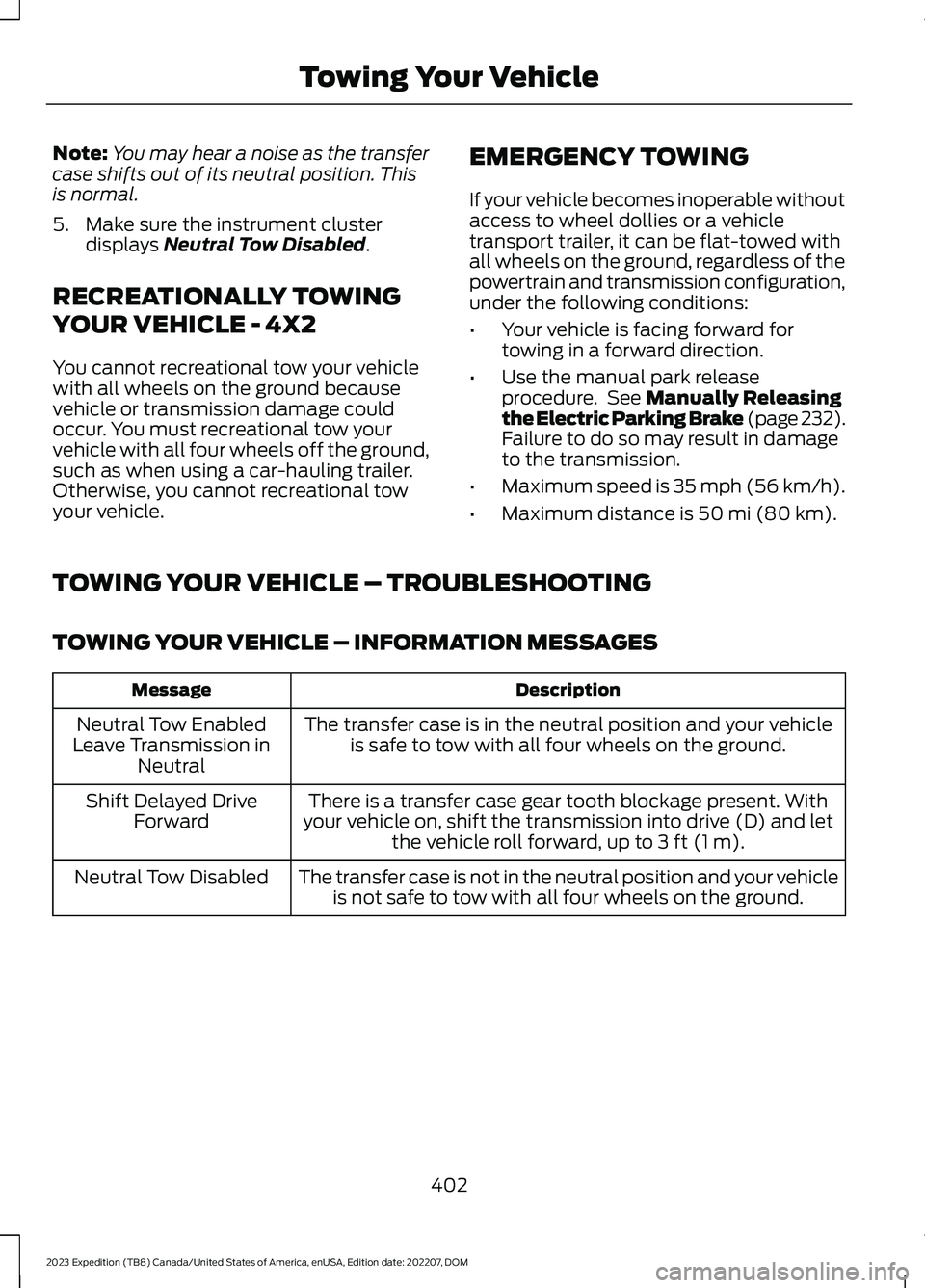
TOWING YOUR VEHICLE – TROUBLESHOOTING
TOWING YOUR VEHICLE – INFORMATION MESSAGES
DescriptionMessage
The transfer case is in the neutral position and your vehicleis safe to tow with all four wheels on the ground.Neutral Tow EnabledLeave Transmission inNeutral
There is a transfer case gear tooth blockage present. Withyour vehicle on, shift the transmission into drive (D) and letthe vehicle roll forward, up to 3 ft (1 m).
Shift Delayed DriveForward
The transfer case is not in the neutral position and your vehicleis not safe to tow with all four wheels on the ground.Neutral Tow Disabled
402
2023 Expedition (TB8) Canada/United States of America, enUSA, Edition date: 202207, DOMTowing Your Vehicle