2023 FORD BRONCO SPORT lock
[x] Cancel search: lockPage 81 of 516
PASSIVE ANTI-THEFT
SYSTEM
Note: The system is not compatible withnon-Ford aftermarket remote start systems.Use of these systems could result in vehiclestarting problems and a loss of securityprotection.
Note:Metallic objects, electronic devicesor a second coded key on the same keychain could cause vehicle starting problemsif they are too close to the key when startingthe engine. Prevent these objects fromtouching the coded key while starting theengine. Switch the ignition off, move allobjects on the key chain away from thecoded key and restart the engine if aproblem occurs.
Note:Do not leave a duplicate coded keyin the vehicle. Always take your keys andlock all doors when leaving the vehicle.
SecuriLock®
The system is an engine immobilizationsystem. It helps to prevent anyone fromstarting the engine without using a codedkey programmed to your vehicle. Using thewrong key could prevent the engine fromstarting. A message may appear in theinformation display.
If you are unable to start the engine with acorrectly coded key, there is a problem withthe system and a message could appearin the information display.
Automatic Arming
The vehicle arms immediately after youswitch the ignition off.
Automatic Disarming
Switching the ignition on with a coded keydisarms the vehicle.
Replacement Keys
Note:Your vehicle comes with twointegrated keyhead transmitters or twointelligent access keys.
The integrated keyhead transmitterfunctions as a programmed ignition keythat operates all the locks and starts thevehicle, as well as a remote control.
The intelligent access key functions as aprogrammed key that operates the driverdoor lock and activates the intelligentaccess with push button start system, aswell as a remote control.
If your programmed transmitters orstandard SecuriLock coded keys(integrated keyhead transmitters only) arelost or stolen and you do not have an extracoded key, you will need to have yourvehicle towed to an authorized dealer. Youneed to erase the key codes from yourvehicle and program new coded keys.
Store an extra programmed key away fromthe vehicle in a safe place to help preventany inconveniences. See your authorizeddealer to purchase additional spare orreplacement keys.
Programming a Spare IntelligentAccess Key (If Equipped)
See your authorized dealer to haveadditional keys programmed to yourvehicle.
ANTI-THEFT ALARM
The system will warn you of anunauthorized entry to your vehicle. It willbe triggered if any door, the luggagecompartment or the hood is openedwithout using the key, remote control orkeyless entry keypad.
The direction indicators will flash and thehorn will sound if unauthorized entry isattempted while the alarm is armed.
77
2023 Bronco Sport (CHD) Canada/United States of America, enUSA, Edition date: 202208, First-PrintingSecurity
Page 82 of 516
Take all remote controls to an authorizeddealer if there is any potential alarmproblem with your vehicle.
Arming the Alarm
The alarm is ready to arm when there isnot a key in the ignition. Electronically lockthe vehicle to arm the alarm.
The message indicator flasheswhen theft protection is active.
Disarming the Alarm
Disarm the alarm by any of the followingactions:
•Unlock the doors or luggagecompartment with the remote controlor keyless entry keypad.
•Switch the ignition on or start thevehicle.
•Use a key in the driver’s door to unlockthe vehicle, then switch the ignition onwithin 12 seconds.
Note:Pressing the panic button on theremote control will stop the horn and signalindicators, but will not disarm the system.
78
2023 Bronco Sport (CHD) Canada/United States of America, enUSA, Edition date: 202208, First-PrintingSecurity
Page 83 of 516
ADJUSTING THE STEERING
WHEEL
WARNING: Do not adjust thesteering wheel when your vehicle ismoving.
Note: Make sure that you are sitting in thecorrect position. See Sitting in the CorrectPosition (page 141).
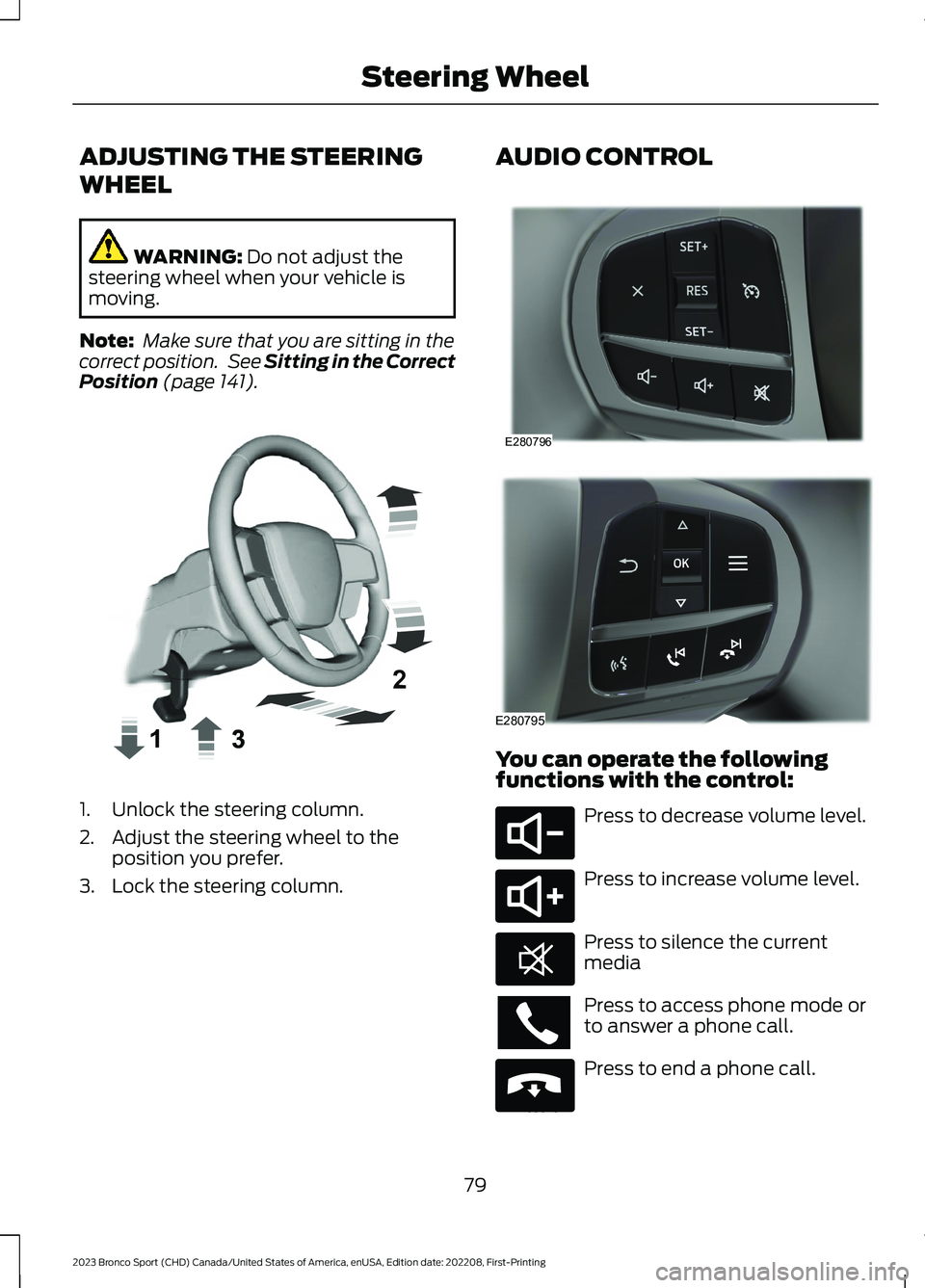
1.Unlock the steering column.
2.Adjust the steering wheel to theposition you prefer.
3.Lock the steering column.
AUDIO CONTROL
You can operate the followingfunctions with the control:
Press to decrease volume level.
Press to increase volume level.
Press to silence the currentmedia
Press to access phone mode orto answer a phone call.
Press to end a phone call.
79
2023 Bronco Sport (CHD) Canada/United States of America, enUSA, Edition date: 202208, First-PrintingSteering WheelE359744 E280796 E280795 E280802 E280803 E268549 E265040
Page 93 of 516
Push the lever up or down to switch thedirection indicators on.
Note:Tap the lever up or down to make thedirection indicators flash three times.
Set the lever to the middle position toswitch the direction indicators off.
Direction Indicator
Flashes when you switch thedirection indicators on.
Note:An increase in the rate of flashingwarns of a failed indicator bulb.
INTERIOR LAMPS
Switching All of the Interior LampsOn
Fully press the button on theoverhead console towards theicon.
Switching All of the Interior LampsOff
Fully press the button on theoverhead console towards theicon.
Interior Lamp Function
Switching the Interior Lamp FunctionOn
The switch is on the overhead console.
Set the switch to the middle position.
When you switch the interior lamp functionon, the interior lamps turn on if:
•You open a door.
•You press the unlock button on theremote control.
•You switch the ignition off.
Switching the Front Interior LampsOn and Off
Press the edge of the lamp lens.
Switching the Rear Interior LampsOn and Off
Press the edge of the lamp lens.
Note:If the rear lamps are switched onthrough the overhead console, you cannotswitch them off with the rear lamp switch.
AMBIENT LIGHTING (IF EQUIPPED)
Use the touchscreen to select thefollowing:
Select the settings option on thefeature bar.
Select Vehicle.
Select Ambient Light.
89
2023 Bronco Sport (CHD) Canada/United States of America, enUSA, Edition date: 202208, First-PrintingLightingE67018 E259649 E299443 E249791 E280315
Page 95 of 516
WHAT IS AUTOMATIC HIGH
BEAM CONTROL
The system turns on high beams if it is darkenough and no other traffic is present. If itdetects an approaching vehicle’sheadlamps or tail lamps, or street lightingahead, the system turns the high beamsoff. Low beams remain on.
A camera sensor, centrally mountedbehind the windshield of your vehicle,continuously monitors conditions to turnthe high beams on and off.
SWITCHING AUTOMATIC HIGH
BEAM CONTROL ON AND OFF
WARNING: Do not use the systemin poor visibility, for example fog, heavyrain, spray or snow.
Use the touchscreen to select thefollowing:
1.Select Settings.
2.Select Vehicle.
3.Select Lighting.
Activating the Automatic HighBeam Control
Switch the lighting control to theautolamps position. SeeAutolamps (page 86).
Note:The lighting control defaults toautolamps each time you switch yourvehicle on.
When active, the high beams turn on if allthe following conditions occur:
•The ambient light level is low enough.
•There is no traffic in front of yourvehicle.
•The vehicle speed is greater thanapproximately 25 mph (40 km/h).
When active, the high beams turn off if atleast one of the following conditions occur:
•The ambient light level is high enoughthat you do not require high beams.
•The system detects an approachingvehicle's headlamps or tail lamps.
•The system detects severe rain, snowor fog.
•A blocked vehicle camera.
•The vehicle speed falls belowapproximately 19 mph (30 km/h).
Note:The deactivation speed is lower oncurves.
Note:Certain curvy road situations maydelay high beam reactivation.
Note:If you have a blocked sensor, thesystem may not operate properly. Keep thewindshield free from obstruction or damage.
Note:The system may not operate properlyin cold or inclement conditions. You canswitch on the high beams by overriding thesystem.
Note:If the system detects a blockage, forexample bird droppings, bug splatter, snowor ice, the system goes into low beam modeuntil you clear the blockage. If you have ablocked camera, a message may appear inthe information display.
Note:Using much larger tires or equippingvehicle accessories such as snowplows canmodify your vehicle's ride height anddegrade automatic high beam controlperformance.
91
2023 Bronco Sport (CHD) Canada/United States of America, enUSA, Edition date: 202208, First-PrintingAutomatic High Beam ControlE281240
Page 97 of 516
POWER WINDOWS
WARNING: Do not leave childrenunattended in your vehicle and do notlet them play with the power windows.Failure to follow this instruction couldresult in personal injury.
WARNING: When closing thepower windows, verify they are free ofobstruction and make sure that childrenand pets are not in the proximity of thewindow openings.
Press the control to open thewindow. Lift the control to closethe window.
To reduce wind noise or pulsing noise whenjust one window is open, slightly open theopposite window.
One-Touch Down (If Equipped)
Press the switch fully and release it. Pressagain or lift it to stop the window.
One-Touch Up (If Equipped)
Lift the switch fully and release it. Press orlift it again to stop the window.
Resetting One-Touch Up
Start the engine.
1.Lift and hold the window switch untilyou fully close the door window.Continue to hold the switch for a fewseconds after you close the window.
2.Release the window switch.
3.Press and hold the window switch untilyou fully open the door window.
4.Release the window switch.
5.Lift and hold the window switch untilyou fully close the window.
6.Test for correct window operation bycarrying out the one-touch down andone-touch up features.
Rear Window Lock
Press the control to lock orunlock the rear window controls.It illuminates when you lock therear window controls.
Bounce-Back (If Equipped)
The window stops and reverses if it detectsan obstruction.
Overriding the Bounce-Back Feature
WARNING: If you overridebounce-back, the window does notreverse if it detects an obstacle. Takecare when closing the windows to avoidpersonal injury or damage to yourvehicle.
Pull up the window switch and hold withina few seconds of the window reaching thebounce-back position. The window travelsup with no bounce-back protection. Thewindow stops if you release the switchbefore the window fully closes.
Resetting Bounce-Back
WARNING: Bounce-back is off untilyou reset the memory. Take care whenclosing the windows to avoid personalinjury or damage to your vehicle.
If you have disconnected the battery, youmust reset the bounce-back memoryseparately for each window.
1.Lift and hold the switch until thewindow is fully closed.
2.Release the switch.
93
2023 Bronco Sport (CHD) Canada/United States of America, enUSA, Edition date: 202208, First-PrintingWindows and Mirrors
Page 98 of 516
3.Lift and hold the switch again for a fewseconds.
4.Release the switch.
5.Lift and hold the switch again for a fewseconds.
6.Release the switch.
7.Press and hold the switch until thewindow is fully open.
8.Lift and hold the switch until thewindow is fully closed.
9.Release the switch.
10.Open the window and then try toclose it using one-touch close.
Note:Repeat the procedure if the windowdoes not close when you use one-touch.
Accessory Delay
You can use the window controls forseveral minutes after switching off theignition or until opening either front door.
GLOBAL OPENING AND
CLOSING (IF EQUIPPED)
You can use the remote control to openthe windows with the ignition off.
Note:You can enable or disable this featurein the information display or see anauthorized dealer. See GeneralInformation (page 104).
Note:To operate this feature, accessorydelay must not be active.
Opening the Windows
You can only open the windows for a shorttime after you unlock your vehicle with theremote control. After you unlock yourvehicle, press and hold the remote controlunlock button to open the windows.Release the button once movement starts.Press the lock or unlock button to stopmovement.
Closing the Windows
WARNING: When closing thepower windows, verify they are free ofobstruction and make sure that childrenand pets are not in the proximity of thewindow openings.
To close the windows, press and hold theremote control lock button. Release thebutton once movement starts. Press thelock or unlock button to stop movement.
EXTERIOR MIRRORS
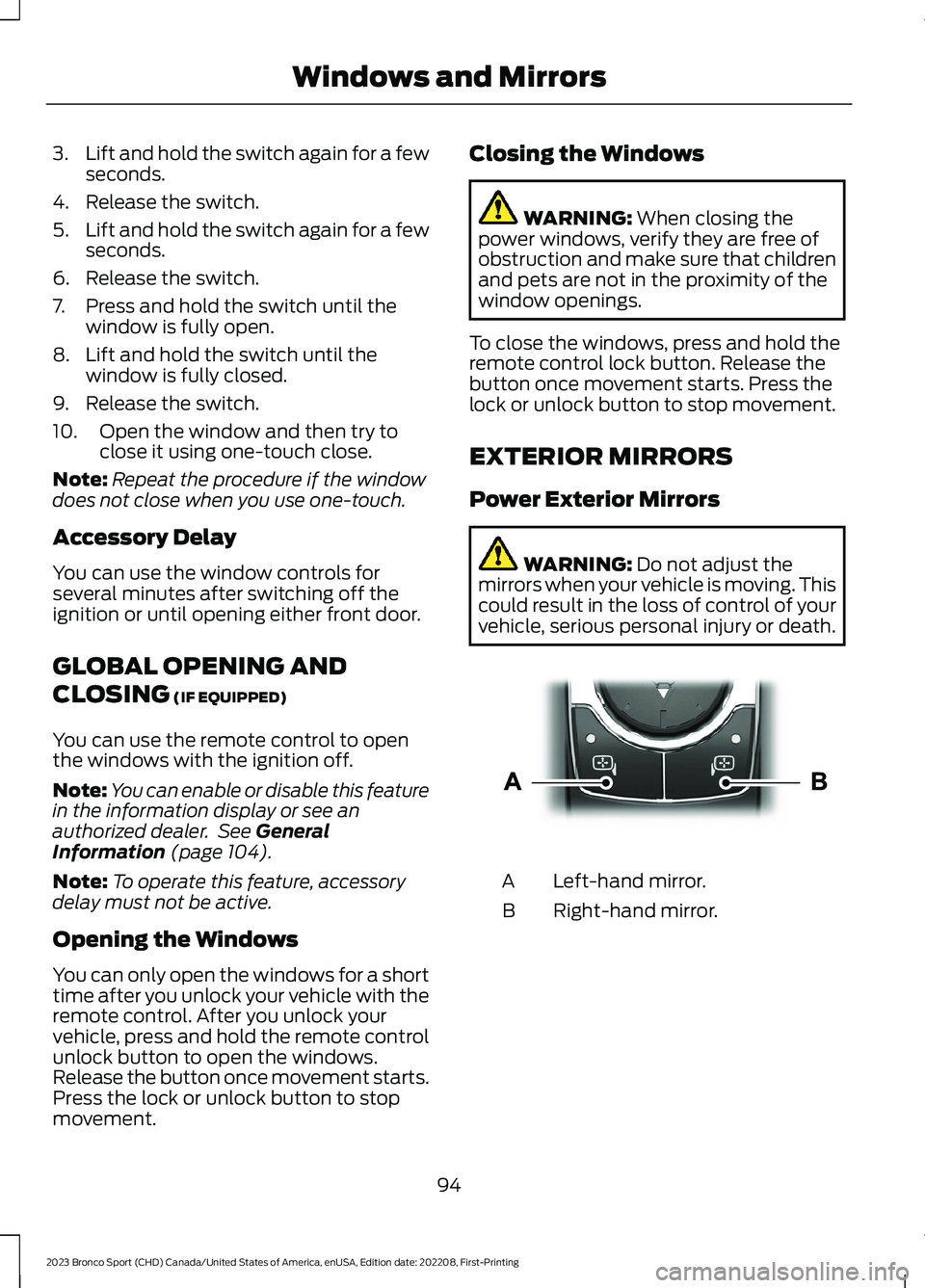
Power Exterior Mirrors
WARNING: Do not adjust themirrors when your vehicle is moving. Thiscould result in the loss of control of yourvehicle, serious personal injury or death.
Left-hand mirror.A
Right-hand mirror.B
94
2023 Bronco Sport (CHD) Canada/United States of America, enUSA, Edition date: 202208, First-PrintingWindows and MirrorsE303926
Page 99 of 516
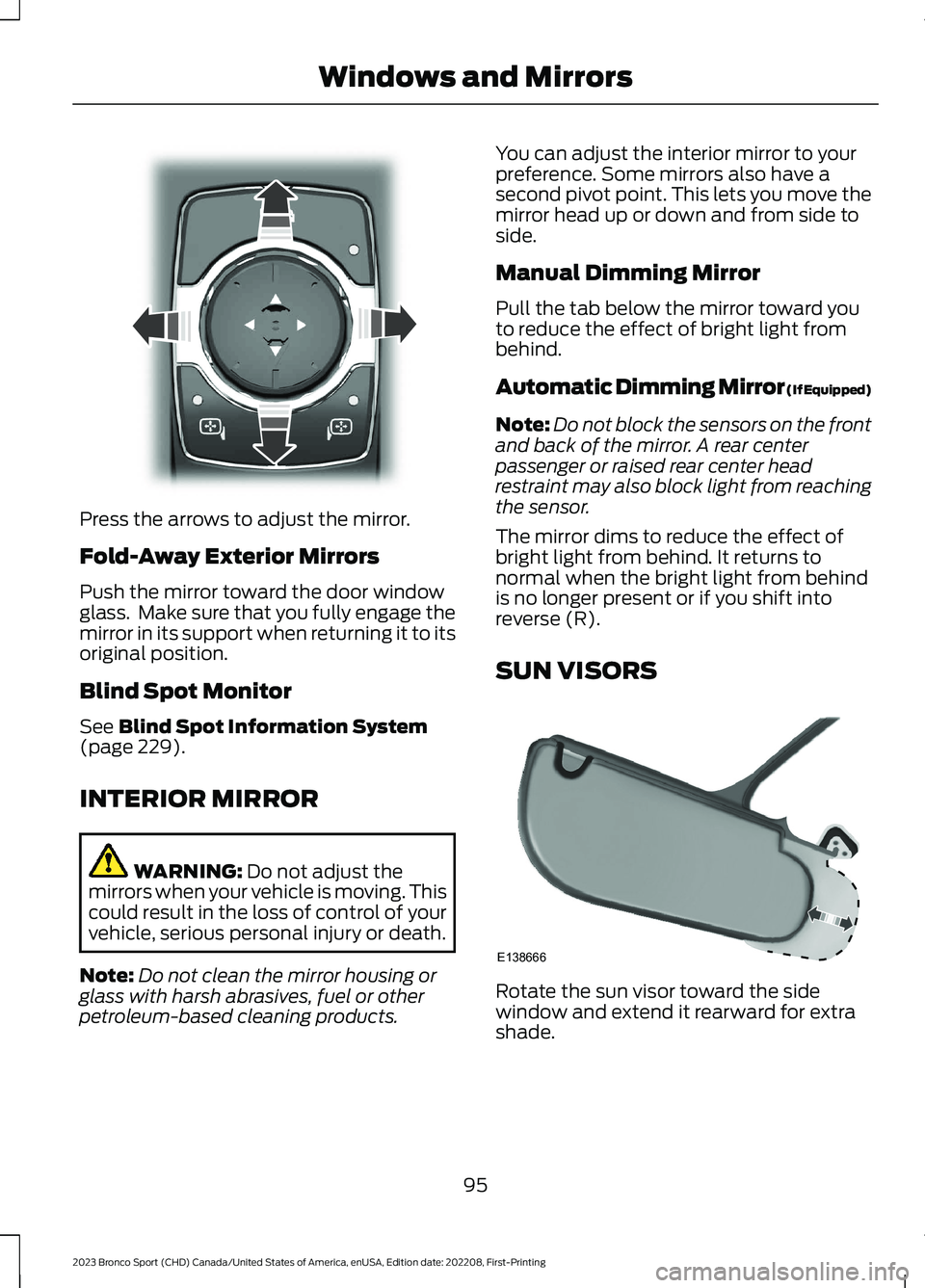
Press the arrows to adjust the mirror.
Fold-Away Exterior Mirrors
Push the mirror toward the door windowglass. Make sure that you fully engage themirror in its support when returning it to itsoriginal position.
Blind Spot Monitor
See Blind Spot Information System(page 229).
INTERIOR MIRROR
WARNING: Do not adjust themirrors when your vehicle is moving. Thiscould result in the loss of control of yourvehicle, serious personal injury or death.
Note:Do not clean the mirror housing orglass with harsh abrasives, fuel or otherpetroleum-based cleaning products.
You can adjust the interior mirror to yourpreference. Some mirrors also have asecond pivot point. This lets you move themirror head up or down and from side toside.
Manual Dimming Mirror
Pull the tab below the mirror toward youto reduce the effect of bright light frombehind.
Automatic Dimming Mirror (If Equipped)
Note:Do not block the sensors on the frontand back of the mirror. A rear centerpassenger or raised rear center headrestraint may also block light from reachingthe sensor.
The mirror dims to reduce the effect ofbright light from behind. It returns tonormal when the bright light from behindis no longer present or if you shift intoreverse (R).
SUN VISORS
Rotate the sun visor toward the sidewindow and extend it rearward for extrashade.
95
2023 Bronco Sport (CHD) Canada/United States of America, enUSA, Edition date: 202208, First-PrintingWindows and MirrorsE303927 E138666