2023 FORD BRONCO SPORT torque
[x] Cancel search: torquePage 224 of 516
Activating Lane Centering
The system only activates when all of thefollowing occur:
•You have adaptive cruise control withstop-and-go on.
•The vehicle is centered in the lane.
•Your hands are on the steering wheelat all times.
•The system detects both lanemarkings.
Note:If it does not detect valid lanemarkings, the system stays inactive untilvalid markings are available.
You can override the system at any timeby steering your vehicle.
When the system is active and thedirection indicator is switched on, thesystem immediately cancels. The systemremains in standby mode as long as thedirection indicator is engaged. The systemautomatically re-activates once the vehicleis centered in a lane and the directionindicator is switched off.
If you drive off-center within the lane, thesystem sets and maintains that preferredlane position. The system providescontinuous assistance steering torqueinput toward the preferred position.
Note:The system can only set preferredlane positions within the lane.
Note:If the system cancels, the preferredposition erases. On the next activation, thesystem provides continuous assistancesteering torque input toward the lane center.
System Alerts and AutomaticCancellation
You must keep your hands on the steeringwheel at all times.
When the system is active and detects nosteering activity for a certain period of time,the system alerts you to put your hands onthe steering wheel. If you do not react tothe warnings the system cancels and slowsyour vehicle down to idle speeds whilemaintaining steering control.
The system also alerts you if your vehiclecrosses lane markings without detectedsteering activity.
Note:The system may detect a light gripor touch on the steering wheel as hands-offdriving.
When the system cancels due to anexternal condition, for example, no lanemarkings are available and your hands arenot on the steering wheel, the systemimmediately alerts you to take control ofthe vehicle. If you ignore this alert, thesystem slows the vehicle while maintainingsteering control.
If your vehicle starts to slowdown, you must contribute tothe steering control and pressand release the button to regain fullsystem performance.
Automatic cancellation can also occur if:
•The lane becomes too wide or toonarrow.
•The system cannot detect valid lanemarkings.
•Lane markings are crossed.
Note:The system disables until the nextkey cycle if your vehicle slows down due todriver inactivity twice within a key cycle.
220
2023 Bronco Sport (CHD) Canada/United States of America, enUSA, Edition date: 202208, First-PrintingAdaptive Cruise Control (If Equipped)
Page 243 of 516
After you turn the steering wheel, thesystem applies additional steering torqueto help you steer around the vehicle. Afteryou pass the vehicle, the system appliessteering torque in the opposite direction toencourage you to steer back into the lane.The system deactivates after you fully passthe vehicle.
Note:The system does not automaticallysteer around a vehicle. If you do not turn thesteering wheel, the system does notactivate.
Note:The system does not activate if thedistance to the vehicle ahead is too smalland you cannot avoid a crash.
Note:The system does not activate forcyclists or pedestrians.
Adjusting the Pre-Collision AssistSettings
Depending on your vehicle options, thepre-collision assist settings can be in thefollowing:
•instrument cluster display. SeeGeneral Information (page 104).
•Touchscreen. See Settings (page 393).
You can adjust the following settings:
•Change alert and distance alertsensitivity to one of three possiblesettings.
•Switch distance indication and alert onor off.
•If required, switch active braking on oroff.
•If required, switch evasive steeringassist on or off.
Note:Active braking and evasive steeringassist turn on every time you switch theignition on.
Note:If you switch active braking off,evasive steering assist turns off.
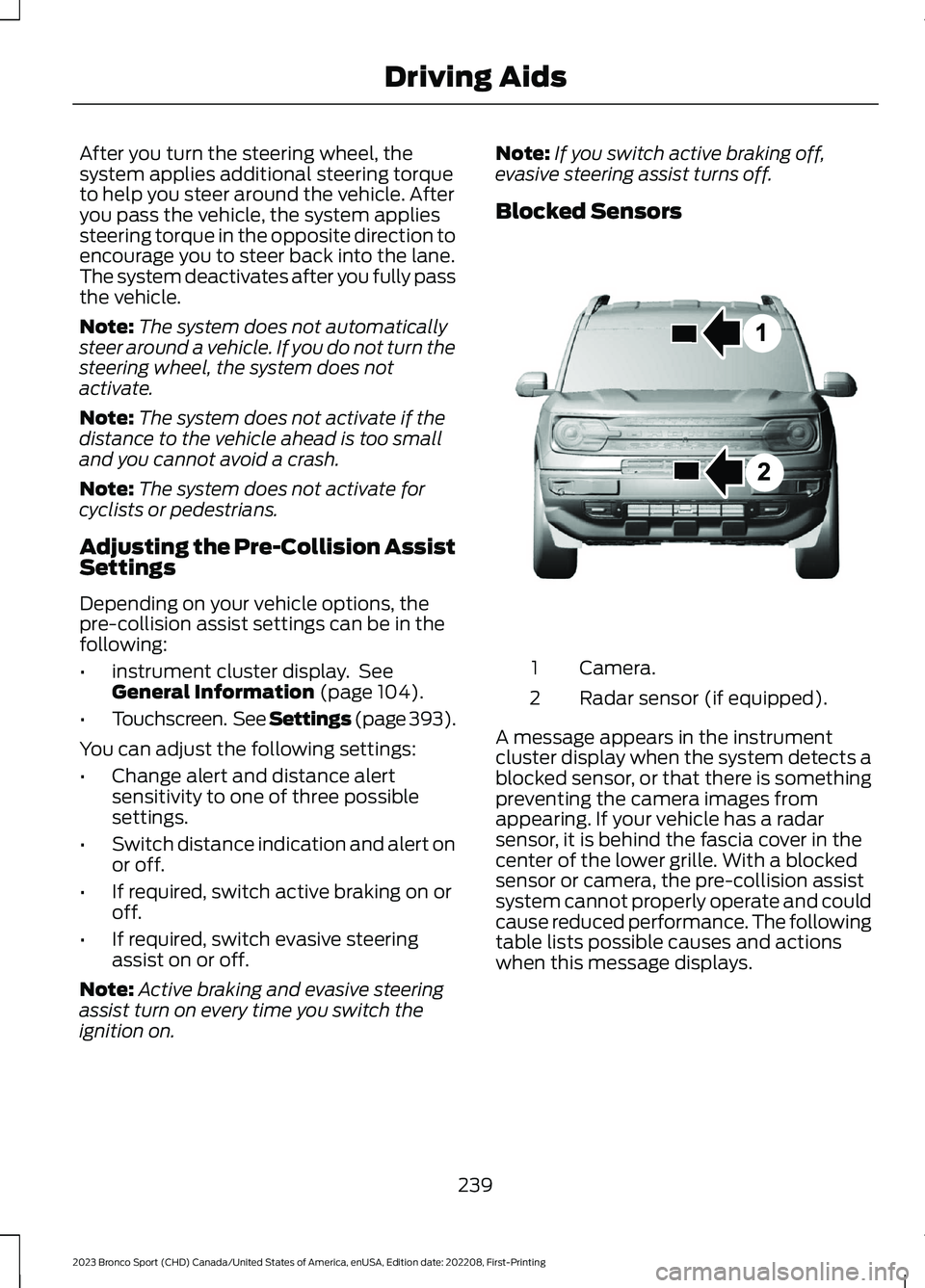
Blocked Sensors
Camera.1
Radar sensor (if equipped).2
A message appears in the instrumentcluster display when the system detects ablocked sensor, or that there is somethingpreventing the camera images fromappearing. If your vehicle has a radarsensor, it is behind the fascia cover in thecenter of the lower grille. With a blockedsensor or camera, the pre-collision assistsystem cannot properly operate and couldcause reduced performance. The followingtable lists possible causes and actionswhen this message displays.
239
2023 Bronco Sport (CHD) Canada/United States of America, enUSA, Edition date: 202208, First-PrintingDriving AidsE325781
Page 259 of 516
RV & Trailer Towing Guide Online
http://www.fleet.ford.com/towing-guides/Website
TRAILER SWAY CONTROL
WARNING: Turning off trailer swaycontrol increases the risk of loss ofvehicle control, serious injury or death.Ford does not recommend disabling thisfeature except in situations where speedreduction may be detrimental (such ashill climbing), the driver has significanttrailer towing experience, and can controltrailer sway and maintain safe operation.
Note:This feature does not prevent trailersway, but reduces it when it begins.
Note:This feature cannot stop all trailersfrom swaying.
Note:In some cases, if your vehicle speedis too high, the system may turn on multipletimes, gradually reducing your vehicle speed.
The system applies the brakes to theindividual wheels and reduces enginetorque to aid vehicle stability. If the trailerbegins to sway, the stability controlwarning lamp flashes and a messageappears in the information display. SeeInformation Messages (page 109). Slowyour vehicle down, pull safely to the sideof the road and check for correct loaddistribution. See Load Carrying (page246).
You can switch this feature off in theinformation display. When you switch theignition on, the system automatically turnson.
RECOMMENDED TOWING WEIGHTS
WebsiteMarket
https://www.fleet.ford.com/towing-guides/United States of America
https://www.fleet.ford.ca/towing-guides/Canada
255
2023 Bronco Sport (CHD) Canada/United States of America, enUSA, Edition date: 202208, First-PrintingTowing
Page 271 of 516
Inspect undercarriage fasteners. If any areloose or damaged, tighten or replaceensuring that the proper torquespecification is used.
Inspect for torn or punctured boots on balljoints, half shafts, steering gears.
Refit the front license plate if removedpreviously.
BREAKING-IN
Your vehicle requires a break-in period. Forthe first 1,000 mi (1,600 km), avoid drivingat high speeds, heavy braking, aggressiveshifting or using your vehicle to tow. Duringthis time, your vehicle may exhibit someunusual driving characteristics.
DRIVING ECONOMICALLY
The following helps to improve fuelconsumption:
•Drive smoothly, accelerate gently andanticipate the road ahead to avoidheavy braking.
•Regularly check your tire pressures andmake sure that they are inflated to thecorrect pressure.
•Follow the recommended maintenanceschedule and carry out therecommended checks.
•Plan your journey and check the trafficbefore you set off. It is more efficientto combine errands into a single tripwhenever possible.
•Avoid idling the engine in cold weatheror for extended periods. Start theengine only when you are ready to setoff.
•Do not carry unnecessary weight in yourvehicle as extra weight wastes fuel.
•Do not add unnecessary accessoriesto the exterior of your vehicle, forexample running boards. If you use aroof rack, remember to fold it down orremove it when not in use.
•Do not shift into neutral when you arebraking or when your vehicle is slowingdown.
•Shut all windows when driving at highspeeds.
•Switch off all electric systems whennot in use, for example air conditioning.Make sure that you unplug anyaccessories from the auxiliary powerpoints when not in use.
FLOOR MATS
WARNING: Use a floor matdesigned to fit the footwell of yourvehicle that does not obstruct the pedalarea. Failure to follow this instructioncould result in the loss of control of yourvehicle, personal injury or death.
WARNING: Pedals that cannotmove freely can cause loss of vehiclecontrol and increase the risk of seriouspersonal injury.
WARNING: Secure the floor matto both retention devices so that itcannot slip out of position and interferewith the pedals. Failure to follow thisinstruction could result in the loss ofcontrol of your vehicle, personal injury ordeath.
267
2023 Bronco Sport (CHD) Canada/United States of America, enUSA, Edition date: 202208, First-PrintingDriving Hints
Page 342 of 516
TECHNICAL SPECIFICATIONS
Wheel Lug Nut Torque Specifications
WARNING: When you install a wheel, always remove any corrosion, dirt or foreignmaterials present on the mounting surfaces of the wheel or the surface of the wheelhub, brake drum or brake disc that contacts the wheel. Make sure to secure any fastenersthat attach the rotor to the hub so they do not interfere with the mounting surfaces ofthe wheel. Installing wheels without correct metal-to-metal contact at the wheelmounting surfaces can cause the wheel nuts to loosen and the wheel to come off whileyour vehicle is in motion, resulting in loss of vehicle control, personal injury or death.
Ib-ft (Nm)*Bolt size
100 lb.ft (135 Nm)M12 x 1.5
*Torque specifications are for nut and bolt threads free of dirt and rust. Use only Fordrecommended replacement fasteners.
Retighten the lug nuts to the specified torque within 100 mi (160 km) after any wheeldisturbance, such as tire rotation, changing a flat tire, wheel removal.
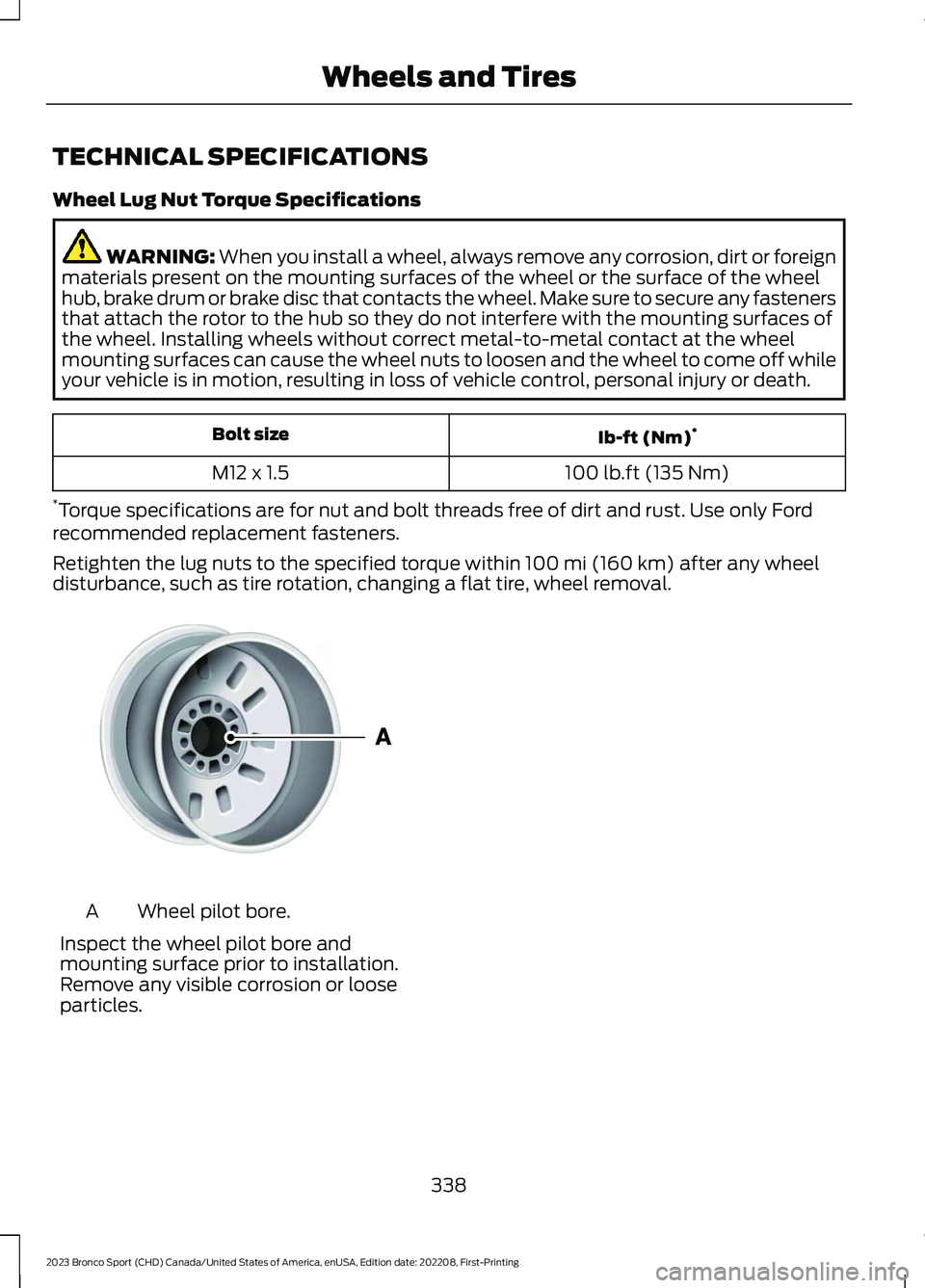
Wheel pilot bore.A
Inspect the wheel pilot bore andmounting surface prior to installation.Remove any visible corrosion or looseparticles.
338
2023 Bronco Sport (CHD) Canada/United States of America, enUSA, Edition date: 202208, First-PrintingWheels and TiresE145950