2023 FORD BRONCO SPORT stop start
[x] Cancel search: stop startPage 106 of 516
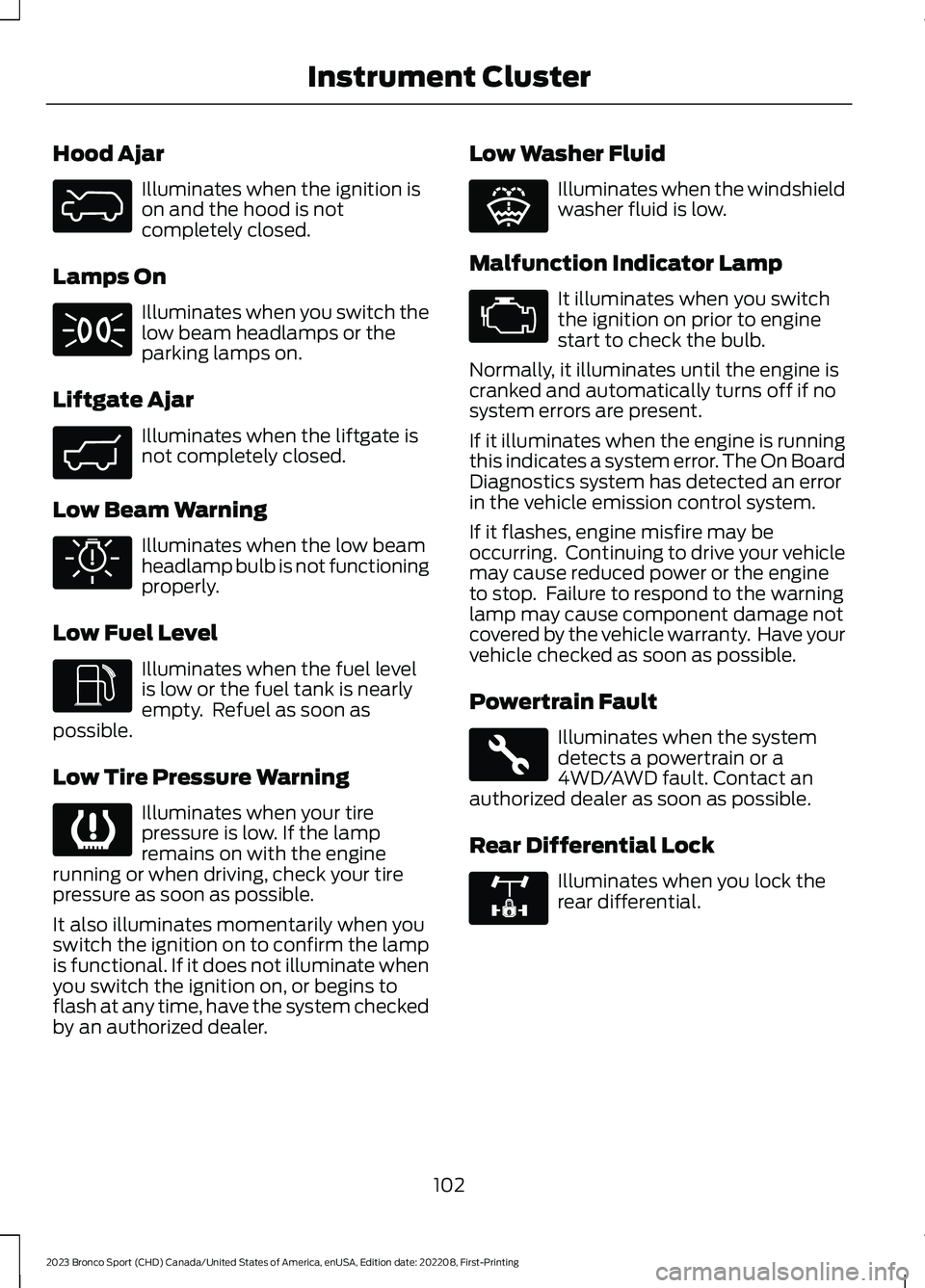
Hood Ajar
Illuminates when the ignition ison and the hood is notcompletely closed.
Lamps On
Illuminates when you switch thelow beam headlamps or theparking lamps on.
Liftgate Ajar
Illuminates when the liftgate isnot completely closed.
Low Beam Warning
Illuminates when the low beamheadlamp bulb is not functioningproperly.
Low Fuel Level
Illuminates when the fuel levelis low or the fuel tank is nearlyempty. Refuel as soon aspossible.
Low Tire Pressure Warning
Illuminates when your tirepressure is low. If the lampremains on with the enginerunning or when driving, check your tirepressure as soon as possible.
It also illuminates momentarily when youswitch the ignition on to confirm the lampis functional. If it does not illuminate whenyou switch the ignition on, or begins toflash at any time, have the system checkedby an authorized dealer.
Low Washer Fluid
Illuminates when the windshieldwasher fluid is low.
Malfunction Indicator Lamp
It illuminates when you switchthe ignition on prior to enginestart to check the bulb.
Normally, it illuminates until the engine iscranked and automatically turns off if nosystem errors are present.
If it illuminates when the engine is runningthis indicates a system error. The On BoardDiagnostics system has detected an errorin the vehicle emission control system.
If it flashes, engine misfire may beoccurring. Continuing to drive your vehiclemay cause reduced power or the engineto stop. Failure to respond to the warninglamp may cause component damage notcovered by the vehicle warranty. Have yourvehicle checked as soon as possible.
Powertrain Fault
Illuminates when the systemdetects a powertrain or a4WD/AWD fault. Contact anauthorized dealer as soon as possible.
Rear Differential Lock
Illuminates when you lock therear differential.
102
2023 Bronco Sport (CHD) Canada/United States of America, enUSA, Edition date: 202208, First-PrintingInstrument ClusterE325774 E71341 E323454 E325579 E325771 E139232 E132353 E67028 E323455 E325779
Page 112 of 516
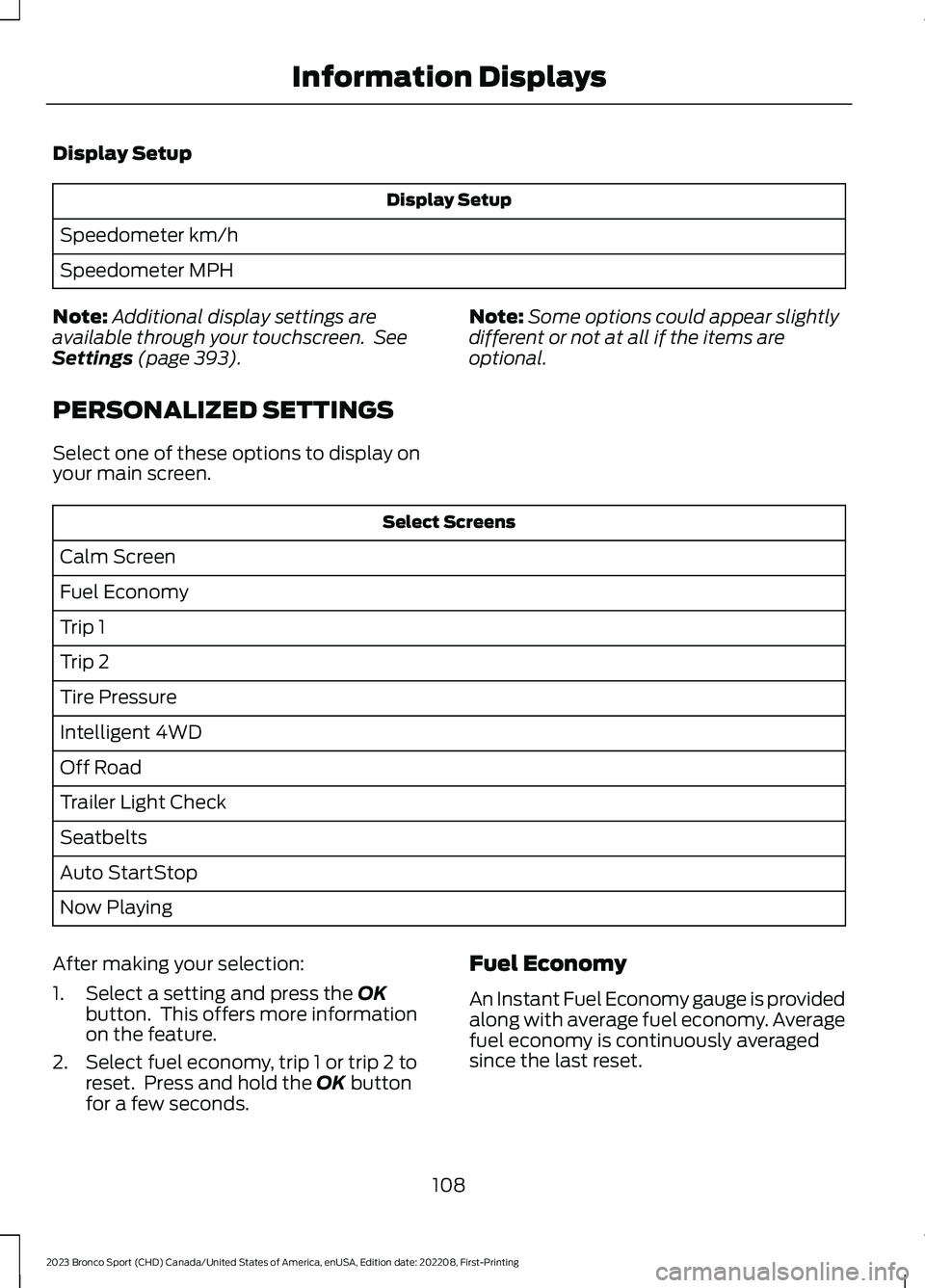
Display Setup
Display Setup
Speedometer km/h
Speedometer MPH
Note:Additional display settings areavailable through your touchscreen. SeeSettings (page 393).
PERSONALIZED SETTINGS
Select one of these options to display onyour main screen.
Note:Some options could appear slightlydifferent or not at all if the items areoptional.
Select Screens
Calm Screen
Fuel Economy
Trip 1
Trip 2
Tire Pressure
Intelligent 4WD
Off Road
Trailer Light Check
Seatbelts
Auto StartStop
Now Playing
After making your selection:
1.Select a setting and press the OKbutton. This offers more informationon the feature.
2.Select fuel economy, trip 1 or trip 2 toreset. Press and hold the OK buttonfor a few seconds.
Fuel Economy
An Instant Fuel Economy gauge is providedalong with average fuel economy. Averagefuel economy is continuously averagedsince the last reset.
108
2023 Bronco Sport (CHD) Canada/United States of America, enUSA, Edition date: 202208, First-PrintingInformation Displays
Page 114 of 516
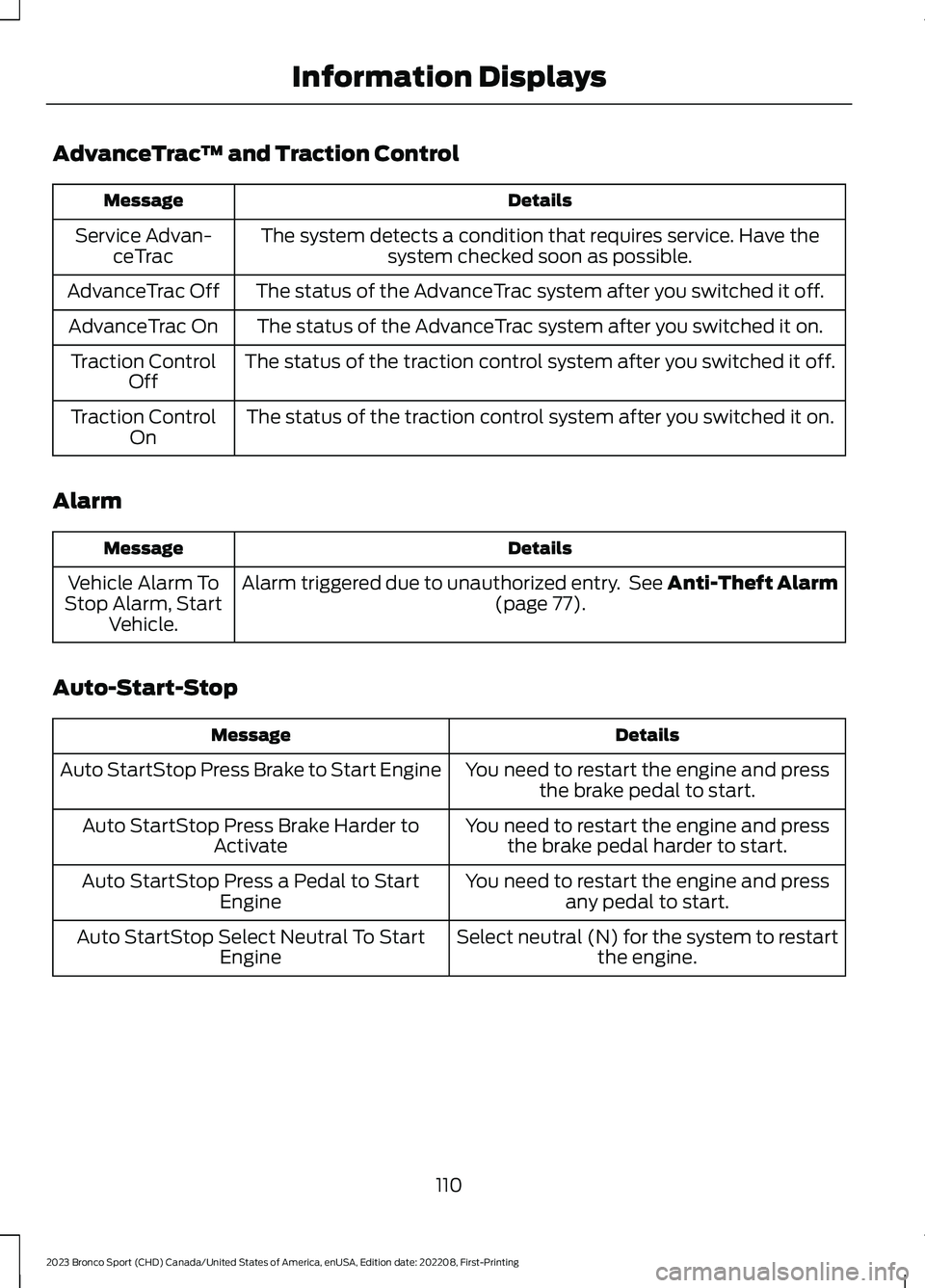
AdvanceTrac™ and Traction Control
DetailsMessage
The system detects a condition that requires service. Have thesystem checked soon as possible.Service Advan-ceTrac
The status of the AdvanceTrac system after you switched it off.AdvanceTrac Off
The status of the AdvanceTrac system after you switched it on.AdvanceTrac On
The status of the traction control system after you switched it off.Traction ControlOff
The status of the traction control system after you switched it on.Traction ControlOn
Alarm
DetailsMessage
Alarm triggered due to unauthorized entry. See Anti-Theft Alarm(page 77).Vehicle Alarm ToStop Alarm, StartVehicle.
Auto-Start-Stop
DetailsMessage
You need to restart the engine and pressthe brake pedal to start.Auto StartStop Press Brake to Start Engine
You need to restart the engine and pressthe brake pedal harder to start.Auto StartStop Press Brake Harder toActivate
You need to restart the engine and pressany pedal to start.Auto StartStop Press a Pedal to StartEngine
Select neutral (N) for the system to restartthe engine.Auto StartStop Select Neutral To StartEngine
110
2023 Bronco Sport (CHD) Canada/United States of America, enUSA, Edition date: 202208, First-PrintingInformation Displays
Page 115 of 516
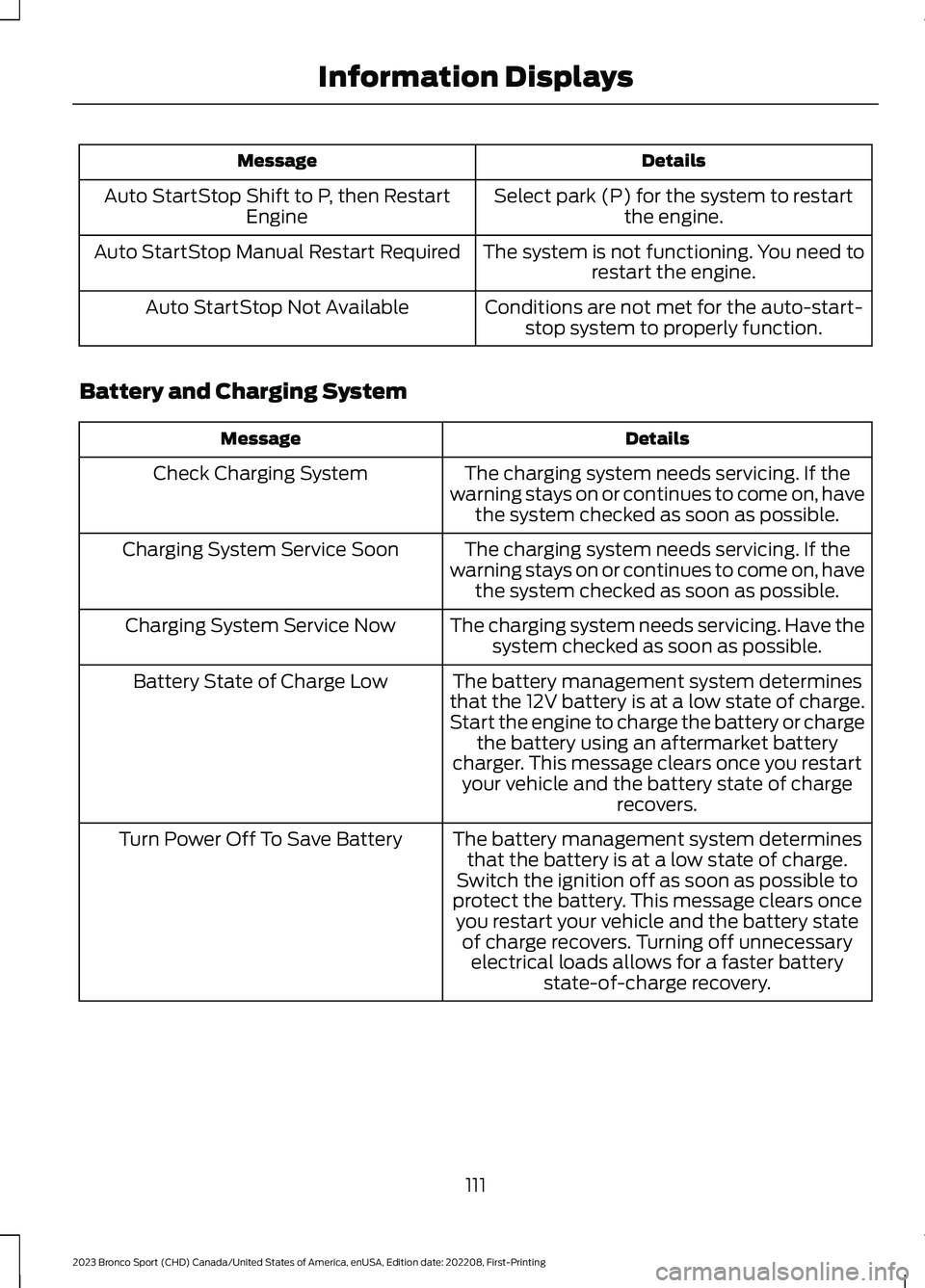
DetailsMessage
Select park (P) for the system to restartthe engine.Auto StartStop Shift to P, then RestartEngine
The system is not functioning. You need torestart the engine.Auto StartStop Manual Restart Required
Conditions are not met for the auto-start-stop system to properly function.Auto StartStop Not Available
Battery and Charging System
DetailsMessage
The charging system needs servicing. If thewarning stays on or continues to come on, havethe system checked as soon as possible.
Check Charging System
The charging system needs servicing. If thewarning stays on or continues to come on, havethe system checked as soon as possible.
Charging System Service Soon
The charging system needs servicing. Have thesystem checked as soon as possible.Charging System Service Now
The battery management system determinesthat the 12V battery is at a low state of charge.Start the engine to charge the battery or chargethe battery using an aftermarket batterycharger. This message clears once you restartyour vehicle and the battery state of chargerecovers.
Battery State of Charge Low
The battery management system determinesthat the battery is at a low state of charge.Switch the ignition off as soon as possible toprotect the battery. This message clears onceyou restart your vehicle and the battery stateof charge recovers. Turning off unnecessaryelectrical loads allows for a faster batterystate-of-charge recovery.
Turn Power Off To Save Battery
111
2023 Bronco Sport (CHD) Canada/United States of America, enUSA, Edition date: 202208, First-PrintingInformation Displays
Page 119 of 516
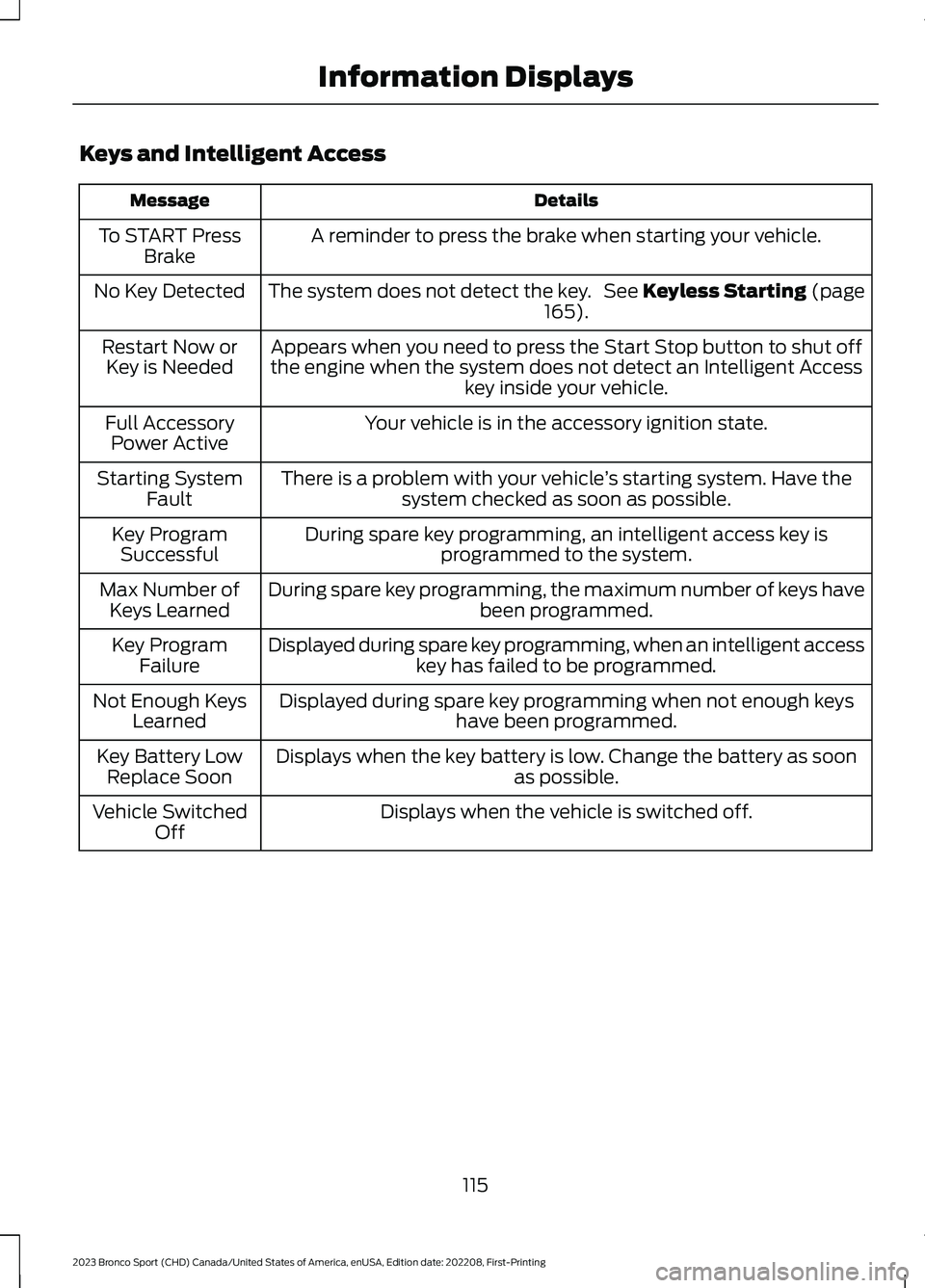
Keys and Intelligent Access
DetailsMessage
A reminder to press the brake when starting your vehicle.To START PressBrake
The system does not detect the key. See Keyless Starting (page165).No Key Detected
Appears when you need to press the Start Stop button to shut offthe engine when the system does not detect an Intelligent Accesskey inside your vehicle.
Restart Now orKey is Needed
Your vehicle is in the accessory ignition state.Full AccessoryPower Active
There is a problem with your vehicle’s starting system. Have thesystem checked as soon as possible.Starting SystemFault
During spare key programming, an intelligent access key isprogrammed to the system.Key ProgramSuccessful
During spare key programming, the maximum number of keys havebeen programmed.Max Number ofKeys Learned
Displayed during spare key programming, when an intelligent accesskey has failed to be programmed.Key ProgramFailure
Displayed during spare key programming when not enough keyshave been programmed.Not Enough KeysLearned
Displays when the key battery is low. Change the battery as soonas possible.Key Battery LowReplace Soon
Displays when the vehicle is switched off.Vehicle SwitchedOff
115
2023 Bronco Sport (CHD) Canada/United States of America, enUSA, Edition date: 202208, First-PrintingInformation Displays
Page 123 of 516
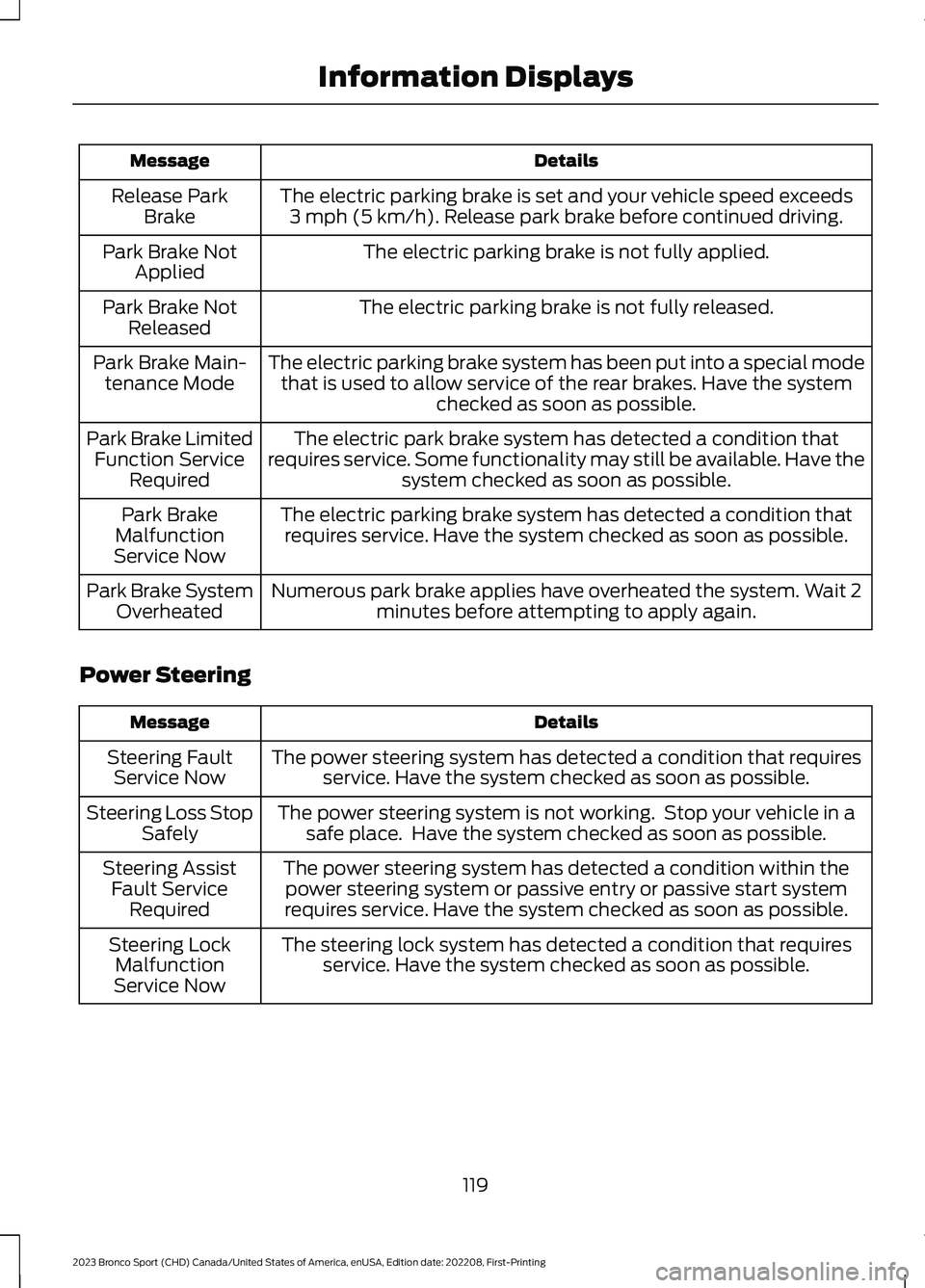
DetailsMessage
The electric parking brake is set and your vehicle speed exceeds3 mph (5 km/h). Release park brake before continued driving.Release ParkBrake
The electric parking brake is not fully applied.Park Brake NotApplied
The electric parking brake is not fully released.Park Brake NotReleased
The electric parking brake system has been put into a special modethat is used to allow service of the rear brakes. Have the systemchecked as soon as possible.
Park Brake Main-tenance Mode
The electric park brake system has detected a condition thatrequires service. Some functionality may still be available. Have thesystem checked as soon as possible.
Park Brake LimitedFunction ServiceRequired
The electric parking brake system has detected a condition thatrequires service. Have the system checked as soon as possible.Park BrakeMalfunctionService Now
Numerous park brake applies have overheated the system. Wait 2minutes before attempting to apply again.Park Brake SystemOverheated
Power Steering
DetailsMessage
The power steering system has detected a condition that requiresservice. Have the system checked as soon as possible.Steering FaultService Now
The power steering system is not working. Stop your vehicle in asafe place. Have the system checked as soon as possible.Steering Loss StopSafely
The power steering system has detected a condition within thepower steering system or passive entry or passive start systemrequires service. Have the system checked as soon as possible.
Steering AssistFault ServiceRequired
The steering lock system has detected a condition that requiresservice. Have the system checked as soon as possible.Steering LockMalfunctionService Now
119
2023 Bronco Sport (CHD) Canada/United States of America, enUSA, Edition date: 202208, First-PrintingInformation Displays
Page 129 of 516
WHAT IS REMOTE START
The system allows you to remotely startyour vehicle and to adjust the interiortemperature according to the settings thatyou chose.
REMOTE START
PRECAUTIONS
WARNING: Do not start the enginein a closed garage or in other enclosedareas. Exhaust fumes are toxic. Alwaysopen the garage door before you startthe engine. Failure to follow thisinstruction could result in personal injuryor death.
REMOTE START LIMITATIONS
Remote start does not work under thefollowing conditions:
•The alarm horn is sounding.
•The hood is open.
•The transmission is not in park (P).
•The ignition is on.
•The battery voltage is below theminimum operating voltage.
•Remote start is not enabled.
Note:Do not use remote start if the fuellevel is low.
ENABLING REMOTE START
1.Press Settings on the touchscreen.
2.Press Vehicle.
3.Press Remote Start Setup.
4.Switch System on.
Note:To use remote start, make sure thatthe modem is enabled. See Connecting theVehicle to a Mobile Network (page 352).
REMOTELY STARTING AND
STOPPING THE VEHICLE
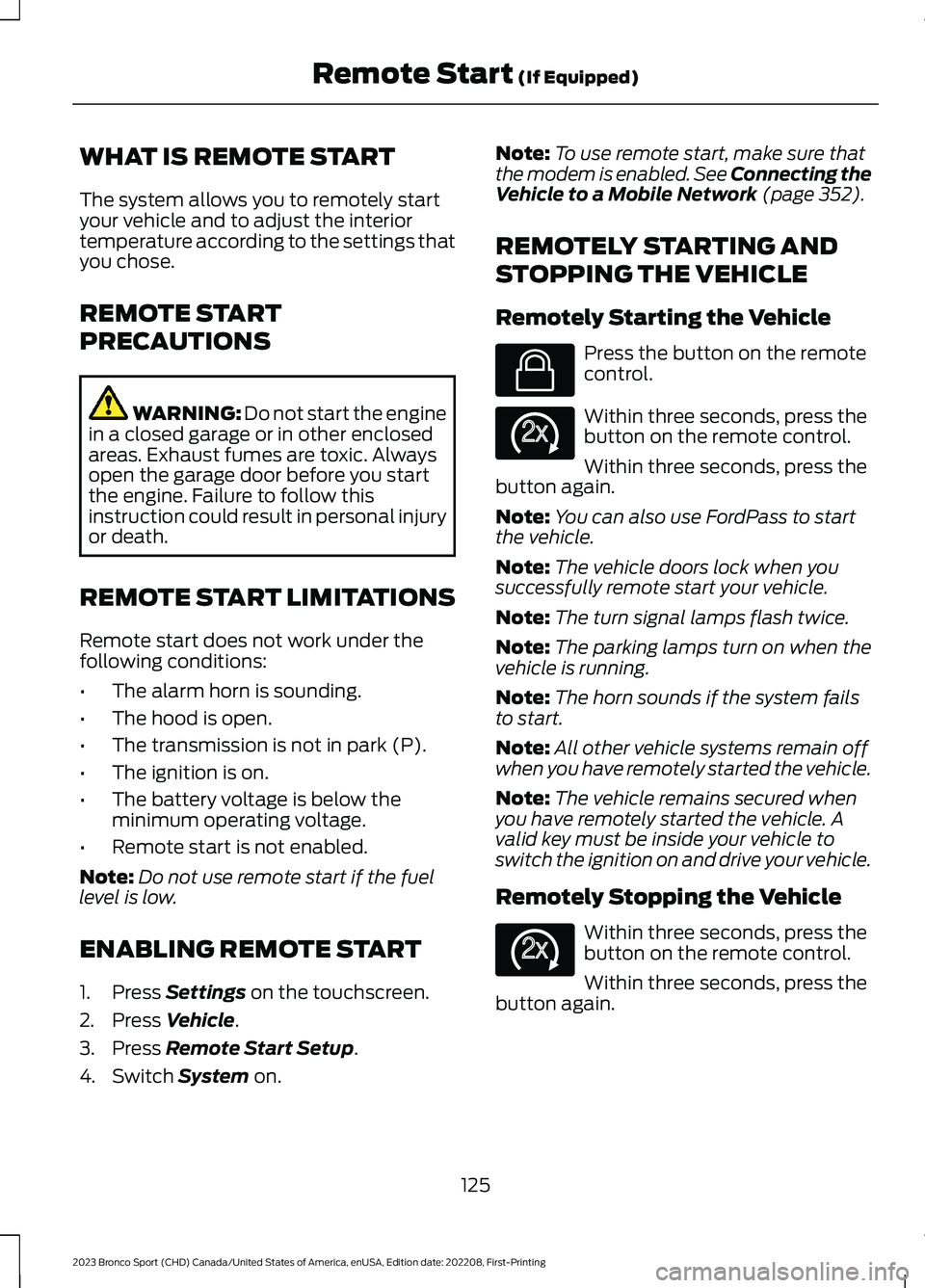
Remotely Starting the Vehicle
Press the button on the remotecontrol.
Within three seconds, press thebutton on the remote control.
Within three seconds, press thebutton again.
Note:You can also use FordPass to startthe vehicle.
Note:The vehicle doors lock when yousuccessfully remote start your vehicle.
Note:The turn signal lamps flash twice.
Note:The parking lamps turn on when thevehicle is running.
Note:The horn sounds if the system failsto start.
Note:All other vehicle systems remain offwhen you have remotely started the vehicle.
Note:The vehicle remains secured whenyou have remotely started the vehicle. Avalid key must be inside your vehicle toswitch the ignition on and drive your vehicle.
Remotely Stopping the Vehicle
Within three seconds, press thebutton on the remote control.
Within three seconds, press thebutton again.
125
2023 Bronco Sport (CHD) Canada/United States of America, enUSA, Edition date: 202208, First-PrintingRemote Start (If Equipped)E138623 E138625 E138625
Page 130 of 516
EXTENDING THE REMOTE
START DURATION
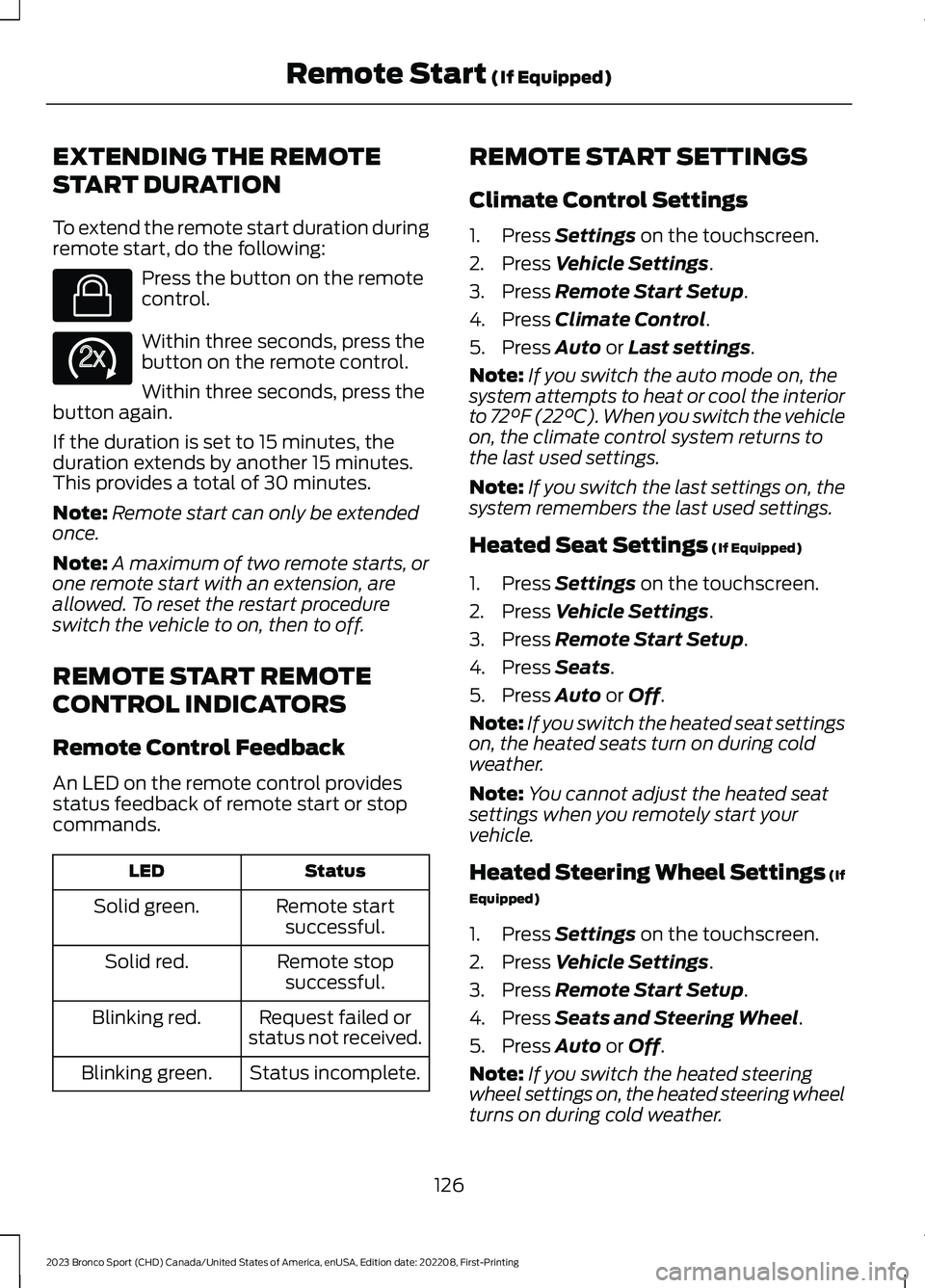
To extend the remote start duration duringremote start, do the following:
Press the button on the remotecontrol.
Within three seconds, press thebutton on the remote control.
Within three seconds, press thebutton again.
If the duration is set to 15 minutes, theduration extends by another 15 minutes.This provides a total of 30 minutes.
Note:Remote start can only be extendedonce.
Note:A maximum of two remote starts, orone remote start with an extension, areallowed. To reset the restart procedureswitch the vehicle to on, then to off.
REMOTE START REMOTE
CONTROL INDICATORS
Remote Control Feedback
An LED on the remote control providesstatus feedback of remote start or stopcommands.
StatusLED
Remote startsuccessful.Solid green.
Remote stopsuccessful.Solid red.
Request failed orstatus not received.Blinking red.
Status incomplete.Blinking green.
REMOTE START SETTINGS
Climate Control Settings
1.Press Settings on the touchscreen.
2.Press Vehicle Settings.
3.Press Remote Start Setup.
4.Press Climate Control.
5.Press Auto or Last settings.
Note:If you switch the auto mode on, thesystem attempts to heat or cool the interiorto 72°F (22°C). When you switch the vehicleon, the climate control system returns tothe last used settings.
Note:If you switch the last settings on, thesystem remembers the last used settings.
Heated Seat Settings (If Equipped)
1.Press Settings on the touchscreen.
2.Press Vehicle Settings.
3.Press Remote Start Setup.
4.Press Seats.
5.Press Auto or Off.
Note:If you switch the heated seat settingson, the heated seats turn on during coldweather.
Note:You cannot adjust the heated seatsettings when you remotely start yourvehicle.
Heated Steering Wheel Settings (If
Equipped)
1.Press Settings on the touchscreen.
2.Press Vehicle Settings.
3.Press Remote Start Setup.
4.Press Seats and Steering Wheel.
5.Press Auto or Off.
Note:If you switch the heated steeringwheel settings on, the heated steering wheelturns on during cold weather.
126
2023 Bronco Sport (CHD) Canada/United States of America, enUSA, Edition date: 202208, First-PrintingRemote Start (If Equipped)E138623 E138625