2023 FORD BRONCO SPORT key
[x] Cancel search: keyPage 68 of 516
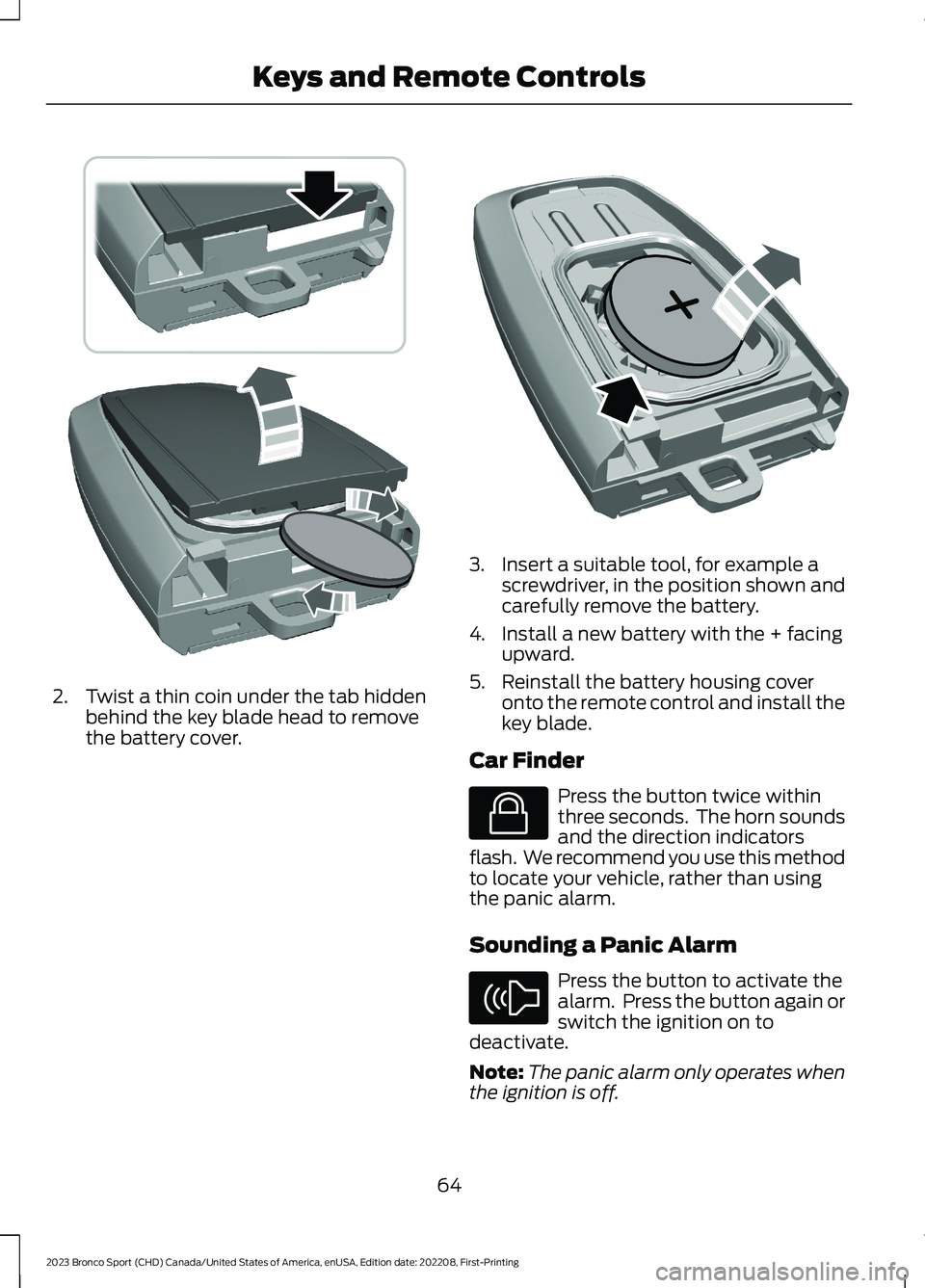
2.Twist a thin coin under the tab hiddenbehind the key blade head to removethe battery cover.
3.Insert a suitable tool, for example ascrewdriver, in the position shown andcarefully remove the battery.
4.Install a new battery with the + facingupward.
5.Reinstall the battery housing coveronto the remote control and install thekey blade.
Car Finder
Press the button twice withinthree seconds. The horn soundsand the direction indicatorsflash. We recommend you use this methodto locate your vehicle, rather than usingthe panic alarm.
Sounding a Panic Alarm
Press the button to activate thealarm. Press the button again orswitch the ignition on todeactivate.
Note:The panic alarm only operates whenthe ignition is off.
64
2023 Bronco Sport (CHD) Canada/United States of America, enUSA, Edition date: 202208, First-PrintingKeys and Remote ControlsE303824 E218402 E138623 E138624
Page 69 of 516
REPLACING A LOST KEY OR
REMOTE CONTROL
Replacement or additional keys or remotecontrols can be purchased from yourauthorized dealer. Your dealer can programthe transmitters to your vehicle.
65
2023 Bronco Sport (CHD) Canada/United States of America, enUSA, Edition date: 202208, First-PrintingKeys and Remote Controls
Page 70 of 516
WHAT IS MYKEY
MyKey allows you to program keys withrestricted driving modes to promote gooddriving habits.
You can program the restrictions to all keysexcept one. Any keys that you did notprogram are administrator keys or adminkeys.
Note:Every MyKey receives the samerestrictions and settings. You cannotprogram them individually.
MYKEY SETTINGS
NON-CONFIGURABLE MYKEYSETTINGS
Seatbelt Reminder or Belt-Minder™
MyKey mutes the audio system until thefront seat passengers buckle the front seatbelts.
Note:If your vehicle includes an AM/FMradio or a very basic audio system, the radiomay not mute.
Satellite Radio (If Equipped)
Some satellite radio channels haverestricted access to adult radio content.
Early Low Fuel
The low fuel level warning lamp turns onearlier.
Driving and Parking Aids
You cannot configure settings for parkingaids, blind spot information system, andcross traffic alert. These systems turn onwhen the vehicle turns on, and you cannotswitch them off with a MyKey.
You cannot configure settings forpre-collision assist and lane keeping. Thesesystems turn on when the vehicle turns on.
A new destination in the navigation systemcan only be set using voice commandswhen using a MyKey, and with your vehiclemoving.
Note:MyKey drivers may be able to switchthe lane keeping assist off, but this featureturns back on automatically with every newkey cycle.
CONFIGURABLE MYKEYSETTINGS
You can configure the following settingsafter creating a MyKey. See Creating aMyKey (page 67).
Speed Limit
WARNING: Do not set MyKeymaximum speed limit to a limit that willprevent the driver from maintaining asafe speed considering posted speedlimits and prevailing road conditions. Thedriver is always responsible to drive inaccordance with local laws andprevailing conditions. Failure to do socould result in accident or injury.
You can set a speed limit for your vehicle.Warning messages appear on thetouchscreen and a tone sounds if yourvehicle reaches the set speed. You cannotoverride the set speed when using a MyKey.
Speed Minder
You can set a speed reminder for yourvehicle. Warning messages appear on thetouchscreen and a tone sounds if yourvehicle exceeds the set speed.
66
2023 Bronco Sport (CHD) Canada/United States of America, enUSA, Edition date: 202208, First-PrintingMyKey™
Page 71 of 516
Audio System Volume Limit
The audio system maximum volumereduces. A message appears on thetouchscreen if you attempt to exceed thevolume limit. Automatic volume controlturns off.
911 Assist
If you set 911 assist to always on, youcannot switch it off with a MyKey.
Do Not Disturb
If you set do not disturb to always on, youcannot switch it off with a MyKey.
Note:If a phone is connected using AppleCarPlay or Android Auto while driving witha MyKey, the driver can receive phone callsand text messages even if the do not disturbrestriction is on. And if the vehicle comeswith satellite radio, there is no restriction onthe adult content.
Traction and Stability Control
If you set traction control or stabilitycontrol to always on, you cannot switch itoff with a MyKey.
CREATING A MYKEY
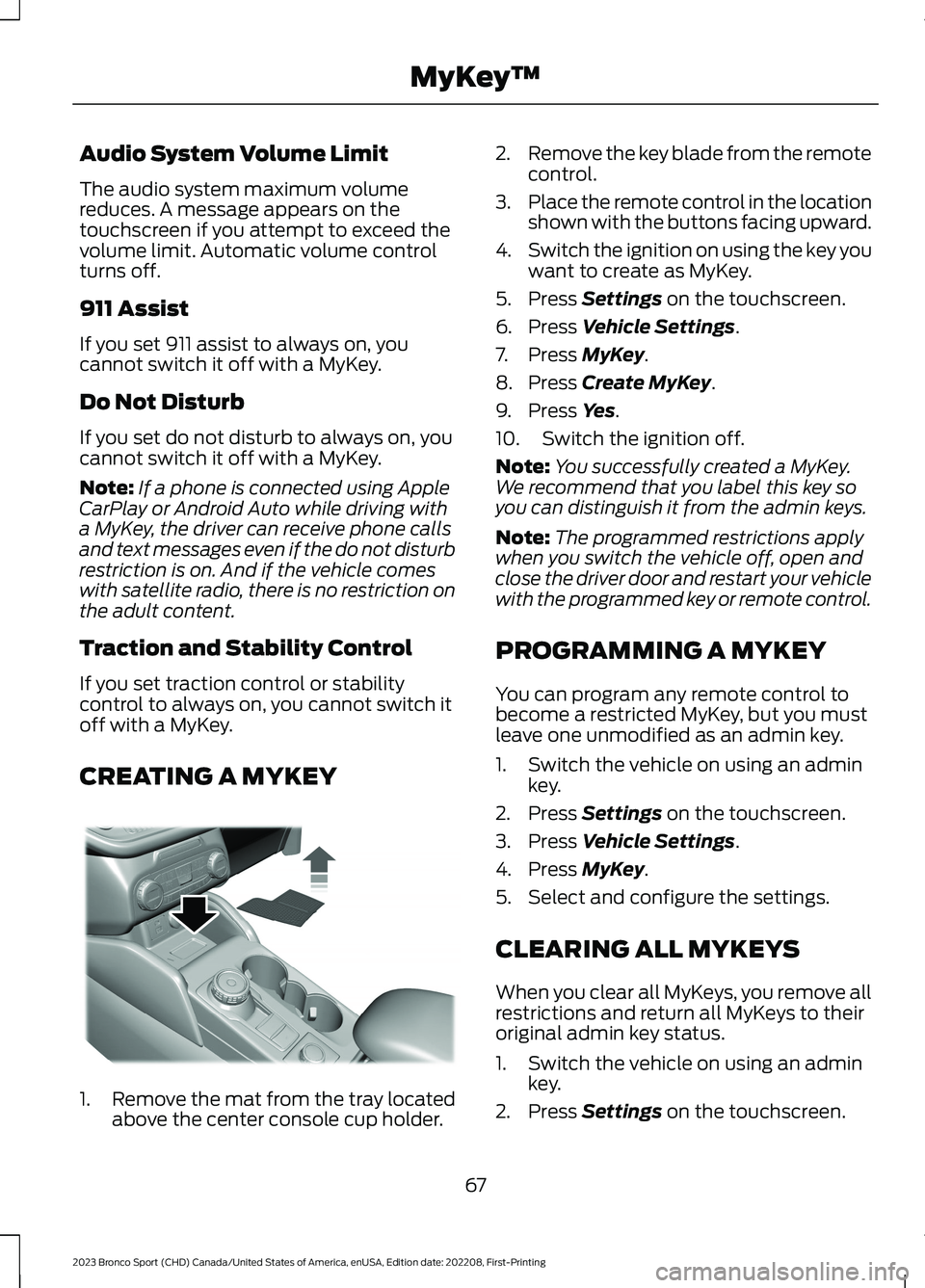
1.Remove the mat from the tray locatedabove the center console cup holder.
2.Remove the key blade from the remotecontrol.
3.Place the remote control in the locationshown with the buttons facing upward.
4.Switch the ignition on using the key youwant to create as MyKey.
5.Press Settings on the touchscreen.
6.Press Vehicle Settings.
7.Press MyKey.
8.Press Create MyKey.
9.Press Yes.
10.Switch the ignition off.
Note:You successfully created a MyKey.We recommend that you label this key soyou can distinguish it from the admin keys.
Note:The programmed restrictions applywhen you switch the vehicle off, open andclose the driver door and restart your vehiclewith the programmed key or remote control.
PROGRAMMING A MYKEY
You can program any remote control tobecome a restricted MyKey, but you mustleave one unmodified as an admin key.
1.Switch the vehicle on using an adminkey.
2.Press Settings on the touchscreen.
3.Press Vehicle Settings.
4.Press MyKey.
5.Select and configure the settings.
CLEARING ALL MYKEYS
When you clear all MyKeys, you remove allrestrictions and return all MyKeys to theiroriginal admin key status.
1.Switch the vehicle on using an adminkey.
2.Press Settings on the touchscreen.
67
2023 Bronco Sport (CHD) Canada/United States of America, enUSA, Edition date: 202208, First-PrintingMyKey™E387533
Page 72 of 516
3.Press Vehicle Settings.
4.Press MyKey.
5.Press Clear All MyKeys.
6.Press Yes.
CHECKING MYKEY SYSTEM
STATUS
You can find information about thedistance traveled using a MyKey, and thenumber of admin keys and MyKeys createdfor your vehicle.
1.Switch the vehicle on.
2.Press Settings on the touchscreen.
3.Press Vehicle Settings.
4.Press MyKey.
5.Press MyKey Information.
USING MYKEY WITH REMOTE
START SYSTEMS (IF EQUIPPED)
MyKey is not compatible with unapproved,aftermarket remote start systems. If youchoose to install a remote start system,see an authorized dealer for an approvedremote start system.
MYKEY – TROUBLESHOOTING
MYKEY – INFORMATION MESSAGES
DescriptionMessage
Displays when trying to create a MyKey and the admin key isnot placed in the backup position. See Creating a MyKey(page 67).
Place Key in BackupLocation
Displays when trying to create a MyKey with a key alreadydesignated as a MyKey.Key is Already a MyKey
Displays to confirm that the key is restricted after you switchthe ignition off.This Key restricted atNext Key Cycle. LabelKey as MyKey
68
2023 Bronco Sport (CHD) Canada/United States of America, enUSA, Edition date: 202208, First-PrintingMyKey™
Page 73 of 516
MYKEY – FREQUENTLY ASKEDQUESTIONS
What is an admin key?
An admin key is a key that you havenot created as a MyKey. See Creatinga MyKey (page 67).
Why am I not able to create a MyKey?
You have not placed the admin key inthe backup position. See Creating aMyKey (page 67). The key used toswitch the ignition on is not an adminkey. The key used to switch the ignitionon is the only admin key. There has tobe at least one admin key. You did notswitch the ignition off after creatingthe last MyKey.
Why am I not able to program a MyKey?
The admin key is not inside yourvehicle. The key used to switch theignition on is not an admin key. Youhave not created any MyKeys. SeeCreating a MyKey (page 67).
Why am I not able to clear the MyKeys?
The admin key is not inside yourvehicle. The key used to switch theignition on is not an admin key. Youhave not created any MyKeys. SeeCreating a MyKey (page 67).
Why is the MyKey distance notaccumulating?
The key used to start the engine is anadmin key. An admin key and a MyKeyare inside your vehicle. You have notcreated any MyKeys. See Creating aMyKey (page 67). You have clearedthe MyKeys. See Clearing AllMyKeys (page 67).
Why am I not able to start the enginewith a MyKey?
An admin key and a MyKey are insideyour vehicle. The system recognizesonly the admin key when both arepresent.
69
2023 Bronco Sport (CHD) Canada/United States of America, enUSA, Edition date: 202208, First-PrintingMyKey™
Page 74 of 516
LOCKING AND UNLOCKING
You can use the power door lock controlor the remote control to lock and unlockyour vehicle.
Note:Do not use the door latch assemblyto attach any accessory, such as handles orsteps, as this can cause damage to yourvehicle.
Note:Always take your keys and lock alldoors when leaving your vehicle.
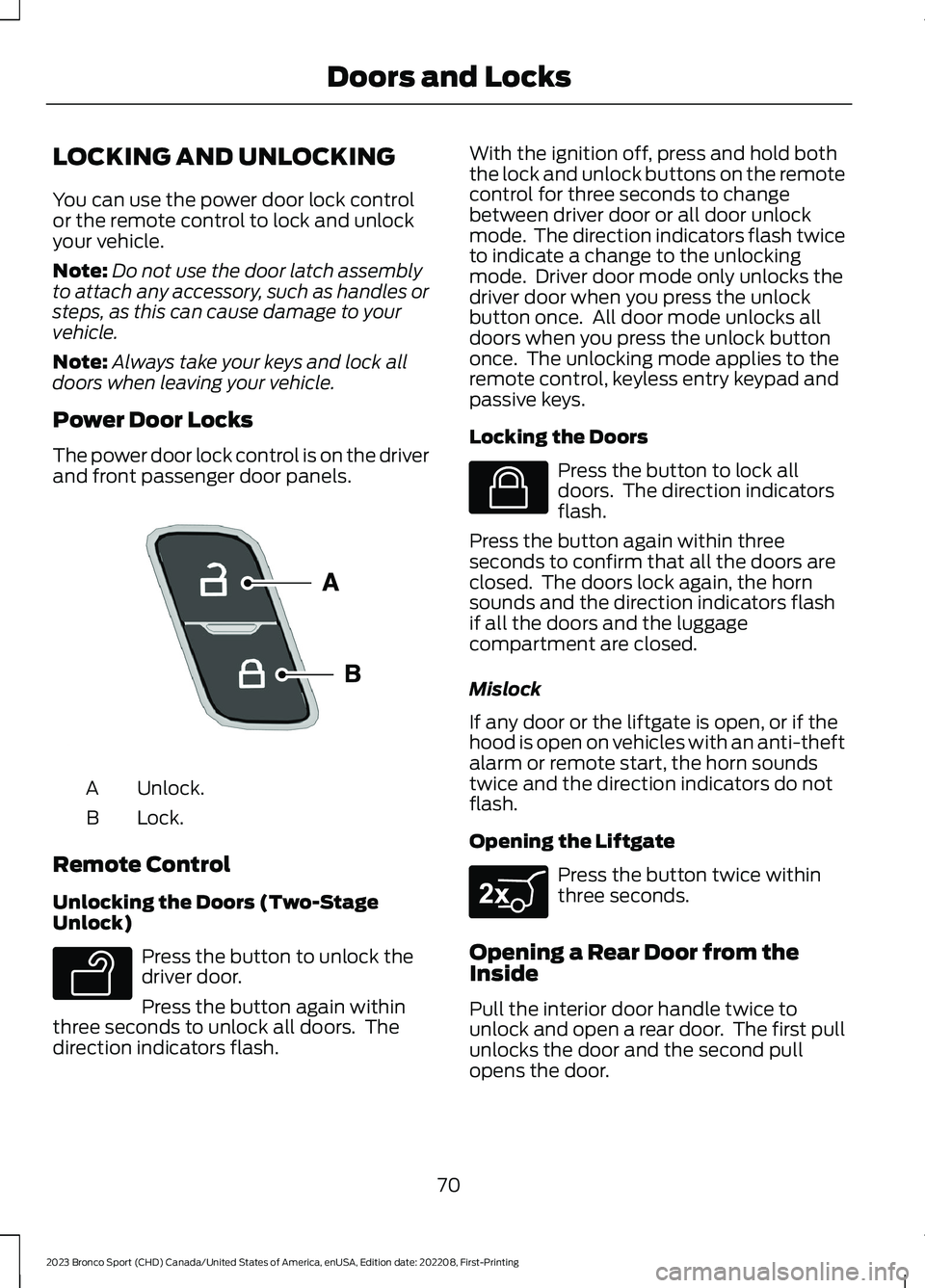
Power Door Locks
The power door lock control is on the driverand front passenger door panels.
Unlock.A
Lock.B
Remote Control
Unlocking the Doors (Two-StageUnlock)
Press the button to unlock thedriver door.
Press the button again withinthree seconds to unlock all doors. Thedirection indicators flash.
With the ignition off, press and hold boththe lock and unlock buttons on the remotecontrol for three seconds to changebetween driver door or all door unlockmode. The direction indicators flash twiceto indicate a change to the unlockingmode. Driver door mode only unlocks thedriver door when you press the unlockbutton once. All door mode unlocks alldoors when you press the unlock buttononce. The unlocking mode applies to theremote control, keyless entry keypad andpassive keys.
Locking the Doors
Press the button to lock alldoors. The direction indicatorsflash.
Press the button again within threeseconds to confirm that all the doors areclosed. The doors lock again, the hornsounds and the direction indicators flashif all the doors and the luggagecompartment are closed.
Mislock
If any door or the liftgate is open, or if thehood is open on vehicles with an anti-theftalarm or remote start, the horn soundstwice and the direction indicators do notflash.
Opening the Liftgate
Press the button twice withinthree seconds.
Opening a Rear Door from theInside
Pull the interior door handle twice tounlock and open a rear door. The first pullunlocks the door and the second pullopens the door.
70
2023 Bronco Sport (CHD) Canada/United States of America, enUSA, Edition date: 202208, First-PrintingDoors and LocksE196954 E138629 E138623 E267940
Page 75 of 516
Activating Passive Key
General Information
You can unlock and lock your vehiclewithout taking the keys out of your pocketor purse when the passive key is within 3 ft(1 m) of your vehicle. Passive key uses asensor on the back of the door handle forunlocking and a separate sensor on theface of each door handle for locking.
The system does not function if:
•The vehicle battery has no charge.
•The passive key battery has no charge.
•The passive key frequencies arejammed.
Note:The system may not operate if thepassive key is close to metal objects orelectronic devices, for example keys or a cellphone.
Note:If the system does not operate, usethe key blade to lock and unlock yourvehicle. See Remote Control (page 60).
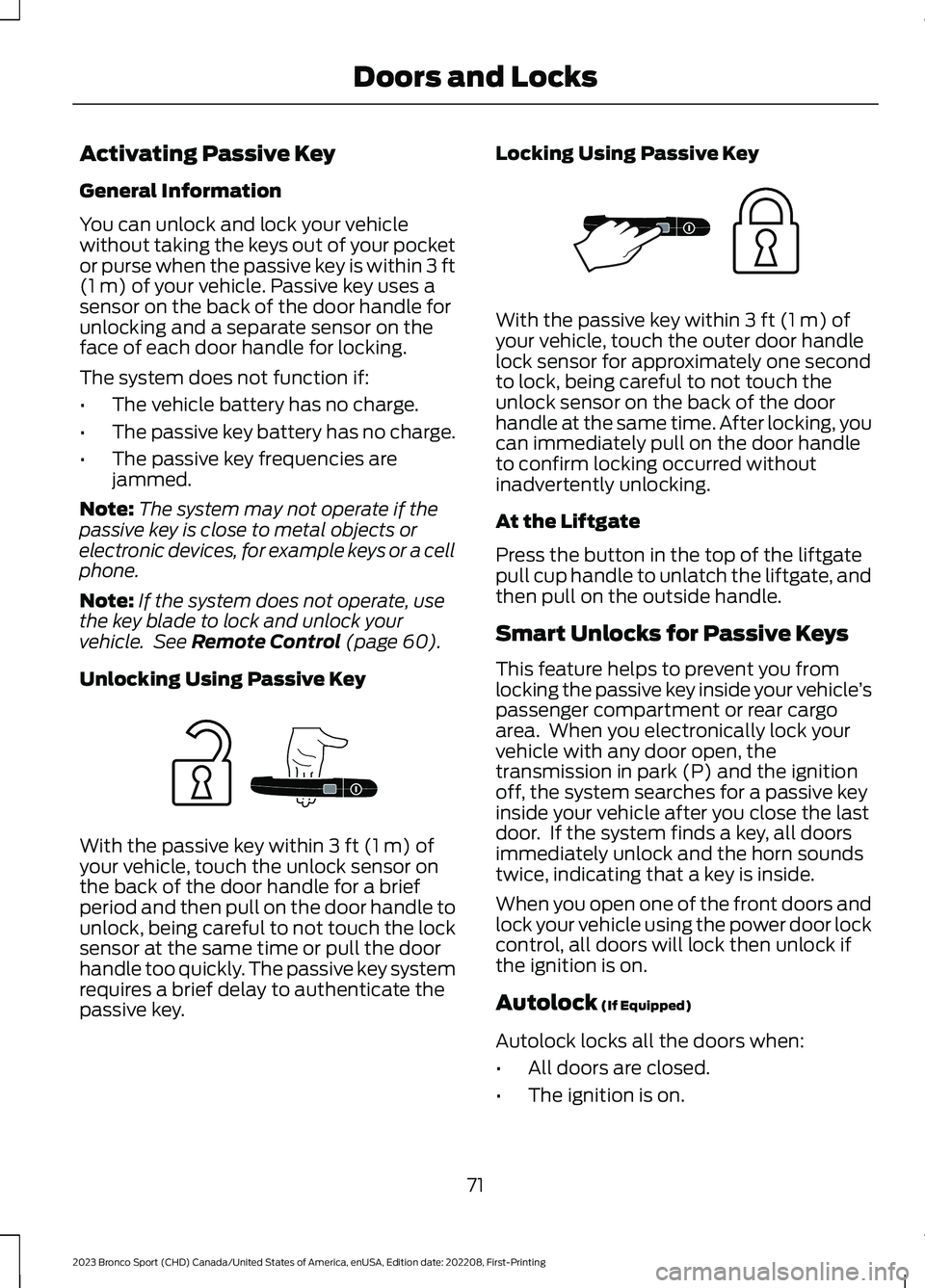
Unlocking Using Passive Key
With the passive key within 3 ft (1 m) ofyour vehicle, touch the unlock sensor onthe back of the door handle for a briefperiod and then pull on the door handle tounlock, being careful to not touch the locksensor at the same time or pull the doorhandle too quickly. The passive key systemrequires a brief delay to authenticate thepassive key.
Locking Using Passive Key
With the passive key within 3 ft (1 m) ofyour vehicle, touch the outer door handlelock sensor for approximately one secondto lock, being careful to not touch theunlock sensor on the back of the doorhandle at the same time. After locking, youcan immediately pull on the door handleto confirm locking occurred withoutinadvertently unlocking.
At the Liftgate
Press the button in the top of the liftgatepull cup handle to unlatch the liftgate, andthen pull on the outside handle.
Smart Unlocks for Passive Keys
This feature helps to prevent you fromlocking the passive key inside your vehicle’spassenger compartment or rear cargoarea. When you electronically lock yourvehicle with any door open, thetransmission in park (P) and the ignitionoff, the system searches for a passive keyinside your vehicle after you close the lastdoor. If the system finds a key, all doorsimmediately unlock and the horn soundstwice, indicating that a key is inside.
When you open one of the front doors andlock your vehicle using the power door lockcontrol, all doors will lock then unlock ifthe ignition is on.
Autolock (If Equipped)
Autolock locks all the doors when:
•All doors are closed.
•The ignition is on.
71
2023 Bronco Sport (CHD) Canada/United States of America, enUSA, Edition date: 202208, First-PrintingDoors and LocksE248555 E248556