2023 FORD BRONCO wipers
[x] Cancel search: wipersPage 7 of 642

Security
Passive Anti-Theft System........................97
Security – Troubleshooting.......................97
Steering Wheel
Adjusting the Steering Wheel..................99
Horn...................................................................99
Switching the Heated Steering WheelOn and Off..................................................99
Wipers and Washers
Wipers.............................................................100
Switching the Rear Window Wiper Onand Off........................................................100
Reverse Wipe................................................100
Checking the Wiper Blades......................101
Replacing the Front Wiper Blades.........101
Replacing the Rear Wiper Blades..........102
Washers..........................................................102
Wipers and Washers – Troubleshooting.........................................................................103
Exterior Lighting
Exterior Lighting Control...........................104
Headlamps....................................................104
Headlamps – Troubleshooting..............104
Autolamps.....................................................105
Exterior Lamps.............................................105
Exterior Zone Lighting................................107
Automatic High Beam Control..............108
Automatic High Beam Control –Troubleshooting.......................................110
Interior Lighting
Switching All of the Interior Lamps Onand Off...........................................................111
Switching the Front Interior Lamps Onand Off...........................................................111
Switching the Rear Interior Lamps Onand Off...........................................................111
Interior Lamp Function................................111
Adjusting the Instrument Panel LightingBrightness....................................................112
Ambient Lighting..........................................112
Interior Lighting – Troubleshooting........112
Windows
Opening and Closing the Windows.......113
Global Opening.............................................113
Window Bounce-Back................................114
Locking the Rear Window Controls.......114
Interior Mirror
Interior Mirror Precautions.........................115
Manually Dimming the Interior Mirror..........................................................................115
Auto-Dimming Interior Mirror...................115
Exterior Mirrors
Adjusting the Exterior Mirrors...................116
Folding the Exterior Mirrors.......................116
Instrument Cluster
Instrument Cluster Overview - Excluding:Raptor...........................................................117
Instrument Cluster Overview - Raptor..........................................................................118
Tachometer....................................................118
Speedometer.................................................118
Fuel Gauge......................................................118
Engine Coolant Temperature Gauge..........................................................................119
Transmission Fluid Temperature Gauge..........................................................................119
Turbo Boost Gauge - 2.3L EcoBoost™..........................................................................119
What Is the Information Bar.....................119
What Are the Instrument ClusterWarning Lamps.........................................119
Instrument Cluster Warning Lamps......120
What Are the Instrument ClusterIndicators.....................................................121
3
2023 Bronco (TG1) Canada/United States of America, enUSA, Edition date: 202208, DOMTable of Contents
Page 104 of 642
WIPERS
WIPER PRECAUTIONS
The vehicle is equipped with protectionfeatures to prevent damage to the wipermotor in case of overheating, usage on drywindshields or obstructions to the wiperblade due to snow or ice accumulation onthe windshield.
In such conditions, the wiper motor mayrestrict its speed, reduce area of cleaningor completely stop operation. Systemreturns back to normal operation modeonce conditions are resolved.
Do not operate the wipers on a drywindshield. This could scratch the glass ordamage the wiper blades. Use thewindshield washers before wiping a drywindshield.
Fully defrost the windshield before youswitch the windshield wipers on.
Switch the windshield wipers off beforeentering a car wash.
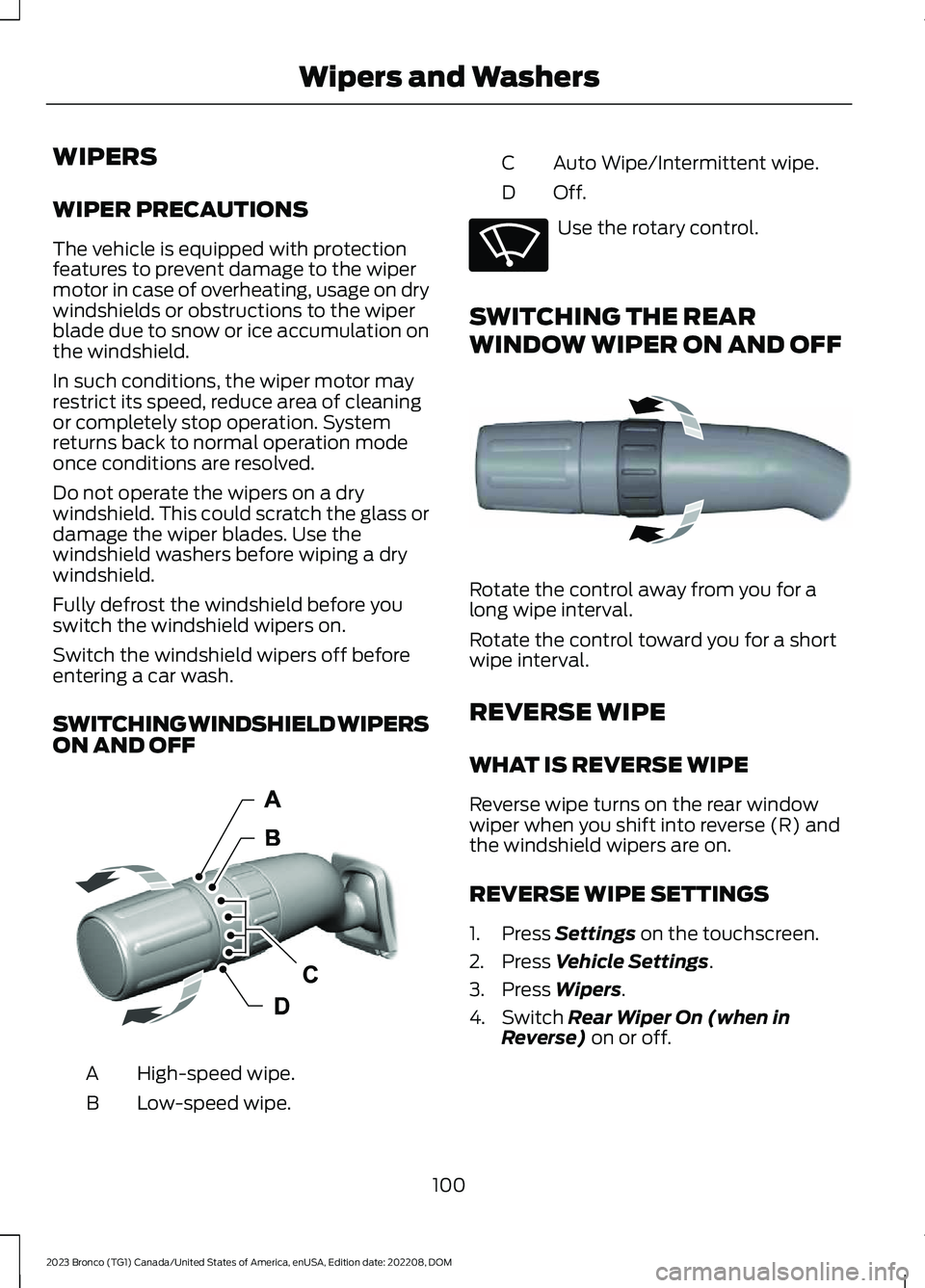
SWITCHING WINDSHIELD WIPERSON AND OFF
High-speed wipe.A
Low-speed wipe.B
Auto Wipe/Intermittent wipe.C
Off.D
Use the rotary control.
SWITCHING THE REAR
WINDOW WIPER ON AND OFF
Rotate the control away from you for along wipe interval.
Rotate the control toward you for a shortwipe interval.
REVERSE WIPE
WHAT IS REVERSE WIPE
Reverse wipe turns on the rear windowwiper when you shift into reverse (R) andthe windshield wipers are on.
REVERSE WIPE SETTINGS
1.Press Settings on the touchscreen.
2.Press Vehicle Settings.
3.Press Wipers.
4.Switch Rear Wiper On (when inReverse) on or off.
100
2023 Bronco (TG1) Canada/United States of America, enUSA, Edition date: 202208, DOMWipers and WashersE383137 E270969 E340280
Page 105 of 642

CHECKING THE WIPER
BLADES
Improving Your Windshield WiperPerformance
Run the tip of your fingers over the edge ofthe blade to check for roughness.
REPLACING THE FRONT
WIPER BLADES
1.Pull the wiper blade and arm awayfrom the glass.
Note:Do not hold the wiper blade to lift thewiper arm.
2.Lift the wiper blade primary locking clip.
3.Press the wiper blade secondarylocking clip.
4.Remove the wiper blade.
Note:Make sure that the wiper arm doesnot spring back against the glass when thewiper blade is not attached.
5.To install, reverse the removalprocedure.
Note:Make sure that the wiper blade locksinto place.
101
2023 Bronco (TG1) Canada/United States of America, enUSA, Edition date: 202208, DOMWipers and WashersE142463 E165804 2E327597 E327598
Page 106 of 642

REPLACING THE REAR WIPER
BLADES
1.Lift the wiper arm.
Note:Do not hold the wiper blade to lift thewiper arm.
2.Remove the wiper blade.
Note:Make sure that the wiper arm doesnot spring back against the glass when thewiper blade is not attached.
3.To install, reverse the removalprocedure.
Note:Make sure that the wiper blade locksinto place.
WASHERS
WASHER PRECAUTIONS
WARNING: If you operate yourvehicle in temperatures below 41°F(5°C), use washer fluid with antifreezeprotection. Failure to use washer fluidwith antifreeze protection in coldweather could result in impairedwindshield vision and increase the riskof injury or accident.
Do not operate the washers when thewasher reservoir is empty. This could causethe washer pump to overheat.
Keep the outside of the windshield clean.The rain sensor is very sensitive and thewipers may operate if dirt, mist or insectshit the windshield.
USING THE WINDSHIELD WASHER
Press and hold the button at theend of the lever to operate thewindshield washer.
Note:A courtesy wipe occurs a short timeafter the wipers stop to clear any remainingwasher fluid when switched on. SeeSwitching the Courtesy Wipe On and Off(page 103).
102
2023 Bronco (TG1) Canada/United States of America, enUSA, Edition date: 202208, DOMWipers and Washers E271380 E311291 E270967
Page 107 of 642

SWITCHING THE COURTESY WIPEON AND OFF
Courtesy Wipe
1.Press Settings on the touchscreen.
2.Press Vehicle Settings.
3.Press Wipers.
4.Switch Courtesy Wipe on or off.
USING THE REAR WINDOWWASHER
Rotate the control to the top or bottomposition and hold it to operate the rearwindow washer.
Note:A courtesy wipe occurs a short timeafter the wipers stop to clear any remainingwasher fluid when switched on. SeeSwitching the Courtesy Wipe On and Off(page 103).
ADDING WASHER FLUID
WASHER FLUID SPECIFICATION
See Washer Fluid Specification (page476).
WIPERS AND WASHERS –
TROUBLESHOOTING
WIPERS AND WASHERS –WARNING LAMPS
Illuminates when the windshieldwasher fluid is low.
WIPERS AND WASHERS –FREQUENTLY ASKED QUESTIONS
Why are there streaks and smears onthe windshield?
The wiper blades could be dirty, wornor damaged. Check the wiper blades.See Checking the Wiper Blades(page 101). If the wiper blades are dirty,clean them with washer fluid or waterapplied with a soft sponge or cloth. Ifthe wiper blades are worn or damaged,install new ones. See Replacing theFront Wiper Blades (page 101).
103
2023 Bronco (TG1) Canada/United States of America, enUSA, Edition date: 202208, DOMWipers and WashersE340280 E340983 E132353
Page 109 of 642

How long may it take for theacceptable condensation to becleared?
•Clearing time may take as long as 48hours under dry weather conditions.
How much condensation isunacceptable?
•A water puddle inside the lamp.Streaks, drip marks or large dropletspresent on the interior of the lens.
What should I do if unacceptablecondensation is present?
•Have your vehicle checked as soon aspossible.
Why do my headlamps turn offwhen I have them switched onwhen I switch my vehicle off?
•The battery saver turns the headlampsoff after a short period of time after youswitch your vehicle off.
AUTOLAMPS
WHAT ARE AUTOLAMPS
WARNING: The system does notrelieve you of your responsibility to drivewith due care and attention. You mayneed to override the system if it does notturn the headlamps on in low visibilityconditions, for example daytime fog.
Autolamps turn the headlamps on in lowlight situations or when the windshieldwipers operate.
AUTOLAMP SETTINGS
1.Press Settings on the touchscreen.
2.Press Vehicle Settings.
3.Press Lighting.
4.Press Autolamp Delay.
5.Press a setting.
EXTERIOR LAMPS
USING THE TURN SIGNAL LAMPS
Intelligent Three Blink Turn Signal
Push the lever up or down toswitch the turn signal lamps on.
Set the lever to the middle position toswitch the turn signal lamps off.
Note:Tap the lever up or down to make theturn signal lamps flash three times.
Turn Signal Lamp Indicator
It flashes when you switch theturn signal lamps on.
Note:An increase in the rate of flashingwarns of a failed turn signal lamp.
105
2023 Bronco (TG1) Canada/United States of America, enUSA, Edition date: 202208, DOMExterior LightingE311431 E67018 E67018
Page 323 of 642

Look ahead on your route noting upcomingobstacles, surface texture or color changesor any other factors which may indicate achange in available traction. Adjust thevehicle speed and route to avoid a loss intraction. Conditions can change causingthe course to vary day to day. Markobstacles with GPS markers to avoidpotential vehicle damage. Wherenecessary, get out of your vehicle andcheck the terrain.
When driving off-road, if the front or rearsuspension is bottoming-out or excessivecontact with the skid-plates is happening,reduce the vehicle's speed to avoidpotential damage to your vehicle.
If you are driving in a dusty area, be sure toleave ample distance between your vehicleand any other vehicles to allow foradequate vision.
When driving off-road verify that yourwipers and washers are working properlyand reduce your speed for better visibility.
When driving in desert conditions, werecommend driving with your headlampson to help other drivers easily see you.
When convoying with other vehicles, werecommend that communication is used,and the lead vehicle notify other vehiclesof upcoming obstacles.
Keep available ground clearance in mindand pick a route that minimizes the risk ofcatching the underside of the vehicle onan obstacle.
When negotiating low speed obstacles,applying light brake pressure in conjunctionwith the throttle allows you to negotiatethe obstacle in a more controlled manner.
Driving off-road requires a high amount ofconcentration. Even if your local law doesnot prohibit drinking alcohol when drivingoff-road we do not recommend it.
DRIVING OFF-ROAD
Driving In Snow and Ice
WARNING: If you are driving inslippery conditions that require tirechains or cables, then it is critical thatyou drive cautiously. Keep speeds down,allow for longer stopping distances andavoid aggressive steering to reduce thechances of a loss of vehicle controlwhich can lead to serious injury or death.If the rear end of your vehicle slides whilecornering, steer in the direction of theslide until you regain control of yourvehicle.
Four-wheel drive vehicles have advantagesover two-wheel drive vehicles in snow andice but can skid like any other vehicle. Ifyour vehicle slides when driving on snowyor icy roads, turn the steering wheel in thedirection of the slide until you regaincontrol. Avoid sudden applications ofpower and quick changes of direction onsnow and ice. Slowly and steadily applythe accelerator when starting from a fullstop. Avoid sudden braking.
WARNING: Do not becomeoverconfident in the ability of four-wheeldrive vehicles. Although a four-wheeldrive vehicle may accelerate better thana two-wheel drive vehicle in low tractionsituations, it won't stop any faster thantwo-wheel drive vehicles. Always driveat a safe speed.
Make sure you allow sufficient distancebetween your vehicle and other vehiclesfor stopping.
In emergency stopping situations, do notpump the brake pedal, apply the brakefirmly.
319
2023 Bronco (TG1) Canada/United States of America, enUSA, Edition date: 202208, DOMDriving Hints
Page 329 of 642

Use this when driving over large obstacles,such as rocks or logs, to help maintain aconstant vehicle speed.
In 4H, the system offers lift pedal brakingand auto hill hold functionality. See WhatIs Trail One Pedal Drive (page 223).
Note:Trail one pedal drive is only availablewhen the vehicle is in 4H or 4L.
Using Trail Turn Assist
The feature reduces the turn radius of thevehicle on off-road surfaces.
The system reduces driver effort tonegotiate difficult off-road terrain byallowing the vehicle to make a tight turnin a single maneuver that might otherwiserequire a three point turn. See Trail TurnAssist (page 227).
Note:Trail turn assist is only available whenthe vehicle is in 4H or 4L.
Note:Trail turn assist cannot activate if therear differential is locked.
What Are Rock Rails (If Equipped)
Rock rails protect the rocker and body sidefrom damage and provide a sliding surfaceto allow the vehicle to cross boulders androck ledges.
Rock rails also can act as a pivot point tosharply turn the vehicle in tight spaces withhigh walls or rocks present.
AFTER DRIVING YOUR VEHICLEOFF-ROAD
WARNING: After off-road use,before returning to the road, check thewheels and tires for damage. Off-roaduse may cause damage to your wheelsand tires that can lead to tire failure, lossof vehicle control, serious injury or death.
Driving off-road places more stress on yourvehicle than most on-road driving. Afterdriving off-road, check for damage to thewheels, chassis and underbody.
Inspect the underbody of your vehicle bychecking tires, body structure, steering,suspension, and exhaust system fordamage.
Inspect the tires for any cuts in the treador sidewall area. Also inspect the sidewallfor any bulge indicating damage to the tire.
Make sure the tires are inflated to propertire pressure as indicated on the tireplacard.
Check the radiator for mud and debris andclean as needed.
Check that the air filter is clean and dry.
Remove accumulations of plants or brush.These things could be a fire hazard or hidedamage to the fuel lines, brake hoses andpropeller shafts.
Make sure the grille and radiator are clearof any obstructions that may affectcooling.
After extended operation in mud, sand,water, or similar dirty conditions, inspectthe wipers and washers to make sure theyare working.
Note:Mud caked windows are hard to seethrough and can damage wiper blades ormotor.
Check wipers for debris or anything thatmay scratch the windshield.
If you experience unusual vibration afterdriving in mud, slush or similar conditions,check the wheels for impacted material.Impacted material can cause vibrationswhen driving and wheel imbalance.Remove the material to reduce thevibration.
325
2023 Bronco (TG1) Canada/United States of America, enUSA, Edition date: 202208, DOMDriving Hints