2023 FORD BRONCO instrument cluster
[x] Cancel search: instrument clusterPage 273 of 642
•All four-wheel drive modes areselectable. There is no defaultfour-wheel drive mode and theprevious selection is maintained whenthe vehicle is restarted.
•Normal is the default for the steering,exhaust and suspension modes.
•Off-road steering mode is notavailable.
•Sport suspension is available.
•Off-road suspension mode is notavailable.
•Stabilizer bar cannot be disconnected.
The system tunes the engine andtransmission controls to tow mode. Thesystem tunes the stability and tractioncontrols to normal mode.
The rear electronic locking differential isavailable below 25 mph (40 km/h) andthe front electronic locking differential isavailable in four-wheel drive low (4L). SeeSwitching the Electronic LockingDifferential On and Off (page 203).
G.O.A.T. MODE CONTROL –
TROUBLESHOOTING
G.O.A.T. MODE CONTROL –WARNING LAMPS
Some drive modes reducetraction and stability controlperformance and the indicatorilluminates in the instrument cluster.
G.O.A.T. MODE CONTROL – INFORMATION MESSAGES
DetailsMessage
Displays when the system switches tonormal mode to support towing perform-ance.
Changing to Normal Drive Mode forImproved Towing Performance
Displays when you select a drive mode thatis not available. Select a different drivemode.
Drive Mode Not Available
Displays when you select a drive mode thatis not available. Check the four-wheel drivemode, electronic locking differential andstabilizer bar before selecting a drive mode.
Drive Mode Preconditions Not Met
Displays when you select a drive mode thatis not available. Have the system checked.Drive Mode Selection Reduced due toSystem Fault
Displays when you select an off-road drivemode.Off-Road Use Only
269
2023 Bronco (TG1) Canada/United States of America, enUSA, Edition date: 202208, DOMG.O.A.T. Mode ControlE130458
Page 284 of 642

BLIND SPOT INFORMATION
SYSTEM REQUIREMENTS -
AUTOMATIC TRANSMISSION
Blind spot information system turns onwhen all the following occur:
•You start your vehicle.
•You shift into drive (D).
•The vehicle speed is greater than6 mph (10 km/h).
SWITCHING BLIND SPOT
INFORMATION SYSTEM ON
AND OFF
To switch blind spot information systemon or off, use the touchscreen:
1.Press Features on the touchscreen.
2.Press Driver Assistance.
3.Press Blind Spot Information System.
4.Switch the feature on or off.
When you switch blind spot informationsystem off, a warning lamp illuminates.When you switch the system on or off, thealert indicators flash twice.
Note:The system remembers the lastsetting when you start your vehicle.
To permanently switch the system off,contact an authorized dealer.
LOCATING THE BLIND SPOT
INFORMATION SYSTEM
SENSORS - EXCLUDING:
RAPTOR
The sensors are behind the rear fasciapanel.
Note:Keep the sensors free from snow, iceand large accumulations of dirt.
Note:Do not cover the sensors with bumperstickers, repair compound or other objects.
Note:Bike and cargo racks could causefalse alerts due to obstruction of the sensor.We recommend switching the feature offwhen using a bike or cargo rack.
Note:Blocked sensors may affect systemaccuracy.
If the sensors become blocked, a messageappears in the instrument cluster display.See Blind Spot Information System –Information Messages (page 282). Thealert indicators illuminate but the systemdoes not alert you.
280
2023 Bronco (TG1) Canada/United States of America, enUSA, Edition date: 202208, DOMBlind Spot Information System (If Equipped)E339014
Page 285 of 642
LOCATING THE BLIND SPOT
INFORMATION SYSTEM
SENSORS - RAPTOR
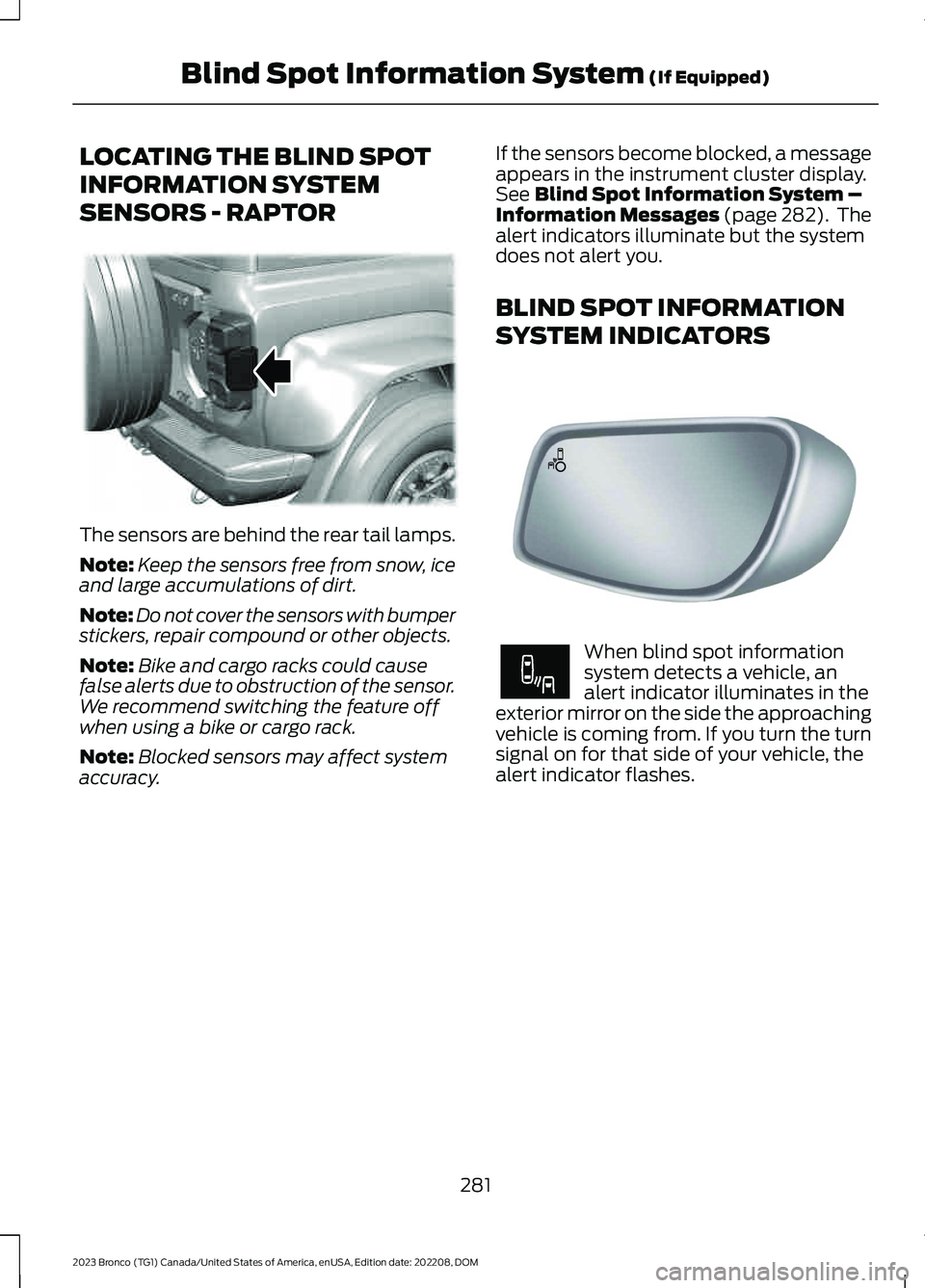
The sensors are behind the rear tail lamps.
Note:Keep the sensors free from snow, iceand large accumulations of dirt.
Note:Do not cover the sensors with bumperstickers, repair compound or other objects.
Note:Bike and cargo racks could causefalse alerts due to obstruction of the sensor.We recommend switching the feature offwhen using a bike or cargo rack.
Note:Blocked sensors may affect systemaccuracy.
If the sensors become blocked, a messageappears in the instrument cluster display.See Blind Spot Information System –Information Messages (page 282). Thealert indicators illuminate but the systemdoes not alert you.
BLIND SPOT INFORMATION
SYSTEM INDICATORS
When blind spot informationsystem detects a vehicle, analert indicator illuminates in theexterior mirror on the side the approachingvehicle is coming from. If you turn the turnsignal on for that side of your vehicle, thealert indicator flashes.
281
2023 Bronco (TG1) Canada/United States of America, enUSA, Edition date: 202208, DOMBlind Spot Information System (If Equipped)E387524 E142442 E249861E249861
Page 288 of 642

3.Switch Cross Traffic Alert on or off.
Note:The system switches on every timeyou switch the ignition on. To permanentlyswitch the system off, contact an authorizeddealer.
LOCATING THE CROSS
TRAFFIC ALERT SENSORS -
EXCLUDING: RAPTOR
The sensors are behind the rear fasciapanel.
Note:Keep the sensors free from snow, iceand large accumulations of dirt.
Note:Do not cover the sensors with bumperstickers, repair compound or other objects.
Note:Bike and cargo racks could causefalse alerts due to obstruction of the sensor.We recommend switching the feature offwhen using a bike or cargo rack.
Note:Blocked sensors may affect systemaccuracy.
If something is blocking the sensors, amessage may appear in the informationdisplay when you shift into reverse (R).
LOCATING THE CROSS
TRAFFIC ALERT SENSORS -
RAPTOR
The sensors are behind the rear tail lamps.
Note:Keep the sensors free from snow, iceand large accumulations of dirt.
Note:Do not cover the sensors with bumperstickers, repair compound or other objects.
Note:Bike and cargo racks could causefalse alerts due to obstruction of the sensor.We recommend switching the feature offwhen using a bike or cargo rack.
Note:Blocked sensors may affect systemaccuracy.
If something is blocking the sensors, amessage may appear in the instrumentcluster display when you shift into reverse(R).
CROSS TRAFFIC ALERT
INDICATORS
When the cross traffic alertdetects an approaching vehicle,a tone sounds, a warning lampilluminates in the relevant exterior mirrorand arrows appear in the informationdisplay to show which side the vehicle isapproaching from.
284
2023 Bronco (TG1) Canada/United States of America, enUSA, Edition date: 202208, DOMCross Traffic Alert (If Equipped)E339014 E387524 E268294
Page 289 of 642

If the system malfunctions, a warning lampilluminates in the instrument cluster anda message appears in the instrumentcluster display. Have your vehicle checkedas soon as possible.
Note:If arrows do not display, a messageappears in the instrument cluster display.
Note:In some conditions, the system couldalert you, even when there is nothing in thedetection zone, for example a vehiclepassing further away from your vehicle.
CROSS TRAFFIC ALERT – TROUBLESHOOTING
CROSS TRAFFIC ALERT – INFORMATION MESSAGES
ActionMessage
Displays instead of indication arrows whenthe system detects a vehicle. Check forapproaching traffic.
Cross Traffic Alert
Indicates blocked cross traffic alert systemsensors. Clean the sensors. If the messagecontinues to appear, have your vehiclechecked as soon as possible.
Cross Traffic Not Available Sensor BlockedSee Manual
The system has malfunctioned. Have yourvehicle checked as soon as possible.Cross Traffic System Fault
Displays if you attach a trailer to yourvehicle.Cross Traffic Alert Deactivated TrailerAttached
Note:When connecting a trailer, the systemmay detect the trailer and turn the systemOFF. If the system does not turn OFFautomatically, switch the cross traffic alertsystem OFF manually.
285
2023 Bronco (TG1) Canada/United States of America, enUSA, Edition date: 202208, DOMCross Traffic Alert (If Equipped)
Page 296 of 642

PRE-COLLISION ASSIST –FREQUENTLY ASKED QUESTIONS
Camera Troubleshooting
The windshield in front of the camerais dirty or obstructed.
Clean the outside of the windshield infront of the camera.
The windshield in front of the camerais clean, but the message remains inthe instrument cluster display.
Wait a short time. It could take severalminutes for the camera to detect thatthere is no obstruction.
Radar Troubleshooting (If Equipped)
The surface of the radar in the grille isdirty or obstructed.
Clean the grille surface in front of theradar or remove the object causing theobstruction.
The surface of the radar in the grille isclean, but the message remains in theinstrument cluster display.
Wait a short time. It could take severalminutes for the radar to detect thatthere is no obstruction.
Heavy rain, spray or fog is interferingwith the radar signals.
The pre-collision assist system istemporarily disabled. Pre-collisionassist reactivates a short time afterthe weather conditions improve.
Swirling water or snow or ice on thesurface of the road could interfere withthe radar signals.
The pre-collision assist system istemporarily disabled. Pre-collisionassist reactivates a short time afterthe weather conditions improve.
Radar is out of alignment due to a frontend impact.
Have your vehicle serviced to have theradar checked for proper coverage andoperation.
292
2023 Bronco (TG1) Canada/United States of America, enUSA, Edition date: 202208, DOMPre-Collision Assist
Page 298 of 642

SWITCHING DRIVER ALERT ON
AND OFF
To switch driver alert on or off, use thetouchscreen:
1.Press Features on the touchscreen.
2.Press Driver Assistance.
3.Switch Driver Alert on or off.
Note:The system remains on or offdepending on the last selection.
Resetting Driver Alert
You can reset the system by either:
•Switching the ignition off and on.
•Stopping the vehicle and then openingand closing the driver door.
DRIVER ALERT INDICATORS
System Warnings
The warning system has two stages:
1.A temporary warning is issued to adviseyou to take a rest. This message onlyappears for a short time.
2.If you do not rest and the systemcontinues to detect that your drivingdeteriorates, it issues a further warning.This remains in the instrument clusterdisplay until you cancel it.
Note:The system does not warn you if thevehicle speed falls below approximately40 mph (65 km/h).
DRIVER ALERT – TROUBLESHOOTING
DRIVER ALERT – INFORMATION MESSAGES
ActionMessage
Stop and rest as soon as it is safe to do so.Driver Alert Warning Rest Now
Take a rest soon.Driver Alert Warning Rest Suggested
294
2023 Bronco (TG1) Canada/United States of America, enUSA, Edition date: 202208, DOMDriver Alert (If Equipped)
Page 320 of 642

WINCHING LIMITATIONS
The following could impact winchoperation:
•Temperatures below 32°F (0°C).
•Low battery charge.
•Winching without the engine runningor for sustained pulls of a minute ormore.
•Try winching using shorter pullswith breaks, both to check setupand to allow the vehicle's batteryto recharge.
•Exceeding the winch or winch roperating.
You may see messages on your instrumentcluster if the system voltage drops belowa set threshold, specifically if batteryhealth is poor, winching occurs in freezingtemperatures, and/or a continuouswinching cycle. These messages go awayonce vehicle system voltage returns tonormal.
WINCHING YOUR VEHICLE
For more information, refer to The BasicGuide to Winching Techniques.
1.Put on gloves.
2.Switch the clutch to the freespoolposition.
3.Pull the winch rope to the anchor point.
4.Secure the winch rope to the anchorpoint using a tree trunk protector orchoker chain.
5.Secure the clevis to the tree trunkprotector or choker chain and the hookstrap by threading the two ends of thetree trunk protector or choker chain andthe hook strap loop through the clevis.Do not overtighten the clevis.
6.Switch the clutch to the lockedposition.
7.Remove the cap from the control boxand connect the remote control to thecontrol box.
8.Put the winch rope under tension byslowly winding it with the remotecontrol.
9.Check the anchor and make sure allthe connections are secure and free ofdebris.
10.Make sure the winch rope is neatlywound around the spooling drum.
11.Place an energy absorber, such as atree limb, heavy jacket, chain orbackpack, over the winch rope,halfway between the winch andanchor point.
12.Make sure that everyone in theimmediate area is clear of thewinching vehicle.
13.With your vehicle switched on, beginwinching slowly and steadily with theremote control.
14.Continue winching your vehicle untilit is on stable ground.
15.Place your vehicle in park (P).
Note:If your vehicle is manual transmission,place it in first gear.
16.Disconnect the winch rope from theanchor.
17.Wind the winch rope back onto thewinch drum by walking it back withthe remote control. Keep tension onthe rope when rewinding it onto thedrum to evenly distribute the winchrope on the drum.
18.Secure the winch hook to the shacklepoint or the fairlead.
19.Disconnect the remote control fromthe control box. Store the remote ina clean, dry place. Place the cap backon the control box.
316
2023 Bronco (TG1) Canada/United States of America, enUSA, Edition date: 202208, DOMWinching - Everglades