2023 FORD BRONCO clock
[x] Cancel search: clockPage 207 of 642

WHAT IS THE ELECTRONIC
LOCKING DIFFERENTIAL
The electronic locking differential is adevice housed in the front or rear axle and,when activated allows both wheels on thataxle to turn at the same speed. Theelectronic locking differential can provideadditional traction should your vehiclebecome stuck. You can activate thedifferential electronically and shift it on thefly within the operating speed range. Theelectronic differential automaticallydisengages when the vehicle speedexceeds a set value and it automaticallyreengages when the vehicle speed goesbelow a set value. See Switching theElectronic Locking Differential On andOff (page 203). It also automaticallyengages based on certain selected G.O.A.Tmodes. See G.O.A.T. Mode Control(page 260). The electronic lockingdifferential is for use in mud, rocks, sand,or any off-road condition where you needmaximum traction. It is not for use on drypavement.
Note:The electronic locking differentialsare for off-road use only and not for use ondry pavement. Using the electronic lockingdifferentials on dry pavement results inincreased tire wear, noise and vibration ordriveline damage.
Note:The front electronic lockingdifferential is only available in four-wheeldrive low (4L).
Note:Locking the front differential reducesyour ability to make tight turning maneuversand creates additional resistance to steeringinputs.
Note:Switching the electronic lockingdifferentials off while turning results indisengagement difficulties. If the electroniclocking differential has difficultydisengaging, release the accelerator pedaland turn the steering wheel back and forthin small increments while maintainingcontrol and following a straight line.
SWITCHING THE ELECTRONIC
LOCKING DIFFERENTIAL ON
AND OFF - EXCLUDING:
RAPTOR
Bronco 4x4 Systems
Activating the Electronic LockingDifferential
Front locking differential switchA
Rear locking differential switchB
You can activate the front or rear lockingdifferential by pressing the switch on thecenter switch pack.
Note:Do not perform this operation whencruise control or trail control is selected andactive. The differential could have difficultyengaging.
203
2023 Bronco (TG1) Canada/United States of America, enUSA, Edition date: 202208, DOMElectronic Locking Differential (If Equipped)E333068
Page 269 of 642
Two-wheel drive high (2H) is the defaultfour-wheel drive mode. All four-wheel drivemodes are selectable when in normalmode. Normal is the default for thesteering, suspension and exhaust modes.Off-road steering mode is not available.All suspension and exhaust modes areavailable.
The system tunes the engine andtransmission controls and the stability andtraction controls to normal mode.
The rear electronic locking rear differentialis available below 25 mph (40 km/h), andboth locking differentials are availablebelow 25 mph (40 km/h) when four-wheeldrive low (4L) is selected in the transfercase. See Switching the ElectronicLocking Differential On and Off (page203).
The stabilizer bar can be disconnected atspeeds below 30 mph (48 km/h). Trail onepedal, trail control, and trail turn assist arealso available.
OFF-ROAD - RAPTOR
For off-road driving throughsand, loose gravel, mud or mixedoff-road terrain.
This mode optimizes accelerator pedalresponse, traction and stability controls toenhance vehicle performance in off-roadenvironments. If your vehicle becomesstuck in deep conditions, this mode maybe preferred.
Four-wheel drive high (4H) is the defaultfour-wheel drive mode. Four-wheel drivelow (4L) is selectable, but two-wheel drivehigh (2H) and four-wheel drive auto (4A)are not available. Off-road is the defaultsteering and suspension mode. Sport is thedefault exhaust mode, but all steering,suspension, and exhaust modes areavailable.
The system tunes the engine, transmission,stability and traction control to off-roadmode.
The rear electronic locking differentialengages when you select this mode at anyspeed, and you can disengage it at anytime using the button. The front electroniclocking differential can be engaged in 4L.See Switching the Electronic LockingDifferential On and Off (page 203).
The stabilizer bar can be disconnected atspeeds below 50 mph (80 km/h). Thecamera system also turns on.
Note:Do not use this mode when drivingon pavement or packed snow. This couldcause driveline bind up and damage thesystem depending on the four-wheel drivemode selection. See Four-Wheel Drive(page 195).
ROCK CRAWL - EXCLUDING:RAPTOR
For off-road driving andoptimum rock-climbing ability.Rock crawl mode optimizes thethrottle and transmission response toprovide you additional control of yourvehicle.
Four-wheel drive low (4L) is the onlydriveline configuration available in rockcrawl, the system prompts you to put yourvehicle into four-wheel drive low (4L) uponselection.
The front electronic locking differential isavailable below 25 mph (40 km/h) whenin four-wheel drive low (4L). The rearelectronic locking differential is engagedwhen in rock crawl mode and is availableat any speed.
The stabilizer bar disconnects when in rockcrawl mode.
265
2023 Bronco (TG1) Canada/United States of America, enUSA, Edition date: 202208, DOMG.O.A.T. Mode ControlE366491 E322413
Page 270 of 642

Note:When using rock crawl mode ondry/hard pavement, your vehicle couldexperience vibration, driveline bind up,damage and potential excessive tire andvehicle wear.
ROCK CRAWL - RAPTOR
For off-road driving andoptimum rock-climbingcapability.
Rock crawl mode has the followingfeatures:
•Engages both front and rear electroniclocking differentials.
•Disconnects the stabilizer bar.
•Turns on the cameras.
•Optimizes throttle response.
•Adjusts transmission shift points toprovide additional control of yourvehicle.
Four-wheel drive low (4L) is the onlytransfer case option available in rock crawlmode. Off-road is the default steeringsetting, but all steering modes areavailable. Off-road is the defaultsuspension mode, and Normal is thedefault exhaust mode. The system tunesthe engine and transmission controls torock crawl mode.
The electronic locking differentials engagewhen you select this mode, and you candisengage them at any time using thebuttons. See Switching the ElectronicLocking Differential On and Off (page203).
The stabilizer bar can be disconnected atspeeds below 50 mph (80 km/h).
Note:When using rock crawl mode ondry/hard pavement, your vehicle couldexperience vibration, driveline bind up,damage and potential excessive tire andvehicle wear.
SAND - EXCLUDING: RAPTOR
For off-road driving on soft, drysand or deep snow. This modemay help get your vehicleunstuck from deep snow or sand.
Four-wheel drive high (4H) is the defaultfour-wheel drive mode. Four-wheel drivelow (4L) is selectable in sand mode.
The front electronic locking differential isavailable below 25 mph (40 km/h) whenin four-wheel drive low (4L). The rearelectronic locking differential is engagedwhen in sand mode and is available at anyspeed in all selectable four-wheel drivemodes.
The stabilizer bar disconnect is availablein four-wheel drive high (4H) or four-wheeldrive low (4L).
Note:The front camera system switcheson when you are in sand mode and yourspeed is less than 15 mph (24 km/h). If youexceed 15 mph (24 km/h), the camera shutsoff until your vehicle speed is below 12 mph(20 km/h).
Note:When using Sand mode on dry/hardpavement, your vehicle could experiencevibration, driveline bind up, damage andpotential excessive tire and vehicle wear.
Note:Sand mode is not intended for useon firm, slippery surfaces, such as pavedroads covered with snow or ice. For slippery,firm surfaces use slippery mode.
SLIPPERY - ADVANCED 4X4 WITH4A MODE, EXCLUDING: RAPTOR
For less than ideal roadconditions, you can use thismode for crossing terrain wherea firm surface is covered with loose orslippery material, such as snow or ice.Slippery mode lowers throttle responseand optimizes shifting for slippery surfaces.
266
2023 Bronco (TG1) Canada/United States of America, enUSA, Edition date: 202208, DOMG.O.A.T. Mode ControlE366492 E332185 E295414
Page 274 of 642

DetailsMessage
Displays when you select a four-wheel drivemode that is not available in the currentdrive mode. Select an available four-wheeldrive mode.
Selected 4x4 Mode Not Available in CurrentDrive Mode
Displays when you select an electroniclocking differential that is not available inthe current drive mode. Select an availableelectric locking differential.
Selected Locking Differential Not Availablein Current Drive Mode
Displays when you attempt to disconnectthe stabilizer bar in the current drive mode.Select a different drive mode to disconnectthe stabilizer bar.
Sta-Bar Disconnect Not Available InSelected Drive Mode
270
2023 Bronco (TG1) Canada/United States of America, enUSA, Edition date: 202208, DOMG.O.A.T. Mode Control
Page 328 of 642

When you are driving through water do notexceed 4 mph (7 km/h).
OFF-ROAD DRIVING AIDS
Bronco 4x4 Systems
Selecting an Off-Road G.O.A.TMode
Using the appropriate drive mode increasesyour vehicle's control. See G.O.A.T. ModeControl (page 260).
Note:Drive modes are selected by usingthe Goes Over Any-type of Terrain G.O.A.T.MODES controller.
Using Four-Wheel Drive
Your vehicle has a four-wheel drive systemthat offers various modes to help youoptimize traction on any off-road surface.See Four-Wheel Drive (page 195).
Using the Stabilizer BarDisconnect
The stabilizer bar disconnect improvessuspension articulation, improving tractionand comfort in rough terrain.
The vehicle's disconnect system ishydraulically actuated.
Your vehicle is capable of disconnectingunder high load. Your vehicle is alsocapable of reconnecting under allconditions.
It is not necessary for the vehicle to be onlevel ground in order to reconnect thestabilizer bar. See Stabilizer BarDisconnect (page 229).
Using the Cameras Off-Road
Use the 360 degree camera to enhanceyour off-road experience. See 360 DegreeCamera (page 247).
Using the Front and RearDifferential Lock
When engaged, the front and reardifferential lock provides additionaltraction to your vehicle by forcing eitherthe two rear wheels or two front wheels toturn at the same speed.
You can activate and deactivate the frontand rear differential lock on the fly withinthe operating speed range. See ElectronicLocking Differential (page 203).
Using Trail Control
The system works in a similar manner tocruise control in off-road conditions. TrailControl provides you the ability tomaneuver the vehicle without using thethrottle and brake pedals.
Trail Control allows you to set a speedbetween 1 mph (1.6 km/h) to 14 mph(23 km/h) in a forward motion and 1 mph(1.6 km/h) to 5 mph (8 km/h) in reverse.The system controls acceleration andbraking in difficult off-road environments,which allows you to focus on steering. SeeTrail Control (page 222).
Trail Control Performance:
•Manages wheel slip to maximizetraction.
•Removes the need for you to use bothfeet when driving in off-road situations.
•Provides braking to maximize tractionin descents.
•Gives you confidence in difficultenvironments.
Using Trail One Pedal Drive
Trail one pedal drive coordinatespropulsive and braking torque through yourapplication of the accelerator pedal tosimulate a two footed driving technique.
324
2023 Bronco (TG1) Canada/United States of America, enUSA, Edition date: 202208, DOMDriving Hints
Page 358 of 642
ENGINE OIL
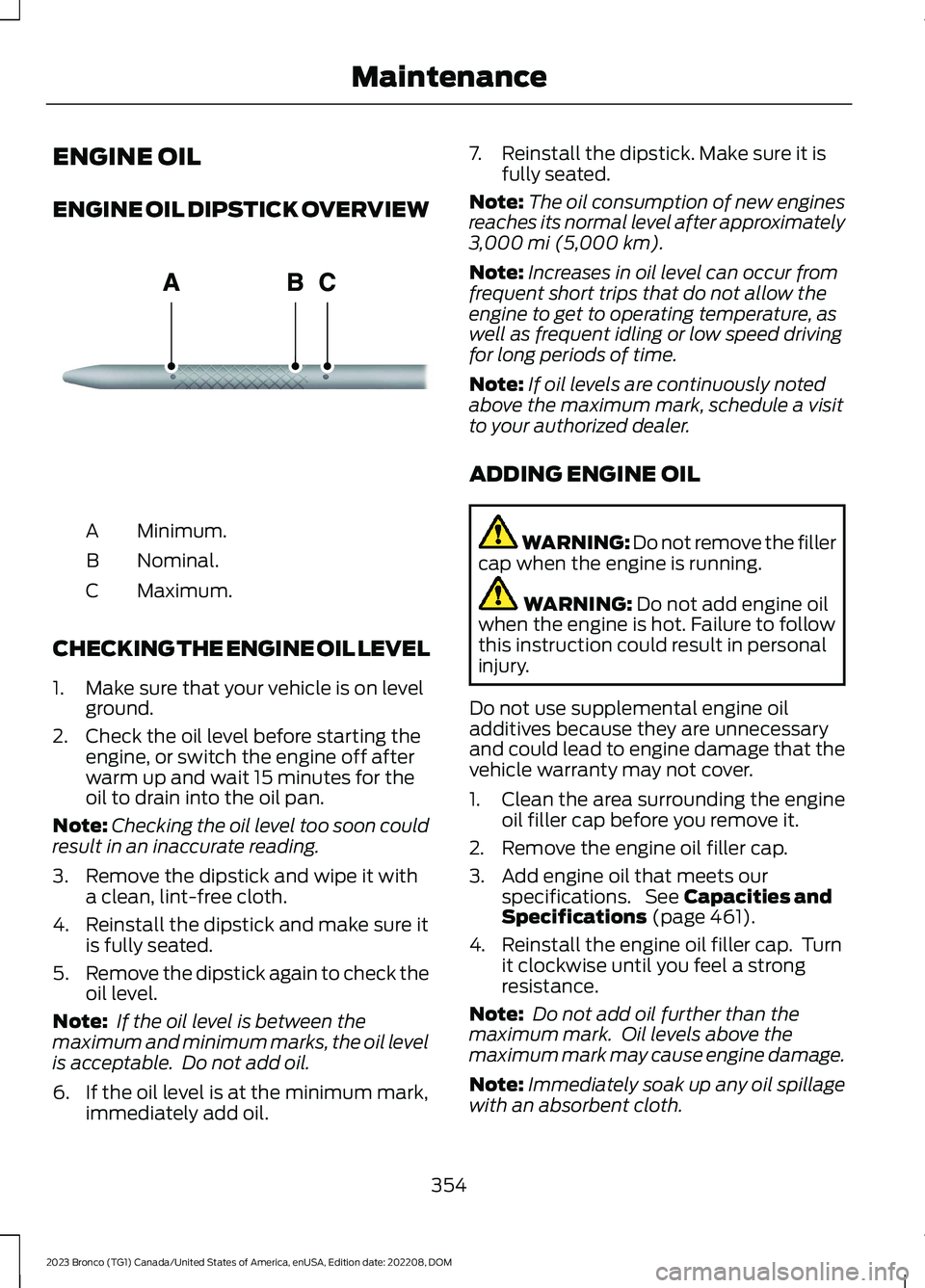
ENGINE OIL DIPSTICK OVERVIEW
Minimum.A
Nominal.B
Maximum.C
CHECKING THE ENGINE OIL LEVEL
1.Make sure that your vehicle is on levelground.
2.Check the oil level before starting theengine, or switch the engine off afterwarm up and wait 15 minutes for theoil to drain into the oil pan.
Note:Checking the oil level too soon couldresult in an inaccurate reading.
3.Remove the dipstick and wipe it witha clean, lint-free cloth.
4.Reinstall the dipstick and make sure itis fully seated.
5.Remove the dipstick again to check theoil level.
Note: If the oil level is between themaximum and minimum marks, the oil levelis acceptable. Do not add oil.
6.If the oil level is at the minimum mark,immediately add oil.
7.Reinstall the dipstick. Make sure it isfully seated.
Note:The oil consumption of new enginesreaches its normal level after approximately3,000 mi (5,000 km).
Note:Increases in oil level can occur fromfrequent short trips that do not allow theengine to get to operating temperature, aswell as frequent idling or low speed drivingfor long periods of time.
Note:If oil levels are continuously notedabove the maximum mark, schedule a visitto your authorized dealer.
ADDING ENGINE OIL
WARNING: Do not remove the fillercap when the engine is running.
WARNING: Do not add engine oilwhen the engine is hot. Failure to followthis instruction could result in personalinjury.
Do not use supplemental engine oiladditives because they are unnecessaryand could lead to engine damage that thevehicle warranty may not cover.
1.Clean the area surrounding the engineoil filler cap before you remove it.
2.Remove the engine oil filler cap.
3.Add engine oil that meets ourspecifications. See Capacities andSpecifications (page 461).
4.Reinstall the engine oil filler cap. Turnit clockwise until you feel a strongresistance.
Note: Do not add oil further than themaximum mark. Oil levels above themaximum mark may cause engine damage.
Note:Immediately soak up any oil spillagewith an absorbent cloth.
354
2023 Bronco (TG1) Canada/United States of America, enUSA, Edition date: 202208, DOMMaintenanceE270482
Page 360 of 642

WARNING: Do not remove thecoolant reservoir cap when the engine ison or the cooling system is hot. Wait 10minutes for the cooling system to cooldown. Cover the coolant reservoir capwith a thick cloth to prevent thepossibility of scalding and slowly removethe cap. Failure to follow this instructioncould result in personal injury.
WARNING: Do not add coolantwhen the vehicle is on or the coolingsystem is hot. Failure to follow thisinstruction could result in personal injury.
WARNING: Do not add coolantfurther than the MAX mark.
WARNING: Do not put coolant inthe windshield washer reservoir. Ifsprayed on the windshield, coolant couldmake it difficult to see through thewindshield.
WARNING: Do not allow the fluidto touch your skin or eyes. If thishappens, rinse the affected areasimmediately with plenty of water andcontact your physician.
Note: Do not use stop leak pellets, coolingsystem sealants, or non-specified additivesas they can cause damage to the enginecooling or heating systems. Resultingcomponent damage may not be covered bythe vehicle Warranty.
Note:Automotive fluids are notinterchangeable.
It is very important to use predilutedcoolant approved to the correctspecification in order to avoid plugging thesmall passageways in the engine coolingsystem. See Capacities andSpecifications (page 461). Do not mixdifferent colors or types of coolant in yourvehicle. Mixing of engine coolants or usingan incorrect coolant may harm the engineor cooling system components and couldvoid the vehicle Warranty.
Note:If prediluted coolant is not available,use the approved concentrated coolantdiluting it to 50/50 with deionized ordistilled water. See Capacities andSpecifications (page 461). Using water thathas not been deionized may contribute todeposit formation, corrosion and pluggingof the small cooling system passageways.
To top up the coolant level do thefollowing:
1.Unscrew the cap slowly. Any pressureescapes as you unscrew the cap.
2.Add enough prediluted coolant toreach the correct level.
Note:We do not recommend the use ofrecycled coolant.
3.Replace the coolant reservoir cap. Turnthe cap clockwise until it contacts thehard stop.
4.Check the coolant level in the coolantreservoir the next few times you driveyour vehicle. If necessary, repeat step2.
If you have to add more than 1.1 qt (1 L) ofengine coolant per month, have yourvehicle checked as soon as possible.Operating an engine with a low level ofcoolant can result in engine overheatingand possible engine damage.
In case of emergency, you can add a largeamount of water without engine coolantin order to reach a vehicle service location.Service your vehicle as soon as possible.
356
2023 Bronco (TG1) Canada/United States of America, enUSA, Edition date: 202208, DOMMaintenance
Page 367 of 642

For longer, trouble-free operation, keep thetop of the battery clean and dry and thebattery cables tightly fastened to thebattery terminals. If any corrosion ispresent on the battery or terminals, removethe cables from the terminals and cleanwith a wire brush. You can neutralize theacid with a solution of baking soda andwater.
We recommend that you disconnect thenegative battery cable terminal from thebattery if you plan to store your vehicle foran extended period.
Note:If you only disconnect the negativebattery cable terminal, make sure it isisolated or placed away from the batteryterminal to avoid unintended connection orarcing.
If you disconnect or replace the batteryand your vehicle has an automatictransmission, it must relearn its adaptivestrategy. Because of this, the transmissionmay shift firmly when first driven. This isnormal operation while the transmissionfully updates its operation to optimumshift feel.
Removing the Battery
1.Apply the parking brake and switch theignition off.
2.Switch all electrical equipment off, forexample lights and radio.
3.Wait a minimum of two minutes beforedisconnecting the battery.
Note:The engine management system hasa power hold function and remains poweredfor a period of time after you switch theignition off. This is to allow diagnostic andadaptive tables to be stored. Disconnectingthe battery without waiting can causedamage not covered by the vehicleWarranty.
4.Disconnect and isolate the negativebattery cable terminal.
5.Disconnect and isolate the positivebattery cable terminal.
6.Remove the battery securing clamp.
7.Remove the battery.
If you disconnect or replace the vehiclebattery, you must reset the followingfeatures:
•Window bounce-back. See WindowBounce-Back (page 114).
•Clock Settings.
•Pre-set radio stations.
Replacing the Battery
Note:Before reconnecting the battery,make sure the ignition remains switched off.
You must replace the battery with one ofexactly the same specification.
To install, reverse the removal procedure.
Note:Make sure that you correctly installthe battery terminal covers, battery coverand battery cable terminals.
RESETTING THE BATTERYSENSOR
When you install a new battery, reset thebattery sensor by doing the following:
1.Switch the ignition on, and leave theengine off.
Note:Complete Steps 2 and 3 within 10seconds.
2.Flash the high beam headlamps fivetimes, ending with the high beams off.
3.Press and release the brake pedal threetimes.
The battery warning lamp flashes threetimes to confirm that the reset issuccessful.
363
2023 Bronco (TG1) Canada/United States of America, enUSA, Edition date: 202208, DOMMaintenance