2023 DODGE HORNET warning
[x] Cancel search: warningPage 107 of 288

STARTING AND OPERATING105
PARKSENSE FRONT/REAR PARK ASSIST
SYSTEM — IF EQUIPPED
The ParkSense Park Assist system provides visual and
audible indications of the distance between the rear, and
if equipped, the front fascia/bumper and a detected
obstacle when backing up or moving forward (e.g. during a
parking maneuver).
NOTE:
The system is designed to assist the driver and not to
substitute the driver.
The driver must stay in full control of the vehicle's
acceleration and braking and is responsible for
controlling the vehicle's movements
Úpage 106.
ParkSense will retain the last system state (enabled or
disabled) from the last ignition cycle when the ignition is
changed to the ON/RUN position.
ParkSense is active in DRIVE or REVERSE, as long as the
system is on. The system will remain active until the
vehicle speed is increased to approximately 8 mph
(13 km/h) or above while in DRIVE or NEUTRAL, and
7 mph (11 km/h) or above while in REVERSE. While in
REVERSE and above the system's operating speed, a
warning will appear in the radio touchscreen indicating the
vehicle speed is too fast. The system will become active
again if the vehicle speed is decreased to less than
approximately 6 mph (9 km/h).
PARKSENSE SENSORS
The six ParkSense sensors (four when vehicle is not
equipped with front sensors), located in the rear fascia/
bumper, and the six ParkSense sensors located in the
front fascia/bumper, monitor the area in front and behind
the vehicle that is within the sensors’ field of view.
The front sensors detect obstacles from approximately
12 inches (30 cm) up to 35 inches (90 cm) from the front fascia/bumper. The rear sensors can detect obstacles
from approximately 12 inches (30 cm) up to 59 inches
(150 cm) from the rear fascia/bumper. These distances
depend on the location, type and orientation of the
obstacle in the horizontal direction.
PARKSENSE WARNING DISPLAY
The ParkSense Warning screen will only be displayed if the
settings are selected within the Uconnect system
Úpage 130.
The ParkSense Warning screen is located within the radio
touchscreen, and provides visual warnings to indicate the
distance between the rear fascia/bumper and/or front
fascia/bumper and the detected obstacle.
PARKSENSE DISPLAY
The warning display will turn on indicating the system status
when the vehicle is in REVERSE, or when the vehicle is in
DRIVE or NEUTRAL and an obstacle has been detected.
The system will determine if an obstacle is in course of
collision with the vehicle and will provide a visual warning
to the driver. The system will indicate a detected obstacle
by showing an arc in the left and/or right front or rear
regions based on the object’s distance and location relative to the vehicle. The color of the arc depends on the
distance and position of the obstacle inside or outside the
trajectory.
If the system detects an obstacle outside of the vehicles
trajectory then it will display in grey. When the obstacle
detected is on course of a collision the system will turn
yellow then red. If the obstacle detected is less than
12 inches (30 cm) then a continuous tone will sound and
the corresponding red arc will be displayed.
Front Park Assist Audible Alerts
When an obstacle in course of a collision gets closer to the
vehicle the tone frequency smoothly increases. The
audible alert will remain on until one of the following
conditions occurs:
The vehicle is at a standstill and the gear selector is
moved out of the REVERSE position.
When the obstacle detected is outside of the vehicle
path.
ParkSense will turn off the Front Park Assist audible alert
(chime) after approximately three seconds when an
obstacle has been detected, or if the vehicle is stationary.
NOTE:ParkSense will reduce the volume of the radio, if on, when
the system is sounding an audible tone.
Adjustable Chime Volume Settings
Front and Rear chime volume settings can be selected
from the Uconnect system
Úpage 130.
The chime volume settings include low, medium, and high.
ParkSense will retain its last known configuration state
through ignition cycles.
4
23_GG_OM_EN_USC_t.book Page 105
Page 108 of 288

106STARTING AND OPERATING
(Continued)
ENABLING AND DISABLING PARKSENSE
ParkSense can be enabled and disabled with
the ParkSense switch, located in front of the
center console, to the rear of the gear selector.
When the ParkSense switch is pushed to disable the
system, the LED in the switch will illuminate, and the
display will read “Parksense Off” when the vehicle is
shifted into DRIVE or REVERSE.
NOTE:The ParkSense switch LED will be off when the system is
active.
The ParkSense switch LED will also be illuminated when
ParkSense requires service. If the ParkSense switch is
pushed, and requires service, the ParkSense switch LED
will blink momentarily, and then the LED will be on.
SERVICE THE PARKSENSE PARK ASSIST
S
YSTEM
During vehicle start up, when the ParkSense System has
detected a faulted condition, the instrument cluster will
display a warning message associated with the detected
fault.
If "Sensor Lock" appears in the instrument cluster display,
make sure the outer surface and the underside of the rear
fascia/bumper and/or front fascia/bumper is clean and
clear of snow, ice, mud, dirt or other obstructions and then
cycle the ignition. If the message continues to appear, see
an authorized dealer.
If the "System Not Available" message appears in the
instrument cluster display, see an authorized dealer.
CLEANING THE PARKSENSE SYSTEM
Clean the ParkSense sensors with water, car wash soap
and a soft cloth. Do not use rough or hard cloths. Do not
scratch or poke the sensors. Otherwise, you could damage
the sensors.
PARKSENSE SYSTEM USAGE
P
RECAUTIONS
Ensure that the front and rear fascias/bumpers are
free of snow, ice, mud, dirt and debris to keep the Park -
Sense system operating properly.
Jackhammers, large trucks, and other vibrations could
affect the performance of ParkSense.
When you turn ParkSense off, the display will read
“Parksense Off” when the vehicle is shifted into DRIVE
or REVERSE. Furthermore, once you turn ParkSense
off, it remains off until you turn it on again, even if you
cycle the ignition.
ParkSense, when on, will reduce the volume of the
radio when it is sounding a tone.
Clean the ParkSense sensors regularly, taking care not
to scratch or damage them. The sensors must not be
covered with ice, snow, slush, mud, dirt or debris.
Failure to do so can result in the system not working
properly. The ParkSense system might not detect an
obstacle behind or in front of the fascia/bumper, or it
could provide a false indication that an obstacle is
behind or in front of the fascia/bumper.
Use the ParkSense switch to turn the ParkSense
system off if objects such as bicycle carriers, etc. are
attached to the rear fascia/bumper. Failure to do so
can result in the system misinterpreting a close object
as a sensor problem, causing the “System Not Avail -
able” message to be displayed in the instrument
cluster display.
NOTE:If any objects are attached to the fascia/bumper within a
6.5 ft (2 m) field of view, they will interfere and cause false
alerts and possibly blockage.
There may be a delay in the object detection rate if the
object is moving.
The rear sensors are automatically deactivated when
the trailer’s electric plug is inserted in the vehicle’s tow
socket. The front sensors (if equipped) will stay active
and can provide acoustic and visual warnings. The rear
sensors are automatically reactivated when the
trailer's cable plug is removed.
WARNING!
Drivers must be careful when backing up even when
using ParkSense. Always check carefully behind your
vehicle, look behind you, and be sure to check for
pedestrians, animals, other vehicles, obstructions,
and blind spots before backing up. You are respon -
sible for safety and must continue to pay attention to
your surroundings. Failure to do so can result in
serious injury or death.
23_GG_OM_EN_USC_t.book Page 106
Page 109 of 288

STARTING AND OPERATING107
SIDE DISTANCE WARNING (SDW)
S
YSTEM
The Side Distance Warning system has the function of
detecting the presence of side obstacles near the vehicle
using the parking sensors located in the front and rear
fascias/bumpers.
Side Distance Warning Display
The Side Distance Warning screen will only be displayed if
this feature is enabled within Uconnect Settings
Úpage 130.
The system warns the driver with an acoustic signal, and
when selected, with visual indications on the radio
touchscreen display.
NOTE:ParkSense will reduce the volume of the radio if on when
the system is sounding an audible tone.
Activation/Deactivation
The system can operate only after driving a short distance
and if the vehicle speed is between 0 and 8 mph (0 and
13 km/h) while in DRIVE or NEUTRAL, or 7 mph (11 km/h) in REVERSE. The system can be activated/deactivated via
the Settings menu of the Uconnect system. If the
ParkSense System is deactivated via the ParkSense
switch, then the Side Distance Warning system will
automatically be deactivated.
Side Distance Warning System Status
NOTE:
The vehicle needs to be driven approximately one car
length in order for the Side Distance Warning system to
activate.
Before using ParkSense, it is strongly recommended
that the ball mount and hitch ball assembly be
disconnected from the vehicle when the vehicle is
not used for towing. Failure to do so can result in
injury or damage to vehicles or obstacles because
the hitch ball will be much closer to the obstacle than
the rear fascia/bumper when the vehicle sounds the
continuous tone. Also, the sensors could detect the
ball mount and hitch ball assembly, depending on its
size and shape, giving a false indication that an
obstacle is behind the vehicle.
CAUTION!
ParkSense is only a parking aid and it is unable to
recognize every obstacle, including small obstacles.
Parking curbs might be temporarily detected or not
detected at all. Obstacles located above or below the
sensors will not be detected when they are in close
proximity.
The vehicle must be driven slowly when using
ParkSense in order to be able to stop in time when an
obstacle is detected. It is recommended that the
driver looks over his/her shoulder when using
ParkSense.
WARNING!
WARNING ALERTS
Distance
(in/cm) Less than
12 inches
(30 cm)12 – 23 inches
(30 – 60 cm)
Arcs-Left Red Arc Yellow Arc
Arcs-Right Red Arc Yellow Arc
Audible Alert
Chime Audible alert only when the vehicle
is on course for a collision
Radio Volume
Reduced Yes
Yes
1 — System Not Active
2 — System Active
4
23_GG_OM_EN_USC_t.book Page 107
Page 110 of 288

108STARTING AND OPERATING
(Continued)
Side Distance Warning Usage Precautions
Some conditions may influence the performance of the
Side Distance Warning system:
NOTE:
Ensure that the front and rear fascias/bumpers are
free of snow, ice, mud, dirt and debris to keep the
ParkSense system operating properly.
Construction equipment, large trucks, and other vibra -
tions could affect the performance of ParkSense.
ParkSense, when on, will reduce the volume of the
radio when it is sounding a tone.
Clean the ParkSense sensors regularly, taking care not
to scratch or damage them. The sensors must not be
covered with ice, snow, slush, mud, dirt or debris.
Failure to do so can result in the system not working
properly. The ParkSense system might not detect an
obstacle behind or in front of the fascia/bumper, or it
could provide a false indication that an obstacle is
behind or in front of the fascia/bumper.
The presence of a tow hook without a trailer may inter -
fere with the correct operation of the parking sensors.
Before using the ParkSense system, it is recom -
mended to remove the removable tow hook ball
assembly and any attachments from the vehicle when
it is not used for towing operations. If you leave the tow
hook fitted when not towing a trailer, the tow hook
could be detected as an obstacle by the sensors.
Contact your authorized dealer to update the
ParkSense system operations.
PARKSENSE ACTIVE PARK ASSIST SYSTEM —
IF EQUIPPED
The ParkSense Active Park Assist system is intended to
assist the driver during parallel, perpendicular, and
parallel park exit maneuvers by identifying a proper
parking space, providing audible/visual instructions, and
controlling the steering wheel. The ParkSense Active Park
Assist system is defined as “semi-automatic” since the
driver maintains control of the accelerator, gear selector
and brakes. Depending on the driver's parking maneuver
selection, the ParkSense Active Park Assist system is
capable of maneuvering a vehicle into a parallel or a
perpendicular parking space on either side (i.e., driver
side or passenger side), as well as exiting a parallel
parking space.
NOTE:
The driver is always responsible for controlling the
vehicle, responsible for any surrounding objects, and
must intervene as required.
The system is designed to assist the driver and not to
substitute the driver.
WARNING!
Drivers must be careful when backing up even when
using ParkSense. Always check carefully behind your
vehicle, look behind you, and be sure to check for
pedestrians, animals, other vehicles, obstructions,
and blind spots before backing up. You are respon -
sible for safety and must continue to pay attention to
your surroundings. Failure to do so can result in
serious injury or death.
Before using ParkSense, it is strongly recommended
that the ball mount and hitch ball assembly be
disconnected from the vehicle when the vehicle is
not used for towing. Failure to do so can result in
injury or damage to vehicles or obstacles because
the hitch ball will be much closer to the obstacle than
the rear fascia/bumper when the vehicle sounds the
continuous tone. Also, the sensors could detect the
ball mount and hitch ball assembly, depending on its
size and shape, giving a false indication that an
obstacle is behind the vehicle.
CAUTION!
ParkSense is only a parking aid and it is unable to
recognize every obstacle, including small obstacles.
Parking curbs might be temporarily detected or not
detected at all. Obstacles located above or below the
sensors will not be detected when they are in close
proximity.
The vehicle must be driven slowly when using
ParkSense in order to be able to stop in time when
an obstacle is detected. It is recommended that
the driver looks over his/her shoulder when using
ParkSense.
CAUTION!
23_GG_OM_EN_USC_t.book Page 108
Page 113 of 288

STARTING AND OPERATING111
Once the vehicle is in position, you will be instructed to
stop the vehicle’s movement and remove your hands from
the steering wheel. When the vehicle comes to a standstill
(your hands still removed from the steering wheel), you will
be instructed to place the gear selector into the REVERSE
position.
Shift To Reverse — Parallel Parking Space
Shift To Reverse — Perpendicular Parking Space
The system may then instruct the driver to wait for steering
to complete before then instructing to check the vehicle’s
surroundings, and move backward.
Several more gear shifts (DRIVE and REVERSE) while
keeping hands off of the steering wheel will be instructed
to the driver while checking the vehicle’s surroundings
before completing the parking maneuver.
When the vehicle is in the parking position, the maneuver
is complete and the driver will be instructed to check the
vehicle's parking position, then shift the vehicle into PARK.
The message “Active ParkSense Complete - Check Parking
Position” will be displayed momentarily.
NOTE:
It is the driver's responsibility to use the brake and stop
the vehicle. The driver should check their surroundings
and be prepared to stop the vehicle either when
instructed to, or when driver intervention is required.
It is the driver’s responsibility to use the brake and
accelerator during the semi-automatic parking
maneuver.
When the system instructs the driver to remove their
hands from the steering wheel, the driver should check
their surroundings and begin to back up slowly.
The system will cancel the maneuver if the vehicle
speed exceeds 5 mph (7 km/h) during active steering
guidance into the parking space. The system will
provide a warning to the driver at 3 mph (5 km/h) that
tells them to slow down. The driver is then responsible
for completing the maneuver if the system is canceled.
If the system is canceled during the maneuver for any
reason, the driver must take control of the vehicle.
WARNING!
Drivers must be careful when performing parallel or
perpendicular parking maneuvers even when using
the ParkSense Active Park Assist system. Always
check carefully behind and in front of your vehicle,
look behind and in front of you, and be sure to check
for pedestrians, animals, other vehicles, obstruc -
tions, and blind spots before backing up and moving
forward. You are responsible for safety and must
continue to pay attention to your surroundings.
Failure to do so can result in serious injury or death.
Before using the ParkSense Active Park Assist
system, it is strongly recommended that the ball
mount and hitch ball assembly be disconnected from
the vehicle when the vehicle is not used for towing.
Failure to do so can result in injury or damage to vehi -
cles or obstacles because the hitch ball will be much
closer to the obstacle than the rear fascia/bumper
when the vehicle sounds the continuous tone. Also,
the sensors could detect the ball mount and hitch
ball assembly, depending on its size and shape,
giving a false indication that an obstacle is behind
the vehicle.
4
23_GG_OM_EN_USC_t.book Page 111
Page 115 of 288

STARTING AND OPERATING113
Construction equipment, large trucks, and other vibra -
tions could affect the performance of ParkSense.
Sensors may detect a nonexistent obstacle (echo
noise) due to mechanical noises, for example while
washing the vehicle or in the case of rain, strong wind,
and hail.
The sensors may not detect objects of a particular
shape or made from particular materials (very thin
poles, trailer beams, panels, nets, bushes, anti-parking
posts, pavements, rubbish bins, motor vehicles, etc.).
Always take great care to check that the vehicle and its
path are actually compatible with the parking place
identified by the system.
The use of wheels and tires that are different size to the
original equipment could affect the operation of the
system.
The operation of the rear sensors is automatically
deactivated when the trailer's electric plug is inserted
in the vehicle's tow hook socket, while the front
sensors stay active and can provide acoustic and
visual warnings. If this situation occurs, Active Park
Assist will not work. The rear sensors are automatically
reactivated when the trailer's cable plug is removed.
In the case of parking maneuvers on roads with
inclines, the performance of the system could be
inferior and it may deactivate.
If a parking maneuver is being carried out between
two parked vehicles alongside a curb, the system may
cause the vehicle to drive up onto the curb.
Some maneuvers at very tight bends might be impos -
sible to be carried out.
Take great care to ensure that conditions do not
change during the parking maneuver (e.g. if there are
persons and/or animals in the parking place, moving
vehicles, etc.) and intervene immediately if necessary.
During parking maneuvers, pay attention to vehicles
approaching from the opposite direction. Always abide
by the law and road regulations.
NOTE:
Correct system operation is not guaranteed if snow
chains or the compact spare tire are fitted.
The function only informs the driver about the last
appropriate parking place (parallel or perpendicular)
detected by the parking sensors.
Some messages displayed are accompanied by
audible warnings.
LANESENSE — IF EQUIPPED
LANESENSE OPERATION
The LaneSense system is operational at speeds above
37 mph (60 km/h) and below 112 mph (180 km/h). The
LaneSense system uses a forward facing camera to detect
lane markings and measure vehicle position within the
lane boundaries. When both lane markings are detected and the driver
unintentionally drifts out of the lane (no turn signal
applied), the LaneSense system provides a haptic warning
in the form of torque applied to the steering wheel to
prompt the driver to remain within the lane boundaries. If
the driver continues to unintentionally drift out of the lane,
the LaneSense system provides a visual warning through
the instrument cluster display to prompt the driver to
remain within the lane boundaries.
The driver may manually override the haptic warning by
applying torque to the steering wheel at any time.
When only a single lane marking is detected and the driver
unintentionally drifts across the lane marking (no turn
signal applied), the LaneSense system provides a visual
warning through the instrument cluster display to prompt
the driver to remain within the lane. When only a single
lane marking is detected, a haptic (torque) warning will not
be provided.
NOTE:When operating conditions have been met, the Lane
-
Sense system will monitor if the driver’s hands are on the
steering wheel and provides an audible warning to the
driver when the driver’s hands are not detected on the
steering wheel. The system will cancel if the driver does
not return their hands to the wheel.
4
23_GG_OM_EN_USC_t.book Page 113
Page 116 of 288
114STARTING AND OPERATING
TURNING LANESENSE ON OR OFF
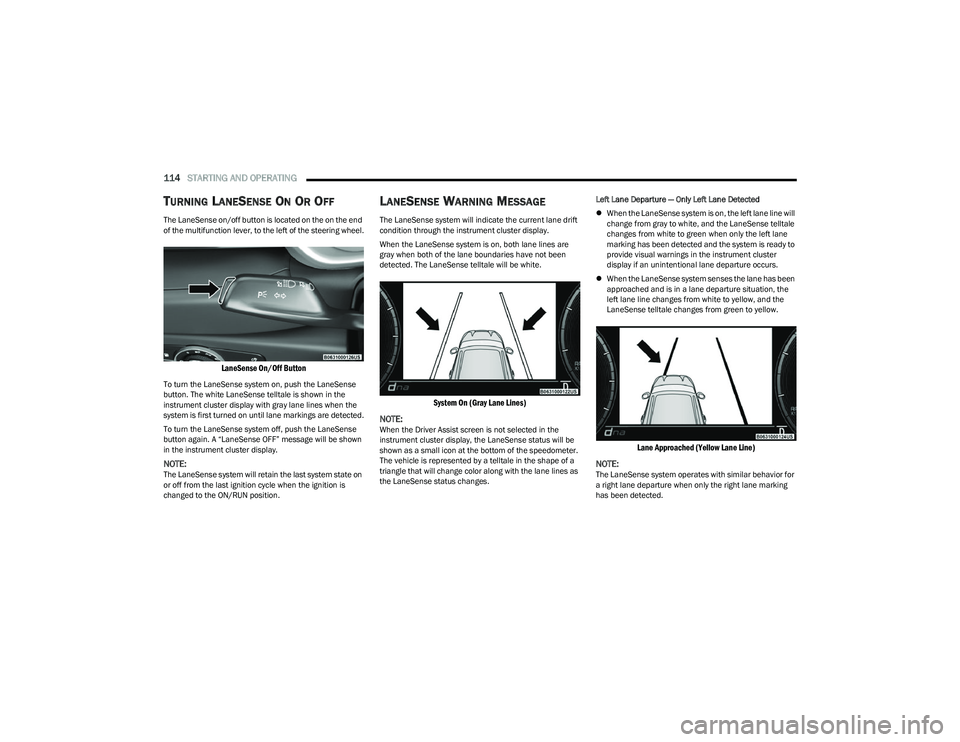
The LaneSense on/off button is located on the on the end
of the multifunction lever, to the left of the steering wheel.
LaneSense On/Off Button
To turn the LaneSense system on, push the LaneSense
button. The white LaneSense telltale is shown in the
instrument cluster display with gray lane lines when the
system is first turned on until lane markings are detected.
To turn the LaneSense system off, push the LaneSense
button again. A “LaneSense OFF” message will be shown
in the instrument cluster display.
NOTE:The LaneSense system will retain the last system state on
or off from the last ignition cycle when the ignition is
changed to the ON/RUN position.
LANESENSE WARNING MESSAGE
The LaneSense system will indicate the current lane drift
condition through the instrument cluster display.
When the LaneSense system is on, both lane lines are
gray when both of the lane boundaries have not been
detected. The LaneSense telltale will be white.
System On (Gray Lane Lines)
NOTE:
When the Driver Assist screen is not selected in the
instrument cluster display, the LaneSense status will be
shown as a small icon at the bottom of the speedometer.
The vehicle is represented by a telltale in the shape of a
triangle that will change color along with the lane lines as
the LaneSense status changes. Left Lane Departure — Only Left Lane Detected
When the LaneSense system is on, the left lane line will
change from gray to white, and the LaneSense telltale
changes from white to green when only the left lane
marking has been detected and the system is ready to
provide visual warnings in the instrument cluster
display if an unintentional lane departure occurs.
When the LaneSense system senses the lane has been
approached and is in a lane departure situation, the
left lane line changes from white to yellow, and the
LaneSense telltale changes from green to yellow.
Lane Approached (Yellow Lane Line)
NOTE:
The LaneSense system operates with similar behavior for
a right lane departure when only the right lane marking
has been detected.
23_GG_OM_EN_USC_t.book Page 114
Page 117 of 288
STARTING AND OPERATING115
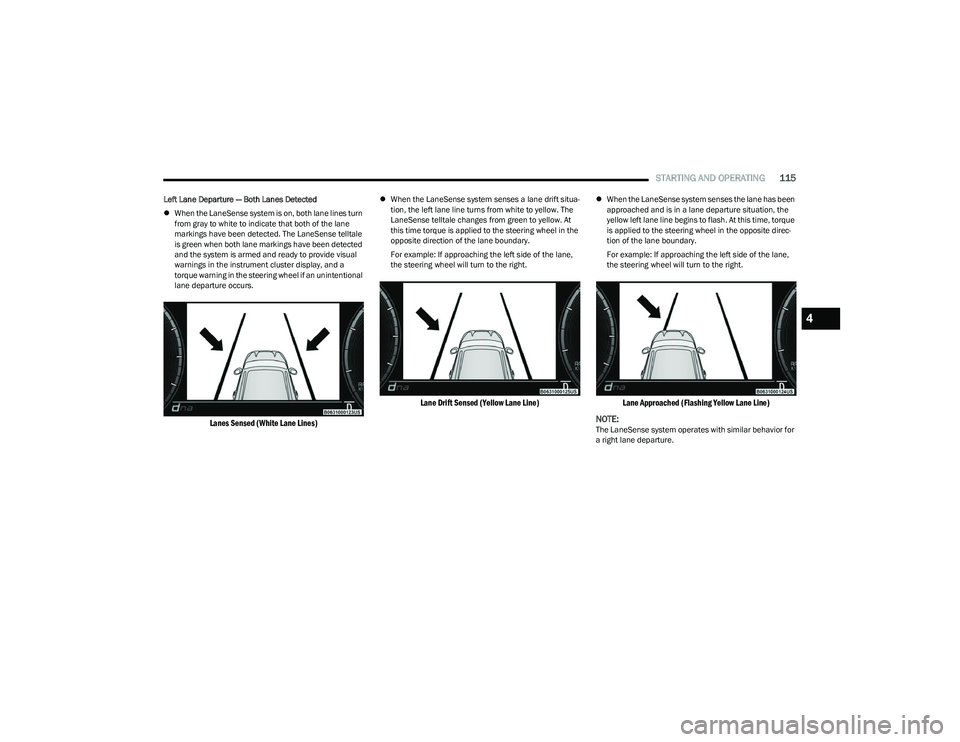
Left Lane Departure — Both Lanes Detected
When the LaneSense system is on, both lane lines turn
from gray to white to indicate that both of the lane
markings have been detected. The LaneSense telltale
is green when both lane markings have been detected
and the system is armed and ready to provide visual
warnings in the instrument cluster display, and a
torque warning in the steering wheel if an unintentional
lane departure occurs.
Lanes Sensed (White Lane Lines)
When the LaneSense system senses a lane drift situa -
tion, the left lane line turns from white to yellow. The
LaneSense telltale changes from green to yellow. At
this time torque is applied to the steering wheel in the
opposite direction of the lane boundary.
For example: If approaching the left side of the lane,
the steering wheel will turn to the right.
Lane Drift Sensed (Yellow Lane Line)
When the LaneSense system senses the lane has been
approached and is in a lane departure situation, the
yellow left lane line begins to flash. At this time, torque
is applied to the steering wheel in the opposite direc -
tion of the lane boundary.
For example: If approaching the left side of the lane,
the steering wheel will turn to the right.
Lane Approached (Flashing Yellow Lane Line)
NOTE:
The LaneSense system operates with similar behavior for
a right lane departure.
4
23_GG_OM_EN_USC_t.book Page 115