2023 DODGE HORNET reset
[x] Cancel search: resetPage 154 of 288

152MULTIMEDIA
PERFORMANCE PAGES
The Performance Pages is an application that provides
performance indicators that will help you gain familiarity
with the capabilities of your vehicle in real time.
To access Performance options, select “Performance”
from the top page headers within the Vehicle tab.
The Performance Pages includes:
Technical Gauges
Consumption History
Accessory Gauges
Viewing Content
Press the desired Performance item on the touchscreen to
view the content related to it. The following describes each feature and its operation:TE
C H N IC A L GAUG ES
Selecting “Technical Gauges” will display the following
items:
Pressure (Turbo)
Engine Torque Value (Torque)
Technical Gauges
NOTE:
The graphic displayed may change depending on the
different versions and engines.
CO N SU M PTIO N HIS TO RY
Selecting “Consumption History” will relay information
regarding the fuel consumption of the vehicle. This
information can be relayed in 60 graphic notches per
minute.
Consumption History
Fuel Consumption Chart
Each column shown in the graph displays the average
“Instantaneous Consumption” recorded during the last
minute of travel.
The fuel consumption graphic bar is shown on the display
with “n examples” in which the last column represents the
last recorded consumption values. This column will be
displayed in a lighter color than the other columns for the
oldest fuel consumption.
Consumption Reset
Press the Reset icon on the display to reset the
consumption values. A message will appear on the screen.
Select “Yes” to reset the values.
23_GG_OM_EN_USC_t.book Page 152
Page 164 of 288

162SAFETY
NOTE:In a parking lot situation, oncoming vehicles can be
blocked by vehicles parked on either side. If the sensors
are blocked by other structures or vehicles, the system will
not be able to alert the driver.
Blind Spot Modes
Blind Spot Alert has three selectable modes of operation
that are available in the Uconnect system.
Blind Spot Alert Lights Only (Default Setting)
When operating in Lights Only mode, the BSM system will
provide a visual alert in the appropriate side view mirror
based on a detected object. However, when the system is
operating in Rear Cross Path (RCP) mode, the system will
respond with both visual and audible alerts when a
detected object is present. Whenever an audible alert is
requested, the radio is muted for the duration of the
chime. Blind Spot Alert Lights/Chime
When operating in Blind Spot Alert Lights/Chime mode,
the BSM system will provide a visual alert in the
appropriate side view mirror based on a detected object.
If the turn signal is then activated, and it corresponds to
an alert present on that side of the vehicle, an audible
chime will also be sounded. Whenever a turn signal and
detected object are present on the same side at the same
time, both the visual and audible alerts will be issued. In
addition to the audible alert the radio (if on) will also be
muted.
When the system is in RCP, the system shall respond with
both visual and audible alerts when a detected object is
present. Whenever an audible alert is requested, the radio
volume is reduced. Turn/hazard signal status is ignored;
the RCP state always requests the chime.
Blind Spot Alert Off
When the BSM system is turned off, there will be no visual
or audible alerts from either the BSM or RCP systems.NOTE:The BSM system will store the current operating mode
when the vehicle is shut off. Each time the vehicle is
started the previously stored mode will be recalled and
used.
Blocked Sensor
If the system detects degraded performance due to
contamination or foreign objects, a message will warn you
of a blocked sensor and the warning indicators in side
view mirrors will be illuminated. The warning indicators will
remain illuminated until blockage clearing conditions are
met. First clear the fascia/bumper area around the sensors of the blockage. After removing the blockage,
reset the system by cycling the ignition from ON to OFF and
then back ON.
FORWARD COLLISION WARNING (FCW)
W
ITH MITIGATION — IF EQUIPPED
FCW with Mitigation provides the driver with audible
warnings, visual warnings (within the instrument cluster
display), and may apply a brake jerk to warn the driver
when it detects a potential frontal collision. The warnings
and limited braking are intended to provide the driver with
enough time to react, avoid or mitigate the potential
collision.
NOTE:FCW monitors the information from the forward looking
sensors/cameras as well as the Electronic Brake
Controller (EBC), to calculate the probability of a forward
collision. When the system determines that a forward
collision is probable, the driver will be provided with
audible and visual warnings and may provide a brake jerk
warning.
If the driver does not take action based upon these
progressive warnings, then the system will provide a
limited level of active braking to help slow the vehicle and
mitigate the potential forward collision. If the driver reacts
to the warnings by braking and the system determines
that the driver intends to avoid the collision by braking but
has not applied sufficient brake force, the system will
compensate and provide additional brake force as
required.
WARNING!
Rear Cross Path Detection (RCP) is not a backup aid
system. It is intended to be used to help a driver detect
an oncoming vehicle in a parking lot situation. Drivers
must be careful when backing up, even when using
RCP. Always check carefully behind your vehicle, look
behind you, and be sure to check for pedestrians,
animals, other vehicles, obstructions, and blind spots
before backing up. Failure to do so can result in serious
injury or death.
23_GG_OM_EN_USC_t.book Page 162
Page 167 of 288
SAFETY165
Turning PEB On Or Off
NOTE:The default status of PEB is “On.” This allows the system
to warn you of a possible frontal collision with the pedes -
trian/cyclist.
The PEB button is located in the Uconnect Settings
Úpage 130.
To turn the PEB system off, push the Pedestrian
Emergency Braking OFF button.
To turn the PEB system back on, push the Warning Active
Braking button.
Changing the PEB status to “Only Warning” prevents the
system from providing autonomous braking, or additional
brake support if the driver is not braking adequately in the
event of a potential frontal collision with a pedestrian/cyclist.
Changing the PEB status to “Off” deactivates the system,
so no warning or active braking will be available in case of
a possible frontal collision with a pedestrian/cyclist.
NOTE:The PEB system will retain the last setting selected by the
driver after ignition shut down. The system will not reset to
the default setting when the vehicle is restarted.
TIRE PRESSURE MONITORING SYSTEM
(TPMS)
The TPMS will warn the driver of a low tire pressure based
on the vehicle recommended cold placard pressure.
The tire pressure will vary with temperature by
approximately 1 psi (7 kPa) for every 12°F (6.5°C). This
means that when the outside temperature decreases, the
tire pressure will decrease. Tire pressure should always be
set based on cold inflation tire pressure. This is defined as
the tire pressure after the vehicle has not been driven for
at least three hours, or driven less than 1 mile (1.6 km)
after a three hour period. The cold tire inflation pressure
must not exceed the maximum inflation pressure molded
into the tire sidewall. The tire pressure will also increase
as the vehicle is driven. This is normal and there should be
no adjustment for this increased pressure.
For more information on how to properly inflate the
vehicle’s tires, see
Úpage 246.
The TPMS will warn the driver of a low tire pressure if the
tire pressure falls below the low-pressure warning limit for
any reason, including low temperature effects and natural
pressure loss through the tire. The TPMS will continue to
warn the driver of low tire pressure as long as the
condition exists, and will not turn off until the tire pressure
is at or above the recommended cold placard pressure.
NOTE:Once the low tire pressure warning (Tire Pressure
Monitoring System Warning Light) illuminates, you must
increase the tire pressure to the recommended cold
placard pressure in order for the Tire Pressure Monitoring
System Warning Light to turn off.
The system will automatically update and the Tire
Pressure Monitoring System Warning Light will turn off
once the system receives the updated tire pressures. The
vehicle may need to be driven for up to 20 minutes above
15 mph (24 km/h) in order for the TPMS to receive this information.
For example, your vehicle may have a recommended cold
(parked for more than three hours) placard pressure of
33 psi (227 kPa). If the ambient temperature is 68°F
(20°C) and the measured tire pressure is 28 psi
(193 kPa), a temperature drop to 20°F (-7°C) will
decrease the tire pressure to approximately 24 psi
(165 kPa). This tire pressure is low enough to turn on
the Tire Pressure Monitoring System Warning Light.
Driving the vehicle may cause the tire pressure to rise to
approximately 28 psi (193 kPa), but the Tire Pressure
Monitoring System Warning Light will still be on. In this
situation, the Tire Pressure Monitoring System Warning
Light will turn off only after the tires are inflated to the
vehicle’s recommended cold placard pressure value
Úpage 275.
NOTE:When filling warm tires, the tire pressure may need to be
increased up to an additional 4 psi (28 kPa) above the
recommended cold placard pressure in order to turn the
Tire Pressure Monitoring System Warning Light off.
6
23_GG_OM_EN_USC_t.book Page 165
Page 186 of 288

184SAFETY
If A Deployment Occurs
The front air bags are designed to deflate immediately
after deployment.
NOTE:Front and/or side air bags will not deploy in all collisions.
This does not mean something is wrong with the air bag
system.
If you do have a collision which deploys the air bags, any
or all of the following may occur:
The air bag material may sometimes cause abrasions
and/or skin reddening to the occupants as the air bags
deploy and unfold. The abrasions are similar to friction
rope burns or those you might get sliding along a carpet
or gymnasium floor. They are not caused by contact
with chemicals. They are not permanent and normally
heal quickly. However, if you haven’t healed signifi -
cantly within a few days, or if you have any blistering,
see your doctor immediately.
As the air bags deflate, you may see some smoke-like
particles. The particles are a normal by-product of the
process that generates the non-toxic gas used for air
bag inflation. These airborne particles may irritate the
skin, eyes, nose, or throat. If you have skin or eye irrita -
tion, rinse the area with cool water. For nose or throat
irritation, move to fresh air. If the irritation continues,
see your doctor. If these particles settle on your
clothing, follow the garment manufacturer’s instruc -
tions for cleaning.
Do not drive your vehicle after the air bags have deployed.
If you are involved in another collision, the air bags will not
be in place to protect you.
NOTE:
Air bag covers may not be obvious in the interior trim,
but they will open during air bag deployment.
After any collision, the vehicle should be taken to an
authorized dealer immediately.
Enhanced Accident Response System
In the event of an impact, if the communication network
remains intact, and the power remains intact, depending
on the nature of the event, the Occupant Restraint
Controller (ORC) will determine whether to have the
Enhanced Accident Response System perform the
provided functions:
Cut off fuel to the engine (if equipped)
Cut off battery power to the electric motor (if equipped)
Flash hazard lights as long as the battery has power
Turn on the interior lights, which remain on as long as
the battery has power or for 15 minutes from the inter -
vention of the Enhanced Accident Response System
Unlock the power door locks Your vehicle may also be designed to perform any of these
other functions in response to the Enhanced Accident
Response System:
Turn off the Fuel Filter Heater, Turn off the HVAC Blower
Motor, Close the HVAC Circulation Door
Cut off battery power to the:
Engine
Electric Motor (if equipped)
Electric power steering
Brake booster
Electric park brake
Automatic transmission gear selector
Horn
Front wiperNOTE:After an accident, remember to cycle the ignition to the
STOP (OFF/LOCK) position and remove the key from the
ignition switch to avoid draining the battery. Carefully
check the vehicle for fuel leaks in the engine compartment
and on the ground near the engine compartment and fuel
tank before resetting the system and starting the engine.
If there are no fuel leaks or damage to the vehicle elec -
trical devices (e.g. headlights) after an accident, reset the
system by following the procedure provided. If you have
any doubt, contact an authorized dealer.
WARNING!
Deployed air bags and seat belt pretensioners cannot
protect you in another collision. Have the air bags, seat
belt pretensioners, and the seat belt retractor
assemblies replaced by an authorized dealer
immediately. Also, have the Occupant Restraint
Controller System serviced as well.
23_GG_OM_EN_USC_t.book Page 184
Page 187 of 288
SAFETY185
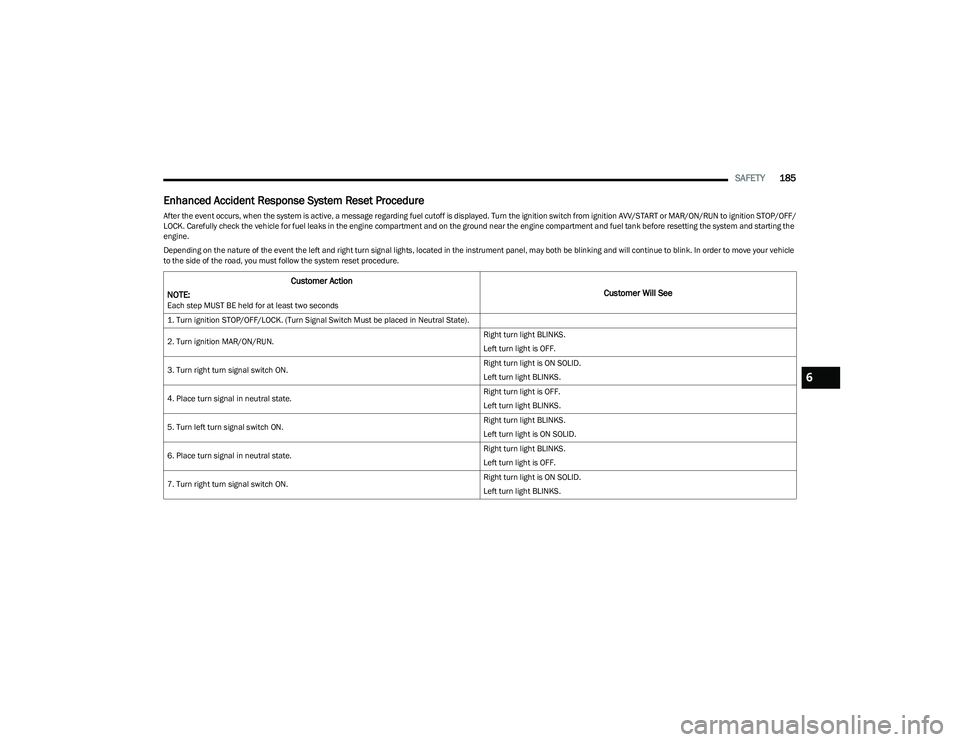
Enhanced Accident Response System Reset Procedure
After the event occurs, when the system is active, a message regarding fuel cutoff is displayed. Turn the ignition switch from ignition AVV/START or MAR/ON/RUN to ignition STOP/OFF/
LOCK. Carefully check the vehicle for fuel leaks in the engine compartment and on the ground near the engine compartment and fuel tank before resetting the system and starting the
engine.
Depending on the nature of the event the left and right turn signal lights, located in the instrument panel, may both be blinking and will continue to blink. In order to move your vehicle
to the side of the road, you must follow the system reset procedure.
Customer Action
NOTE:
Each step MUST BE held for at least two seconds
Customer Will See
1. Turn ignition STOP/OFF/LOCK. (Turn Signal Switch Must be placed in Neutral State).
2. Turn ignition MAR/ON/RUN. Right turn light BLINKS.
Left turn light is OFF.
3. Turn right turn signal switch ON. Right turn light is ON SOLID.
Left turn light BLINKS.
4. Place turn signal in neutral state. Right turn light is OFF.
Left turn light BLINKS.
5. Turn left turn signal switch ON. Right turn light BLINKS.
Left turn light is ON SOLID.
6. Place turn signal in neutral state. Right turn light BLINKS.
Left turn light is OFF.
7. Turn right turn signal switch ON. Right turn light is ON SOLID.
Left turn light BLINKS.
6
23_GG_OM_EN_USC_t.book Page 185
Page 188 of 288
186SAFETY
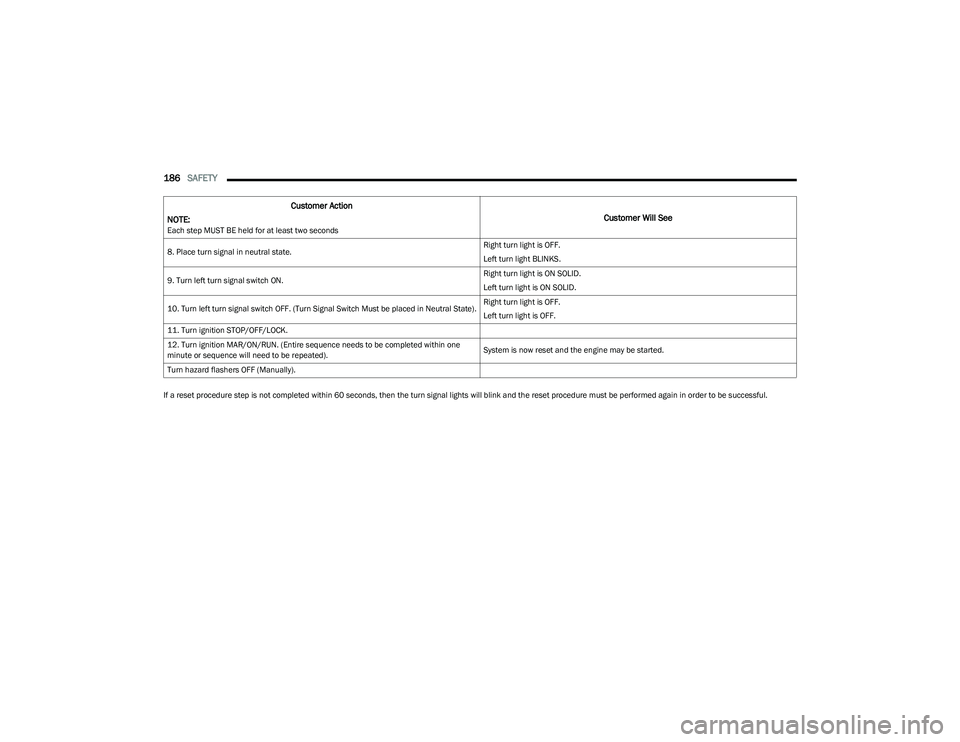
If a reset procedure step is not completed within 60 seconds, then the turn signal lights will blink and the reset procedure must be performed again in order to be successful.8. Place turn signal in neutral state.
Right turn light is OFF.
Left turn light BLINKS.
9. Turn left turn signal switch ON. Right turn light is ON SOLID.
Left turn light is ON SOLID.
10. Turn left turn signal switch OFF. (Turn Signal Switch Must be placed in Neutral State). Right turn light is OFF.
Left turn light is OFF.
11. Turn ignition STOP/OFF/LOCK.
12. Turn ignition MAR/ON/RUN. (Entire sequence needs to be completed within one
minute or sequence will need to be repeated). System is now reset and the engine may be started.
Turn hazard flashers OFF (Manually).
Customer Action
NOTE:
Each step MUST BE held for at least two seconds
Customer Will See
23_GG_OM_EN_USC_t.book Page 186
Page 225 of 288

223
SERVICING AND MAINTENANCE
SCHEDULED SERVICING
Your vehicle is equipped with an automatic oil change
indicator system. The oil change indicator system will
remind you that it is time to take your vehicle in for
scheduled maintenance.
Based on engine operation conditions, the oil change
indicator message will illuminate in the instrument cluster.
This means that service is required for your vehicle.
Operating conditions such as frequent short-trips, trailer
towing, and extremely hot or cold ambient temperatures
will influence when the “Change Oil” or “Oil Change
Required” message is displayed. Have your vehicle
serviced as soon as possible, within the next 500 miles
(805 km).An authorized dealer will reset the oil change indicator
message after completing the scheduled oil change. If a
scheduled oil change is performed by someone other than
an authorized dealer, the message can be reset by
referring to the steps described under Instrument Cluster
Display
Úpage 66.
NOTE:Under no circumstances should oil change intervals
exceed 10,000 miles (16,000 km), one year or 350 hours
of engine run time, whichever comes first. The 350 hours
of engine run or idle time is generally only a concern for
fleet customers.
Once A Month Or Before A Long Trip:
Check engine oil level.
Check windshield washer fluid level.
Check the tire inflation pressures and look for unusual
wear or damage. Rotate tires at the first sign of irreg -
ular wear, even if it occurs before the oil indicator
system turns on.
Check the fluid levels of the coolant reservoir, and
brake master cylinder reservoir, and fill as needed.
Check function of all interior and exterior lights.
8
23_GG_OM_EN_USC_t.book Page 223
Page 233 of 288
SERVICING AND MAINTENANCE231
Service Position Strategy
The Service Position Strategy places the wiper blades in a
position that allows them to be easily changed.
To enable the Service Position Strategy, the wipers must
be in the park position before placing the ignition in the
OFF position. The Service Position Strategy must be
activated within two minutes after the ignition is placed in
the OFF position. To correctly activate the Service Position
command, move the wiper lever upward for at least half a
second. At every valid activation of the Service Position
command, the wiper blades are activated for 250 ms. The
Service Position command can be repeated several times
to bring the blades into the desired position, up to a
maximum of three times. After three subsequent
activations the strategy is disabled. Function Deactivation And Reset:
The ignition is placed in the ON/RUN position.
There are three subsequent activations.
The two minute timer has expired after turning the
ignition OFF.
NOTE:When turning the ignition ON, the blades go into the
park position.
Front Wiper Blade Removal/Installation
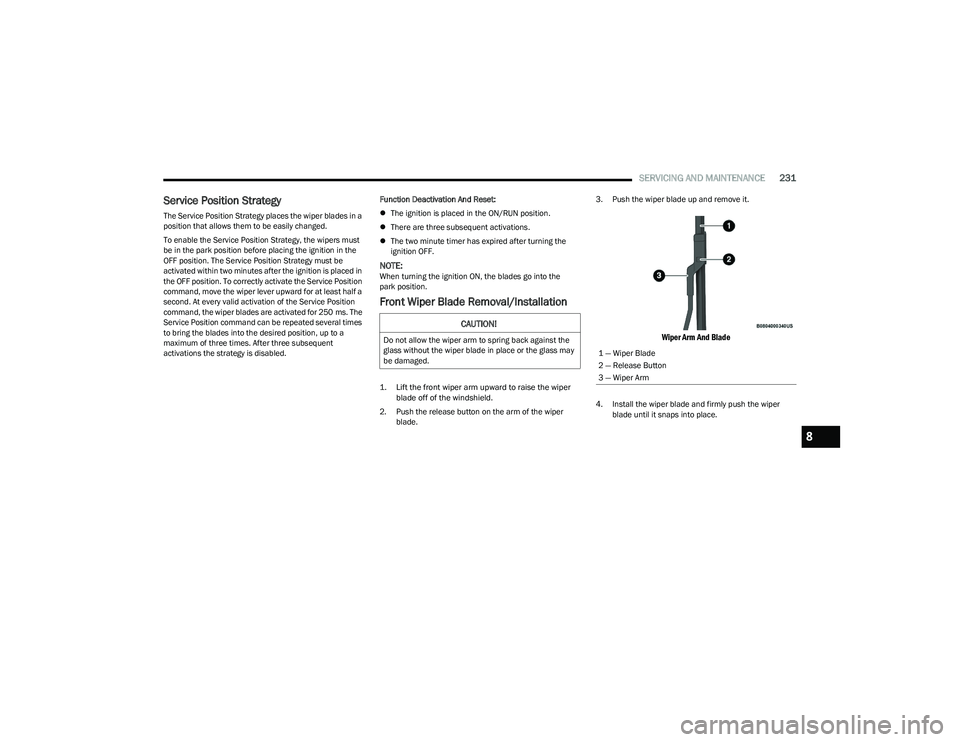
1. Lift the front wiper arm upward to raise the wiper
blade off of the windshield.
2. Push the release button on the arm of the wiper blade. 3. Push the wiper blade up and remove it.
Wiper Arm And Blade
4. Install the wiper blade and firmly push the wiper
blade until it snaps into place.
CAUTION!
Do not allow the wiper arm to spring back against the
glass without the wiper blade in place or the glass may
be damaged.
1 — Wiper Blade
2 — Release Button
3 — Wiper Arm
8
23_GG_OM_EN_USC_t.book Page 231