2023 DODGE HORNET lock
[x] Cancel search: lockPage 26 of 288
24GETTING TO KNOW YOUR VEHICLE
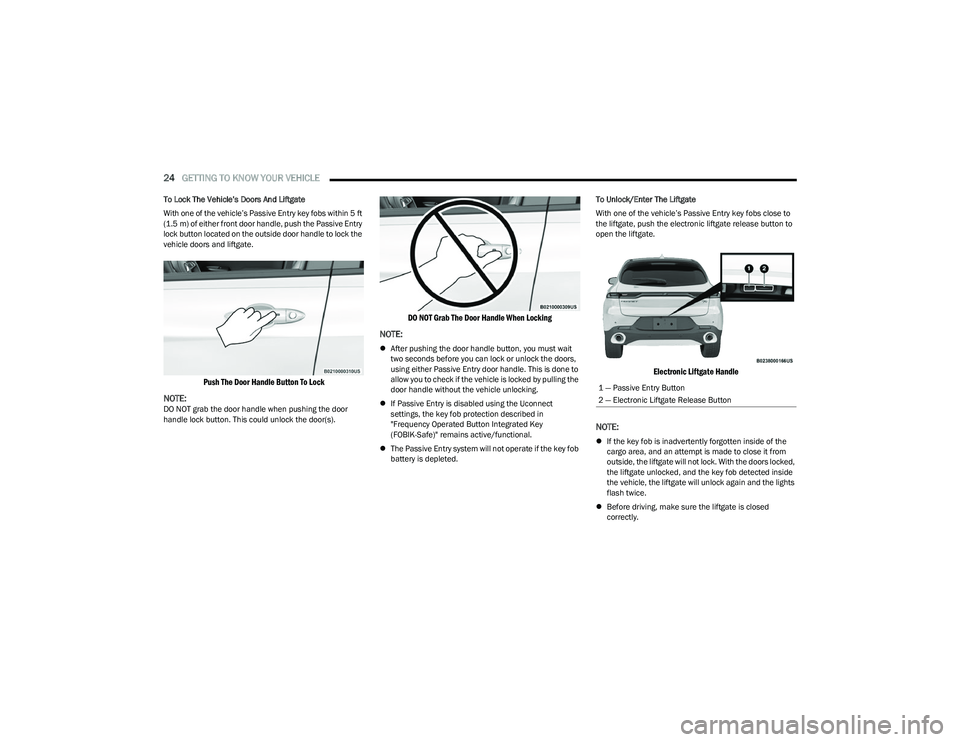
To Lock The Vehicle’s Doors And Liftgate
With one of the vehicle’s Passive Entry key fobs within 5 ft
(1.5 m) of either front door handle, push the Passive Entry
lock button located on the outside door handle to lock the
vehicle doors and liftgate.
Push The Door Handle Button To Lock
NOTE:
DO NOT grab the door handle when pushing the door
handle lock button. This could unlock the door(s).
DO NOT Grab The Door Handle When Locking
NOTE:
After pushing the door handle button, you must wait
two seconds before you can lock or unlock the doors,
using either Passive Entry door handle. This is done to
allow you to check if the vehicle is locked by pulling the
door handle without the vehicle unlocking.
If Passive Entry is disabled using the Uconnect
settings, the key fob protection described in
"Frequency Operated Button Integrated Key
(FOBIK-Safe)" remains active/functional.
The Passive Entry system will not operate if the key fob
battery is depleted. To Unlock/Enter The Liftgate
With one of the vehicle’s Passive Entry key fobs close to
the liftgate, push the electronic liftgate release button to
open the liftgate.
Electronic Liftgate Handle
NOTE:
If the key fob is inadvertently forgotten inside of the
cargo area, and an attempt is made to close it from
outside, the liftgate will not lock. With the doors locked,
the liftgate unlocked, and the key fob detected inside
the vehicle, the liftgate will unlock again and the lights
flash twice.
Before driving, make sure the liftgate is closed
correctly.
1 — Passive Entry Button
2 — Electronic Liftgate Release Button
23_GG_OM_EN_USC_t.book Page 24
Page 27 of 288

GETTING TO KNOW YOUR VEHICLE25
To Lock The Liftgate
With a valid Passive Entry key fob within 5 ft (1.5 m) of the
liftgate, push the Passive Entry lock button located on the
outside liftgate door handle.
NOTE:The liftgate Passive Entry lock button will lock all doors
and the liftgate Úpage 275.
AUTOMATIC DOOR LOCKS —
I
F EQUIPPED
When enabled, the door locks will lock automatically when
the vehicle's speed exceeds 12 mph (20 km/h). The auto
door lock feature is enabled or disabled within the
Uconnect system
Úpage 130.
AUTOMATIC UNLOCK DOORS ON EXIT
The doors will unlock automatically on vehicles with power
door locks if:
1. The Automatic Unlock Doors On Exit feature is
enabled.
2. All doors are closed.
3. The gear selector was not in PARK, then is placed in PARK.
4. Any door is opened.
DEAD LOCK DEVICE — IF EQUIPPED
The Dead Lock Device is a safety device that prevents the
use of the internal door handles of the vehicle and the
power door lock switch. This device prevents the doors
from opening within the passenger compartment.
The device works on all doors.
Arming The Device
The device is armed after two pushes of the lock button
on the key fob
For vehicles equipped with Passive Entry, the device
will also work by pushing the lock button on the driver’s
or passenger’s side exterior door handle
The arming of the device is indicated by three flashes of
the turn signals.
NOTE:The device does not operate if one or more doors are not
properly closed.
Disarming The Device
The device will automatically disarm by pushing the
unlock button on the key fob
By placing the ignition in the ON/RUN position
For vehicles equipped with Passive Entry, the device
will also disarm by using the driver’s or passenger’s
Passive Entry door handle to unlock and open the door
CHILD-PROTECTION DOOR LOCK
S
YSTEM — REAR DOORS
To provide a safer environment for small children riding in
the rear seats, the rear doors are equipped with a
Child-Protection Door Lock system.
To use the system, open each rear door, use a flat-blade
screwdriver (or emergency key) and rotate the dial to the
lock or unlock position. When the system on a door is
engaged, that door can only be opened by using the
outside door handle even if the inside door lock is in the
unlocked position.
Child-Protection Door Lock Function
2
23_GG_OM_EN_USC_t.book Page 25
Page 28 of 288

26GETTING TO KNOW YOUR VEHICLE
NOTE:
When the Child-Protection Door Lock system is
engaged, the door can be opened only by using the
outside door handle even though the inside door lock
is in the unlocked position.
After disengaging the Child-Protection Door Lock
system, always test the door from the inside to make
certain it is in the desired position.
After engaging the Child-Protection Door Lock system,
always test the door from the inside to make certain it
is in the desired position.
For emergency exit with the system engaged, rotate the
door lock button until the lock indicator is hidden
(unlocked position), lower the window, and open the
door with the outside door handle.
NOTE:Always use this device when carrying children. After
engaging the child lock on both rear doors, check for
effective engagement by trying to open a door with the
internal handle. Once the Child-Protection Door Lock
system is engaged, it is impossible to open the doors from
inside the vehicle. Before getting out of the vehicle, be
sure to check that there is no one left inside.
STEERING WHEEL
TILT/TELESCOPING STEERING COLUMN
This feature allows you to tilt the steering column upward
or downward. It also allows you to lengthen or shorten the
steering column. The tilt/telescoping lever is located
below the steering wheel at the end of the steering
column.
Tilt/Telescoping Lever
To unlock the steering column, push the control handle
downward (toward the floor). To tilt the steering column,
move the steering wheel upward or downward as desired.
To lengthen or shorten the steering column, pull the
steering wheel outward or push it inward as desired.
To lock the steering column in position, push the control
handle upward until fully engaged.
HEATED STEERING WHEEL —
I
F EQUIPPED
The steering wheel contains a heating element
that helps warm your hands in cold weather.
The heated steering wheel will begin to heat at
a fast, medium, or low level depending on the
current temperature of the steering wheel. Once the
heated steering wheel has been turned on, it will stay on
until the operator turns it off. The heated steering wheel
may not turn on when it is already warm.
To access the heated steering wheel button,
press the Comfort settings button within the
Uconnect system.
Press the heated steering wheel button once to turn
the heat on.
Press the heated steering wheel button a second time
to turn the heat off.
NOTE:The engine must be running for the heated steering wheel
to operate.
WARNING!
Avoid trapping anyone in a vehicle in a collision.
Remember that the rear doors can only be opened from
the outside when the Child-Protection locks are
engaged (locked).
WARNING!
Do not adjust the steering column while driving.
Adjusting the steering column while driving or driving
with the steering column unlocked, could cause the
driver to lose control of the vehicle. Failure to follow this
warning may result in serious injury or death.
23_GG_OM_EN_USC_t.book Page 26
Page 31 of 288
GETTING TO KNOW YOUR VEHICLE29
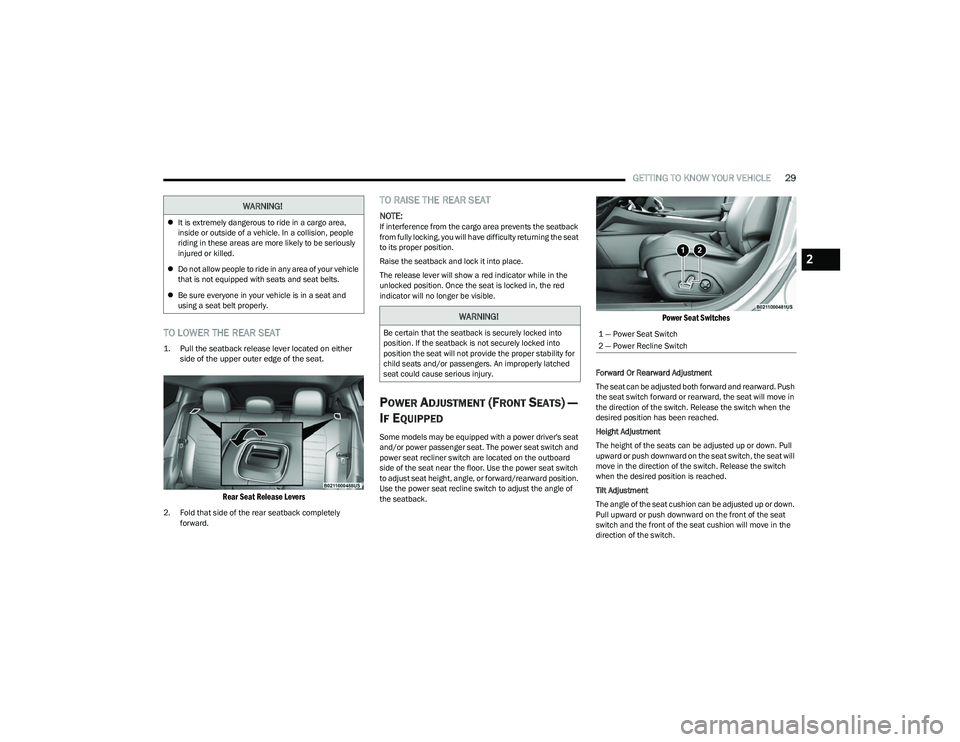
TO LOWER THE REAR SEAT
1. Pull the seatback release lever located on either
side of the upper outer edge of the seat.
Rear Seat Release Levers
2. Fold that side of the rear seatback completely forward.
TO RAISE THE REAR SEAT
NOTE:If interference from the cargo area prevents the seatback
from fully locking, you will have difficulty returning the seat
to its proper position.
Raise the seatback and lock it into place.
The release lever will show a red indicator while in the
unlocked position. Once the seat is locked in, the red
indicator will no longer be visible.
POWER ADJUSTMENT (FRONT SEATS) —
I
F EQUIPPED
Some models may be equipped with a power driver's seat
and/or power passenger seat. The power seat switch and
power seat recliner switch are located on the outboard
side of the seat near the floor. Use the power seat switch
to adjust seat height, angle, or forward/rearward position.
Use the power seat recline switch to adjust the angle of
the seatback.
Power Seat Switches
Forward Or Rearward Adjustment
The seat can be adjusted both forward and rearward. Push
the seat switch forward or rearward, the seat will move in
the direction of the switch. Release the switch when the
desired position has been reached.
Height Adjustment
The height of the seats can be adjusted up or down. Pull
upward or push downward on the seat switch, the seat will
move in the direction of the switch. Release the switch
when the desired position is reached.
Tilt Adjustment
The angle of the seat cushion can be adjusted up or down.
Pull upward or push downward on the front of the seat
switch and the front of the seat cushion will move in the
direction of the switch.
WARNING!
It is extremely dangerous to ride in a cargo area,
inside or outside of a vehicle. In a collision, people
riding in these areas are more likely to be seriously
injured or killed.
Do not allow people to ride in any area of your vehicle
that is not equipped with seats and seat belts.
Be sure everyone in your vehicle is in a seat and
using a seat belt properly.
WARNING!
Be certain that the seatback is securely locked into
position. If the seatback is not securely locked into
position the seat will not provide the proper stability for
child seats and/or passengers. An improperly latched
seat could cause serious injury.1 — Power Seat Switch
2 — Power Recline Switch
2
23_GG_OM_EN_USC_t.book Page 29
Page 33 of 288

GETTING TO KNOW YOUR VEHICLE31
FRONT VENTILATED SEATS —
I
F EQUIPPED
Located in the seat cushion and seat back are
fans that draw the air from the passenger
compartment and move air through fine
perforations in the seat cover to help keep the
driver and front passenger cooler in higher ambient
temperatures. The fans operate at three speeds:
HI, MED, and LO.
The front ventilated seats control buttons are located
within the Uconnect system. You can gain access to the
control buttons through the climate screen or the controls
screen.
Press the ventilated seat button once to choose HI.
Press the ventilated seat button a second time to
choose MED.
Press the ventilated seat button a third time to
choose LO.
Press the ventilated seat button a fourth time to turn
the ventilated seat off.
NOTE:The engine must be running for the ventilated seats to
operate.
For information on use with the Remote Start system, see
Úpage 19.
REAR SEAT ARMREST — IF EQUIPPED
The center part of the rear seat can also be used as a rear
armrest with cup holders, pull the rear armrest strap to
release it from the seat and pull forward.
Pull Rear Armrest Strap
HEAD RESTRAINTS
Head restraints are designed to reduce the risk of injury by
restricting head movement in the event of a rear impact.
Head restraints should be adjusted so that the top of the
head restraint is located above the top of your ear.
NOTE:Do not reverse the head restraints (making the rear of the
head restraint face forward) in an attempt to gain addi -
tional clearance to the back of your head.
WARNING!
Be certain that the seatback is securely locked into
position. If the seatback is not securely locked into
position the seat will not provide the proper stability for
child seats and/or passengers. An improperly latched
seat could cause serious injury.
WARNING!
All occupants, including the driver, should not
operate a vehicle or sit in a vehicle’s seat until the
head restraints are placed in their proper positions in
order to minimize the risk of neck injury in the event
of a crash.
Head restraints should never be adjusted while the
vehicle is in motion. Driving a vehicle with the head
restraints improperly adjusted or removed could
cause serious injury or death in the event of a
collision.
2
23_GG_OM_EN_USC_t.book Page 31
Page 36 of 288

34GETTING TO KNOW YOUR VEHICLE
MIRRORS
INSIDE REARVIEW MIRROR
Manual Mirror — If Equipped
The rearview mirror can be adjusted left and right, or tilted
up and down. The mirror should be adjusted to center on
the view through the rear window.
Headlight glare from vehicles behind you can be reduced
by moving the small control under the mirror to the night
position (toward the rear of the vehicle). The mirror should
be adjusted while set in the day position (toward the
windshield).
Adjusting Rearview Mirror
Automatic Dimming Mirror — If Equipped
This mirror automatically adjusts for headlight glare from
vehicles behind you.
The rearview mirror can be adjusted left and right, or tilted
up and down. The mirror should be adjusted to center on
the view through the rear window.
NOTE:The Automatic Dimming Mirror feature is disabled when
the vehicle is in REVERSE to improve the driver’s rear view.
Automatic Dimming Mirror
ILLUMINATED VANITY MIRRORS
To access an illuminated vanity mirror, flip down one of the
visors and lift the mirror cover.
Lift Illuminated Vanity Mirror Cover
Sun Visor Slide-On-Rod Feature —
If Equipped
The sun visor Slide-On-Rod feature allows for additional
flexibility in positioning the sun visor to block out the sun.
1. Fold down the sun visor.
2. Unclip the visor from the center clip.
3. Pivot the sun visor toward the side window.
4. Extend the sun visor for additional sun blockage.
NOTE:The sun visor can also be extended while the sun visor is
against the windshield for additional sun blockage
through the front of the vehicle.
CAUTION!
To avoid damage to the mirror during cleaning, never
spray any cleaning solution directly onto the mirror.
Apply the solution onto a clean cloth and wipe the
mirror clean.
23_GG_OM_EN_USC_t.book Page 34
Page 42 of 288

40GETTING TO KNOW YOUR VEHICLE
EXTERIOR LIGHTS
MULTIFUNCTION LEVER
Multifunction Lever
The multifunction lever controls the operation of the
turn signals, headlight beam selection and passing lights.
The multifunction lever is located on the left side of the
steering column.
HEADLIGHT SWITCH
The headlight switch is located on the left side of the
instrument panel. This switch controls the operation of the
headlights, parking lights, automatic headlights (if
equipped), instrument panel lights, and interior lights.
Headlight Switch
To turn on the headlights, rotate the headlight switch
clockwise. When the headlight switch is on, the parking
lights, taillights, license plate light and instrument panel
lights are also turned on.
The headlight switch is equipped with a momentary O (off)
detent. When the vehicle is at a standstill and the
headlight switch is held in the O (off) position, the Daytime
Running Lights (DRLs) will turn on. As soon as the vehicle
starts to move, the O (off) position is disabled and the
DRLs may turn off and low beam headlights may
automatically turn on based on exterior ambient
light levels. From the O (off) position, rotate the headlight switch
clockwise to the first detent for automatic headlights, the
second detent for parking lights and instrument panel
lights operation, or to the third detent for headlights,
parking lights, and instrument panel lights operation.
DAYTIME RUNNING LIGHTS (DRLS) —
I
F EQUIPPED
The Daytime Running Lights (DRLs) (low intensity) come
on automatically whenever the ignition is placed in the
ON/RUN position, and the headlight switch is turned to the
AUTO position, and the dusk sensor detects sufficient
external light.
NOTE:On some vehicles, the Daytime Running Lights may deac -
tivate, or reduce intensity, on one side of the vehicle (when
a turn signal is activated on that side), or on both sides of
the vehicle (when the hazard warning lights are activated).
HIGH/LOW BEAM SWITCH
Push the multifunction lever towards the instrument panel
to switch the headlights to high beams. The headlight
switch must first be turned to the AUTO or on position.
The high beam indicator will illuminate in the instrument
cluster when the high beams are active.
Push the lever forward again to return to low beam
headlights.
1 — Rotate Headlight Control
2 — Instrument Panel Dimmer Control
23_GG_OM_EN_USC_t.book Page 40
Page 43 of 288

GETTING TO KNOW YOUR VEHICLE41
AUTOMATIC HIGH BEAM HEADLAMP
C
ONTROL — IF EQUIPPED
The Automatic High Beam Headlamp Control system
provides increased forward lighting at night by automating
high beam control through the use of a digital camera
mounted on the windshield. This camera detects vehicle
specific light and automatically switches from high beams
to low beams until the approaching vehicle is out of view.
NOTE:
The Automatic High Beam Headlamp Control can be
turned on or off through Uconnect Settings.
This function can only be activated with the headlight
switch in the AUTO position.
Broken, muddy, or obstructed headlights and taillights
of vehicles in the field of view will cause headlights to
remain on longer (closer to the vehicle). Also, dirt, film,
and other obstructions on the windshield or camera
lens will cause the system to function improperly.
FLASH-TO-PASS
You can signal another vehicle with your headlights by
lightly pulling the multifunction lever toward you. This will
cause the high beam headlights to turn on, and remain on,
until the lever is released.
AUTOMATIC HEADLIGHTS — IF EQUIPPED
This system automatically turns the headlights
on or off according to ambient light levels. To
turn the system on, rotate the headlight switch
clockwise to the AUTO position.
When the system is on, the headlight time delay feature is
also on. This means the headlights will stay on for up to
90 seconds after you place the ignition into the OFF
position. To turn the automatic system off, move the
headlight switch out of the AUTO position.
NOTE:The engine must be running before the headlights will
come on in the automatic mode.
HEADLIGHTS ON AUTOMATICALLY WITH
W
IPERS — IF EQUIPPED
If your vehicle is equipped with Automatic Headlights, it
also has this customer-programmable feature. When your
headlights are in the automatic mode and the engine is
running, they will automatically turn on when the wiper
system is on. This feature is programmable through the
Uconnect system.
NOTE:When your headlights come on during the daytime, the
vehicle will monitor outside brightness and decide if the
instrument panel needs to be dimmed.
HEADLIGHT DELAY
To aid in your exit, your vehicle is equipped with a
headlight delay that will leave the headlights on for
approximately 90 seconds. This delay is initiated when the
ignition is placed in the OFF position while the headlight
switch is on, and then the headlight switch is cycled off.
Headlight delay can be canceled by either turning the
headlight switch on then off, or by placing the ignition in
the ON/RUN position.
NOTE:The headlight delay time is programmable through
Uconnect Settings Úpage 130.
LIGHTS-ON REMINDER
If the headlights or parking lights are on after the ignition
is in the OFF position, a chime will sound to alert the driver
when the driver's door is opened.
CORNERING LIGHTS — IF EQUIPPED
The cornering lights are a feature to improve visibility at
night while turning the vehicle. When activated, a light
incorporated in the headlight assembly will illuminate on
the side of the vehicle the steering wheel is rotated, or that
the turn signal indicator is on. It can be activated through
the Uconnect system
Úpage 130.
2
23_GG_OM_EN_USC_t.book Page 41