2023 DODGE HORNET key battery
[x] Cancel search: key batteryPage 45 of 288

GETTING TO KNOW YOUR VEHICLE43
Overhead Light Timing
On certain models, to assist getting in and out of the
vehicle at night or in poorly-lit areas, two timed modes
have been provided.
Timing While Getting Into The Vehicle
The overhead lights turn on according to the following
modes:
Will illuminate for approximately three minutes when
the doors are unlocked.
Will illuminate for approximately three minutes when
one of the doors is opened.
Will illuminate for approximately 27 seconds when
each individual door is closed and switch off simultane -
ously when the doors are locked.
Timing is interrupted when the ignition is placed in the
ON/RUN position.
Three Modes Are Available For Turning Off Overhead
Lighting:
When all doors are closed after entering the vehicle,
the three-minute timer will stop and a seconds timer
will start for the interior lights. This timing will stop
when the ignition is placed in the ON/RUN position.
When doors are locked (either with key fob or with the
emergency key inserted in driver side door), the over -
head light turns off.
The interior lights will turn off after 15 minutes to
preserve the battery. Timing While Getting Out Of The Vehicle
After placing the ignition in the OFF position, the overhead
lights will turn on as follows:
For a few seconds after the engine stops.
For approximately three minutes when one of the doors
is opened.
For several seconds when the last door is closed.
The timing stops automatically when the doors are locked.
Rear Overhead Light
The rear overhead lights are activated or deactivated by
on/off switches located on the front overhead console or
within the rear overhead lights themselves.
Rear Overhead Light On/Off Switches
The light turns on when a door is opened.
NOTE:The light will turn off automatically after a few minutes if a
door is left open. To turn it on again, open another door or
close and reopen the same door.
Instrument Panel Dimmer Control
The instrument panel dimmer control is part of the
headlight switch and is located on the driver’s side of the
instrument panel.
Rotating the instrument panel dimmer up or down will
adjust the brightness of the instrument panel lights if the
built-in light sensor determines that the ambient light
levels are low enough that the backlighting should be
enabled.
Instrument Panel Dimmer
2
23_GG_OM_EN_USC_t.book Page 43
Page 55 of 288
GETTING TO KNOW YOUR VEHICLE53
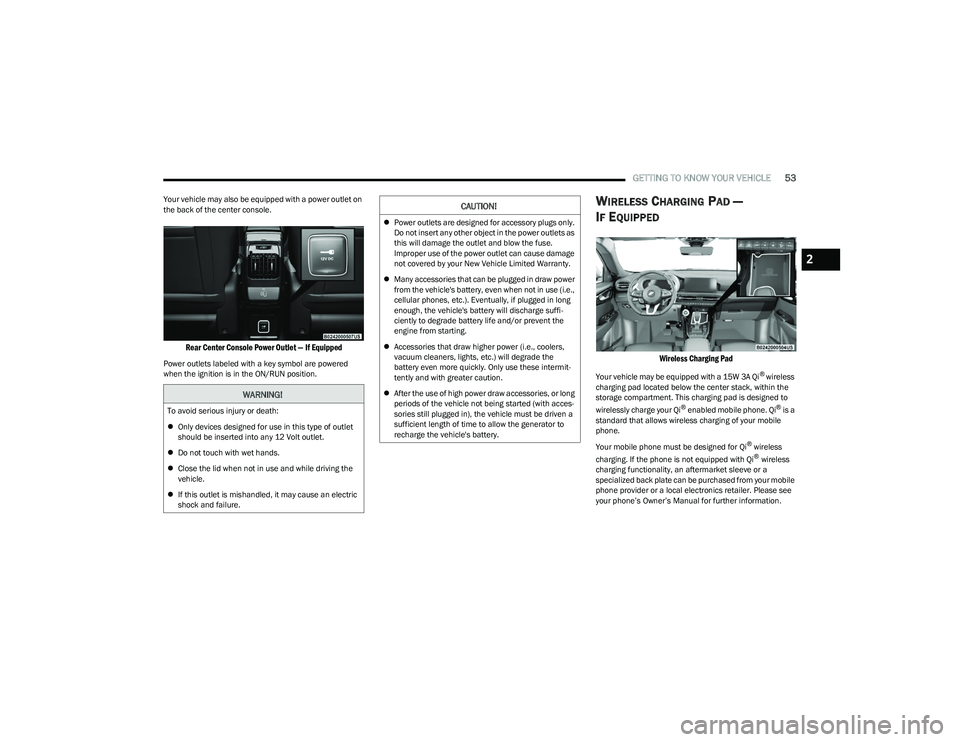
Your vehicle may also be equipped with a power outlet on
the back of the center console.
Rear Center Console Power Outlet — If Equipped
Power outlets labeled with a key symbol are powered
when the ignition is in the ON/RUN position.
WIRELESS CHARGING PAD —
I
F EQUIPPED
Wireless Charging Pad
Your vehicle may be equipped with a 15W 3A Qi® wireless
charging pad located below the center stack, within the
storage compartment. This charging pad is designed to
wirelessly charge your Qi
® enabled mobile phone. Qi® is a
standard that allows wireless charging of your mobile
phone.
Your mobile phone must be designed for Qi
® wireless
charging. If the phone is not equipped with Qi® wireless
charging functionality, an aftermarket sleeve or a
specialized back plate can be purchased from your mobile
phone provider or a local electronics retailer. Please see
your phone’s Owner’s Manual for further information.
WARNING!
To avoid serious injury or death:
Only devices designed for use in this type of outlet
should be inserted into any 12 Volt outlet.
Do not touch with wet hands.
Close the lid when not in use and while driving the
vehicle.
If this outlet is mishandled, it may cause an electric
shock and failure.
CAUTION!
Power outlets are designed for accessory plugs only.
Do not insert any other object in the power outlets as
this will damage the outlet and blow the fuse.
Improper use of the power outlet can cause damage
not covered by your New Vehicle Limited Warranty.
Many accessories that can be plugged in draw power
from the vehicle's battery, even when not in use (i.e.,
cellular phones, etc.). Eventually, if plugged in long
enough, the vehicle's battery will discharge suffi -
ciently to degrade battery life and/or prevent the
engine from starting.
Accessories that draw higher power (i.e., coolers,
vacuum cleaners, lights, etc.) will degrade the
battery even more quickly. Only use these intermit -
tently and with greater caution.
After the use of high power draw accessories, or long
periods of the vehicle not being started (with acces -
sories still plugged in), the vehicle must be driven a
sufficient length of time to allow the generator to
recharge the vehicle's battery.
2
23_GG_OM_EN_USC_t.book Page 53
Page 56 of 288

54GETTING TO KNOW YOUR VEHICLE
The wireless charging pad is equipped with an anti-slip
mat to hold your mobile phone in place, and an LED
indicator light.
Place the device inside the prepared area delimited in the
mat as shown in the image. Incorrect positioning will
prevent the phone from charging.
Correct Phone Position
LED Indicator Status:
No Light: Charging pad is idle or searching for a device.
Device may not be compatible with the Qi
® standard.
Blue Light: Device is detected and is charging.
Red Light/Flashing: Internal error, or foreign object is
detected.
Green Light: Device has completed battery charging
(if device is equipped to transmit this information). Important Notes Regarding This Vehicle’s Wireless
Charging Pad:
The presence of the NFC function active on a smart -
phone could signal malfunction anomalies.
The ignition must be in the ON/RUN position in order
for the phone to charge.
To avoid interference with the key fob search, the wire -
less charging pad will stop charging when any door is
opened.
Be sure to place the mobile device correctly (display
facing upward, and phone not covering the LED) on the
wireless charging pad.
Wireless charging is not as fast as when the phone is
connected to a wired charger.
The phone’s protective case must be removed when
placed on the wireless charging pad.
iPhone
® 12 (including iPod®) is equipped with soft -
ware to protect the device from overheating. When the
software is active, the rate of charge is slowed down to
protect the device.
Phones must always be placed on the wireless
charging pad within the outline shown on the pad so
that its charging parts connect with the charging coils
of the system. Movement of the phone during charging
may prevent or slow the rate of charge.
Having multiple applications open on the phone while
charging will reduce the charging efficiency, and may
even shut down an application that is actively running
(i.e. Apple CarPlay
®). This may also cause the phone to
overheat.
Wireless chargers may implement certain methods to
prevent the phone from overheating during charging
such as slowing down the rate of charge. In certain
instances, the device may shut down for a brief period
of time (when the device reaches a certain tempera -
ture). If this happens, it does not mean there is a fault
with the wireless charging pad. This may just be a
protective measure to prevent damage to the phone.
The use of multiple wireless functions at the same time
(wireless charging, Apple CarPlay
®, Android Auto™)
could cause the device to overheat, resulting in limita -
tion of the functions or it turning off. In this case, it is
recommended to connect the system using t
he USB port.
Do not place the key fob or any other type of metal/
magnetized object inside the mobile phone housing or
near the wireless charging pad.
CAUTION!
The key fob should not be placed on the charging pad
or within 6 inches (15 cm) of it. Doing so can cause
excessive heat buildup and damage to the fob. Placing
the fob in close proximity of the charging pad blocks the
fob from being detected by the vehicle and prevents the
vehicle from starting.
23_GG_OM_EN_USC_t.book Page 54
Page 64 of 288

62GETTING TO KNOW YOUR VEHICLE
HANDS-FREE LIFTGATE — IF EQUIPPED
Hands-Free Liftgate Activation Zone
To open or close the liftgate using hands-free activation,
use a straight in and out kicking motion under the vehicle
activation zone in the general location below the rear
license plate. Do not move your foot sideways or in a
sweeping motion or the sensors may not detect the
motion.
Move your foot under the fascia/bumper, simulating a
kick. When you have completed this movement, withdraw
your leg. To activate the liftgate, both sensors must detect
your leg. If it is closed, the Hands-Free Liftgate unlocks and opens
completely, and with another movement of the foot, it
stops. A further movement of the foot reverses the
direction and closes the liftgate completely, if you do not
stop it again.
If it is open, with a movement of the foot, the Hands-Free
Liftgate closes completely, and with another movement of
the foot, it stops. If the liftgate is stopped, another
movement of the foot will reverse the direction and open
it completely.
NOTE:
To conserve the battery charge, avoid performing this
operation repeatedly with the engine off.
Opening or closing the Hands-Free Liftgate requires a
valid Passive Entry key fob within 5 ft (1.5 m) of the door
handle. If a valid Passive Entry key fob is not within 5 ft
(1.5 m), the liftgate will not respond to any kicks.
The Hands-Free Liftgate feature may be turned on or
off through the Uconnect system
Úpage 130.
The Hands-Free Liftgate feature should be turned off
during jacking, tire changing, manual car wash, and
vehicle service.
The Hands-Free Liftgate feature can be activated by
any metallic object making a similar in-and-out motion
under the rear fascia/bumper, such as cleaning using
a metal broom.
The Hands-Free Liftgate will only operate when the
transmission is in PARK.
If anything obstructs the Hands-Free Liftgate while it is
opening or closing, the liftgate will automatically
reverse to the closed/open position, provided it meets
sufficient resistance.
There are pinch sensors attached to the side of the lift -
gate opening. Light pressure anywhere along these
strips will cause the liftgate to return to the open posi -
tion.
If the power liftgate encounters multiple obstructions
within the same cycle, the system will automatically stop.
If this occurs, the liftgate must be operated manually.
The power liftgate will release, but not power open, in
temperatures below −12°F (−24°C). Be sure to
remove any buildup of snow or ice from the liftgate
before opening the liftgate.
If the liftgate is left open for an extended period of time
(approximately one hour), the liftgate may need to be
closed manually to reset power liftgate functionality.
23_GG_OM_EN_USC_t.book Page 62
Page 83 of 288

STARTING AND OPERATING81
Keyless Enter ’n Go™ — With Driver’s Foot Off The Brake
Pedal (In PARK Or NEUTRAL Position)
The Keyless Enter ’n Go™ feature operates similar to an
ignition switch. It has three positions, OFF, ON/RUN, and
START. To change the ignition switch positions without
starting the vehicle and use the accessories follow, these
steps starting with the ignition switch in the OFF position:
1. Push the ENGINE START/STOP button once to
change the ignition switch to the ON/RUN position.
2. Push the ENGINE START/STOP button a second time to change the ignition switch to the OFF position.
COLD WEATHER OPERATION
(B
ELOW –22°F OR −30°C)
To ensure reliable starting at these temperatures, use of
an externally powered electric engine block heater
(available from an authorized dealer) is recommended.
EXTENDED PARK STARTING
NOTE:Extended Park condition occurs when the vehicle has not
been started or driven for at least 30 days.
1. Install a battery charger or jumper cables to the
battery to ensure a full battery charge during the
crank cycle.
2. Place the ignition in the START position and release it when the engine starts. For Keyless Enter ‘n Go™
ignition systems, press and hold the brake pedal
while pushing the ENGINE START/STOP button once. 3. If the engine fails to start within 10 seconds, place
the ignition in the OFF position, wait 10 to 15 seconds
to allow the starter to cool, then repeat the “Extended
Park Starting” procedure.
4. If the engine fails to start after eight attempts, allow the starter to cool for at least 10 minutes, then repeat
the procedure.
AFTER STARTING — WARMING UP THE
E
NGINE
The idle speed is controlled automatically and it will
decrease as the engine warms up.
IF ENGINE FAILS TO START
If the engine fails to start after you have followed the
“Normal Starting” procedure, and has not experienced an
Extended Park condition as identified in “Extended Park
Starting” procedure, it may be flooded. Push the
accelerator pedal all the way to the floor and hold it there.
Crank the engine for no more than 10 seconds. This
should clear any excess fuel in case the engine is flooded.
Leave the ignition key in the ON/RUN position, release the
accelerator pedal and repeat the “Normal Starting”
procedure.
CAUTION!
To prevent damage to the starter, do not crank
continuously for more than 10 seconds at a time. Wait
10 to 15 seconds before trying again.
CAUTION!
To prevent damage to the starter, do not continuously
crank the engine for more than 10 seconds at a time.
Wait 10 to 15 seconds before trying again.
WARNING!
Never pour fuel or other flammable liquid into the
throttle body air inlet opening in an attempt to start
the vehicle. This could result in flash fire causing
serious personal injury.
Do not attempt to push or tow your vehicle to get it
started. Vehicles equipped with an automatic trans -
mission cannot be started this way. Unburned fuel
could enter the catalytic converter and once the
engine has started, ignite and damage the converter
and vehicle.
If the vehicle has a discharged battery, booster
cables may be used to obtain a start from a booster
battery or the battery in another vehicle. This type of
start can be dangerous if done improperly
Úpage 215.
4
23_GG_OM_EN_USC_t.book Page 81
Page 186 of 288

184SAFETY
If A Deployment Occurs
The front air bags are designed to deflate immediately
after deployment.
NOTE:Front and/or side air bags will not deploy in all collisions.
This does not mean something is wrong with the air bag
system.
If you do have a collision which deploys the air bags, any
or all of the following may occur:
The air bag material may sometimes cause abrasions
and/or skin reddening to the occupants as the air bags
deploy and unfold. The abrasions are similar to friction
rope burns or those you might get sliding along a carpet
or gymnasium floor. They are not caused by contact
with chemicals. They are not permanent and normally
heal quickly. However, if you haven’t healed signifi -
cantly within a few days, or if you have any blistering,
see your doctor immediately.
As the air bags deflate, you may see some smoke-like
particles. The particles are a normal by-product of the
process that generates the non-toxic gas used for air
bag inflation. These airborne particles may irritate the
skin, eyes, nose, or throat. If you have skin or eye irrita -
tion, rinse the area with cool water. For nose or throat
irritation, move to fresh air. If the irritation continues,
see your doctor. If these particles settle on your
clothing, follow the garment manufacturer’s instruc -
tions for cleaning.
Do not drive your vehicle after the air bags have deployed.
If you are involved in another collision, the air bags will not
be in place to protect you.
NOTE:
Air bag covers may not be obvious in the interior trim,
but they will open during air bag deployment.
After any collision, the vehicle should be taken to an
authorized dealer immediately.
Enhanced Accident Response System
In the event of an impact, if the communication network
remains intact, and the power remains intact, depending
on the nature of the event, the Occupant Restraint
Controller (ORC) will determine whether to have the
Enhanced Accident Response System perform the
provided functions:
Cut off fuel to the engine (if equipped)
Cut off battery power to the electric motor (if equipped)
Flash hazard lights as long as the battery has power
Turn on the interior lights, which remain on as long as
the battery has power or for 15 minutes from the inter -
vention of the Enhanced Accident Response System
Unlock the power door locks Your vehicle may also be designed to perform any of these
other functions in response to the Enhanced Accident
Response System:
Turn off the Fuel Filter Heater, Turn off the HVAC Blower
Motor, Close the HVAC Circulation Door
Cut off battery power to the:
Engine
Electric Motor (if equipped)
Electric power steering
Brake booster
Electric park brake
Automatic transmission gear selector
Horn
Front wiperNOTE:After an accident, remember to cycle the ignition to the
STOP (OFF/LOCK) position and remove the key from the
ignition switch to avoid draining the battery. Carefully
check the vehicle for fuel leaks in the engine compartment
and on the ground near the engine compartment and fuel
tank before resetting the system and starting the engine.
If there are no fuel leaks or damage to the vehicle elec -
trical devices (e.g. headlights) after an accident, reset the
system by following the procedure provided. If you have
any doubt, contact an authorized dealer.
WARNING!
Deployed air bags and seat belt pretensioners cannot
protect you in another collision. Have the air bags, seat
belt pretensioners, and the seat belt retractor
assemblies replaced by an authorized dealer
immediately. Also, have the Occupant Restraint
Controller System serviced as well.
23_GG_OM_EN_USC_t.book Page 184
Page 273 of 288
CUSTOMER ASSISTANCE271
ROADSIDE ASSISTANCE
Available 24 hours, 7 days a week.
Call 1-800-521-2779 or visit chrysler.rsahelp.com(USA)
Call 1-800-363-4869 or visit fca.roadsideaid.com
(Canada)
Who is Covered
You are covered by Roadside Assistance services if
you are a purchaser for use of the vehicle. Roadside
Assistance services last for five years or 60,000 miles on
the odometer, whichever occurs first, calculated from the
start date of the Basic Limited Warranty, as set forth in
your Warranty Information book.
1
1. Towing services provided through Cross Country Motor Club, Inc.
Medford, MA 02155, except in AK,CA, HI, OR, WI, and WY, where services
are provided by Cross Country Motor Club of California, Inc., Thousand
Oaks, CA 91360.
What to Do
If your vehicle requires jump start assistance, out of gas/
fuel delivery, tire service, lockout service or towing as a
result of a mechanical breakdown, dial toll-free: USA:
1-800-521-2779/Canada: 1-800-363-4869. Provide your
name, Vehicle Identification Number (VIN) required for
covered services, license plate number, and your location,
including the telephone number from which you are
calling. Briefly describe the nature of the problem and
answer a few simple questions. You will be given the name
of the service provider and an estimated time of arrival. If
you feel you are in an unsafe situation, please let us know.
With your consent, we will contact local police or safety
authorities. If Unable to Contact Roadside Assistance
If you are unable to contact Roadside Assistance or
unable to provide a valid Vehicle Identification Number
(VIN), and you obtain towing services on your own, you may
submit your original receipts from the licensed towing or
service facility, for services rendered within 30 days of the
occurrence. Be sure to include your VIN, odometer
mileage at the time of service, and current mailing
address. We will process the claim based on vehicle and
service eligibility. If eligible, we will reimburse you for the
reasonable amount actually paid, based on the usual and
customary charges for that service in the area where they
were provided. FCA US LLC’s determination relating to
reimbursement is final. Correspondence should be
mailed to:
FCA US LLC Customer Assistance
P.O. Box 9145
Medford, MA 02155
Attention Claims Department
FCA US LLC reserves the right to modify the terms or
discontinue the Roadside Assistance Program at anytime.
The Roadside Assistance program is subject to restrictions
and conditions of use, which are determined solely by
FCA US LLC.
Flat Tire Service
If you are inconvenienced by a flat tire, we will dispatch a
service provider to use your vehicle’s temporary spare tire
(if equipped) as recommended in your Owner’s Manual.
This is not a permanent flat tire repair.
Out of Gas/Fuel Delivery
Drivers cannot always count on a gas station being
nearby, especially when traveling away from home. We will
dispatch a service provider to deliver a small amount of
fuel (maximum two gallons) to get you to a nearby station.
This service is limited to two occurrences in a 12-month
period.
Battery Jump Assistance
No time is a good time for a depleted battery. With
Roadside Assistance, you do not have to worry about
being stranded. We will dispatch a service provider to
provide you with a battery jump anytime, day or night.
Lockout Service
Whether the keys are locked in your vehicle or frozen locks
are keeping you from getting on your way, help is just a
phone call away. This service is limited to providing access
to the vehicle’s seating area. It does not cover the cost of
replacement keys.
Towing Service
Our towing service gives you peace of mind and
confidence. If your vehicle becomes disabled as a result of
a mechanical breakdown, Roadside Assistance will
dispatch a towing service to transport your vehicle to the
closest authorized Chrysler, Dodge, Jeep®, or Ram dealer.
If you choose to go to another dealer, you will be
responsible for the cost if the extra distance exceeds
10 miles.
10
23_GG_OM_EN_USC_t.book Page 271
Page 279 of 288
277
INDEX
AActive Driving Assist System ....................................... 101
Active Speed Limiter ....................................................... 90
Adaptive Cruise Control (ACC) ........................................92
Adding Engine Coolant (Antifreeze) ............................ 234
Additives, Fuel .............................................................. 267
Air Bag........................................................................... 176Air Bag Operation.................................................... 177
Air Bag Warning Light .................................... 176
, 178
Driver Knee Air Bag ................................................ 181
Enhanced Accident Response ...................... 184
, 222
Event Data Recorder (EDR).................................... 222 Front Air Bag ........................................................... 178
If Deployment Occurs ............................................. 184
Knee Impact Bolsters ............................................. 181
Maintaining Your Air Bag System .......................... 187
Maintenance ........................................................... 187
Redundant Air Bag Warning Light ......................... 176
Side Air Bags ........................................................... 181
Transporting Pets.................................................... 199
Air Bag Light ........................................................ 176
, 200
Air Cleaner, Engine (Engine Air Cleaner Filter) ........... 229
Air Conditioner Maintenance ...................................... 229
Air Conditioner Refrigerant ................................. 229
, 230
Air Conditioner System ................................................ 229
Air Conditioning ............................................................... 46
Air Conditioning Filter ........................................... 50
, 230
Air Conditioning, Operating Tips ..................................... 49 Air Filter......................................................................... 229 Air Pressure
Tires.......................................................................... 254
Alarm Arm The System......................................................... 20
Disarm The System ................................................... 21
Panic........................................................................... 13
Security Alarm..................................................... 20
, 73
Alarm System Security Alarm............................................................ 20
All Wheel Drive Towing ...................................................................... 221
All Wheel Drive (AWD)............................................88
, 221
Alterations/Modifications Vehicle.......................................................................... 8
Antifreeze (Engine Coolant) ............................... 233
, 268
Disposal ...................................................................234
Anti-Lock Brake System (ABS) ..................................... 154
Anti-Lock Warning Light.................................................. 74
Arming System Security Alarm............................................................ 20
Assist, Hill Start ............................................................. 158
Audio Systems (Radio) ................................................. 129
Auto Down Power Windows............................................ 55
Auto Hold ......................................................................... 84
Auto Liftgate Fault Warning Light .................................. 73
Automatic Dimming Mirror ............................................. 34 Automatic Door Locks .................................................... 25Automatic Headlights ..................................................... 41 Automatic High Beams .................................................. 41
Automatic Temperature Control (ATC) .......................... 49
Automatic Transaxle....................................................... 85
Automatic Transmission ................................................ 86 Adding Fluid .................................................... 237
, 269
Fluid And Filter Change........................................... 237
Fluid Change ........................................................... 237
Fluid Level Check .................................................... 236
Fluid Type .......................................................237
, 269
Special Additives ..................................................... 236
Auxiliary Electrical Outlet (Power Outlet) ...................... 52
Axle Fluid....................................................................... 269
Axle Lubrication ............................................................ 269
BBattery.................................................................... 72, 227
Charging System Light .............................................. 72
Keyless Key Fob Replacement................................. 14
Battery Saver Feature .................................................... 70
Belts, Seat..................................................................... 200
Blind Spot Monitoring .................................................. 159
Body Mechanism Lubrication ...................................... 230
B-Pillar Location ........................................................... 251
Brake Assist System..................................................... 155
Brake Control System, Electronic................................ 155
Brake Fluid.................................................................... 269
11
23_GG_OM_EN_USC_t.book Page 277