2023 DODGE HORNET esc
[x] Cancel search: escPage 26 of 288
24GETTING TO KNOW YOUR VEHICLE
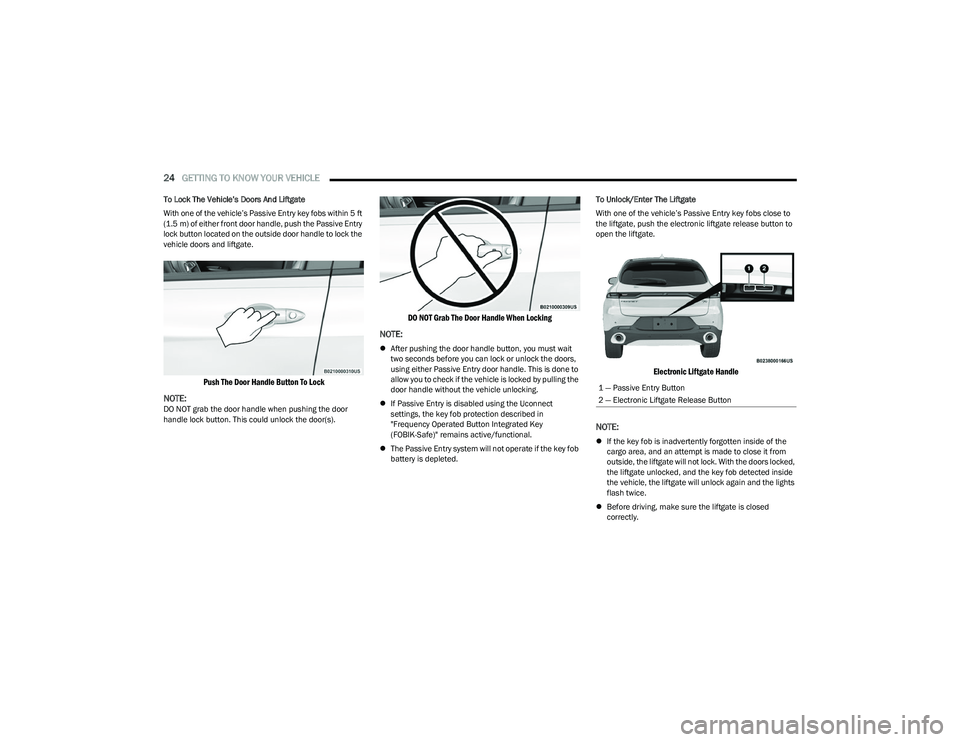
To Lock The Vehicle’s Doors And Liftgate
With one of the vehicle’s Passive Entry key fobs within 5 ft
(1.5 m) of either front door handle, push the Passive Entry
lock button located on the outside door handle to lock the
vehicle doors and liftgate.
Push The Door Handle Button To Lock
NOTE:
DO NOT grab the door handle when pushing the door
handle lock button. This could unlock the door(s).
DO NOT Grab The Door Handle When Locking
NOTE:
After pushing the door handle button, you must wait
two seconds before you can lock or unlock the doors,
using either Passive Entry door handle. This is done to
allow you to check if the vehicle is locked by pulling the
door handle without the vehicle unlocking.
If Passive Entry is disabled using the Uconnect
settings, the key fob protection described in
"Frequency Operated Button Integrated Key
(FOBIK-Safe)" remains active/functional.
The Passive Entry system will not operate if the key fob
battery is depleted. To Unlock/Enter The Liftgate
With one of the vehicle’s Passive Entry key fobs close to
the liftgate, push the electronic liftgate release button to
open the liftgate.
Electronic Liftgate Handle
NOTE:
If the key fob is inadvertently forgotten inside of the
cargo area, and an attempt is made to close it from
outside, the liftgate will not lock. With the doors locked,
the liftgate unlocked, and the key fob detected inside
the vehicle, the liftgate will unlock again and the lights
flash twice.
Before driving, make sure the liftgate is closed
correctly.
1 — Passive Entry Button
2 — Electronic Liftgate Release Button
23_GG_OM_EN_USC_t.book Page 24
Page 28 of 288

26GETTING TO KNOW YOUR VEHICLE
NOTE:
When the Child-Protection Door Lock system is
engaged, the door can be opened only by using the
outside door handle even though the inside door lock
is in the unlocked position.
After disengaging the Child-Protection Door Lock
system, always test the door from the inside to make
certain it is in the desired position.
After engaging the Child-Protection Door Lock system,
always test the door from the inside to make certain it
is in the desired position.
For emergency exit with the system engaged, rotate the
door lock button until the lock indicator is hidden
(unlocked position), lower the window, and open the
door with the outside door handle.
NOTE:Always use this device when carrying children. After
engaging the child lock on both rear doors, check for
effective engagement by trying to open a door with the
internal handle. Once the Child-Protection Door Lock
system is engaged, it is impossible to open the doors from
inside the vehicle. Before getting out of the vehicle, be
sure to check that there is no one left inside.
STEERING WHEEL
TILT/TELESCOPING STEERING COLUMN
This feature allows you to tilt the steering column upward
or downward. It also allows you to lengthen or shorten the
steering column. The tilt/telescoping lever is located
below the steering wheel at the end of the steering
column.
Tilt/Telescoping Lever
To unlock the steering column, push the control handle
downward (toward the floor). To tilt the steering column,
move the steering wheel upward or downward as desired.
To lengthen or shorten the steering column, pull the
steering wheel outward or push it inward as desired.
To lock the steering column in position, push the control
handle upward until fully engaged.
HEATED STEERING WHEEL —
I
F EQUIPPED
The steering wheel contains a heating element
that helps warm your hands in cold weather.
The heated steering wheel will begin to heat at
a fast, medium, or low level depending on the
current temperature of the steering wheel. Once the
heated steering wheel has been turned on, it will stay on
until the operator turns it off. The heated steering wheel
may not turn on when it is already warm.
To access the heated steering wheel button,
press the Comfort settings button within the
Uconnect system.
Press the heated steering wheel button once to turn
the heat on.
Press the heated steering wheel button a second time
to turn the heat off.
NOTE:The engine must be running for the heated steering wheel
to operate.
WARNING!
Avoid trapping anyone in a vehicle in a collision.
Remember that the rear doors can only be opened from
the outside when the Child-Protection locks are
engaged (locked).
WARNING!
Do not adjust the steering column while driving.
Adjusting the steering column while driving or driving
with the steering column unlocked, could cause the
driver to lose control of the vehicle. Failure to follow this
warning may result in serious injury or death.
23_GG_OM_EN_USC_t.book Page 26
Page 48 of 288

46GETTING TO KNOW YOUR VEHICLE
The rain sensor is able to recognize and automatically
adjust itself when the following conditions occur:
Presence of dirt on the controlled surface
(e.g. salt, dirt, etc.).
Presence of streaks of water caused by the worn
window wiper blades.
Difference between day and night.
REAR WINDOW WIPER/WASHER
Shifting the vehicle into REVERSE with the windshield wiper
operating activates a single cycle of the rear window wiper.
Push the windshield wiper lever downward (with the
vehicle in REVERSE) to activate/deactivate continuous
rear wiper operation.
Push the windshield wiper lever downward (without the
vehicle in REVERSE) to activate/deactivate intermittent
rear wiper operation.
Push the windshield wiper lever towards the instrument
panel to activate the rear window washer (a brief push
activates one washing cycle, while keeping the stalk
pushed washes continuously until the stalk is released).
NOTE:Make sure the rear wiper is turned off when cleaning the
windshield glass.
CLIMATE CONTROLS
The Climate Control system allows you to regulate the
temperature, air flow, and direction of air circulating
throughout the vehicle. The controls are located on the
touchscreen and on the instrument panel below the radio.
AUTOMATIC CLIMATE CONTROL
D
ESCRIPTIONS AND FUNCTIONS
Uconnect 5 or 5 NAV With 10.25-Inch Display Automatic
Climate Controls
Instrument Panel Center Stack Climate Controls
MAX A/C Button
Press and release the MAX A/C button on the
touchscreen to change the current setting to
the coldest output of air. The MAX A/C indicator
illuminates when MAX A/C is on. Pressing the
button again will cause the MAX A/C operation to exit.
Pressing other settings will cause the MAX A/C to exit.
NOTE:The MAX A/C button is only available on the touchscreen.
A/C Button
Press and release the A/C button on the
touchscreen, or push the button on the
faceplate to change the current setting.
The A/C indicator illuminates when A/C is ON.
The Air Conditioning (A/C) button allows the operator to
manually activate or deactivate the air conditioning
system. When the air conditioning system is turned on,
dehumidified air will flow through the outlets into the
cabin.
If your air conditioning performance seems lower than
expected, check the front of the A/C condenser (located in
front of the radiator), for an accumulation of dirt or insects.
Clean with a gentle water spray from the front of the
radiator and through the condenser. If the problem
persists, please contact an authorized dealer.
23_GG_OM_EN_USC_t.book Page 46
Page 51 of 288

GETTING TO KNOW YOUR VEHICLE49
Combine Modes
Dual Level Combination
Front Defrost and Panel Mode
Tri-Level Combination
Front Defrost, Panel Mode, and Floor Mode
Climate Control OFF Button
Press and release this button on the
touchscreen, or push and release the
button on the faceplate to turn the
Climate Control ON/OFF.
AUTOMATIC TEMPERATURE
CONTROL (ATC)
Automatic Operation
1. Push the AUTO button on the faceplate, or the
AUTO button on the touchscreen (if equipped) on the
Automatic Temperature Control (ATC) Panel.
2. Next, adjust the temperature you would like the system to maintain by adjusting the temperature
control buttons. Once the desired temperature is
displayed, the system achieves and automatically
maintains that comfort level.
3. When the system is set up for your comfort level, it is not necessary to change the settings. You experience
the greatest efficiency by simply allowing the system
to function automatically.
NOTE:
It is not necessary to move the temperature settings for
cold or hot vehicles. The system automatically adjusts
the temperature, mode, and blower speed to provide
comfort as quickly as possible.
The temperature can be displayed in US or Metric units
by selecting the US/Metric customer-programmable
feature.
To provide you with maximum comfort in the Automatic
mode during cold start-ups, the blower fan remains on low
until the engine warms up. The blower increases in speed
and transition into Auto mode.
Manual Operation Override
This system offers a full complement of manual override
features. The AUTO symbol in the front ATC display will be
turned off when the system is being used in the manual
mode.
CLIMATE VOICE COMMANDS
Adjust vehicle temperatures hands-free and keep
everyone comfortable while you keep moving ahead.
Push the VR button on the steering wheel. After the beep,
say one of the following commands:
“Set the driver temperature to 70 degrees ”
“Set the passenger temperature to 70 degrees ”
Did You Know: Voice Command for Climate may only be
used to adjust the interior temperature of your vehicle.
Voice Command will not work to adjust the heated seats
or steering wheel if equipped.
OPERATING TIPS
Refer to the chart at the end of this section for suggested
control settings for various weather conditions.
Summer Operation
The engine cooling system must be protected with a
high-quality antifreeze coolant to provide proper corrosion
protection and to protect against engine overheating.
OAT coolant (conforming to MS.90032) is recommended.
The driver or front passenger can combine
two or three of the modes described by
selecting them individually on the climate
control screen. Combine modes by
pressing each icon on the touchscreen.
2
23_GG_OM_EN_USC_t.book Page 49
Page 58 of 288
56GETTING TO KNOW YOUR VEHICLE
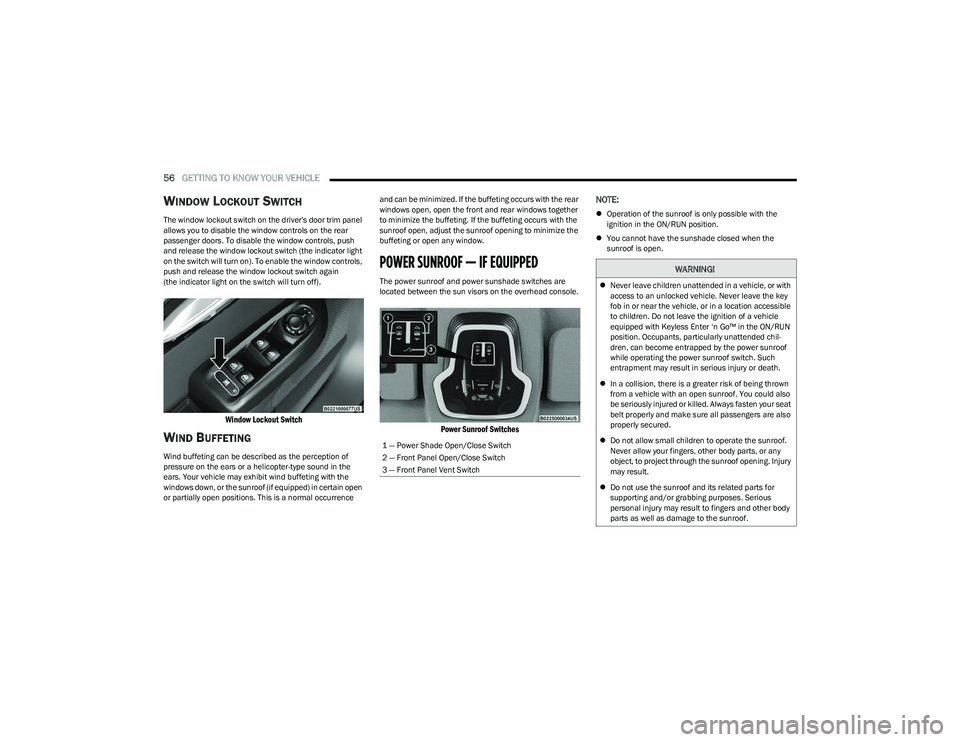
WINDOW LOCKOUT SWITCH
The window lockout switch on the driver's door trim panel
allows you to disable the window controls on the rear
passenger doors. To disable the window controls, push
and release the window lockout switch (the indicator light
on the switch will turn on). To enable the window controls,
push and release the window lockout switch again
(the indicator light on the switch will turn off).
Window Lockout Switch
WIND BUFFETING
Wind buffeting can be described as the perception of
pressure on the ears or a helicopter-type sound in the
ears. Your vehicle may exhibit wind buffeting with the
windows down, or the sunroof (if equipped) in certain open
or partially open positions. This is a normal occurrence and can be minimized. If the buffeting occurs with the rear
windows open, open the front and rear windows together
to minimize the buffeting. If the buffeting occurs with the
sunroof open, adjust the sunroof opening to minimize the
buffeting or open any window.
POWER SUNROOF — IF EQUIPPED
The power sunroof and power sunshade switches are
located between the sun visors on the overhead console.
Power Sunroof Switches
NOTE:
Operation of the sunroof is only possible with the
ignition in the ON/RUN position.
You cannot have the sunshade closed when the
sunroof is open.
1 — Power Shade Open/Close Switch
2 — Front Panel Open/Close Switch
3 — Front Panel Vent Switch
WARNING!
Never leave children unattended in a vehicle, or with
access to an unlocked vehicle. Never leave the key
fob in or near the vehicle, or in a location accessible
to children. Do not leave the ignition of a vehicle
equipped with Keyless Enter ‘n Go™ in the ON/RUN
position. Occupants, particularly unattended chil -
dren, can become entrapped by the power sunroof
while operating the power sunroof switch. Such
entrapment may result in serious injury or death.
In a collision, there is a greater risk of being thrown
from a vehicle with an open sunroof. You could also
be seriously injured or killed. Always fasten your seat
belt properly and make sure all passengers are also
properly secured.
Do not allow small children to operate the sunroof.
Never allow your fingers, other body parts, or any
object, to project through the sunroof opening. Injury
may result.
Do not use the sunroof and its related parts for
supporting and/or grabbing purposes. Serious
personal injury may result to fingers and other body
parts as well as damage to the sunroof.
23_GG_OM_EN_USC_t.book Page 56
Page 60 of 288

58GETTING TO KNOW YOUR VEHICLE
RE-INITIALIZATION PROCEDURE
Automatic operation of the sunroof must be re-initialized
in case of faulty sunroof operation. It may also be
necessary to re-initialize the sunroof after the vehicle’s
battery has been disconnected and then reconnected.
NOTE:The anti-pinch safety device is deactivated during the
re-initialization procedure.
Proceed as follows:
1. Place the ignition in the ON/RUN position.
2. Make sure the sunroof glass and the power sunshade
are fully closed. Release the sunroof close switch,
then push and hold it again within five seconds.
Continue to hold the switch while the sunshade fully
opens, the sunroof glass fully opens, followed by the
glass fully closing then the sunshade fully closing.
3. Release the switch once all of the operations stop. Re-initialization of the sunroof motor is now
complete.
NOTE:If the switch is released prior to full completion of the oper -
ations described, the entire re-initialization procedure
must be repeated from step 1.
4. Confirm express operations for the sunroof glass and sunshade are functional for opening and closing
operations.
SUNROOF MAINTENANCE
Use only a non-abrasive cleaner and a soft cloth to clean
the glass panel. Periodically check for and clear out any
debris that may have collected in the tracks.
HOOD
OPENING THE HOOD
Two latches must be released to open the hood.
1. Pull the hood release lever located underneath the driver’s side of the instrument panel.
Hood Release Location (Underneath Instrument Panel)
2. Move to the outside of the vehicle. The safety latch release lever is located behind the front edge of the
hood at the center. Lift the hood slightly and reach in
at the center of the hood with a palm facing the
ground. Once contact is made with the safety latch
release lever, push it to the left to fully release the
hood.
Hood Safety Latch Release Lever Location
3. Raise the hood completely. The operation is assisted by the addition of two gas props which hold it in the
open position.
NOTE:
Vehicle must be at a stop and the gear selector must
be in PARK.
While lifting the hood, use both hands.
Before lifting the hood, check that the wiper arms are
not in motion and not in the lifted position.
23_GG_OM_EN_USC_t.book Page 58
Page 66 of 288

64GETTING TO KNOW YOUR VEHICLE
(Continued)
Cargo Tie-Down Hooks And Loops
The tie-downs located on the cargo area floor should be
used to secure loads safely when the vehicle is moving.
Cargo Tie-Down Loops
Cargo tie-down loops are located on the trim panels.
WARNING!
Cargo tie-downs are not safe anchors for a child seat
tether strap. In a sudden stop or accident, a tie-down
could pull loose and allow the child seat to come
loose. A child could be badly injured. Use only the
anchors provided for child seat tethers.
To help protect against personal injury, passengers
should not be seated in the rear cargo area. The rear
cargo space is intended for load carrying purposes
only, not for passengers, who should sit in seats and
use seat belts.The weight and position of cargo and passengers can
change the vehicle center of gravity and vehicle
handling. To avoid loss of control resulting in personal
injury, follow these guidelines for loading your vehicle:
Do not carry loads that exceed the load limits
described on the label attached to the left door or
left door center pillar.
Always place cargo evenly on the cargo floor. Put
heavier objects as low and as far forward as possible.
Place as much cargo as possible in front of the rear
axle. Too much weight or improperly placed weight
over or behind the rear axle can cause the vehicle to
sway.
Do not pile luggage or cargo higher than the top of
the seatback. This could impair visibility or become a
dangerous projectile in a sudden stop or accident.
WARNING!
23_GG_OM_EN_USC_t.book Page 64
Page 68 of 288

66GETTING TO KNOW YOUR INSTRUMENT PANEL
INSTRUMENT CLUSTER DESCRIPTIONS
Use this QR code to access your digital
experience.
1. Speedometer
Indicates vehicle speed.
2. Instrument Cluster Display When the appropriate condi -
tions exist, this display shows
the instrument cluster display messages.
The display always shows one of the main menu
items after ignition is placed on.
3. Tachometer Indicates the engine speed in revolutions per
minute (RPM x 1000).
4. Fuel Gauge The pointer shows the level of fuel in the fuel tank
when the Keyless Push Button Ignition is in the
ON/RUN position.
The fuel pump symbol points to the
side of the vehicle where the fuel door
is located.
Push the center-rear edge of the fuel filler door
and release to open. 5. Oil Temperature Gauge
The temperature gauge shows engine oil tempera -
ture. Any reading within the normal range indi -
cates that the engine is operating satisfactorily.
NOTE:The Instrument Cluster Warning Indicators will illuminate
briefly for a bulb check when the ignition is first cycled.
Depending on your vehicle trim, your instrument cluster
display may vary.
INSTRUMENT CLUSTER DISPLAY
Your vehicle may be equipped with an instrument cluster
display, which offers useful information to the driver. With
the ignition in the OFF mode, opening/closing of a door will
activate the display for viewing, and display the total miles,
or kilometers, in the odometer. Your instrument cluster
display is designed to display important information about
your vehicle’s systems and features. Using the driver
interactive display located on the instrument panel, your
instrument cluster display can show you how systems are
working and give you warnings when they aren’t. The
steering wheel mounted controls allow you to scroll
through and enter the main menus and submenus. You
can access the specific information you want and make
selections and adjustments.
INSTRUMENT CLUSTER DISPLAY
L
OCATION AND CONTROLS
The instrument cluster display features a driver interactive
display that is located in the instrument cluster.
NOTE:Depending on your vehicle trim, your instrument cluster
display may vary.
Instrument Cluster Display And Controls Location
1 – Instrument Cluster Display Screen
2 – Instrument Cluster Display Controls
23_GG_OM_EN_USC_t.book Page 66