148
CITROËN Connect Nav
Menus
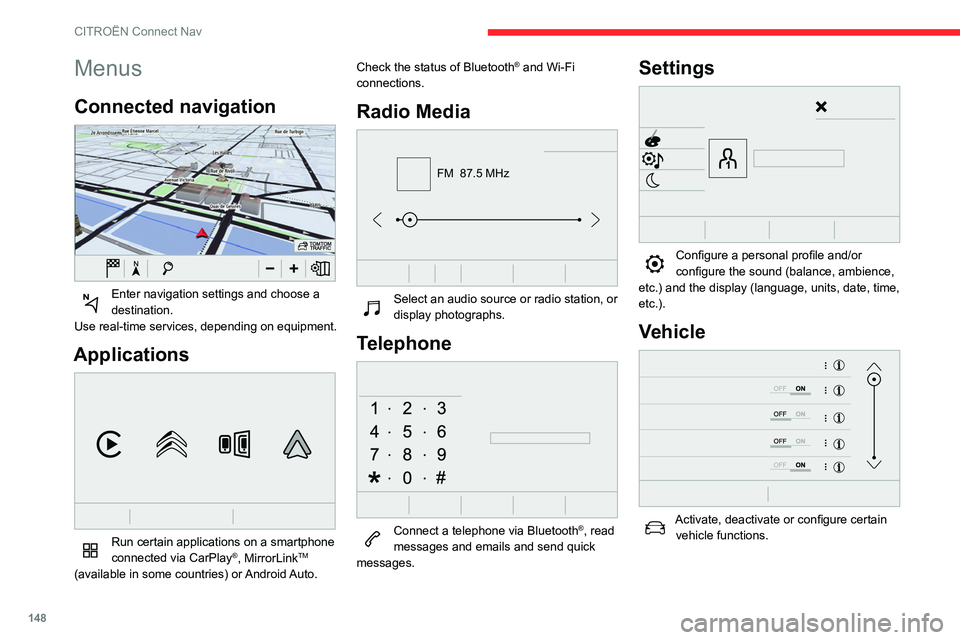
Connected navigation
Enter navigation settings and choose a
destination.
Use real-time services, depending on equipment.
Applications
Run certain applications on a smartphone
connected via CarPlay®, MirrorLinkTM
(available in some countries) or Android Auto. Check the status of Bluetooth
® and Wi-Fi
connections.
Radio Media
FM 87.5 MHz
Select an audio source or radio station, or
display photographs.
Telephone
Connect a telephone via Bluetooth®, read
messages and emails and send quick
messages.
Settings
Configure a personal profile and/or
configure the sound (balance, ambience,
etc.) and the display (language, units, date, time,
etc.).
Vehicle
Activate, deactivate or configure certain vehicle functions.
Air conditioning
21,518,5
Manage various temperature and air flow
settings.
Voice commands
Steering wheel-mounted
controls
Voice commands:
Voice commands can be issued from any
screen page after a short press on the "Voice
commands" button located on the steering
wheel or at the end of the lighting control stalk
(depending on equipment), as long as there is no
telephone call in progress.
149
CITROËN Connect Nav
11Air conditioning
21,518,5
Manage various temperature and air flow
settings.
Voice commands
Steering wheel-mounted
controls
Voice commands:
Voice commands can be issued from any
screen page after a short press on the "Voice
commands" button located on the steering
wheel or at the end of the lighting control stalk
(depending on equipment), as long as there is no
telephone call in progress.
To ensure that voice commands are always recognised by the system, please
follow these recommendations:
–
use natural language in a normal tone
without breaking up words or raising your
voice.
–
always wait for the "beep" (audible signal)
before speaking.
–
for best results, closing the windows and
sunroof is recommended, to avoid extraneous
interference (depending on version).
–
before issuing a voice command, ask any
other passengers to refrain from speaking.
First steps
Example of a "voice command" for
navigation:
"Navigate to address 11 regent street,
London"
Example of a "voice command" for the radio and
media:
"Play artist Madonna"
Example of a "voice command" for the
telephone:
"Call David Miller"
The voice commands, with a choice of 17 languages (Arabic, Brazilian, Czech,
Danish, Dutch, English, Farsi, French,
German, Italian, Norwegian, Polish,
Portuguese, Russian, Spanish, Swedish,
Turkish), are made using the language
previously chosen and set in the system.
For some voice commands, there are
alternative synonyms.
Example: Guide to / Navigate to / Go to / ...
The voice commands in Arabic for: "Navigate
to address" and "Display POI in the city", are
not available.
Information - Using the
system
When voice commands are activated, by
briefly pressing the button, help is
displayed on the touch screen, offering various
menus and enabling voice-based interaction with
the system.
A number of commands are available when a
menu is selected.
171
Alphabetical index
A
ABS 52
Accessories
49
Active Safety Brake
85–87
AdBlue®
12, 104
AdBlue® tank
105
Additive, Diesel
102–103
Adjusting headlamps
44
Adjusting head restraints
28
Adjusting seat
27
Adjusting the air distribution
33–34
Adjusting the air flow
33–34
Adjusting the date
143, 167
Adjusting the height of the steering wheel
29
Adjusting the lumbar support
27
Adjusting the seat angle
27
Adjusting the temperature
33–34
Adjusting the time
143, 167
Advice on care and maintenance
37, 106–107
Advice on driving
6, 67
Airbags
55, 57, 59
Airbags, curtain
56–57
Airbags, front
56–57, 60
Airbags, lateral
56–57
Air conditioning
32, 34
Air conditioning, automatic
33–34
Air conditioning, manual
32, 34
Air intake
33–34
Air vents
31
Alarm
24
Anti-lock braking system (ABS)
52
Antitheft / Immobiliser 18
Apple CarPlay connection
139, 157
Armrest, front
37, 39
Assistance call
50
Assistance, emergency braking
52, 87
Audible warning
50
Audio streaming (Bluetooth)
138, 161–162
B
Battery 97–98, 121–122
Battery, 12 V
102, 122–124
Battery, charging
122–123
Battery, remote control
21–22
Blanking screen (snow shield)
96
Blind spot sensors
89
BlueHDi
12, 102, 108
Bluetooth (hands-free)
140–141, 163
Bluetooth (telephone)
140–141, 163–164
Bodywork
106
Bonnet
99–100
Boot
23–24, 37, 40
Brake discs
103
Brake lamps
11 7
Brakes
103
Braking assistance system
52
Braking, automatic emergency
85–87
Brightness
142
Bulbs
11 5
Bulbs (changing)
115–117
C
Cable, audio 161
Cable, Jack
161
Capacity, fuel tank
94–95
Cap, fuel filler
94–95
Care of the bodywork
106
CD
138, 161
CD, MP3
138, 161
Central locking
18–20
Changing a bulb
115–118
Changing a fuse
119–121
Changing a wheel
109, 111–112
Changing a wiper blade
46–47
Changing the remote control battery
22
Checking the engine oil level
11–12
Checking the levels
100–102
Checking tyre pressures
(using the kit)
108–109, 111
Checks
100, 102–103
Checks, routine
102–103
Child lock
65–66
Children
54, 60, 63–64, 65
Children (safety)
65–66
Child seats
54, 57–60
Child seats, conventional
60
Child seats, i-Size
65
Child seats, ISOFIX
62–63, 65
Cleaning (advice)
106
Closing the boot
23–24
Closing the doors
19–20
Coat hanger
39