2023 CHRYSLER PACIFICA HYBRID charging
[x] Cancel search: chargingPage 104 of 328

102GETTING TO KNOW YOUR INSTRUMENT PANEL
NOTE:
The charging system is independent from load reduc -
tion. The charging system performs a diagnostic on the
charging system continuously.
If the Battery Charge Warning Light is on it may indicate
a problem with the charging system
Úpage 103.
The electrical loads that may be switched off (if equipped),
and vehicle functions which can be effected by load
reduction:
Heated Seat/Vented Seats/Heated Wheel
Heated/Cooled Cup Holders — If Equipped
Rear Defroster And Heated Mirrors
HVAC System
115 Volts AC Power Inverter System
Audio and Telematics System
Loss of the battery charge may indicate one or more of the
following conditions:
The charging system cannot deliver enough electrical
power to the vehicle system because the electrical
loads are larger than the capability of charging system.
The charging system is still functioning properly.
Turning on all possible vehicle electrical loads (e.g.
HVAC to max settings, exterior and interior lights, over -
loaded power outlets +12 Volts, 150W, USB ports)
during certain driving conditions (city driving, towing,
frequent stopping).
Installing options like additional lights, upfitter elec -
trical accessories, audio systems, alarms and similar
devices.
Unusual driving cycles (short trips separated by long
parking periods).
The vehicle was parked for an extended period of time
(weeks, months).
The battery was recently replaced and was not charged
completely.
The battery was discharged by an electrical load left on
when the vehicle was parked.
The battery was used for an extended period with the
engine not running to supply radio, lights, chargers,
+12 Volt portable appliances like vacuum cleaners,
game consoles and similar devices.
What to do when an electrical load reduction action
message is present (“Battery Saver On” or “Battery Saver
Mode”)
During a trip:
Reduce power to unnecessary loads if possible:
Turn off redundant lights (interior or exterior)
Check what may be plugged in to power outlets
+12 Volts, 150W, USB ports
Check HVAC settings (blower, temperature)
Check the audio settings (volume)
After a trip:
Check if any aftermarket equipment was installed
(additional lights, upfitter electrical accessories, audio
systems, alarms) and review specifications if any (load
and Ignition Off Draw currents).
Evaluate the latest driving cycles (distance, driving
time and parking time).
The vehicle should have service performed if the
message is still present during consecutive trips and
the evaluation of the vehicle and driving pattern did not
help to identify the cause.
WARNING LIGHTS AND MESSAGES
The warning/indicator lights will illuminate in the
instrument panel together with a dedicated message and/
or acoustic signal when applicable. These indications are
indicative and precautionary and as such must not be
considered as exhaustive and/or alternative to the
information contained in the Owner’s Manual, which you
are advised to read carefully in all cases. Always refer to
the information in this chapter in the event of a failure
indication. All active telltales will display first if applicable.
The system check menu may appear different based upon
equipment options and current vehicle status. Some
telltales are optional and may not appear.
RED WARNING LIGHTS
Air Bag Warning Light
This warning light will illuminate to indicate a
fault with the air bag, and will turn on for four to
eight seconds as a bulb check when the ignition
is placed in the ON/RUN or ACC/ON/RUN
position. This light will illuminate with a single chime when a
fault with the air bag has been detected, it will stay on until
the fault is cleared. If the light is either not on during startup,
stays on, or turns on while driving, have the system
inspected at an authorized dealer as soon as possible.
23_RUP_OM_EN_USC_t.book Page 102
Page 105 of 328
GETTING TO KNOW YOUR INSTRUMENT PANEL103
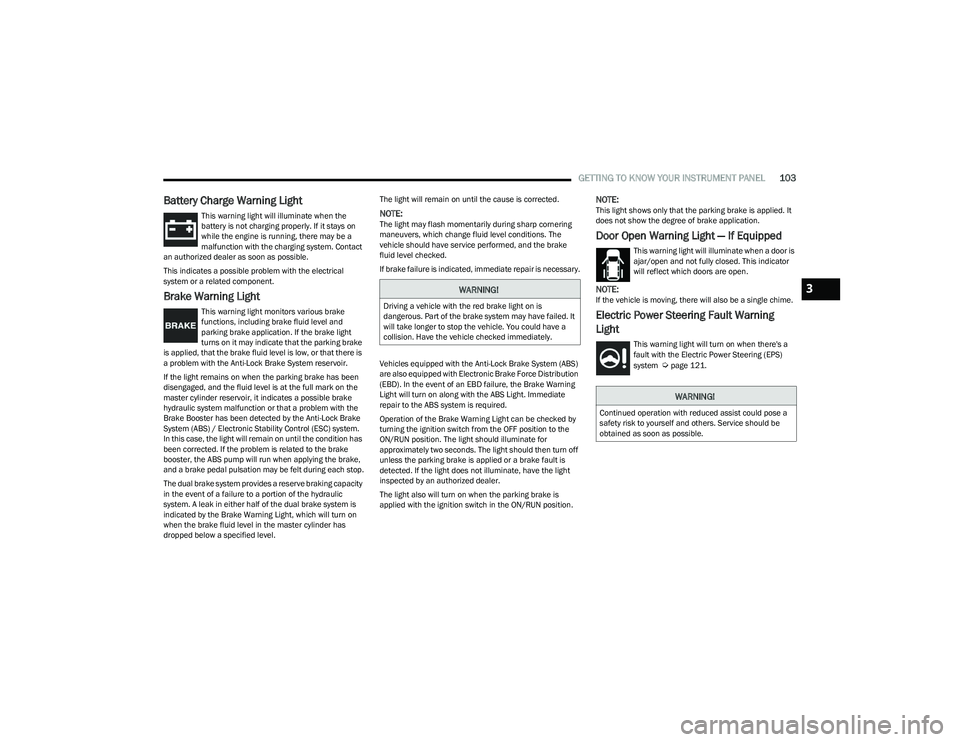
Battery Charge Warning Light
This warning light will illuminate when the
battery is not charging properly. If it stays on
while the engine is running, there may be a
malfunction with the charging system. Contact
an authorized dealer as soon as possible.
This indicates a possible problem with the electrical
system or a related component.
Brake Warning Light
This warning light monitors various brake
functions, including brake fluid level and
parking brake application. If the brake light
turns on it may indicate that the parking brake
is applied, that the brake fluid level is low, or that there is
a problem with the Anti-Lock Brake System reservoir.
If the light remains on when the parking brake has been
disengaged, and the fluid level is at the full mark on the
master cylinder reservoir, it indicates a possible brake
hydraulic system malfunction or that a problem with the
Brake Booster has been detected by the Anti-Lock Brake
System (ABS) / Electronic Stability Control (ESC) system.
In this case, the light will remain on until the condition has
been corrected. If the problem is related to the brake
booster, the ABS pump will run when applying the brake,
and a brake pedal pulsation may be felt during each stop.
The dual brake system provides a reserve braking capacity
in the event of a failure to a portion of the hydraulic
system. A leak in either half of the dual brake system is
indicated by the Brake Warning Light, which will turn on
when the brake fluid level in the master cylinder has
dropped below a specified level. The light will remain on until the cause is corrected.
NOTE:The light may flash momentarily during sharp cornering
maneuvers, which change fluid level conditions. The
vehicle should have service performed, and the brake
fluid level checked.
If brake failure is indicated, immediate repair is necessary.
Vehicles equipped with the Anti-Lock Brake System (ABS)
are also equipped with Electronic Brake Force Distribution
(EBD). In the event of an EBD failure, the Brake Warning
Light will turn on along with the ABS Light. Immediate
repair to the ABS system is required.
Operation of the Brake Warning Light can be checked by
turning the ignition switch from the OFF position to the
ON/RUN position. The light should illuminate for
approximately two seconds. The light should then turn off
unless the parking brake is applied or a brake fault is
detected. If the light does not illuminate, have the light
inspected by an authorized dealer.
The light also will turn on when the parking brake is
applied with the ignition switch in the ON/RUN position.
NOTE:This light shows only that the parking brake is applied. It
does not show the degree of brake application.
Door Open Warning Light — If Equipped
This warning light will illuminate when a door is
ajar/open and not fully closed. This indicator
will reflect which doors are open.
NOTE:If the vehicle is moving, there will also be a single chime.
Electric Power Steering Fault Warning
Light
This warning light will turn on when there's a
fault with the Electric Power Steering (EPS)
system
Úpage 121.
WARNING!
Driving a vehicle with the red brake light on is
dangerous. Part of the brake system may have failed. It
will take longer to stop the vehicle. You could have a
collision. Have the vehicle checked immediately.
WARNING!
Continued operation with reduced assist could pose a
safety risk to yourself and others. Service should be
obtained as soon as possible.
3
23_RUP_OM_EN_USC_t.book Page 103
Page 124 of 328
122STARTING AND OPERATING
POSSIBLE REASONS THE ENGINE DOES
N
OT AUTOSTOP
Prior to engine shut down, the system will check many
safety and comfort conditions for Stop/Start and ensure
they are fulfilled. Detailed information about the operation
of the Stop/Start system may be viewed in the instrument
cluster display Stop/Start screen. Situations when the
engine will not stop include (but not limited to):
If Stop/Start is manually disabled by the Stop/Start
OFF button.
Driver’s seat belt is not buckled.
Driver’s door is not closed.
Battery temperature is too warm or cold.
Battery charge is low. During this time a message will
display “Stop/Start Not Ready Battery Charging”.
The vehicle is on a steep grade.
Cabin heating or cooling is in process and an accept -
able cabin temperature has not been achieved.
HVAC is set to full defrost mode at a high blower speed.
HVAC is set to MAX A/C.
Engine has not reached normal operating temperature.
The transmission is not in a forward gear.
Hood is open.
Brake pedal is not pressed with sufficient pressure.
Accelerator pedal input.
Engine temperature is too high.
5 mph (8 km/h) threshold has not been achieved from
previous Autostop.
Steering angle is beyond threshold.
Vehicle is at too high of an altitude.
Ambient temperature is beyond operating range.
Stop/Start related system malfunction.
Adaptive Cruise Control (ACC) is on and speed is set.
It may be possible for the vehicle to be driven several
times without the Stop/Start system going into a STOP/
START READY state under more extreme conditions of the
items listed.
TO START THE ENGINE WHILE IN
A
UTOSTOP
While in a forward gear, the engine will start when the
brake pedal is released or the accelerator pedal is
pressed. The transmission will automatically re-engage
upon engine restart.
Conditions That Will Cause The Engine To Start
Automatically While In Autostop:
The transmission selector is moved out of DRIVE.
To maintain cabin temperature comfort.
HVAC is set to full defrost mode.
HVAC system temperature or fan speed is manually
adjusted.
Battery voltage drops too low. During this time a
message will display “Stop/Start Not Ready Battery
Charging”.
Stop/Start OFF switch is pushed.
Stop/Start related system malfunction.
Steering wheel is turned beyond threshold.
TO MANUALLY TURN OFF THE STOP/
S
TART SYSTEM
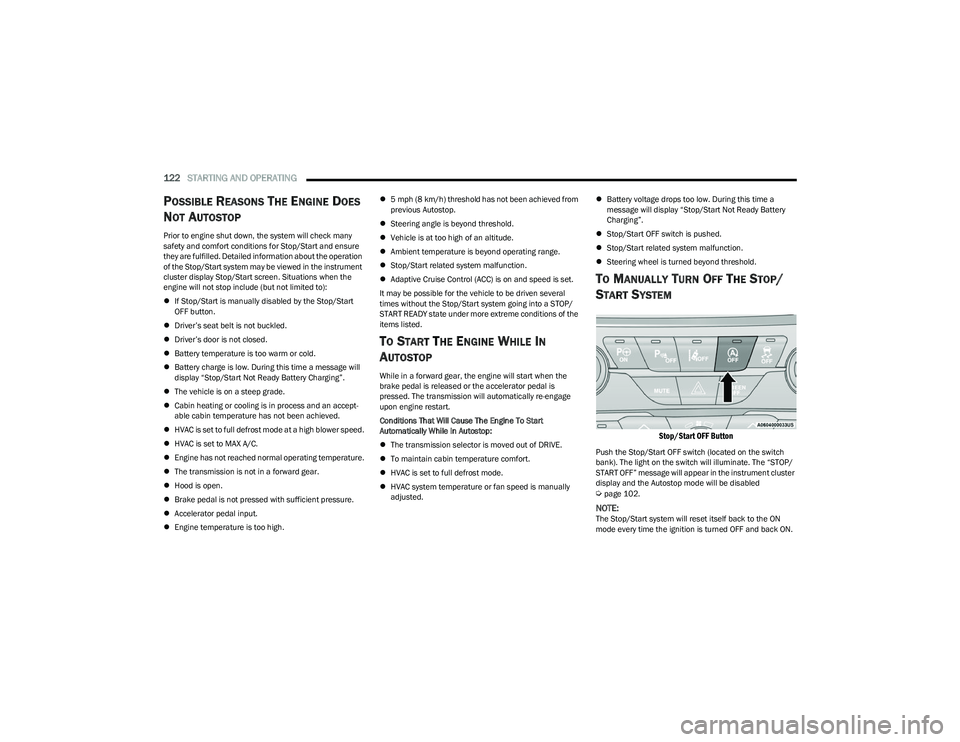
Stop/Start OFF Button
Push the Stop/Start OFF switch (located on the switch
bank). The light on the switch will illuminate. The “STOP/
START OFF” message will appear in the instrument cluster
display and the Autostop mode will be disabled
Úpage 102.
NOTE:The Stop/Start system will reset itself back to the ON
mode every time the ignition is turned OFF and back ON.
23_RUP_OM_EN_USC_t.book Page 122
Page 179 of 328
MULTIMEDIA177
REAR SEAT ENTERTAINMENT (RSE) WITH
AMAZON FIRE TV BUILT-IN — IF EQUIPPED
OVERVIEW
Rear Seat Entertainment with Fire TV built-in is designed
to give your family years of enjoyment.
Fire TV lets passengers enjoy a wide variety of content
from popular apps (subscriptions may be required).
Stream videos, play games, listen to music, get
information, and watch downloaded programs all while on
the road. Two Voice Remotes with Alexa are included with
the system. Press the Microphone button on the Voice
Remote with Alexa to easily find, launch, and control
content. Check sports scores, play music, control smart
home devices, or see your live camera feeds (compatible
smart home device required and sold separately). In
addition to streaming and downloaded content, changing
the input in Fire TV also enables you to:
Play your favorite CDs, DVDs, or Blu-ray™ Discs.
Mirror what’s on your phone or tablet to Fire TV via
Miracast capable devices.
Plug and play a variety of standard video games or
devices into the HDMI port.
Listen to audio over wired or wireless headphones (not
included, customer will have to provide their own or
play audio through in-cabin speakers with Listen In
feature in front seat).
Plug and play a variety of devices into the front seat
Video USB port. USB ports located under the rear
screens are charge only.
Watch content individually on each rear display or
mirror across both displays to watch together.
NOTE:Vehicle must be in an active and usable cellular range and
properly equipped with a Uconnect 5 NAV system and
Rear Seat Entertainment with Fire TV package. Streaming
requires a Wi-Fi connection and registered Amazon
account to run Fire TV in the vehicle. Streaming service
subscriptions are not included. Services and features are
subject to change or withdrawal at any time, may not be
available in all areas and languages, and may require
separate subscriptions.
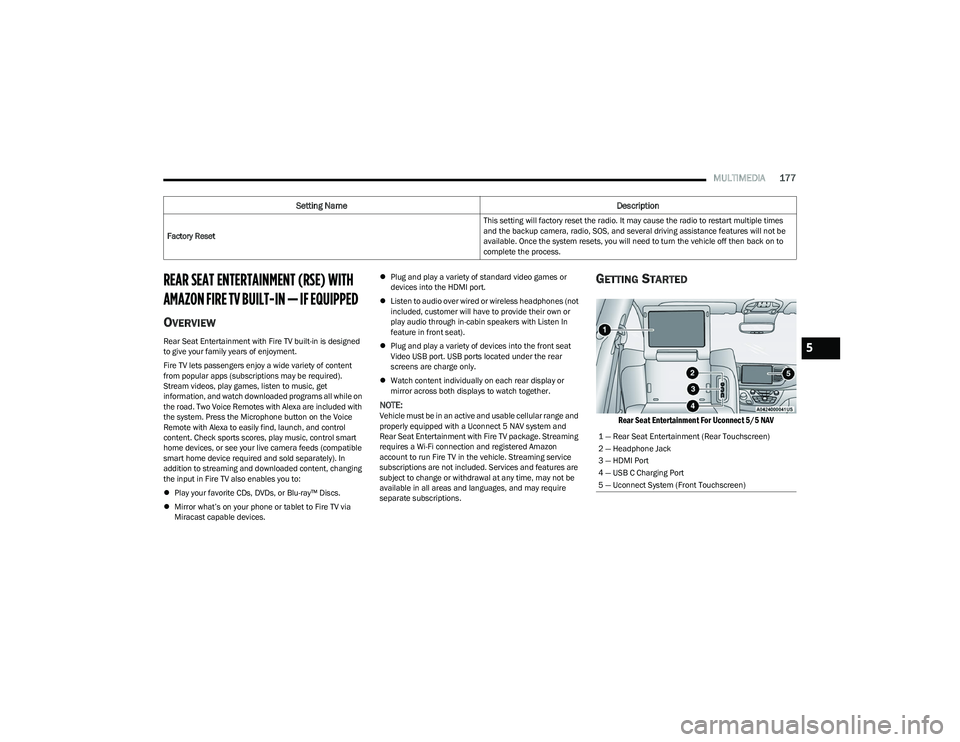
GETTING STARTED
Rear Seat Entertainment For Uconnect 5/5 NAV
Factory Reset This setting will factory reset the radio. It may cause the radio to restart multiple times
and the backup camera, radio, SOS, and several driving assistance features will not be
available. Once the system resets, you will need to turn the vehicle off then back on to
complete the process.
Setting Name
Description
1 — Rear Seat Entertainment (Rear Touchscreen)
2 — Headphone Jack
3 — HDMI Port
4 — USB C Charging Port
5 — Uconnect System (Front Touchscreen)
5
23_RUP_OM_EN_USC_t.book Page 177
Page 254 of 328
252IN CASE OF EMERGENCY
JUMP STARTING PROCEDURE
Connecting The Jumper Cables
1. Connect the positive
(+) end of the jumper cable to
the positive (+)
post of the vehicle with the
discharged battery.
2. Connect the opposite end of the positive (+) jumper
cable to the positive (+) post of the booster battery.
3. Connect the negative (-) end of the jumper cable to
the negative (-) post of the booster battery.
4. Connect the opposite end of the negative (-) jumper
cable to the remote negative (-) post near the
windshield cowl (exposed metallic/unpainted post of
the discharge vehicle). 5. Start the engine in the vehicle that has the booster
battery, let the engine idle a few minutes, and then
start the engine in the vehicle with the discharged
battery.
6. Once the engine is started, see the following discon- necting procedure for the next steps.
Disconnecting The Jumper Cables
1. Disconnect the negative
(-)
end of the jumper cable
from the remote negative post of the vehicle with the
discharged battery.
2. Disconnect the opposite end of the negative (-)
jumper cable from the negative (-) post of the booster
battery.
3. Disconnect the positive (+) end of the jumper cable
from the positive (+) post of the booster battery.
4. Disconnect the opposite end of the positive (+)
jumper cable from the positive (+) post of the vehicle
with the discharged battery and reinstall the
protective cap.
If frequent jump starting is required to start your vehicle
you should have the battery and charging system
inspected at an authorized dealer.
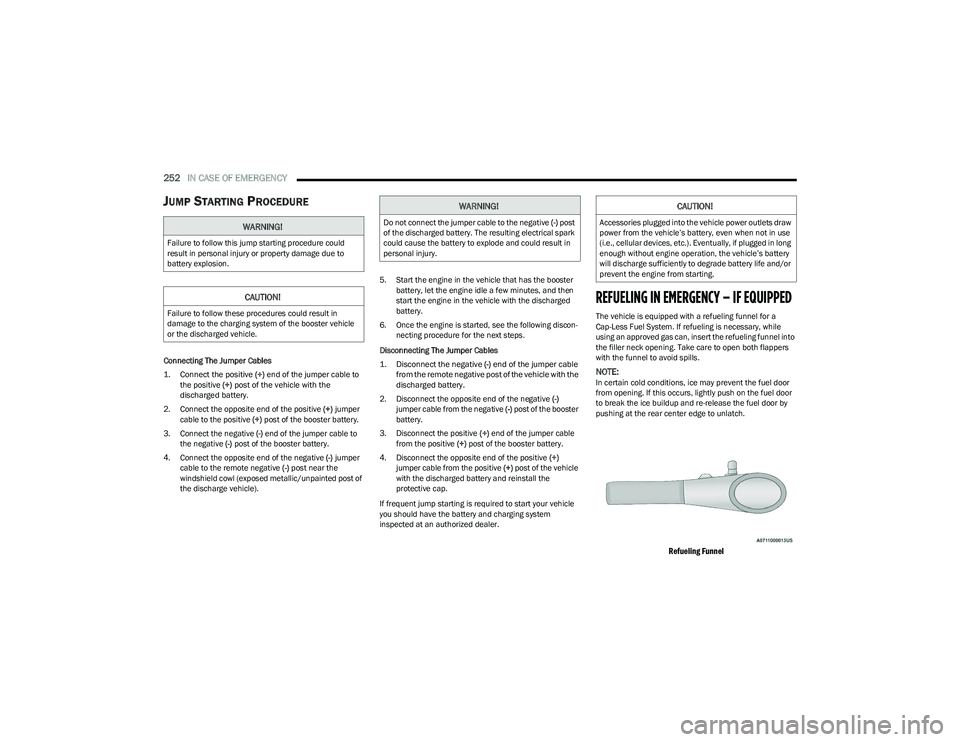
REFUELING IN EMERGENCY – IF EQUIPPED
The vehicle is equipped with a refueling funnel for a
Cap-Less Fuel System. If refueling is necessary, while
using an approved gas can, insert the refueling funnel into
the filler neck opening. Take care to open both flappers
with the funnel to avoid spills.
NOTE:In certain cold conditions, ice may prevent the fuel door
from opening. If this occurs, lightly push on the fuel door
to break the ice buildup and re-release the fuel door by
pushing at the rear center edge to unlatch.
Refueling Funnel
WARNING!
Failure to follow this jump starting procedure could
result in personal injury or property damage due to
battery explosion.
CAUTION!
Failure to follow these procedures could result in
damage to the charging system of the booster vehicle
or the discharged vehicle.
WARNING!
Do not connect the jumper cable to the negative (-) post
of the discharged battery. The resulting electrical spark
could cause the battery to explode and could result in
personal injury.
CAUTION!
Accessories plugged into the vehicle power outlets draw
power from the vehicle’s battery, even when not in use
(i.e., cellular devices, etc.). Eventually, if plugged in long
enough without engine operation, the vehicle’s battery
will discharge sufficiently to degrade battery life and/or
prevent the engine from starting.
23_RUP_OM_EN_USC_t.book Page 252
Page 282 of 328

280SERVICING AND MAINTENANCE
F72 –10 Amp Red Heated Mirror *
F73 30 Amp Pink –Rear Defroster
F74 20 Amp Blue –Trailer Tow Backup Lights*
F75 –5 Amp TanOverhead Console / RR Center Stack
F76 –20 Amp YellowUconnect / Center Display / Telematics
F77 –10 Amp RedRR Entertainment / Media HUB / USB(S) /
Rain Sensor / Sunroof / RR View Mirror/ Overhead DVD Player / INT Monitoring Camera / Wireless Charging Pad
F78 –15 Amp BlueTCM (ZF) / E-Shifter / Cluster
F79 –10 Amp RedICS / HVAC / SCCM/ EPB SW
F80 ––Not Populated
F81 ––Not Populated
F82 ––Not Populated
F83 20 Amp Blue
–TT Park Lights *
30 Amp Pink –Headlamp Washer Pump *
F84 30 Amp Pink –Drive Train Control MOD *
F85 –20 Amp Yellow Cigar Lighter
F86 ––Not Populated
F87 ––Not Populated
F88 –20 Amp Yellow Front Heated Seats *
F89 –20 Amp Yellow Rear Heated Seats *
F90 ––Not Populated
Cavity
Cartridge Fuse Blade FuseDescription
*If Equipped
23_RUP_OM_EN_USC_t.book Page 280
Page 315 of 328
313
INDEX
AAbout Your Brakes ....................................................... 303
Adaptive Cruise Control (ACC) (Cruise Control) ... 123, 124
Adding Engine Coolant (Antifreeze) ............................ 272
Additives, Fuel .............................................................. 305
Adjust Down...........................................................................41
Forward ...................................................................... 40
Rearward ....................................................................40
Up................................................................................ 41
Air Bag........................................................................... 210 Air Bag Operation.................................................... 211
Air Bag Warning Light .................................... 209
, 211
Driver Knee Air Bag ................................................ 215
Enhanced Accident Response ...................... 218
, 258
Event Data Recorder (EDR).................................... 258 Front Air Bag ........................................................... 211
If Deployment Occurs ............................................. 217
Knee Impact Bolsters ............................................. 214
Maintaining Your Air Bag System .......................... 218
Maintenance ........................................................... 218
Redundant Air Bag Warning Light ......................... 210
Side Air Bags ........................................................... 215
Transporting Pets.................................................... 233
Air Bag Light ...............................................102
, 209, 233
Air Cleaner, Engine (Engine Air Cleaner Filter) ........... 265
Air Conditioner Maintenance ...................................... 266
Air Conditioner Refrigerant .......................................... 266
Air Conditioner System ................................................ 266 Air Conditioning Filter ............................................71
, 266
Air Conditioning, Operating Tips .................................... 70
Air Filter ......................................................................... 265
Air Pressure Tires.......................................................................... 291
Alarm Arm The System......................................................... 19
Disarm The System ................................................... 19
Security Alarm.......................................................... 105
All Wheel Drive Towing ...................................................................... 258
All Wheel Drive (AWD)...................................................120
Alterations/Modifications Vehicle.......................................................................... 8
Amazon FireTV .................................................... 177
, 181
Amazon FireTV Built-In ................................................. 177
Antifreeze (Engine Coolant) ............................... 272
, 306
Disposal ...................................................................273
Anti-Lock Brake System (ABS) ..................................... 187
Anti-Lock Warning Light................................................ 105
Assist, Hill Start ............................................................. 190
Audio Jack ....................................................................... 74
Audio Systems (Radio) ................................................. 157
Auto Up Power Windows ................................................ 79
Automatic Dimming Mirror ............................................. 48 Automatic Headlights ..................................................... 56Automatic Temperature Control (ATC) .......................... 70
Automatic Transaxle ..................................................... 117 Automatic Transmission .............................................. 118
Adding Fluid .................................................... 274
, 307
Fluid And Filter Change........................................... 274
Fluid Change ........................................................... 274
Fluid Level Check .................................................... 274
Fluid Type .......................................................274
, 307
Special Additives ..................................................... 274
AutoPark ....................................................................... 111
AUX Cord ......................................................................... 74
Auxiliary Electrical Outlet (Power Outlet) ...................... 75
AWD Towing...................................................................... 258
Axle Lubrication ............................................................ 307
BBack Up Camera........................................................... 142
Battery..................................................................103, 263
Charging System Light ............................................ 103
Jump Starting .......................................................... 251
Keyless Key Fob Replacement................................. 13
Battery Saver Feature .................................................... 57
Belts, Seat..................................................................... 233
Blind Spot Monitoring .................................................. 192
Body Mechanism Lubrication ...................................... 268
B-Pillar Location ........................................................... 288
Brake Assist System..................................................... 188
Brake Control System, Electronic................................ 188
Brake Fluid.................................................................... 307
11
23_RUP_OM_EN_USC_t.book Page 313
Page 323 of 328
321
Sizes ........................................................................ 284
Snow Tires ............................................................... 294Spare Tires ............................................240
, 295, 296
Spinning .................................................................. 292
Trailer Towing .......................................................... 152
Tread Wear Indicators ............................................ 293
Wheel Nut Torque ................................................... 303
To Open Hood..................................................................82
Tongue Weight/Trailer Weight .................................... 151
Towing ........................................................................... 147 Disabled Vehicle ..................................................... 256
Guide ....................................................................... 149Recreational ............................................................ 154
Weight...................................................................... 149
Towing Behind A Motorhome ...................................... 154
Traction ......................................................................... 155
Traction Control............................................................ 191
Trailer Sway Control (TSC) ........................................... 192
Trailer Towing ............................................................... 147 Hitches .................................................................... 149
Minimum Requirements ........................................ 151
Tips .......................................................................... 153
Trailer And Tongue Weight ..................................... 151
Wiring....................................................................... 152
Trailer Towing Guide .................................................... 149
Trailer Weight ............................................................... 149
Transaxle Automatic ................................................................ 117Operation................................................................. 117 Transmission................................................................. 118
Automatic ....................................................... 118, 274
Maintenance............................................................274
Transporting Pets ......................................................... 233
Tread Wear Indicators ..................................................293
Turn Signals ................................................. 54
, 108, 282
UUconnect 4C/4C Nav With 8.4-Inch Display ............... 158
Uconnect Settings Customer Programmable Features .......................... 21
Passive Entry Programming ...................................... 21
Uniform Tire Quality Grades ......................................... 298
Universal Garage Door Opener (HomeLink®) —
If Equipped
b
............................................................... 51
Unleaded Gasoline ....................................................... 304
Untwisting Procedure, Seat Belt ..................................204
USB .................................................................................. 74
VVacuum ........................................................................... 86 Stow ‘n Vac ................................................................ 86
Vanity Mirrors .................................................................. 48
Vehicle Identification Number (VIN) ............................ 303
Vehicle Loading................................................... 146
, 288
Vehicle Maintenance ....................................................264
Vehicle Modifications/Alterations ................................... 8
Vehicle Storage ............................................................... 70
Ventilated Seats ............................................................. 44
Voice Command.............................................................. 47
Voice Recognition System (VR) ...................................... 47
WWarning Lights Red........................................................................... 102
Yellow....................................................................... 105
Warning Lights And Messages .................................... 102
Warranty Information ................................................... 310
Washers, Windshield ................................................... 263
Washing Vehicle ........................................................... 300
Water Driving Through ....................................................... 156
Wheel And Wheel Tire Care ......................................... 296
Wheel And Wheel Tire Trim.......................................... 296
Wind Buffeting ................................................................ 79
Window Fogging ............................................................. 70
Windows.......................................................................... 78 Power ......................................................................... 78
Windshield Defroster ................................................... 234
Windshield Washers ............................................. 59
, 263
Fluid ......................................................................... 263
Windshield Wiper Blades ............................................. 268
Wipers Blade Replacement ......................................... 268
Wipers, Intermittent ....................................................... 59 Wireless Charging Pad ................................................... 77
Wrecker Towing ............................................................ 256
11
23_RUP_OM_EN_USC_t.book Page 321