2023 CHEVROLET SUBURBAN Manual gear
[x] Cancel search: Manual gearPage 270 of 443
Chevrolet Tahoe/Suburban Owner Manual (GMNA-Localizing-U.S./Canada/
Mexico-16416971) - 2023 - CRC - 5/16/22
Driving and Operating 269
.The accessory trailer cameras are
swapped at the hitch connector. Ensure
that the accessory camera(s) are
connected to the correct input.
.The accessory trailer camera(s) are
connected to the correct camera input.
.The accessory trailer camera(s) are not
installed according to the installation
instructions.
A feature may be unavailable or not
activating as expected if:
.The customization is disabled. Check the
customization settings where applicable.
.The accessory trailer cameras are
swapped at the hitch connector. Ensure
that the accessory camera(s) are
connected to the correct camera input.
A view may switch automatically if:
.The vehicle is shifted to another gear.
Park Assist
The vehicle may be equipped with the Rear
Park Assist (RPA) and Front Park Assist (FPA).
The Park Assist system may provide
assistance to driver while backing up and
parking. Park Assist uses ultrasonic sensors
in the bumper to measure the distance
between the vehicle and objects. The system calculates the distance between vehicle and
object via measuring the time it takes for
the ultrasonic waves to bounce back from
the object. Park Assist works only at speeds
up to about 11 Km/h (7 mph). An illuminated
indicater light in the parking system is
ready to operate. The sensors on the
bumpers may detect objects up to 1.8m
(6 ft) behind and 1.25m (4 ft) in front of the
vehicle within a one 25 cm (10) high off the
ground and below bumper level. These
detection distances may be shorter during
warmer or humid weather. Blocked sensors
will not detect objects and can also cause
false detections. Keep the sensors clean of
mud, dirt, snow, ice and slush and clean
sensors after a wash in freezing
temperatures.
{Warning
The Park Assist System is no substitute
for careful and attentive driving. The Park
Assist system does not detect children,
pedestrians, bicyclists, animals, or objects
located below the bumper or that are too
close or too far from the vehicle. It is not
available at speeds greater than 11 km/h
(7 mph). To prevent injury, death,
(Continued)
Warning (Continued)
or vehicle damage, even with Park Assist,
always check the area around the vehicle
and check all mirrors before moving
forward or backing.
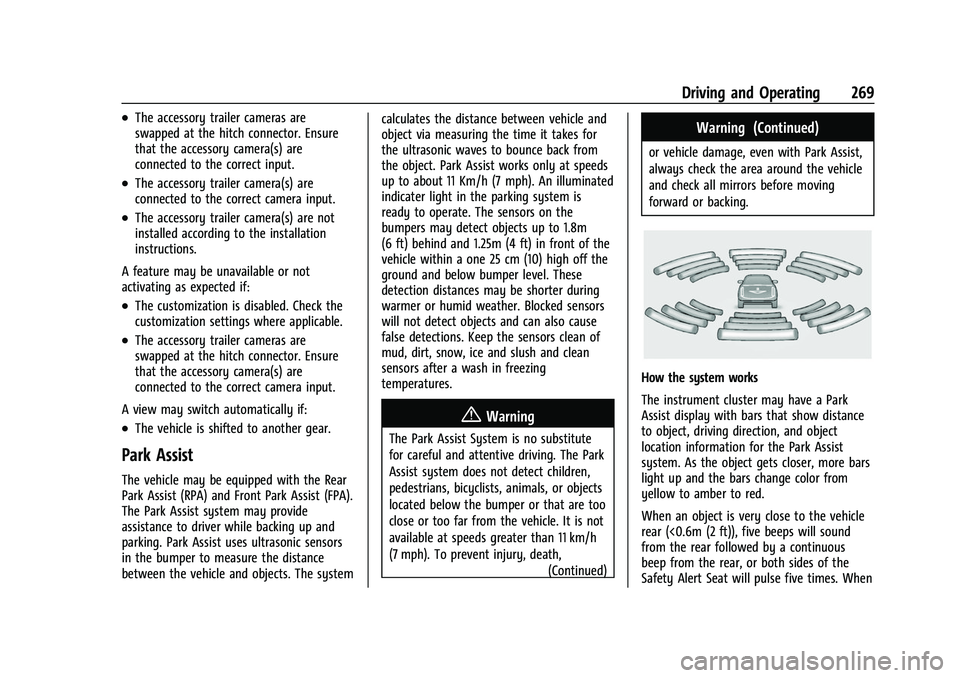
How the system works
The instrument cluster may have a Park
Assist display with bars that show distance
to object, driving direction, and object
location information for the Park Assist
system. As the object gets closer, more bars
light up and the bars change color from
yellow to amber to red.
When an object is very close to the vehicle
rear (<0.6m (2 ft)), five beeps will sound
from the rear followed by a continuous
beep from the rear, or both sides of the
Safety Alert Seat will pulse five times. When
Page 271 of 443

Chevrolet Tahoe/Suburban Owner Manual (GMNA-Localizing-U.S./Canada/
Mexico-16416971) - 2023 - CRC - 5/16/22
270 Driving and Operating
an object is very close to the vehicle front
(<0.3m (1 ft)), a continuous beep will sound
from the front, or both sides of the Safety
Alert Seat will pulse five times. Beeps for
FPA are higher pitched than for RPA.
Turning the Features On or Off
TheXbutton located in the customizing
menu is used to turn on or off the Park
Assist.
Front and Rear Park Assist can be set to Off,
On, or On with Towbar through vehicle
personalization. To view available settings
for this feature, touch the Settings icon on
the infotainment home page. Select
“Vehicle” to display the list of available
options and select “Collision/Detection
Systems”. If Park Assist is turned off through
vehicle personalization, the Park Assist
button will be disabled. To turn the Park
Assist on again, select On in vehicle
personalization. The On with Towbar setting
allows for Park Assist to work properly with
an attached trailer hitch. Turn off Park Assist
when towing a trailer.
To view available settings for this feature,
touch the Settings icon on the infotainment
home page. Select “Vehicle”to display the
list of available options and select “Collision/Detection Systems”. On some models, select
the guidance lines button on the
infotainment display to turn them on or off.
Automatic Parking Assist (APA)
If equipped, under certain conditions
Enhanced Automatic Parking Assist (APA) can
use sensors based on sonar technology
along the vehicle’s front, rear and sides to
detect a parking spot and automatically park
the vehicle. The vehicle will automatically
maneuver into a detected spot moving at or
near idle speed. It does this by
automatically steering, braking, accelerating,
and gear shifting. The driver must always be
prepared to apply braking if necessary. A
display and beeps help to guide the parking
maneuvers.
{Warning
APA may not always detect objects in the
parking space, objects that are not rigid
(e.g. shrubs and chain-link fences), objects
below the bumper, objects high off the
ground (e.g. flatbed trucks), hanging
objects, objects below ground level (e.g.
large potholes), or moving objects (e.g.
pedestrians, cyclists, vehicles). Always
(Continued)
Warning (Continued)
verify that the parking space is
appropriate for parking a vehicle. APA
may not respond to changes in the
parking space, such as movement of an
adjacent vehicle, or a person or object
entering the parking space. APA does not
detect or avoid traffic that is behind or
alongside of the vehicle. Always be
prepared to stop the vehicle during the
parking maneuver.
How to Activate Automatic Parking
To activate APA, press
Oon the Home
Page of the infotainment display for the
system to begin searching for a parking
space while driving forward at no greater
than 30 km/h (18 mph). By default, APA
searches for parallel parking spaces to the
right of the vehicle up to the sensors’ range
of 1.5 m (5 ft). To search for a parking space
to the left, turn on the left turn signal or,
if available, change the side selection in the
infotainment display. To switch the parking
mode between parallel and perpendicular
press and hold
Owhile searching for a
valid parking spot or, if available, change the
parking mode in the infotainment display.
Page 272 of 443
Chevrolet Tahoe/Suburban Owner Manual (GMNA-Localizing-U.S./Canada/
Mexico-16416971) - 2023 - CRC - 5/16/22
Driving and Operating 271
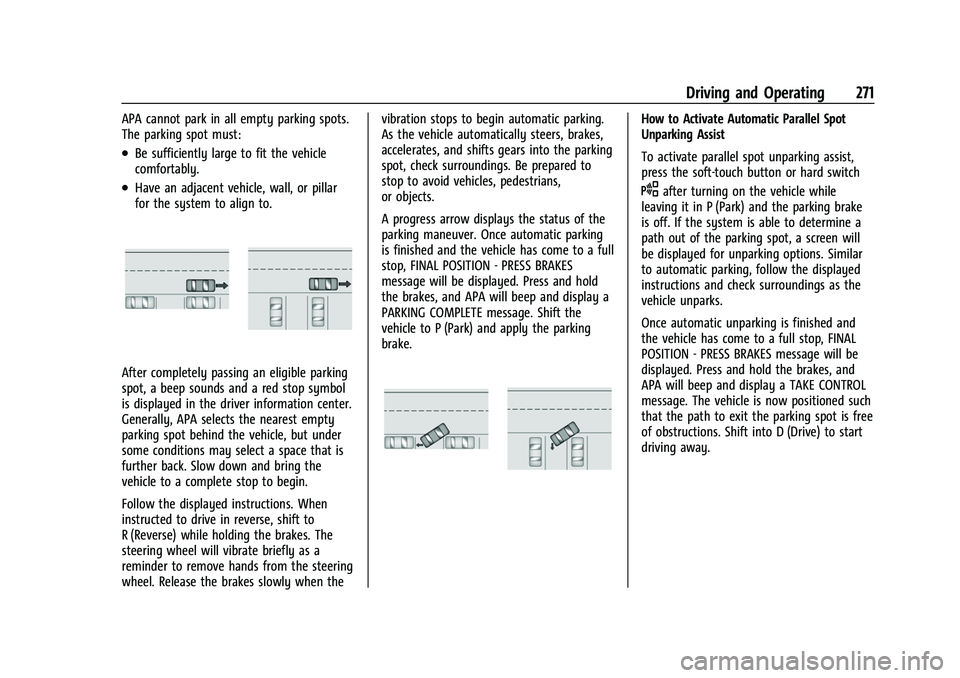
APA cannot park in all empty parking spots.
The parking spot must:
.Be sufficiently large to fit the vehicle
comfortably.
.Have an adjacent vehicle, wall, or pillar
for the system to align to.
After completely passing an eligible parking
spot, a beep sounds and a red stop symbol
is displayed in the driver information center.
Generally, APA selects the nearest empty
parking spot behind the vehicle, but under
some conditions may select a space that is
further back. Slow down and bring the
vehicle to a complete stop to begin.
Follow the displayed instructions. When
instructed to drive in reverse, shift to
R (Reverse) while holding the brakes. The
steering wheel will vibrate briefly as a
reminder to remove hands from the steering
wheel. Release the brakes slowly when thevibration stops to begin automatic parking.
As the vehicle automatically steers, brakes,
accelerates, and shifts gears into the parking
spot, check surroundings. Be prepared to
stop to avoid vehicles, pedestrians,
or objects.
A progress arrow displays the status of the
parking maneuver. Once automatic parking
is finished and the vehicle has come to a full
stop, FINAL POSITION - PRESS BRAKES
message will be displayed. Press and hold
the brakes, and APA will beep and display a
PARKING COMPLETE message. Shift the
vehicle to P (Park) and apply the parking
brake.
How to Activate Automatic Parallel Spot
Unparking Assist
To activate parallel spot unparking assist,
press the soft-touch button or hard switch
Oafter turning on the vehicle while
leaving it in P (Park) and the parking brake
is off. If the system is able to determine a
path out of the parking spot, a screen will
be displayed for unparking options. Similar
to automatic parking, follow the displayed
instructions and check surroundings as the
vehicle unparks.
Once automatic unparking is finished and
the vehicle has come to a full stop, FINAL
POSITION - PRESS BRAKES message will be
displayed. Press and hold the brakes, and
APA will beep and display a TAKE CONTROL
message. The vehicle is now positioned such
that the path to exit the parking spot is free
of obstructions. Shift into D (Drive) to start
driving away.
Page 276 of 443

Chevrolet Tahoe/Suburban Owner Manual (GMNA-Localizing-U.S./Canada/
Mexico-16416971) - 2023 - CRC - 5/16/22
Driving and Operating 275
Driving With a Trailer
Use caution while backing up when towing
a trailer. The RCTA feature is automatically
disabled when a trailer is attached to the
vehicle.
Turning the Features On or Off
To view available settings for this feature,
touch the Settings icon on the infotainment
home page. Select“Vehicle”to display the
list of available options and select “Collision/
Detection Systems”.
Assistance Systems for Driving
If equipped, when driving the vehicle in a
forward gear, Forward Collision Alert (FCA),
Front Pedestrian Braking (FPB), Lane Keep
Assist (LKA), Side Blind Zone Alert (SBZA),
Lane Change Alert (LCA), and/or Automatic
Emergency Braking (AEB) can help to avoid a
crash or reduce crash damage.
Forward Collision Alert (FCA)
System
If equipped, the FCA system may help to
avoid or reduce the harm caused by
front-end crashes. When approaching a
vehicle ahead too quickly, FCA provides a
red flashing alert on the windshield and rapidly beeps or pulses the driver seat. FCA
also lights an amber visual alert if following
another vehicle much too closely.
FCA detects vehicles within a distance of
approximately 60 m (197 ft) and operates at
speeds above 8 km/h (5 mph). If the vehicle
has Adaptive Cruise Control (ACC), it can
detect vehicles to distances of approximately
110 m (360 ft) and operates at all speeds.
See
Adaptive Cruise Control (Advanced)
0 236.
{Warning
FCA is a warning system and does not
apply the brakes. When approaching a
slower-moving or stopped vehicle ahead
too rapidly, or when following a vehicle
too closely, FCA may not provide a
warning with enough time to help avoid
a crash. It also may not provide any
warning at all. FCA does not warn of
pedestrians, animals, signs, guardrails,
bridges, construction barrels, or other
objects. Be ready to take action and
apply the brakes. See Defensive Driving
0 196. FCA can be disabled through vehicle settings.
To view available settings for this feature,
touch the Settings icon on the infotainment
home page. Select
“Vehicle”to display the
list of available options and select “Collision/
Detection Systems”.
Detecting the Vehicle Ahead
FCA warnings will not occur unless the FCA
system detects a vehicle ahead. When a
vehicle is detected, the vehicle ahead
indicator will display green. Vehicles may
not be detected on curves, highway exit
ramps, or hills, due to poor visibility; or if a
vehicle ahead is partially blocked by
pedestrians or other objects. FCA will not
detect another vehicle ahead until it is
completely in the driving lane.
Page 278 of 443
Chevrolet Tahoe/Suburban Owner Manual (GMNA-Localizing-U.S./Canada/
Mexico-16416971) - 2023 - CRC - 5/16/22
Driving and Operating 277
Following Distance Indicator
The following distance to a moving vehicle
ahead in your path is indicated in following
time in seconds on the Driver Information
Center (DIC). SeeDriver Information Center
(DIC) (Uplevel) 0126 orDriver Information
Center (DIC) (Base Level) 0123. The
minimum following time is 0.5 seconds
away. If there is no vehicle detected ahead,
or the vehicle ahead is out of sensor range,
dashes will be displayed.
Unnecessary Alerts
FCA may provide unnecessary alerts for
turning vehicles, vehicles in other lanes,
objects that are not vehicles, or shadows.
These alerts are normal operation and the
vehicle does not need service.
Cleaning the System
If the FCA system does not seem to operate
properly, this may correct the issue:
.Clean the outside of the windshield in
front of the rearview mirror.
.Clean the entire front of the vehicle.
.Clean the headlamps.
For cleaning instructions, see “Washing the
Vehicle” underExterior Care 0390. System operation may also be limited under
snow, heavy rain, or road spray conditions.
Automatic Emergency
Braking (AEB)
If equipped, the AEB system may help avoid
or reduce the harm caused by front-end
crashes. AEB also includes Intelligent Brake
Assist (IBA). When the system detects a
vehicle ahead in your path that is traveling
in the same direction that you may be
about to crash into, it can provide a boost
to braking or automatically brake the
vehicle. This can help avoid or lessen the
severity of crashes when driving in a
forward gear. Depending on the situation,
the vehicle may automatically brake
moderately or hard. This automatic
emergency braking can only occur if a
vehicle is detected. This is shown by the FCA
vehicle ahead indicator being lit. See
Forward Collision Alert (FCA) System
0275.
The system works when driving in a forward
gear between 8 km/h (5 mph) and 80 km/h
(50 mph), or on vehicles with Adaptive
Cruise Control (ACC), above 4 km/h (2 mph).
It can detect vehicles up to approximately
60 m (197 ft).
{Warning
AEB is an emergency crash preparation
feature and is not designed to avoid
crashes. Do not rely on AEB to brake the
vehicle. AEB will not brake outside of its
operating speed range and only responds
to detected vehicles.
AEB may not:
.Detect a vehicle ahead on winding or
hilly roads.
.Detect all vehicles, especially vehicles
with a trailer, tractors, muddy
vehicles, etc.
.Detect a vehicle when weather limits
visibility, such as in fog, rain, or snow.
.Detect a vehicle ahead if it is partially
blocked by pedestrians or other
objects.
Complete attention is always required
while driving, and you should be ready to
take action and apply the brakes and/or
steer the vehicle to avoid crashes.
Page 279 of 443
Chevrolet Tahoe/Suburban Owner Manual (GMNA-Localizing-U.S./Canada/
Mexico-16416971) - 2023 - CRC - 5/16/22
278 Driving and Operating
AEB may slow the vehicle to a complete
stop to try to avoid a potential crash. If this
happens, AEB may hold the vehicle at a stop
momentarily. Firmly press the accelerator to
continue driving.
{Warning
AEB may automatically brake the vehicle
suddenly in situations where it is
unexpected and undesired. It could
respond to a turning vehicle ahead,
guardrails, signs, and other non-moving
objects. To override AEB, firmly press the
accelerator pedal, if it is safe to do so.
Intelligent Brake Assist (IBA)
IBA may activate when the brake pedal is
applied quickly by providing a boost to
braking based on the speed of approach and
distance to a vehicle ahead.
Minor brake pedal pulsations or pedal
movement during this time is normal and
the brake pedal should continue to be
applied as needed. IBA will automatically
disengage only when the brake pedal is
released.
{Warning
IBA may increase vehicle braking in
situations when it may not be necessary.
You could block the flow of traffic. If this
occurs, take your foot off the brake pedal
and then apply the brakes as needed.
AEB and IBA can be disabled through vehicle
personalization. To view available settings
for this feature, touch the Settings icon on
the infotainment home page. Select
“Vehicle” to display the list of available
options and select “Collision/Detection
Systems”.
{Warning
Using AEB or IBA while towing a trailer
could cause you to lose control of the
vehicle and crash. Turn the system to
Alert or Off when towing a trailer.
A system unavailable message may
display if:
.The front of the vehicle or windshield is
not clean.
.Heavy rain or snow is interfering with
object detection.
.There is a problem with the StabiliTrak/
Electronic Stability Control (ESC) system.
The AEB system does not need service.
Front Pedestrian Braking (FPB)
System
If equipped, the FPB system may help avoid
or reduce the harm caused by front-end
crashes with nearby pedestrians when
driving in a forward gear. FPB displays an
amber indicator,
~, when a nearby
pedestrian is detected ahead. When
approaching a detected pedestrian too
quickly, FPB provides a red flashing alert on
the windshield and rapidly beeps or pulses
the driver seat. FPB can provide a boost to
braking or automatically brake the vehicle.
This system includes Intelligent Brake Assist
(IBA), and the Automatic Emergency Braking
(AEB) system may also respond to
pedestrians. See Automatic Emergency
Braking (AEB) 0277.
The FPB system can detect and alert to
pedestrians in a forward gear at speeds
between 8 km/h (5 mph) and 80 km/h
(50 mph). During daytime driving, the
system detects pedestrians up to a distance
Page 281 of 443
Chevrolet Tahoe/Suburban Owner Manual (GMNA-Localizing-U.S./Canada/
Mexico-16416971) - 2023 - CRC - 5/16/22
280 Driving and Operating
8 km/h (5 mph) and 80 km/h (50 mph).
Automatic braking levels may be reduced
under certain conditions, such as higher
speeds.
FPB may slow the vehicle to a complete
stop to try to avoid a potential collision
with a pedestrian. If this happens, the
vehicle may be held at a stop momentarily.
Firmly press the accelerator to drive
forward.
{Warning
FPB may alert or automatically brake the
vehicle suddenly in situations where it is
unexpected and undesired. It could falsely
alert or brake for objects similar in shape
or size to pedestrians, including shadows.
This is normal operation and the vehicle
does not need service. To override
Automatic Braking, firmly press the
accelerator pedal, if it is safe to do so.
Automatic Braking can be disabled through
vehicle settings.To view available settings
from the infotainment screen, touch Settings
> Vehicle > Collision/Detection Systems >
Front Pedestrian Detection.
{Warning
Using the FPB system while towing a
trailer could cause you to lose control of
the vehicle and crash. Turn the system to
Alert or Off when towing a trailer.
Cleaning the System
If FPB does not seem to operate properly,
cleaning the outside of the windshield in
front of the rearview mirror may correct the
issue.
Side Blind Zone Alert (SBZA)
If equipped, the SBZA system is a
lane-changing aid that assists drivers with
avoiding crashes that occur with moving
vehicles in the side blind zone, or blind spot
areas. When the vehicle is in a forward gear,
the left or right side mirror display will light
up if a moving vehicle is detected in that
blind zone. If the turn signal is activated and
a vehicle is also detected on the same side,
the display will flash as an extra warning
not to change lanes. Since this system is part of the Lane Change Alert (LCA) system,
read the entire LCA section before using this
feature.
Lane Change Alert (LCA)
If equipped, the Lane Change Alert (LCA)
system is a lane-changing aid that can assist
drivers with avoiding lane change crashes
with moving vehicles in the side blind zone,
or blind spot areas or with vehicles rapidly
approaching these areas from behind. When
a vehicle is detected in the blind zone, the
LCA warning display will light up in the
corresponding side mirror and will flash if
the turn signal is on. The Side Blind Zone
Alert (SBZA) system is included as part of
the LCA system.
{Warning
LCA does not alert the driver to vehicles
outside of the system detection zones,
pedestrians, bicyclists, or animals. It may
not provide alerts when changing lanes
under all driving conditions. Failure to use
proper care when changing lanes may
result in injury, death, or vehicle damage.
(Continued)
Page 282 of 443
Chevrolet Tahoe/Suburban Owner Manual (GMNA-Localizing-U.S./Canada/
Mexico-16416971) - 2023 - CRC - 5/16/22
Driving and Operating 281
Warning (Continued)
Before making a lane change, always
check mirrors, glance over your shoulder,
and use the turn signals.
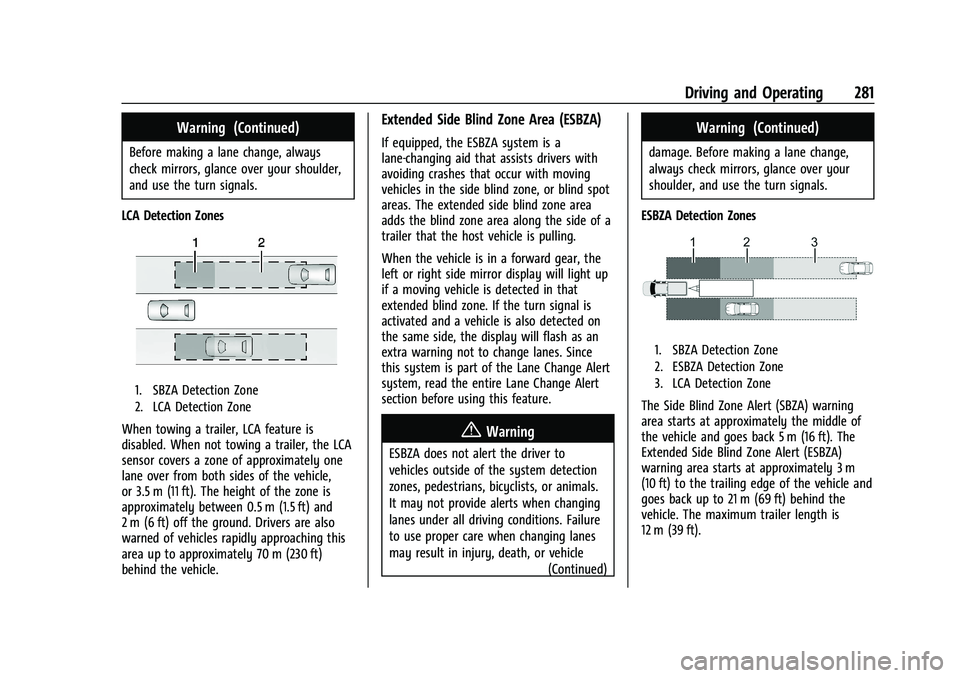
LCA Detection Zones
1. SBZA Detection Zone
2. LCA Detection Zone
When towing a trailer, LCA feature is
disabled. When not towing a trailer, the LCA
sensor covers a zone of approximately one
lane over from both sides of the vehicle,
or 3.5 m (11 ft). The height of the zone is
approximately between 0.5 m (1.5 ft) and
2 m (6 ft) off the ground. Drivers are also
warned of vehicles rapidly approaching this
area up to approximately 70 m (230 ft)
behind the vehicle.
Extended Side Blind Zone Area (ESBZA)
If equipped, the ESBZA system is a
lane-changing aid that assists drivers with
avoiding crashes that occur with moving
vehicles in the side blind zone, or blind spot
areas. The extended side blind zone area
adds the blind zone area along the side of a
trailer that the host vehicle is pulling.
When the vehicle is in a forward gear, the
left or right side mirror display will light up
if a moving vehicle is detected in that
extended blind zone. If the turn signal is
activated and a vehicle is also detected on
the same side, the display will flash as an
extra warning not to change lanes. Since
this system is part of the Lane Change Alert
system, read the entire Lane Change Alert
section before using this feature.
{Warning
ESBZA does not alert the driver to
vehicles outside of the system detection
zones, pedestrians, bicyclists, or animals.
It may not provide alerts when changing
lanes under all driving conditions. Failure
to use proper care when changing lanes
may result in injury, death, or vehicle (Continued)
Warning (Continued)
damage. Before making a lane change,
always check mirrors, glance over your
shoulder, and use the turn signals.
ESBZA Detection Zones
1. SBZA Detection Zone
2. ESBZA Detection Zone
3. LCA Detection Zone
The Side Blind Zone Alert (SBZA) warning
area starts at approximately the middle of
the vehicle and goes back 5 m (16 ft). The
Extended Side Blind Zone Alert (ESBZA)
warning area starts at approximately 3 m
(10 ft) to the trailing edge of the vehicle and
goes back up to 21 m (69 ft) behind the
vehicle. The maximum trailer length is
12 m (39 ft).