2023 CHEVROLET SILVERADO 1500 change wheel
[x] Cancel search: change wheelPage 246 of 463
Chevrolet Silverado 1500 Owner Manual (GMNA-Localizing-U.S./Canada/
Mexico/Paraguay-16515119) - 2023 - CRC - 6/2/22
Driving and Operating 245
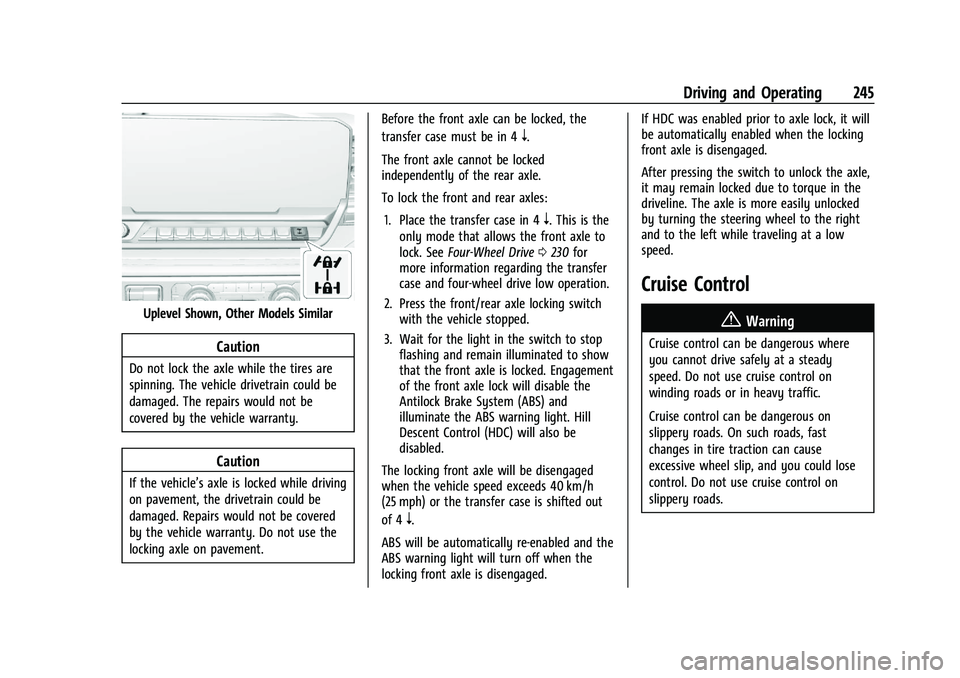
Uplevel Shown, Other Models Similar
Caution
Do not lock the axle while the tires are
spinning. The vehicle drivetrain could be
damaged. The repairs would not be
covered by the vehicle warranty.
Caution
If the vehicle’s axle is locked while driving
on pavement, the drivetrain could be
damaged. Repairs would not be covered
by the vehicle warranty. Do not use the
locking axle on pavement.Before the front axle can be locked, the
transfer case must be in 4
n.
The front axle cannot be locked
independently of the rear axle.
To lock the front and rear axles: 1. Place the transfer case in 4
n. This is the
only mode that allows the front axle to
lock. See Four-Wheel Drive 0230 for
more information regarding the transfer
case and four-wheel drive low operation.
2. Press the front/rear axle locking switch with the vehicle stopped.
3. Wait for the light in the switch to stop flashing and remain illuminated to show
that the front axle is locked. Engagement
of the front axle lock will disable the
Antilock Brake System (ABS) and
illuminate the ABS warning light. Hill
Descent Control (HDC) will also be
disabled.
The locking front axle will be disengaged
when the vehicle speed exceeds 40 km/h
(25 mph) or the transfer case is shifted out
of 4
n.
ABS will be automatically re-enabled and the
ABS warning light will turn off when the
locking front axle is disengaged. If HDC was enabled prior to axle lock, it will
be automatically enabled when the locking
front axle is disengaged.
After pressing the switch to unlock the axle,
it may remain locked due to torque in the
driveline. The axle is more easily unlocked
by turning the steering wheel to the right
and to the left while traveling at a low
speed.
Cruise Control
{
Warning
Cruise control can be dangerous where
you cannot drive safely at a steady
speed. Do not use cruise control on
winding roads or in heavy traffic.
Cruise control can be dangerous on
slippery roads. On such roads, fast
changes in tire traction can cause
excessive wheel slip, and you could lose
control. Do not use cruise control on
slippery roads.
Page 249 of 463
Chevrolet Silverado 1500 Owner Manual (GMNA-Localizing-U.S./Canada/
Mexico/Paraguay-16515119) - 2023 - CRC - 6/2/22
248 Driving and Operating
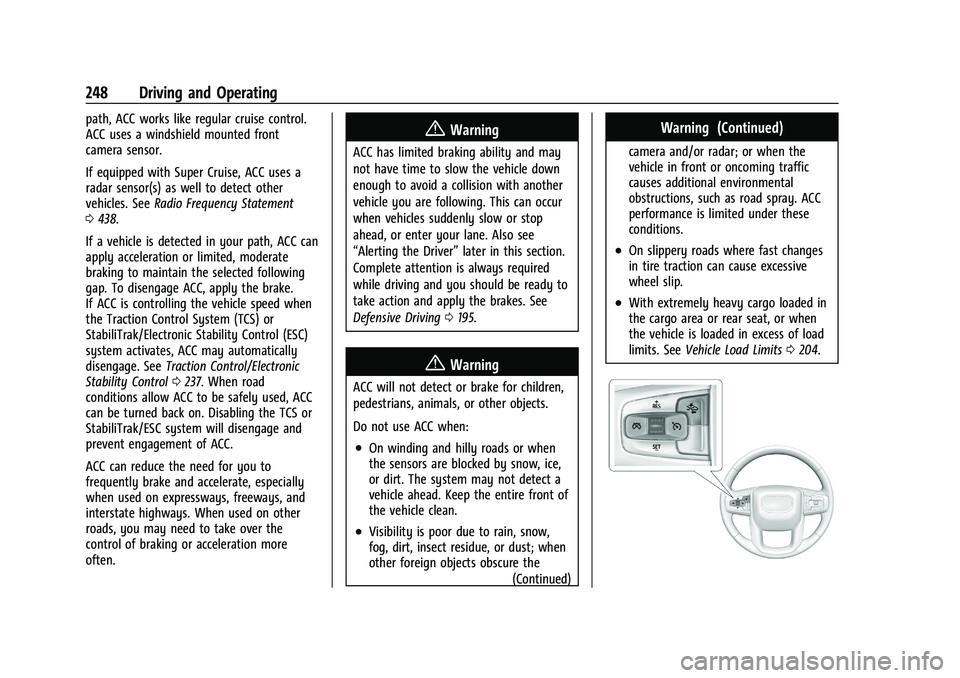
path, ACC works like regular cruise control.
ACC uses a windshield mounted front
camera sensor.
If equipped with Super Cruise, ACC uses a
radar sensor(s) as well to detect other
vehicles. SeeRadio Frequency Statement
0 438.
If a vehicle is detected in your path, ACC can
apply acceleration or limited, moderate
braking to maintain the selected following
gap. To disengage ACC, apply the brake.
If ACC is controlling the vehicle speed when
the Traction Control System (TCS) or
StabiliTrak/Electronic Stability Control (ESC)
system activates, ACC may automatically
disengage. See Traction Control/Electronic
Stability Control 0237. When road
conditions allow ACC to be safely used, ACC
can be turned back on. Disabling the TCS or
StabiliTrak/ESC system will disengage and
prevent engagement of ACC.
ACC can reduce the need for you to
frequently brake and accelerate, especially
when used on expressways, freeways, and
interstate highways. When used on other
roads, you may need to take over the
control of braking or acceleration more
often.{Warning
ACC has limited braking ability and may
not have time to slow the vehicle down
enough to avoid a collision with another
vehicle you are following. This can occur
when vehicles suddenly slow or stop
ahead, or enter your lane. Also see
“Alerting the Driver” later in this section.
Complete attention is always required
while driving and you should be ready to
take action and apply the brakes. See
Defensive Driving 0195.
{Warning
ACC will not detect or brake for children,
pedestrians, animals, or other objects.
Do not use ACC when:
.On winding and hilly roads or when
the sensors are blocked by snow, ice,
or dirt. The system may not detect a
vehicle ahead. Keep the entire front of
the vehicle clean.
.Visibility is poor due to rain, snow,
fog, dirt, insect residue, or dust; when
other foreign objects obscure the
(Continued)
Warning (Continued)
camera and/or radar; or when the
vehicle in front or oncoming traffic
causes additional environmental
obstructions, such as road spray. ACC
performance is limited under these
conditions.
.On slippery roads where fast changes
in tire traction can cause excessive
wheel slip.
.With extremely heavy cargo loaded in
the cargo area or rear seat, or when
the vehicle is loaded in excess of load
limits. SeeVehicle Load Limits 0204.
Page 252 of 463
Chevrolet Silverado 1500 Owner Manual (GMNA-Localizing-U.S./Canada/
Mexico/Paraguay-16515119) - 2023 - CRC - 6/2/22
Driving and Operating 251
.If ACC is holding the vehicle at a stop and
there is another vehicle directly ahead,
pressing RES+ will increase the set speed.
.Pressing RES+ when there is no longer a
vehicle ahead or the vehicle ahead is
pulling away and the brake is not applied
with cause the ACC to resume.
When it is determined that there is no
vehicle ahead or the vehicle ahead is beyond
the selected following gap, then the vehicle
speed will increase to the set speed.
Reducing Speed While ACC Is at a Set Speed
If ACC is already activated, do one of the
following:
.Use the brake to get to the desired lower
speed. Release the brake and press SET–.
The vehicle will now cruise at the lower
speed.
.Press and hold SET– until the desired
lower speed is reached, then release it.
.To decrease the vehicle speed in smaller
increments, press SET− briefly. For each
press, the vehicle goes about 1 km/h
(1 mph) slower.
.To decrease the vehicle speed in larger
increments, hold SET−. While holding
SET−, the vehicle speed decreases to the
next 5 km/h (5 mph) step, then continues
to decrease by 5 km/h (5 mph) at a time.
The set speed can also be decreased while
the vehicle is stopped.
.If stopped with the brake applied, press
or hold SET− until the desired set speed is
displayed.
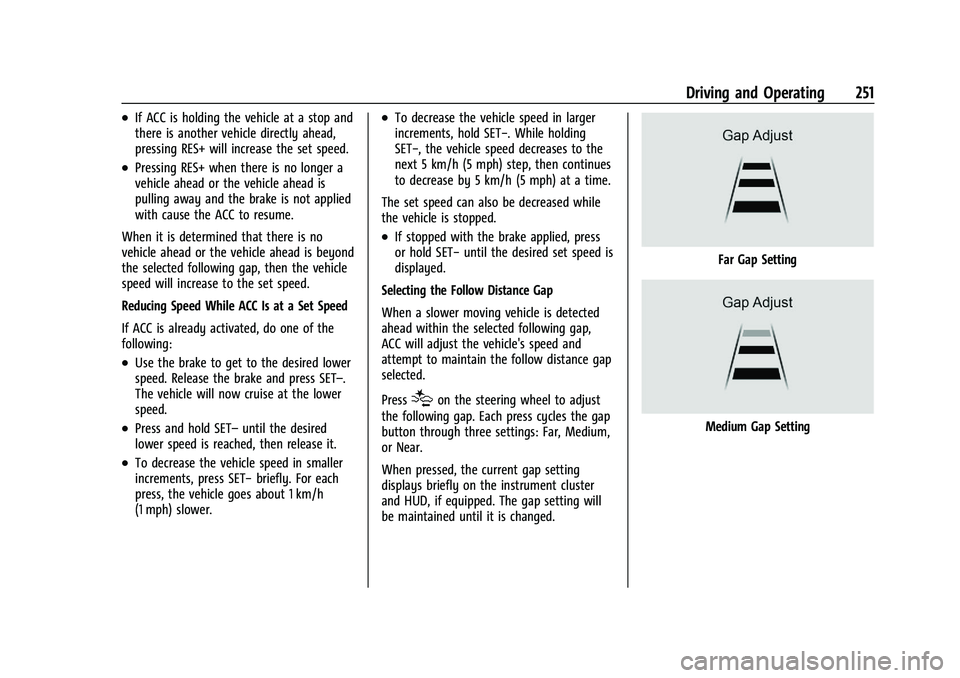
Selecting the Follow Distance Gap
When a slower moving vehicle is detected
ahead within the selected following gap,
ACC will adjust the vehicle's speed and
attempt to maintain the follow distance gap
selected.
Press
[on the steering wheel to adjust
the following gap. Each press cycles the gap
button through three settings: Far, Medium,
or Near.
When pressed, the current gap setting
displays briefly on the instrument cluster
and HUD, if equipped. The gap setting will
be maintained until it is changed.
Far Gap Setting
Medium Gap Setting
Page 253 of 463
Chevrolet Silverado 1500 Owner Manual (GMNA-Localizing-U.S./Canada/
Mexico/Paraguay-16515119) - 2023 - CRC - 6/2/22
252 Driving and Operating
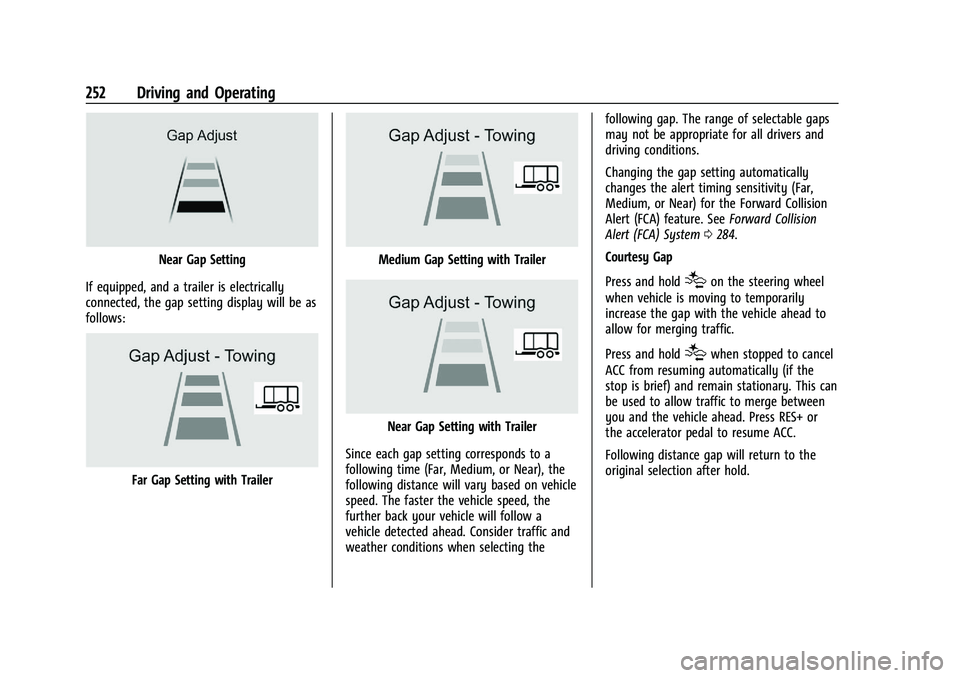
Near Gap Setting
If equipped, and a trailer is electrically
connected, the gap setting display will be as
follows:
Far Gap Setting with Trailer
Medium Gap Setting with Trailer
Near Gap Setting with Trailer
Since each gap setting corresponds to a
following time (Far, Medium, or Near), the
following distance will vary based on vehicle
speed. The faster the vehicle speed, the
further back your vehicle will follow a
vehicle detected ahead. Consider traffic and
weather conditions when selecting the following gap. The range of selectable gaps
may not be appropriate for all drivers and
driving conditions.
Changing the gap setting automatically
changes the alert timing sensitivity (Far,
Medium, or Near) for the Forward Collision
Alert (FCA) feature. See
Forward Collision
Alert (FCA) System 0284.
Courtesy Gap
Press and hold
[on the steering wheel
when vehicle is moving to temporarily
increase the gap with the vehicle ahead to
allow for merging traffic.
Press and hold
[when stopped to cancel
ACC from resuming automatically (if the
stop is brief) and remain stationary. This can
be used to allow traffic to merge between
you and the vehicle ahead. Press RES+ or
the accelerator pedal to resume ACC.
Following distance gap will return to the
original selection after hold.
Page 260 of 463
Chevrolet Silverado 1500 Owner Manual (GMNA-Localizing-U.S./Canada/
Mexico/Paraguay-16515119) - 2023 - CRC - 6/2/22
Driving and Operating 259
this section and the ACC section before
using Super Cruise. SeeAdaptive Cruise
Control (Camera) 0247.
An active Connected Service plan that
includes Super Cruise Services is required to
use Super Cruise.
{Warning
Super Cruise does not perform all aspects
of driving, nor does it do everything a
driver can do. Super Cruise only steers to
maintain vehicle position in the current
lane or, under some circumstances, to
change lanes. Super Cruise can only be
used with Adaptive Cruise Control.
Super Cruise does:
.Not prevent crashes or warn of
possible crashes.
.Not steer to avoid stopped or
slow-moving vehicles, cross-traffic,
construction barriers or cones,
motorcycles, children, pedestrians,
animals, or other objects on the road.
.Not steer in response to vehicles or
objects next to your vehicle, including
vehicles attempting to enter your lane. (Continued)
Warning (Continued)
.Not respond to traffic lights, stop
signs, or other traffic control devices.
.Not respond to crossing traffic.
.Not make turns.
.Not steer to merge onto or to exit
highways.
.Not steer to avoid, or steer through
construction zones.
.Not function on surface streets.
.Not respond to oncoming traffic.
.Not function in city driving conditions.
{Warning
Some state and local laws may require
hands to be kept on the steering wheel
at all times. Only remove your hands
from the steering wheel if Super Cruise is
engaged, it is safe to do so, and it is
permitted by state and local laws.
{Warning
Failure to supervise the driving task and
to respond appropriately, even while
Super Cruise is operating, can cause a
crash. Super Cruise may not respond as
you would to all driving situations and
may not maintain lane position under all
conditions.
It is extremely important to pay
attention to the operation of the vehicle,
even while using Super Cruise. Do not
use a hand-held device while driving,
even with Super Cruise engaged. To
prevent serious injury or death:
.Always remain properly seated in the
driver seat with your seat belt
fastened.
.Never remove your hands from the
steering wheel when Super Cruise is
not operating.
.Always make sure traffic conditions
are safe before using Super Cruise.
.Always keep the entire vehicle and the
sensors clean. Sensors are on the
front, sides, and rear of the vehicle.(Continued)
Page 263 of 463
Chevrolet Silverado 1500 Owner Manual (GMNA-Localizing-U.S./Canada/
Mexico/Paraguay-16515119) - 2023 - CRC - 6/2/22
262 Driving and Operating
wheel until the steering wheel light bar
turns green, and then release the steering
wheel when it is safe to do so.
{Warning
To help prevent crashes before making a
lane change:
.Always check mirrors.
.Glance over your shoulder.
.Use the turn signals.
Super Cruise Lane Change
Super Cruise can steer to perform a single
lane change under certain conditions when
requested by the driver or initiated by the
Super Cruise System.
To request a lane change:
On Demand Lane Changes 1. Verify the lane next to your vehicle is clear and conditions are safe to make a
lane change.
2. Use the turn signal lever to activate the turn signal in the direction of the desired
lane change.
3. Return the turn signal lever to the neutral position after the lane change.
See Turn and Lane-Change Signals 0141. 4. To cancel a lane change, return the turn
signal lever to the neutral position, move
the lever in the opposite direction of the
lane change, or steer manually at
any time.
Automatic Lane Changes
Super Cruise System may initiate a single
lane change when enabled through vehicle
settings under following conditions:.The Super Cruise System may initiate a
lane change to the left to pass a slower
moving vehicle ahead and a subsequent
lane change to right to return to your
original lane.
.Super Cruise System may initiate a lane
change to left or right when current lane
is ending ahead.
.To cancel a Super Cruise lane change,
return the turn signal lever to the neutral
position or move the turn signal lever.
.Super Cruise may initiate an automatic
lane change to left or right when a
slower moving vehicle is detected in the
adjacent ending lane to provide space for
merging vehicle.
If Super Cruise detects that traffic is clear,
Super Cruise will steer the vehicle to
perform the lane change. A message appears on the Driver Information Center (DIC)
during the lane change to provide more
information on the status of the lane
change.
Super Cruise Lane Change functionality is
only available on Super Cruise capable
Divided Roads.
Super Cruise Lane Change may be disabled
when a trailer or other accessories (e.g. bike
rack, cargo tray, etc.) are detected. Do not
use Super Cruise Lane Change when towing
a trailer.
The Super Cruise Lane Change feature can
be customized to be Off, On Demand Lane
Change, or On Demand Lane Change &
Automatic Lane Change through the vehicle
personalization menu. Touch the Settings
icon on the infotainment home page. Select
“Vehicle”
to display the list of available
options and select “Super Cruise Lane
Change”.
{Warning
Super Cruise Lane Change may not detect
a vehicle in an adjacent lane. Always
supervise the driving task and monitor
traffic conditions when using the Super
(Continued)
Page 264 of 463
Chevrolet Silverado 1500 Owner Manual (GMNA-Localizing-U.S./Canada/
Mexico/Paraguay-16515119) - 2023 - CRC - 6/2/22
Driving and Operating 263
Warning (Continued)
Cruise Lane Change feature. Only request
a lane change when traffic conditions are
safe for a lane change, and always be
ready to manually steer the vehicle. See
“Steering Manually and Changing Lanes”
listed previously in this section.
Take Over Alert
{Warning
Super Cruise will not maintain the
vehicle’s speed while the steering wheel
light bar is flashing red. If the steering
wheel light bar flashes red, immediately
resume manual steering to prevent
serious injury or death. If you do not
resume manual steering, the vehicle will
begin to slow in the same lane and
eventually come to a complete stop on
the road.
Any time the steering wheel light bar
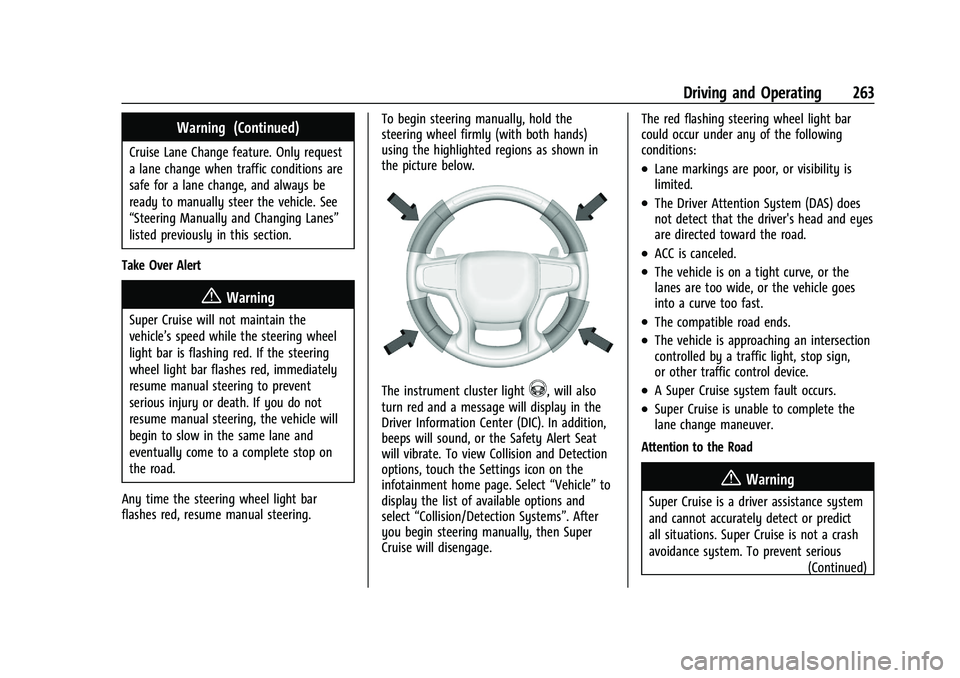
flashes red, resume manual steering. To begin steering manually, hold the
steering wheel firmly (with both hands)
using the highlighted regions as shown in
the picture below.
The instrument cluster light^, will also
turn red and a message will display in the
Driver Information Center (DIC). In addition,
beeps will sound, or the Safety Alert Seat
will vibrate. To view Collision and Detection
options, touch the Settings icon on the
infotainment home page. Select “Vehicle”to
display the list of available options and
select “Collision/Detection Systems”. After
you begin steering manually, then Super
Cruise will disengage. The red flashing steering wheel light bar
could occur under any of the following
conditions:
.Lane markings are poor, or visibility is
limited.
.The Driver Attention System (DAS) does
not detect that the driver's head and eyes
are directed toward the road.
.ACC is canceled.
.The vehicle is on a tight curve, or the
lanes are too wide, or the vehicle goes
into a curve too fast.
.The compatible road ends.
.The vehicle is approaching an intersection
controlled by a traffic light, stop sign,
or other traffic control device.
.A Super Cruise system fault occurs.
.Super Cruise is unable to complete the
lane change maneuver.
Attention to the Road
{Warning
Super Cruise is a driver assistance system
and cannot accurately detect or predict
all situations. Super Cruise is not a crash
avoidance system. To prevent serious (Continued)
Page 265 of 463
Chevrolet Silverado 1500 Owner Manual (GMNA-Localizing-U.S./Canada/
Mexico/Paraguay-16515119) - 2023 - CRC - 6/2/22
264 Driving and Operating
Warning (Continued)
injury or death, you must supervise the
driving task and monitor the road
conditions. You may need to respond to
traffic events by steering, braking,
or accelerating. SeeDefensive Driving
0 195. Super Cruise also cannot determine
whether you are awake, asleep, impaired,
or properly focused on safe driving. The
vehicle could crash into other vehicles,
drive out of the lane, or drive off the
road. Complete attention is always
required while driving, even while using
Super Cruise. Be prepared to take over
steering or apply the brakes at any time.
{Warning
To prevent serious injury or death, be
alert and pay special attention when
passing highway exits, entrances, and
crossings with Super Cruise, and be ready
to take control of the vehicle when
necessary. Changes in lane markings
around exits and entrances can
momentarily cause Super Cruise to not
detect the correct lane. If this occurs,
Super Cruise may attempt steering inputs
to bring the vehicle back into the correct
lane and, in rare circumstances, could
over-correct and cause the vehicle to
momentarily cross into a lane next to
your vehicle unless you manually steer to
maintain your lane position.
The Driver Attention System (DAS) on the
steering column continually monitors driver
head and eye position to estimate driver
attention to the road. The camera does not
record or share pictures, audio, or video. Sunglasses, hats, or other types of clothing
that change the shape of the head may
interfere with camera performance. To
improve camera performance, raise or lower
the steering wheel, or change the seat
position.
Pay close attention to the road ahead to
avoid these three increasing alerts: