2023 CHEVROLET MALIBU low oil pressure
[x] Cancel search: low oil pressurePage 231 of 332
Chevrolet Malibu Owner Manual (GMNA-Localizing-U.S./Canada-
16273584) - 2023 - CRC - 9/28/22
230 Vehicle Care
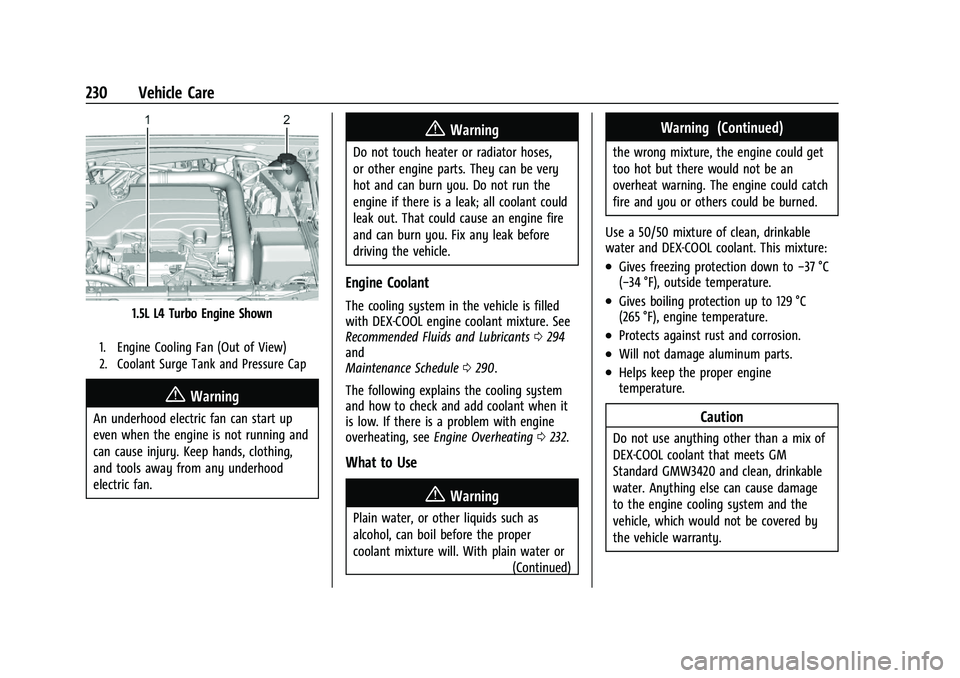
1.5L L4 Turbo Engine Shown
1. Engine Cooling Fan (Out of View)
2. Coolant Surge Tank and Pressure Cap
{Warning
An underhood electric fan can start up
even when the engine is not running and
can cause injury. Keep hands, clothing,
and tools away from any underhood
electric fan.
{Warning
Do not touch heater or radiator hoses,
or other engine parts. They can be very
hot and can burn you. Do not run the
engine if there is a leak; all coolant could
leak out. That could cause an engine fire
and can burn you. Fix any leak before
driving the vehicle.
Engine Coolant
The cooling system in the vehicle is filled
with DEX-COOL engine coolant mixture. See
Recommended Fluids and Lubricants0294
and
Maintenance Schedule 0290.
The following explains the cooling system
and how to check and add coolant when it
is low. If there is a problem with engine
overheating, see Engine Overheating 0232.
What to Use
{Warning
Plain water, or other liquids such as
alcohol, can boil before the proper
coolant mixture will. With plain water or
(Continued)
Warning (Continued)
the wrong mixture, the engine could get
too hot but there would not be an
overheat warning. The engine could catch
fire and you or others could be burned.
Use a 50/50 mixture of clean, drinkable
water and DEX-COOL coolant. This mixture:
.Gives freezing protection down to −37 °C
(−34 °F), outside temperature.
.Gives boiling protection up to 129 °C
(265 °F), engine temperature.
.Protects against rust and corrosion.
.Will not damage aluminum parts.
.Helps keep the proper engine
temperature.
Caution
Do not use anything other than a mix of
DEX-COOL coolant that meets GM
Standard GMW3420 and clean, drinkable
water. Anything else can cause damage
to the engine cooling system and the
vehicle, which would not be covered by
the vehicle warranty.
Page 232 of 332
Chevrolet Malibu Owner Manual (GMNA-Localizing-U.S./Canada-
16273584) - 2023 - CRC - 9/28/22
Vehicle Care 231
Never dispose of engine coolant by putting
it in the trash, or by pouring it on the
ground, or into sewers, streams or bodies of
water. Have the coolant changed by an
authorized service center, familiar with legal
requirements regarding used coolant
disposal. This will help protect the
environment and your health.
Checking Coolant
The vehicle must be on a level surface when
checking the coolant level.
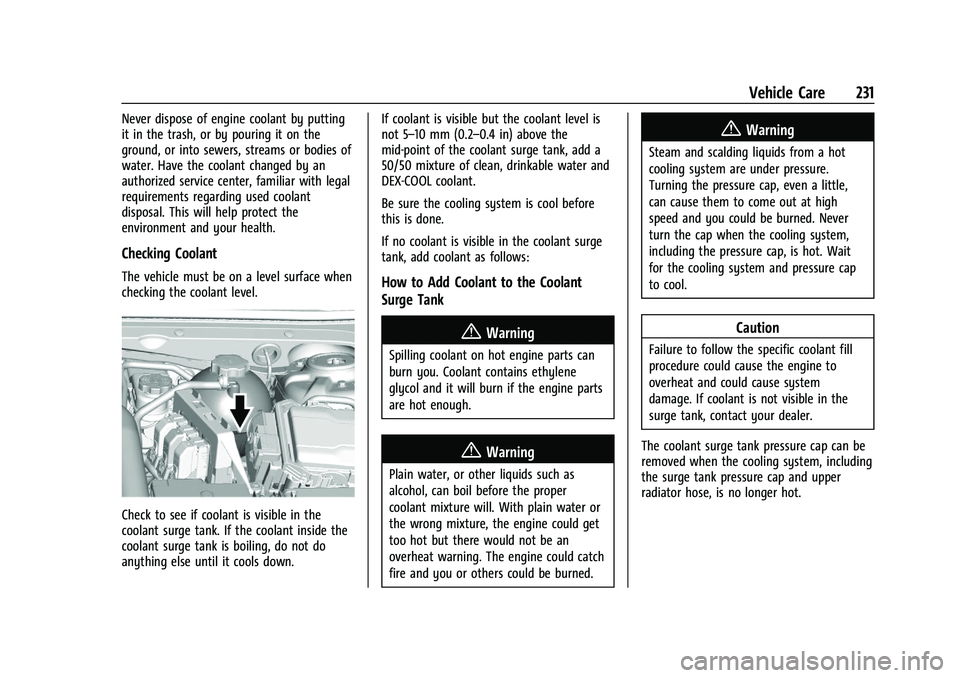
Check to see if coolant is visible in the
coolant surge tank. If the coolant inside the
coolant surge tank is boiling, do not do
anything else until it cools down.If coolant is visible but the coolant level is
not 5–10 mm (0.2–0.4 in) above the
mid-point of the coolant surge tank, add a
50/50 mixture of clean, drinkable water and
DEX-COOL coolant.
Be sure the cooling system is cool before
this is done.
If no coolant is visible in the coolant surge
tank, add coolant as follows:
How to Add Coolant to the Coolant
Surge Tank
{Warning
Spilling coolant on hot engine parts can
burn you. Coolant contains ethylene
glycol and it will burn if the engine parts
are hot enough.
{Warning
Plain water, or other liquids such as
alcohol, can boil before the proper
coolant mixture will. With plain water or
the wrong mixture, the engine could get
too hot but there would not be an
overheat warning. The engine could catch
fire and you or others could be burned.
{Warning
Steam and scalding liquids from a hot
cooling system are under pressure.
Turning the pressure cap, even a little,
can cause them to come out at high
speed and you could be burned. Never
turn the cap when the cooling system,
including the pressure cap, is hot. Wait
for the cooling system and pressure cap
to cool.
Caution
Failure to follow the specific coolant fill
procedure could cause the engine to
overheat and could cause system
damage. If coolant is not visible in the
surge tank, contact your dealer.
The coolant surge tank pressure cap can be
removed when the cooling system, including
the surge tank pressure cap and upper
radiator hose, is no longer hot.
Page 282 of 332
Chevrolet Malibu Owner Manual (GMNA-Localizing-U.S./Canada-
16273584) - 2023 - CRC - 9/28/22
Vehicle Care 281
If using an automatic car wash, follow the
car wash instructions. The windshield wiper
and rear window wiper, if equipped, must
be off. Remove any accessories that may be
damaged or interfere with the car wash
equipment.
Rinse the vehicle well, before washing and
after, to remove all cleaning agents
completely. If they are allowed to dry on
the surface, they could stain.
Dry the finish with a soft, clean chamois or
an all-cotton towel to avoid surface
scratches and water spotting.
Cleaning Underhood Components
Caution
Do not power wash any component
under the hood that has this
e
symbol.
This could cause damage that would not
be covered by the vehicle warranty.
Solvents or aggressive cleaners may harm
underhood components. The usages of these
chemicals should be avoided.
Recommend water only. A pressure washer may be used, but care
must be utilized. The following criteria must
be followed:
.Water pressure must be kept below
14 000 KPa (2,000 PSI).
.Water temperature must be below 80 °C
(180 °F).
.Spray nozzle with a 40 degree wide angle
spray pattern or wider must be used.
.Nozzle must be kept at least 30 cm (1 ft)
away from all surfaces.
Finish Care
Application of aftermarket clearcoat sealant/
wax materials is not recommended.
If painted surfaces are damaged, see your
dealer to have the damage assessed and
repaired. Foreign materials such as calcium
chloride and other salts, ice melting agents,
road oil and tar, tree sap, bird droppings,
chemicals from industrial chimneys, etc., can
damage the vehicle's finish if they remain
on painted surfaces. Wash the vehicle as
soon as possible. If necessary, use
non-abrasive cleaners that are marked safe
for painted surfaces to remove foreign
matter.
Occasional hand waxing or mild polishing
should be done to remove residue from the
paint finish. See your dealer for approved
cleaning products.
Do not apply waxes or polishes to uncoated
plastic, vinyl, rubber, decals, simulated
wood, or flat paint as damage can occur.
Caution
Machine compounding or aggressive
polishing on a basecoat/clearcoat paint
finish may damage it. Use only
non-abrasive waxes and polishes that are
made for a basecoat/clearcoat paint finish
on the vehicle.
To keep the paint finish looking new, keep
the vehicle garaged or covered whenever
possible.
Protecting Exterior Bright Metal Moldings
Caution
Failure to clean and protect the bright
metal moldings can result in a hazy
white finish or pitting. This damage
would not be covered by the vehicle
warranty.
Page 285 of 332
Chevrolet Malibu Owner Manual (GMNA-Localizing-U.S./Canada-
16273584) - 2023 - CRC - 9/28/22
284 Vehicle Care
Visually check constant velocity joint boots
and axle seals for leaks.
Body Component Lubrication
Lubricate all key lock cylinders, hood hinges,
decklid hinges, steel fuel door hinge, unless
the components are plastic. Applying silicone
grease on weatherstrips with a clean cloth
will make them last longer, seal better, and
not stick or squeak.
Underbody Maintenance
At least twice a year, spring and fall, use
plain water to flush any corrosive materials
from the underbody. Take care to
thoroughly clean any areas where mud and
other debris can collect.
Do not directly power wash the transfer
case and/or front/rear axle output seals.
High pressure water can overcome the seals
and contaminate the fluid. Contaminated
fluid will decrease the life of the transfer
case and/or axles and should be replaced.
Sheet Metal Damage
If the vehicle is damaged and requires sheet
metal repair or replacement, make sure the
body repair shop applies anti-corrosion
material to parts repaired or replaced to
restore corrosion protection.Original manufacturer replacement parts will
provide the corrosion protection while
maintaining the vehicle warranty.
Finish Damage
Quickly repair minor chips and scratches
with touch-up materials available from your
dealer to avoid corrosion. Larger areas of
finish damage can be corrected in your
dealer's body and paint shop.
Chemical Paint Spotting
Airborne pollutants can fall upon and attack
painted vehicle surfaces causing blotchy,
ring-shaped discolorations, and small,
irregular dark spots etched into the paint
surface. See
“Finish Care” previously in this
section.
Interior Care
To prevent dirt particle abrasions, regularly
clean the vehicle's interior. Before using
cleaners, read and follow all safety
instructions on the label. While cleaning the
interior, open the doors and windows to get
proper ventilation. Newspapers or dark
garments can transfer color to the vehicle’s
interior.
Caution
Immediately remove cleaners, hand
lotions, sunscreen, and insect repellent
from all interior surfaces or permanent
damage may result.
Caution
Use cleaners specifically designed for the
surfaces being cleaned to prevent
permanent damage to the vehicle. Apply
all cleaners directly to a cleaning cloth.
Do not spray cleaners on any switches or
controls.
When using liquid soap cleaners, follow the
directions on the specific cleaner or soap
solution for dilution instructions.
Caution
To prevent damage:
.Never use a razor or any other sharp
object to remove soil from any interior
surface
.Never use a brush with stiff bristles.(Continued)
Page 319 of 332
Chevrolet Malibu Owner Manual (GMNA-Localizing-U.S./Canada-
16273584) - 2023 - CRC - 9/28/22
318 Connected Services
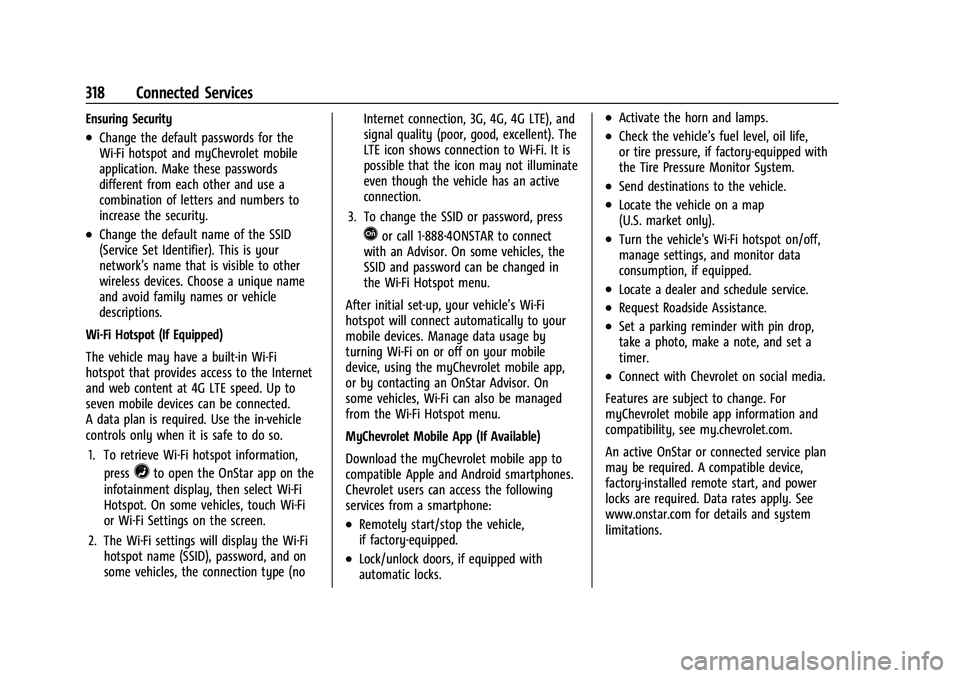
Ensuring Security
.Change the default passwords for the
Wi-Fi hotspot and myChevrolet mobile
application. Make these passwords
different from each other and use a
combination of letters and numbers to
increase the security.
.Change the default name of the SSID
(Service Set Identifier). This is your
network’s name that is visible to other
wireless devices. Choose a unique name
and avoid family names or vehicle
descriptions.
Wi-Fi Hotspot (If Equipped)
The vehicle may have a built-in Wi-Fi
hotspot that provides access to the Internet
and web content at 4G LTE speed. Up to
seven mobile devices can be connected.
A data plan is required. Use the in-vehicle
controls only when it is safe to do so. 1. To retrieve Wi-Fi hotspot information, press
=to open the OnStar app on the
infotainment display, then select Wi-Fi
Hotspot. On some vehicles, touch Wi-Fi
or Wi-Fi Settings on the screen.
2. The Wi-Fi settings will display the Wi-Fi hotspot name (SSID), password, and on
some vehicles, the connection type (no Internet connection, 3G, 4G, 4G LTE), and
signal quality (poor, good, excellent). The
LTE icon shows connection to Wi-Fi. It is
possible that the icon may not illuminate
even though the vehicle has an active
connection.
3. To change the SSID or password, press
Qor call 1-888-4ONSTAR to connect
with an Advisor. On some vehicles, the
SSID and password can be changed in
the Wi-Fi Hotspot menu.
After initial set-up, your vehicle’s Wi-Fi
hotspot will connect automatically to your
mobile devices. Manage data usage by
turning Wi-Fi on or off on your mobile
device, using the myChevrolet mobile app,
or by contacting an OnStar Advisor. On
some vehicles, Wi-Fi can also be managed
from the Wi-Fi Hotspot menu.
MyChevrolet Mobile App (If Available)
Download the myChevrolet mobile app to
compatible Apple and Android smartphones.
Chevrolet users can access the following
services from a smartphone:
.Remotely start/stop the vehicle,
if factory-equipped.
.Lock/unlock doors, if equipped with
automatic locks.
.Activate the horn and lamps.
.Check the vehicle’s fuel level, oil life,
or tire pressure, if factory-equipped with
the Tire Pressure Monitor System.
.Send destinations to the vehicle.
.Locate the vehicle on a map
(U.S. market only).
.Turn the vehicle's Wi-Fi hotspot on/off,
manage settings, and monitor data
consumption, if equipped.
.Locate a dealer and schedule service.
.Request Roadside Assistance.
.Set a parking reminder with pin drop,
take a photo, make a note, and set a
timer.
.Connect with Chevrolet on social media.
Features are subject to change. For
myChevrolet mobile app information and
compatibility, see my.chevrolet.com.
An active OnStar or connected service plan
may be required. A compatible device,
factory-installed remote start, and power
locks are required. Data rates apply. See
www.onstar.com for details and system
limitations.
Page 326 of 332
Chevrolet Malibu Owner Manual (GMNA-Localizing-U.S./Canada-
16273584) - 2023 - CRC - 9/28/22
Index 325
InformationPublication Ordering . . . . . . . . . . . . . . . . . . . 308
Infotainment Using the System . . . . . . . . . . . . . . . . . . . . . . . 112
Infotainment System . . . . . . . . . . . . . . . . . . . . . 311
Inspection Multi-Point Vehicle . . . . . . . . . . . . . . . . . . . . 292
Instrument Cluster . . . . . . . . . . . . . . . . . . . . . . . . 80
Instrument Panel Overview . . . . . . . . . . . . . . . . 4
Interior Rearview Mirrors . . . . . . . . . . . . . . . . . .22
Introduction . . . . . . . . . . . . . . . . . . . . . . . . . . . 2, 109
J
Jack Auxiliary . . . . . . . . . . . . . . . . . . . . . . . . . . . . . . . . 121
Jump Starting - North America . . . . . . . . . . . . . . . 275
K
Keys . . . . . . . . . . . . . . . . . . . . . . . . . . . . . . . . . . . . . . . 6
Remote . . . . . . . . . . . . . . . . . . . . . . . . . . . . . . . . . . 7
Remote Operation . . . . . . . . . . . . . . . . . . . . . . . 7
L
Labeling, Tire Sidewall . . . . . . . . . . . . . . . . . . . 252
LampsCourtesy . . . . . . . . . . . . . . . . . . . . . . . . . . . . . . . 105
Daytime Running (DRL) . . . . . . . . . . . . . . . . 104
Dome . . . . . . . . . . . . . . . . . . . . . . . . . . . . . . . . . . 105 Lamps (cont'd)
Exterior Controls . . . . . . . . . . . . . . . . . . . . . . . 102
Exterior Lamps Off Reminder . . . . . . . . . . 103
Exterior Lighting Battery Saver . . . . . . . . 108
Flash-to-Pass . . . . . . . . . . . . . . . . . . . . . . . . . . . 103
High/Low Beam Changer . . . . . . . . . . . . . . 103
License Plate . . . . . . . . . . . . . . . . . . . . . . . . . . . 242
Malfunction Indicator (Check
Engine) . . . . . . . . . . . . . . . . . . . . . . . . . . . . . . . 88
On Reminder . . . . . . . . . . . . . . . . . . . . . . . . . . . 95
Reading . . . . . . . . . . . . . . . . . . . . . . . . . . . . . . . . 106
Lane
Change Alert (LCA) . . . . . . . . . . . . . . . . . . . . . 207
Keep Assist (LKA) . . . . . . . . . . . . . . . . . . . . . . 209
Keep Assist Light . . . . . . . . . . . . . . . . . . . . . . . 91
Lap-Shoulder Belt . . . . . . . . . . . . . . . . . . . . . . . . . .41
LATCH System
Replacing Parts after a Crash . . . . . . . . . . . 67
LATCH, Lower Anchors and Tethers for Children . . . . . . . . . . . . . . . . . . . . . . . . . . . . . . . . . 60
LED Lighting . . . . . . . . . . . . . . . . . . . . . . . . . . . . . 239
Lighting
Entry . . . . . . . . . . . . . . . . . . . . . . . . . . . . . . . . . . 106
Exit . . . . . . . . . . . . . . . . . . . . . . . . . . . . . . . . . . . . 107
Illumination Control . . . . . . . . . . . . . . . . . . . 105
LED . . . . . . . . . . . . . . . . . . . . . . . . . . . . . . . . . . . . 239 Lights
Airbag Readiness . . . . . . . . . . . . . . . . . . . . . . . 86
Antilock Brake System (ABS)
Warning . . . . . . . . . . . . . . . . . . . . . . . . . . . . . . 90
Brake System Warning . . . . . . . . . . . . . . . . . 89
Charging System . . . . . . . . . . . . . . . . . . . . . . . 87
Check Engine (Malfunction Indicator) . . . . . . . . . . . . . . . . . . . . . . . . . . . . . 88
Cruise Control Light . . . . . . . . . . . . . . . . . . . . . 95
Door Ajar . . . . . . . . . . . . . . . . . . . . . . . . . . . . . . . 95
Electric Parking Brake . . . . . . . . . . . . . . . . . . . 90
Engine Coolant Temperature Warning . . . . . . . . . . . . . . . . . . . . . . . . . . . . . . 92
Engine Oil Pressure . . . . . . . . . . . . . . . . . . . . . 93
Gauges and Indicators . . . . . . . . . . . . . . . . . . 80
High-Beam On . . . . . . . . . . . . . . . . . . . . . . . . . . 94
Lane Keep Assist . . . . . . . . . . . . . . . . . . . . . . . . 91
Low Fuel Warning . . . . . . . . . . . . . . . . . . . . . . 94
Seat Belt Reminders . . . . . . . . . . . . . . . . . . . . 85
Security . . . . . . . . . . . . . . . . . . . . . . . . . . . . . . . . . 94
Service Electric Parking Brake . . . . . . . . . . . 90
StabiliTrak OFF . . . . . . . . . . . . . . . . . . . . . . . . . . 92
Tire Pressure . . . . . . . . . . . . . . . . . . . . . . . . . . . . 93
Traction Control System (TCS)/StabiliTrak . . . . . . . . . . . . . . . . . . . . . . 92
Traction Off . . . . . . . . . . . . . . . . . . . . . . . . . . . . . 91
Page 327 of 332
Chevrolet Malibu Owner Manual (GMNA-Localizing-U.S./Canada-
16273584) - 2023 - CRC - 9/28/22
326 Index
LocksAutomatic Door . . . . . . . . . . . . . . . . . . . . . . . . . . 17
Delayed Locking . . . . . . . . . . . . . . . . . . . . . . . . 16
Door . . . . . . . . . . . . . . . . . . . . . . . . . . . . . . . . . . . . 14
Lockout Protection . . . . . . . . . . . . . . . . . . . . . . . 17
Power Door . . . . . . . . . . . . . . . . . . . . . . . . . . . . . 16
Safety . . . . . . . . . . . . . . . . . . . . . . . . . . . . . . . . . . . 17
Loss of Control . . . . . . . . . . . . . . . . . . . . . . . . . . 169
Low Fuel Warning Light . . . . . . . . . . . . . . . . . . 94
Low-Profile Tires . . . . . . . . . . . . . . . . . . . . . . . . . 252
Lower Anchors and Tethers for Children (LATCH System) . . . . . . . . . . . . . . . . 60
Lumbar Adjustment . . . . . . . . . . . . . . . . . . . . . . . .32 Front Seats . . . . . . . . . . . . . . . . . . . . . . . . . . . . . 32
M
MaintenanceRecords . . . . . . . . . . . . . . . . . . . . . . . . . . . . . . . . 296
Maintenance Schedule . . . . . . . . . . . . . . . . . . . 290 Recommended Fluids andLubricants . . . . . . . . . . . . . . . . . . . . . . . . . . . . 294
Malfunction Indicator Lamp . . . . . . . . . . . . . . . 88
Manual Mode . . . . . . . . . . . . . . . . . . . . . . . . . . . . . . . . . . 183
Map Data Updates . . . . . . . . . . . . . . . . . . . . . . . . 133
Maps . . . . . . . . . . . . . . . . . . . . . . . . . . . . . . . . . . . . . 125
Media Avoiding Untrusted Devices . . . . . . . . . . . . . 118 Memory Seats . . . . . . . . . . . . . . . . . . . . . . . . . . . . .32
Messages
Engine Power . . . . . . . . . . . . . . . . . . . . . . . . . . 101
Vehicle . . . . . . . . . . . . . . . . . . . . . . . . . . . . . . . . 100
Vehicle Speed . . . . . . . . . . . . . . . . . . . . . . . . . . 101
Mirrors Automatic Dimming Rearview . . . . . . . . . . 23
Convex . . . . . . . . . . . . . . . . . . . . . . . . . . . . . . . . . . 21
Folding . . . . . . . . . . . . . . . . . . . . . . . . . . . . . . . . . 22
Heated . . . . . . . . . . . . . . . . . . . . . . . . . . . . . . . . . 22
Interior Rearview . . . . . . . . . . . . . . . . . . . . . . . 22
Manual Rearview . . . . . . . . . . . . . . . . . . . . . . . 23
Power . . . . . . . . . . . . . . . . . . . . . . . . . . . . . . . . . . 22
Tilt in Reverse . . . . . . . . . . . . . . . . . . . . . . . . . . 22
Monitor System, Tire Pressure . . . . . . . . . . . 259
Multi-band Antenna . . . . . . . . . . . . . . . . . . . . . . 118
Multi-Point Vehicle Inspection (MPVI) . . . . 292
N
Navigation Connected Services . . . . . . . . . . . . . . . . . . . . . 317
Destination . . . . . . . . . . . . . . . . . . . . . . . . . . . . 126
Symbols . . . . . . . . . . . . . . . . . . . . . . . . . . . . . . . 125
Using the System . . . . . . . . . . . . . . . . . . . . . . 122
Net, Convenience . . . . . . . . . . . . . . . . . . . . . . . . . .73
New Vehicle Break-In . . . . . . . . . . . . . . . . . . . . . 175
O
Odometer . . . . . . . . . . . . . . . . . . . . . . . . . . . . . . . . 83 Trip . . . . . . . . . . . . . . . . . . . . . . . . . . . . . . . . . . . . . 83
Off-Road Recovery . . . . . . . . . . . . . . . . . . . . . . . . . . . . . . . 168
Oil Engine . . . . . . . . . . . . . . . . . . . . . . . . . . . . . . . . . 225
Engine Oil Life System . . . . . . . . . . . . . . . . . 227
Pressure Light . . . . . . . . . . . . . . . . . . . . . . . . . . 93
Older Children, Restraints . . . . . . . . . . . . . . . . . 54
Online Account . . . . . . . . . . . . . . . . . . . . . . . . . . 302
OnStar . . . . . . . . . . . . . . . . . . . . . . . . . . . . . . . . . . . . 311
Additional Information . . . . . . . . . . . . . . . . . 314
Overview . . . . . . . . . . . . . . . . . . . . . . . . . . . . . . 312
OnStar Emergency . . . . . . . . . . . . . . . . . . . . . . . . 313
OnStar Security . . . . . . . . . . . . . . . . . . . . . . . . . . . 313
Outlets Power . . . . . . . . . . . . . . . . . . . . . . . . . . . . . . . . . . 76
Overheating, Engine . . . . . . . . . . . . . . . . . . . . . 232
Overview . . . . . . . . . . . . . . . . . . . . . . . . . . . . . . . . .110
Instrument Panel . . . . . . . . . . . . . . . . . . . . . . . . 4
P
ParkAssist . . . . . . . . . . . . . . . . . . . . . . . . . . . . . 198, 199
Shifting Into . . . . . . . . . . . . . . . . . . . . . . . . . . . 179
Shifting Out of . . . . . . . . . . . . . . . . . . . . . . . . 180