2023 CHEVROLET EQUINOX mode
[x] Cancel search: modePage 194 of 360
Chevrolet Equinox Owner Manual (GMNA-Localizing-U.S./Canada-
16540728) - 2023 - crc - 6/16/22
Driving and Operating 193
Auto Engine Stop/Start
When the brakes are applied and the vehicle
is at a complete stop, the engine may turn
off. When stopped, the tachometer displays
AUTO STOP. SeeTachometer092. When the
brake pedal is released or the accelerator
pedal is pressed, the engine will restart.
To maintain vehicle performance, other
conditions may cause the engine to
automatically restart before the brake pedal
is released.
Auto Stops may not occur and/or auto
restarts may occur because:
.The climate control settings require the
engine to be running to cool or heat the
vehicle interior.
.The vehicle battery needs to charge.
.The vehicle battery has recently been
disconnected.
.Minimum vehicle speed has not been
reached since the last Auto Stop
.The accelerator pedal is pressed.
.The engine or transmission is not at the
required operating temperature.
.The outside temperature is not in the
required operating range.
.The vehicle is shifted out of D (Drive).
.Certain driver modes have been selected.
.The vehicle is on a steep hill or grade.
.The driver door has been opened or driver
seat belt has been unbuckled.
.The hood has been opened.
.The Auto Stop has reached the maximum
allowed time.
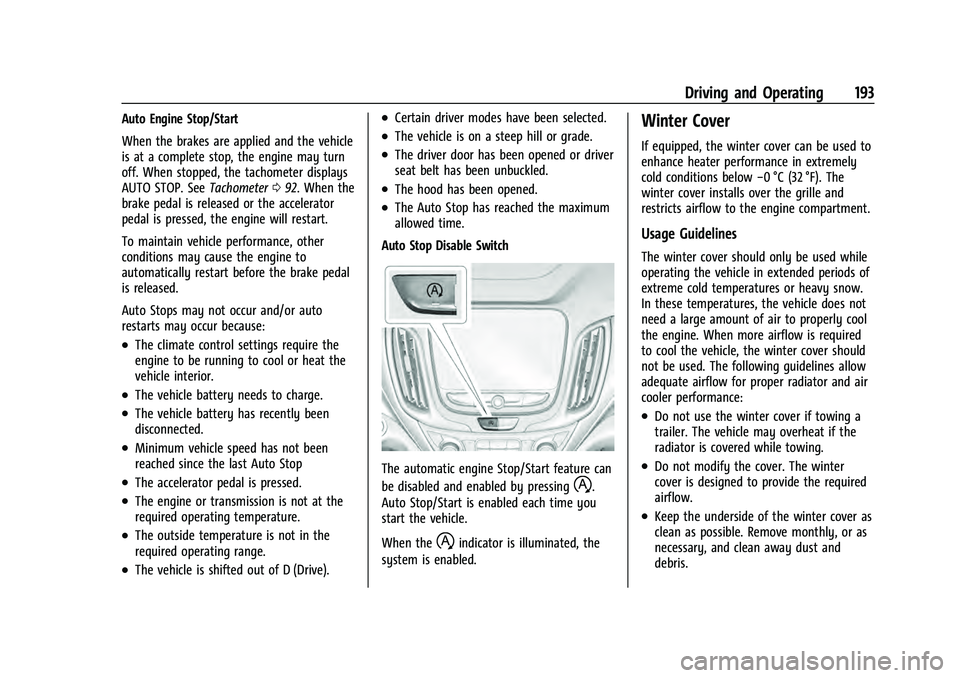
Auto Stop Disable Switch
The automatic engine Stop/Start feature can
be disabled and enabled by pressing
h.
Auto Stop/Start is enabled each time you
start the vehicle.
When the
hindicator is illuminated, the
system is enabled.
Winter Cover
If equipped, the winter cover can be used to
enhance heater performance in extremely
cold conditions below −0 °C (32 °F). The
winter cover installs over the grille and
restricts airflow to the engine compartment.
Usage Guidelines
The winter cover should only be used while
operating the vehicle in extended periods of
extreme cold temperatures or heavy snow.
In these temperatures, the vehicle does not
need a large amount of air to properly cool
the engine. When more airflow is required
to cool the vehicle, the winter cover should
not be used. The following guidelines allow
adequate airflow for proper radiator and air
cooler performance:
.Do not use the winter cover if towing a
trailer. The vehicle may overheat if the
radiator is covered while towing.
.Do not modify the cover. The winter
cover is designed to provide the required
airflow.
.Keep the underside of the winter cover as
clean as possible. Remove monthly, or as
necessary, and clean away dust and
debris.
Page 197 of 360
Chevrolet Equinox Owner Manual (GMNA-Localizing-U.S./Canada-
16540728) - 2023 - crc - 6/16/22
196 Driving and Operating
Retained Accessory Power (RAP)
When the vehicle is turned from on to off,
the following features (if equipped) will
continue to function for up to 10 minutes,
or until the driver door is opened. These
features will also work when the vehicle is
on or in accessory mode:
.Infotainment System
.Power Windows (during RAP this
functionality will be lost when any door
is opened)
.Sunroof (during RAP this functionality will
be lost when any door is opened)
.Auxiliary Power Outlet
.Audio System
.OnStar System
Shifting Into Park
{Warning
It can be dangerous to get out of the
vehicle if the shift lever is not fully in
P (Park) with the parking brake firmly set.
The vehicle can roll. If you have left the
engine running, the vehicle can move
suddenly. You or others could be injured.(Continued)
Warning (Continued)
To be sure the vehicle will not move,
even when you are on fairly level ground,
use the steps that follow. If you are
pulling a trailer, seeDriving
Characteristics and Towing Tips 0238.
To shift into P (Park): 1. Hold the brake pedal down and set the parking brake. See Electric Parking Brake
0 202 for more information.
2. Hold the button on the shift lever and push the lever toward the front of the
vehicle into P (Park).
3. Turn the ignition off.
Leaving the Vehicle with the Engine
Running
{Warning
It can be dangerous to leave the vehicle
with the engine running. It could
overheat and catch fire. (Continued)
Warning (Continued)
It is dangerous to get out of the vehicle
if the shift lever is not fully in P (Park)
with the parking brake firmly set. The
vehicle can roll.
Do not leave the vehicle when the engine
is running. If you have left the engine
running, the vehicle can move suddenly.
You or others could be injured. To be
sure the vehicle will not move, even
when you are on fairly level ground,
always set the parking brake and move
the shift lever to P (Park). SeeShifting
Into Park 0196. If you are towing a
trailer, see Driving Characteristics and
Towing Tips 0238.
If you have to leave the vehicle with the
engine running, the vehicle must be in
P (Park) and the parking brake set.
Release the button and check that the shift
lever cannot be moved out of P (Park).
Torque Lock
Torque lock is when the weight of the
vehicle puts too much force on the parking
pawl in the transmission. This happens when
Page 200 of 360
Chevrolet Equinox Owner Manual (GMNA-Localizing-U.S./Canada-
16540728) - 2023 - crc - 6/16/22
Driving and Operating 199
Caution (Continued)
covered by the vehicle warranty. Shift to
R (Reverse) only after the vehicle is
stopped.
To rock the vehicle back and forth to get
out of snow, ice, or sand without damaging
the transmission, see If the Vehicle Is Stuck
0 186.
N : In this position, the engine does not
connect with the wheels. To restart the
engine when the vehicle is already moving,
use N (Neutral) only.
{Warning
Shifting into a drive gear while the
engine is running at high speed is
dangerous. Unless your foot is firmly on
the brake pedal, the vehicle could move
very rapidly. You could lose control and
hit people or objects. Do not shift into a
drive gear while the engine is running at
high speed.
Caution
Shifting out of P (Park) or N (Neutral) with
the engine running at high speed may
damage the transmission. The repairs
would not be covered by the vehicle
warranty. Be sure the engine is not
running at high speed when shifting the
vehicle.
Caution
A transmission hot message may display
if the automatic transmission fluid is too
hot. Driving under this condition can
damage the vehicle. Stop and idle the
engine to cool the automatic
transmission fluid. This message clears
when the transmission fluid has cooled
sufficiently.
D : This position is for normal driving.
If more power is needed for passing, press
the accelerator pedal down.
Caution
If the vehicle does not shift gears, the
transmission could be damaged. Have the
vehicle serviced right away.
Caution
Spinning the tires or holding the vehicle
in one place on a hill using only the
accelerator pedal may damage the
transmission. The repair will not be
covered by the vehicle warranty. If the
vehicle is stuck, do not spin the tires.
When stopping on a hill, use the brakes
to hold the vehicle in place.
L : Allows the driver to select the range of
gear positions. See Manual Mode0200.
Operating Modes
The transmission may operate in a lower
gear than normal to improve vehicle
performance. The engine speed may be
higher and there may be an increase in
noise during the following conditions:
.When climbing a grade.
.When driving downhill.
.When driving in hot temperatures or at
high altitude.
Page 201 of 360
Chevrolet Equinox Owner Manual (GMNA-Localizing-U.S./Canada-
16540728) - 2023 - crc - 6/16/22
200 Driving and Operating
Manual Mode
Electronic Range Select (ERS) Mode
ERS or manual mode allows for the selection
of the range of gear positions. Use this
mode when driving downhill or towing a
trailer to limit the top gear and vehicle
speed. The shift position indicator within the
Driver Information Center (DIC) will display a
number next to the L indicating the highest
available gear under manual mode and the
driving conditions when manual mode was
selected.
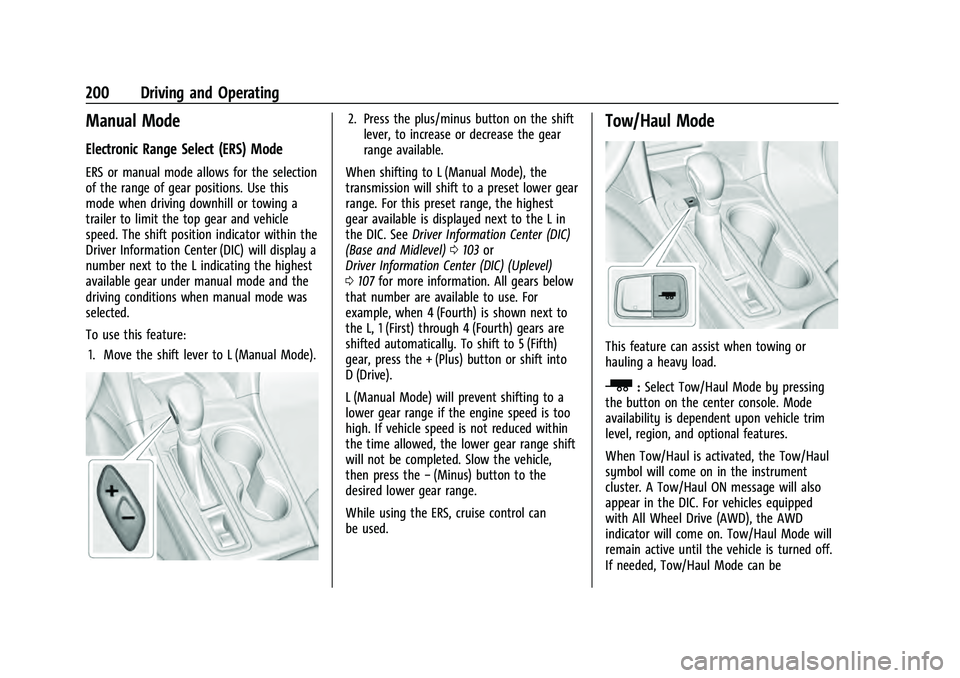
To use this feature:1. Move the shift lever to L (Manual Mode).
2. Press the plus/minus button on the shift lever, to increase or decrease the gear
range available.
When shifting to L (Manual Mode), the
transmission will shift to a preset lower gear
range. For this preset range, the highest
gear available is displayed next to the L in
the DIC. See Driver Information Center (DIC)
(Base and Midlevel) 0103 or
Driver Information Center (DIC) (Uplevel)
0 107 for more information. All gears below
that number are available to use. For
example, when 4 (Fourth) is shown next to
the L, 1 (First) through 4 (Fourth) gears are
shifted automatically. To shift to 5 (Fifth)
gear, press the + (Plus) button or shift into
D (Drive).
L (Manual Mode) will prevent shifting to a
lower gear range if the engine speed is too
high. If vehicle speed is not reduced within
the time allowed, the lower gear range shift
will not be completed. Slow the vehicle,
then press the −(Minus) button to the
desired lower gear range.
While using the ERS, cruise control can
be used.Tow/Haul Mode
This feature can assist when towing or
hauling a heavy load.
_: Select Tow/Haul Mode by pressing
the button on the center console. Mode
availability is dependent upon vehicle trim
level, region, and optional features.
When Tow/Haul is activated, the Tow/Haul
symbol will come on in the instrument
cluster. A Tow/Haul ON message will also
appear in the DIC. For vehicles equipped
with All Wheel Drive (AWD), the AWD
indicator will come on. Tow/Haul Mode will
remain active until the vehicle is turned off.
If needed, Tow/Haul Mode can be
Page 202 of 360
Chevrolet Equinox Owner Manual (GMNA-Localizing-U.S./Canada-
16540728) - 2023 - crc - 6/16/22
Driving and Operating 201
reactivated when the vehicle is turned on.
SeeDriving Characteristics and Towing Tips
0 238.
Automatic Engine Grade Braking
Automatic Engine Grade Braking assists
when driving downhill. It maintains vehicle
speed by automatically implementing a shift
pattern that uses the engine and the
transmission to slow the vehicle. The system
will automatically command downshifts to
reduce vehicle speed. The normal shift
pattern will return once the vehicle is on a
low grade or when the accelerator pedal is
pressed.
While in the Electronic Range Select (ERS)
mode, grade braking is deactivated, allowing
the driver to select a range and limiting the
highest gear available. Grade braking is
available for normal driving and in Tow/
Haul Mode.
See Automatic Transmission 0198.
Drive Systems
All-Wheel Drive
Vehicles with this feature can operate in
All-Wheel Drive (AWD) Mode. The AWD system delivers power to all four
wheels and the system adjusts as needed to
improve traction.
Press the AWD switch on the center console
to activate the system. The AWD light will
flash briefly while the system is engaging
and stay lit to indicate AWD is active. Press
the switch again to disable the system. The
light will flash briefly while the system
disables and then stay off.
The AWD Mode will stay selected until the
mode is changed.
When operated in Front-Wheel Drive (FWD)
Mode, the vehicle will deliver power to the
front wheels only and may provide better
fuel economy.
A system off message displays when there
is a temporary condition making the AWD
system unavailable. The vehicle will run
in FWD.
This could be caused by:
.A compact spare tire on the vehicle.
.AWD system overheat.
.Loss of wheel or vehicle speed.
.Certain other vehicle electrical conditions.
The message turns off when the compact
spare tire is replaced by a full-size tire, the
differential fluid cools, or the above
conditions are no longer present and the
warning message is reset.
To reset the warning message manually,
turn the ignition off and then back on again
after 30 seconds. If the message stays on,
see your dealer.
Brakes
Electric Brake Boost
Vehicles equipped with electric brake boost
have hydraulic brake circuits that are
electronically controlled when the brake
pedal is applied during normal operation.
The system performs routine tests and turns
off within a few minutes after the vehicle is
turned off. Noise may be heard during this
time. If the brake pedal is pressed during
the tests or when the electric brake boost
system is off, a noticeable change in pedal
force and travel may be felt. This is normal.
Antilock Brake System (ABS)
The Antilock Brake System (ABS) helps
prevent a braking skid and maintain steering
while braking hard.
Page 210 of 360
Chevrolet Equinox Owner Manual (GMNA-Localizing-U.S./Canada-
16540728) - 2023 - crc - 6/16/22
Driving and Operating 209
The speedometer reading can be displayed
in either English or metric units. See
Instrument Cluster (Base and Midlevel)087
or
Instrument Cluster (Uplevel) 090. The
increment value used depends on the units
displayed.
Reducing Speed While Using Cruise Control
If the cruise control system is already
activated:
.Press and hold -SET until the desired
lower speed is reached, then release it.
.To slow down in small increments, briefly
press -SET. For each press, the vehicle
goes about 1 km/h (1 mph) slower.
The speedometer reading can be displayed
in either English or metric units. See
Instrument Cluster (Base and Midlevel) 087
or
Instrument Cluster (Uplevel) 090. The
increment value used depends on the units
displayed.
Passing Another Vehicle While Using Cruise
Control
Use the accelerator pedal to increase the
vehicle speed. When you take your foot off
the pedal, the vehicle will slow down to the
previous set cruise speed. While pressing the accelerator pedal or shortly following the
release to override cruise control, briefly
pressing -SET will result in cruise control set
to the current vehicle speed.
Using Cruise Control on Hills
How well the cruise control works on hills
depends upon the vehicle speed, load, and
the steepness of the hills. When going up
steep hills, you might have to step on the
accelerator pedal to maintain the vehicle
speed. When going downhill, you might
have to brake or shift to a lower gear to
keep your speed down. If the brake pedal is
applied, cruise control will disengage.
Ending Cruise Control
There are four ways to end cruise control:
.Step lightly on the brake pedal.
.Press*.
.Shift the transmission to N (Neutral).
.To turn off cruise control, press5.
Erasing Speed Memory
The cruise control set speed is erased from
memory if
5is pressed or if the ignition is
turned off.
Adaptive Cruise Control (Camera)
If equipped, Adaptive Cruise Control (ACC)
allows the cruise control set speed and
following gap to be selected. Read this
entire section before using this system. The
following gap is the following time between
your vehicle and a vehicle detected directly
ahead in your path, moving in the same
direction. If no vehicle is detected in your
path, ACC works like regular cruise control.
ACC uses a windshield mounted front
camera sensor.
If a vehicle is detected in your path, ACC can
apply acceleration or limited, moderate
braking to maintain the selected following
gap. To disengage ACC, apply the brake.
If ACC is controlling the vehicle speed when
the Traction Control System (TCS) or
StabiliTrak/Electronic Stability Control (ESC)
system activates, ACC may automatically
disengage. See Traction Control/Electronic
Stability Control 0204. When road
conditions allow ACC to be safely used, ACC
can be turned back on. Disabling the TCS or
StabiliTrak/ESC system will disengage and
prevent engagement of ACC.
ACC can reduce the need for you to
frequently brake and accelerate, especially
when used on expressways, freeways, and
Page 212 of 360
Chevrolet Equinox Owner Manual (GMNA-Localizing-U.S./Canada-
16540728) - 2023 - crc - 6/16/22
Driving and Operating 211
*:Press to disengage ACC without erasing
the selected set speed.
[: Press to select a following gap setting
for ACC of Far, Medium, or Near.
The speedometer reading can be displayed
in either English or metric units. See
Instrument Cluster (Base and Midlevel) 087
or
Instrument Cluster (Uplevel) 090. The
increment value used depends on the units
displayed.
Switching Between ACC and Regular Cruise
Control
To switch between ACC and regular cruise
control, press and hold
*. A Driver
Information Display (DIC) message displays.
See Vehicle Messages 0110.
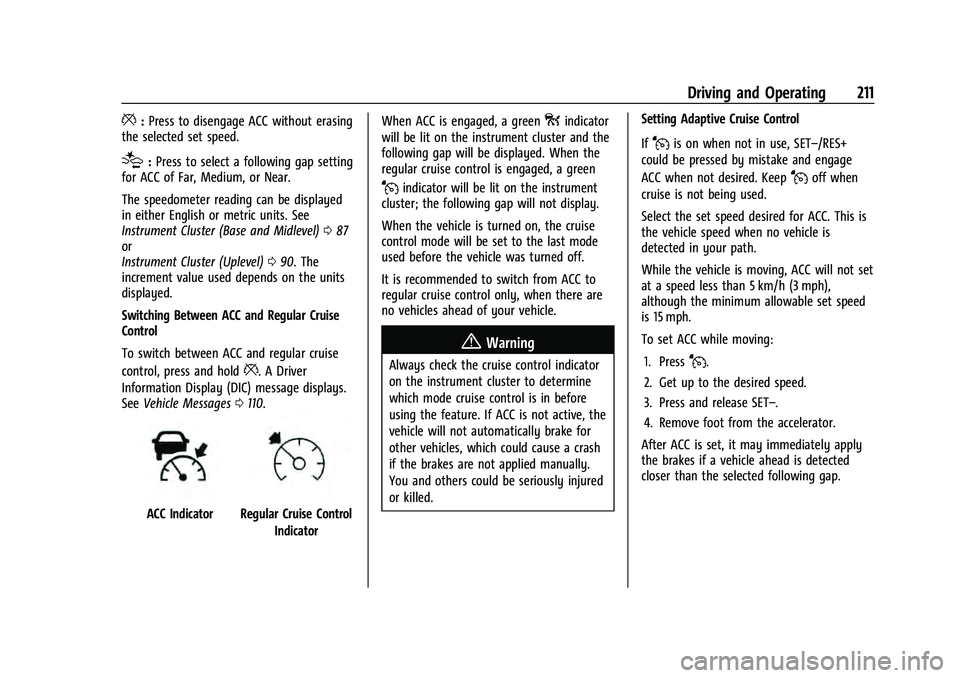
ACC IndicatorRegular Cruise Control
Indicator When ACC is engaged, a green
oindicator
will be lit on the instrument cluster and the
following gap will be displayed. When the
regular cruise control is engaged, a green
Jindicator will be lit on the instrument
cluster; the following gap will not display.
When the vehicle is turned on, the cruise
control mode will be set to the last mode
used before the vehicle was turned off.
It is recommended to switch from ACC to
regular cruise control only, when there are
no vehicles ahead of your vehicle.
{Warning
Always check the cruise control indicator
on the instrument cluster to determine
which mode cruise control is in before
using the feature. If ACC is not active, the
vehicle will not automatically brake for
other vehicles, which could cause a crash
if the brakes are not applied manually.
You and others could be seriously injured
or killed. Setting Adaptive Cruise Control
If
Jis on when not in use, SET–/RES+
could be pressed by mistake and engage
ACC when not desired. Keep
Joff when
cruise is not being used.
Select the set speed desired for ACC. This is
the vehicle speed when no vehicle is
detected in your path.
While the vehicle is moving, ACC will not set
at a speed less than 5 km/h (3 mph),
although the minimum allowable set speed
is 15 mph.
To set ACC while moving:
1. Press
J.
2. Get up to the desired speed.
3. Press and release SET–.
4. Remove foot from the accelerator.
After ACC is set, it may immediately apply
the brakes if a vehicle ahead is detected
closer than the selected following gap.
Page 226 of 360
Chevrolet Equinox Owner Manual (GMNA-Localizing-U.S./Canada-
16540728) - 2023 - crc - 6/16/22
Driving and Operating 225
How to Activate Automatic Parking
To activate APA, press the soft-touch button
or hard switch
Ofor the system to begin
searching for a parking space while driving
forward at no greater than
30 km/h (18 mph). By default, APA searches
for parallel parking spaces to the right of
the vehicle up to the sensors’ range of 1.5 m
(5 ft). To search for a parking space to the
left, turn on the left turn signal or,
if available, change the side selection in the
infotainment display. To switch the parking
mode between parallel and perpendicular
press and hold
Owhile searching for a
valid parking spot or, if available, change the
parking mode in the infotainment display.
APA cannot park in all empty parking spots.
The parking spot must:
.Be sufficiently large to fit the vehicle
comfortably.
.Have an adjacent vehicle, wall, or pillar
for the system to align to.
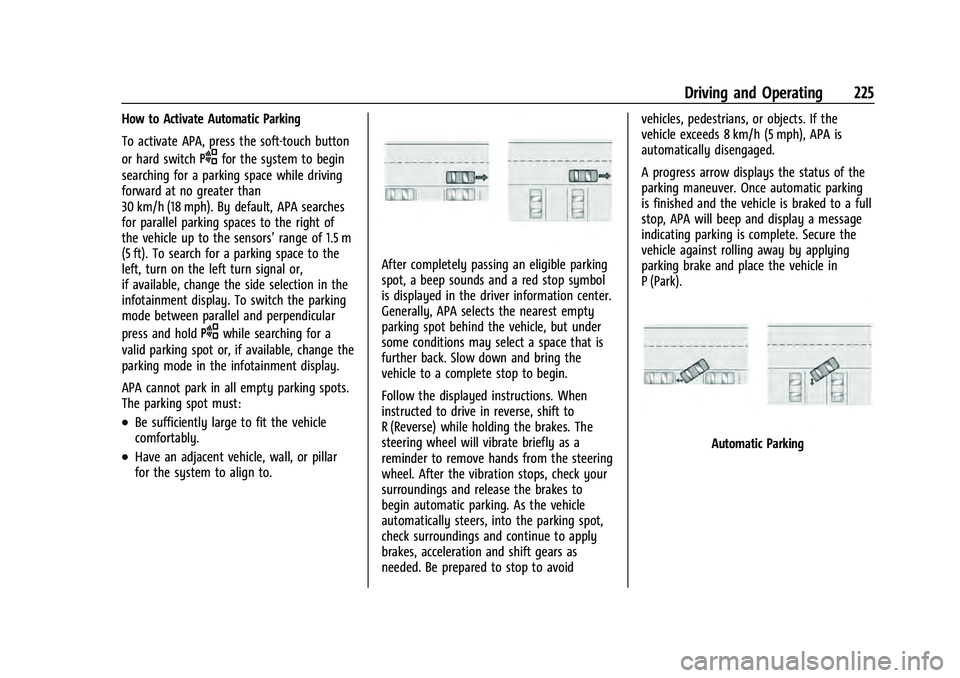
After completely passing an eligible parking
spot, a beep sounds and a red stop symbol
is displayed in the driver information center.
Generally, APA selects the nearest empty
parking spot behind the vehicle, but under
some conditions may select a space that is
further back. Slow down and bring the
vehicle to a complete stop to begin.
Follow the displayed instructions. When
instructed to drive in reverse, shift to
R (Reverse) while holding the brakes. The
steering wheel will vibrate briefly as a
reminder to remove hands from the steering
wheel. After the vibration stops, check your
surroundings and release the brakes to
begin automatic parking. As the vehicle
automatically steers, into the parking spot,
check surroundings and continue to apply
brakes, acceleration and shift gears as
needed. Be prepared to stop to avoid vehicles, pedestrians, or objects. If the
vehicle exceeds 8 km/h (5 mph), APA is
automatically disengaged.
A progress arrow displays the status of the
parking maneuver. Once automatic parking
is finished and the vehicle is braked to a full
stop, APA will beep and display a message
indicating parking is complete. Secure the
vehicle against rolling away by applying
parking brake and place the vehicle in
P (Park).
Automatic Parking