2023 CHEVROLET BOLT EV steering wheel
[x] Cancel search: steering wheelPage 197 of 308

Chevrolet BOLT EV Owner Manual (GMNA-Localizing-U.S./Canada-
16404388) - 2023 - CRC - 3/7/22
196 Driving and Operating
audible alert or the driver seat may pulse
indicating that a lane marking has been
crossed.
To turn LKA on and off, press
Aon the
center console. If equipped, the indicator
light on the button comes on when LKA is
on and turns off when LKA is disabled.
When on,
Ais white, if equipped,
indicating that the system is not ready to
assist.
Ais green if LKA is ready to
assist. LKA may assist by gently turning the
steering wheel if the vehicle approaches a
detected lane marking.
Ais amber when
assisting. It may also provide a Lane
Departure Warning (LDW) alert by flashing
Aamber if the vehicle crosses a
detected lane marking. Additionally, there
may be three beeps, or the driver seat may
pulse three times, on the right or left,
depending on the lane departure direction.
Take Steering
The LKA system does not continuously steer
the vehicle. If LKA does not detect active
driver steering, an alert and chime may be
provided. Steer the vehicle to dismiss. LKA
may become temporarily unavailable after
repeated take steering alerts.
When the System Does Not Seem to
Work Properly
The system performance may be
affected by:
.Close vehicles ahead.
.Sudden lighting changes, such as when
driving through tunnels.
.Banked roads.
.Roads with poor lane markings, such as
two-lane roads.
If the LKA system is not functioning
properly when lane markings are clearly
visible, cleaning the windshield may help.
A camera blocked message may display if
the camera is blocked. Some driver
assistance systems may have reduced
performance or not work at all. An LKA or
LDW unavailable message may display if the
systems are temporarily unavailable. This
message could be due to a blocked camera.
The LKA system does not need service. Clean
the outside of the windshield behind the
rearview mirror.
LKA assistance and/or LDW alerts may occur
due to tar marks, shadows, cracks in the
road, temporary or construction lane
markings, or other road imperfections. This is normal system operation; the vehicle does
not need service. Turn LKA off if these
conditions continue.
Charging
When to Charge
When the high voltage battery is low, the
following charging messages may display on
the Driver Information Center (DIC):
CHARGE VEHICLE SOON :
The battery needs
to be charged soon.
PROPULSION POWER IS REDUCED : The
accelerator pedal response is reduced and
the remaining range value changes to LOW,
charge the vehicle immediately.
OUT OF ENERGY, CHARGE VEHICLE NOW :
The battery charge is fully depleted. The
vehicle will slow to a stop. Brake and
steering assist will continue operating. Once
stopped, turn the vehicle off. See Propulsion
Power Messages 0101.
Page 234 of 308
Chevrolet BOLT EV Owner Manual (GMNA-Localizing-U.S./Canada-
16404388) - 2023 - CRC - 3/7/22
Vehicle Care 233
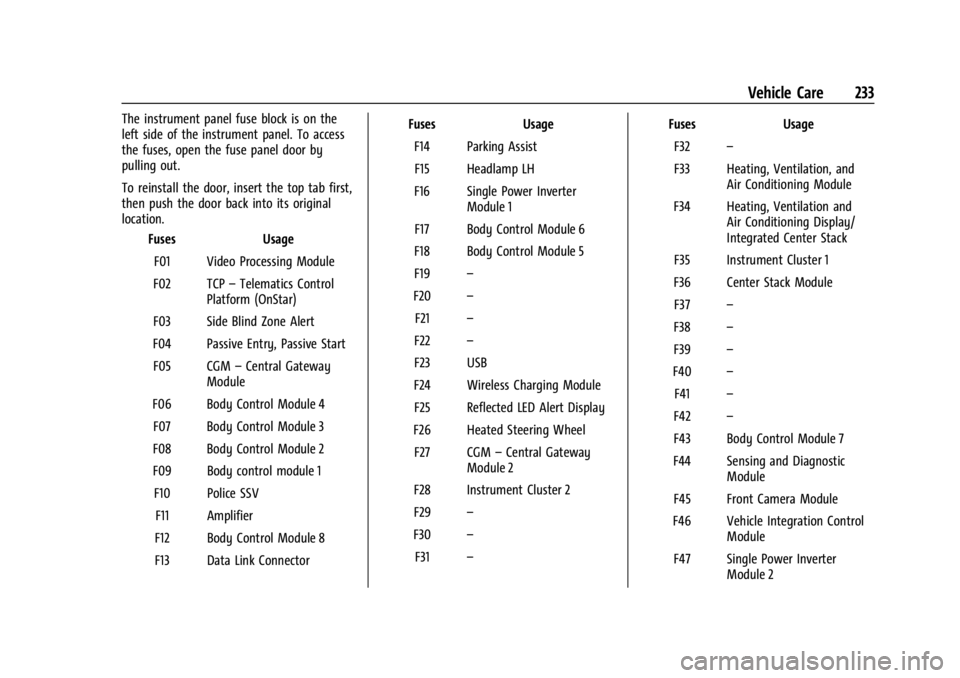
The instrument panel fuse block is on the
left side of the instrument panel. To access
the fuses, open the fuse panel door by
pulling out.
To reinstall the door, insert the top tab first,
then push the door back into its original
location.Fuses Usage
F01 Video Processing Module
F02 TCP –Telematics Control
Platform (OnStar)
F03 Side Blind Zone Alert
F04 Passive Entry, Passive Start F05 CGM –Central Gateway
Module
F06 Body Control Module 4 F07 Body Control Module 3
F08 Body Control Module 2
F09 Body control module 1 F10 Police SSV F11 Amplifier
F12 Body Control Module 8
F13 Data Link Connector Fuses
Usage
F14 Parking Assist F15 Headlamp LH
F16 Single Power Inverter Module 1
F17 Body Control Module 6
F18 Body Control Module 5
F19 –
F20 –
F21 –
F22 –
F23 USB
F24 Wireless Charging Module F25 Reflected LED Alert Display
F26 Heated Steering Wheel F27 CGM –Central Gateway
Module 2
F28 Instrument Cluster 2
F29 –
F30 –
F31 – Fuses
Usage
F32 –
F33 Heating, Ventilation, and Air Conditioning Module
F34 Heating, Ventilation and Air Conditioning Display/
Integrated Center Stack
F35 Instrument Cluster 1
F36 Center Stack Module F37 –
F38 –
F39 –
F40 –
F41 –
F42 –
F43 Body Control Module 7
F44 Sensing and Diagnostic Module
F45 Front Camera Module
F46 Vehicle Integration Control Module
F47 Single Power Inverter Module 2
Page 235 of 308

Chevrolet BOLT EV Owner Manual (GMNA-Localizing-U.S./Canada-
16404388) - 2023 - CRC - 3/7/22
234 Vehicle Care
FusesUsage
F48 Headlamp RH
F49 Auxiliary Jack F50 Steering Wheel Controls F51 –
F52 –
F53 Auxiliary Power Outlet
F54 –
F55 Logistic
F56 Police SSV
Relays Usage
F57 Police SSV
F58 Logistics Relay
F59 –
F60 Accessory/Retained
Accessory Power RelayWheels and Tires
Tires
Every new GM vehicle has high-quality
tires made by a leading tire
manufacturer. See the warranty manual
for information regarding the tire
warranty and where to get service. For
additional information refer to the tire
manufacturer.
{Warning
.Poorly maintained and improperly
used tires are dangerous.
.Overloading the tires can cause
overheating as a result of too
much flexing. There could be a
blowout and a serious crash. See
Vehicle Load Limits
0158.
.Underinflated tires pose the same
danger as overloaded tires. The
resulting crash could cause serious
injury. Check all tires frequently to
(Continued)
Warning (Continued)
maintain the recommended
pressure. Tire pressure should be
checked when the tires are cold.
.Overinflated tires are more likely
to be cut, punctured, or broken by
a sudden impact —such as when
hitting a pothole. Keep tires at the
recommended pressure.
.Worn or old tires can cause a
crash. If the tread is badly worn,
replace them.
.Replace any tires that have been
damaged by impacts with
potholes, curbs, etc.
.Improperly repaired tires can cause
a crash. Only your dealer or an
authorized tire service center
should repair, replace, dismount,
and mount the tires.
(Continued)
Page 244 of 308

Chevrolet BOLT EV Owner Manual (GMNA-Localizing-U.S./Canada-
16404388) - 2023 - CRC - 3/7/22
Vehicle Care 243
If the hazard warning flashers are on, the
tire fill alert visual feedback will not work
properly.
The TPMS will not activate the tire fill alert
properly under the following conditions:
.There is interference from an external
device or transmitter.
.The air pressure from the inflation device
is not sufficient to inflate the tire.
.There is a malfunction in the TPMS.
.There is a malfunction in the horn or turn
signal lamps.
.The identification code of the TPMS
sensor is not registered to the system.
.The battery of the TPMS sensor is low.
If the tire fill alert does not operate due to
TPMS interference, move the vehicle about
1 m (3 ft) back or forward and try again.
If the tire fill alert feature is not working,
use a tire pressure gauge.
TPMS Sensor Matching Process
Each TPMS sensor has a unique
identification code. The identification code
needs to be matched to a new tire/wheel
position after rotating the vehicle’s tires or
replacing one or more of the TPMS sensors.
The TPMS sensor matching process should also be performed after replacing a spare
tire with a road tire containing the TPMS
sensor. The malfunction light and the DIC
message should go off when the vehicle has
been turned off and started again. The
sensors are matched to the tire/wheel
positions, using a TPMS relearn tool, in the
following order: driver side front tire,
passenger side front tire, passenger side rear
tire, and driver side rear. See your dealer for
service or to purchase a relearn tool.
A TPMS relearn tool can also be purchased.
See Tire Pressure Monitor Sensor Activation
Tool at www.gmtoolsandequipment.com or
call 1-800-GM TOOLS (1-800-468-6657).
There are two minutes to match the first
tire/wheel position, and five minutes overall
to match all four tire/wheel positions. If it
takes longer, the matching process stops
and must be restarted.
The TPMS sensor matching process is:
1. Set the parking brake.
2. Press POWEROto start the vehicle. See
Power Button 0161. 3. Make sure the Tire Pressure info page
option is turned on. The info pages on
the DIC can be turned on and off
through the Options menu. See Driver
Information Center (DIC) 099.
4. Use the DIC controls on the right side of the steering wheel to scroll to the Tire
Pressure screen under the DIC info page.
5. Press and hold the thumbwheel in the center of the DIC controls.
A message requesting acceptance of the
process may display.
The horn sounds twice to signal the
receiver is in relearn mode and the TIRE
LEARNING ACTIVE message displays on
the DIC screen.
6. Start with the driver side front tire.
7. Place the relearn tool against the tire sidewall, near the valve stem. Then press
the button to activate the TPMS sensor.
A horn chirp confirms that the sensor
identification code has been matched to
this tire and wheel position.
8. Proceed to the passenger side front tire, and repeat the procedure in Step 7.
9. Proceed to the passenger side rear tire, and repeat the procedure in Step 7.
Page 250 of 308

Chevrolet BOLT EV Owner Manual (GMNA-Localizing-U.S./Canada-
16404388) - 2023 - CRC - 3/7/22
Vehicle Care 249
Your dealer will know the kind of wheel that
is needed.
Each new wheel should have the same
load-carrying capacity, diameter, width,
offset, and be mounted the same way as
the one it replaces.
Replace wheels, wheel bolts, wheel nuts,
or Tire Pressure Monitor System (TPMS)
sensors with new GM original equipment
parts.
{Warning
Using the wrong replacement wheels,
wheel bolts, or wheel nuts can be
dangerous. It could affect the braking and
handling of the vehicle. Tires can lose air
and cause loss of control, resulting in a
crash. Always use the correct wheel,
wheel bolts, and wheel nuts for
replacement.
{Warning
Replacing a wheel with a used one is
dangerous. How it has been used or how
far it has been driven may be unknown.(Continued)
Warning (Continued)
It could fail suddenly and cause a crash.
When replacing wheels, use a new GM
original equipment wheel.
Caution
The wrong wheel can also cause
problems with bearing life, brake cooling,
speedometer or odometer calibration,
headlamp aim, bumper height, vehicle
ground clearance, and tire or tire chain
clearance to the body and chassis.
Tire Chains
{Warning
Do not use tire chains. There is not
enough clearance. Tire chains used on a
vehicle without the proper amount of
clearance can cause damage to the
brakes, suspension, or other vehicle parts.
The area damaged by the tire chains
could cause loss of control and a crash.(Continued)
Warning (Continued)
Use another type of traction device only
if its manufacturer recommends it for the
vehicle's tire size combination and road
conditions. Follow that manufacturer's
instructions. To avoid vehicle damage,
drive slowly and readjust or remove the
traction device if it contacts the vehicle.
Do not spin the wheels. If traction
devices are used, install them on the tires
of the drive axle only.
If a Tire Goes Flat
It is unusual for a tire to blow out while
driving, especially if the tires are maintained
properly. SeeTires0234. If air goes out of
a tire, it is much more likely to leak out
slowly. But if there is ever a blowout, here
are a few tips about what to expect and
what to do.
If a front tire fails, the flat tire creates a
drag that pulls the vehicle toward that side.
Take your foot off the accelerator pedal and
grip the steering wheel firmly. Steer to
maintain lane position, and then gently
brake to a stop, well off the road,
if possible.
Page 266 of 308

Chevrolet BOLT EV Owner Manual (GMNA-Localizing-U.S./Canada-
16404388) - 2023 - CRC - 3/7/22
Vehicle Care 265
Caution (Continued)
or brushes. Use only GM approved
cleaners. Do not drive the vehicle through
an automatic car wash that uses silicon
carbide tire/wheel cleaning brushes.
Damage could occur and the repairs
would not be covered by the vehicle
warranty.
Brake System
Visually inspect brake lines and hoses for
proper hook-up, binding, leaks, cracks,
chafing, etc. Inspect disc brake pads for wear
and rotors for surface condition. Inspect
drum brake linings/shoes for wear or cracks.
Inspect all other brake parts.
Steering, Suspension, and Chassis
Components
Visually inspect steering, suspension, and
chassis components for damaged, loose,
or missing parts or signs of wear at least
once a year.
Inspect power steering for proper
attachment, connections, binding, leaks,
cracks, chafing, etc.Visually check constant velocity joint boots
and axle seals for leaks.
Body Component Lubrication
Lubricate all key lock cylinders, hood hinges,
liftgate hinges, steel charge port door, and
power assist step hinges, unless the
components are plastic. Applying silicone
grease on weatherstrips with a clean cloth
will make them last longer, seal better, and
not stick or squeak.
Underbody Maintenance
At least twice a year, spring and fall, use
plain water to flush any corrosive materials
from the underbody. Take care to
thoroughly clean any areas where mud and
other debris can collect.
Sheet Metal Damage
If the vehicle is damaged and requires sheet
metal repair or replacement, make sure the
body repair shop applies anti-corrosion
material to parts repaired or replaced to
restore corrosion protection.
Original manufacturer replacement parts will
provide the corrosion protection while
maintaining the vehicle warranty.
Finish Damage
Quickly repair minor chips and scratches
with touch-up materials available from your
dealer to avoid corrosion. Larger areas of
finish damage can be corrected in your
dealer's body and paint shop.
Chemical Paint Spotting
Airborne pollutants can fall upon and attack
painted vehicle surfaces causing blotchy,
ring-shaped discolorations, and small,
irregular dark spots etched into the paint
surface. See
“Finish Care” previously in this
section.
Interior Care
To prevent dirt particle abrasions, regularly
clean the vehicle's interior. Before using
cleaners, read and follow all safety
instructions on the label. While cleaning the
interior, open the doors and windows to get
proper ventilation. Newspapers or dark
garments can transfer color to the vehicle’s
interior.
Page 300 of 308

Chevrolet BOLT EV Owner Manual (GMNA-Localizing-U.S./Canada-
16404388) - 2023 - CRC - 3/7/22
Index 299
Circuit Breakers . . . . . . . . . . . . . . . . . . . . . . . . . . 229
CleaningExterior Care . . . . . . . . . . . . . . . . . . . . . . . . . . . 262
Interior Care . . . . . . . . . . . . . . . . . . . . . . . . . . . 265
Climate Control Systems Automatic . . . . . . . . . . . . . . . . . . . . . . . . . . . . . 144
Clock . . . . . . . . . . . . . . . . . . . . . . . . . . . . . . . . . . . . . 76
Cluster, Instrument . . . . . . . . . . . . . . . . . . . . . . . 79
Collision Damage Repair . . . . . . . . . . . . . . . . . 283
Compartment Underhood . . . . . . . . . . . . . . . . . . . . . . . . . . . . 216
Compartments Storage . . . . . . . . . . . . . . . . . . . . . . . . . . . . . . . . . 69
Compass . . . . . . . . . . . . . . . . . . . . . . . . . . . . . . . . . . 76
Compressor Kit, Tire Sealant . . . . . . . . . . . . . 250
Connected Services Connections . . . . . . . . . . . . . . . . . . . . . . . . . . . 294
Diagnostics . . . . . . . . . . . . . . . . . . . . . . . . . . . . 296
Navigation . . . . . . . . . . . . . . . . . . . . . . . . . . . . . 294
Connections Connected Services . . . . . . . . . . . . . . . . . . . . 294
Control Traction and Electronic Stability . . . . . . . . 171
Control of a Vehicle . . . . . . . . . . . . . . . . . . . . . .154
Controls Steering Wheel . . . . . . . . . . . . . . . . . . . . . . . . . 111
Convex Mirrors . . . . . . . . . . . . . . . . . . . . . . . . . . . . 21
Cooling . . . . . . . . . . . . . . . . . . . . . . . . . . . . . . . . . . 144 Cooling System . . . . . . . . . . . . . . . . . . . . . . . . . . . 217
Courtesy Lamps . . . . . . . . . . . . . . . . . . . . . . . . . . 107
Courtesy Transportation Program . . . . . . . . 282
Cover
Cargo . . . . . . . . . . . . . . . . . . . . . . . . . . . . . . . . . . . 70
Cruise Control . . . . . . . . . . . . . . . . . . . . . . . . . . . . 172 Adaptive . . . . . . . . . . . . . . . . . . . . . . . . . . . . . . . 174
Light . . . . . . . . . . . . . . . . . . . . . . . . . . . . . . . . . . . . 89
Cupholders . . . . . . . . . . . . . . . . . . . . . . . . . . . . . . . 69
Customer Assistance Offices . . . . . . . . . . . . . . . . . . . . . . . . . . . . . . . . . 279
Text Telephone (TTY) Users . . . . . . . . . . . . 280
Customer Information Publications Ordering Information . . . . . 285
Customer Satisfaction Procedure . . . . . . . . . 278
Cybersecurity . . . . . . . . . . . . . . . . . . . . . . . . . . . . 287
D
Damage Repair, Collision . . . . . . . . . . . . . . . . . 283
Danger, Warning, and Caution . . . . . . . . . . . . . .2
Dashboard . . . . . . . . . . . . . . . . . . . . . . . . . . . . . . . . . 4
Data Collection OnStar . . . . . . . . . . . . . . . . . . . . . . . . . . . . . . . . . 288
Data Recorders, Event . . . . . . . . . . . . . . . . . . . 287
Daytime Running Lamps (DRL) . . . . . . . . . . . 105
Defensive Driving . . . . . . . . . . . . . . . . . . . . . . . . . 153
Delayed Charging Override . . . . . . . . . . . . . . 200
Delayed Locking . . . . . . . . . . . . . . . . . . . . . . . . . . . 17 Diagnostics
Connected Services . . . . . . . . . . . . . . . . . . . . 296
Disabled Vehicle Transporting . . . . . . . . . . . . . . . . . . . . . . . . . . . 258
Distracted Driving . . . . . . . . . . . . . . . . . . . . . . . . . 153
Dome Lamps . . . . . . . . . . . . . . . . . . . . . . . . . . . . . 107
Door Ajar Light . . . . . . . . . . . . . . . . . . . . . . . . . . . . . . . 90
Delayed Locking . . . . . . . . . . . . . . . . . . . . . . . . . 17
Locks . . . . . . . . . . . . . . . . . . . . . . . . . . . . . . . . . . . . 15
Power Locks . . . . . . . . . . . . . . . . . . . . . . . . . . . . . 17
Drive Unit Electric . . . . . . . . . . . . . . . . . . . . . . . . . . . . . . . . . 165
Driver Assistance Systems . . . . . . . . . . . . . . . . . . . . 183
Efficiency Gauge . . . . . . . . . . . . . . . . . . . . . . . . 82
Information Center (DIC) . . . . . . . . . . . . . . . . 99
Selected Operating Modes . . . . . . . . . . . . . 164
Teen . . . . . . . . . . . . . . . . . . . . . . . . . . . . . . . . . . . 135
Driving Assistance Systems . . . . . . . . . . . . . . . . . . . . 188
Defensive . . . . . . . . . . . . . . . . . . . . . . . . . . . . . . 153
Distracted . . . . . . . . . . . . . . . . . . . . . . . . . . . . . 153
Hill and Mountain Roads . . . . . . . . . . . . . . 156
If the Vehicle is Stuck . . . . . . . . . . . . . . . . . 158
Impaired . . . . . . . . . . . . . . . . . . . . . . . . . . . . . . . 154
Loss of Control . . . . . . . . . . . . . . . . . . . . . . . . 155
Off-Road Recovery . . . . . . . . . . . . . . . . . . . . . 155
Page 302 of 308

Chevrolet BOLT EV Owner Manual (GMNA-Localizing-U.S./Canada-
16404388) - 2023 - CRC - 3/7/22
Index 301
Headlamps (cont'd)Bulb Replacement . . . . . . . . . . . . . . . . . . . . . . 225
Daytime Running Lamps (DRL) . . . . . . . . . 105
Flash-to-Pass . . . . . . . . . . . . . . . . . . . . . . . . . . . 105
High-Beam On Light . . . . . . . . . . . . . . . . . . . . 89
High/Low Beam Changer . . . . . . . . . . . . . . 104
Lamps On Reminder . . . . . . . . . . . . . . . . . . . . 89
Heated Front Seats . . . . . . . . . . . . . . . . . . . . . . . . . . . . . 29
Mirrors . . . . . . . . . . . . . . . . . . . . . . . . . . . . . . . . . . 21
Steering Wheel . . . . . . . . . . . . . . . . . . . . . . . . . 73
Heating . . . . . . . . . . . . . . . . . . . . . . . . . . . . . . . . . . 144
High Voltage Battery Gauge . . . . . . . . . . . . . . .81
High Voltage Devices and Wiring . . . . . . . . 227
High-Beam On Light . . . . . . . . . . . . . . . . . . . . . . 89
Hill and Mountain Roads . . . . . . . . . . . . . . . . 156
Hill Start Assist (HSA) . . . . . . . . . . . . . . . . . . . . 170
Hood . . . . . . . . . . . . . . . . . . . . . . . . . . . . . . . . . . . . .214
Horn . . . . . . . . . . . . . . . . . . . . . . . . . . . . . . . . . . . . . . .73
How to Wear Seat Belts Properly . . . . . . . . . .33
HVAC . . . . . . . . . . . . . . . . . . . . . . . . . . . . . . . . . . . . 144
I
Immobilizer . . . . . . . . . . . . . . . . . . . . . . . . . . . . . . . 20
Indicator Pedestrian Ahead . . . . . . . . . . . . . . . . . . . . . . . 87
Vehicle Ahead . . . . . . . . . . . . . . . . . . . . . . . . . . 87 Indicators
Warning Lights and Gauges . . . . . . . . . . . . . 79
Infants and Young Children, Restraints . . . . 50
Information Energy . . . . . . . . . . . . . . . . . . . . . . . . . . . . . . . . . . 97
Publication Ordering . . . . . . . . . . . . . . . . . . . 285
Infotainment
Using the System . . . . . . . . . . . . . . . . . . . . . . . 112
Inspection Multi-Point Vehicle . . . . . . . . . . . . . . . . . . . . 272
Instrument Cluster . . . . . . . . . . . . . . . . . . . . . . . . 79
Instrument Panel Overview . . . . . . . . . . . . . . . . 4
Interior Rearview Mirrors . . . . . . . . . . . . . . . . . .22
Introduction . . . . . . . . . . . . . . . . . . . . . . . . . . . 2, 110
J
Jump
Starting - North America . . . . . . . . . . . . . . . 256
K
Keys . . . . . . . . . . . . . . . . . . . . . . . . . . . . . . . . . . . . . . . 6Remote . . . . . . . . . . . . . . . . . . . . . . . . . . . . . . . . . . 7
Remote Operation . . . . . . . . . . . . . . . . . . . . . . . 7
L
Labeling, Tire Sidewall . . . . . . . . . . . . . . . . . . . 236
LampsCourtesy . . . . . . . . . . . . . . . . . . . . . . . . . . . . . . . 107
Daytime Running (DRL) . . . . . . . . . . . . . . . . 105 Lamps (cont'd)
Dome . . . . . . . . . . . . . . . . . . . . . . . . . . . . . . . . . . 107
Exterior Controls . . . . . . . . . . . . . . . . . . . . . . . 103
Exterior Lamps Off Reminder . . . . . . . . . . 104
Exterior Lighting Battery Saver . . . . . . . . 109
Flash-to-Pass . . . . . . . . . . . . . . . . . . . . . . . . . . . 105
High/Low Beam Changer . . . . . . . . . . . . . . 104
License Plate . . . . . . . . . . . . . . . . . . . . . . . . . . . 226
On Reminder . . . . . . . . . . . . . . . . . . . . . . . . . . . 89
Reading . . . . . . . . . . . . . . . . . . . . . . . . . . . . . . . . 107
Lane Change Alert (LCA) . . . . . . . . . . . . . . . . . . . . . 193
Keep Assist (LKA) . . . . . . . . . . . . . . . . . . . . . . 195
Keep Assist Light . . . . . . . . . . . . . . . . . . . . . . . 86
Lap-Shoulder Belt . . . . . . . . . . . . . . . . . . . . . . . . . .35
LATCH System Replacing Parts after a Crash . . . . . . . . . . . 64
LATCH, Lower Anchors and Tethers for Children . . . . . . . . . . . . . . . . . . . . . . . . . . . . . . . . . .55
LED Lighting . . . . . . . . . . . . . . . . . . . . . . . . . . . . . 225
Liftgate . . . . . . . . . . . . . . . . . . . . . . . . . . . . . . . . . . . .18
Lighting Entry . . . . . . . . . . . . . . . . . . . . . . . . . . . . . . . . . . 107
Exit . . . . . . . . . . . . . . . . . . . . . . . . . . . . . . . . . . . . 108
Illumination Control . . . . . . . . . . . . . . . . . . . 106
LED . . . . . . . . . . . . . . . . . . . . . . . . . . . . . . . . . . . . 225
Lights Airbag Readiness . . . . . . . . . . . . . . . . . . . . . . . 83