2023 CHEVROLET BOLT EV instrument cluster
[x] Cancel search: instrument clusterPage 6 of 308

Chevrolet BOLT EV Owner Manual (GMNA-Localizing-U.S./Canada-
16404388) - 2023 - CRC - 3/7/22
Introduction 5
1.Air Vents 0147.
2. Turn and Lane-Change Signals 0106.
IntelliBeam System Button (If Equipped).
See Exterior Lamp Controls 0103.
3. Instrument Cluster 079.
Driver Information Center (DIC) 099.
4. Windshield Wiper/Washer 074.
5. Charging Status Feedback 0201.
Automatic Headlamp System 0105.
Indicator Light and Solar Sensor (ILSS).
See “Sensors” underAutomatic Climate
Control System 0144.
6. Infotainment System. See AM-FM Radio
0 115.
7. Hazard Warning Flashers 0106
8. Automatic Climate Control System 0144.
Heated Front Seats 029 (If Equipped).
Heated Steering Wheel 073 (If
Equipped).
9. Power Outlets 076.
10. Electric Parking Brake 0168.
11. Driver Selected Operating Modes 0164.
Traction Control/Electronic Stability
Control 0171 Lane Keep Assist (LKA)
0195 (If
Equipped).
12. Shift Switches. See Electric Drive Unit
0 165.
13. Wireless Charging 076.
14. Power Button 0161.
15. Steering Wheel Controls 0111
Volume Switches. See Steering Wheel
Controls 0111 (Out of View).
16. Horn 073.
17. Steering Wheel Adjustment 073 (Out
of View).
18. Favorite Switches. See Steering Wheel
Controls 0111 (Out of View).
19. Cruise Control 0172.
Adaptive Cruise Control (Camera) 0174
(If Equipped).
20. Regen on Demand. See Regenerative
Braking 0170.
21. Instrument Panel Fuse Block 0232.
22. Data Link Connector (DLC) (Out of View). SeeService Vehicle Soon Light 085.
23. Exterior Lamp Controls 0103.
24. Instrument Panel Illumination Control
0106.
Page 21 of 308

Chevrolet BOLT EV Owner Manual (GMNA-Localizing-U.S./Canada-
16404388) - 2023 - CRC - 3/7/22
20 Keys, Doors, and Windows
Disarming the System
Do one of the following to disarm the alarm
system or turn off the alarm if it has been
activated:
.PressKon the RKE transmitter.
.Unlock the vehicle using the Keyless
Access system.
.Start the vehicle.
To avoid setting off the alarm by accident:
.Lock the vehicle after all occupants have
left the vehicle.
.Always unlock a door with the RKE
transmitter.
Unlocking the driver door with the key will
not disarm the system or turn off the alarm.
How to Detect a Tamper Condition
IfKis pressed on the RKE transmitter and
the horn chirps and the lights flash three
times, an alarm occurred previously while
the alarm system was armed.
If the alarm has been activated, a message
will appear on the DIC.
Immobilizer
See Radio Frequency Statement 0286.
Immobilizer Operation
This vehicle has a passive theft-deterrent
system.
The system does not have to be manually
armed or disarmed.
The vehicle is automatically immobilized
when the remote key leaves the vehicle.
The immobilization system is disarmed
when POWER
Ois pressed and a valid
remote key is found in the vehicle.
The security light on the instrument cluster
comes on when there is a problem with
arming or disarming the theft-deterrent
system.
The system has one or more remote keys
matched to an immobilizer control unit in
the vehicle. Only a correctly matched
remote key will start the vehicle. If the
remote key is damaged, you may not be
able to start the vehicle. When trying to start the vehicle, the
security light comes on briefly when the
vehicle is turned on.
If the vehicle does not start and the security
light stays on, there is a problem with the
system. Turn the vehicle off and try again.
If the remote key appears to be undamaged,
try another remote key, or place the remote
key in the remote key pocket.
See
“Starting the Vehicle with a Low Remote
Key Battery” underRemote Key Operation
0 7.
If the vehicle does not start with the other
remote key or with the remote key placed
in the remote key pocket, the vehicle needs
service.
See your dealer who can service the
theft-deterrent system and have a new
remote key programmed to the vehicle.
Do not leave the remote key or device that
disarms or deactivates the theft-deterrent
system in the vehicle.
Page 41 of 308

Chevrolet BOLT EV Owner Manual (GMNA-Localizing-U.S./Canada-
16404388) - 2023 - CRC - 3/7/22
40 Seats and Restraints
There is an airbag readiness light on the
instrument cluster, which shows the airbag
symbol. The system checks the airbag
electrical system for malfunctions. The light
tells you if there is an electrical problem.
SeeAirbag Readiness Light 083 for more
information.
Where Are the Airbags?
The driver frontal airbag is in the center of
the steering wheel. The front outboard passenger frontal airbag
is in the passenger side instrument panel.
The driver knee airbag is below the steering
column. The front outboard passenger knee
airbag is below the glove box.
Driver Side Shown, Passenger Side Similar
The driver and front outboard passenger
seat-mounted side impact airbags are in the
side of the seatbacks closest to the door.
The roof-rail airbags for the driver, front
outboard passenger, and second row
outboard passengers are in the ceiling above
the side windows.
Page 73 of 308

Chevrolet BOLT EV Owner Manual (GMNA-Localizing-U.S./Canada-
16404388) - 2023 - CRC - 3/7/22
72 Instruments and Controls
Instruments and Controls
Controls
Steering Wheel Adjustment . . . . . . . . . . . . . 73
Heated Steering Wheel . . . . . . . . . . . . . . . . . 73
Horn . . . . . . . . . . . . . . . . . . . . . . . . . . . . . . . . . . . . 73
Pedestrian Safety Signal . . . . . . . . . . . . . . . . 73
Windshield Wiper/Washer . . . . . . . . . . . . . . 74
Rear Window Wiper/Washer . . . . . . . . . . . 75
Compass . . . . . . . . . . . . . . . . . . . . . . . . . . . . . . . 76
Clock . . . . . . . . . . . . . . . . . . . . . . . . . . . . . . . . . . . 76
Power Outlets . . . . . . . . . . . . . . . . . . . . . . . . . . 76
Wireless Charging . . . . . . . . . . . . . . . . . . . . . . 76
Warning Lights, Gauges, and Indicators
Warning Lights, Gauges, andIndicators . . . . . . . . . . . . . . . . . . . . . . . . . . . . . 79
Instrument Cluster . . . . . . . . . . . . . . . . . . . . . 79
Speedometer . . . . . . . . . . . . . . . . . . . . . . . . . . . 81
Odometer . . . . . . . . . . . . . . . . . . . . . . . . . . . . . . 81
Trip Odometer . . . . . . . . . . . . . . . . . . . . . . . . . . 81
Battery Gauge (High Voltage) . . . . . . . . . . 81
Driver Efficiency Gauge . . . . . . . . . . . . . . . . . 82
Power Indicator Gauge . . . . . . . . . . . . . . . . . 82
Seat Belt Reminders . . . . . . . . . . . . . . . . . . . . 82
Airbag Readiness Light . . . . . . . . . . . . . . . . . 83
Passenger Airbag Status Indicator . . . . . . 84
Charging System Light (12-Volt Battery) . . . . . . . . . . . . . . . . . . . . . . . . . . . . . . 84
Service Vehicle Soon Light . . . . . . . . . . . . . . 85 Brake System Warning Light . . . . . . . . . . . 85
Electric Parking Brake Light . . . . . . . . . . . . . 85
Service Electric Parking Brake Light . . . . . 85
Antilock Brake System (ABS) Warning
Light . . . . . . . . . . . . . . . . . . . . . . . . . . . . . . . . . 86
Sport Mode Light . . . . . . . . . . . . . . . . . . . . . . 86
Lane Keep Assist (LKA) Light . . . . . . . . . . . 86
Vehicle Ahead Indicator . . . . . . . . . . . . . . . . 87
Pedestrian Ahead Indicator . . . . . . . . . . . . . 87
Traction Off Light . . . . . . . . . . . . . . . . . . . . . . . 87
StabiliTrak OFF Light . . . . . . . . . . . . . . . . . . . . 87
Traction Control System (TCS)/StabiliTrak Light . . . . . . . . . . . . . . . . . . . . . . . . . . . . . . . . . 88
Tire Pressure Light . . . . . . . . . . . . . . . . . . . . . 88
Security Light . . . . . . . . . . . . . . . . . . . . . . . . . . 88
Vehicle Ready Light . . . . . . . . . . . . . . . . . . . . 88
One-Pedal Driving Light . . . . . . . . . . . . . . . . 89
High-Beam On Light . . . . . . . . . . . . . . . . . . . . 89
Lamps On Reminder . . . . . . . . . . . . . . . . . . . . 89
Cruise Control Light . . . . . . . . . . . . . . . . . . . . 89
Door Ajar Light . . . . . . . . . . . . . . . . . . . . . . . . . 90
Information Displays
Power Flows . . . . . . . . . . . . . . . . . . . . . . . . . . . 90
Programmable Charging . . . . . . . . . . . . . . . . 90
Energy Information . . . . . . . . . . . . . . . . . . . . . 97
Charging Options . . . . . . . . . . . . . . . . . . . . . . 99
Driver Information Center (DIC) . . . . . . . . 99
Vehicle Messages
Vehicle Messages . . . . . . . . . . . . . . . . . . . . . . 101
Propulsion Power Messages . . . . . . . . . . . . 101
Vehicle Speed Messages . . . . . . . . . . . . . . . 102
Page 77 of 308

Chevrolet BOLT EV Owner Manual (GMNA-Localizing-U.S./Canada-
16404388) - 2023 - CRC - 3/7/22
76 Instruments and Controls
Compass
The vehicle has a compass display in the
instrument cluster above the speedometer.
The compass receives its heading and other
information from the Global Positioning
System (GPS) antenna and vehicle speed
information.
The compass system has automatic
calibration and zone adjustment features.
Avoid covering the GPS antenna for long
periods of time with objects that may
interfere with the antenna's ability to
receive a satellite signal. The compass
system is designed to operate for a certain
number of miles or degrees of turn before
needing a signal from the GPS satellites. The
compass system will automatically
determine when a GPS signal is restored and
provide a heading.
Clock
Set the time and date using the
infotainment system. See "Time/Date" under
Settings0132.
Power Outlets
The accessory power outlet can be used to
plug in electrical equipment, such as a
mobile phone or MP3 player. The accessory
power outlet only works with the vehicle
turned on.
The vehicle has an accessory power outlet
on the lower center stack below the climate
control.
Open the cover to access and replace when
not in use.
Caution
Leaving electrical equipment plugged in
for an extended period of time while the
vehicle is off will drain the battery.
Always unplug electrical equipment when
not in use and do not plug in equipment
that exceeds the maximum 20 amp
rating.
Certain accessory power plugs may not be
compatible with the accessory power outlet
and could overload vehicle or adapter fuses.
If a problem is experienced, see your dealer. When adding electrical equipment, be sure
to follow the proper installation instructions
included with the equipment. See
Add-On
Electrical Equipment 0211.
Caution
Hanging heavy equipment from the
power outlet can cause damage not
covered by the vehicle warranty. The
power outlets are designed for accessory
power plugs only, such as cell phone
charge cords.
Wireless Charging
If equipped and enabled, the vehicle has
wireless charging in the bin below the
climate control system. The system operates
at 145 kHz and wirelessly charges one Qi
compatible smartphone. The power output
of the system is capable of charging at a
rate up to 3 amp (15 W), as requested by
the compatible smartphone. See Radio
Frequency Statement 0286.
Page 80 of 308

Chevrolet BOLT EV Owner Manual (GMNA-Localizing-U.S./Canada-
16404388) - 2023 - CRC - 3/7/22
Instruments and Controls 79
Warning Lights, Gauges, and
Indicators
Warning lights and gauges can signal that
something is wrong before it becomes
serious enough to cause an expensive repair
or replacement. Paying attention to the
warning lights and gauges could prevent
injury.
Some warning lights come on briefly when
the propulsion system is started to indicate
they are working. When one of the warning
lights comes on and stays on while driving,
or when one of the gauges shows there
may be a problem, check the section that
explains what to do. Waiting to do repairs
can be costly and even dangerous.
Instrument Cluster
The instrument cluster displays a preview of
information that includes electric range,
charging, odometer, and battery status. This
happens upon entry when the driver door is
opened, before starting the vehicle. This
preview will dismiss after starting the
vehicle or soon after closing the driver door.
Enhanced English Cluster Shown, Others and Metric Similar
1.Battery Gauge (High Voltage) 081
2. Speedometer 081
3. Power Indicator Gauge 082
Driver Efficiency Gauge 082
4. Driver Information Center (DIC) 099
Reconfigurable Instrument Cluster
The cluster layout can be changed. There are
two display configurations to choose from:
Modern, and Enhanced. Use the steering
wheel control to move between the
different display zones and scroll through
the different displays. See “Layout”under
“Cluster Menu” following.
Page 81 of 308

Chevrolet BOLT EV Owner Manual (GMNA-Localizing-U.S./Canada-
16404388) - 2023 - CRC - 3/7/22
80 Instruments and Controls
.Modern configuration displays the
speedometer with a battery gauge and
efficiency gauge.
.Enhanced configuration displays the
speedometer with battery gauge,
efficiency ring, and power gauge.
Cluster Menu
There is an interactive display area in the
center of the instrument cluster.
Use the right steering wheel control to open
and scroll through the different items and
displays.
Press
oto access the cluster applications.
Move the thumbwheel up or down to scroll
through the list of available applications. Not all applications will be available on all
vehicles.
Cluster Menu Applications
.Vehicle info. This is where the Driver
Information Center (DIC) displays can be
viewed. See
Driver Information Center
(DIC) 099.
.Audio
.Navigation
.Phone
.Layout
.Options
Audio
In the main view of the Audio application,
move the thumbwheel up or down to scroll
through radio stations or move to the next/
previous track of a USB/Bluetooth device
that is connected to the vehicle. Press the
thumbwheel to select the Audio app, then
press
pto enter the Audio menu. In the
Audio menu browse for music, select from
the favorites, or change the audio source.
Navigation
In the Navigation menu, if there is no active
route, press the thumbwheel to access
Recents or Favorites. If there is an active route, press the thumbwheel to cancel or
resume route guidance, mute or unmute
voice guidance, or access Recents or
Favorites.
Phone
In the Phone menu, if there is no active
phone call, view recent calls, scroll through
contacts, or select from the favorites.
If there is an active call, mute or unmute
the phone or switch to handset or handsfree
operation.
Layout
Choose Modern, or Enhanced layout by
pressing the thumbwheel while the desired
item is highlighted. Exit the Layout menu by
pressing
o.
Options
Press the thumbwheel to select the
Options app.
Move the thumbwheel up or down to scroll
through the items in the Options menu. Exit
the Options menu by pressing
o.
Units : Press
por press the thumbwheel
while Units is displayed to enter the Units
menu. Choose US or metric units by
Page 83 of 308
Chevrolet BOLT EV Owner Manual (GMNA-Localizing-U.S./Canada-
16404388) - 2023 - CRC - 3/7/22
82 Instruments and Controls
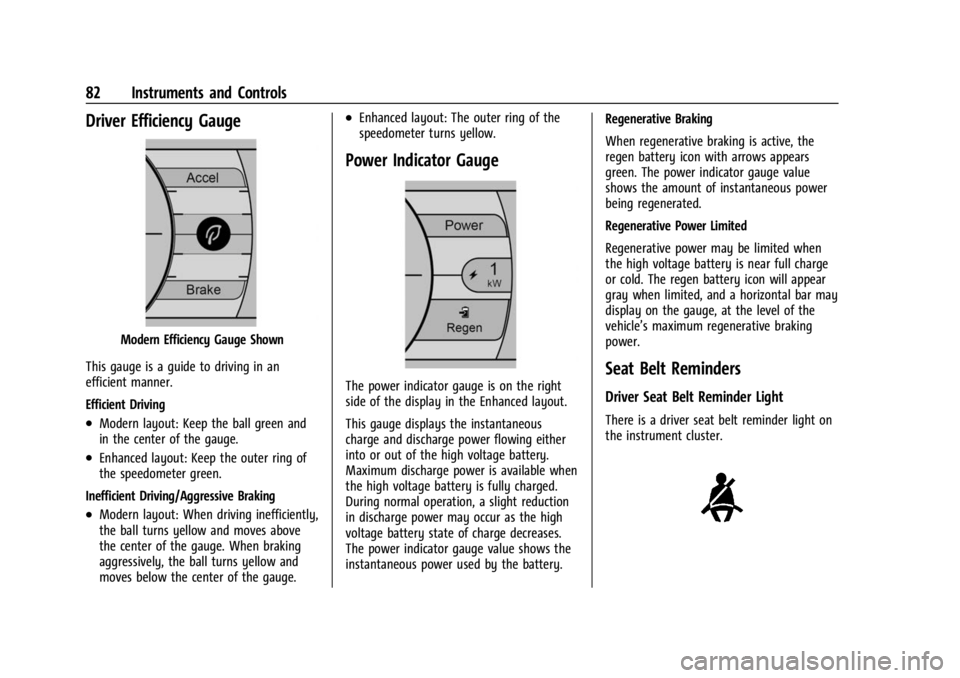
Driver Efficiency Gauge
Modern Efficiency Gauge Shown
This gauge is a guide to driving in an
efficient manner.
Efficient Driving
.Modern layout: Keep the ball green and
in the center of the gauge.
.Enhanced layout: Keep the outer ring of
the speedometer green.
Inefficient Driving/Aggressive Braking
.Modern layout: When driving inefficiently,
the ball turns yellow and moves above
the center of the gauge. When braking
aggressively, the ball turns yellow and
moves below the center of the gauge.
.Enhanced layout: The outer ring of the
speedometer turns yellow.
Power Indicator Gauge
The power indicator gauge is on the right
side of the display in the Enhanced layout.
This gauge displays the instantaneous
charge and discharge power flowing either
into or out of the high voltage battery.
Maximum discharge power is available when
the high voltage battery is fully charged.
During normal operation, a slight reduction
in discharge power may occur as the high
voltage battery state of charge decreases.
The power indicator gauge value shows the
instantaneous power used by the battery. Regenerative Braking
When regenerative braking is active, the
regen battery icon with arrows appears
green. The power indicator gauge value
shows the amount of instantaneous power
being regenerated.
Regenerative Power Limited
Regenerative power may be limited when
the high voltage battery is near full charge
or cold. The regen battery icon will appear
gray when limited, and a horizontal bar may
display on the gauge, at the level of the
vehicle’s maximum regenerative braking
power.Seat Belt Reminders
Driver Seat Belt Reminder Light
There is a driver seat belt reminder light on
the instrument cluster.