2023 CADILLAC XT6 lock
[x] Cancel search: lockPage 43 of 507

Cadillac XT6 Owner Manual (GMNA-Localizing-U.S./Canada-16405819) -
2023 - CRC - 3/23/22
42 Keys, Doors, and Windows
may result in a pulsing sound
when one window is down and
the other three are up. To
reduce the sound, open
another window or the
sunroof, if equipped.
Power Windows
{Warning
Children could be seriously
injured or killed if caught in
the path of a closing
window. Never leave the
remote key in a vehicle with
children. When there are
children in the rear seat, use
the window lockout switch
to prevent operation of the
windows. See Keys08.
The power windows work
when the ignition is on, in
accessory mode, or when
Retained Accessory Power
(RAP) is active. See Retained
Accessory Power (RAP) 0263.
Using the window switch,
press to open or pull to close
the window.
The windows may be
temporarily disabled if they
are used repeatedly within a
short time.
Window Lockout
This feature stops the rear
passenger window switches
from working.
.Press2to engage the rear
window lockout feature. The
indicator light is on when
engaged.
.Press2again to disengage.
Page 45 of 507

Cadillac XT6 Owner Manual (GMNA-Localizing-U.S./Canada-16405819) -
2023 - CRC - 3/23/22
44 Keys, Doors, and Windows
display the list of available
options and select“Remote
Lock, Unlock, Start”.
Sun Visors
Pull the sun visor down to
block glare. Detach the sun
visor from the center mount to
pivot to the side window and,
if equipped, extend along
the rod.
Roof
Sunroof
If equipped, the ignition must
be on or in accessory mode,
or Retained Accessory Power
(RAP) must be active to operate the sunroof. See
Ignition Positions
0257 and
Retained Accessory Power
(RAP) 0263.
1. Sunroof Switch
2. Sunshade Switch
Sunroof Express Operation :
Press and release
e(1) to
vent. Press and release again
to move to the partially
opened comfort stop position.
Press and release again to
express-open to the fully
opened position. Press and
release
e(1) at any time to
stop movement. Press and release
g(1) to
express-close. Press and
release
g(1) at any time to
stop movement.
Sunroof Comfort Stop
Position : This vehicle may be
equipped with a comfort stop
to prevent excessive wind
noise. The sunroof will stop
approximately halfway open
during and express open. To
fully open the sunroof, press
and release
g(1) again.
Sunroof Manual Operation :
The sunroof can change to
manual mode by holding
e(1)
while opening. The sunroof will
now open as long as
e(1) is
held. Press and release
e(1)
again to change back to
express operation.
Power Sunshade Express
Operation : Press and
release
C(2) to express-open
the sunshade. Press and
release
C(2) at any time to
stop movement. Press and
Page 48 of 507

Cadillac XT6 Owner Manual (GMNA-Localizing-U.S./Canada-16405819) -
2023 - CRC - 3/22/22
Seats and Restraints 47
Head Restraints
Front Seats
{Warning
With head restraints that
are not installed and
adjusted properly, there is a
greater chance that
occupants will suffer a neck/
spinal injury in a crash. Do
not drive until the head
restraints for all occupants
are installed and adjusted
properly.
The vehicle's front seats have
adjustable head restraints in
the outboard seating
positions.
Adjust the head restraint so
that the top of the restraint is
at the same height as the top
of the occupant's head. This
position reduces the chance of
a neck injury in a crash.
The height of the head
restraint can be adjusted.To raise or lower the head
restraint, press the button
located on the side of the
head restraint, and pull up or
push the head restraint down,
and release the button. Pull
and push on the head restraint
after the button is released to
make sure that it is locked in
place.
The front seat outboard head
restraints are not removable.
Page 49 of 507
Cadillac XT6 Owner Manual (GMNA-Localizing-U.S./Canada-16405819) -
2023 - CRC - 3/22/22
48 Seats and Restraints
Rear Seats
Second Row Seats
The vehicle’s second row
seats have adjustable head
restraints in the outboard
seating positions.
The height of the head
restraint can be adjusted. Pull
the head restraint up to raise
it. Try to move the head
restraint to make sure that it
is locked in place.
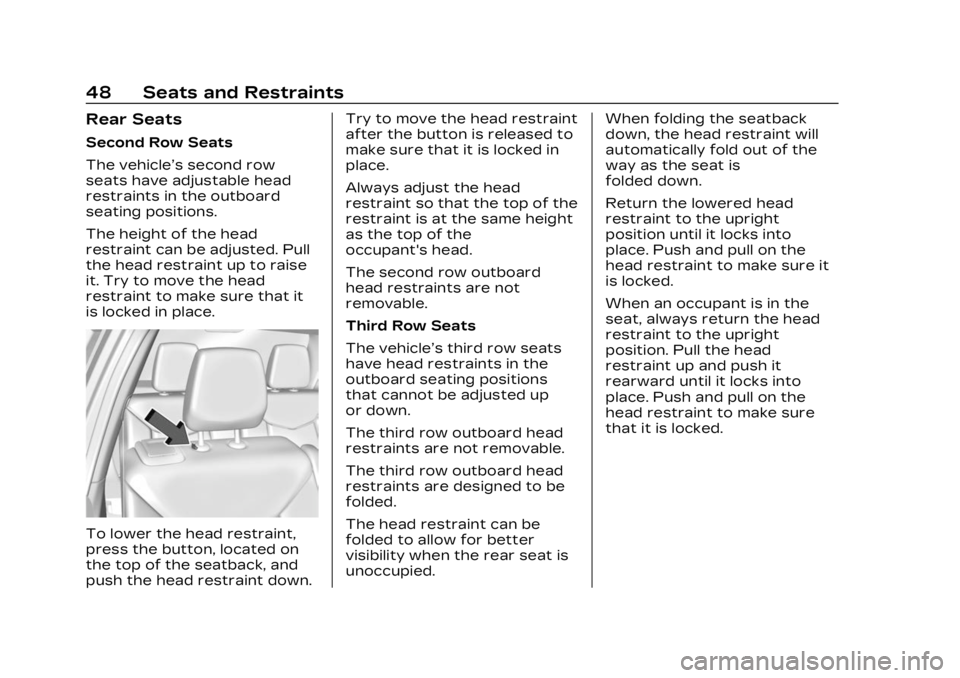
To lower the head restraint,
press the button, located on
the top of the seatback, and
push the head restraint down.Try to move the head restraint
after the button is released to
make sure that it is locked in
place.
Always adjust the head
restraint so that the top of the
restraint is at the same height
as the top of the
occupant's head.
The second row outboard
head restraints are not
removable.
Third Row Seats
The vehicle’s third row seats
have head restraints in the
outboard seating positions
that cannot be adjusted up
or down.
The third row outboard head
restraints are not removable.
The third row outboard head
restraints are designed to be
folded.
The head restraint can be
folded to allow for better
visibility when the rear seat is
unoccupied.
When folding the seatback
down, the head restraint will
automatically fold out of the
way as the seat is
folded down.
Return the lowered head
restraint to the upright
position until it locks into
place. Push and pull on the
head restraint to make sure it
is locked.
When an occupant is in the
seat, always return the head
restraint to the upright
position. Pull the head
restraint up and push it
rearward until it locks into
place. Push and pull on the
head restraint to make sure
that it is locked.
Page 54 of 507

Cadillac XT6 Owner Manual (GMNA-Localizing-U.S./Canada-16405819) -
2023 - CRC - 3/22/22
Seats and Restraints 53
If the memory seat recalls to
the wrong position, the
driver’s remote key number 1
or 2 may not match the
memory button number
positions they were saved to.
Try the other remote key or
try saving the positions to the
other 1 or 2 memory button.
See“Saving Seating Positions”
previously in this section.
Automatic Seat Entry Memory
recalls are only available for
driver’s remote key numbers
1 and 2. Remote keys 3–8 will
not provide Seat Entry
Memory recalls.
Auto Seat Exit Memory
Recall
Seat Exit Memory will begin
movement to the seating
position of the
B
button when:
.The vehicle is turned off and
the driver door is open or
opened within a short time.
.A seating position has been
previously been saved to the
Bmemory button. See
“Saving Seating Positions”
previously in this section.
.Seat Exit Memory is enabled.
See “Enabling Automatic
Recalls” previously in this
section.
.The vehicle is in P (Park).
Seat Exit Memory recall will
continue if the vehicle is
shifted out of P (Park) prior to
reaching the saved memory
position.
Seat Exit Memory is not linked
to the driver’s remote key. The
seating position saved to
Bis
used for all drivers.
Cancel Memory Seating
Recalls
.During any memory recall:
Press a power seat control
Press SET memory button
.During Manual memory
recall:
Release 1, 2, or
Bmemory
button
.During Auto Seat Entry
Memory Recall:
Turn vehicle off
Press SET, 1, 2, or
B
memory buttons
.During Auto Seat Exit
Memory Recall:
Press SET, 1, 2, or
B
memory buttons
Obstructions
If something has blocked the
seat while recalling a memory
position, the recall may stop.
Remove the obstruction and
try the recall again. If the
memory position still does not
recall, see your dealer.
Page 56 of 507

Cadillac XT6 Owner Manual (GMNA-Localizing-U.S./Canada-16405819) -
2023 - CRC - 3/22/22
Seats and Restraints 55
heated or ventilated seats at
the level required by the
vehicle’s interior temperature.
The active high, medium, low,
or off heated or ventilated
seat level will be indicated by
the manual heated or
ventilated seat buttons on the
center stack. Use the manual
heated or ventilated seat
buttons on the center stack to
turn auto heated or ventilated
seats off. If the passenger
seat is unoccupied, the auto
heated or ventilated seats
feature will not activate that
seat. To enable or disable auto
heated or ventilated seats,
select Settings > Vehicle >
Climate and Air Quality > Auto
Cooled or Auto Heated Seats
> ON or OFF.
Remote Start Heated and
Ventilated Seats
During a remote start, the
heated or ventilated seats,
if equipped, can be turned on
automatically. When it is cold
outside, the heated seats turnon, and when it is hot outside
the ventilated seats turn on.
If the auto heated or
ventilated seats feature,
if equipped, is not turned on,
the heated or ventilated seats
will be canceled when the
ignition is turned on. Press the
heated or ventilated seat
button to use the heated or
ventilated seats after the
vehicle is started.
The heated or ventilated seat
indicator lights do not turn on
during a remote start.
The temperature performance
of an unoccupied seat may be
reduced. This is normal.
To enable or disable remote
start heated or ventilated
seats, select Settings >
Vehicle > Remote Lock,
Unlock, and Start > Remote
Start Auto Heat Seats or
Remote Start Auto Cool Seats
> ON or OFF. See Remote
Vehicle Start
019.Rear Seats
Rear Seat Reminder
If equipped, the message
REAR SEAT REMINDER LOOK
IN REAR SEAT displays under
certain conditions indicating
there may be an item or
passenger in the rear seat.
Check before exiting the
vehicle.
This feature will activate when
a second row door is opened
while the vehicle is on or up to
10 minutes before the vehicle
is turned on. There will be an
alert when the vehicle is
turned off. The alert does not
directly detect objects in the
rear seat; instead, under
certain conditions, it detects
when a rear door is opened
and closed, indicating that
there may be something in the
rear seat.
The feature is active only once
each time the vehicle is turned
on and off, and will require
reactivation by opening and
Page 57 of 507

Cadillac XT6 Owner Manual (GMNA-Localizing-U.S./Canada-16405819) -
2023 - CRC - 3/22/22
56 Seats and Restraints
closing the second row doors.
There may be an alert even
when there is nothing in the
rear seat; for example, if a
child entered the vehicle
through the rear door and left
the vehicle without the vehicle
being shut off.
The feature can be turned on
or off. Select Settings > Rear
Seat Reminder > ON or OFF.
Rear Seat Adjustment
The second row seats slide
forward for more room.
Bucket Seat Shown, BenchSeat Similar To adjust the seat position:
1. Remove objects on the floor in front of or on the
second row seat, or in the
seat tracks on the floor.
2. Lift the lever below the seat cushion and slide the
seat forward or backward.
Entering and Exiting the
Third Row
{Warning
Using the third row seating
position while the second
row is folded could cause
injury in a sudden stop or
crash. Be sure to return the
seat to the passenger
seating position. Push and
pull on the seat to make
sure it is locked into place.
{Warning
If the seatback and seat
base are not locked, the
seat could move forward in a
sudden stop or crash and
injure the occupant. Always
push and pull on the
seatbacks to be sure the
seatback and seat base are
locked.
Caution
Folding a rear seat with the
seat belts still fastened may
cause damage to the seat or
the seat belts. Always
unbuckle the seat belts and
return them to their normal
stowed position before
folding a rear seat.
To access the third row from
the passenger side:
The second row passenger
side seat can be easily moved
for third row entry or exit with
a forward-facing child
Page 58 of 507

Cadillac XT6 Owner Manual (GMNA-Localizing-U.S./Canada-16405819) -
2023 - CRC - 3/22/22
Seats and Restraints 57
restraint installed using the
LATCH system. Remove a
rear-facing child restraint
before moving the seat for
third row entry or exit.
{Warning
Remove the child from the
child restraint before moving
the seat forward for third
row entry or exit. Failure to
do so may result in injury to
the child.
1. Remove objects on the floor in front of or under
the second row seat, or in
the seat tracks on the
floor.
2. Pull the handle on the topof the seat forward and
pull the seat forward.
Returning the Seat to the
Seating Position
To return the second row seat
to its normal seating position:
1. Remove objects on the floor behind or under the
second row seat or in the
seat tracks on the floor.
2. Push on the seatback until the seat is locked into
place. 3. Push and pull on the
seatback and seat cushion
to make sure they are
locked in place.
4. Check that the seat belt is not under the seat cushion.
Reclining the Seatbacks
To recline the seatbacks:
1. Leaning rearward in theseat, pull the reclining
seatback handle.
2. Move the seatback to the desired position, and then
release the handle to lock
the seatback in place.