2023 CADILLAC XT5 wheel
[x] Cancel search: wheelPage 135 of 482

Cadillac XT5 Owner Manual (GMNA-Localizing-U.S./Canada/Mexico-
16406251) - 2023 - CRC - 3/25/22
134 Instruments and Controls
.Green: Appears when LKA is
turned on and ready to
assist. LKA will gently turn
the steering wheel if the
vehicle approaches a
detected lane marking.
.Amber: Appears when LKA is
active. The light flashes
amber as a Lane Departure
Warning (LDW) alert to
indicate that the lane
marking has been
unintentionally crossed.
If the system detects you
are steering intentionally (to
pass or change lanes), the
LDW alert may not display.
LKA will not assist or alert if
the turn signal is active in the
direction of lane departure,
or if LKA detects that you are
accelerating, braking,
or actively steering. See Lane
Keep Assist (LKA) 0315.
Vehicle Ahead
Indicator
If equipped, this indicator will
display green when a vehicle is
detected ahead and amber
when you are following a
vehicle ahead much too
closely.
See Forward Collision Alert
(FCA) System 0303.
Pedestrian Ahead
Indicator
If equipped, this indicator will
display amber when a nearby
pedestrian is detected in front
of the vehicle.
See Front Pedestrian Braking
(FPB) System 0307.
Traction Off Light
This light comes on briefly
when the vehicle is turned on
to show that the light is
working. If it does not come on
then, have it fixed so it will be
ready to warn you if there is a
problem.
The traction off light comes on
when the Traction Control
System (TCS) has been turned
off. If StabiliTrak/Electronic
Stability Control (ESC) is
turned off, TCS is also turned
off. To turn TCS and ESC off
Page 136 of 482

Cadillac XT5 Owner Manual (GMNA-Localizing-U.S./Canada/Mexico-
16406251) - 2023 - CRC - 3/25/22
Instruments and Controls 135
and on, see Traction Control/
Electronic Stability Control
0271.
If TCS is off, wheel slip during
acceleration is not limited
unless necessary to help
protect the driveline from
damage. Adjust driving
accordingly.
StabiliTrak OFF Light
This light comes on briefly
when the vehicle is turned on
to show that the light is
working. If it does not come on
then, have it fixed so it will be
ready to warn you if there is a
problem.
This light comes on when the
StabiliTrak/Electronic Stability
Control (ESC) system is turned
off. If StabiliTrak/ESC is off,
the Traction Control System (TCS) is also off. To turn ESC
off and on, see Traction
Control/Electronic Stability
Control
0271.
If ESC and TCS are off, the
systems do not assist in
controlling the vehicle. Adjust
driving accordingly.
Traction Control
System (TCS)/
StabiliTrak Light
This light comes on briefly
when the vehicle is turned on
to show that the light is
working. If it does not come on
then, have it fixed so it will be
ready to warn you if there is a
problem.
If the light is on and not
flashing, the TCS and
potentially the StabiliTrak/ESC system are not fully
operational and may not assist
in maintaining control. Adjust
driving accordingly. If the
condition persists, see your
dealer as soon as possible.
A Driver Information Center
(DIC) message may display.
The light flashes when the
TCS and/or the StabiliTrak/
ESC system is actively
working.
See Traction Control/
Electronic Stability Control
0
271.
Engine Coolant
Temperature Warning
Light (Uplevel Only)
This light comes on briefly
while starting the vehicle.
Page 141 of 482

Cadillac XT5 Owner Manual (GMNA-Localizing-U.S./Canada/Mexico-
16406251) - 2023 - CRC - 3/25/22
140 Instruments and Controls
The info pages can also be
turned on or off through the
DIC page Info Page Options.
DIC Information Displays
The following is the list of all
possible DIC information
displays. Some of the
information displays may not
be available for your particular
vehicle.
While in the Info Page Options
menu, the info pages can be
restored to the default factory
settings by pressing and
holding
Ron the left steering
wheel controls and SEL on the
right steering wheel controls
at the same time.
Speed : Shows the vehicle
speed in either kilometers per
hour (km/h) or miles per
hour (mph).
Trip 1 or Trip 2 and Average
Fuel Economy : The Trip
display shows the current
distance traveled, in either
kilometers (km) or miles (mi),
since the trip odometer was last reset. The trip odometer
can be reset through the Trip
display, or by pressing SEL
and selecting yes or no while
this display is active.
Shows the approximate fuel
economy in kilometers per
liter (km/L), liters per
100 kilometers (L/100km),
or miles per gallon (mpg).. This
number is calculated based on
the number of L/100 km (mpg)
recorded since the last time
this menu item was reset. This
number reflects only the
approximate average fuel
economy that the vehicle has
right now, and will change as
driving conditions change. The
Average Fuel Economy can be
reset by pressing SEL and
selecting yes or no while this
display is active.
Fuel Range :
Shows the
approximate distance the
vehicle can be driven without
refueling. LOW will be
displayed when the vehicle is
low on fuel. The fuel range estimate is based on an
average of the vehicle's fuel
economy over recent driving
history and the amount of fuel
remaining in the fuel tank.
Oil Life :
Shows an estimate of
the oil's remaining useful life.
If REMAINING OIL LIFE 99% is
displayed, that means 99% of
the current oil life remains.
When the remaining oil life is
low, the CHANGE ENGINE OIL
SOON message will appear on
the display. The oil should be
changed as soon as possible.
See Engine Oil 0345. In
addition to the engine oil life
system monitoring the oil life,
additional maintenance is
recommended. See
Maintenance Schedule 0429.
The Oil Life display must be
reset after each oil change.
It will not reset itself. Do not
reset the Oil Life display
accidentally at any time other
than when the oil has just
been changed. It cannot be
Page 143 of 482

Cadillac XT5 Owner Manual (GMNA-Localizing-U.S./Canada/Mexico-
16406251) - 2023 - CRC - 3/25/22
142 Instruments and Controls
Battery Voltage :Shows the
current battery voltage.
Coolant Temperature :
Shows the engine coolant
temperature in either degrees
Celsius (°C) or degrees
Fahrenheit (°F).
Oil Temperature : Shows the
engine oil temperature in
either degrees Celsius (°C) or
degrees Fahrenheit (°F).
Transmission Fluid
Temperature : Shows the
temperature of the automatic
transmission fluid in either
degrees Celsius (°C) or
degrees Fahrenheit (°F).
Off Road : Displays vehicle
pitch and roll information, road
wheel angle, and four-wheel
drive (4WD) status.
Engine Boost : If equipped,
displays engine manifold
pressure relative to ambient
air pressure. It will display
boost pressure generated by
the turbocharging system. Info Page Options :
Scroll to
choose which info pages
appear on the DIC. Press SEL
to select or deselect.
Blank Page : Allows for no
information to be displayed in
the cluster info display areas.
Head-Up
Display (HUD)
{Warning
If the HUD image is too
bright or too high in your
field of view, it may take you
more time to see things you
need to see when it is dark
outside. Be sure to keep the
HUD image dim and placed
low in your field of view.
If equipped with HUD, some
information concerning the
operation of the vehicle is
projected onto the windshield.
The image is projected
through the HUD lens on top
of the instrument panel. The information appears as an
image focused out toward the
front of the vehicle.
Caution
If you try to use the HUD
image as a parking aid, you
may misjudge the distance
and damage your vehicle. Do
not use the HUD image as a
parking aid.
The HUD information can be
displayed in various languages.
The speedometer reading and
other numerical values can be
displayed in either English or
metric units.
The language selection is
changed through the radio
and the units of measurement
are changed through the
instrument cluster. See
Settings 0205 and “Options”
under Instrument Cluster
0 122.
Page 144 of 482

Cadillac XT5 Owner Manual (GMNA-Localizing-U.S./Canada/Mexico-
16406251) - 2023 - CRC - 3/25/22
Instruments and Controls 143
HUD Display on theWindshield
The HUD may display some of
the following vehicle
information and vehicle
messages or alerts:
.Speed
.Tachometer
.Audio
.Phone
.Navigation
.Collision Alert
.Adaptive Cruise Control and
set speed
.Lane Departure
.Low Fuel
Some vehicle messages or
alerts displayed in the HUD
may be cleared by using the
steering wheel controls. See
Vehicle Messages 0146.
Some information shown may
not be available on your
vehicle if it is not equipped
with these features.
The HUD control is to the left
of the steering wheel.
To adjust the HUD image: 1. Adjust the driver seat.
2. Start the engine.
3. Use the following settings to adjust the HUD.
$:Press or lift to center the
HUD image. The HUD image
can only be adjusted up and
down, not side to side.
!: Press to select the
display view. Each press will
change the display view.
D: Lift and hold to brighten
the display. Press and hold to
dim the display. Continue to
hold to turn the display off.
The HUD image will
automatically dim and brighten
to compensate for outside
lighting. The HUD brightness
control can also be adjusted
as needed.
The HUD image can
temporarily light up depending
on the angle and position of
sunlight on the HUD display.
This is normal.
Polarized sunglasses could
make the HUD image harder
to see.
Page 145 of 482
Cadillac XT5 Owner Manual (GMNA-Localizing-U.S./Canada/Mexico-
16406251) - 2023 - CRC - 3/25/22
144 Instruments and Controls
Head-Up Display (HUD)
Rotation Option
This feature allows for
adjusting the angle of the HUD
image.
Press SEL on the steering
wheel controls while Head-Up
Display Rotation is highlighted
to enter Adjust Mode. Press
y
orzto adjust the angle of the
HUD display. Press
SorTto
highlight OK, then press SEL
to save the setting. CANCEL
can also be selected to cancel
the setting. The vehicle must
be in P (Park). See Instrument
Cluster 0122.
HUD Views
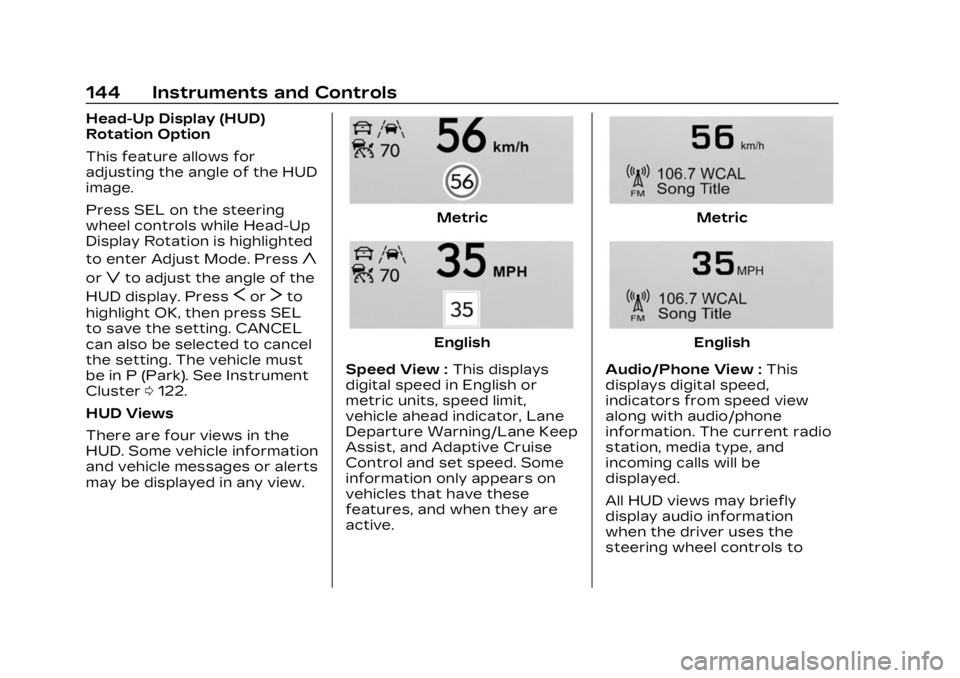
There are four views in the
HUD. Some vehicle information
and vehicle messages or alerts
may be displayed in any view.
Metric
English
Speed View : This displays
digital speed in English or
metric units, speed limit,
vehicle ahead indicator, Lane
Departure Warning/Lane Keep
Assist, and Adaptive Cruise
Control and set speed. Some
information only appears on
vehicles that have these
features, and when they are
active.
Metric
English
Audio/Phone View : This
displays digital speed,
indicators from speed view
along with audio/phone
information. The current radio
station, media type, and
incoming calls will be
displayed.
All HUD views may briefly
display audio information
when the driver uses the
steering wheel controls to
Page 156 of 482

Cadillac XT5 Owner Manual (GMNA-Localizing-U.S./Canada/Mexico-
16406251) - 2023 - CRC - 3/25/22
Lighting 155
wipers are not operating,
these lamps turn off. Move the
exterior lamp control to
Oor
;to disable this feature.
Hazard Warning
Flashers
|:Touch|on the center
stack to make the front and
rear turn signal lamps flash on
and off. Touch again to turn
the flashers off.
The hazard warning flashers
turn on automatically if the
airbags deploy.
Turn and
Lane-Change Signals
Move the lever all the way up
or down to signal a turn.
An arrow on the instrument
cluster flashes in the direction
of the turn or lane change.
Raise or lower the lever until
the arrow starts to flash to
signal a lane change. Hold it
there until the lane change is
completed. If the lever is
briefly pressed and released,
the turn signal flashes three
times.
The turn and lane-change
signal can be turned off
manually by moving the lever
back to its original position. If after signaling a turn or lane
change, the arrow flashes
rapidly or does not come on, a
signal bulb may be burned out.
Replace any burned out bulbs.
If a bulb is not burned out,
check the fuse. See Fuses and
Circuit Breakers
0367.
Cornering Lamps
Cornering lamps automatically
come on when all of the
following occur:
.The low-beam headlamps
are on.
.The turn signals are
activated or the steering
wheel is at a turning angle.
.The vehicle speed is below
40 km/h (25 mph).
Page 157 of 482
Cadillac XT5 Owner Manual (GMNA-Localizing-U.S./Canada/Mexico-
16406251) - 2023 - CRC - 3/25/22
156 Lighting
Interior Lighting
Instrument Panel
Illumination Control
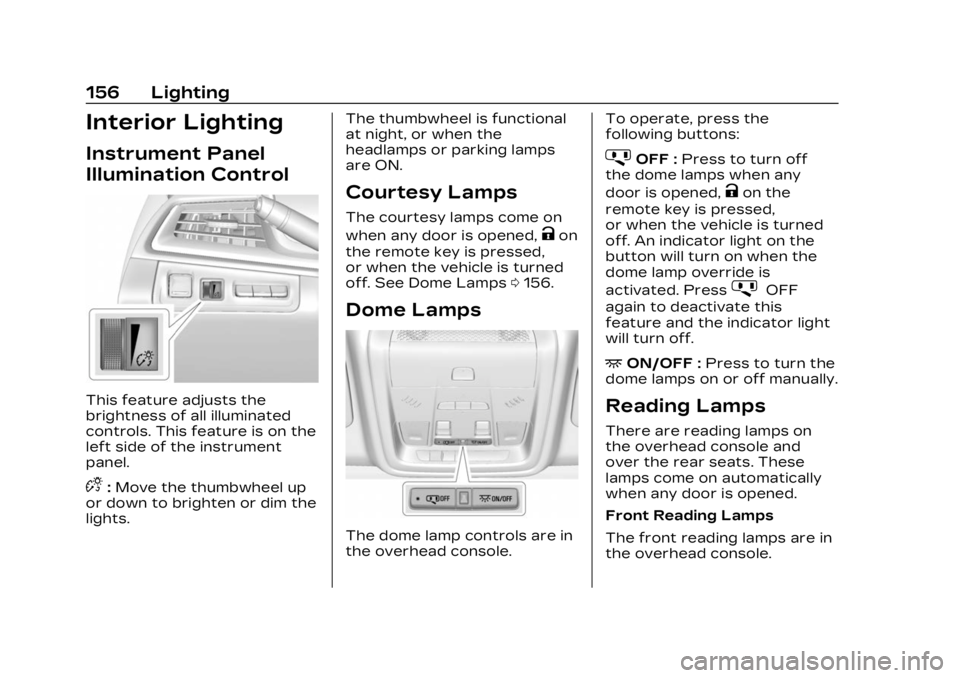
This feature adjusts the
brightness of all illuminated
controls. This feature is on the
left side of the instrument
panel.
D:Move the thumbwheel up
or down to brighten or dim the
lights. The thumbwheel is functional
at night, or when the
headlamps or parking lamps
are ON.
Courtesy Lamps
The courtesy lamps come on
when any door is opened,
Kon
the remote key is pressed,
or when the vehicle is turned
off. See Dome Lamps 0156.
Dome Lamps
The dome lamp controls are in
the overhead console. To operate, press the
following buttons:
jOFF :
Press to turn off
the dome lamps when any
door is opened,
Kon the
remote key is pressed,
or when the vehicle is turned
off. An indicator light on the
button will turn on when the
dome lamp override is
activated. Press
jOFF
again to deactivate this
feature and the indicator light
will turn off.
+ON/OFF : Press to turn the
dome lamps on or off manually.
Reading Lamps
There are reading lamps on
the overhead console and
over the rear seats. These
lamps come on automatically
when any door is opened.
Front Reading Lamps
The front reading lamps are in
the overhead console.