2023 CADILLAC XT5 lights
[x] Cancel search: lightsPage 125 of 482

Cadillac XT5 Owner Manual (GMNA-Localizing-U.S./Canada/Mexico-
16406251) - 2023 - CRC - 3/25/22
124 Instruments and Controls
.Info App. This is where the
selected Driver Information
Center (DIC) displays can be
viewed. See Driver
Information Center (DIC)
0139.
.Audio
.Navigation
.Phone
.Night Vision
.Options
Audio
In the Audio menu browse for
music, select from the
favorites, or change the audio
source. Use
yorzto change
the station or go to the next
or previous track.
Navigation
If there is an active route,
press SEL to cancel or resume
route guidance, or turn the
voice prompts on or off.
Phone
In the Phone menu, if there is
no active phone call, view
recent calls, or scroll through contacts. If there is an active
call, mute the phone or switch
to handset operation.
Night Vision
If equipped, Provides an
infrared night vision image of
the area beyond the
headlamps that highlights and
provides alerts to detected
pedestrians or large animals.
See Night Vision System
0
310.
Options
Use
yorzto scroll through
items in the Options menu.
Units : Choose US or metric
units by pressing SEL while
the desired item is highlighted.
Info Page Options : Press
SEL to select the items to be
displayed in the Info app. See
Driver Information Center
(DIC) 0139.
Display : Press SEL to enter
the Display menu. Select to
turn on or off the speedometer, time, fuel range,
or, if equipped, compass or
speed sign.
Speed Warning :
The Speed
Warning display allows the
driver to set a warning at a
speed that they do not want
to exceed. To set the Speed
Warning press SEL when
Speed Warning is displayed.
Use the
yorzto adjust the
value and press SEL to set the
speed.
Once the speed is set, this
feature can be turned off by
pressing the SEL while
viewing this page. If the
selected speed limit is
exceeded, a pop-up warning is
displayed with a chime.
Head-Up Display (HUD)
(Uplevel) : If equipped, this
feature allows for adjusting
the angle of the HUD image
and changing or turning off
the Speed Limit Sign.
Page 129 of 482

Cadillac XT5 Owner Manual (GMNA-Localizing-U.S./Canada/Mexico-
16406251) - 2023 - CRC - 3/25/22
128 Instruments and Controls
Warning (Continued)
inflate without a crash. To
help avoid injury, have the
vehicle serviced right away.
If there is a problem with the
airbag system, a Driver
Information Center (DIC)
message may also come on.
Passenger Airbag
Status Indicator
The vehicle has a passenger
sensing system. See
Passenger Sensing System
0 75 for important safety
information. The overhead
console has a passenger
airbag status indicator.
When the vehicle is started,
the passenger airbag status
indicator will light ON and OFF,
or the symbol for on and off,
for several seconds as a
system check. Then, after
several more seconds, the
status indicator will light either
ON or OFF, or either the on or
off symbol, to let you know the
status of the front outboard
passenger frontal airbag.
If the word ON, or the on
symbol, is lit on the passenger
airbag status indicator, it
means that the front outboard
passenger frontal airbag is
allowed to inflate.
If the word OFF, or the off
symbol, is lit on the passenger
airbag status indicator, it
means that the passenger
sensing system has turned off
the front outboard passenger
frontal airbag.
If, after several seconds, both
status indicator lights remain
on, or if there are no lights at
all, there may be a problem with the lights or the
passenger sensing system.
See your dealer for service.
{Warning
If the airbag readiness light
ever comes on and stays on,
it means that something may
be wrong with the airbag
system. To help avoid injury
to yourself or others, have
the vehicle serviced right
away. See Airbag Readiness
Light
0127 for more
information, including
important safety
information.
Charging System
Light
Page 153 of 482
Cadillac XT5 Owner Manual (GMNA-Localizing-U.S./Canada/Mexico-
16406251) - 2023 - CRC - 3/25/22
152 Lighting
AUTO :Automatically turns
the exterior lamps on and off,
depending on outside lighting.
;: Turns on the parking
lamps including all lamps,
except the headlamps.
2: Turns on the headlamps
together with the parking
lamps and instrument panel
lights.
IntelliBeam System
If equipped, this system turns
the vehicle's high-beam
headlamps on and off
according to surrounding
traffic conditions.
The system turns the
high-beam headlamps on when
it is dark enough and there is
no other traffic present.
This light
bcomes on in the
instrument cluster when the
IntelliBeam system is enabled. Turning On and Enabling
IntelliBeam
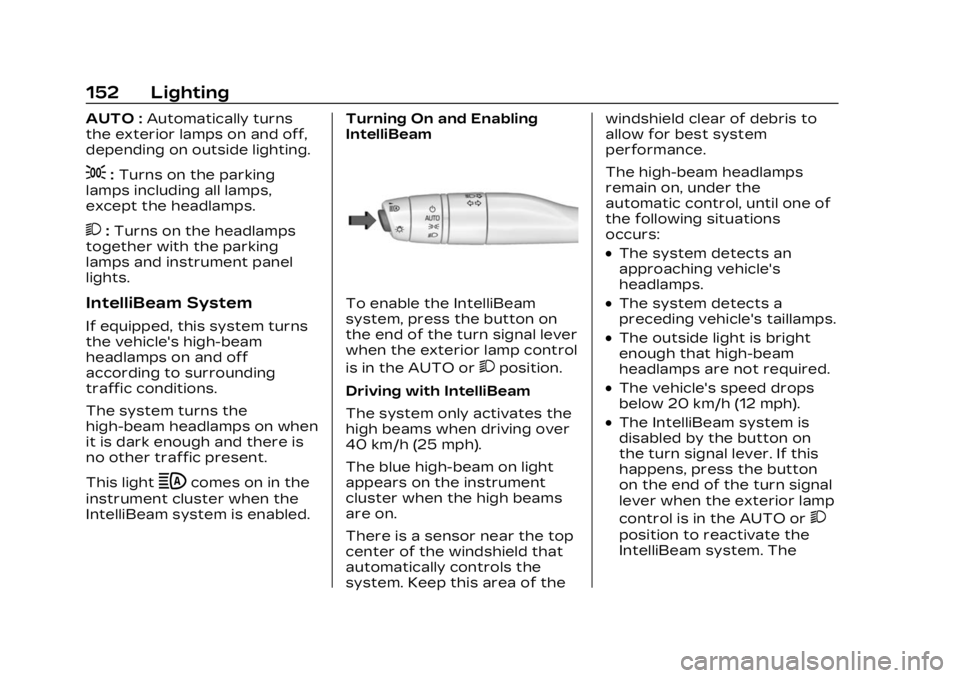
To enable the IntelliBeam
system, press the button on
the end of the turn signal lever
when the exterior lamp control
is in the AUTO or
2position.
Driving with IntelliBeam
The system only activates the
high beams when driving over
40 km/h (25 mph).
The blue high-beam on light
appears on the instrument
cluster when the high beams
are on.
There is a sensor near the top
center of the windshield that
automatically controls the
system. Keep this area of the windshield clear of debris to
allow for best system
performance.
The high-beam headlamps
remain on, under the
automatic control, until one of
the following situations
occurs:
.The system detects an
approaching vehicle's
headlamps.
.The system detects a
preceding vehicle's taillamps.
.The outside light is bright
enough that high-beam
headlamps are not required.
.The vehicle's speed drops
below 20 km/h (12 mph).
.The IntelliBeam system is
disabled by the button on
the turn signal lever. If this
happens, press the button
on the end of the turn signal
lever when the exterior lamp
control is in the AUTO or
2
position to reactivate the
IntelliBeam system. The
Page 155 of 482

Cadillac XT5 Owner Manual (GMNA-Localizing-U.S./Canada/Mexico-
16406251) - 2023 - CRC - 3/25/22
154 Lighting
.The exterior lamp control is
in AUTO.
.The light sensor determines
it is daytime.
.The parking brake is
released or the vehicle is not
in P (Park).
When the DRL are on, the
taillamps, sidemarker lamps,
and other lamps will not be on.
The DRL turn off when the
headlamps are turned to
Oor
the ignition is off. For vehicles
first sold in Canada, the DRL
can only be turned off when
the vehicle is parked.
Automatic Headlamp
System
When the exterior lamp
control is set to AUTO and it is
dark enough outside, the
headlamps come on
automatically.
There is a light sensor on top
of the instrument panel. Do
not cover the sensor.
The system may also turn on
the headlamps when driving
through a parking garage or
tunnel.
If the vehicle is started in a
dark garage, the automatic
headlamp system comes on
immediately. If it is light
outside when the vehicle
leaves the garage, there is a
slight delay before the
automatic headlamp system
changes to the Daytime
Running Lamps (DRL). During that delay, the instrument
cluster may not be as bright as
usual. Make sure the
instrument panel brightness
control is in the full bright
position. See Instrument Panel
Illumination Control
0156.
When it is bright enough
outside, the headlamps will
turn off or may change
to DRL.
The automatic headlamp
system turns off when the
exterior lamp control is turned
to
Oor the ignition is off.
For vehicles sold in Canada,
this control only works when
the transmission is in P (Park).
Lights On with Wipers
If the windshield wipers are
activated in daylight with the
engine on, and the exterior
lamp control is in AUTO, the
headlamps, parking lamps, and
other exterior lamps come on.
The transition time for the
lamps coming on varies based
on wiper speed. When the
Page 157 of 482
Cadillac XT5 Owner Manual (GMNA-Localizing-U.S./Canada/Mexico-
16406251) - 2023 - CRC - 3/25/22
156 Lighting
Interior Lighting
Instrument Panel
Illumination Control
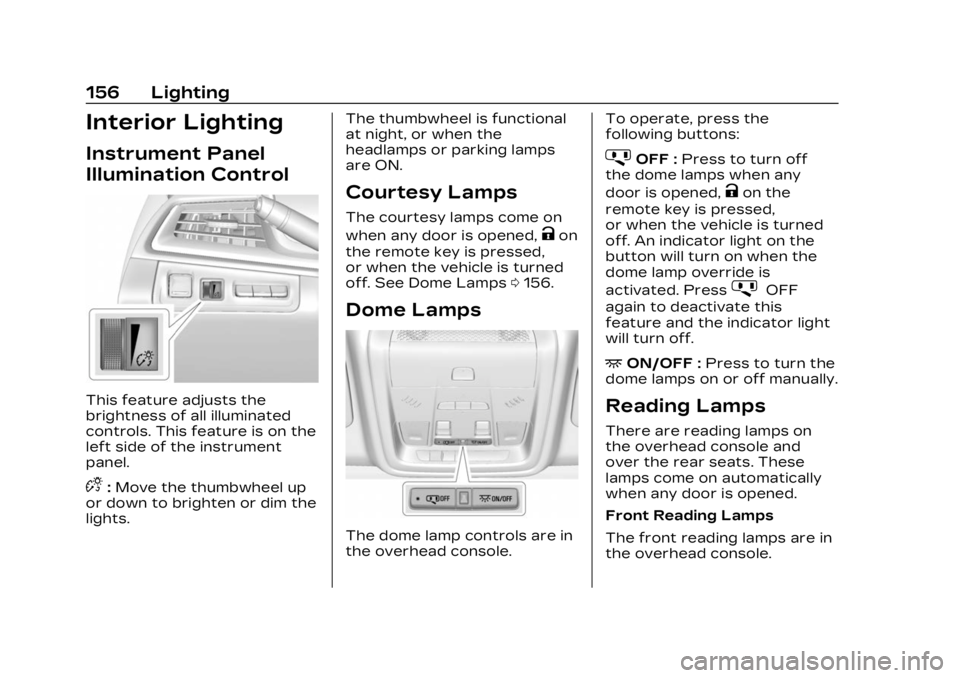
This feature adjusts the
brightness of all illuminated
controls. This feature is on the
left side of the instrument
panel.
D:Move the thumbwheel up
or down to brighten or dim the
lights. The thumbwheel is functional
at night, or when the
headlamps or parking lamps
are ON.
Courtesy Lamps
The courtesy lamps come on
when any door is opened,
Kon
the remote key is pressed,
or when the vehicle is turned
off. See Dome Lamps 0156.
Dome Lamps
The dome lamp controls are in
the overhead console. To operate, press the
following buttons:
jOFF :
Press to turn off
the dome lamps when any
door is opened,
Kon the
remote key is pressed,
or when the vehicle is turned
off. An indicator light on the
button will turn on when the
dome lamp override is
activated. Press
jOFF
again to deactivate this
feature and the indicator light
will turn off.
+ON/OFF : Press to turn the
dome lamps on or off manually.
Reading Lamps
There are reading lamps on
the overhead console and
over the rear seats. These
lamps come on automatically
when any door is opened.
Front Reading Lamps
The front reading lamps are in
the overhead console.
Page 158 of 482

Cadillac XT5 Owner Manual (GMNA-Localizing-U.S./Canada/Mexico-
16406251) - 2023 - CRC - 3/25/22
Lighting 157
Press the lamp lenses to turn
the front reading lamps on
or off.
Rear Reading Lamps
The rear reading lamps are
over the rear seats.
Press the lamp lens to turn
the rear reading lamps on
or off.
Lighting Features
Entry Lighting
The interior lamps turn on
when pressing
Kon the
remote key or opening any
doors, and the dome lamp
control is in the door position.
Some exterior lamps also turn
on when pressing
Kon the
remote key or opening any
doors. Low-Beam lamps will
only turn on briefly at night,
or in areas with limited lighting.
All lamps will gradually fade
out after about 30 seconds.
Entry lighting can be disabled
manually by closing all doors,
pressing
Qon the remote key,
or starting the vehicle. This feature can be changed.
On the infotainment home
page, select the Settings icon
TVehicleTVehicle Locator
Lights.
Exit Lighting
Some exterior lamps and
interior lamps turn on when
the driver door is opened after
the vehicle is turned off.
The exterior and interior lamps
remain on for a set amount of
time, then automatically
turn off.
The interior lights turn on
when the vehicle is turned off.
The exterior lamps turn off
immediately by turning the
exterior lamp control off.
This feature can be changed.
On the infotainment home
screen, select the Settings
icon
TVehicleTExit Lighting.
Page 229 of 482

Cadillac XT5 Owner Manual (GMNA-Localizing-U.S./Canada/Mexico-
16406251) - 2023 - CRC - 3/25/22
228 Climate Controls
Use the manual heated and
ventilated seat buttons on the
center stack to turn auto
heated or ventilated seats off.
If the passenger seat is
unoccupied, the auto heated
or ventilated seats feature will
not activate that seat. The
auto heated and ventilated
seats feature can be
programmed to always be
enabled when the vehicle is
on. If equipped with a heated
steering wheel, the auto
heated steering wheel
activation will follow the
heated seat auto activation
and the heated wheel
indicator will follow the state
of the steering wheel heat.
See Heated and Ventilated
Front Seats054.
Remote Start Climate
Control Operation :
If equipped with the remote
start feature, the climate
control system may run when
the vehicle is started remotely.
The system uses the driver’s
previous settings to heat or cool the inside of the vehicle.
The rear window defogger
may come on during remote
start based on cold ambient
conditions. The rear window
defogger indicator light does
not come on during a remote
start.
If equipped, the heated seats
will turn on if it is cold outside
or the ventilated seats will
turn on if it is hot outside. The
heated and ventilated seat
indicator lights may not come
on during a remote start.
If equipped, the heated
steering wheel will come on in
a remote start if it is cold
outside. The heated steering
wheel indicator light may not
come on. See Remote Vehicle
Start
019 and
Heated and Ventilated Front
Seats 054.Sensor
The solar sensor, on top of the
instrument panel near the
windshield, monitors the
solar heat.
The climate control system
uses the sensor information to
adjust the temperature, fan
speed, recirculation, and air
delivery mode for best
comfort.
If the sensor is covered, the
automatic climate control
system may not work properly.
Page 304 of 482

Cadillac XT5 Owner Manual (GMNA-Localizing-U.S./Canada/Mexico-
16406251) - 2023 - CRC - 3/25/22
Driving and Operating 303
Forward Collision
Alert (FCA) System
If equipped, the FCA system
may help to avoid or reduce
the harm caused by front-end
crashes. When approaching a
vehicle ahead too quickly, FCA
provides a red flashing alert
on the windshield and rapidly
beeps or pulses the driver
seat. FCA also lights an amber
visual alert if following another
vehicle much too closely.
FCA detects vehicles within a
distance of approximately
60 m (197 ft) and operates at
speeds above 8 km/h (5 mph).
If the vehicle has Adaptive
Cruise Control (ACC), it can
detect vehicles to distances of
approximately 110 m (360 ft)
and operates at all speeds.
See Adaptive Cruise Control
(Advanced)0277.
{Warning
FCA is a warning system and
does not apply the brakes.
When approaching a
slower-moving or stopped
vehicle ahead too rapidly,
or when following a vehicle
too closely, FCA may not
provide a warning with
enough time to help avoid a
crash. It also may not
provide any warning at all.
FCA does not warn of
pedestrians, animals, signs,
guardrails, bridges,
construction barrels,
or other objects. Be ready to
take action and apply the
brakes. See Defensive
Driving 0235.
To view available settings for
this feature, touch the
Settings icon on the
infotainment home page.
Select “Vehicle” to display the list of available options and
select
“Collision/Detection
Systems”.
Detecting the Vehicle
Ahead
FCA warnings will not occur
unless the FCA system
detects a vehicle ahead. When
a vehicle is detected, the
vehicle ahead indicator will
display green. Vehicles may
not be detected on curves,
highway exit ramps, or hills,
due to poor visibility; or if a
vehicle ahead is partially
blocked by pedestrians or
other objects. FCA will not
detect another vehicle ahead
until it is completely in the
driving lane.