2023 CADILLAC XT5 instrument panel
[x] Cancel search: instrument panelPage 81 of 482

Cadillac XT5 Owner Manual (GMNA-Localizing-U.S./Canada/Mexico-
16406251) - 2023 - CRC - 3/25/22
80 Seats and Restraints
service manual have
information about servicing
the vehicle and the airbag
system. To purchase a service
manual, see Publication
Ordering Information0452.
{Warning
For up to 10 seconds after
the vehicle is turned off and
the battery is disconnected,
an airbag can still inflate
during improper service. You
can be injured if you are
close to an airbag when it
inflates. Avoid yellow
connectors. They are
probably part of the airbag
system. Be sure to follow
proper service procedures,
and make sure the person
performing work for you is
qualified to do so.
Adding Equipment to
the Airbag-Equipped
Vehicle
Adding accessories that
change the vehicle's frame,
bumper system, height, front
end, or side sheet metal may
keep the airbag system from
working properly.
The operation of the airbag
system can also be affected
by changing, including
improperly repairing or
replacing, any parts of the
following:
.Airbag system, including
airbag modules, front or side
impact sensors, sensing and
diagnostic module, or airbag
wiring
.Front seats, including
stitching, seams or zippers
.Seat belts
.Steering wheel, instrument
panel, overhead console,
ceiling trim, or pillar
garnish trim
.Inner door seals, including
speakers
Your dealer and the service
manual have information about
the location of the airbag
modules and sensors, sensing
and diagnostic module, and
airbag wiring along with the
proper replacement
procedures.
In addition, the vehicle has a
passenger sensing system for
the front outboard passenger
position, which includes
sensors that are part of the
passenger seat. The
passenger sensing system
may not operate properly if
the original seat trim is
replaced with non-GM covers,
upholstery, or trim; or with GM
covers, upholstery, or trim
designed for a different
vehicle. Any object, such as an
aftermarket seat heater or a
comfort-enhancing pad or
device, installed under or on
top of the seat fabric, could
also interfere with the
Page 131 of 482

Cadillac XT5 Owner Manual (GMNA-Localizing-U.S./Canada/Mexico-
16406251) - 2023 - CRC - 3/25/22
130 Instruments and Controls
Caution (Continued)
Inspection/Maintenance
test. See Accessories and
Modifications0338.
If the light is flashing : A
malfunction has been
detected that could damage
the emission control system
and increase vehicle
emissions. Diagnosis and
service may be required.
To help prevent damage,
reduce vehicle speed and
avoid hard accelerations and
uphill grades. If towing a
trailer, reduce the amount of
cargo being hauled as soon as
possible.
If the light continues to flash,
find a safe place to park. Turn
the vehicle off and wait at
least 10 seconds before
restarting the engine. If the
light is still flashing, follow the
previous guidelines and see
your dealer for service as
soon as possible. If the light is on steady :
A
malfunction has been
detected. Diagnosis and
service may be required.
Check the following:
.If fuel has been added to the
vehicle using the capless fuel
funnel adapter, make sure
that it has been removed.
See “Filling the Tank with a
Portable Gas Can” under
Filling the Tank 0319. The
diagnostic system can
detect if the adapter has
been left installed in the
vehicle, allowing fuel to
evaporate into the
atmosphere. A few driving
trips with the adapter
removed may turn off the
light.
.Poor fuel quality can cause
inefficient engine operation
and poor driveability, which
may go away once the
engine is warmed up. If this
occurs, change the fuel
brand. It may require at least
one full tank of the proper fuel to turn the light off. See
Recommended Fuel (2.0L L4
Engine)
0318 or
Recommended Fuel (3.6L
V6 Engine) 0318.
If the light remains on, see
your dealer.
Emissions Inspection and
Maintenance Programs
If the vehicle requires an
Emissions Inspection/
Maintenance test, the test
equipment will likely connect
to the vehicle's Data Link
Connector (DLC).
The DLC is under the
instrument panel to the left of
the steering wheel.
Connecting devices that are
not used to perform an
Emissions Inspection/
Page 143 of 482

Cadillac XT5 Owner Manual (GMNA-Localizing-U.S./Canada/Mexico-
16406251) - 2023 - CRC - 3/25/22
142 Instruments and Controls
Battery Voltage :Shows the
current battery voltage.
Coolant Temperature :
Shows the engine coolant
temperature in either degrees
Celsius (°C) or degrees
Fahrenheit (°F).
Oil Temperature : Shows the
engine oil temperature in
either degrees Celsius (°C) or
degrees Fahrenheit (°F).
Transmission Fluid
Temperature : Shows the
temperature of the automatic
transmission fluid in either
degrees Celsius (°C) or
degrees Fahrenheit (°F).
Off Road : Displays vehicle
pitch and roll information, road
wheel angle, and four-wheel
drive (4WD) status.
Engine Boost : If equipped,
displays engine manifold
pressure relative to ambient
air pressure. It will display
boost pressure generated by
the turbocharging system. Info Page Options :
Scroll to
choose which info pages
appear on the DIC. Press SEL
to select or deselect.
Blank Page : Allows for no
information to be displayed in
the cluster info display areas.
Head-Up
Display (HUD)
{Warning
If the HUD image is too
bright or too high in your
field of view, it may take you
more time to see things you
need to see when it is dark
outside. Be sure to keep the
HUD image dim and placed
low in your field of view.
If equipped with HUD, some
information concerning the
operation of the vehicle is
projected onto the windshield.
The image is projected
through the HUD lens on top
of the instrument panel. The information appears as an
image focused out toward the
front of the vehicle.
Caution
If you try to use the HUD
image as a parking aid, you
may misjudge the distance
and damage your vehicle. Do
not use the HUD image as a
parking aid.
The HUD information can be
displayed in various languages.
The speedometer reading and
other numerical values can be
displayed in either English or
metric units.
The language selection is
changed through the radio
and the units of measurement
are changed through the
instrument cluster. See
Settings 0205 and “Options”
under Instrument Cluster
0 122.
Page 152 of 482

Cadillac XT5 Owner Manual (GMNA-Localizing-U.S./Canada/Mexico-
16406251) - 2023 - CRC - 3/25/22
Lighting 151
Lighting
Exterior Lighting
Exterior Lamp Controls . . . 151
Exterior Lamps OffReminder . . . . . . . . . . . . . . . . . . . 153
Headlamp High/ Low-Beam Changer . . . . . 153
Flash-to-Pass . . . . . . . . . . . . . . . 153
Daytime Running Lamps (DRL) . . . . . . . . . . . . . . . 153
Automatic Headlamp System . . . . . . . . . . . . . . . . . . . . . . 154
Hazard Warning Flashers . . . . . . . . . . . . . . . . . . . . . 155
Turn and Lane-Change Signals . . . . . . . . . . . . . . . . . . . . . . . 155
Cornering Lamps . . . . . . . . . . 155
Interior Lighting
Instrument Panel Illumination Control . . . . . . 156
Courtesy Lamps . . . . . . . . . . . 156
Dome Lamps . . . . . . . . . . . . . . . . 156
Reading Lamps . . . . . . . . . . . . . 156
Lighting Features
Entry Lighting . . . . . . . . . . . . . . . 157
Exit Lighting . . . . . . . . . . . . . . . . . 157
Battery Power Protection . . . . . . . . . . . . . . . . . . 158
Exterior Lighting Battery
Saver . . . . . . . . . . . . . . . . . . . . . . . . . 158Exterior Lighting
Exterior Lamp
Controls
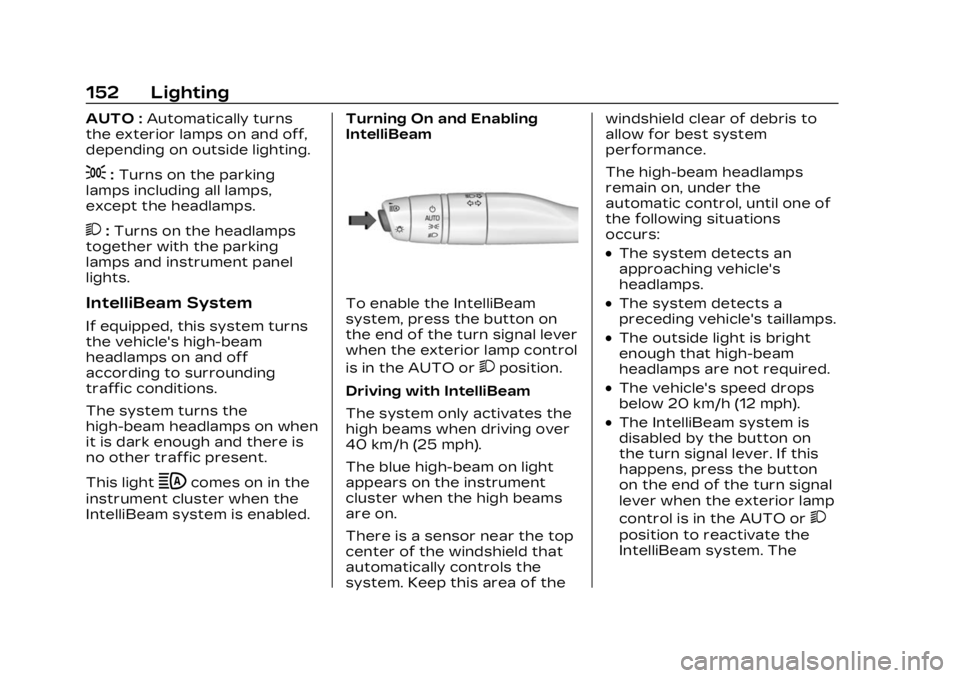
The exterior lamp control is on
the turn signal lever.
Turn the control to the
following positions:
O:Turns the exterior lamps
off and deactivates the AUTO
mode. Turn to
Oagain to
reactivate the AUTO mode.
In Canada, the headlamps will
automatically reactivate when
the vehicle is shifted out of
P (Park).
Page 153 of 482
Cadillac XT5 Owner Manual (GMNA-Localizing-U.S./Canada/Mexico-
16406251) - 2023 - CRC - 3/25/22
152 Lighting
AUTO :Automatically turns
the exterior lamps on and off,
depending on outside lighting.
;: Turns on the parking
lamps including all lamps,
except the headlamps.
2: Turns on the headlamps
together with the parking
lamps and instrument panel
lights.
IntelliBeam System
If equipped, this system turns
the vehicle's high-beam
headlamps on and off
according to surrounding
traffic conditions.
The system turns the
high-beam headlamps on when
it is dark enough and there is
no other traffic present.
This light
bcomes on in the
instrument cluster when the
IntelliBeam system is enabled. Turning On and Enabling
IntelliBeam
To enable the IntelliBeam
system, press the button on
the end of the turn signal lever
when the exterior lamp control
is in the AUTO or
2position.
Driving with IntelliBeam
The system only activates the
high beams when driving over
40 km/h (25 mph).
The blue high-beam on light
appears on the instrument
cluster when the high beams
are on.
There is a sensor near the top
center of the windshield that
automatically controls the
system. Keep this area of the windshield clear of debris to
allow for best system
performance.
The high-beam headlamps
remain on, under the
automatic control, until one of
the following situations
occurs:
.The system detects an
approaching vehicle's
headlamps.
.The system detects a
preceding vehicle's taillamps.
.The outside light is bright
enough that high-beam
headlamps are not required.
.The vehicle's speed drops
below 20 km/h (12 mph).
.The IntelliBeam system is
disabled by the button on
the turn signal lever. If this
happens, press the button
on the end of the turn signal
lever when the exterior lamp
control is in the AUTO or
2
position to reactivate the
IntelliBeam system. The
Page 155 of 482

Cadillac XT5 Owner Manual (GMNA-Localizing-U.S./Canada/Mexico-
16406251) - 2023 - CRC - 3/25/22
154 Lighting
.The exterior lamp control is
in AUTO.
.The light sensor determines
it is daytime.
.The parking brake is
released or the vehicle is not
in P (Park).
When the DRL are on, the
taillamps, sidemarker lamps,
and other lamps will not be on.
The DRL turn off when the
headlamps are turned to
Oor
the ignition is off. For vehicles
first sold in Canada, the DRL
can only be turned off when
the vehicle is parked.
Automatic Headlamp
System
When the exterior lamp
control is set to AUTO and it is
dark enough outside, the
headlamps come on
automatically.
There is a light sensor on top
of the instrument panel. Do
not cover the sensor.
The system may also turn on
the headlamps when driving
through a parking garage or
tunnel.
If the vehicle is started in a
dark garage, the automatic
headlamp system comes on
immediately. If it is light
outside when the vehicle
leaves the garage, there is a
slight delay before the
automatic headlamp system
changes to the Daytime
Running Lamps (DRL). During that delay, the instrument
cluster may not be as bright as
usual. Make sure the
instrument panel brightness
control is in the full bright
position. See Instrument Panel
Illumination Control
0156.
When it is bright enough
outside, the headlamps will
turn off or may change
to DRL.
The automatic headlamp
system turns off when the
exterior lamp control is turned
to
Oor the ignition is off.
For vehicles sold in Canada,
this control only works when
the transmission is in P (Park).
Lights On with Wipers
If the windshield wipers are
activated in daylight with the
engine on, and the exterior
lamp control is in AUTO, the
headlamps, parking lamps, and
other exterior lamps come on.
The transition time for the
lamps coming on varies based
on wiper speed. When the
Page 157 of 482
Cadillac XT5 Owner Manual (GMNA-Localizing-U.S./Canada/Mexico-
16406251) - 2023 - CRC - 3/25/22
156 Lighting
Interior Lighting
Instrument Panel
Illumination Control
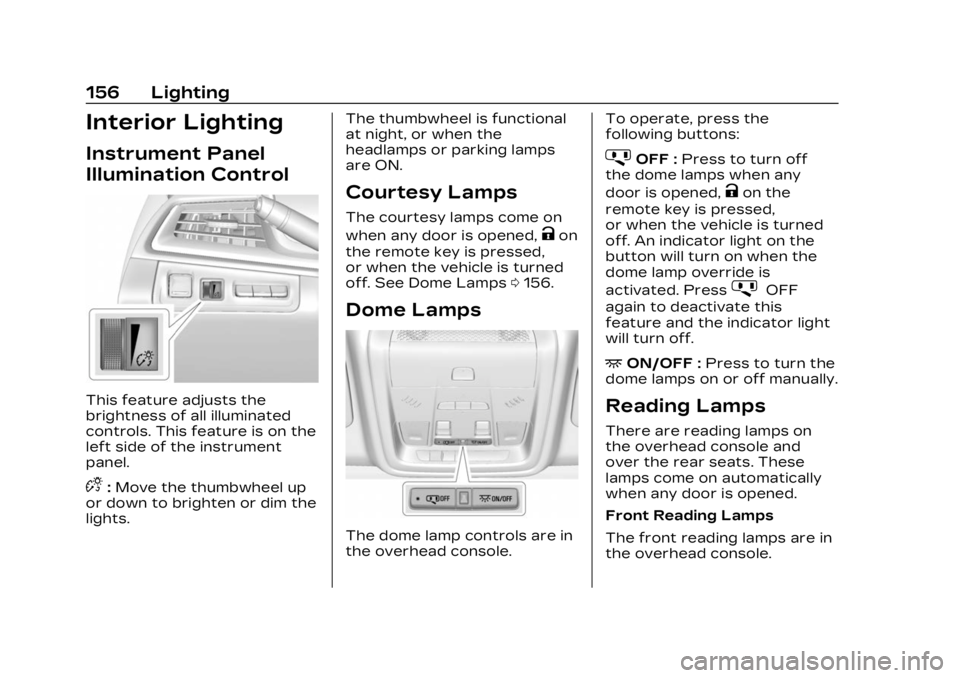
This feature adjusts the
brightness of all illuminated
controls. This feature is on the
left side of the instrument
panel.
D:Move the thumbwheel up
or down to brighten or dim the
lights. The thumbwheel is functional
at night, or when the
headlamps or parking lamps
are ON.
Courtesy Lamps
The courtesy lamps come on
when any door is opened,
Kon
the remote key is pressed,
or when the vehicle is turned
off. See Dome Lamps 0156.
Dome Lamps
The dome lamp controls are in
the overhead console. To operate, press the
following buttons:
jOFF :
Press to turn off
the dome lamps when any
door is opened,
Kon the
remote key is pressed,
or when the vehicle is turned
off. An indicator light on the
button will turn on when the
dome lamp override is
activated. Press
jOFF
again to deactivate this
feature and the indicator light
will turn off.
+ON/OFF : Press to turn the
dome lamps on or off manually.
Reading Lamps
There are reading lamps on
the overhead console and
over the rear seats. These
lamps come on automatically
when any door is opened.
Front Reading Lamps
The front reading lamps are in
the overhead console.
Page 227 of 482

Cadillac XT5 Owner Manual (GMNA-Localizing-U.S./Canada/Mexico-
16406251) - 2023 - CRC - 3/25/22
226 Climate Controls
Air Delivery Mode Control :
When the climate information
is displayed, touch the desired
air delivery mode on the
climate control display to
change the direction of the
airflow. The selected air
delivery mode button is lit.
Touching any of the air
delivery buttons cancels
automatic air delivery control
and the direction of the airflow
can be controlled manually.
Press AUTO to return to
automatic operation.
To change the current mode,
select one of the following:
Y:Air is directed to the
instrument panel outlets.
\: Air is divided between the
instrument panel outlets and
the floor outlets.
[: Air is directed to the floor
outlets.
-: Clears the windows of fog
or moisture. Air is directed to
the windshield and floor
outlets.
0: Clears the windshield of
fog or frost more quickly. Air is
directed to the windshield.
Press
0to turn on or off.
Changing the air delivery
mode also turns the
defrost off.
A/C : Touch A/C Mode on the
climate control display to turn
the automatic air conditioning
on or off. If the fan is turned
off or the outside temperature
falls below freezing, the air
conditioner will not run.
Press AUTO to return to
automatic operation and the
air conditioner runs as needed.
@: Press to alternate
between recirculating air
inside the vehicle or pulling in
outside air. The indicator light
on the button is lit when
recirculation mode is active.
This helps to quickly cool the air inside the vehicle or reduce
the outside air and odors that
might enter.
Pressing this control cancels
automatic recirculation. Press
AUTO to return to automatic
operation; recirculation runs
automatically as needed.
Manual recirculation mode is
not available when in Defrost
or Defog modes.
Auto Defog :
The climate
control system may have a
sensor to automatically detect
high humidity inside the
vehicle. When high humidity is
detected, the climate control
system may adjust to outside
air supply and turn on the air
conditioner. If the climate
control system does not
detect possible window
fogging, it returns to normal
operation. To turn Auto Defog
off or on, select Settings >
Climate and Air Quality > Auto
Defog > Select ON or OFF.