2023 CADILLAC LYRIC light
[x] Cancel search: lightPage 164 of 424
Cadillac Lyriq Owner Manual (GMNA-Localizing-U.S./Canada-15644413) -
2023 - CRC - 2/23/22
Infotainment System 163
To change the units, see
Instrument Cluster0108.
Mute Settings
During active route guidance,
Google Maps can give audible
voice directions, traffic alerts,
or can be muted. In the Google
Maps app, touch Settings,
then Mute settings to access
the options.
Compass
The Google Maps orientation
can be changed between the
direction currently traveling
and pointing north. Touch the
compass to switch between
these options.
To recenter the map to the
current location, touch the
location icon.
Super Cruise
If equipped, Super Cruise
highlights routes in a specific
outline. See Super Cruise
0 236.Electric Vehicle (EV)
Features with
Google Maps
When vehicle data is shared
with Google, some of the
Maps features for EVs are as
follows:
.Battery charge level at
arrival
.Estimated minimum
charging time
If the vehicle needs to be
charged to reach a
destination, charging stations
may automatically be added to
a route.
Maps
Auto-downloaded Maps
Google Maps downloads
offline maps automatically for
use when not connected to
the Internet and for making
map data available to vehicle
features regardless of
connectivity. These offline maps are only available when
the vehicle has a subscription
data plan.
To turn on auto-download:
1. Open Google Maps.
2. Touch Settings.
3. Touch Privacy Center, then select Offline maps.
4. Select Auto-download offline maps.
5. Check the Internet connection and wait for the
download to finish.
Downloading Offline Maps 1. Open Google Maps.
2. Touch Settings, then Offline maps.
3. Touch the square with the Select your own map icon.
4. Adjust the map to cover the desired area to download.
5. Touch Download.
Page 178 of 424

Cadillac Lyriq Owner Manual (GMNA-Localizing-U.S./Canada-15644413) -
2023 - CRC - 2/23/22
Infotainment System 177
Buckle to Drive
This feature can prevent
shifting out of Park when the
driver, and if applicable the
front passenger, seat belt is
not buckled. See Buckle To
Drive051.
Climate and Air Quality
Adjusts different climate
settings.
Collision/Detection Systems
Adjusts different driver
assistance system settings.
Comfort and Convenience
Adjusts different comfort and
convenience settings.
Lighting
Adjusts different lighting
settings.
Power Door Locks
Adjusts different door lock
settings. Remote Lock, Unlock, and
Start
Adjusts different remote lock
settings.
Seating Position
Adjusts different seating
position settings.
Apps and Permissions
Shows a list of installed apps
and the permissions used.
Date / Time
Allows setting of the clock.
Display
Allows adjustment of the
infotainment display.
Sounds
Allows adjustment of the
infotainment system sounds.
Users
Modifies the infotainment
system’s users.
Accounts
Allows adding or adjusting of
the user accounts.
Privacy
This menu allows adjustment
of the infotainment privacy
settings.
Storage
This menu shows the storage
info on the infotainment
system.
Security
This menu allows adjustment
of the infotainment security
settings.
System
The menu may contain the
following:
Language
This will set the display
language used on the
infotainment display.
Page 187 of 424

Cadillac Lyriq Owner Manual (GMNA-Localizing-U.S./Canada-15644413) -
2023 - CRC - 2/23/22
186 Climate Controls
Climate Control Display
The fan, air delivery mode, air
conditioning, temperature,
and Sync settings can be
controlled by touching
CLIMATE on the infotainment
Home Page or the climate
button in the climate control
display application tray.1. Personalization Settings
2. On/Off (Power)
3. AUTO (Automatic Operation)
4. Driver Temperature
5. Air Delivery Mode Controls
6. Fan Control
7. Passenger Temperature 8. SYNC (Synchronized
Temperature)
9. Air Conditioning
10. Heat
Automatic Operation
The system automatically
controls the fan speed, air
delivery, and recirculation to
heat or cool the vehicle to the
desired temperature.
When AUTO is underlined, the
system is in full automatic
operation. Either AC or HEAT
will be underlined to indicate
the system is automatically
cooling or heating. Turning off
the indicated button turns off
that function resulting in fan
operation only. If the air
delivery mode or fan setting is
manually adjusted, the auto
indicator turns off and the
display shows the selected
settings. Auto operation can
be turned off individually for
climate settings.
For automatic operation:1. Press AUTO. 2. Set the temperature. Allow
the system time to stabilize.
Then adjust the
temperature as needed for
best comfort.
To improve efficiency and to
warm or cool the vehicle
faster, recirculation is
automatically selected. The
recirculation light will not
come on. Press@to select
recirculation; press it again to
select outside air.
English units can be changed
to metric units through the
instrument cluster. Select
Settings > Time, Date, and Unit
> US or Metric.
OFF : Press OFF to turn the
fan on or off. When OFF is
selected, the system stops air
from flowing into the cabin.
If ON is selected or any other
buttons are pressed, the
climate control system will
turn on and operate at the
current setting.
Page 188 of 424

Cadillac Lyriq Owner Manual (GMNA-Localizing-U.S./Canada-15644413) -
2023 - CRC - 2/23/22
Climate Controls 187
y/z:The temperature can
be adjusted separately for the
driver and the passenger.
Press to decrease or lift to
increase the temperature.
Press or lift and hold to rapidly
increase or decrease the
temperature. Press SYNC on
the Climate Display to reset
the Passenger Temperature
to the Driver Temperature.
Manual Operation
z 9 y: Press to decrease or
lift to increase the fan speed.
Press or lift and hold the fan
controls to adjust speed more
quickly. The fan speed setting
displays. Any adjustment of
the fan speed cancels
automatic fan control and the
fan can be controlled manually.
Press AUTO to return to
automatic operation.
To turn off the fan and climate
control system, press OFF on
the center stack climate
controls. The airflow will be blocked from entering in all air
delivery modes, except
defrost.
The maximum automatic fan
speed can be set to low,
medium, or high. To adjust
Auto Fan Speed, select
Settings > Climate and Air
Quality > Auto Fan Speed.
Air Delivery Mode Control :
When the climate information
is displayed, press the desired
air delivery mode on the
climate control display to
change the direction of the
airflow. The selected air
delivery mode button is lit.
Pressing any of the air
delivery buttons cancels
automatic air delivery control
and the direction of the airflow
can be controlled manually.
Press AUTO to return to
automatic operation.
To change the current mode,
select one or more of the
following:
z:
Air is directed to the
windshield, outboard a/c
outlets, and side window
outlets.
Y: Air is directed to the
instrument panel outlets.
[: Air is directed to the floor
outlets.
vHEAT : Touch to turn the
automatic heater on or off. An
indicator light comes on to
show that the heater is
enabled. If the fan is turned
off, the heater will not run.
Press AUTO to return to
automatic operation.
d: Clears the windshield of
fog or frost more quickly. Air is
directed to the windshield.
Press
dto turn on or off.
Changing the air delivery
mode also turns the
defrost off.
A/C : Touch AC to turn the
automatic air conditioning on
or off. If the fan is turned off,
the air conditioner will not run.
Page 189 of 424

Cadillac Lyriq Owner Manual (GMNA-Localizing-U.S./Canada-15644413) -
2023 - CRC - 2/23/22
188 Climate Controls
Press AUTO to return to
automatic operation and the
air conditioner runs as needed.
@:Press to alternate
between recirculating air
inside the vehicle or pulling in
outside air. The indicator light
on the button is lit when
recirculation mode is active.
This helps to quickly cool the
air inside the vehicle and
reduce the entry of outside air
and odors.
Pressing this button cancels
automatic recirculation. Press
AUTO to return to automatic
operation; recirculation runs
automatically as needed.
Manual recirculation mode is
not available when in Defrost.
The climate control system
uses a sensor to automatically
detect high humidity inside the
vehicle. When high humidity is
detected, the climate control
system may adjust to outside
air supply, turn on the heater
and air conditioner, increase fan and temperature, and
direct more air to the
windshield. When the climate
control system does not
detect possible window
fogging, it returns to normal
operation. To turn Auto Defog
off or on, select Settings >
Climate and Air Quality > Auto
Defog > Select ON or OFF.
If Auto Defog is turned off,
or fogging does not clear
quickly enough, select
dto
more quickly clear the
windshield.
Rear Window Defogger
K: Press to turn the rear
window defogger on or off. An
indicator light on the button
comes on to show that the
rear window defogger is on.
The rear window defogger
only works when the vehicle is
on. If the outside temperature
is below 7°C (45°F), and the
rear window defogger is on,
the area of the windshield beneath the windshield wipers
will warm up to melt
accumulated snow or ice.
The rear window defogger can
be set to automatic operation.
When Auto Rear Defog is
selected, the rear window
defogger turns on
automatically when the vehicle
is first started in cold weather
and turns off when the vehicle
is warmed. To turn Auto Rear
Defog off or on, select
Settings > Climate and Air
Quality > Auto Rear Defog >
Select ON or OFF.
The heated outside rearview
mirrors turn on when the rear
window defogger button is on
and help to clear fog or frost
from the surface of the
mirrors.
Caution
Do not try to clear frost or
other material from the
inside of the front
windshield and rear window
(Continued)
Page 190 of 424
Cadillac Lyriq Owner Manual (GMNA-Localizing-U.S./Canada-15644413) -
2023 - CRC - 2/23/22
Climate Controls 189
Caution (Continued)
with a razor blade or
anything else that is sharp.
This may damage the rear
window defogger grid and
affect the radio's ability to
pick up stations clearly. The
repairs would not be
covered by the vehicle
warranty.
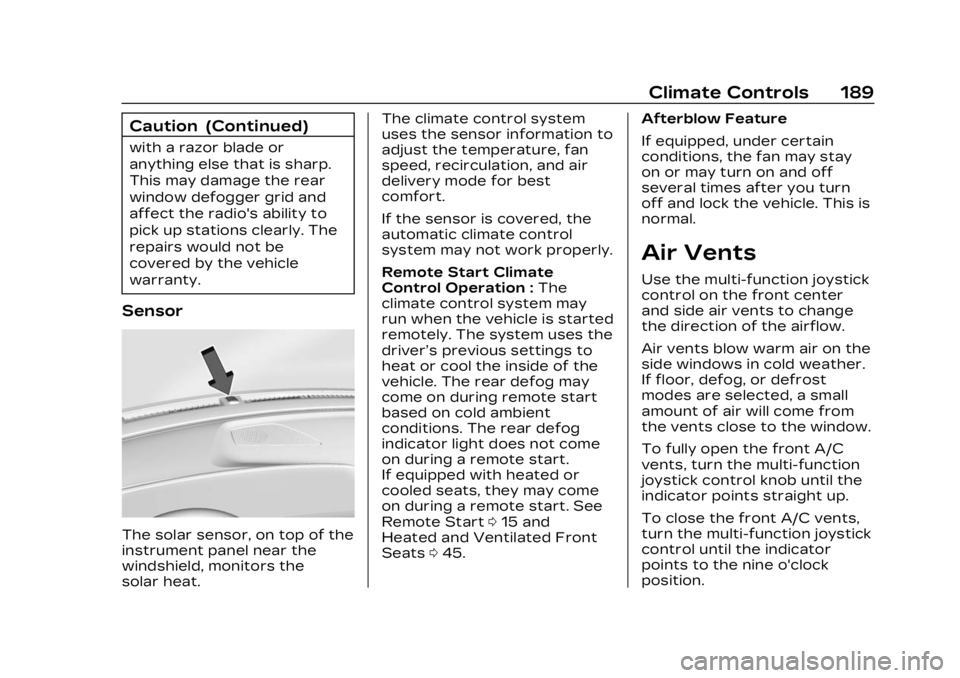
Sensor
The solar sensor, on top of the
instrument panel near the
windshield, monitors the
solar heat.The climate control system
uses the sensor information to
adjust the temperature, fan
speed, recirculation, and air
delivery mode for best
comfort.
If the sensor is covered, the
automatic climate control
system may not work properly.
Remote Start Climate
Control Operation :
The
climate control system may
run when the vehicle is started
remotely. The system uses the
driver’s previous settings to
heat or cool the inside of the
vehicle. The rear defog may
come on during remote start
based on cold ambient
conditions. The rear defog
indicator light does not come
on during a remote start.
If equipped with heated or
cooled seats, they may come
on during a remote start. See
Remote Start 015 and
Heated and Ventilated Front
Seats 045. Afterblow Feature
If equipped, under certain
conditions, the fan may stay
on or may turn on and off
several times after you turn
off and lock the vehicle. This is
normal.
Air Vents
Use the multi-function joystick
control on the front center
and side air vents to change
the direction of the airflow.
Air vents blow warm air on the
side windows in cold weather.
If floor, defog, or defrost
modes are selected, a small
amount of air will come from
the vents close to the window.
To fully open the front A/C
vents, turn the multi-function
joystick control knob until the
indicator points straight up.
To close the front A/C vents,
turn the multi-function joystick
control until the indicator
points to the nine o'clock
position.
Page 195 of 424

Cadillac Lyriq Owner Manual (GMNA-Localizing-U.S./Canada-15644413) -
2023 - CRC - 2/23/22
194 Driving and Operating
Acceleration/Braking/
Coasting
Avoid rapid accelerations and
decelerations.
Use cruise control when
appropriate.
Plan ahead for decelerations,
and coast whenever possible.
Do not rush to traffic signals,
and do not shift to N (Neutral)
to coast.
Use the One-Pedal Driving
feature when appropriate to
help recover energy during
coasting and braking.
One-Pedal mode recovers
more energy while coasting
and braking than D (Drive)
mode. See One-Pedal Driving
0214.
Use the steering wheel Regen
on Demand paddle during
deceleration to help recover
energy. See Regenerative
Braking 0220. Terrain and Vehicle Speed
Higher speeds and grade
changes use more energy and
can significantly reduce
electric range.
Climate Setting
Using the heat and air
conditioning systems
decreases the energy
available for electric driving.
Optimal energy efficiency is
achieved when the heat, air
conditioning, and fan are
turned off.
Use the heated and ventilated
seat features (if equipped)
instead of the climate control
system. Heating and
ventilating the seat uses less
energy than heating and
cooling the interior. See
Heated and Ventilated Front
Seats
045 and
Heated Rear Seats 049.
Use the Remote Start Climate
Control feature to heat or cool
the interior while the vehicle is
plugged in to use electricity from the electrical outlet
instead of using energy from
the battery. See Remote Start
0
15.
In hot weather, avoid parking
in direct sunlight. Use
sunshades inside the vehicle.
Keep the inside of the
windows clean to reduce
fogging. Turn off the front
defroster and rear defogger
when they are not needed.
Avoid driving with the
windows open at highway
speeds.
Use the Battery Gauge on the
Instrument Cluster to view the
effect of climate control
settings on your estimated
range. See Battery Gauge
(High Voltage) 0110.
Outside Temperature
On colder days, it is best to
plug in the vehicle overnight,
and then remote start the
vehicle.
Page 200 of 424

Cadillac Lyriq Owner Manual (GMNA-Localizing-U.S./Canada-15644413) -
2023 - CRC - 2/23/22
Driving and Operating 199
the road. Learn to recognize
warning clues—such as
enough water, ice, or packed
snow on the road to make a
mirrored surface —and slow
down when you have any
doubt.
.Try to avoid sudden
steering, acceleration,
or braking, including
reducing vehicle speed by
shifting to a lower gear. Any
sudden changes could cause
the tires to slide.
Remember: Antilock brakes
help avoid only the
braking skid.
Driving on Wet Roads
Rain and wet roads can
reduce vehicle traction and
affect your ability to stop and
accelerate. Always drive
slower in these types of
driving conditions and avoid
driving through large puddles
and deep-standing or flowing
water.
{Warning
Wet brakes can cause
crashes. They might not
work as well in a quick stop
and could cause pulling to
one side. You could lose
control of the vehicle.
After driving through a large
puddle of water or a car/
vehicle wash, lightly apply
the brake pedal until the
brakes work normally.
Flowing or rushing water
creates strong forces.
Driving through flowing
water could cause the
vehicle to be carried away.
If this happens, you and
other vehicle occupants
could drown. Do not ignore
police warnings and be very
cautious about trying to
drive through flowing water.
Hydroplaning
Hydroplaning is dangerous.
Water can build up under the
vehicle's tires so they actually
ride on the water. This can
happen if the road is wet
enough and you are going fast
enough. When the vehicle is
hydroplaning, it has little or no
contact with the road.
There is no hard and fast rule
about hydroplaning. The best
advice is to slow down when
the road is wet.
Other Rainy Weather Tips
Besides slowing down, other
wet weather driving tips
include:
.Allow extra following
distance.
.Pass with caution.
.Keep windshield wiping
equipment in good shape.
.Keep the windshield washer
fluid reservoir filled.
.Have good tires with proper
tread depth. See Tires 0334.