2023 CADILLAC LYRIC tow
[x] Cancel search: towPage 205 of 424
Cadillac Lyriq Owner Manual (GMNA-Localizing-U.S./Canada-15644413) -
2023 - CRC - 2/23/22
204 Driving and Operating
luggage load capacity is
650 lbs. (1400-750 (5 x
150) = 650 lbs.)
5.Determine the combined
weight of luggage and
cargo being loaded on
the vehicle. That weight
may not safely exceed
the available cargo and
luggage load capacity
calculated in Step 4.
6.If your vehicle will be
towing a trailer, load from
your trailer will be
transferred to your
vehicle. Consult this
manual to determine how
this reduces the available
cargo and luggage load
capacity of your vehicle.”
See Trailer Towing 0299
for important information
on towing a trailer, towing
safety rules and
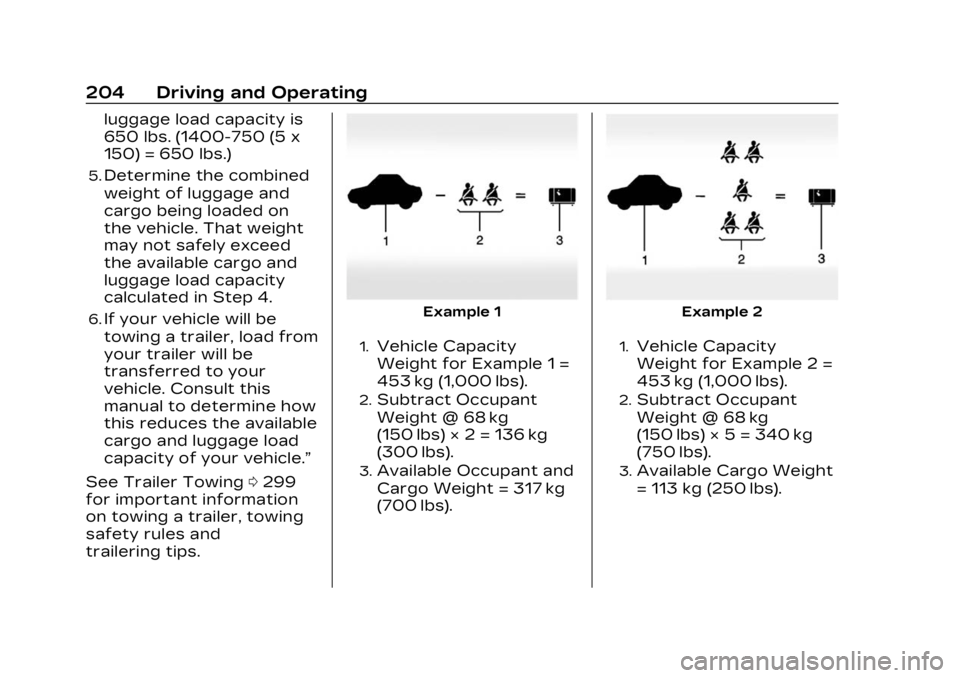
trailering tips.Example 1
1.Vehicle Capacity
Weight for Example 1 =
453 kg (1,000 lbs).
2.Subtract Occupant
Weight @ 68 kg
(150 lbs) × 2 = 136 kg
(300 lbs).
3.Available Occupant and
Cargo Weight = 317 kg
(700 lbs).
Example 2
1.Vehicle Capacity
Weight for Example 2 =
453 kg (1,000 lbs).
2.Subtract Occupant
Weight @ 68 kg
(150 lbs) × 5 = 340 kg
(750 lbs).
3.Available Cargo Weight
= 113 kg (250 lbs).
Page 213 of 424

Cadillac Lyriq Owner Manual (GMNA-Localizing-U.S./Canada-15644413) -
2023 - CRC - 2/23/22
212 Driving and Operating
The vehicle will not shift into
P (Park) if it is moving too fast.
Stop the vehicle and shift into
P (Park).
To shift in and out of P (Park),
see Shifting Into Park0209
and Shifting out of Park 0210.
R : Use this gear to back up.
If the vehicle is shifted from
either R (Reverse) to D (Drive)
or D (Drive) to R (Reverse)
while the speed is too high,
the vehicle may shift to
N (Neutral). Reduce the vehicle
speed and try the shift again.
To shift into R (Reverse): 1. Bring the vehicle to a complete stop.
2. From the center position, move the shift lever
rearward toward you, and
then up. R is illuminated
in red.
3. After releasing the shift lever, it will return to the
center position. To shift out of R (Reverse):
1. Bring the vehicle to a complete stop.
2. Shift to the desired gear.
3. After releasing the shift lever, it will return to the
center position.
At low vehicle speeds,
R (Reverse) can be used to
rock the vehicle back and forth
to get out of snow, ice, or sand
without damaging the electric
drive unit. See If the Vehicle Is
Stuck 0202.
N : In this position, the
propulsion system is inactive.
If the vehicle is moving and
turned off, restart the
propulsion system in
N (Neutral) only.
Caution
The vehicle is not designed
to stay in N (Neutral) for
extended periods of time.
It will automatically shift into
P (Park). To shift into N (Neutral):
1. Move the shift lever rearward toward the driver.
.If the vehicle is in P (Park),
apply the brake pedal
while moving the shift
lever rearward.
.The N indicator will
illuminate red.
2. After releasing the shift lever, it will return to the
center position.
To shift out of N (Neutral): 1. Bring the vehicle to a complete stop.
2. Hold the brake pedal down
3. Shift into the desired gear.
If the brake pedal is not
applied, the vehicle may
remain in N (Neutral).
Car Wash Mode
This vehicle includes a Car
Wash Mode that allows the
vehicle to remain in N (Neutral)
for use in automatic car
washes.
Page 214 of 424
Cadillac Lyriq Owner Manual (GMNA-Localizing-U.S./Canada-15644413) -
2023 - CRC - 2/23/22
Driving and Operating 213
Car Wash Mode is not to be
used for vehicle towing. If the
vehicle needs to be towed, see
Transporting a Disabled
Vehicle0359.
Caution
The vehicle is not designed
to stay in N (Neutral) for
extended periods of time.
It will automatically shift into
P (Park).
Car Wash Mode (Vehicle
On) - Driver In Vehicle
To place the vehicle in
N (Neutral) with the vehicle on
and occupied: 1. Drive to the entrance of the car wash.
2. Apply the brake pedal.
3. Shift to N (Neutral).
4. Release the brake pedal. The vehicle is now ready for
the car wash. Car Wash Mode (Vehicle
On) - Driver Out of Vehicle
To place the vehicle in
N (Neutral) with the vehicle on
and unoccupied:
1. Drive to the entrance of the car wash.
2. Apply the brake pedal.
3. Open the door.
4. Shift to N (Neutral), then release the brake pedal.
5. The indicator should continue to show N. If it
does not, repeat Steps 2–4.
6. Exit the vehicle and close the door. The vehicle is now
ready for the car wash.
7. The vehicle may automatically shift into
P (Park) upon reentry.
D : This position is for normal
driving. If more power is
needed for passing, press the
accelerator pedal down. To shift into D (Drive):
1. Bring the vehicle to a complete stop.
2. From the center position, move the shift lever
rearward toward you and
then down..If the vehicle is in P (Park),
press the brake pedal
while moving the shift
lever.
.D will illuminate red.
3. After releasing the shift lever, it will return to the
center position.
To shift out of D (Drive): 1. Bring the vehicle to a complete stop.
2. Shift to the desired gear.
Page 221 of 424
Cadillac Lyriq Owner Manual (GMNA-Localizing-U.S./Canada-15644413) -
2023 - CRC - 2/23/22
220 Driving and Operating
Regenerative Braking
Regenerative braking takes
some of the energy from the
moving vehicle and turns it
back into electrical energy.
This energy is then stored
back into the high voltage
battery system, contributing
to increased energy efficiency.
Regenerative power may be
limited when the battery is
near full charge or cold. See
“Regenerative Power Limited”
under Power Indicator Gauge
0111. Regenerative braking
supplements your vehicle’s
conventional brakes, especially
when going downhill. See Hill
and Mountain Roads 0200.
{Warning
Do not charge your vehicle’s
battery above an 80%
charge if you are going to
drive down long, steep
grades such as mountain
passes. This provides room
(Continued)
Warning (Continued)
in the battery for
regenerative braking to
supplement your
conventional brakes during
the descent. This is
especially important when
towing a trailer, which puts
additional stress on your
vehicle’s braking system.
See“Charge Now” under
Charging 0123 for
information on setting
charge limits. See Hill and
Mountain Roads 0200 for
important information about
driving on grades.
The brake system uses
regenerative braking,
conventional hydraulic braking,
or a combination of both as
appropriate.
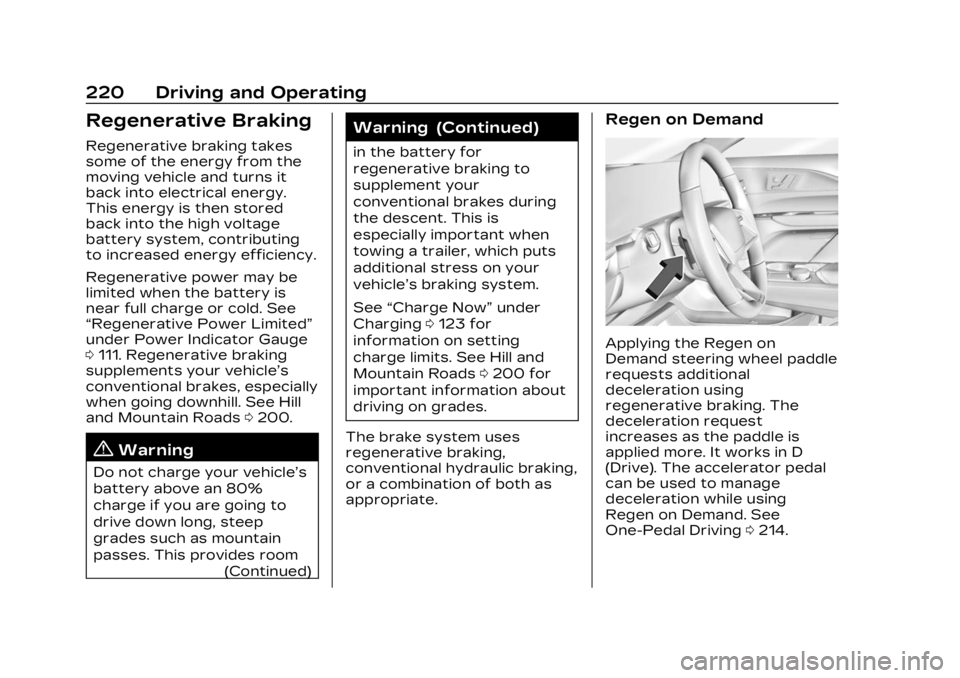
Regen on Demand
Applying the Regen on
Demand steering wheel paddle
requests additional
deceleration using
regenerative braking. The
deceleration request
increases as the paddle is
applied more. It works in D
(Drive). The accelerator pedal
can be used to manage
deceleration while using
Regen on Demand. See
One-Pedal Driving 0214.
Page 227 of 424
Cadillac Lyriq Owner Manual (GMNA-Localizing-U.S./Canada-15644413) -
2023 - CRC - 2/23/22
226 Driving and Operating
Warning (Continued)
Do not use ACC when:
.On winding and hilly roads
or when the camera
sensor is blocked by snow,
ice, or dirt. The system
may not detect a vehicle
ahead. Keep the
windshield and headlamps
clean.
.When visibility is poor due
to rain, snow, fog, dirt,
insect residue, or dust;
when other foreign
objects obscure the
camera’s view; or when
the vehicle in front or
oncoming traffic causes
additional environmental
obstructions, such as road
spray. ACC performance is
limited under these
conditions.(Continued)
Warning (Continued)
.On slippery roads where
fast changes in tire
traction can cause
excessive wheel slip
.With extremely heavy
cargo loaded in the cargo
area or rear seat
.When towing a trailer
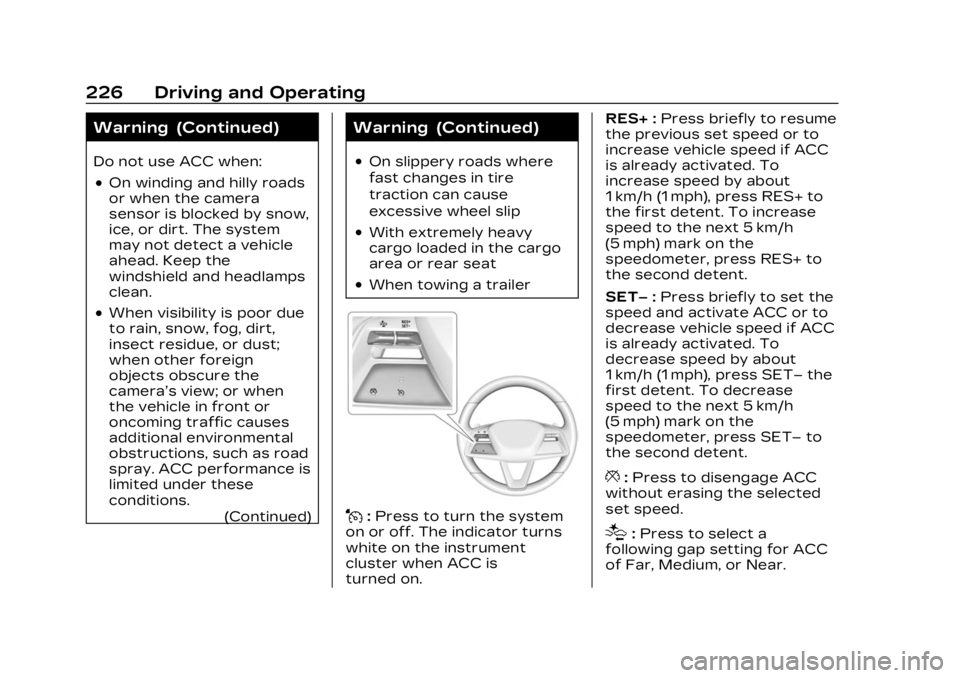
J:Press to turn the system
on or off. The indicator turns
white on the instrument
cluster when ACC is
turned on. RES+ :
Press briefly to resume
the previous set speed or to
increase vehicle speed if ACC
is already activated. To
increase speed by about
1 km/h (1 mph), press RES+ to
the first detent. To increase
speed to the next 5 km/h
(5 mph) mark on the
speedometer, press RES+ to
the second detent.
SET– :Press briefly to set the
speed and activate ACC or to
decrease vehicle speed if ACC
is already activated. To
decrease speed by about
1 km/h (1 mph), press SET– the
first detent. To decrease
speed to the next 5 km/h
(5 mph) mark on the
speedometer, press SET– to
the second detent.
*: Press to disengage ACC
without erasing the selected
set speed.
[: Press to select a
following gap setting for ACC
of Far, Medium, or Near.
Page 236 of 424
Cadillac Lyriq Owner Manual (GMNA-Localizing-U.S./Canada-15644413) -
2023 - CRC - 2/23/22
Driving and Operating 235
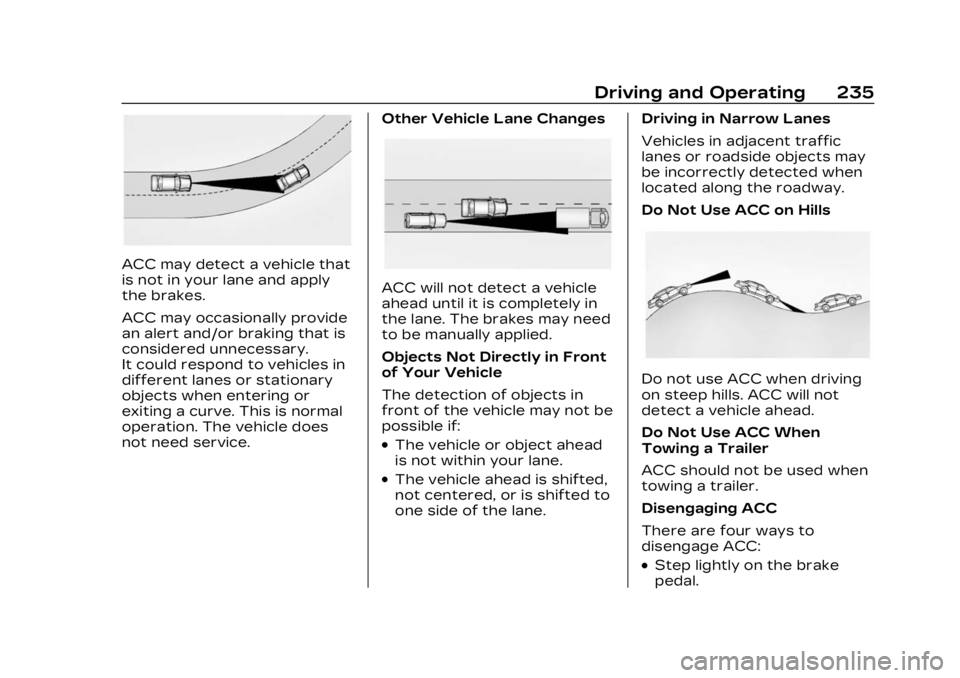
ACC may detect a vehicle that
is not in your lane and apply
the brakes.
ACC may occasionally provide
an alert and/or braking that is
considered unnecessary.
It could respond to vehicles in
different lanes or stationary
objects when entering or
exiting a curve. This is normal
operation. The vehicle does
not need service.Other Vehicle Lane Changes
ACC will not detect a vehicle
ahead until it is completely in
the lane. The brakes may need
to be manually applied.
Objects Not Directly in Front
of Your Vehicle
The detection of objects in
front of the vehicle may not be
possible if:
.The vehicle or object ahead
is not within your lane.
.The vehicle ahead is shifted,
not centered, or is shifted to
one side of the lane.Driving in Narrow Lanes
Vehicles in adjacent traffic
lanes or roadside objects may
be incorrectly detected when
located along the roadway.
Do Not Use ACC on Hills
Do not use ACC when driving
on steep hills. ACC will not
detect a vehicle ahead.
Do Not Use ACC When
Towing a Trailer
ACC should not be used when
towing a trailer.
Disengaging ACC
There are four ways to
disengage ACC:
.Step lightly on the brake
pedal.
Page 240 of 424

Cadillac Lyriq Owner Manual (GMNA-Localizing-U.S./Canada-15644413) -
2023 - CRC - 2/23/22
Driving and Operating 239
Warning (Continued)
.Never remove your hands
from the steering wheel
when Super Cruise is not
operating.
.Always make sure traffic
conditions are safe before
using Super Cruise.
.Always keep the entire
vehicle and the sensors
clean. Sensors are on the
front, sides, and rear of
the vehicle.
.Always observe posted
speed limits. Only use
Super Cruise at or below
the posted speed limit.
Super Cruise should not be
used in complex or uncertain
driving conditions, including:
.Not in construction zones.
.Not when approaching or
exiting toll plazas. (Continued)
Warning (Continued)
.Not when approaching an
intersection that is
controlled with a traffic
light, stop sign, or other
traffic control device.
.Not when lane markings
are not present or cannot
be detected. For example,
there is too much glare,
weather conditions are
poor, or lanes are poorly
marked.
.Not on slippery or icy
roads.
.Not in adverse weather
conditions, including rain,
sleet, fog, ice, or snow.
.Not on winding or hilly
roads.
.Not for city driving.
.Not during heavy or
emergency braking.
.Not on surface streets.(Continued)
Warning (Continued)
.Not on a road shoulder,
service drive, or under an
elevated freeway.
.Not when towing a trailer.
.Not in a highway exit lane.
When Super Cruise is
Available
Super Cruise Indicator
Super Cruise is designed to
operate only when:
.ACC is on. See Adaptive
Cruise Control (Advanced)
0 225.
.Teen Driver is not active.
.The GPS detects the vehicle
is on a compatible highway.
Page 241 of 424

Cadillac Lyriq Owner Manual (GMNA-Localizing-U.S./Canada-15644413) -
2023 - CRC - 2/23/22
240 Driving and Operating
.Both the camera and the
radar sensors are
functioning and not covered,
obstructed, or damaged.
.The Driver Attention System
(DAS) detects the driver's
head and eyes are directed
toward the road.
.The lane markings are clearly
visible and able to be
detected by the system.
Poor Conditions
Poor Conditions
Using Super Cruise
{Warning
To prevent serious injury or
death, only remove your
hands from the steering
wheel if the steering wheel
light bar,
Z, and\are
green. Super Cruise may not
begin steering immediately,
even when Super Cruise is
available and
]has been
pressed.
To engage:
.PressJto turn on ACC.
Make sure the white
\
indicator displays in the
instrument cluster. See
Adaptive Cruise Control
(Advanced) 0225.
.When Super Cruise is
available, the white
Zwill
display in the instrument
cluster.
.Press]. ACC will set the
speed at the current vehicle
speed. If ACC has a
previously set speed, it may
resume at that speed.