2023 CADILLAC LYRIC radio
[x] Cancel search: radioPage 163 of 424

Cadillac Lyriq Owner Manual (GMNA-Localizing-U.S./Canada-15644413) -
2023 - CRC - 2/23/22
162 Infotainment System
Bluetooth Sound Menu
See“Infotainment System
Sound Menu” under AM-FM
Radio 0156.
FCC Radiation Exposure
Statement
This equipment has been
evaluated to be installed and
operated at a minimum
distance of 6 cm between the
device and your body. The
vehicle design ensures this
distance is maintained during
normal use. Changes or
modifications to any of these
systems by other than an
authorized service facility
could void authorization to use
this equipment.
ISED Radiation Exposure
Statement
This equipment complies with
RSS-102 radiation exposure
limits set forth for an
uncontrolled environment. This
equipment should be installed
and operated with a minimum
distance of 6 cm between the radiator and any part of your
body. The vehicle design
ensures this distance is
maintained during normal use.
Changes or modifications to
any of these systems by other
than an authorized service
facility could void
authorization to use this
equipment.
See Radio Frequency
Statement
0395.
Navigation
Using the Navigation
System
The Navigation software is
provided by Google Maps. The
information provided in this
section is a general overview
and is subject to change. For
the latest functional
information, see g.co/
mapsincar.
Accept the Terms and
Conditions to use. Internet Connectivity
Google Maps relies on a
subscription data plan for full
functionality, including
availability of offline maps.
Google Maps can be used
offline when driving through
connectivity dead zones by
auto-downloading offline maps
prior to going offline.
Profiles
Sign in to a Google Account
for personalized service.
Information available in the
Google Account will be shown.
To log into a profile, see
Accounts under Settings
0
176.
Voice Assistant
If equipped, Google Maps can
be controlled by voice
commands, see Google
Assistant under Voice
Recognition 0166.
Language and Units
To change the language, see
Settings 0176.
Page 168 of 424
Cadillac Lyriq Owner Manual (GMNA-Localizing-U.S./Canada-15644413) -
2023 - CRC - 2/23/22
Infotainment System 167
Assistant on the Home screen,
or by using the wake up words
“Hey Google”or“OK Google.”
However, not all features
within these areas are
supported by voice commands
and requires the user to have
a data subscription in order to
use the Google Assistant
feature.
Using Voice Recognition
Voice recognition becomes
available once the system is
initialized. This begins when
the vehicle is turned on.
Initialization may take a few
moments.
1. Press
gon the steering
wheel controls, touch
Google Assistant on the
Home screen, or use the
wake up words “Hey
Google” or“OK Google” to
activate voice recognition.
2. Clearly speak one of the commands described later
in this section.
Canceling Google
Assistant
.Presscon the steering
wheel controls to cancel the
Google Assistant request.
Helpful Hints for Speaking
Commands
Voice recognition identifies
commands that are naturally
stated in sentence form,
or direct commands that state
the application and the task.
For best results:
.Speak the command
naturally, not too fast, not
too slow.
.Use direct commands
without a lot of extra words.
For example, “Call
work,” “Play” followed by the
artist or song name,
or “Tune” followed by the
radio station number.
Direct commands are more
clearly understood by the
system. An example of a direct
command is “Dial
saved with a name and a place,
the direct command should
include both. For example
“Call
Voice Recognition for the
Radio
If browsing the audio sources
when voice is touched, the
voice recognition commands
for AM, FM, and SiriusXM (if
equipped) are available.
“Play
Tune to the radio station
frequency identified in the
command (like “nine fifty”).
“Play
Tune to the radio station
frequency identified in the
command (like “one oh one
point one”).
“Play channel
to the SiriusXM radio station
channel number identified in
the command. This command
may require an online
connection.
Page 169 of 424

Cadillac Lyriq Owner Manual (GMNA-Localizing-U.S./Canada-15644413) -
2023 - CRC - 2/23/22
168 Infotainment System
“Play
on Sirius XM”:Tune to the
SiriusXM radio station channel
name identified in the
command. This command may
require an online connection.
Voice Recognition for the
Phone
Make sure the phone is paired
using Bluetooth to use the
phone related voice
commands.
“Call
Initiate a call to a stored
contact. The command may
include location if the contact
has location numbers stored.
“Call
“At Work,” “On Mobile,” or
“On Other” :Initiate a call to a
stored contact and location at
home, at work, on mobile
device, or on another phone.
“Call < phone number>” :
Initiate a call to a phone
number of seven digits or 10
digits. “Redial”
:Initiate a call to the
last dialed number.
Voice Recognition for
Navigation
Navigation commands can be
used to start, cancel route,
or add way points/POI.
“Navigate to
to the address in the
command.
“Add
way” :Adds a way-point to the
current route.
“Take me home” :Starts
navigation to Home location
set in Google maps.
Onboard Vehicle
Commands
These commands can be used
to adjust vehicle temperature
or control window defrosters.
“Turn on the A/C” :Turns on
the air conditioning. “Set temperature to
:Set to a
specific temperature inside
your vehicle.
Phone Assistant Voice
Recognition
While a device is connected
via Bluetooth, press and hold
gon the steering wheel
controls to pass through and
launch Google assistant on the
phone or Siri.
Phone
Bluetooth (Overview)
The Bluetooth-capable system
can interact with many mobile
devices to:
.Place and receive calls in a
hands-free mode.
.Share the device’s address
book or contact list with the
vehicle.
.Stream audio (music,
podcasts).
Page 181 of 424
Cadillac Lyriq Owner Manual (GMNA-Localizing-U.S./Canada-15644413) -
2023 - CRC - 2/23/22
180 Infotainment System
On certain vehicles, when the
Speed Limiter is turned ON,
the vehicle’s maximum
acceleration will be limited.
The DIC will display a message
that the acceleration is limited.
Teen Driver Speed Warning :
Displays a warning in the DIC
when exceeding a selectable
speed. Turn the speed
warning on or off and choose
the desired speed warning
level. The speed warning does
not limit the speed of the
vehicle. On some infotainment
systems, touch Set Teen
Driver Speed Warning to set
the warning speed.
Set Teen Driver Speed
Warning :Choose the desired
speed warning level. The
speed warning does not limit
the speed of the vehicle.
SiriusXM Explicit Content
Filter : Allows the SiriusXM
Explicit Content Filter to be
turned ON or OFF. When ON,
the teen driver will not be able
to listen to SiriusXM stations that contain explicit content,
and the Explicit Content Filter
selection in the Audio Settings
will be unavailable for change.
When Teen Driver is Active:
.If equipped, the radio will
mute when the driver seat
belt, and in some vehicles
the front passenger seat
belt, is not buckled. The
audio from any device paired
to the vehicle will also be
muted.
.An object placed on the
front passenger seat, such
as a briefcase, handbag,
grocery bag, laptop, or other
electronic device, could
cause the passenger
sensing system to falsely
sense an unbuckled front
passenger and mute the
radio. If this happens,
remove the object from the
seat. See Passenger
Sensing System
066.
.Some safety systems, such
as Automatic Emergency
Braking, if equipped, cannot
be turned off.
.The gap setting for Adaptive
Cruise Control and alert
timing for Forward Collision
Alert, if equipped, cannot be
changed.
.When trying to change a
safety feature that is not
configurable in Teen Driver,
the feature may be grayed
out or removed from the
infotainment menu, or the
DIC will display a message
indicating that Teen Driver is
active and the action is not
available.
.Super Cruise, if equipped, is
not available.
.Do not tow a trailer if
equipped with Automatic
Emergency Braking.
Report Card
The vehicle owner must
secure the driver’s consent to
record certain vehicle data
when the vehicle is driven with
Page 183 of 424

Cadillac Lyriq Owner Manual (GMNA-Localizing-U.S./Canada-15644413) -
2023 - CRC - 2/23/22
182 Infotainment System
.Touch Clear PIN and All
Teen Driver Keys from the
Teen Driver menu. This will
also unregister any Teen
Driver keys and delete
the PIN.
Forgotten PIN
See your dealer to reset
the PIN.
Trademarks and
License
Agreements
FCC Information
See Radio Frequency
Statement 0395.
If you decide to continue
service after your trial, your
selected subscription plan will
automatically renew thereafter. You will be
charged at then-current rates.
Fees and taxes apply. Please
see the SiriusXM Customer
Agreement at siriusxm.com for
complete terms and how to
cancel, which includes calling
SiriusXM at 1-866-635-2349.
All fees and programming are
subject to change.
Fees and Taxes: Subscription
fee, taxes, one time activation
fee, and other fees may apply.
Subscription fee is consumer
only. All fees and programming
subject to change.
Subscriptions subject to
Customer Agreement available
at www.siriusxm.com. SiriusXM
service is only available in the
48 contiguous United States
and Canada.
In Canada: Some deterioration
of service may occur in
extreme northern latitudes.
This is beyond the control of
SiriusXM Satellite Radio.
Explicit Language Notice:
Channels with frequent
explicit language are indicated
with an
“XL”preceding the
channel name. Channel
blocking is available for
SiriusXM Satellite Radio
receivers by notifying
SiriusXM:
.USA Customers —See
www.siriusxm.com or call
1-888-601–6296.
.Canada Customers —See
www.siriusxm.ca or call
1-877-438-9677.
It is prohibited to copy,
decompile, disassemble,
reverse engineer, hack,
manipulate, or otherwise make
available any technology or
software incorporated in
receivers compatible with the
SiriusXM Satellite Radio
System or that support the
SiriusXM website, the Online
Service or any of its content.
Furthermore, the AMBER
voice compression software
included in this product is
Page 184 of 424

Cadillac Lyriq Owner Manual (GMNA-Localizing-U.S./Canada-15644413) -
2023 - CRC - 2/23/22
Infotainment System 183
protected by intellectual
property rights including
patent rights, copyrights, and
trade secrets of Digital Voice
Systems, Inc.
General Requirements:1. A License Agreement from SiriusXM is required for any
product that incorporates
SiriusXM Technology and/or
for use of any of the
SiriusXM marks to be
manufactured, distributed,
or marketed in the SiriusXM
Service Area.
2. For products to be distributed, marketed, and/
or sold in Canada, a
separate agreement is
required with Canadian
Satellite Radio Inc.
(operating as SiriusXM
Canada).
TouchSense Technology and
TouchSense System 1000
Series Licensed from
Immersion Corporation.
TouchSense System 1000
protected under one or more
of the U.S. Patents at the
following address
www.immersion.com/
patent-marking.html and other
patents pending.
Bluetooth
The Bluetooth word mark and
logos are owned by the
Bluetooth SIG, Inc. and any use
of such marks by General
Motors is under license. Other
trademarks and trade names
are those of their respective
owners. Java
Java is a registered trademark
of Oracle and/or its affiliates.
MPEG4–AVC (H.264)
THIS PRODUCT IS LICENSED
UNDER THE AVC PATENT
PORTFOLIO LICENSE FOR
THE PERSONAL AND
NON-COMMERCIAL USE OF
A CONSUMER TO (i) ENCODE
VIDEO IN COMPLIANCE WITH
THE AVC STANDARD (“AVC
VIDEO”) AND/OR (ii) DECODE
AVC VIDEO THAT WAS
ENCODED BY A CONSUMER
ENGAGED IN A PERSONAL
AND NON-COMMERCIAL
ACTIVITY AND/OR WAS
OBTAINED FROM A VIDEO
PROVIDER LICENSED TO
PROVIDE AVC VIDEO. NO
LICENSE IS GRANTED OR
SHALL BE IMPLIED FOR ANY
OTHER USE. ADDITIONAL
INFORMATION MAY BE
OBTAINED FROM MPEG LA,
LLC. SEE HTTPS://
WWW.MPEGLA.COM.
Page 190 of 424
Cadillac Lyriq Owner Manual (GMNA-Localizing-U.S./Canada-15644413) -
2023 - CRC - 2/23/22
Climate Controls 189
Caution (Continued)
with a razor blade or
anything else that is sharp.
This may damage the rear
window defogger grid and
affect the radio's ability to
pick up stations clearly. The
repairs would not be
covered by the vehicle
warranty.
Sensor
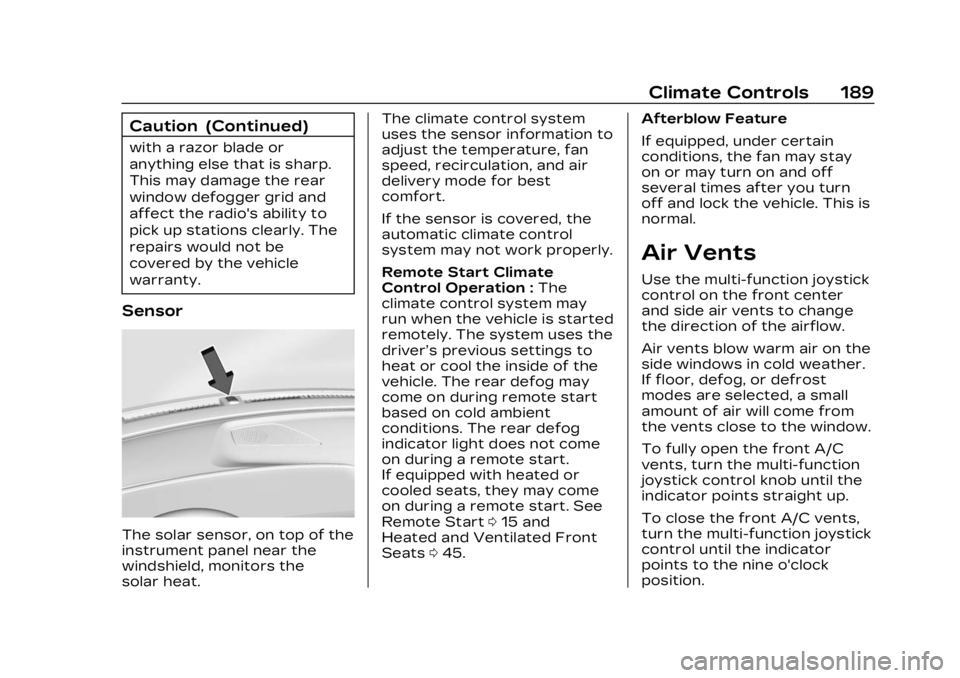
The solar sensor, on top of the
instrument panel near the
windshield, monitors the
solar heat.The climate control system
uses the sensor information to
adjust the temperature, fan
speed, recirculation, and air
delivery mode for best
comfort.
If the sensor is covered, the
automatic climate control
system may not work properly.
Remote Start Climate
Control Operation :
The
climate control system may
run when the vehicle is started
remotely. The system uses the
driver’s previous settings to
heat or cool the inside of the
vehicle. The rear defog may
come on during remote start
based on cold ambient
conditions. The rear defog
indicator light does not come
on during a remote start.
If equipped with heated or
cooled seats, they may come
on during a remote start. See
Remote Start 015 and
Heated and Ventilated Front
Seats 045. Afterblow Feature
If equipped, under certain
conditions, the fan may stay
on or may turn on and off
several times after you turn
off and lock the vehicle. This is
normal.
Air Vents
Use the multi-function joystick
control on the front center
and side air vents to change
the direction of the airflow.
Air vents blow warm air on the
side windows in cold weather.
If floor, defog, or defrost
modes are selected, a small
amount of air will come from
the vents close to the window.
To fully open the front A/C
vents, turn the multi-function
joystick control knob until the
indicator points straight up.
To close the front A/C vents,
turn the multi-function joystick
control until the indicator
points to the nine o'clock
position.
Page 196 of 424
Cadillac Lyriq Owner Manual (GMNA-Localizing-U.S./Canada-15644413) -
2023 - CRC - 2/23/22
Driving and Operating 195
Allow the vehicle to warm up
for 20 minutes before driving.
Vehicle Charging/
Maintenance
Charging
Keep the vehicle plugged in,
even when fully charged, to
keep the battery temperature
ready for the next drive. This
is important when outside
temperatures are extremely
hot or cold.
If possible, use a level 2
(240 volt) high power charge
station for best results. This
allows the interior of the
vehicle and high voltage
battery to warm to optimal
temperature.
Maintenance
Always keep the tires properly
inflated and the vehicle
properly aligned.
The weight of excess cargo in
the vehicle affects efficiency
and range. Avoid carrying
more than is needed.Avoid unnecessary use of
electrical accessories. Power
used for functions other than
propelling the vehicle will
reduce the available range.
Using a rooftop carrier will
reduce efficiency due to
additional weight and drag.
Distracted Driving
Distraction comes in many
forms and can take your focus
from the task of driving.
Exercise good judgment and
do not let other activities
divert your attention away
from the road. Many local
governments have enacted
laws regarding driver
distraction. Become familiar
with the local laws in
your area.
To avoid distracted driving,
keep your eyes on the road,
keep your hands on the
steering wheel, and focus your
attention on driving.
.Do not use a mobile phone in
demanding driving situations.
Use a hands-free method to
place or receive necessary
phone calls.
.Watch the road. Do not read,
take notes, or look up
information on mobile
phones or other electronic
devices.
.Designate a front seat
passenger to handle
potential distractions.
.Become familiar with vehicle
features before driving, such
as programming favorite
radio stations and adjusting
climate control and seat
settings. Program all trip
information into any
navigation device prior to
driving.
.Wait until the vehicle is
parked to retrieve items that
have fallen to the floor.
.Stop or park the vehicle to
tend to children.
.Keep pets in an appropriate
carrier or restraint.