2023 CADILLAC LYRIC horn
[x] Cancel search: hornPage 101 of 424

Cadillac Lyriq Owner Manual (GMNA-Localizing-U.S./Canada-15644413) -
2023 - CRC - 2/23/22
100 Instruments and Controls
Automatic Heated Steering
Wheel
The heated steering wheel
may turn on during a remote
start along with the heated
seats when it is cold outside.
The heated steering wheel
indicator may come on in
remote start.
The heated steering wheel will
turn on when the auto heated
seat is activated. The heated
steering wheel indicator will
display the state of the
steering wheel heat.
See Heated and Ventilated
Front Seats045.
To turn this feature on or off,
select Settings > Vehicle >
Comfort and Convenience >
Heated Steering Wheel >
Select ON or OFF.
Horn
To sound the horn, pressa
on the steering wheel.
Pedestrian Safety
Signal
The vehicle is equipped with
automatic sound generation.
The automatic sound is
generated to indicate the
vehicle presence to
pedestrians. The sound
changes if the vehicle is
speeding up or slowing down.
It is activated when the vehicle
is shifted into a forward gear,
N (Neutral), or R (Reverse), up
to 34 km/h (21 mph).
Windshield Wiper/
Washer
This vehicle is equipped with
Rainsense and a sensor near
the top center of the
windshield detects the amount
of water on the windshield and
controls the frequency of the
windshield wiper based on the
current sensitivity setting. Keep this area of the
windshield clear of debris to
allow for best system
performance.
Base Windshield/Washer
Lever Shown
With the vehicle on, move the
windshield wiper lever to
select the wiper speed.
OFF : Use to turn the
wipers off.
LO : Use for slow wipes.
HI : Use for fast wipes.
Turn the band to select the
frequency of intermittent
wipes between OFF and LO.
Page 132 of 424

Cadillac Lyriq Owner Manual (GMNA-Localizing-U.S./Canada-15644413) -
2023 - CRC - 2/23/22
Instruments and Controls 131
according to any existing
schedules. The Home Charge
Location can be changed or
deleted at this screen.
The wireless service and GPS
satellite technologies must be
available and operating for
features to function properly.
These systems may not
operate if the battery is
disconnected, or if the vehicle
has been off for an extended
period of time. If GPS is
unavailable, a message
displays on the infotainment
screen. GPS functionality may
resume after the next time
you drive the vehicle.
Notifications
This section contains on/off
preferences for multiple
notifications triggered during
the Charging session.
Charge Status Feedback :
Provides an audible
notification through horn
chirps that accompany
changes in the charging
status.Charge Cord Unplugged
Alert :
When on and your
vehicle is locked, your vehicle
will honk the horn and flash
the lights if charge cord
becomes unplugged.
Charge Power Loss Alert :
When on, your vehicle will
honk the horn and flash the
lights if Charging power is
cut off.
DC Fast Charge Battery
Conditioning
If equipped, adjusts the
battery to the optimal
temperature for quicker DC
Fast Charging. This should be
done before charging at a DC
Fast Charger.
Depending on the outside and
battery temperature, battery
conditioning could take longer
to reach the optimal
temperature. While en route to a DC fast
charge station using Google
Maps, DC Fast Charge
Conditioning happens
automatically.
Cabin Pre-Conditioning
Temperature
Allows for the preferred cabin
temperature to be set. During
a planned charging session at
the vehicle's Home Charge
Location, the vehicle cabin is
warmed or cooled to this
temperature if set to ON in
either the Charge Later
screen, or in an active
Schedule.
Preferred Charge Times
Allows preferred charge time
windows to be enabled for the
Home Charge Location during
both weekday and weekend
planned charging sessions.
It does so whether the vehicle
is set to Charge Later,
or observing a scheduled
charge. This allows for
charging at a lower cost by
prioritizing charging during the
Page 331 of 424

Cadillac Lyriq Owner Manual (GMNA-Localizing-U.S./Canada-15644413) -
2023 - CRC - 2/23/22
330 Vehicle Care
Fuses Usage52 MTR WDW
LIFTER RT
–
Motor Window
Lifter Right
53 FRT WPR
–Front
Wiper
54 TRLR
HEAVYDUTY/
TRLR EUROPE
–
Trailer Battery
55 –
56 FOLD SEAT RT
MTR
–Fold Seat
Right Motor
57 EBCM–
Electronic
Brake Control
Module
58 FRT BLWR MTR
–
Front Blower
Motor
59 –
60 Horn 61 Rear Defog Fuses Usage
62 REAR BLWR MTR
–
Rear Blower
Motor
63 MTR S/ROOF &
SUNSHD
–Motor
Sunroof and
Motor Sunshade
64 PWR SEAT DRVR
–
Power Seat
Driver
65 PWR SEAT PASS
DRVR
–Power
Seat Passenger
Driver
66 CRFM
–
Condenser
Radiator Fan
Module
67 Heated Wiper
68 Spare
69 Spare
70 RELAY’S COIL Fuses Usage
71 REAR HTD/
SEAT 2
–Rear
Heated Seat 2
72 FRT HTD/SEAT 1
–
Front Heated
Seat 1
73 FOLD SEAT LT
MTR
–Fold Seat
Left Motor
74 TRLR INTERFACE
MDL BATT
SOURCE 2
–
Trailer Interface
Module Battery
Source 2
75 Spare
76 Spare 77 Spare
78 TRLR ST/TRN LT
& TRLR RT
–
Trailer Stop Turn
Left and Trailer
Stop Turn Right
Page 347 of 424

Cadillac Lyriq Owner Manual (GMNA-Localizing-U.S./Canada-15644413) -
2023 - CRC - 2/23/22
346 Vehicle Care
message should go off after
successfully completing the
sensor matching process.
See "TPMS Sensor Matching
Process" later in this section.
.One or more TPMS sensors
are missing or damaged. The
malfunction light and the DIC
message should go off when
the TPMS sensors are
installed and the sensor
matching process is
performed successfully. See
your dealer for service.
.Replacement tires or wheels
do not match the original
equipment tires or wheels.
Tires and wheels other than
those recommended could
prevent the TPMS from
functioning properly. See
Buying New Tires0350.
.Operating electronic devices
or being near facilities using
radio wave frequencies
similar to the TPMS could
cause the TPMS sensors to
malfunction. If the TPMS is not functioning
properly, it cannot detect or
signal a low tire pressure
condition. See your dealer for
service if the TPMS
malfunction light and DIC
message come on and stay on.
Tire Fill Alert (If Equipped)
This feature provides visual
and audible alerts outside the
vehicle to help when inflating
an underinflated tire to the
recommended cold tire
pressure.
When the low tire pressure
warning light comes on:
1. Park the vehicle in a safe, level place.
2. Set the parking brake firmly.
3. Place the vehicle in P (Park).
4. Add air to the tire that is underinflated. The turn
signal lamp will flash.
When the recommended
pressure is reached, the
horn sounds once and the turn signal lamp will stop
flashing and briefly turn
solid.
Repeat these steps for all
underinflated tires that have
illuminated the low tire
pressure warning light.{Warning
Overinflating a tire could
cause the tire to rupture
and you or others could be
injured. Do not exceed the
maximum pressure listed on
the tire sidewall. See Tire
Sidewall Labeling 0337 and
Vehicle Load Limits 0202.
If the tire is overinflated by
more than 35 kPa (5 psi), the
horn will sound multiple times
and the turn signal lamp will
continue to flash for several
seconds after filling stops. To
release and correct the
pressure, while the turn signal
lamp is still flashing, briefly
press the center of the valve
Page 348 of 424

Cadillac Lyriq Owner Manual (GMNA-Localizing-U.S./Canada-15644413) -
2023 - CRC - 2/23/22
Vehicle Care 347
stem. When the recommended
pressure is reached, the horn
sounds once.
If the turn signal lamp does
not flash within 15 seconds
after starting to inflate the
tire, the tire fill alert has not
been activated or is not
working.
If the hazard warning flashers
are on, the tire fill alert visual
feedback will not work
properly.
The TPMS will not activate the
tire fill alert properly under the
following conditions:
.There is interference from
an external device or
transmitter.
.The air pressure from the
inflation device is not
sufficient to inflate the tire.
.There is a malfunction in
the TPMS.
.There is a malfunction in the
horn or turn signal lamps.
.The identification code of
the TPMS sensor is not
registered to the system.
.The battery of the TPMS
sensor is low.
If the tire fill alert does not
operate due to TPMS
interference, move the vehicle
about 1 m (3 ft) back or
forward and try again. If the
tire fill alert feature is not
working, use a tire pressure
gauge.
TPMS Sensor Matching
Process —Auto Learn
Function
Each TPMS sensor has a
unique identification code. The
identification code needs to be
matched to a new tire/wheel
position after rotating the
tires or replacing one or more
of the TPMS sensors. When a
tire is installed, the vehicle
must be stationary for about
20 minutes before the system
recalculates. The following
relearn process takes up to 10 minutes, driving at a
minimum speed of 20 km/h
(12 mph). A dash (-) or pressure
value will display in the DIC.
See Driver Information Center
(DIC)
0132. A warning
message displays in the DIC if
a problem occurs during the
relearn process.
Tire Inspection
We recommend that the
tires, including the spare
tire, if the vehicle has one,
be inspected for signs of
wear or damage at least
once a month.
Replace the tire if:
.The indicators at three or
more places around the
tire can be seen.
.There is cord or fabric
showing through the
tire's rubber.
Page 379 of 424
Cadillac Lyriq Owner Manual (GMNA-Localizing-U.S./Canada-15644413) -
2023 - CRC - 2/23/22
378 Service and Maintenance
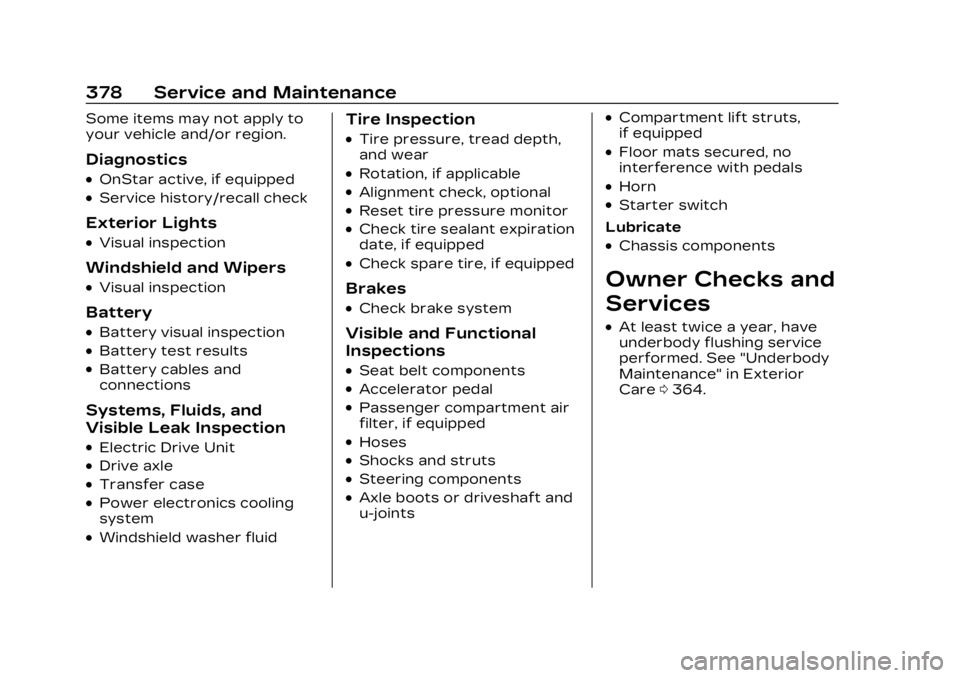
Some items may not apply to
your vehicle and/or region.
Diagnostics
.OnStar active, if equipped
.Service history/recall check
Exterior Lights
.Visual inspection
Windshield and Wipers
.Visual inspection
Battery
.Battery visual inspection
.Battery test results
.Battery cables and
connections
Systems, Fluids, and
Visible Leak Inspection
.Electric Drive Unit
.Drive axle
.Transfer case
.Power electronics cooling
system
.Windshield washer fluid
Tire Inspection
.Tire pressure, tread depth,
and wear
.Rotation, if applicable
.Alignment check, optional
.Reset tire pressure monitor
.Check tire sealant expiration
date, if equipped
.Check spare tire, if equipped
Brakes
.Check brake system
Visible and Functional
Inspections
.Seat belt components
.Accelerator pedal
.Passenger compartment air
filter, if equipped
.Hoses
.Shocks and struts
.Steering components
.Axle boots or driveshaft and
u-joints
.Compartment lift struts,
if equipped
.Floor mats secured, no
interference with pedals
.Horn
.Starter switch
Lubricate
.Chassis components
Owner Checks and
Services
.At least twice a year, have
underbody flushing service
performed. See "Underbody
Maintenance" in Exterior
Care 0364.
Page 409 of 424

Cadillac Lyriq Owner Manual (GMNA-Localizing-U.S./Canada-15644413) -
2023 - CRC - 2/23/22
408 Connected Services
Ensuring Security
.Change the default
passwords for the Wi-Fi
hotspot and myCadillac
mobile application. Make
these passwords different
from each other and use a
combination of letters and
numbers to increase the
security.
.Change the default name of
the SSID (Service Set
Identifier). This is your
network’s name that is
visible to other wireless
devices. Choose a unique
name and avoid family names
or vehicle descriptions.
Wi-Fi Hotspot, If Equipped
The vehicle may have a built-in
Wi-Fi hotspot that provides
access to the Internet and
web content at 4G LTE speed.
Up to seven mobile devices
can be connected. A data plan
is required. Use the in-vehicle
controls only when it is safe to
do so. 1. To retrieve Wi-Fi hotspot
information, tap the Wi-Fi
Hotspot icon on the
infotainment home screen.
2. The Wi-Fi settings will display the Wi-Fi hotspot
name (SSID), password, and
on some vehicles, the
connection type (no Internet
connection, 3G, 4G, 4G
LTE), and signal quality
(poor, good, excellent). The
LTE icon shows connection
to Wi-Fi. It is possible that
the icon may not illuminate
even though the vehicle has
an active connection.
3. To change the SSID or password, press
Qor call
1-888-4ONSTAR to connect
with an Advisor. On some
vehicles, the SSID and
password can be changed in
the Wi-Fi Hotspot menu.
After initial set-up, your
vehicle’s Wi-Fi hotspot will
connect automatically to your
mobile devices. Manage data
usage by turning Wi-Fi on or off on your mobile device,
using the myCadillac mobile
app, or by contacting an
OnStar Advisor. On some
vehicles, Wi-Fi can also be
managed from the Wi-Fi
Hotspot menu.
MyCadillac Mobile App, If
Available
Download the myCadillac
mobile app to compatible
Apple and Android
smartphones. Cadillac users
can access the following
services from a smartphone:
.Remotely start/stop the
vehicle, if factory-equipped.
.Lock/unlock doors,
if equipped with automatic
locks.
.Activate the horn and lamps.
.Check the vehicle’s energy
level, range or tire pressure,
if factory-equipped with the
Tire Pressure Monitor
System.
.Send destinations to the
vehicle.
Page 410 of 424

Cadillac Lyriq Owner Manual (GMNA-Localizing-U.S./Canada-15644413) -
2023 - CRC - 2/23/22
Connected Services 409
.Locate the vehicle on a map
(U.S. market only).
.Turn the vehicle's Wi-Fi
hotspot on/off, manage
settings, and monitor data
consumption, if equipped.
.Locate a dealer and
schedule service.
.Request Roadside Service.
.Set a parking reminder with
pin drop, take a photo, make
a note, and set a timer.
.Connect with Cadillac on
social media.
Features are subject to
change. For myCadillac mobile
app information and
compatibility, see
my.cadillac.com.
An active OnStar or
connected service plan may be
required. A compatible device,
factory-installed remote start,
and power locks are required.
Data rates apply. See
www.onstar.com for details
and system limitations.
Remote Services
Contact an OnStar Advisor to
unlock the doors or sound the
horn and flash the lamps.
Marketplace
OnStar Advisors can provide
offers from restaurants and
retailers on your route, help
locate hotels, or book a room.
These services vary by
market.
Diagnostics
By monitoring and reporting
on the vehicle’s key systems,
OnStar Advanced Diagnostics,
if equipped, provides a way
to keep up on maintenance.
Capabilities vary by model. See
www.onstar.com for details
and system limitations.
Features are subject to
change. For updates on
feature capabilities, see
my.cadillac.com. Message and
data rates may apply.