2023 CADILLAC LYRIC warning
[x] Cancel search: warningPage 245 of 424
Cadillac Lyriq Owner Manual (GMNA-Localizing-U.S./Canada-15644413) -
2023 - CRC - 2/23/22
244 Driving and Operating
.Super Cruise is unable to
complete the lane change
maneuver.
Attention to the Road
{Warning
Super Cruise is a driver
assistance system and
cannot accurately detect or
predict all situations. Super
Cruise is not a crash
avoidance system. To
prevent serious injury or
death, you must supervise
the driving task and monitor
the road conditions. You
may need to respond to
traffic events by steering,
braking, or accelerating. See
Defensive Driving 0196.
Super Cruise also cannot
determine whether you are
awake, asleep, impaired,
or properly focused on safe
driving. The vehicle could
crash into other vehicles,
drive out of the lane, or drive (Continued)
Warning (Continued)
off the road. Complete
attention is always required
while driving, even while
using Super Cruise. Be
prepared to take over
steering or apply the brakes
at any time.
{Warning
To prevent serious injury or
death, be alert and pay
special attention when
passing highway exits,
entrances, and crossings
with Super Cruise, and be
ready to take control of the
vehicle when necessary.
Changes in lane markings
around exits and entrances
can momentarily cause
Super Cruise to not detect
the correct lane. If this
occurs, Super Cruise may
attempt steering inputs to
(Continued)
Warning (Continued)
bring the vehicle back into
the correct lane and, in rare
circumstances, could
over-correct and cause the
vehicle to momentarily cross
into a lane next to your
vehicle unless you manually
steer to maintain your lane
position.
The Driver Attention System
(DAS) on the steering column
continually monitors driver
head and eye position to
estimate driver attention to
the road. The camera does not
record or share pictures,
audio, or video.
Sunglasses, hats, or other
types of clothing that change
the shape of the head may
interfere with camera
performance. To improve
camera performance, raise or
lower the steering wheel,
or change the seat position.
Page 246 of 424

Cadillac Lyriq Owner Manual (GMNA-Localizing-U.S./Canada-15644413) -
2023 - CRC - 2/23/22
Driving and Operating 245
Pay close attention to the road ahead to avoid these three increasing alerts:First Alert
.If the steering wheel light bar flashes green, the system has detected
that your head and eyes may not be directed toward the road.
.The flashing will stop when the system detects that your head and eyes
appear to be directed toward the road.
Second Alert
.If the steering wheel light bar flashes green for too long, Super Cruise
will alert the driver to take control of steering immediately by flashing
the light bar red. Also, either beeps will sound or the Safety Alert Seat
will vibrate. Touch the Settings icon on the infotainment home page.
Select “Vehicle” to display the list of available options and select
“Collision/Detection Systems.”
.Take over steering, then Super Cruise will disengage.
.To re-engage Super Cruise, press]. See “Using Super Cruise”
previously in this section.
Third Alert
.If the steering wheel light bar flashes red for too long, a voice command
will tell you to take control of the vehicle.
.Take control of the steering immediately; ACC and Super Cruise will
disengage.
.A DIC message will indicate that Super Cruise is locked out. Super
Cruise cannot be re-engaged until the vehicle is turned off and back on.
.Continued failure to take over steering will cause the vehicle to brake to
a stop and OnStar will be called. The brake lamps and hazard warning
flashers will come on.
.Take control of the vehicle and continue driving.
Page 247 of 424
Cadillac Lyriq Owner Manual (GMNA-Localizing-U.S./Canada-15644413) -
2023 - CRC - 2/23/22
246 Driving and Operating
Stationary or Very
Slow-Moving Objects;
Cross-Traffic
{Warning
Super Cruise is not a crash
avoidance system and will
not steer or brake to avoid a
crash. Super Cruise does
not steer to prevent a crash
with stopped or slow-moving
vehicles. You must supervise
the driving task and may
need to steer and brake to
prevent a crash, especially in
stop-and-go traffic or when
a vehicle suddenly enters
your lane. Always pay
attention when using Super
Cruise. Failure to do so
could result in a crash
involving serious injury or
death.Curves in the Road
{Warning
The vehicle could drift out of
your lane of travel. To
prevent crashes, always be
ready to manually steer.
Super Cruise may not detect
your lane on curves in the
road. Super Cruise may not
detect the markings that
show your lane. You may not
have time to react to a
vehicle in the lane next to
your vehicle while on curves
in the road.
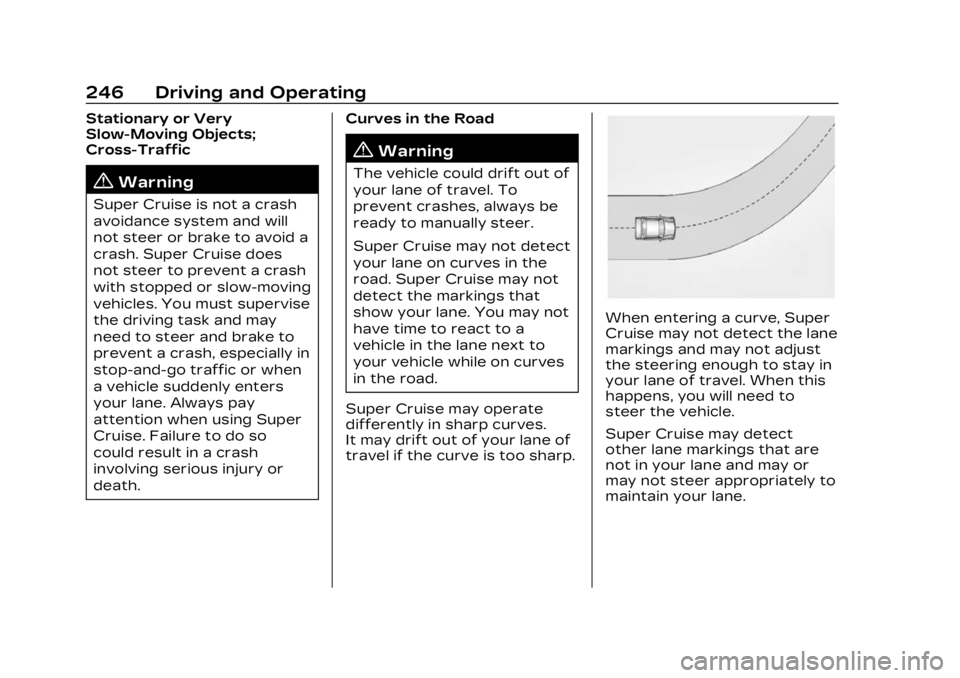
Super Cruise may operate
differently in sharp curves.
It may drift out of your lane of
travel if the curve is too sharp.
When entering a curve, Super
Cruise may not detect the lane
markings and may not adjust
the steering enough to stay in
your lane of travel. When this
happens, you will need to
steer the vehicle.
Super Cruise may detect
other lane markings that are
not in your lane and may or
may not steer appropriately to
maintain your lane.
Page 256 of 424
Cadillac Lyriq Owner Manual (GMNA-Localizing-U.S./Canada-15644413) -
2023 - CRC - 2/23/22
Driving and Operating 255
Conditions and Privacy
Statement on the OnStar
website.
Location Services
This setting enables or
disables sharing of vehicle
location outside the vehicle for
certain purposes. Even if the
Location Services setting is
disabled, vehicle location
information will continue to be
shared for emergency
services and Super Cruise,
if equipped.
System Care
The camera on the steering
column has a lens cover that
may become dirty over time
and affect camera
performance. Clean the lens
cover with a soft cloth
sprayed with glass cleaner.
Wipe the lens gently, then dry
it. Never use abrasive cloths/
cleaners or corrosive
chemicals of any kind on the
lens cover.Super Cruise uses the front
radar, front camera, and
360 degree cameras for its
operation. Clean surfaces are
required for Super Cruise
operation. See Adaptive
Cruise Control (Advanced)
0
225, “Surround Vision
Camera” under Assistance
Systems for Parking or
Backing 0257, and Lane Keep
Assist (LKA) 0280 for care
information.
Caution
The Super Cruise system is
a highly sophisticated
system and should only be
serviced by technicians with
the proper training, tools,
and safety instructions,
which your dealer has.
Without proper training and
tools the vehicle may
become damaged.
Driver Assistance
Systems
This vehicle may have features
that work together to help
avoid crashes or reduce crash
damage while driving, backing,
and parking. Read this entire
section before using these
systems.
{Warning
Do not rely on the Driver
Assistance Systems. These
systems do not replace the
need for paying attention
and driving safely. You may
not hear or see alerts or
warnings provided by these
systems. Failure to use
proper care when driving
may result in injury, death,
or vehicle damage. See
Defensive Driving 0196.
(Continued)
Page 257 of 424

Cadillac Lyriq Owner Manual (GMNA-Localizing-U.S./Canada-15644413) -
2023 - CRC - 2/23/22
256 Driving and Operating
Warning (Continued)
Under many conditions,
these systems will not:
.Detect children,
pedestrians, bicyclists,
or animals.
.Detect vehicles or objects
outside the area
monitored by the system.
.Work at all driving speeds.
.Warn you or provide you
with enough time to avoid
a crash.
.Work under poor visibility
or bad weather conditions.
.Work if the detection
sensor is not cleaned or is
covered by ice, snow, mud,
or dirt.
.Work if the detection
sensor is covered up, such
as with a sticker, magnet,
or metal plate.(Continued)
Warning (Continued)
.Work if the area
surrounding the detection
sensor is damaged or not
properly repaired.
Complete attention is
always required while
driving, and you should be
ready to take action and
apply the brakes and/or
steer the vehicle to avoid
crashes.
{Warning
Stickers or accessories
attached on or around the
front or rear fascia of your
vehicle can impair the radar
sensors resulting in vehicle
damage or personal injury.
Your vehicle could brake
suddenly. Do not attach
anything on or around the
front or rear fascia, including (Continued)
Warning (Continued)
the license plate, the
bumper, or the grille. Use
only GM genuine
accessories.
Audible Alert
Some driver assistance
features alert the driver of
obstacles by beeping. To view
available settings for this
feature, touch the Settings
icon on the infotainment home
page. Select “Vehicle”to
display the list of available
options and select “Comfort
and Convenience”.
Cleaning
Depending on vehicle options,
keep these areas of the
vehicle clean to ensure the
best driver assistance feature
performance. Driver
Information Center (DIC)
messages may display when
the systems are unavailable or
blocked.
Page 259 of 424

Cadillac Lyriq Owner Manual (GMNA-Localizing-U.S./Canada-15644413) -
2023 - CRC - 2/23/22
258 Driving and Operating
1. View Displayed by theCamera
1. View Displayed by theCamera
2. Corners of the Rear Bumper
Displayed images may be
farther or closer than they
appear. The area displayed is
limited and objects that are
close to either corner of the
bumper or under the bumper
do not display.
A warning triangle may display
to show that RPA has
detected an object. This
triangle changes from amber
to red and increases in size
the closer the object.
If
dor a service message
appears on the infotainment
display, there may be a camera
malfunction. See your dealer.
{Warning
The camera(s) do not display
children, pedestrians,
bicyclists, crossing traffic,
animals, or any other object
outside of the cameras’ field
of view, below the bumper,
or under the vehicle. Shown
distances may be different
(Continued)
Warning (Continued)
from actual distances. Do
not drive or park the vehicle
using only these camera(s).
Always check behind and
around the vehicle before
driving. Failure to use proper
care may result in injury,
death, or vehicle damage.
Surround Vision
System
If equipped, Surround Vision
displays an image of the area
surrounding the vehicle, along
with the front or rear camera
views on the infotainment
display. The front camera is in
the grille or near the front
emblem, the side cameras are
on the bottom of the outside
mirrors, and the rear camera is
above the license plate.
The Surround Vision system
can be accessed by selecting
CAMERA in the infotainment
display or when the vehicle is
Page 260 of 424

Cadillac Lyriq Owner Manual (GMNA-Localizing-U.S./Canada-15644413) -
2023 - CRC - 2/23/22
Driving and Operating 259
shifted into R (Reverse). To
return to the previous screen
sooner, when not in
R (Reverse) press Home or
Back on the infotainment
system, shift into P (Park),
or reach a vehicle speed of
approximately 12 km/h (8 mph)
while in D (Drive).
{Warning
The Surround Vision
Cameras have blind spots
and will not display all
objects near the corners of
the vehicle. Folding side
mirrors that are out of
position will not display
surround view correctly.
Always check around the
vehicle when parking or
backing.
1. Views Displayed by theSurround Vision Cameras
2. Area Not Shown
1. Views Displayed by the Surround Vision Cameras
2. Area Not Shown
{Warning
The camera(s) do not display
children, pedestrians,
bicyclists, crossing traffic,
animals, or any other object
outside of the cameras’ field
of view, below the bumper,
or under the vehicle. Shown
distances may be different
from actual distances. Do
not drive or park the vehicle
using only these camera(s).
Always check behind and
around the vehicle before
driving. Failure to use proper
care may result in injury,
death, or vehicle damage.
Page 262 of 424

Cadillac Lyriq Owner Manual (GMNA-Localizing-U.S./Canada-15644413) -
2023 - CRC - 2/23/22
Driving and Operating 261
Sensors located in the
bumpers measure the
distance between the vehicle
and objects using sonar
technology. These sensors are
designed to detect certain
objects up to 2.5 m (8 ft)
behind and 1.2 m (4 ft) in front
of your vehicle that are taller
than 25 cm (10 in).
Different environmental
conditions may affect whether
and how far the Park Assist
system can detect objects.
Keep the sensors clean of
mud, dirt, snow, ice, and slush;
and clean sensors after a car
wash in freezing
temperatures. Sensors that
are not clean may not detect
objects or may cause the
system to alert when not
required.
{Warning
The Park Assist System is
no substitute for careful and
attentive driving. The Park(Continued)
Warning (Continued)
Assist system does not
detect children, pedestrians,
bicyclists, animals, or objects
located below the bumper or
that are too close or too far
from the vehicle. It is not
available at speeds greater
than 9 km/h (6 mph). To
prevent injury, death,
or vehicle damage, even with
Park Assist, always check
the area around the vehicle
and check all mirrors before
moving forward or backing.
How the System Works
The vehicle may have a Park
Assist amphitheatre-like
display on the cluster with
bars that represent the
estimated location of a
detected object and the
vehicle’s distance from the
object. As a detected object
becomes closer, more bars
light up and change color from
yellow to amber to red. When an object is first
detected in the rear, one beep
will be heard from the rear,
or the driver's seat will pulse
two times, if equipped with
Safety Alert Seat. When an
object is very close, five beeps
will sound from the front or
rear (depending on the
object's location), or the
driver's seat will pulse five
times. Beeps for front are
higher pitched than the rear.
Turning the System On
and Off
The Park Assist System can
be turned on or off using the
infotainment system. To view
available settings for this
feature, touch the Settings