2023 BUICK ENCORE GX auto stop
[x] Cancel search: auto stopPage 7 of 367

Buick Encore GX Owner Manual (GMNA-Localizing-U.S./Canada/Mexico-
16263917) - 2023 - CRC - 2/24/22
6 Introduction
1.Air Vents 0182.
2. Turn Signal Lever. See Turn and
Lane-Change Signals 0124.
IntelliBeam System Button (If Equipped).
See Exterior Lamp Controls 0121.
3. Instrument Cluster 093.
Driver Information Center (DIC) Display.
See Driver Information Center (DIC) (Base
Level) 0108 or
Driver Information Center (DIC) (Uplevel)
0 110.
4. Windshield Wiper/Washer 085.
5. Light Sensor. See Automatic Headlamp
System 0123.
Anti-Theft Alarm System. See Vehicle
Alarm System 025.
6. Hazard Warning Flashers 0124.
7. Infotainment Controls. See Overview
0 129.
8. Climate Control Systems 0177.
Dual Automatic Climate Control System
0 179.
Heated Front Seats 041. (If Equipped).
9. Power Outlets 088.
10. Wireless Charging 090 (If Equipped). 11. Auto Stop Disable Switch. See
Stop/Start
System 0196.
All-Wheel Drive Button (If Equipped).
Lane Keep Assist (LKA) 0235 (If
Equipped).
Traction Control/Electronic Stability
Control 0208.
Assistance Systems for Parking or Backing
0 222 (If Equipped).
12. Electric Parking Brake 0206.
13. Shift Lever. See Automatic Transmission
0 202.
14. USB Port 0137.
Auxiliary Jack 0139.
15. ENGINE START/STOP Button. See Ignition
Positions 0194.
16. Steering Wheel Controls 0130.
17. Horn 085.
18. Steering Wheel Adjustment 085 (Out
of View).
19. Cruise Control 0209.
Adaptive Cruise Control (Camera) 0211 (If
Equipped).
Heated Steering Wheel 085 (If
Equipped). Forward Collision Alert (FCA) System
0
227 (If Equipped).
20. Head-Up Display Controls (HUD) (If Equipped). See Head-Up Display (HUD)
0 113.
21. Hood Release. See Hood0251.
22. Exterior Lamp Controls 0121.
Page 16 of 367

Buick Encore GX Owner Manual (GMNA-Localizing-U.S./Canada/Mexico-
16263917) - 2023 - CRC - 2/24/22
Keys, Doors, and Windows 15
Other conditions can affect the performance
of the remote key. SeeRemote Key08.
Starting the Engine Using Remote Start
To start the vehicle:
1. Press and release
Qon the remote key.
2. Immediately after completing Step 1, press and hold
/until the turn signal
lamps flash. If the vehicle's lights cannot
be seen, press and hold
/for at least
four seconds.
When the vehicle starts, the park lamps will
turn on and remain on as long as the
engine is running. The doors will be locked
and the climate control system will operate
automatically if the vehicle has the
automatic system, or at the same setting as
when the vehicle was last turned off.
With an automatic climate control system
and if equipped with heated seats, the
heated seats turn on during colder outside
temperatures and shut off when the ignition
is turned on.
The rear window defogger and heated
mirrors, if equipped, turn on during colder
outside temperatures and turn off when the
ignition is turned on. After entering the vehicle during a remote
start, press the brake and ENGINE START/
STOP with the remote key in the vehicle to
drive the vehicle.
If the vehicle is left running, it automatically
shuts off after 15 minutes unless a time
extension has been done.
Extending Engine Run Time
To extend the engine run time by
15 minutes, repeat Steps 1 and 2 while the
engine is still running. An extension can be
requested 30 seconds after starting. The
engine run time can only be extended if it is
the first remote start since the vehicle has
been driven. Remote start can be extended
one time.
If the remote start procedure is used again
while the engine is still running, 15 minutes
will be added on for a total of 30 minutes.
For example, if
Qand then/are pressed
again while the engine is still running,
15 minutes will be added on for a total of
30 minutes.
A maximum of two remote starts or remote
start with an extension are allowed between
ignition cycles. After the vehicle's engine has been started
two times using the remote start button or
a start with an extension, the ignition must
be turned on and then back off before the
remote start procedure can be used again.
Canceling a Remote Start
To manually shut off a remote start:
.Press and hold/until the lamps
turn off.
.Turn on the hazard warning flashers.
.Turn the ignition on and then off.
Conditions in Which the Remote Start
Will Not Work
The vehicle cannot be started using the
remote start feature if the remote key is in
the vehicle, the hood is open, the vehicle is
not in P (Park), the hazard flashers are on,
the vehicle is on, two remote starts or a
start with an extension have been used,
or there is an emission control system
malfunction.
The engine turns off during a remote start if
the coolant temperature gets too high or if
the oil pressure gets low.
Page 22 of 367

Buick Encore GX Owner Manual (GMNA-Localizing-U.S./Canada/Mexico-
16263917) - 2023 - CRC - 2/24/22
Keys, Doors, and Windows 21
reverse direction. Pressing the touch pad on
the liftgate handle will restart the motion,
but only in the opening direction.
Caution
Manually forcing the liftgate to open or
close during a power cycle can damage
the vehicle. Allow the power cycle to
complete.
The power liftgate may be temporarily
disabled under extreme low temperatures,
or after repeated power cycling over a short
period of time. If this occurs, the liftgate can
still be operated manually.
If the vehicle is shifted out of P (Park) while
the power function is in progress, the
liftgate will continue to completion. If the
vehicle is accelerated before the liftgate has
completed moving, the liftgate may stop or
reverse direction. Check for DIC messages
and make sure the liftgate is closed and
latched before driving.
Falling Liftgate Detection
If the power liftgate automatically closes
after a power opening cycle, it indicates that
the system is reacting to excess weight on
the liftgate or a possible support strut
failure. A repetitive chime will sound while the falling liftgate detection feature is
operating. Remove any excess weight. If the
liftgate continues to automatically close
after opening, see your dealer for service
before using the power liftgate.
Interfering with the power liftgate motion
or manually closing the liftgate too quickly
after power opening may resemble a
support strut failure. This could also activate
the falling liftgate detection feature. Allow
the liftgate to complete its operation and
wait a few seconds before manually closing
the liftgate.
Obstacle Detection Features
If the liftgate encounters an obstacle during
a power open or close cycle, the liftgate will
automatically reverse direction and move a
short distance away from the obstacle. After
removing the obstruction, the power liftgate
operation can be used again. If the liftgate
encounters multiple obstacles on the same
power cycle, the power function will
deactivate. After removing the obstructions,
manually close the liftgate which will allow
normal power operation functions to
resume.
If the vehicle is locked while the liftgate is
closing, and an obstacle is encountered that
prevents the liftgate from completely
closing, the horn will sound as an alert that
the liftgate did not close.
Setting the 3/4 Mode
To change the position the liftgate stops at
when opening:
1. Select MAX or 3/4 mode and power open the liftgate.
2. Stop the liftgate movement at the desired height by pressing any liftgate
switch. Manually adjust the liftgate
position if needed.
3. Press and hold
lto the left of the
latch at the bottom of the liftgate until
the turn signals flash and a beep sounds.
This indicates the setting has been
recorded.
The liftgate cannot be set below a minimum
programmable height. If there is no light
flash or sound, then the height adjustment
may be too low.
Manual Operation
Select OFF to manually operate the liftgate.
See “Manual Liftgate” at the beginning of
this section.
Page 33 of 367

Buick Encore GX Owner Manual (GMNA-Localizing-U.S./Canada/Mexico-
16263917) - 2023 - CRC - 2/24/22
32 Keys, Doors, and Windows
Briefly press or pull the window switch in
the same direction to stop that window’s
express movement.
Window Automatic Reversal System
The express-close feature will reverse
window movement if it comes in contact
with an object. Extreme cold or ice could
cause the window to auto-reverse. The
window will operate normally after the
object or condition is removed.
Automatic Reversal System Override
{Warning
If automatic reversal system override is
active, the window will not reverse
automatically. You or others could be
injured and the window could be
damaged. Before using automatic reversal
system override, make sure that all
people and obstructions are clear of the
window path.
When the engine is on, override the
automatic reversal system by pulling and
holding the window switch if conditions
prevent it from closing.
Programming the Power Windows
Programming may be necessary if the
vehicle battery has been disconnected or
discharged. If the window is unable to
express-up, program each express-close
window: 1. Close all doors.
2. Turn the ignition on or to accessory mode.
3. Partially open the window to be programmed. Then close it and continue
to pull the switch briefly after the
window has fully closed.
4. Open the window and continue to press the switch briefly after the window has
fully opened.
Sun Visors
Pull the sun visor down to block glare.
Detach the sun visor from the center mount
to pivot to the side window and,
if equipped, extend along the rod.
Roof
Sunroof
If equipped, the ignition must be on or in
accessory mode, or Retained Accessory
Power (RAP) must be active to operate the
sunroof. See Ignition Positions 0194 and
Retained Accessory Power (RAP) 0200.
1. Sunroof Switch (SLIDE)
2. Sunshade Switch (SLIDE)
Page 34 of 367
Buick Encore GX Owner Manual (GMNA-Localizing-U.S./Canada/Mexico-
16263917) - 2023 - CRC - 2/24/22
Keys, Doors, and Windows 33
Sunroof Switch
Express-Open/Express-Close :To
express-open the sunroof, fully press and
release
i(1). Press the switch again to
stop it. To express-close the sunroof, fully
press and release
g(1). Press the switch
again to stop it.
Sunroof Comfort Stop Position : This vehicle
may be equipped with a comfort stop to
prevent excessive wind noise. The sunroof
will stop approximately halfway open during
an express open. To fully open the sunroof,
press and release
g(1) again.
Open/Close (Manual Mode) : To open the
sunroof, press to the first position, and hold
i(1) until the sunroof reaches the
desired position. Press and hold
g(1) to
close it.
Vent : From the closed position,
i(1) to
vent the sunroof.
Sunshade Switch
Express-Open/Express-Close : To
express-open the sunshade, fully press and
release
r(2). To express-close the
sunshade, fully press and release
s(2).
Press the switch again to stop it. Open/Close (Manual Mode) :
To open the
sunshade, press to the first position, and
hold
r(2) until the sunshade reaches the
desired position. Press
s(2) to close the
sunshade.
When the sunroof is opened, an air deflector
will automatically raise.
The air deflector will retract when the
sunroof is closed.
Automatic Reversal System
The sunroof has an automatic reversal
system that is only active when the sunroof
is operated in express-close mode.
If an object is in the path while express
closing, the reversal system will detect an
object, stop, and open the sunroof or power
sunshade slightly.
If frost or other conditions prevent closing,
override the feature by closing the sunroof
in manual mode. To stop movement, release
the switch.
In the event of closing difficulties like frost
or other conditions, it is possible to override
the reversal system. To override the reversal
system, close in manual mode. To stop the
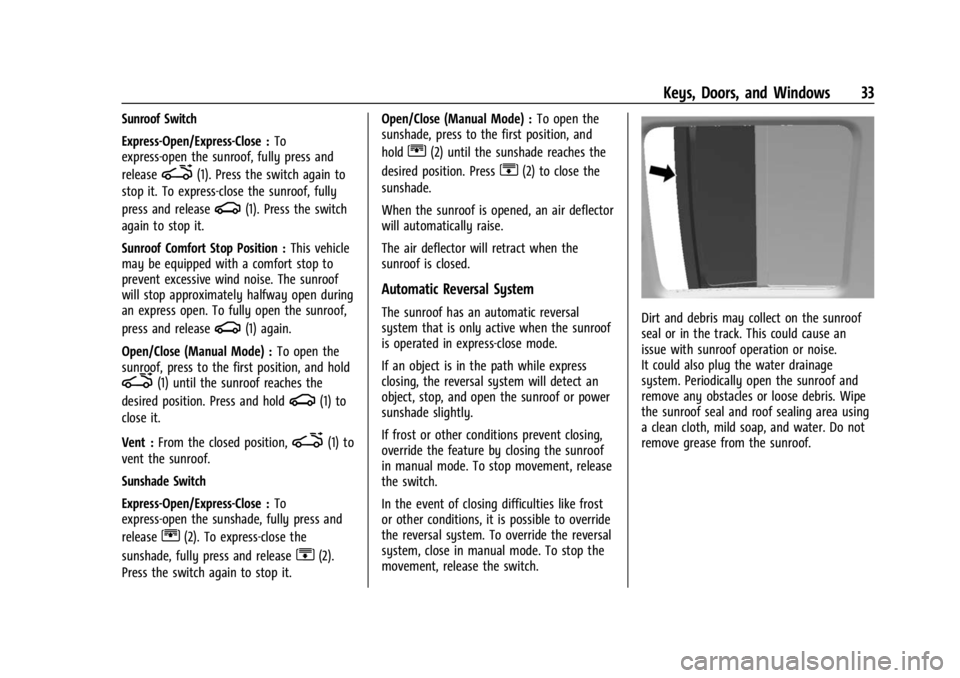
movement, release the switch.Dirt and debris may collect on the sunroof
seal or in the track. This could cause an
issue with sunroof operation or noise.
It could also plug the water drainage
system. Periodically open the sunroof and
remove any obstacles or loose debris. Wipe
the sunroof seal and roof sealing area using
a clean cloth, mild soap, and water. Do not
remove grease from the sunroof.
Page 42 of 367

Buick Encore GX Owner Manual (GMNA-Localizing-U.S./Canada/Mexico-
16263917) - 2023 - CRC - 2/24/22
Seats and Restraints 41
.Seat Exit Memory is enabled. See
“Enabling Automatic Recalls”previously in
this section.
.The shift lever is in P (Park).
Seat Exit Memory recall will continue if the
vehicle is shifted out of P (Park) prior to
reaching the saved memory position.
Seat Exit Memory is not linked to the
driver’s remote key. The seating position
saved to
Bis used for all drivers.
Cancel Memory Seating Recalls
.During any memory recall:
Press a power seat control
Press SET memory button
.During Manual memory recall:
Release 1, 2, or
Bmemory button
.During Auto Seat Entry Memory Recall:
Turn vehicle off
Press SET, 1, 2, or
Bmemory buttons
.During Auto Seat Exit Memory Recall:
Press SET, 1, 2, or
Bmemory buttons Obstructions
If something has blocked the seat while
recalling a memory position, the recall may
stop. Remove the obstruction and try the
recall again. If the memory position still
does not recall, see your dealer.
Heated Front Seats
{Warning
If temperature change or pain to the skin
cannot be felt, the seat heater may cause
burns. To reduce the risk of burns, use
care when using the seat heater,
especially for long periods of time. Do
not place anything on the seat that
insulates against heat, such as a blanket,
cushion, cover, or similar item. This may
cause the seat heater to overheat. An
overheated seat heater may cause a burn
or may damage the seat.
If equipped, the controls are on the climate
control panel. The engine must be running
to operate the heated seats.
Press
MorLto heat the driver or
passenger seat cushion and seatback.
Press the control once for the highest
setting. With each press of the control, the
heated seat will change to the next lower
setting, and then the off setting. Three
lights indicate the highest setting and one
light the lowest. If the heated seats are on
high, the level may automatically be
lowered after approximately 30 minutes.
The passenger seat may take longer to
heat up.
Page 43 of 367

Buick Encore GX Owner Manual (GMNA-Localizing-U.S./Canada/Mexico-
16263917) - 2023 - CRC - 2/24/22
42 Seats and Restraints
Remote Start Heated Seats
When it is cold outside, the heated seats
can be turned on automatically during a
remote vehicle start. The heated seats will
be canceled when the ignition is turned on.
Press the heated seat controls to use the
heated seats after the vehicle is started.
The heated seat indicator lights on the
control do not turn on during a remote
start.
The temperature performance of an
unoccupied seat may be reduced. This is
normal.
To enable or disable remote start heated
seats, select Settings > Vehicle > Remote
Lock, Unlock, and Start > Remote Start Auto
Heat Seats > ON or OFF.
SeeRemote Vehicle Start 014.
Folding Seatback
The front passenger seatback may fold flat.
{Warning
If you fold the seatback forward to carry
longer objects, such as skis, be sure any
such cargo is not near an airbag. In a
(Continued)
Warning (Continued)
crash, an inflating airbag might force that
object toward a person. This could cause
severe injury or even death. Secure
objects away from the area in which an
airbag would inflate.Where Are the
Airbags? 053. Vehicle Load Limits 0191.
{Warning
Things you put on this seatback can
strike and injure people in a sudden stop
or turn, or in a crash. Remove or secure
all items before driving.
To fold the seatback: 1. Lower the head restraint all the way. See Head Restraints 034
2. Move the seat as far back as possible. See Seat Adjustment 036 or
Power Seat Adjustment 0363. Lift the lever fully and fold the seatback
forward. If necessary, move the seat belt
out of the way to access the lever.
4. Continue lowering the seatback until it is completely folded and locks in place.
To raise the seatback: 1. Lift the lever fully to unlock the seatback. Then, raise the seatback and
push it rearward until it re-engages.
2. Push and pull on the seatback to make sure it is locked in place.
Page 87 of 367

Buick Encore GX Owner Manual (GMNA-Localizing-U.S./Canada/Mexico-
16263917) - 2023 - CRC - 2/24/22
86 Instruments and Controls
Windshield Wiper with Intermittent Wipes
(INT Shown, Rainsense Similar)
HI :Use for fast wipes.
LO : Use for slow wipes.
INT : Use for intermittent wipes or
Rainsense, if equipped and enabled. To
adjust wipe frequency, turn the band up for
more frequent wipes or down for less
frequent wipes. If Rainsense is enabled, see
“Rainsense” later in this section. OFF :
Use to turn the wipers off.
1X : For a single wipe, briefly move the
wiper lever down. For several wipes, hold
the wiper lever down.
Clear snow and ice from the wiper blades
before using them. If frozen to the
windshield, carefully loosen or thaw them.
Damaged blades should be replaced. See
Wiper Blade Replacement 0270. Heavy
snow or ice can overload the wiper motor.
Wiper Parking
If the ignition is turned off while the wipers
are on LO, HI, or INT, they will
immediately stop.
If the windshield wiper lever is then moved
to OFF before the driver door is opened or
within 10 minutes, the wipers will restart
and move to the base of the windshield.
If the ignition is turned off while the wipers
are performing wipes due to windshield
washing, the wipers continue to run until
they reach the base of the windshield. Rainsense
If equipped with Rainsense, a sensor located
near the top center of the windshield
detects the amount of water on the
windshield and automatically controls the
frequency of the windshield wiper.
When Rainsense is enabled, the normal
intermittent control operates as a sensitivity
control.
Keep this area of the windshield clear of
debris to allow for best system performance.
AUTO :
Move the windshield wiper lever to
AUTO. Turn the band on the wiper lever to
adjust the sensitivity.
.Turn the band up for more sensitivity to
moisture.
.Turn the band down for less sensitivity to
moisture.