2023 ALFA ROMEO STELVIO window
[x] Cancel search: windowPage 11 of 268

9
EXTERIOR LIGHTS ...................................43
Headlight Switch .................................... 43
Daytime Running Lights (DRLs) ............ 43
High Beam Headlights .......................... 44
Automatic Headlights ............................ 44
Flash-To-Pass ......................................... 44
Automatic High Beam Headlights —
If Equipped ............................................. 44 Parking Lights ....................................... 45
Headlight Off Delay ................................ 45
Rear Fog Lights ...................................... 45
Adaptive Headlight System —
If Equipped ............................................. 45 Turn Signals .......................................... 45
Lane Change Assist ............................... 45
INTERIOR LIGHTS ....................................45
Front Map Reading Lights ..................... 46
Interior Ambient Lighting ...................... 46
Rear Overhead Light ............................. 47
Instrument Panel Dimmer Control ........ 47
WINDSHIELD WIPERS AND WASHERS....47
Windshield Wiper Operation ................. 48
Rain Sensing Wipers.............................. 48
Rear Window Wiper/Washer................. 49
Headlamp Washers — If Equipped ....... 49
CLIMATE CONTROLS ...............................49
Automatic Dual-Zone Climate
Control System ...................................... 50
INTERIOR STORAGE AND EQUIPMENT ... 56
Glove Compartment ...............................56
Center Console .......................................56
Rear Armrest ..........................................56
Power Outlets ........................................ 57
Cigar Lighter And Ash Tray —
If Equipped .............................................58 Wireless Charging Pad —
If Equipped .............................................58
POWER WINDOWS................................... 59
Power Window Controls .........................59
Auto-Up Feature With Anti-Pinch
Protection ............................................... 59 Power Window System Initialization .....59
Wind Buffeting .......................................59
POWER SUNROOF —
IF EQUIPPED ........................................... 60
Power Sunroof ........................................ 60
Opening And Closing The Sunroof ........60
Venting Sunroof......................................61
Sunshade Operation ..............................61
Pinch Protect Feature ............................61
Re-Initialization Procedure ....................61
Sunroof Maintenance ............................61
HOOD ...................................................... 62
Opening The Hood ................................. 62
Closing The Hood ...................................62
POWER LIFTGATE ................................... 62
Opening...................................................62
Closing ....................................................64
Re-Initialization Procedure ....................65
Cargo Area Features ..............................66
GETTING TO KNOW YOUR
INSTRUMENT PANEL
INSTRUMENT PANEL FEATURES ........... 68
Instrument Cluster ............................... 68
Instrument Cluster Descriptions .......... 69
INSTRUMENT CLUSTER DISPLAY ........... 70
Instrument Cluster Display
Description ............................................. 70 Reconfigurable Instrument Cluster
Display .................................................... 70 Reconfigurable Display Items ............... 70
Customer Programmable Settings ....... 73
WARNING LIGHTS AND MESSAGES ON
THE INSTRUMENT PANEL ....................... 74
Red Warning Lights ............................... 75
Amber Warning Lights ........................... 76
Green Indicator Lights........................... 78
Blue Indicator Lights ............................. 79
Red Symbols .......................................... 79
Amber Symbols ...................................... 80
Green Symbols ...................................... 83
Blue Symbols ......................................... 84
ONBOARD DIAGNOSTIC SYSTEM ............ 84
Onboard Diagnostic System (OBD II)
Cybersecurity ......................................... 84
EMISSIONS INSPECTION AND
MAINTENANCE PROGRAMS .................... 85
23_GU_OM_EN_USC_t.book Page 9
Page 24 of 268

GETTING TO KNOW YOUR VEHICLE
22
IGNITION SWITCH
KEYLESS PUSH BUTTON IGNITION
This feature allows the driver to operate the
ignition switch with the push of a button as long
as the key fob is in the passenger compartment.
The START/STOP ignition button has several
operating modes. These modes are OFF, ACC,
and ON/RUN.Keyless Ignition START/STOP Button
The push button ignition can be placed in the
following modes:
OFF
The engine is stopped
Steering is locked
Some electrical devices (e.g. central locking,
alarm, etc.) are still available
ACC
Engine is not started
Some electrical devices are available
(e.g. power windows) ON/RUN
The engine will start (when foot is on the brake
pedal)
All electrical devices are available (e.g. climate
controls, etc.)
If the ignition switch does not change the mode
by pushing the button, the key fob may have a low
or depleted battery. In this situation, a backup
method can be used to operate the ignition
switch. Proceed as follows:
1. Lift the front armrest.
2. Lay the key fob on the indicated spot in the bottom of the center console, positioning the
key fob as shown in the following image,
while pushing the START/STOP ignition
button to start the ignition.
Key Fob Placement Location
NOTE:
For more information on proper engine
starting procedures, see
Ú
page 86.
With the keyless ignition in the ACC position, if
30 minutes pass with the gear selector in
PARK and the engine stopped, the keyless
ignition will automatically reset to the OFF
position.
When opening the driver's door with the ignition
in the ACC position (engine not running), a
chime will sound to remind you to place the
ignition in the OFF position. In addition to the
chime, the message will display “Ignition Or
Accessory On” in the cluster
Úpage 259.
WARNING!
When exiting the vehicle, always make sure
the ignition is in the OFF position, remove the
key fob from the vehicle, and lock your vehicle.
Never leave children alone in a vehicle, or
with access to an unlocked vehicle.
Allowing children to be in a vehicle
unattended is dangerous for a number of
reasons. A child or others could be seriously
or fatally injured. Children should be warned
not to touch the parking brake, brake pedal
or the gear selector.
Do not leave the key fob in or near the
vehicle, or in a location accessible to
children, and do not leave the Keyless Push
Button Ignition in the ON/RUN position. A
child could operate power windows, other
controls, or move the vehicle.
Do not leave children or animals inside
parked vehicles in hot weather. Interior heat
buildup may cause serious injury or death.
CAUTION!
An unlocked vehicle is an invitation for thieves.
Always remove key fob from the vehicle and
lock all doors when leaving the vehicle
unattended.
23_GU_OM_EN_USC_t.book Page 22
Page 25 of 268

23
REMOTE START —
IF EQUIPPED
This system uses the key fob to start the
engine conveniently from outside the
vehicle while still maintaining security.
NOTE:
Obstructions between the vehicle and key fob
may reduce this range
Ú
page 259.
HOW TO USE REMOTE START
Push the Remote Start button on the key fob
twice within five seconds. The vehicle doors will
lock, the turn signals will flash twice, and the horn
will chirp twice. Pushing the Remote Start button
a third time shuts the engine off.
NOTE:
With Remote Start, the engine will only run for
15 minutes.
Remote Start can only be used twice.
If an engine fault is present or fuel level is low,
the vehicle will start and then shut down in
10 seconds.
The parking lights will turn on and remain on
during Remote Start mode.
For security, power window and power sunroof
(if equipped) operation is disabled when the
vehicle is in the Remote Start mode.
The ignition must be placed in the ACC position
before the Remote Start sequence can be
repeated for a third cycle.
All of the following conditions must be met before
the engine will remote start:
Gear selector in PARK
Doors closed
Hood closed
Liftgate closed
Hazard switch off
Brake switch inactive (brake pedal not
pressed)
Battery at an acceptable charge level
Panic button not pushed
System not disabled from previous Remote
Start event
Vehicle Security system indicator flashing
Ignition in OFF position
Fuel level meets minimum requirement
Vehicle Security system is not signaling an
intrusion
Malfunction Indicator Light (MIL) is not
illuminated
TO EXIT REMOTE START MODE
To drive the vehicle after starting the Remote
Start system, either push and release the unlock
button on the key fob to unlock the doors, or
unlock the vehicle using Passive Entry via the
door handles, and disarm the Vehicle Security
system (if equipped). Then, prior to the end of the
15 minute cycle, push and release the START/
STOP ignition button while pressing the brake
pedal.
The Remote Start system will turn the engine off
if the Remote Start button is pushed again, or if
the engine is allowed to run for the entire
15 minute cycle.
REMOTE START COMFORT SYSTEMS —
I
F EQUIPPED
When Remote Start is activated, the heated
steering wheel and front heated seat features will
automatically activate when ambient
temperature is less than 39°F (4°C). These
features will stay on through the duration of
Remote Start.
NOTE:
This feature can be activated through the radio
system. Refer to the Information and Entertain -
ment System Owner’s Manual Supplement for
further information.
WARNING!
Do not start or run an engine in a closed
garage or confined area. Exhaust gas
contains Carbon Monoxide (CO) which is
odorless and colorless. Carbon Monoxide is
poisonous and can cause serious injury or
death when inhaled.
Keep key fobs away from children. Operation
of the Remote Start system, windows, door
locks or other controls could cause serious
injury or death.
23_GU_OM_EN_USC_t.book Page 23
Page 27 of 268

25
(Continued)
VOLUMETRIC/ANTI-LIFT PROTECTION —
I
F EQUIPPED
To ensure the correct operation of the
Volumetric/Anti-Lift Protection system,
completely close the side windows.
To disable the function, push the Volumetric/
Anti-Lift Protection button before activating the
alarm.
When the function is disabled, the light on the
Volumetric/Anti-Lift Protection button flashes for
several seconds.
Volumetric/Anti-Lift Protection Button
Any disabling of the Volumetric/Anti-Lift
Protection must be repeated each time the
ignition is placed in the OFF position.
DOORS
POWER DOOR LOCKS
The power door lock switches are located on each
front door panel. Push the switch to lock or unlock
the doors.
Push the interior lock button on the rear door
panel trim to lock the rear doors only.
Door Lock And Unlock Switch Panel
WARNING!
Do not leave children or animals inside
parked vehicles in hot weather. Interior heat
buildup may cause serious injury or death.
For personal security and safety in the event
of a collision, lock the vehicle doors as you
drive as well as when you park and leave the
vehicle.
Before exiting a vehicle, always shift the
automatic transmission into PARK, apply the
parking brake, turn the engine OFF, remove
the key fob from the vehicle and lock your
vehicle.
Never leave children alone in a vehicle, or
with access to an unlocked vehicle.
Allowing children to be in a vehicle
unattended is dangerous for a number of
reasons. A child or others could be seriously
or fatally injured. Children should be warned
not to touch the parking brake, brake pedal
or the gear selector.
Do not leave the key fob in or near the
vehicle, or in a location accessible to
children. A child could operate power
windows, other controls, or move the vehicle.
CAUTION!
An unlocked vehicle is an invitation for thieves.
Always remove the key fob from the vehicle
and lock all of the doors when leaving the
vehicle unattended.
WARNING!
23_GU_OM_EN_USC_t.book Page 25
Page 31 of 268
29
CHILD-PROTECTION DOOR LOCK
S
YSTEM — REAR DOORS
To provide a safer environment for small children
riding in the rear seats, the rear doors are
equipped with a Child-Protection Door Lock
system.
To use the system, open each rear door, use the
emergency key from the key fob or a flat
screwdriver and rotate the dial to the lock or
unlock position.
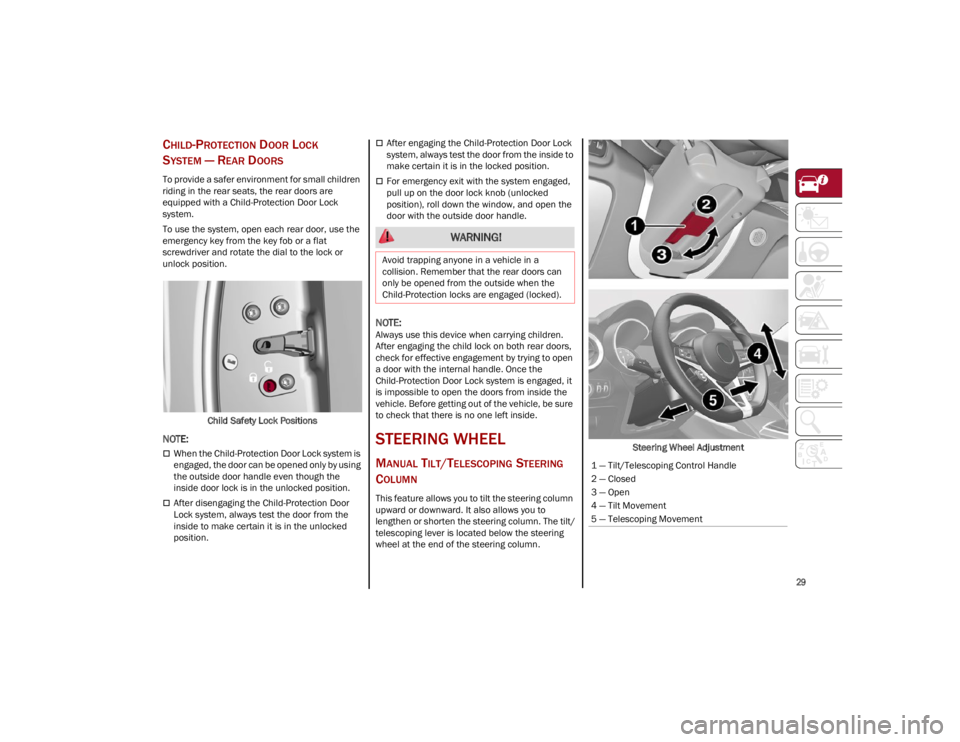
Child Safety Lock Positions
NOTE:
When the Child-Protection Door Lock system is
engaged, the door can be opened only by using
the outside door handle even though the
inside door lock is in the unlocked position.
After disengaging the Child-Protection Door
Lock system, always test the door from the
inside to make certain it is in the unlocked
position.
After engaging the Child-Protection Door Lock
system, always test the door from the inside to
make certain it is in the locked position.
For emergency exit with the system engaged,
pull up on the door lock knob (unlocked
position), roll down the window, and open the
door with the outside door handle.
NOTE:
Always use this device when carrying children.
After engaging the child lock on both rear doors,
check for effective engagement by trying to open
a door with the internal handle. Once the
Child-Protection Door Lock system is engaged, it
is impossible to open the doors from inside the
vehicle. Before getting out of the vehicle, be sure
to check that there is no one left inside.
STEERING WHEEL
MANUAL TILT/TELESCOPING STEERING
C
OLUMN
This feature allows you to tilt the steering column
upward or downward. It also allows you to
lengthen or shorten the steering column. The tilt/
telescoping lever is located below the steering
wheel at the end of the steering column. Steering Wheel Adjustment
WARNING!
Avoid trapping anyone in a vehicle in a
collision. Remember that the rear doors can
only be opened from the outside when the
Child-Protection locks are engaged (locked).
1 — Tilt/Telescoping Control Handle
2 — Closed
3 — Open
4 — Tilt Movement
5 — Telescoping Movement
23_GU_OM_EN_USC_t.book Page 29
Page 40 of 268

GETTING TO KNOW YOUR VEHICLE
38
MIRRORS
AUTOMATIC DIMMING MIRROR
The rearview mirror can be adjusted up, down,
left, and right. The mirror should be adjusted to
center on the view through the rear window.
This mirror automatically adjusts for headlight
glare from vehicles behind you.
You can turn the feature on or off by pushing the
button at the base of the mirror.Electrochromic Mirror Power Button
VANITY MIRROR
On the driver and passenger sun visor, there is a
light which illuminates the sun visor mirror when
folded down. Lift For Vanity Mirror
The courtesy light turns on automatically by lifting
the cover.
Sun Visors
The sun visors are located at the sides of the
interior rearview mirror. They can be adjusted
forward and toward the side window.
To direct the visor toward the passenger side
window, detach the visor from the interior
rearview mirror side hook and turn it towards the
side window.
From this position, the sun visor can also be
extended toward the rear of the vehicle for
additional blockage of sunlight.
There are courtesy mirrors with lights on the back
of the sun visors. Rotate Sun Visor Toward Passenger Window
NOTE:
A rear facing child restraint system should never
be fitted in the front passenger seat. Always
comply with the instructions on the sun visor
Ú
page 170.
OUTSIDE POWER MIRRORS
The power mirror switch is located on the driver’s
side door trim panel.
To adjust the power mirrors, first select the
desired mirror using the power mirror control.
To adjust the selected mirror, push the knob in
the direction desired.
NOTE:
Once adjustment is complete, rotate the knob
to the neutral position to prevent accidental
movements.
The power mirrors can be adjusted with the
ignition in the ACC or ON/RUN position.
CAUTION!
To avoid damage to the mirror during cleaning,
never spray any cleaning solution directly onto
the mirror. Apply the solution onto a clean
cloth and wipe the mirror clean.
23_GU_OM_EN_USC_t.book Page 38
Page 51 of 268

49
The sensor has an adjustment range that varies
progressively from wiper still (no stroke) when the
windshield is dry, to wiper at continuous speed
(fast operation) with intense rain.
Activation
Rotating the wiper switch to the Low Sensitivity
Rain Sensing position (4) or High Sensitivity Rain
Sensing position (3) activates the rain sensor.
The activation of the rain sensor system is done
by tapping the wiper stalk upwards while the
switch is in the Low Sensitivity Rain Sensing
position (4) or High Sensitivity Rain Sensing
position (3).
The variation in sensitivity during rain sensor
operation is also signaled by a stroke of the wiper.
If the windshield washer is used with the rain
sensor activated, the normal washing cycle is
performed, and then the rain sensor resumes its
normal automatic operation.
NOTE:
Keep the glass in the sensor area clean.
Deactivation
To turn off the Rain Sensing Wipers, use the wiper
switch or place the ignition in the OFF position.
In the event of malfunction of the rain sensor
while it is active, the windshield wiper operates
intermittently at a speed consistent with the
sensitivity setting of the rain sensor, whether or
not there is rain on the glass for as long as the
sensor failure is indicated on the display.The sensor continues to operate and it is
possible to set the windshield wiper to continuous
mode (1 or 2). The failure indication remains on
for as long as the sensor is active.
The rain sensor is able to recognize and automat
-
ically adjust itself in the presence of the following
conditions:
Presence of dirt on the controlled surface
(e.g. salt, dirt, etc.).
Presence of streaks of water caused by the
worn window wiper blades.
Difference between day and night.
REAR WINDOW WIPER/WASHER
Push the windshield wiper lever downward to
activate/deactivate continuous rear wiper
operation.
Push the windshield wiper lever towards the
instrument panel to activate the rear window
washer (a brief push activates one washing cycle,
keeping the stalk pushed washes continuously
until the stalk is released).
Shifting the vehicle into REVERSE with the
windshield wiper operating activates a single
cycle of the rear window wiper.
HEADLAMP WASHERS — IF EQUIPPED
The windshield wiper lever operates the headlight
washers when the ignition is in the ON position
and the headlights are turned on. To use the
headlight washers, pull the lever toward you and
release it. The headlight washers will spray a
timed high-pressure spray of washer fluid onto
each headlight lens. In addition, the windshield
washers will spray the windshield and the
windshield wipers will cycle.
NOTE:
The headlight washers work on every tenth wash
cycle request.
CLIMATE CONTROLS
The Climate Control system allows you to regulate
the temperature, air flow, and direction of air
circulating throughout the vehicle. The controls
are located on the touchscreen and on the
instrument panel below the radio.
23_GU_OM_EN_USC_t.book Page 49
Page 53 of 268

51
Automatic Climate Control System (Touchscreen Controls)
1 — Driver Side Temperature Adjustment Bar8 — Heated Rear Window On/Off Button
2 — Driver Side Air Distribution Buttons 9 — MAX-DEF Activation/Deactivation Button (Rapid Defrosting/Demisting)
3 — Fan Speed Adjustment Button 10 — Air Recirculation On/Off Button
4 — Passenger Side Air Distribution Buttons 11 — Climate Control System Compressor On/Off Button
5 — Passenger Side Temperature Adjustment Bar 12 — Driver Side AUTO Button (Automatic Operation)
6 — SYNC Button 13 — Climate Control System On/Off Button
7 — Passenger Side AUTO Button (Automatic Operation)
CAUTION!
The system uses R1234yf refrigerant, which does not pollute the environment in the event of accidental leakage. Under no circumstances use R134a
and R12 fluids, which are incompatible with the components of this system.
23_GU_OM_EN_USC_t.book Page 51