2023 ALFA ROMEO GIULIA ignition
[x] Cancel search: ignitionPage 46 of 248

GETTING TO KNOW YOUR VEHICLE
44
AUTOMATIC HIGH BEAM HEADLIGHTS —
I
F EQUIPPED
The Automatic High Beam Headlights system
provides increased forward lighting at night by
automating high beam control through the use of
a camera mounted on the windshield. This
camera detects vehicle specific light and
automatically switches from high beams to low
beams until the approaching vehicle is out of
view.
This function is enabled with the radio system,
and can only be activated with the light switch
turned to (AUTO).
If the high beam headlights are on, the blue icon/
indicator light will illuminate in the instrument
panel.
When the speed is higher than 25 mph (40 km/h)
and the function is active, the lights will turn off if
the multifunction lever is pushed again.
When the speed is lower than 15 mph (25 km/h)
and the function is active, the function switches
the high beam headlights off.
If the high beam headlights are operated quickly
again (pushing the multifunction lever towards
the instrument panel), the icon/indicator light
will illuminate in the instrument panel, and the
high beam headlights will turn on constantly until
the speed exceeds 25 mph (40 km/h).
When the speed of 25 mph (40 km/h) is
exceeded again, the automatic functioning is
reactivated.
If the multifunction lever is pushed again with the
Automatic High Beam Headlights activated, the
Automatic High Beam Headlights function
deactivates. To deactivate the automatic headlight function,
rotate the headlight switch to the position.
NOTE:
If the system recognizes heavy traffic areas,
the automatic functions remain disabled
independently of the vehicle’s speed.
The Automatic High Beam functionality may
also be influenced by:
• Reflections on road signs
• Dim headlights from oncoming traffic
• Poor weather conditions
• Presence of dirt or other obstructions on
the sensor
• Damage to the windshield
PARKING LIGHTS
To turn on the parking lights and instrument
panel lights, rotate the headlight switch
clockwise to the position. All of the parking
lights will turn on for eight minutes, and opening
the door activates an audible warning.
To leave only the lights on one side (right/left)
illuminated, move the multifunction lever
(located on the left side of the steering wheel) to
the side that you want to remain on. With the
parking lights on, the indicator light on the
instrument panel will illuminate.
To turn off the parking lights, rotate the headlight
switch back to the O (off) position.
HEADLIGHT OFF DELAY
To assist when exiting the vehicle, the “Headlight
Off Delay” feature will leave the headlights on for
up to 90 seconds. This delay is initiated when the
ignition is placed in the OFF position while the
headlight switch is on, and then the headlight
switch is cycled off. Headlight delay can be
canceled by either turning on the headlights or
side lights, or by placing the ignition in the ON
position.
The function can be activated from the radio
system by selecting the following functions in
sequence on the main menu:
1. Settings
2. Lights
3. Headlight Off Delay
REAR FOG LIGHT
The rear fog lights may be operated as desired
when visibility is poor due to fog. The rear fog light
button is integrated with the headlight switch.
Push the button to turn the rear fog lights on/
off.
The lights can be turned off by pushing the
button again or by turning the headlight switch to
the O (off) position and holding it there for a few
seconds.
NOTE:
The headlight switch must first be turned to the
parking lights or headlights position before the
rear fog light button can be pushed.
When the engine is stopped with the rear fog
lights on, they will remain off the next time the
engine is started.
23_GA_OM_EN_USC_t.book Page 44
Page 47 of 248

45
ADAPTIVE FRONTLIGHT SYSTEM
(AFS F
UNCTION) — IF EQUIPPED
This is a system combined with Xenon headlights
(Bi-Xenon 35 W headlamp if equipped) which
directs the headlights horizontally, and contin -
uously and automatically adapts them to the
driving conditions around bends or when
cornering.
The system directs the headlights to light up the
road in the best way, taking into account the
speed of the vehicle and the bend or corner
angle, as well as the speed at which the steering
wheel is turned.
The adaptive lights are automatically activated
when the vehicle is started.
TURN SIGNALS
Move the multifunction lever up or down to
activate the turn signals. The arrows on each side
of the instrument cluster flash to show proper
operation.
The or turn signal will blink on the
instrument panel.
LANE CHANGE ASSIST
Lightly push the lever up or down once, without
moving beyond the detent, and the turn signal will
flash five times then automatically turn off.
To turn off the flashing before the end of the
cycle, move the lever in the opposite direction
until the first click (about half way).
STATIC BENDING LIGHT FUNCTION
(SBL) — IF EQUIPPED
The SBL function utilizes Light Emitting Diodes
(LEDs) in order to better illuminate the street and
increase the light angle while turning. This
function is enabled by rotating the light switch to
position (on) or (AUTO). The SBL LEDs
activate when the speed is below 25 mph
(40 km/h) and the steering radius is below
0.3 miles (500 m).
This function can be activated/deactivated on the
radio system by selecting the following functions
in sequence on the main menu:
1. Settings
2. Lights
3. Cornering Lights
INTERIOR LIGHTS
Courtesy lights are turned on when the front
doors are opened or when the dimmer control is
rotated to its farthest upward position. The glove
compartment light turns on automatically when
the glove compartment is opened and turn off
when it is closed. The door courtesy lights
illuminate when one of the front doors is opened,
and turn off when it is closed. The trunk courtesy
lights turn on automatically when the trunk is
opened and turn off when it is closed. All of these
lights turn on and off regardless of the ignition
status.
FRONT MAP READING LIGHTS
The front map/reading and overhead lights are
mounted in the overhead console. Each light can
be turned on by pushing the corresponding switch on the console. These switches are backlit for
night time visibility. To turn the lights off, push the
switch a second time.
Overhead Console
NOTE:
Before getting out of the vehicle, ensure that the
overhead lights are off. This will prevent the
battery level from being drained once the doors
are closed. If a light is left on accidentally, the
overhead lights turn off automatically approxi -
mately 15 minutes after the engine has been
turned off.
1 — Driver’s Reading/Map Light Switch
2 — Rear Overhead Lights Switch
3 — Overhead Lights Switch
4 — Front Map Reading Lights Switch
5 — Passenger’s Reading/Map Light Switch
6 — Passenger’s Reading/Map Light
7 — Center Reading/Map Light
8 — Driver’s Reading/Map Light
23_GA_OM_EN_USC_t.book Page 45
Page 48 of 248
GETTING TO KNOW YOUR VEHICLE
46
Overhead Light Timing
To assist getting in and out of the vehicle at night
or in poorly-lit areas, two timed modes are
available to keep the interior lighting on after the
engine is turned off.
Timing While Getting Into The Vehicle
The overhead lights will illuminate as follows:
For a few seconds when the doors are
unlocked.
For approximately three minutes when one of
the doors is opened.
For a few seconds when the doors are locked.
Timing is interrupted when the ignition is placed
in the ON/RUN position.
Exiting Overhead Light Timing
The overhead lights will turn off as follows:
After all doors are closed upon entering the
vehicle, the three minute timer will stop and a
second timer will start for the overhead lights.
This timing will end when the ignition is placed
in the ON/RUN position.
When the doors are locked.
After 15 minutes to preserve the battery.
Timing While Getting Out Of The Vehicle
After placing the ignition in the OFF position, the
overhead lights will turn on as follows:
For a few seconds after the engine stops.
For approximately three minutes when one of
the doors is opened.
For a few seconds when the last door is closed.
The timing ends automatically when the doors
are locked.
INTERIOR AMBIENT LIGHTING
The brightness of the interior passenger
compartment lights can be adjusted through the
radio system.
To access the adjustment function, on the main
menu select the following items in sequence:
1. Settings
2. Lights
3. Interior Ambient Lighting
The lights can be adjusted to seven different
levels of brightness.
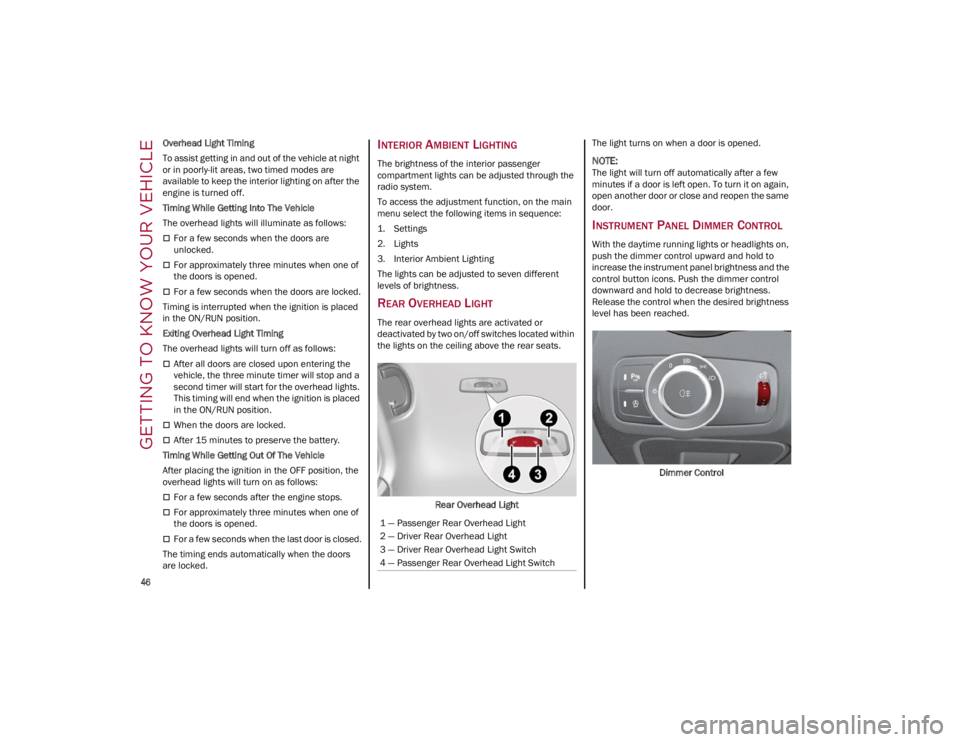
REAR OVERHEAD LIGHT
The rear overhead lights are activated or
deactivated by two on/off switches located within
the lights on the ceiling above the rear seats.
Rear Overhead Light The light turns on when a door is opened.
NOTE:
The light will turn off automatically after a few
minutes if a door is left open. To turn it on again,
open another door or close and reopen the same
door.
INSTRUMENT PANEL DIMMER CONTROL
With the daytime running lights or headlights on,
push the dimmer control upward and hold to
increase the instrument panel brightness and the
control button icons. Push the dimmer control
downward and hold to decrease brightness.
Release the control when the desired brightness
level has been reached.
Dimmer Control
1 — Passenger Rear Overhead Light
2 — Driver Rear Overhead Light
3 — Driver Rear Overhead Light Switch
4 — Passenger Rear Overhead Light Switch
23_GA_OM_EN_USC_t.book Page 46
Page 49 of 248

47
WINDSHIELD WIPERS AND
WASHERS
The windshield wiper/washer lever is located on
the right side of the steering wheel.
The windshield wipers will only operate with the
ignition in the ACC or ON/RUN position.
WINDSHIELD WIPER OPERATION
Rotating the switch to the Low Continuous Wiper
Speed position (2) activates the first (low) level
continuous speed of the windshield wipers in
manual mode.Rotating the switch to the High Continuous Wiper
Speed position (1) activates the second (high)
level continuous speed of the windshield wipers
in manual mode.
Windshield Wiper Switch
Rain Sensors
Rotating the switch to the Low Sensitivity Rain
Sensing position (4), activates the first, less
sensitive level of the Rain Sensing function.
Rotating the switch to the High Sensitivity Rain
Sensing position (3), activates the second, more
sensitive level of the Rain Sensing function
Ú
page 48.
Windshield Washer
To use the washer, pull the windshield wiper lever
toward the steering wheel and hold. Both the windshield washer jet and the
windshield wiper will be activated. The wipers and
washers will continue to operate until you let go of
the lever.
The windshield wiper stops working three strokes
after the lever is released, followed by a final
stroke six seconds later to complete the cycle.
Mist
Push the lever upward to the MIST position and
release for a single wiping cycle.
NOTE:
The Mist feature does not activate the washer
pump; therefore, no washer fluid will be sprayed
on the windshield. The wash function must be
used in order to spray the windshield with washer
fluid.
For information on wiper care and replacement,
see
Ú
page 193.
CAUTION!
Turn the windshield wipers off when driving
through an automatic car wash. Damage to
the windshield wipers may result if the wiper
control is left in any position other than off.
In cold weather, always turn off the wiper
switch and allow the wipers to return to the
PARK position before turning off the engine.
If the wiper switch is left on and the wipers
freeze to the windshield, damage to the
wiper motor may occur when the vehicle is
restarted.
Always remove any buildup of snow that
prevents the windshield wiper blades from
returning to the off position. If the windshield
wiper control is turned off and the blades
cannot return to the off position, damage to
the wiper motor may occur.
1 — High Continuous Wiper Speed
2 — Low Continuous Wiper Speed
3 — High Sensitivity Rain Sensing
4 — Low Sensitivity Rain Sensing
5 — Windshield Wiper Off
WARNING!
Sudden loss of visibility through the
windshield could lead to a collision. You might
not see other vehicles or other obstacles. To
avoid sudden icing of the windshield during
freezing weather, warm the windshield with
the defroster before and during windshield
washer use.
23_GA_OM_EN_USC_t.book Page 47
Page 50 of 248

GETTING TO KNOW YOUR VEHICLE
48
RAIN SENSING WIPERS
This feature senses rain or snowfall on the
windshield and automatically activates the
wipers. The Rain Sensor is located behind the
interior rearview mirror.Rain Sensor
Rotate the end of the multifunction lever to one of
four settings to activate this feature.
The sensor has an adjustment range that varies
progressively from wiper still (no stroke) when the
windshield is dry, to wiper at continuous speed
(fast operation) with intense rain.
Activation
Rotating the wiper switch to the Low Sensitivity
Rain Sensing position (4) or High Sensitivity Rain
Sensing position (3) activates the rain sensor.
The activation of the rain sensor system is done
by tapping the wiper stalk upwards while the
switch is in the Low Sensitivity Rain Sensing
position (4) or High Sensitivity Rain Sensing
position (3). The variation in sensitivity during rain sensor
operation is also signaled by a stroke of the
wiper.
If the windshield washer is used with the rain
sensor activated, the normal washing cycle is
performed, and then the rain sensor resumes its
normal automatic operation.
NOTE:
Keep the glass in the sensor area clean.
With the windshield wiper lever in the Low
Sensitivity Rain Sensing position (4) or High
Sensitivity Rain Sensing position (3), wiping
operates automatically and is disabled when
the outside temperature is below 32°F (0°C).
Deactivation
To turn off the Rain Sensing Wipers, use the wiper
switch or place the ignition in the OFF position.
In the event of malfunction of the rain sensor
while it is active, the windshield wiper operates
intermittently at a speed consistent with the
sensitivity setting of the rain sensor, whether or
not there is rain on the glass for as long as the
sensor failure is indicated on the display.
The sensor continues to operate and it is possible
to set the windshield wiper to continuous mode
(1 or 2). The failure indication remains on for as
long as the sensor is active. The rain sensor is able to recognize and automat
-
ically adjust itself in the presence of the following
conditions:
Presence of dirt on the controlled surface (salt,
dirt, etc.).
Presence of streaks of water caused by the
worn window wiper blades.
Difference between day and night.
HEADLIGHT WASHERS — IF EQUIPPED
The windshield wiper lever operates the headlight
washers when the ignition is in the ON position
and the headlights are turned on. To use the
headlight washers, pull the lever toward you and
release it. The headlight washers will spray a
timed high-pressure spray of washer fluid onto
each headlight lens. In addition, the windshield
washers will spray the windshield and the
windshield wipers will cycle.
NOTE:
The headlight washers work on every tenth wash
cycle request.
CLIMATE CONTROL
The Climate Control system allows you to regulate
the temperature, air flow, and direction of air
circulating throughout the vehicle. The controls
are located on the touchscreen and on the
instrument panel below the radio.
23_GA_OM_EN_USC_t.book Page 48
Page 58 of 248

GETTING TO KNOW YOUR VEHICLE
56
POWER OUTLET
Your vehicle is equipped with a 12 Volt (15 Amp)
power outlet that can be used to power cellular
phones, small electronics and other low powered
electrical accessories. The power outlet is labeled
with a key symbol to indicate how the outlet is
powered. Power outlets labeled with a key are
powered when the ignition is in the ON/RUN or
ACC position.
NOTE:
All accessories connected to powered outlets
should be removed or turned off when the vehicle
is not in use to protect the battery against
discharge.
115 Volt Power Inverter — If Equipped
The Power Inverter is located inside of the center
console. It can be used for small battery-powered
electrical appliances with powers up to 150 W
(e.g. cameras, video camera, tablets, razors,
etc.).
NOTE:
Do not connect devices with powers higher than
150 W to the socket. Do not damage the socket
by using unsuitable adapters.Center Console Power Outlet
WARNING!
To avoid serious injury or death:
Only devices designed for use in this type of
outlet should be inserted into any 12 Volt
outlet.
Do not touch with wet hands.
Close the lid when not in use and while
driving the vehicle.
If this outlet is mishandled, it may cause an
electric shock and failure.
CAUTION!
Power outlets are designed for accessory
plugs only. Do not insert any other object in
the power outlets as this will damage the
outlet and blow the fuse. Improper use of the
power outlet can cause damage not covered
by your New Vehicle Limited Warranty.
Many accessories that can be plugged in
draw power from the vehicle's battery, even
when not in use (i.e., cellular phones, etc.).
Eventually, if plugged in long enough, the
vehicle's battery will discharge sufficiently to
degrade battery life and/or prevent the
engine from starting.
Accessories that draw higher power (i.e.,
coolers, vacuum cleaners, lights, etc.) will
degrade the battery even more quickly. Only
use these intermittently and with greater
caution.
After the use of high power draw
accessories, or long periods of the vehicle
not being started (with accessories still
plugged in), the vehicle must be driven a
sufficient length of time to allow the
generator to recharge the vehicle's battery.
23_GA_OM_EN_USC_t.book Page 56
Page 59 of 248
57
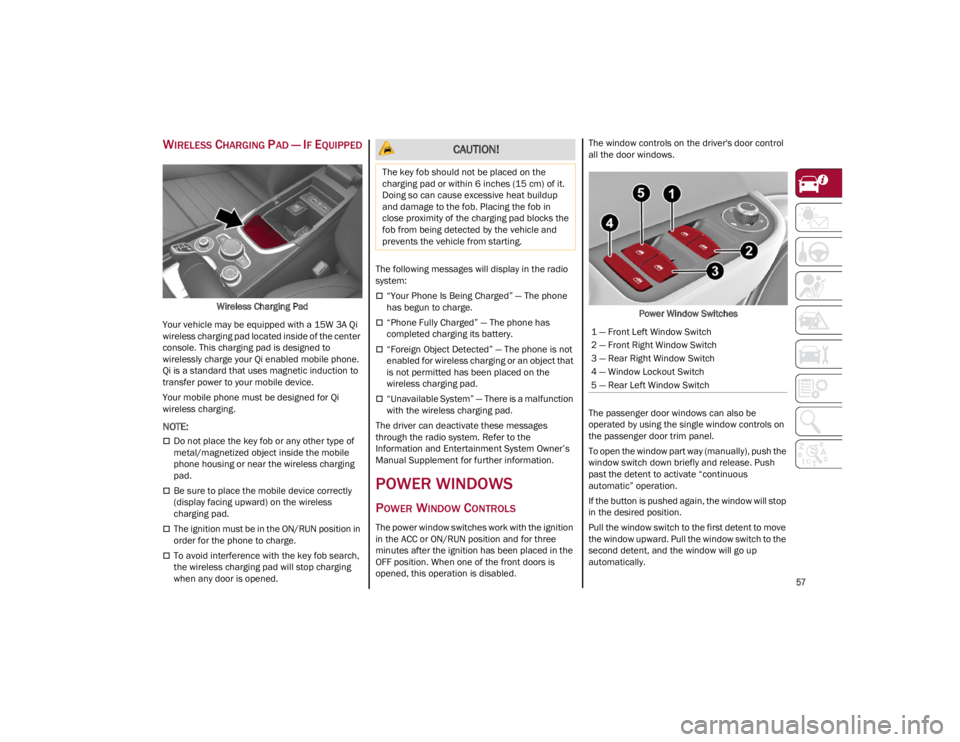
WIRELESS CHARGING PAD — IF EQUIPPED
Wireless Charging Pad
Your vehicle may be equipped with a 15W 3A Qi
wireless charging pad located inside of the center
console. This charging pad is designed to
wirelessly charge your Qi enabled mobile phone.
Qi is a standard that uses magnetic induction to
transfer power to your mobile device.
Your mobile phone must be designed for Qi
wireless charging.
NOTE:
Do not place the key fob or any other type of
metal/magnetized object inside the mobile
phone housing or near the wireless charging
pad.
Be sure to place the mobile device correctly
(display facing upward) on the wireless
charging pad.
The ignition must be in the ON/RUN position in
order for the phone to charge.
To avoid interference with the key fob search,
the wireless charging pad will stop charging
when any door is opened. The following messages will display in the radio
system:
“Your Phone Is Being Charged” — The phone
has begun to charge.
“Phone Fully Charged” — The phone has
completed charging its battery.
“Foreign Object Detected” — The phone is not
enabled for wireless charging or an object that
is not permitted has been placed on the
wireless charging pad.
“Unavailable System” — There is a malfunction
with the wireless charging pad.
The driver can deactivate these messages
through the radio system. Refer to the
Information and Entertainment System Owner’s
Manual Supplement for further information.
POWER WINDOWS
POWER WINDOW CONTROLS
The power window switches work with the ignition
in the ACC or ON/RUN position and for three
minutes after the ignition has been placed in the
OFF position. When one of the front doors is
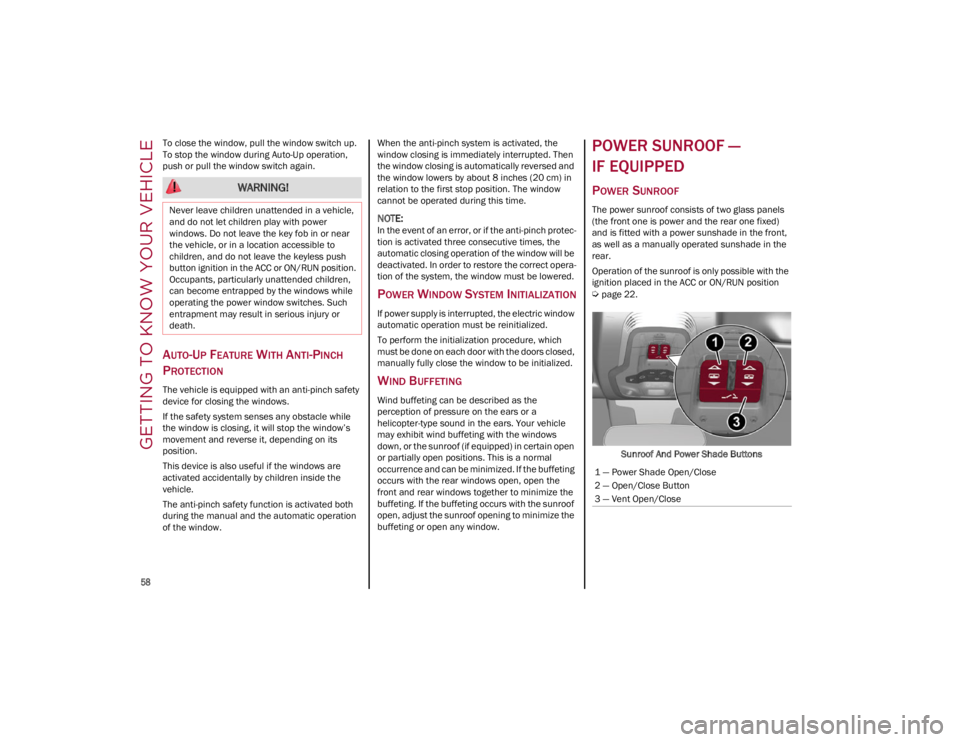
opened, this operation is disabled. The window controls on the driver's door control
all the door windows.
Power Window Switches
The passenger door windows can also be
operated by using the single window controls on
the passenger door trim panel.
To open the window part way (manually), push the
window switch down briefly and release. Push
past the detent to activate “continuous
automatic” operation.
If the button is pushed again, the window will stop
in the desired position.
Pull the window switch to the first detent to move
the window upward. Pull the window switch to the
second detent, and the window will go up
automatically.
CAUTION!
The key fob should not be placed on the
charging pad or within 6 inches (15 cm) of it.
Doing so can cause excessive heat buildup
and damage to the fob. Placing the fob in
close proximity of the charging pad blocks the
fob from being detected by the vehicle and
prevents the vehicle from starting.
1 — Front Left Window Switch
2 — Front Right Window Switch
3 — Rear Right Window Switch
4 — Window Lockout Switch
5 — Rear Left Window Switch
23_GA_OM_EN_USC_t.book Page 57
Page 60 of 248
GETTING TO KNOW YOUR VEHICLE
58
To close the window, pull the window switch up.
To stop the window during Auto-Up operation,
push or pull the window switch again.
AUTO-UP FEATURE WITH ANTI-PINCH
P
ROTECTION
The vehicle is equipped with an anti-pinch safety
device for closing the windows.
If the safety system senses any obstacle while
the window is closing, it will stop the window’s
movement and reverse it, depending on its
position.
This device is also useful if the windows are
activated accidentally by children inside the
vehicle.
The anti-pinch safety function is activated both
during the manual and the automatic operation
of the window. When the anti-pinch system is activated, the
window closing is immediately interrupted. Then
the window closing is automatically reversed and
the window lowers by about 8 inches (20 cm) in
relation to the first stop position. The window
cannot be operated during this time.
NOTE:
In the event of an error, or if the anti-pinch protec
-
tion is activated three consecutive times, the
automatic closing operation of the window will be
deactivated. In order to restore the correct opera -
tion of the system, the window must be lowered.
POWER WINDOW SYSTEM INITIALIZATION
If power supply is interrupted, the electric window
automatic operation must be reinitialized.
To perform the initialization procedure, which
must be done on each door with the doors closed,
manually fully close the window to be initialized.
WIND BUFFETING
Wind buffeting can be described as the
perception of pressure on the ears or a
helicopter-type sound in the ears. Your vehicle
may exhibit wind buffeting with the windows
down, or the sunroof (if equipped) in certain open
or partially open positions. This is a normal
occurrence and can be minimized. If the buffeting
occurs with the rear windows open, open the
front and rear windows together to minimize the
buffeting. If the buffeting occurs with the sunroof
open, adjust the sunroof opening to minimize the
buffeting or open any window.
POWER SUNROOF —
IF EQUIPPED
POWER SUNROOF
The power sunroof consists of two glass panels
(the front one is power and the rear one fixed)
and is fitted with a power sunshade in the front,
as well as a manually operated sunshade in the
rear.
Operation of the sunroof is only possible with the
ignition placed in the ACC or ON/RUN position
Ú
page 22.
Sunroof And Power Shade Buttons
WARNING!
Never leave children unattended in a vehicle,
and do not let children play with power
windows. Do not leave the key fob in or near
the vehicle, or in a location accessible to
children, and do not leave the keyless push
button ignition in the ACC or ON/RUN position.
Occupants, particularly unattended children,
can become entrapped by the windows while
operating the power window switches. Such
entrapment may result in serious injury or
death.
1 — Power Shade Open/Close
2 — Open/Close Button
3 — Vent Open/Close
23_GA_OM_EN_USC_t.book Page 58