2022 YAMAHA FX SVHO check oil
[x] Cancel search: check oilPage 116 of 136
Care and storage
107
ventilated. Always shield your eyes when
working near batteries.
Keep out of the reach of children.
Antidotes
External: Flush with water.
Internal: Drink large quantities of water or
milk. Follow with milk of magnesia, beaten
egg, or vegetable oil. Call a physician im-
mediately.
Eyes: Flush with water for 15 minutes and
get prompt medical attention.
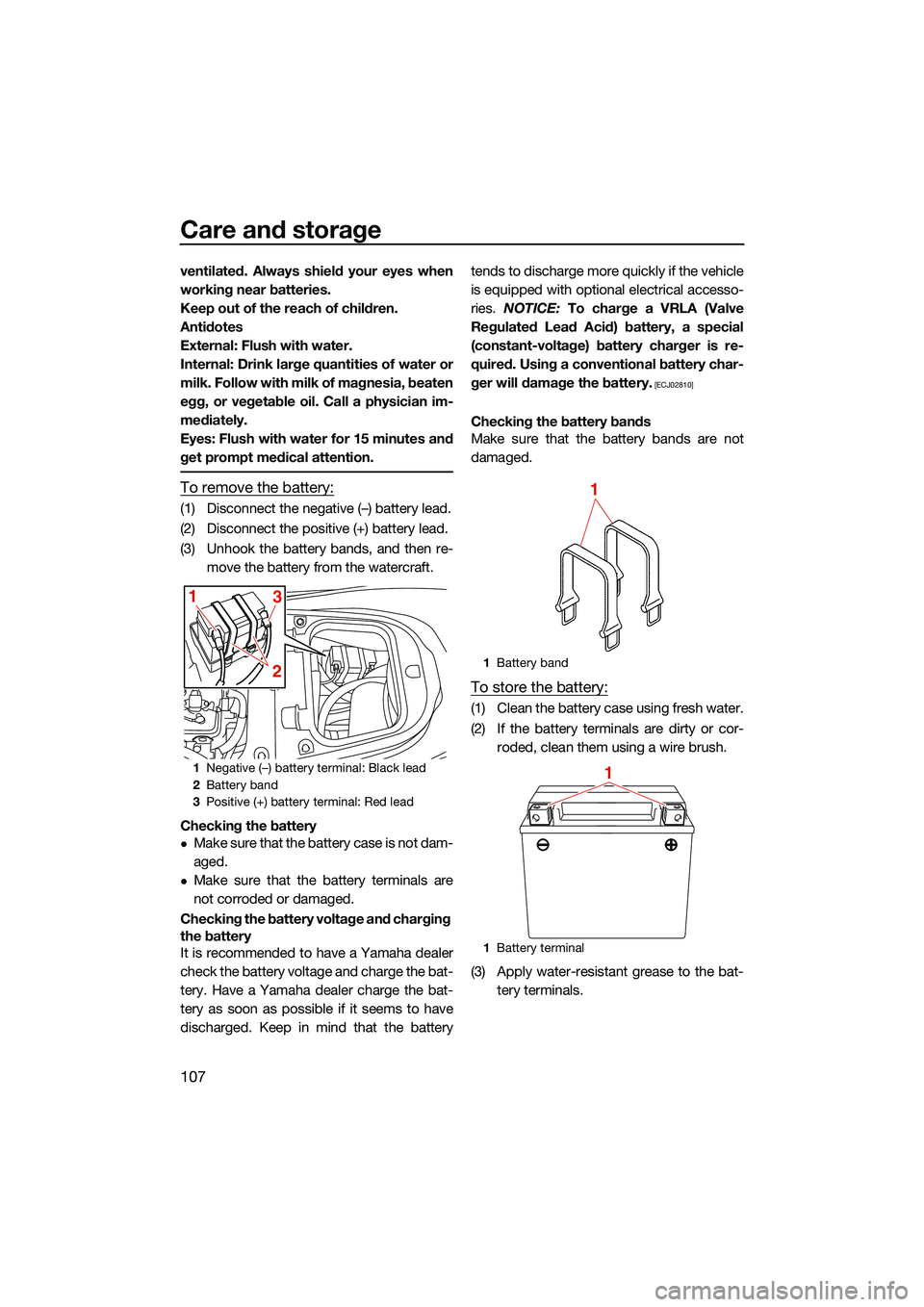
To remove the battery:
(1) Disconnect the negative (–) battery lead.
(2) Disconnect the positive (+) battery lead.
(3) Unhook the battery bands, and then re-move the battery from the watercraft.
Checking the battery
Make sure that the battery case is not dam-
aged.
Make sure that the battery terminals are
not corroded or damaged.
Checking the battery voltage and charging
the battery
It is recommended to have a Yamaha dealer
check the battery voltage and charge the bat-
tery. Have a Yamaha dealer charge the bat-
tery as soon as possible if it seems to have
discharged. Keep in mind that the battery tends to discharge more quickly if the vehicle
is equipped with optional electrical accesso-
ries.
NOTICE: To charge a VRLA (Valve
Regulated Lead Acid) battery, a special
(constant-voltage) battery charger is re-
quired. Using a conventional battery char-
ger will damage the battery.
[ECJ02810]
Checking the battery bands
Make sure that the battery bands are not
damaged.
To store the battery:
(1) Clean the battery case using fresh water.
(2) If the battery terminals are dirty or cor- roded, clean them using a wire brush.
(3) Apply water-resistant grease to the bat- tery terminals.
1Negative (–) battery terminal: Black lead
2 Battery band
3 Positive (+) battery terminal: Red lead
1
231
Battery band
1 Battery terminal
1
1
UF3X73E0.book Page 107 Wednesday, October 6, 2021 9:04 AM
Page 121 of 136

Maintenance
112
EJU43103Periodic maintenance chart
The periodic maintenance chart gives general guidelines for periodic maintenance. Have a
Yamaha dealer perform the checks in the following chart. However, maintenance may need to be performed more frequently depending on your operating conditions. If you have any
questions, consult a Yamaha dealer.
This “ √” mark indicates items to be checked and serviced by a Yamaha dealer.
Item OperationInitial Thereafter every
Page
10 hours 50 hours
or 12
months *1 100
hours or 12
months *1 200
hours or 24
months *1
Fuel line Check fuel hoses and
clamps
√
—
Fuel filler cap/Wa-
ter separator Check O-rings for cracks
and deformation
√
—
Fuel tank Check installation and
straps
√
—
Water inlet strainer Check for clogs and dam-
age
√
—
Cooling water hos-
es Check for damage and
leakage, and check
clamps
√
—
Engine oil Replace √√ 114
Oil filter Replace √114
Intermediate hous-
ing Lubricate
√—
Spark plugs Check √√ —
Battery Check state of charge,
terminals and bands
√
—
Battery leads Check terminals √—
Steering master Check operation and for
looseness
√√
—
Steering cable Check exterior and con-
nections, and lubricate
√
—
Electric trim rod Check exterior and con-
nections, and lubricate
√
—
Shift rod and re-
verse gate Check exterior and con-
nections, and lubricate
√
—
Air filter element Check for damage and
dirt
√
—
Air intake hoses Check for damage, and
check clamps
√
—
Thr
ottle body Lubricate throttle valve √—
UF3X73E0.book Page 112 Wednesday, October 6, 2021 9:04 AM
Page 127 of 136

Trouble recovery
118
Engine runs irregu-
larly or stallsFuel Fuel tank empty Refill as soon as pos-
sible77
Stale or contaminat-
ed Have serviced by
Yamaha dealer
—
Incorrect octane
number Use correct fuel
77
Fuel tank Water or dirt present Have serviced by Yamaha dealer—
Spark plug Fouled or defective Have serviced by Yamaha dealer—
Incorrect heat range Have serviced by Yamaha dealer —
Gap incorrect Have serviced by Yamaha dealer —
Electrical wir-
ing Loose connection Have serviced by
Yamaha dealer —
Fuel injec-
tion system Faulty or clogged in-
jectors Have serviced by
Yamaha dealer
—
Warning is dis-
played Fuel level
warningFuel tank empty Refill as soon as pos-
sible 77
Oil pressure
warning Oil pressure dropped Have serviced by
Yamaha dealer 65
Engine over-
heat warning Jet intake clogged Clean
120
Check en-
gine warning Faulty sensors Have serviced by
Yamaha dealer 64
TROUBLE POSSIBLE CAUSE REMEDY PAGE
UF3X73E0.book Page 118 Wednesday, October 6, 2021 9:04 AM
Page 133 of 136

124
Index
A
Accessory outlet ...................................... 68
Adjustable tilt steering system ................. 26
Adjustable tilt steering system checks .... 88
After removing the watercraft from the water ................................................... 104
Audio control............................................ 66
Audio system (equipped models) ............ 66
B
Battery care............................................ 106
Battery checks ......................................... 87
Battery, jumping..................................... 121
Beaching and docking the watercraft .... 103
Beverage holder ....................................... 74
Bilge water check..................................... 87
Bilge water, draining ................................ 81
Bilge water, draining on land ................... 81
Bilge water, draining on water ................. 81
Boarding alone ......................................... 99
Boarding and starting off from a dock ... 102
Boarding the watercraft ........................... 99
Boarding with passenger(s) ................... 100
Bow eye ................................................... 71
Bow storage compartment ...................... 72
Builder’s plate ............................................ 3
C
Capsized watercraft ............................... 102
Changing the PIN ..................................... 54
Cleaning ................................................. 108
Cleaning the watercraft .......................... 106
Cleat ......................................................... 71
Cooling water pilot outlet check .............. 92
Cooling water pilot outlets ....................... 27
Craft Identification Number (CIN)............... 1
Cruise assist............................................. 37
Cruising limitations................................... 10
D
Depth contour and safety contour settings (“Depth/Position”) ................... 62
Display ..................................................... 42
Display clock change ............................... 55
Display notification information................ 43
Display settings ........................................ 55
Displaying the time since the last maintenance ......................................... 56 Drive control mode................................... 36
Drive control mode screen ....................... 53
Dual Rope Hooks ..................................... 72
E
Electric trim system.................................. 31
Electric trim system check ....................... 90
Emergency procedures .......................... 120
Engine break-in ........................................ 83
Engine compartment check ..................... 86
Engine cover, removing and installing ... 110
Engine idling speed check ....................... 92
Engine lock screen ................................... 63
Engine oil.................................................. 79
Engine oil and oil filter ............................ 114
Engine oil level check ............................... 87
Engine oil requirements ........................... 79
Engine serial number ................................. 1
Engine shut-off cord (lanyard) check ....... 89
Engine shut-off switch ............................. 25
Engine start/stop switch .......................... 24
Engine unit check ..................................... 87
Enjoy your watercraft responsibly ............ 18
Equipment ................................................ 69
F
Fire extinguisher check ............................ 90
Fire extinguisher holder and cover........... 75
Fire extinguisher holder, cover, and
band checks ......................................... 90
Flushing the cooling water passages..... 105
Fuel .......................................................... 77
Fuel level check........................................ 86
Fuel requirements .................................... 77
Fuel system checks ................................. 86
G
GeoFence ................................................. 51
GeoFence settings (“GeoFence”)............. 60
Getting to know your watercraft .............. 93
Glossary, watercraft ................................. 19
Glove compartment ................................. 73
H
Handgrip .................................................. 70
Hazard information................................... 14
Home screen ............................................ 44
Hood check .............................................. 91
Hull and deck check ................................ 91
UF3X73E0.book Page 124 Wednesday, October 6, 2021 9:04 AM