2022 VOLKSWAGEN ID.4 display data
[x] Cancel search: display dataPage 254 of 417

Using contact data
and enter the contact data
you are looking f or. Touch the contact in
the list to start the call.
OR: touch
Favourites. Touch a contact in
the list to start the call.
OR: touch
All. Touch a contact in the
list to start the call.
Using the call list
All. Touch a number in the list
to start the call.
OR: touch
Missed. Touch a number in
the list to start the call.
OR: touch
Mobile. To start the call,
touch a contact or number.
Entering a phone number manually and enter a phone number.
2.
Touch to start the call.
While you are entering a phone num-
ber, contacts that match the number
will be shown on the Inf
otainment system
display.
Sending text messages
Depending on the mobile device and the In-
fotainment system used, you can send and
receive text messages and emails via the mo-
bile phone interface.
Switching between text messages and email .
2.
Touch the desired inbox. and the
Text message inbox.
2. Touch
Enter new message at the bottom of
the screen and enter a new message.
3. Touch
OK.
4. Touch one or more contacts or the de- sired number in the list. If necessary, you
can search for a contact by means of
Search for contact.
5. Touch
Send.
Sending emails and the
EMAIL inbox.
2. Enter a subject and the message on the screen.
3. Touch
OK and select one or more con-
tacts in the list. If necessary, you can
search for a contact by means of
Search for
contact. Telephone book, favourites
and speed dial buttons
Please refer to and on page 218.
Telephone book
The telephone book is stored in the Inf
otain-
ment system when a telephone is paired with
the Infotainment system for the first time. It
may be necessary to confirm transfer on the
mobile device.
The telephone book is updated each time
a new connection is established. The still ex-
isting telephone book can be used during the
update.
If conference calls are supported, the tele-
phone book can be opened during a call and
a further participant added to the call.
If an image is stored for a contact, this can al-
so be displayed in the list next to the entry.
252 Infotainment system
Page 390 of 417

Group
2 3 4 5 6 7
Posi- tion: 1 2 3 4 5 6 7 8 9 10 11 12 13 14 15 16 17
Example W V W Z Z Z C B Z L E 4 0 0 9 5 3 Fig. 201
In the windscreen: v ehicle identifica-
tion number.
The vehicle identification number can be read
from outside the vehicle through a viewer in
the windscreen. The viewer is located in the
lower corner of the windscreen.
For some models, depending on the Infotain-
ment system version, the vehicle identifica-
tion number can be displayed in the
Servicemenu or in the vehicle settings. The vehicle
identification number can also be found on
the type plate. Technical data
Page 392 of 417
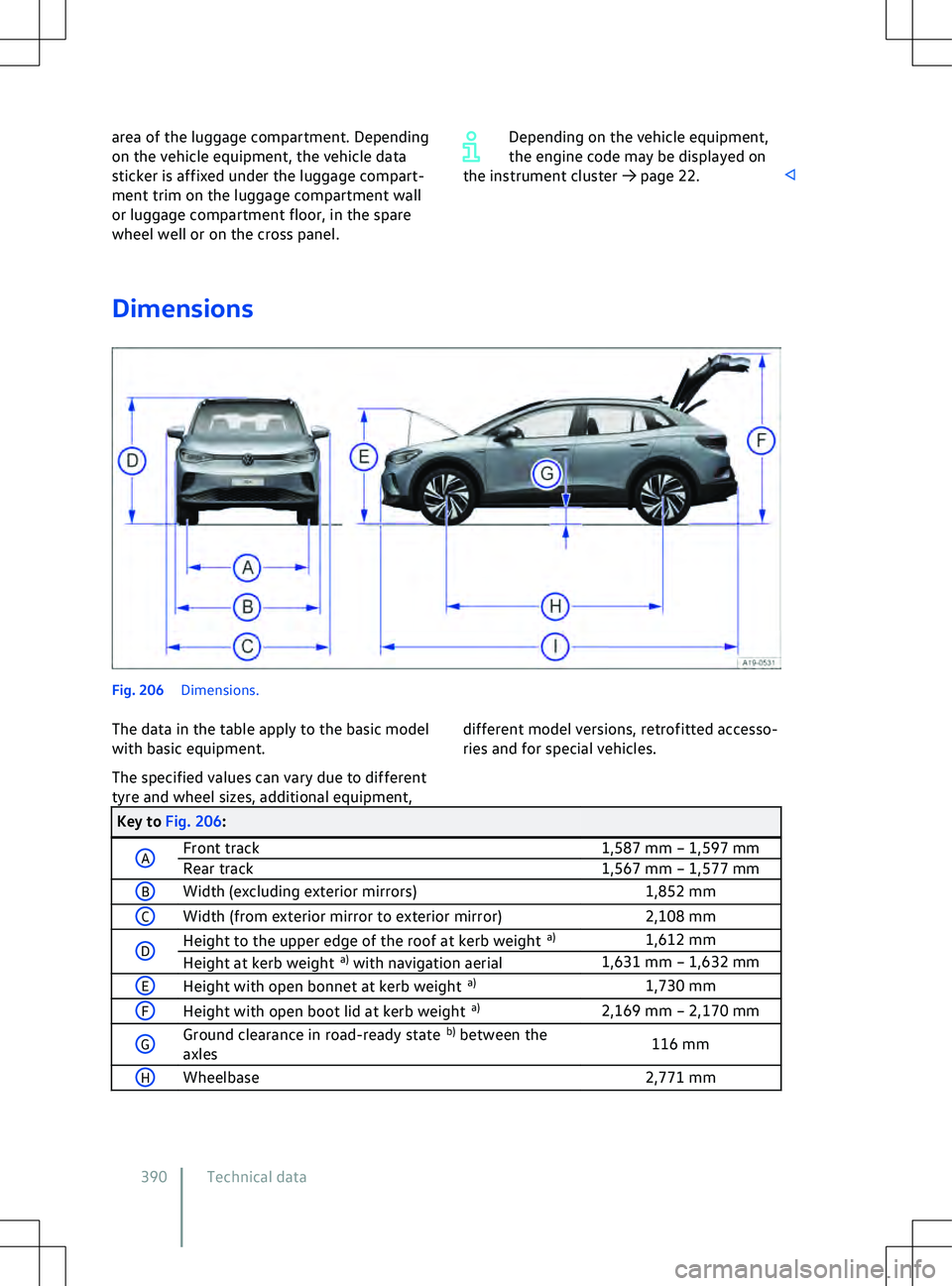
area of the luggage compartment. Depending
on the v
ehicle equipment, the vehicle data
sticker is affixed under the luggage compart-
ment trim on the luggage compartment wall
or luggage compartment floor, in the spare
wheel well or on the cross panel. Depending on the vehicle equipment,
the engine code may be displayed on
the instrument cluster
Page 401 of 417

Securing with a seat belt
65
Securing with i-Size 62
Securing with ISOFIX 62
Securing with the top tether 64
Standards 58
Switching off the front passenger front airbag 53
Weight classes 58
Childproof lock Electrical 81
Cleaning see Vehicle care 355
Climatronic see Air conditioning system 120
Clock 29
Closing Doors 77
Sun blind in the glass roof 119
Windows 89
Cockpit 10
Comfort drive (Travel Assist) see Travel Assist 168
Comfort tyre pressure 333
Coming home and Leaving home function see entry and exit lighting 109
Commercial vehicle registration 373
Component protection 372
Connection Bluetooth 216
Cable 215
USB 215
Wireless 215, 216
Connectivity components 195
Consumables 313
Continuous parking light 108
Control elements 222
Control units Reprogramming 368
System update 196
Controls Cleaning and care 359
Electrically adjustable front seat 95
Mechanically adjustable front seat 94
Convenience closing Windows 90
Convenience functions Reprogramming 368
Convenience opening Windows 90
Convenience turn signal 102Conversions
362, 370
Coolant 315
Checking the coolant level 316
Filler opening 316
Refilling 316
Specification 315
Copyright law 227
Cornering light 105
Dynamic 105
Things to note 111
Counter steering assistance 142
Cruise control system 145
Displays 145
Operating 146
Cruise control system (CCS) Troubleshooting 147
Curtain airbags see Airbag system 55
Customer Care - Call Centre 203
Customer information 366
Customer Interaction Centre 203
Customer Support 203
Cybersecurity 195
Cyclist Monitoring 163
D
Dash panel 10
Airbag system 47
Data connection see Internet 208
Data Link Connector (DLC) 367
Data memory Data services 366
Infotainment functions 368
Data storage Control units 366
Disclosure of data 367
Event data recorder 369
Event memory 367
Integration of mobile devices 368
On-board diagnostic system ( OBD) 367
Online services 369
Operating data in the vehicle 367
Personal reference 367
Rights 367
Data transfer 195
Blocking 204
Unblocking 204
Daytime running lights 103
DC charging
Index 399
11A012720AB
Page 406 of 417

Carrying out functions
224
Inspection 30, 354
Inspection now! 30
Instrument cluster 18
Service interval display 30
Symbols 15
Warning and indicator lamps 15
Interior mirror 116
Interior monitoring system 83
Risk of false alarm 84
Internet Quick connection 209
Setting up a data connection 208
Wi-Fi Client 210
Wi-Fi hotspot 208
Internet Radio 234
ISOFIX 62
see Child seat 57
J
Jack 343
Jump starting Earth connection 302
Jump leads 302
Jump-start connection point (earth con- nection) 302
Procedure 302
K Kerb weight 391, 392
Key Vehicle key 73
Key-operated switch Switching off front passenger front air-bag 53
Keyless Access 75
Emergency switch-off 140
Steering column lock 142
Keyless locking and starting system Keyless
Access
see Keyless Access 75
L
Lane Assist see Lane keeping system (Lane As-sist) 165
Lane change system (Side Assist) 172
Side Assist Plus 174
Switching on and off 173
System limits 172Troubleshooting
174
Lane keeping system (Lane Assist) 165
Displays 167
Switching on and off 166
System limits 165
Troubleshooting 167
Leatherette Cleaning and care 359
Leaving the vehicle 138
LED lights 295
Legal requirements 202
Licences 227
Lifting the vehicle Checklist 346
Jack 345
With the jack 345
Light Entry and exit lighting 109
Light Assist see Main-beam control 105
Lights 102
Advanced main-beam control (Dynamic Light Assist) 107
AUTO 105
Automatic switch-off of side lights and parking lights 108
Background lighting 112
Continuous parking light on both sides of the v ehicle 108
Cornering light 105
Daytime running lights 103
Dynamic headlight range con- trol 110
Functions 104
Headlight range control 109
Instrument and switch lighting 111
Interior and reading lights 111
Main-beam control 105
Poor weather light 104
Rear fog light 104
Side lights 104
Switching on and off 103
Turn signals 102
Vehicle lighting 103
Limiter see Speed limiter 147
Load carrier 262
Load compartment net 260
Load-through hatch 261
Loading Driving with an open boot lid 133
404 Index
Page 408 of 417

Navigation
238, 240, 242
Additional window 245
Controlling the map 239
Controlling the navigation map 239
Detailed view 245
Edit route 245
Entering an address for route guid- ance 242
Equipment level 240
Favourite destinations 243
Function: destination input 242
Further options 245
Last destinations 242, 243
Learn usage patterns 245
Map 239, 243
Navigation announcements 238
Navigation map 239
Offroad mode 243
Operating the map 243
Personal POIs 242
Predictive navigation 242
Restrictions 239
Route plan 245
Saved data 239, 245
Saving destinations 243
Selecting alternative charging sta- tions 244
Selecting charging stations 244
Stored destinations 243
Suggestions 242
Symbols 240
Traffic reports 244
Updating navigation data 241
Using contact data 243
Using the map for destination in- put 243
Zooming into the map 239
Zooming into the navigation map 239
Zooming out of the map 239
Zooming out of the navigation map 239
New tyres 329
Noises Brake support systems 192
Notes on driving 129
Number of seats 34
O
Odometer see View summary 18Old tyres
329
On-board diagnostic system (OBD) 367
Oncoming vehicle braking when turning 164
Online functions Radio 233
Online services 200
Online system update 196
Online vehicle functions 205
Opening Doors 77
Sun blind in the glass roof 119
Windows 89
Operation Park Distance Control 185
Orientation lighting 109
Other applicable documents 217
Overview Centre console 13
Driver door 9
Driver side 10
Front passenger side 14
Front view 7
Rear view 8
Roof 14
Vehicle 7
Warning and indicator lamps 15
Overview of indicator lamps 15
Overview of warning lamps 15
P P ark Distance Control Checklist 180
Malfunction 184
Operating 185
Prerequisites 180
Parking 176
Parking brake 177
Automatic switch-on 177
Car wash 177
Emergency braking function 178
Rolling capability 177
Switching off 177
Switching on 177
Troubleshooting 178
Parking light 108
Switching on and off 108
Parking systems Displays 181
Function buttons 181
General information 179
406 Index
Page 410 of 417

Function
24
Operation 24
Recuperation (energy recovery) Activating 135
Display 135
Selecting level 135
Repairing stone chips (note) 363
Repairs 362
Airbag system 364
Plates 370
Stickers 370
Windscreen 363
Retrofitting a towing bracket 266
Returning end-of life vehicles 373
Returning end-of-life vehicles 373
Reverse assistant see Rear view camera system 185
Reversible belt tensioning 45
Roll-back function Sun blind in the glass roof 119
Windows 91
Rolling capability Parking brake 177
Roof carrier 262
Loading 263
Notes on use 264
Securing 263
Roof load 263
Technical data 263
Roof rack 262
Rubber seals Cleaning and care 359
Running in Brake pads 131
Tyres 330
Running in brake pads see Brakes 131
S
SAFELOCK Safelock 81
SAFELOCK 81
Safety certificate 389
Safety equipment 50
Safety notes 218
Scanning QR code 202
Scrapping 373
Screen 222
Cleaning 227
Screen displays Manoeuvre braking
181
Park Distance Control 181
Seat belt height adjuster 44
Seat belt routing 42
Seat belts 36
Belt retractor 44
Belt status display 37
Belt tension limiter 44
Belt tensioner 44
Buckle-up request 37
Checklist 41
Cleaning and care 359
Fastening 41
Not fastened 39
Seat belt height adjuster 44
Seat belt routing 42
Twisted seat belt 41
Unfastening 41
Use 41
Warning lamp 37
Seat covers Cleaning and care 359
Seat cushions with seat heating Cleaning and care 359
Seat functions 100
Seat heating see Air conditioning system 124
Seat-occupied recognition system see Air conditioning system 120
Seats 34, 93
Adjusting the head restraints 99
Adjusting the steering wheel posi- tion 92
Correct sitting position 35
Electrically adjustable front seat 95
Incorrect sitting position 35
Massage function 102
Mechanically adjustable front seat 94
Memory function 101
Number of seats 34
Rear seat backrest 97
Removing and installing the head re- straints 99
Seat heating 124
Sitting position 34
Seats with airbag components Cleaning and care 359
Selecting a position 140
Selling the vehicle 202
In other countries/continents 134
408 Index
Page 411 of 417

Sensor fields
222
Sensors Add-on parts 363
Damage 363
Repairs 363
Service Digital service schedule 353
Inspection 354
Operating conditions 354
Scope of service 354
Service record 353
Service repairs 353
Vehicle data sticker 353
Service fluids 313
Service interval display 29, 30
Service menu 29
Resetting trip 29
Service interval display 29
Service position Windscreen wipers 293
Setting Time and date 29
Setting the time and date 29
Setting views Multifunction steering wheel 19
Settings App-Connect 212
Area View 182
Parking systems 181
Rear view camera system 181
Wi-Fi 210
Setup Head-up display 22
Park Distance Control 181
Side airbags see Airbag system 54
Side Assist see Lane change system (Side As-sist) 172
Side lights 104
Signal strength display 205
Single door unlocking 79
Snow chains 340
Sockets 193
12-volt 194
Trailer 268
Sound settings 226
Sound system 221
Spanner symbol 30
Spare key 73
Spares 362Special features
Infotainment system 371
Speed index 338
Speed limiter 147
Displays 147
Operating 148
Troubleshooting 148
Speed limiter with predictive control 149
Activating 150
Operation 150
System limits 149
Troubleshooting 150
Static cornering light see Cornering light 105
Stationary air conditioning Programming 128
Switching on 127, 128
Steering Counter steering assistance 142
Electromechanical 142
Electronic steering column lock 142
Indicator lamp 143
Power steering 142
Warning lamp 143
Steering wheel 92
Adjusting 92
Heating 125
Steering wheel heating see Air conditioning system 125
Stickers 370
Stowage areas 193
Stowing loads 254
Stowing luggage 254
Sun blind in the glass roof Opening and closing 119
Roll-back function 119
Sun visors 118
Support 203
Swerve support 163
Switch-off for electrical consumers 322
Switching main beam on and off 105
Switching off Mobile device 248
Mobile phone interface 248
Telephone 248
Switching turn signals on and off 102
Symbols Mobile phone interface 246
see Warning and indicator lamps 15
System Traffic hazard alert 199
Index 40911A012720AB