Page 465 of 548
4657-2. Steps to take in an emergency
7
When trouble arises
played on the multi-informa-
tion display.
*1: Vehicles with 4.2-inch display
*2: Vehicles with 7-inch display
4Press the power switch
shortly and firmly.
In the event that the hybrid system
still cannot be started, contact your
Toyota dealer.
■Stopping the hybrid system
Shift the shift lever to P, set the
parking brake and press the power
switch as you no rmally do when
stopping the hybrid system.
■Replacing the key battery
As the above proc edure is a tempo-
rary measure, it is recommended
that the electronic key battery be
replaced immediate ly when the bat-
tery is depleted. ( P.422)
■Alarm (if equipped)
If a door is unlocked using the
mechanical key when the alarm sys-
tem is set, the alarm may be trig-
gered. ( P.80)
■Changing power switch modes
Release the brake pedal and press
the power switch in step 3 above.
The hybrid system does not start
and modes will be changed each
time the switch is pressed.
( P.200)
If you have a set of jumper (or
booster) cables and a second
vehicle with a 12-volt battery,
you can jump start your vehicle
by following the steps below.
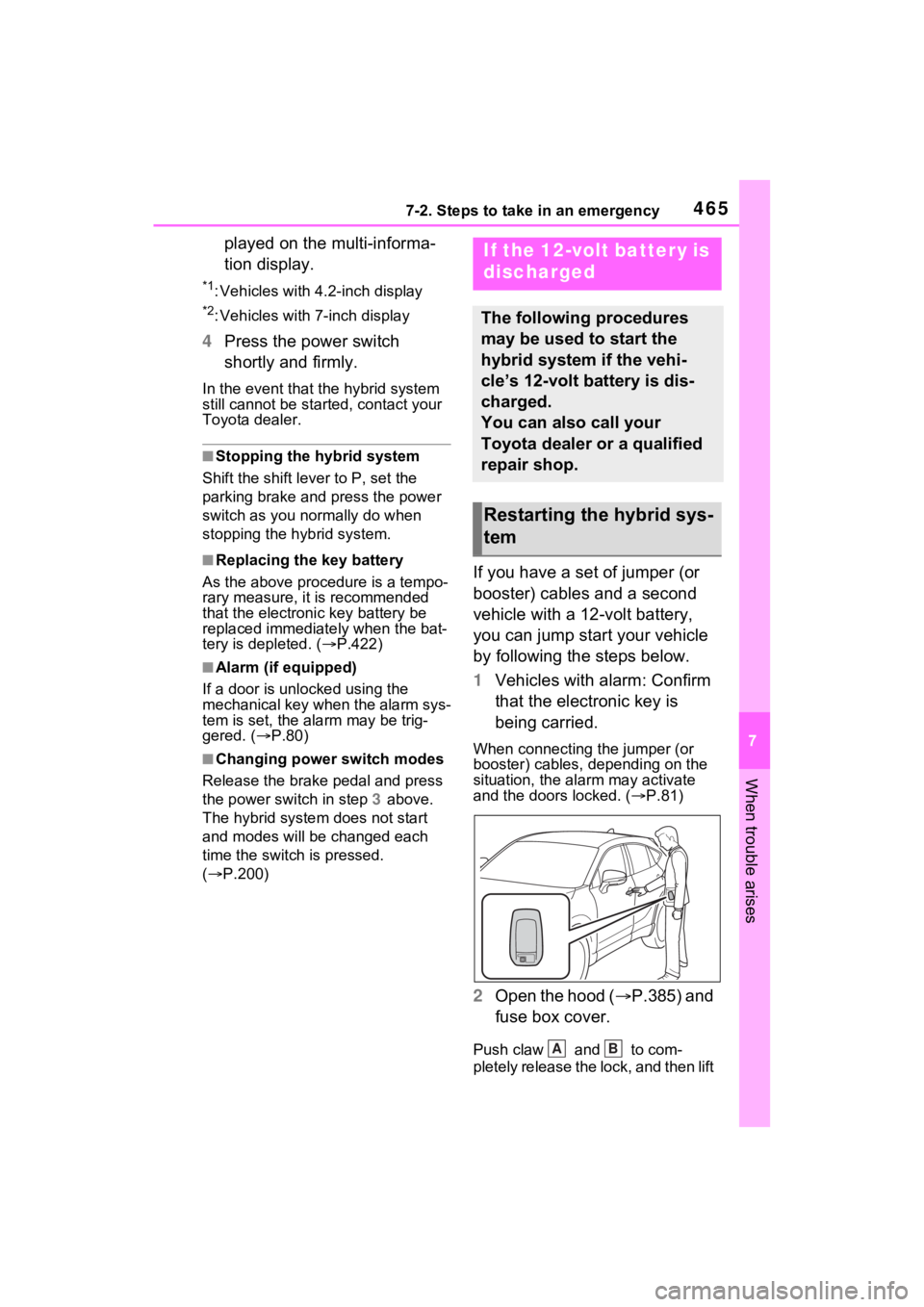
1 Vehicles with alarm: Confirm
that the electronic key is
being carried.
When connecting the jumper (or
booster) cables, depending on the
situation, the alarm may activate
and the doors locked. ( P.81)
2 Open the hood ( P.385) and
fuse box cover.
Push claw and to com-
pletely release the lock, and then lift
If the 12-volt battery is
discharged
The following procedures
may be used to start the
hybrid system if the vehi-
cle’s 12-volt battery is dis-
charged.
You can also call your
Toyota dealer or a qualified
repair shop.
Restarting the hybrid sys-
tem
AB
Page 467 of 548

4677-2. Steps to take in an emergency
7
When trouble arises
recharge the 12-volt battery
of your vehicle.
6 Maintain the engine speed of
the second vehicle and start
the hybrid system of your
vehicle by turning the power
switch to ON.
7 Make sure the “READY” indi-
cator comes on. If the indica-
tor light does not come on,
contact your Toyota dealer.
8 Once the hybrid system has
started, remove the jumper
cables in the exact reverse
order from which they were
connected.
9 Close the exclusive jump
starting terminal cover, and
reinstall the fuse box cover to
its original position.
Once the hybrid system starts,
have the vehicle inspected at
your Toyota dealer as soon as
possible.
■Starting the hybrid system
when the 12-volt battery is dis-
charged
The hybrid system cannot be
started by push-starting.
■To prevent 12-vol t battery dis-
charge
●Turn off the headlights and the
audio system while the hybrid sys-
tem is off.
●Turn off any unnec essary electri-
cal components when the vehicle
is running at a low speed for an
extended period, such as in heavy
traffic.
■When the 12-volt battery is
removed or discharged
●Information stored in the ECU is
cleared. When the 12-volt battery
is depleted, have the vehicle
inspected at you r Toyota dealer.
●Some systems may require initial-
ization. (P.512)
■When removing the 12-volt bat-
tery terminals
When the 12-volt battery terminals
are removed, the information stored
in the ECU is cleared. Before
removing the 12-vo lt battery termi-
nals, contact your Toyota dealer.
■Charging the 12-volt battery
The electricity stored in the 12-volt
battery will discha rge gradually even
when the vehicle i s not in use, due
to natural dischar ge and the drain-
ing effects of certain electrical appli-
ances. If the vehicle is left for a long
time, the 12-volt battery may dis-
charge, and the hybrid system may
be unable to start. (The 12-volt bat-
tery recharges automatically while
the hybrid system is operating.)
■When recharging or replacing
the 12-volt battery
●In some cases, it may not be pos-
sible to unlock the doors using the
smart key system when the 12-
volt battery is discharged. Use the
wireless remote c ontrol or the
mechanical key to lock or unlock
the doors.
●The hybrid syste m may not start
on the first attemp t after reinstall-
ing the 12-volt battery. In that
case, start the hybrid system in
the same manner as when the
electronic key does not operate
properly ( P.464). This is not a
malfunction, as the hybrid system
will start normally on the second
attempt.
●The power switch mode is memo-
rized by the vehicle. When the 12-
volt battery is reconnected, the
system will return to the mode it
Page 502 of 548
5028-2. Customization
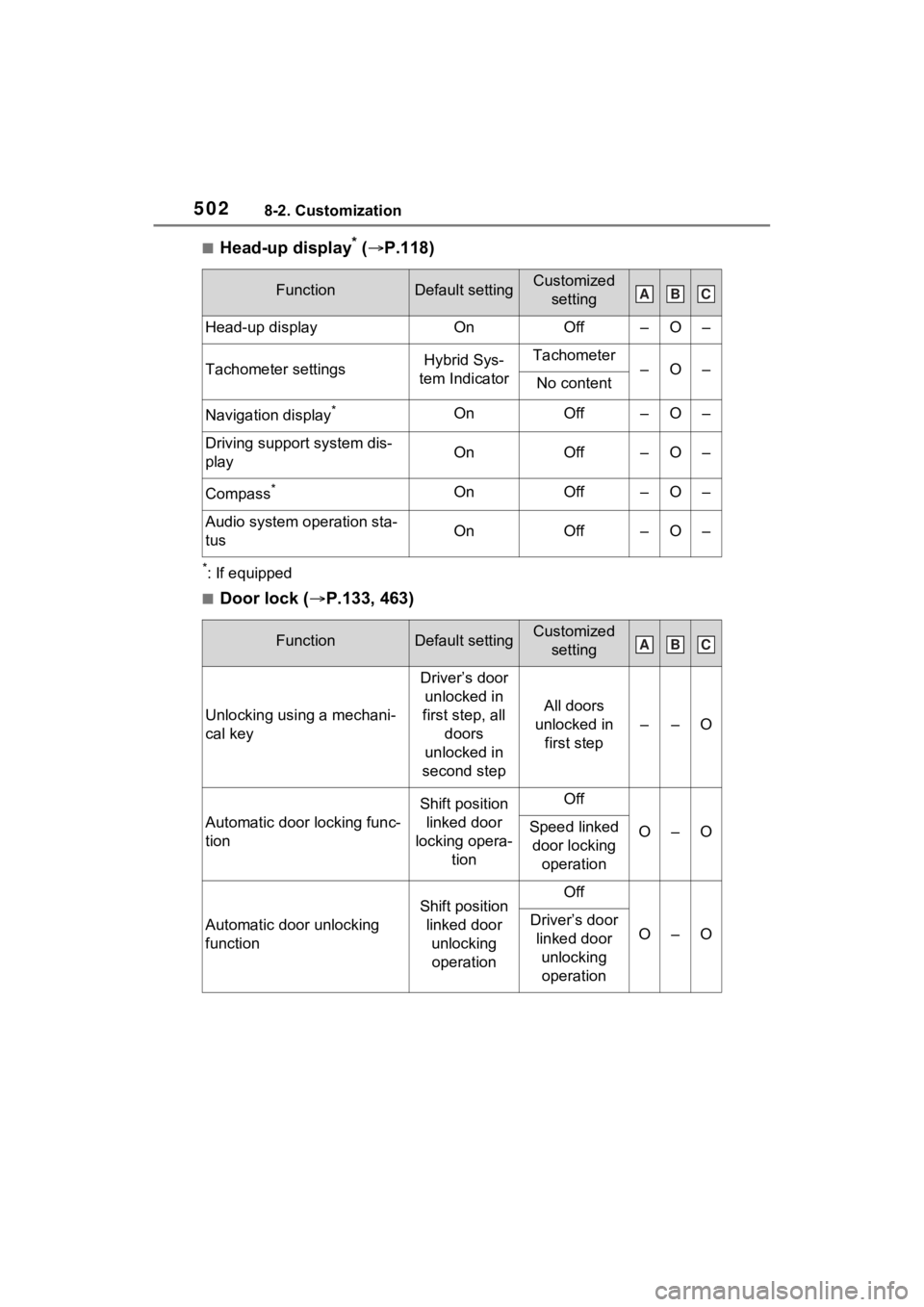
■Head-up display* ( P.118)
*: If equipped
■Door lock ( P.133, 463)
FunctionDefault settingCustomized
setting
Head-up displayOnOff–O–
Tachometer settingsHybrid Sys-
tem IndicatorTachometer–O–No content
Navigation display*OnOff–O–
Driving support system dis-
playOnOff–O–
Compass*OnOff–O–
Audio system operation sta-
tusOnOff–O–
FunctionDefault settingCustomized setting
Unlocking using a mechani-
cal key
Driver’s door unlocked in
first step, all doors
unlocked in
second step
All doors
unlocked in first step
––O
Automatic door locking func-
tion
Shift position linked door
locking opera- tionOff
O–OSpeed linked door locking operation
Automatic door unlocking
function
Shift position linked door unlocking operationOff
O–ODriver’s door linked door unlocking operation
ABC
ABC
Page 503 of 548
5038-2. Customization
8
Vehicle specifications
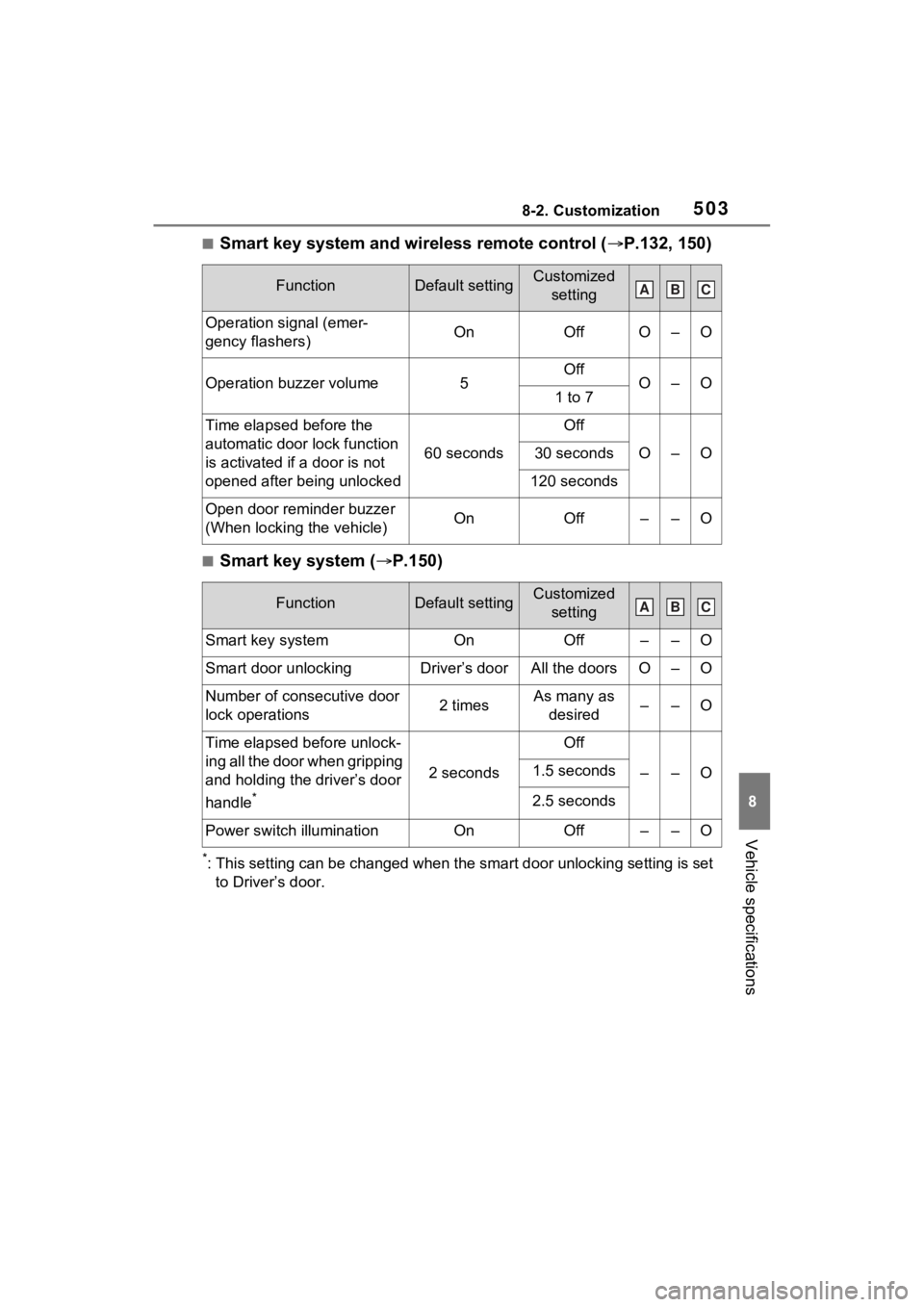
■Smart key system and wireless remote control (P.132, 150)
■Smart key system ( P.150)
*: This setting can be changed when the smart door unlocking sett ing is set
to Driver’s door.
FunctionDefault settingCustomized setting
Operation signal (emer-
gency flashers)OnOffO–O
Operation buzzer volume5OffO–O1 to 7
Time elapsed before the
automatic door lock function
is activated if a door is not
opened after being unlocked
60 seconds
Off
O–O30 seconds
120 seconds
Open door reminder buzzer
(When locking the vehicle)OnOff––O
FunctionDefault settingCustomized setting
Smart key systemOnOff––O
Smart door unlockingDriver’s doorAll the doorsO–O
Number of consecutive door
lock operations2 timesAs many as desired––O
Time elapsed before unlock-
ing all the door when gripping
and holding the driver’s door
handle
*
2 seconds
Off
––O1.5 seconds
2.5 seconds
Power switch illuminationOnOff––O
ABC
ABC
Page 506 of 548
5068-2. Customization
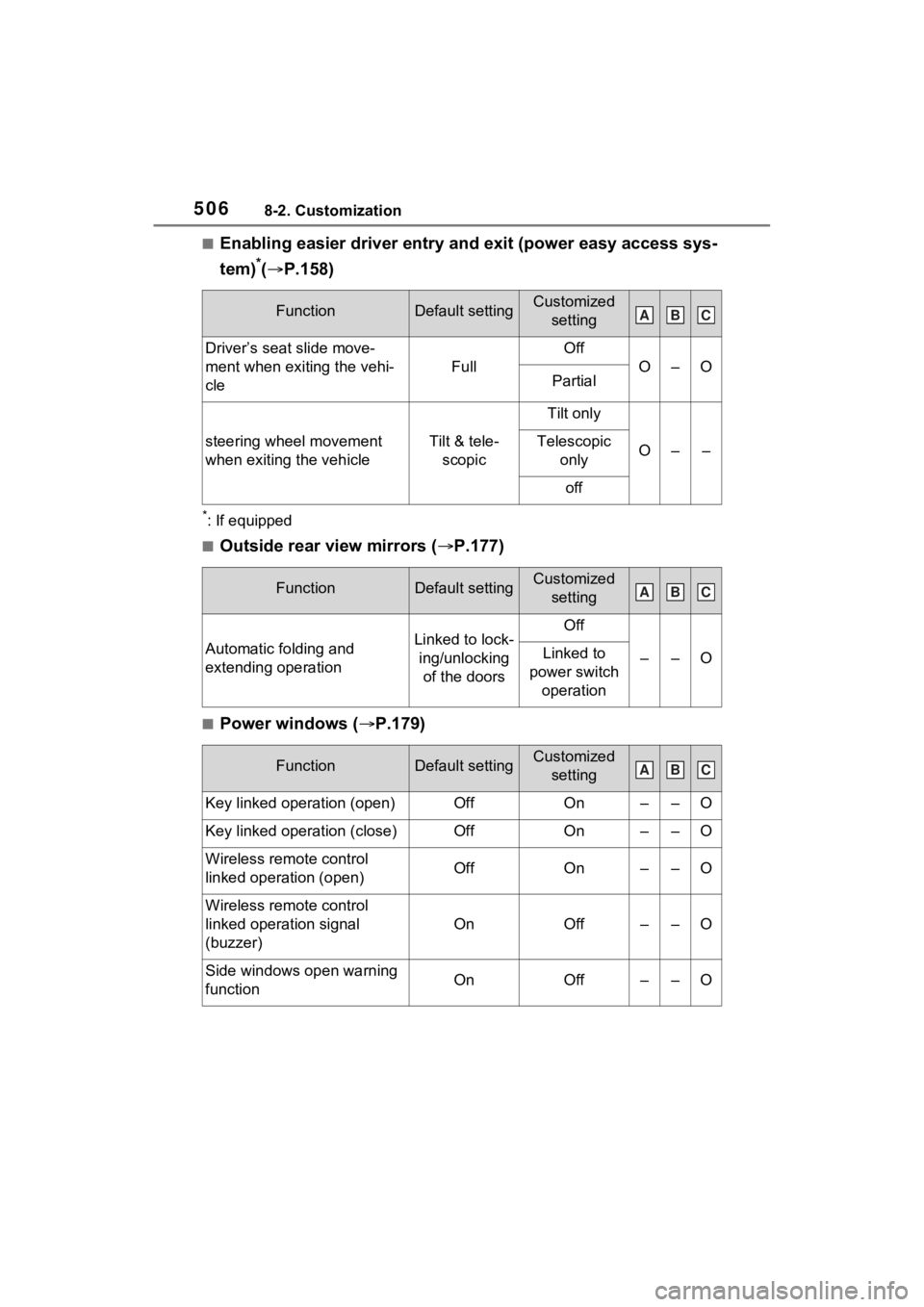
■Enabling easier driver entry and exit (power easy access sys-
tem)
*(P.158)
*: If equipped
■Outside rear view mirrors ( P.177)
■Power windows (P.179)
FunctionDefault settingCustomized
setting
Driver’s seat slide move-
ment when exiting the vehi-
cle
Full
Off
O–OPartial
steering wheel movement
when exiting the vehicleTilt & tele-scopic
Tilt only
O––Telescopic only
off
FunctionDefault settingCustomized setting
Automatic folding and
extending operationLinked to lock-ing/unlocking of the doorsOff
––OLinked to
power switch operation
FunctionDefault settingCustomized setting
Key linked operation (open)OffOn––O
Key linked operation (close)OffOn––O
Wireless remote control
linked operation (open)OffOn––O
Wireless remote control
linked operation signal
(buzzer)
OnOff––O
Side windows open warning
functionOnOff––O
ABC
ABC
ABC
Page 510 of 548
5108-2. Customization
*: If equipped
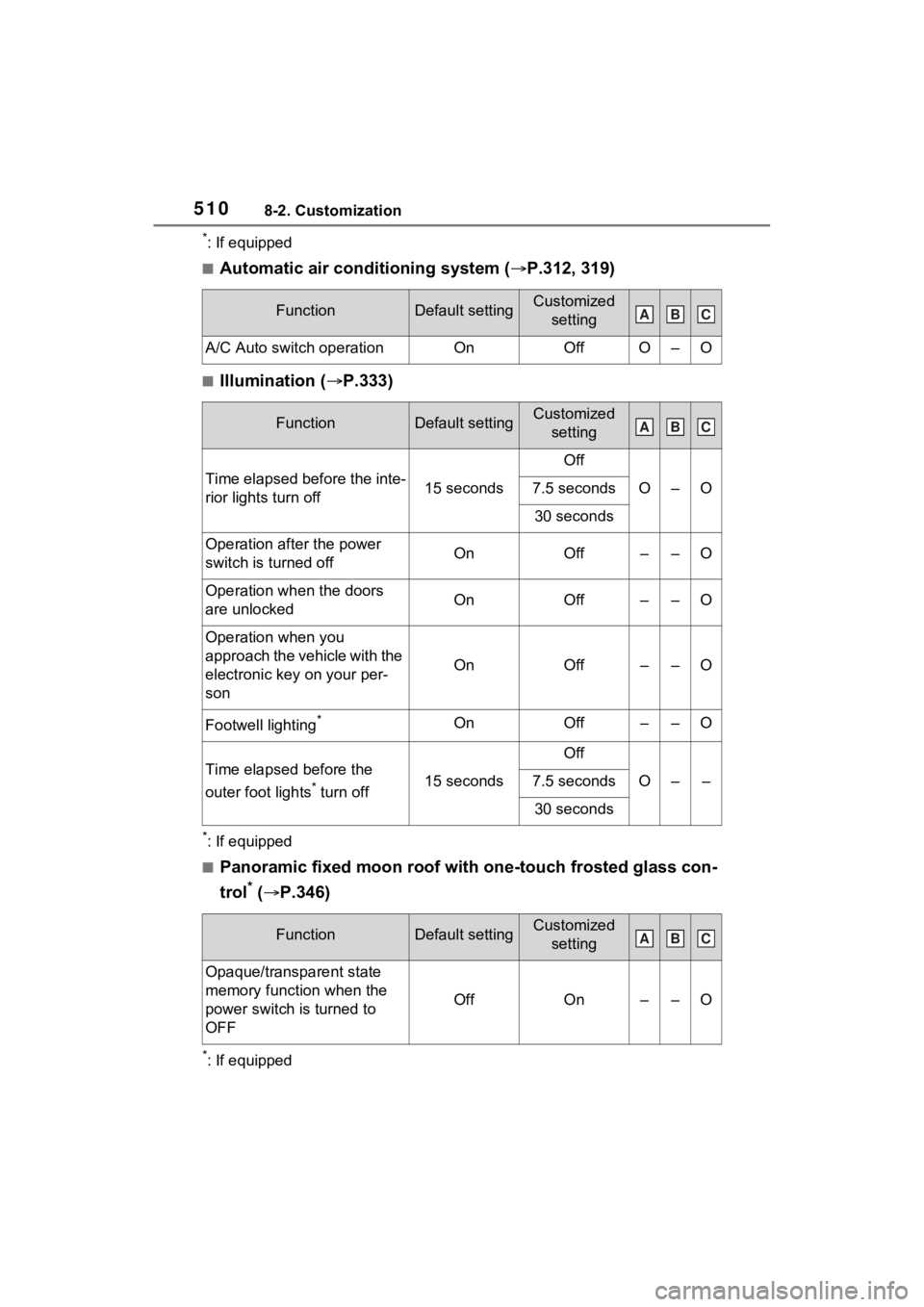
■Automatic air conditioning system (P.312, 319)
■Illumination ( P.333)
*: If equipped
■Panoramic fixed moon roof with one-touch frosted glass con-
trol
* ( P.346)
*: If equipped
FunctionDefault settingCustomized
setting
A/C Auto switch operationOnOffO–O
FunctionDefault settingCustomized setting
Time elapsed before the inte-
rior lights turn off15 seconds
Off
O–O7.5 seconds
30 seconds
Operation after the power
switch is turned offOnOff––O
Operation when the doors
are unlockedOnOff––O
Operation when you
approach the vehicle with the
electronic key on your per-
son
OnOff––O
Footwell lighting*OnOff––O
Time elapsed before the
outer foot lights
* turn off15 seconds
Off
O––7.5 seconds
30 seconds
FunctionDefault settingCustomized setting
Opaque/transparent state
memory function when the
power switch is turned to
OFF
OffOn––O
ABC
ABC
ABC
Page 511 of 548
5118-2. Customization
8
Vehicle specifications
■Vehicle customization
●When the speed linked door locking function and shift position linked door
locking function are both on, th e door lock operates as follows .
• If the vehicle is started with a ll the doors locked, the speed linked door
locking function would not operate.
• If the vehicle is started with any door unlocked, the speed li nked door lock-
ing function will operate.
• When shifting the shift lever to any position other than P, all the doors will
be locked.
●When the smart key system is o ff, the selecting door to unlock cannot be
customized.
●When the doors remain closed after unlocking the doors and the auto-
matic door lock function is ac tivated, the signals will be gene rated in
accordance with the Operation si gnal (buzzer) and the Operation signal
(emergency flashers) settings.
Page 526 of 548
526What to do if... (Troubleshooting)
1-1.What to do if... (Troubleshooting)What to do if... (Troubleshooting)
If you lose your keys or
mechanical keys, new genu-
ine keys or mechanical keys
can be made by your Toyota
dealer. ( P.462)
If you lose your electronic
keys, the risk of vehicle theft
increases significantly. Con-
tact your Toyota dealer imme-
diately. ( P.462)
Is the key battery weak or
depleted? ( P.422)
Is the power switch in ON?
When locking the doors, turn
the power switch off.
( P.200)
Is the electronic key left inside
the vehicle?
When locking the doors,
make sure that you have the electronic key on your person.
The function may not operate
properly due to the condition
of the radio wave. ( P.152)
Is the child-protector lock set?
The rear door cannot be
opened from inside the vehi-
cle when the lock is set. Open
the rear door from outside
and then unlock the child-pro-
tector lock. ( P.137)
Did you press the power
switch while firmly depress-
ing the brake pedal?
( P.197)
Is the shift lever in P?
( P.197)
Is the electronic key any-
where detectable inside the
vehicle? ( P.151)
Is the electronic key battery
weak or depleted?
In this case, the hybrid sys-
tem can be started in a tem-
porary way. ( P.464)
If you have a problem,
check the following before
contacting your Toyota
dealer.
The doors cannot be
locked, unlocked, opened
or closed
You lose your keys
The doors cannot be
locked or unlocked
The rear door cannot be
opened
If you think something is
wrong
The hybrid system does
not start