Page 228 of 548
2284-4. Refueling
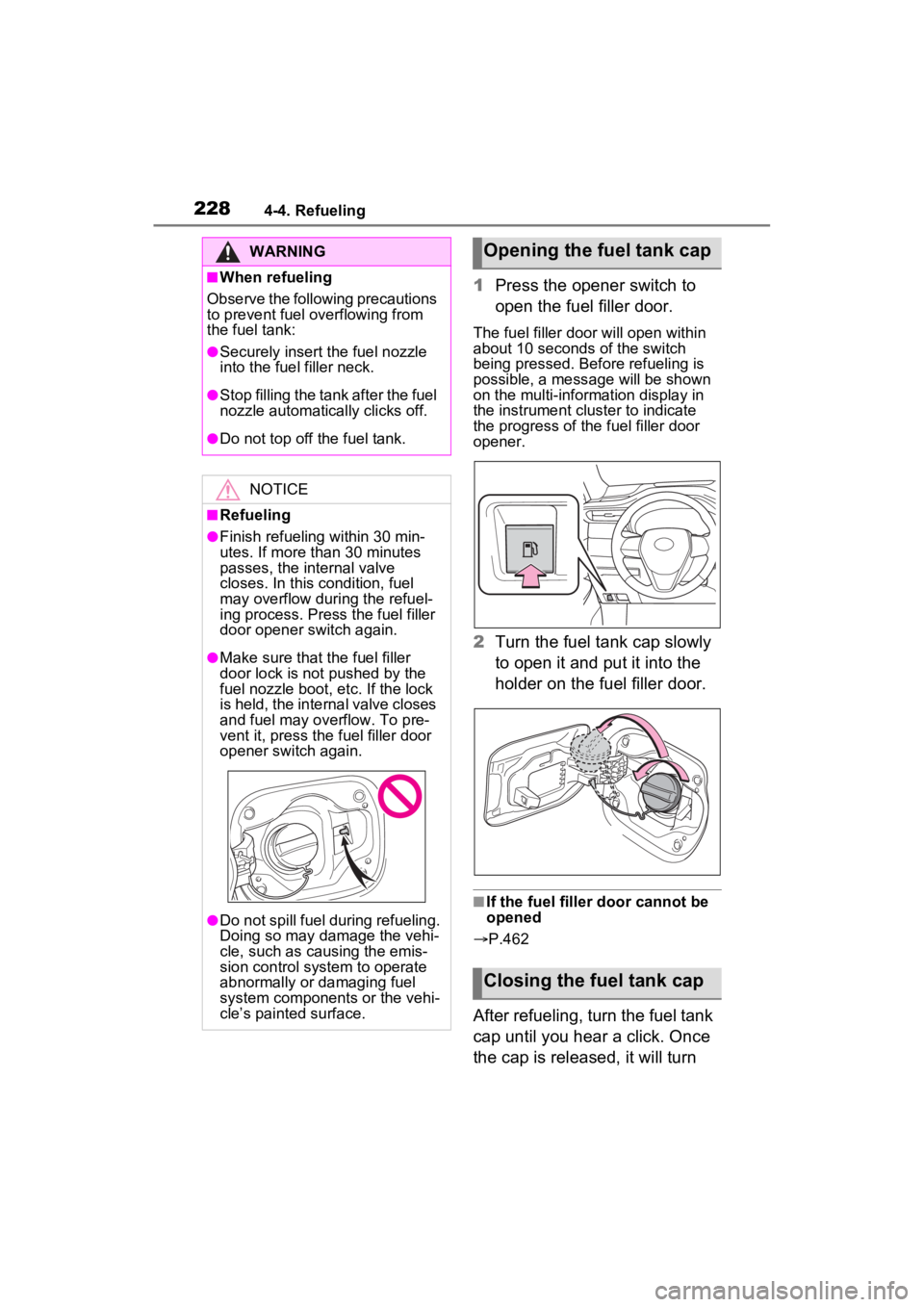
1Press the opener switch to
open the fuel filler door.
The fuel filler door will open within
about 10 seconds of the switch
being pressed. Before refueling is
possible, a message will be shown
on the multi-information display in
the instrument cluster to indicate
the progress of the fuel filler door
opener.
2Turn the fuel tank cap slowly
to open it and put it into the
holder on the fuel filler door.
■If the fuel filler door cannot be
opened
P.462
After refueling, turn the fuel tank
cap until you hear a click. Once
the cap is released, it will turn
WARNING
■When refueling
Observe the following precautions
to prevent fuel overflowing from
the fuel tank:
●Securely insert the fuel nozzle
into the fuel filler neck.
●Stop filling the tank after the fuel
nozzle automatically clicks off.
●Do not top off the fuel tank.
NOTICE
■Refueling
●Finish refueling within 30 min-
utes. If more than 30 minutes
passes, the internal valve
closes. In this condition, fuel
may overflow during the refuel-
ing process. Press the fuel filler
door opener switch again.
●Make sure that the fuel filler
door lock is not pushed by the
fuel nozzle boot, etc. If the lock
is held, the internal valve closes
and fuel may overflow. To pre-
vent it, press the fuel filler door
opener switch again.
●Do not spill fuel during refueling.
Doing so may damage the vehi-
cle, such as causing the emis-
sion control system to operate
abnormally or damaging fuel
system components or the vehi-
cle’s painted surface.
Opening the fuel tank cap
Closing the fuel tank cap
Page 487 of 548
4878-1. Specifications
8
Vehicle specifications
If fuel containing MMT is used, your
emission control system may be
adversely affected.
The malfunction indicator lamp on
the instrument cluster may come on.
If this happens, contact your Toyota
dealer for service.
■If your engine knocks
●Consult your Toyota dealer.
●You may occasionally notice light
knocking for a short time while
accelerating or driving uphill. This
is normal and there is no need for
concern.
NOTICE
■Notice on fuel quality
●Do not use impro per fuels. If
improper fuels are used, the
engine will be damaged.
●Do not use leaded gasoline.
Leaded gasoline can cause
damage to your vehicle’s three-
way catalytic converters caus-
ing the emission control system
to malfunction.
●Do not use gasohol other than
the type previously stated.
Other gasohol may cause fuel
system damage or vehicle per-
formance problems.
●Using unleaded gasoline with
an octane number or rating
lower than the l evel previously
stated will cause persistent
heavy knocking.
At worst, this will lead to engine
damage.
■Fuel-related poor driveability
If poor driveability (poor hot start-
ing, vaporization, engine knock-
ing, etc.) is encountered after
using a different type of fuel, dis-
continue the use of that type of
fuel.
■When refueling with gasohol
Take care not to spill gasohol. It
can damage your vehicle’s paint.
Page 501 of 548
5018-2. Customization
8
Vehicle specifications
*1: For details about each function: P.102, 113
*2: The default setting varies according to country.
*3: Vehicles with 7-inch display only
*4: Even if “Trip” is selected, the display of the average fuel co nsumption will
not change.
*5: If “Tank” is selected, t he gadget will be hidden.
*6: Vehicles with 4.2-inch display only
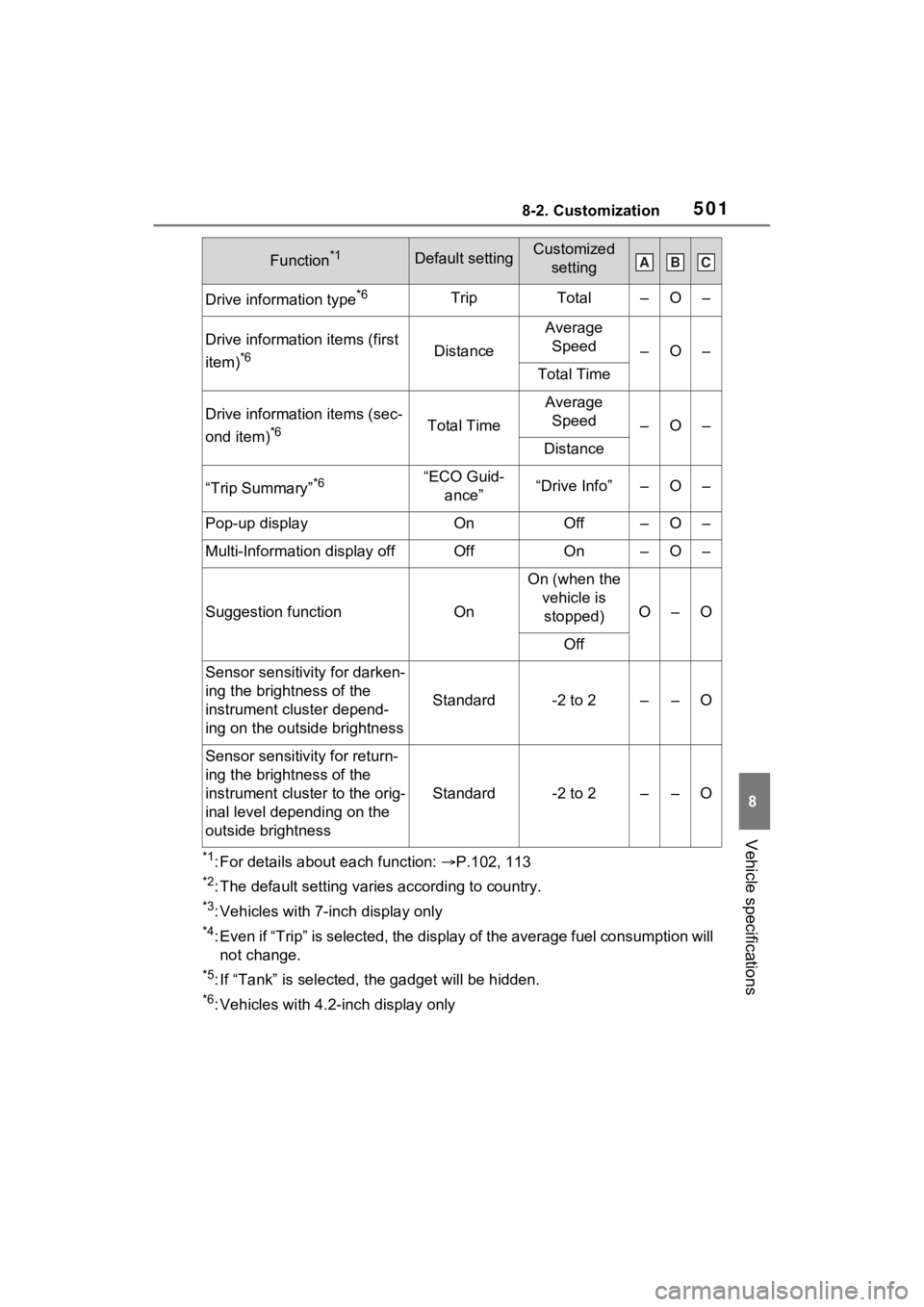
Drive information type*6TripTotal–O–
Drive information items (first
item)
*6Distance
Average Speed
–O–
Total Time
Drive information items (sec-
ond item)
*6Total Time
Average Speed
–O–
Distance
“Trip Summary”*6“ECO Guid- ance”“Drive Info”–O–
Pop-up displayOnOff–O–
Multi-Information display offOffOn–O–
Suggestion functionOn
On (when the vehicle is stopped)
O–O
Off
Sensor sensitivity for darken-
ing the brightness of the
instrument cluster depend-
ing on the outside brightness
Standard-2 to 2––O
Sensor sensitivity for return-
ing the brightness of the
instrument cluster to the orig-
inal level depending on the
outside brightness
Standard-2 to 2––O
Function*1Default settingCustomized settingABC