2022 TOYOTA VENZA HYBRID brake
[x] Cancel search: brakePage 451 of 548

4517-2. Steps to take in an emergency
7
When trouble arises
■If “Traction Battery Needs to be
Protected Shift into P to
Restart” is shown
This message is displayed when the
hybrid battery (traction battery)
charge has become extremely low
because the shift lever has been left
in N for a certain amount of time.
When operating the vehicle, shift to
P and restart the hybrid system.
■If “Shift is in N Release Acceler-
ator Before Shif ting” is shown
Message is displayed when the
accelerator pedal has been
depressed and the shift lever is in N.
Release the accelerator pedal and
shift the shift lever to D or R.
■If “Press Brake when Vehicle is
Stopped Hybrid System may
Overheat” is shown
Message is displayed when the
accelerator pedal is depressed to
maintain the vehicle position when
stopped on a upward slope, etc.
If this continues, the hybrid system
may overheat.
Release the accelerator pedal and
depress the brake pedal.
■If “Auto Power OFF to Conserve
Battery” is shown
Power was turned off due to the
automatic power off function.
Next time when starting the hybrid
system, operate th e hybrid system
for approximatel y 5 minutes to
recharge the 12-volt battery.
■If “Engine Oil Level Low Add or
Replace” is displayed
The engine oil level may be low.
Check the level of the engine oil,
and add engine oil if necessary.
This message may be displayed if
the vehicle is sto pped on a slope.
Move the vehicle to a level surface
and check if the message disap-
pears.
■If “Maintenance Required
Soon” is shown
Indicates that all maintenance
according to the driven distance on
the maintenance schedule
* should
be performed soon.
Comes on approximately 4500
miles (7200 km) after the message
has been reset.
If necessary, perform maintenance.
Please reset the m essage after the
maintenance is performed.
( P.378)
*: Refer to the separate “Scheduled
Maintenance Guide” or “Owner’
Manual Supplement” for the main-
tenance interval applicable to your
vehicle.
■If “Maintenance Required Visit
Your Dealer” is shown
Indicates that all maintenance is
required to correspond to the driven
distance on the maintenance sched-
ule
*.
Comes on approximately 5000
miles (8000 km) after the message
has been reset. (The indicator will
not work properly unless the mes-
sage has been reset.)
Perform the necessary mainte-
nance. Please reset the message
after the maintenance is performed.
( P.378)
*: Refer to the separate “Scheduled
Maintenance Guide” or “Owner’
Manual Supplement” for the main-
tenance interval applicable to your
vehicle.
■If “Oil Maintenance Required
Soon” is displayed
Indicates that the engine oil should
be scheduled to be changed.
Check the engine oil and change it if
necessary.
After changing the engine oil, make
sure to reset t he message.
Page 452 of 548
4527-2. Steps to take in an emergency
( P.390)
■If “Oil Maintenance Required” is
displayed
Indicates that the engine oil should
be changed.
Check and change the engine oil,
and oil filter by your Toyota dealer.
After changing the engine oil, make
sure to reset the message.
( P.390)
■If “Accelerator and Brake Ped-
als Pressed Simultaneously” is
shown
The accelerator and brake pedals
are being depressed simultane-
ously. ( P.185)
Release the accelerator pedal and
depress the brake pedal.
■If a message that indicates the
malfunction of front camera is
displayed
The following sys tems may be sus-
pended until the pr oblem shown in
the message is resolved. ( P.234,
438)
●PCS (Pre-Collis ion System)
●LTA (Lane Tracing Assist)
●AHB (Automatic High Beam)
●RSA (Road Sign Assist)*
●Dynamic radar cruise control with
full-speed range
*: If equipped
■If a message that indicates the
malfunction of radar sensor is
displayed
The following sys tems may be sus-
pended until the pr oblem shown in
the message is resolved. ( P.234,
438)
●PCS (Pre-Collis ion System)
●LTA (Lane Tracing Assist)
●Dynamic radar cruise control with
full-speed range
■If “Radar Cruise Control
Unavailable See Owner’s Man-
ual” is shown
The dynamic radar cruise control
with full-speed range system is sus-
pended temporarily or until the prob-
lem shown in the message is
resolved. (causes and coping meth-
ods: P.234)
■If “Radar Cruise Control
Unavailable” is shown
The dynamic radar cruise control
with full-speed range system cannot
be used temporarily. Use the sys-
tem when it becomes available
again.
■Warning buzzer
P.445
WARNING
■If a warning light comes on or
a warning buzzer sounds
when a warning message is
shown on the multi-informa-
tion display
P.447
NOTICE
■If “Maintenance Required For
Traction Battery At Your
Dealer” is shown
The hybrid battery (traction bat-
tery) is scheduled to be inspected
or replaced. Hav e the vehicle
inspected by your Toyota dealer
immediately.
●Continuing to dr ive the vehicle
without having the hybrid bat-
tery (traction bat tery) inspected
will cause the hybrid system not
to start.
●If the hybrid system does not
start, contact your Toyota
dealer immediately.
Page 453 of 548
4537-2. Steps to take in an emergency
7
When trouble arises
Stop the vehicle in a safe place on a hard, flat surface.
Set the parking brake.
Shift the shift lever to P.
Stop the hybrid system.
Turn on the emergency flashers. ( P.430)
Turn off the power back door system. ( P.149)
If you have a flat tire
Your vehicle is equipped with a spare tire. The flat tire can be
replaced with the spare tire.
For details about tires: P.397
WARNING
■If you have a flat tire
Do not continue driv ing with a flat tire.
Driving even a short distance with a flat tire can damage the t ire and the
wheel beyond repair, which could result in an accident.
Before jacking up the vehicle
Page 455 of 548
4557-2. Steps to take in an emergency
7
When trouble arises
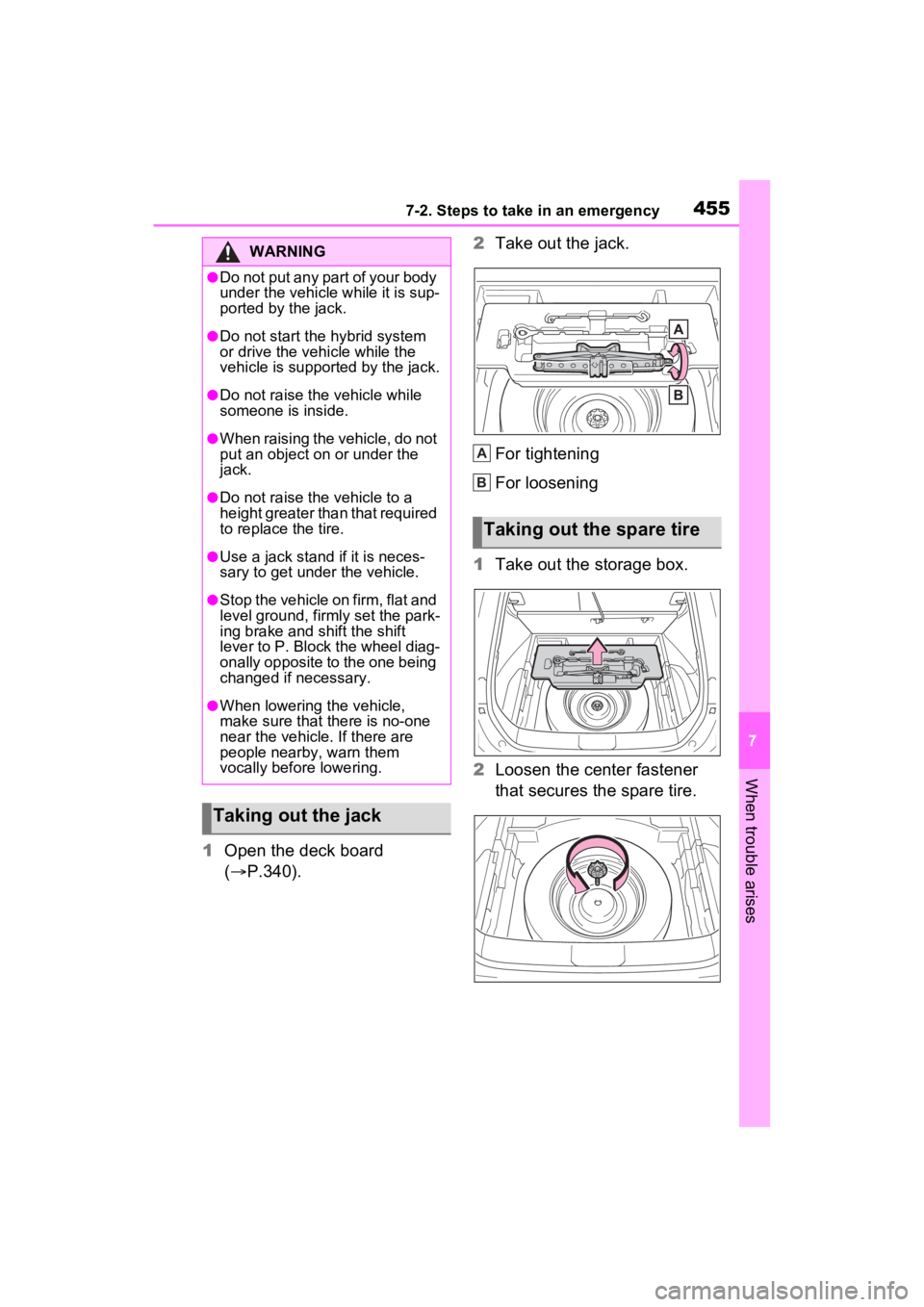
1Open the deck board
( P.340). 2
Take out the jack.
For tightening
For loosening
1 Take out the storage box.
2 Loosen the center fastener
that secures the spare tire.
WARNING
●Do not put any part of your body
under the vehicle while it is sup-
ported by the jack.
●Do not start the hybrid system
or drive the vehicle while the
vehicle is suppor ted by the jack.
●Do not raise the vehicle while
someone is inside.
●When raising the vehicle, do not
put an object on or under the
jack.
●Do not raise the vehicle to a
height greater than that required
to replace the tire.
●Use a jack stand if it is neces-
sary to get under the vehicle.
●Stop the vehicle on firm, flat and
level ground, firm ly set the park-
ing brake and shift the shift
lever to P. Block the wheel diag-
onally opposite to the one being
changed if necessary.
●When lowering the vehicle,
make sure that there is no-one
near the vehicle. If there are
people nearby, warn them
vocally before lowering.
Taking out the jack
Taking out the spare tire
A
B
Page 457 of 548
4577-2. Steps to take in an emergency
7
When trouble arises
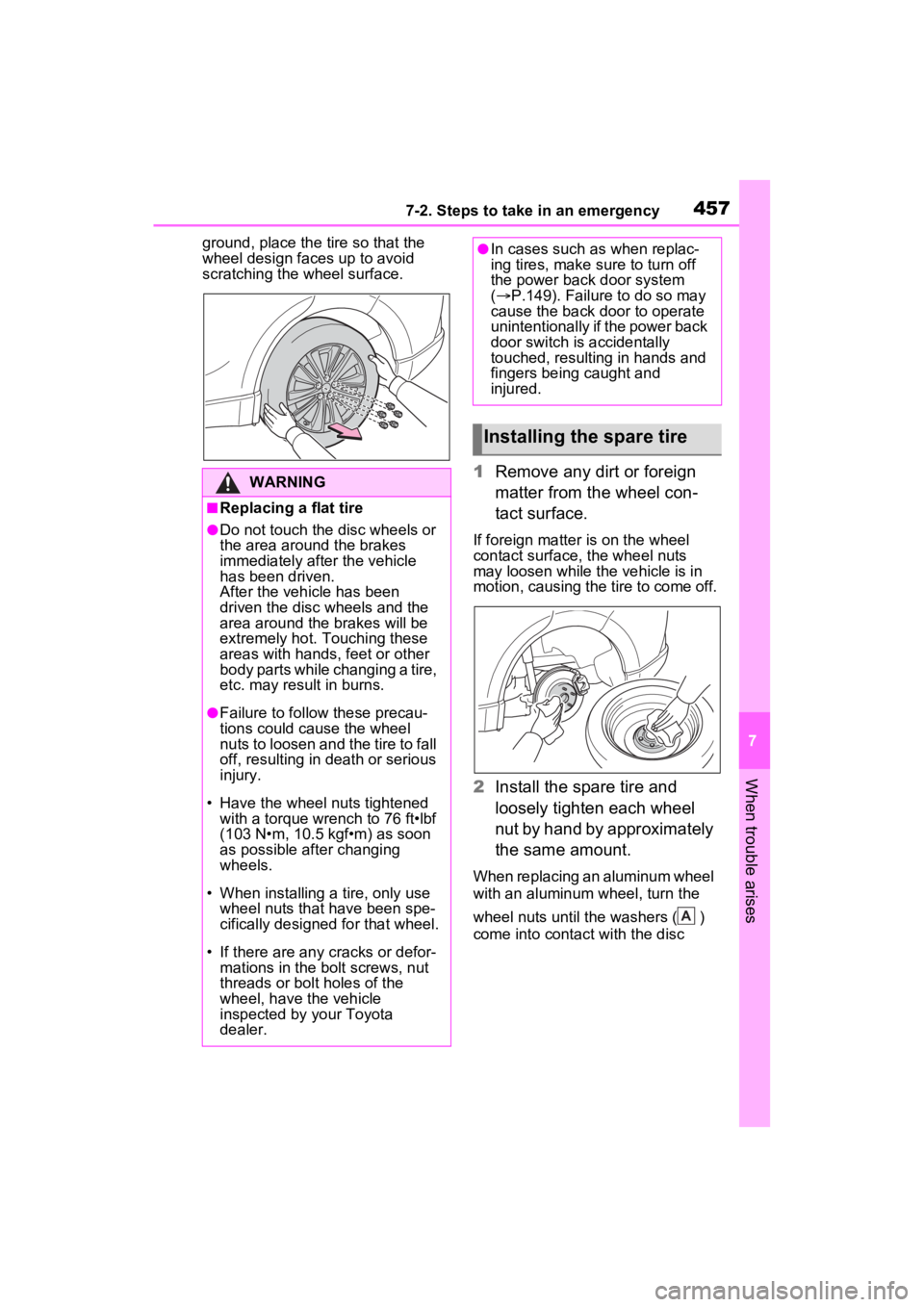
ground, place the tire so that the
wheel design faces up to avoid
scratching the wheel surface.
1 Remove any dirt or foreign
matter from the wheel con-
tact surface.
If foreign matter is on the wheel
contact surface, the wheel nuts
may loosen while the vehicle is in
motion, causing the tire to come off.
2 Install the spare tire and
loosely tighten each wheel
nut by hand by approximately
the same amount.
When replacing an aluminum wheel
with an aluminum wheel, turn the
wheel nuts until the washers ( )
come into contact with the disc
WARNING
■Replacing a flat tire
●Do not touch the disc wheels or
the area around the brakes
immediately after the vehicle
has been driven.
After the vehicle has been
driven the disc wheels and the
area around the brakes will be
extremely hot. Touching these
areas with hands , feet or other
body parts while changing a tire,
etc. may result in burns.
●Failure to follow these precau-
tions could cause the wheel
nuts to loosen and the tire to fall
off, resulting in death or serious
injury.
• Have the wheel nuts tightened with a torque wrench to 76 ft•lbf
(103 N•m, 10.5 kgf•m) as soon
as possible after changing
wheels.
• When installing a tire, only use wheel nuts that have been spe-
cifically designed for that wheel.
• If there are any cracks or defor- mations in the bolt screws, nut
threads or bolt holes of the
wheel, have the vehicle
inspected by your Toyota
dealer.
●In cases such as when replac-
ing tires, make sure to turn off
the power back door system
( P.149). Failure to do so may
cause the back door to operate
unintentionally if the power back
door switch is accidentally
touched, resulting in hands and
fingers being caught and
injured.
Installing the spare tire
A
Page 459 of 548
4597-2. Steps to take in an emergency
7
When trouble arises
1Replace a rear tire with the com-
pact spare tire.
2 Replace the flat front tire with the
tire removed from the rear of the
vehicle.
3 Fit tire chains to the front tires.
WARNING
■When using the compact
spare tire
●Remember that the compact
spare tire provided is specifi-
cally designed for use with your
vehicle. Do not use your com-
pact spare tire on another vehi-
cle.
●Do not use more than one com-
pact spare tire simultaneously.
●Replace the compact spare tire
with a standard tire as soon as
possible.
●Avoid sudden acceleration,
abrupt steering, sudden brak-
ing and shifting operations that
cause sudden engine braking.
■When the compact spare tire
is attached
The vehicle speed may not be
correctly detecte d, and the follow-
ing systems may not operate cor-
rectly:
• ABS & Brake assist
• VSC
• TRAC
• Dynamic radar cruise control with full-speed range
• PCS (Pre-Collision System)
• EPS
• LTA (Lane Tracing Assist)
• Tire pressure warning system
• AHB (Automatic High Beam)
• BSM (Blind Spot Monitor)
• Panoramic view monitor (if equipped)
• Toyota parking assist monitor (if equipped)
• Intuitive parking assist (if equipped)
• PKSB (Parking Support Brake) (if equipped)
• Navigation system (if equipped)
Also, not only c an the following
systems not be ut ilized fully, but
they may actually negatively
affect the drive-train components:
• E-Four (Electronic On-Demand AWD system)
■Speed limit when using the
compact spare tire
Do not drive at speeds in excess
of 50 mph (80 km /h) when a com-
pact spare tire is installed on the
vehicle.
The compact spare tire is not
designed for driving at high
speeds. Failure to observe this
precaution may lead to an acci-
dent causing death or serious
injury.
■After using the tools and jack
Before driving, ma ke sure all the
tools and jack are securely in
place in their storage location to
reduce the possibility of personal
injury during a collision or sudden
braking.
Page 461 of 548
![TOYOTA VENZA HYBRID 2022 Owners Manual 4617-2. Steps to take in an emergency
7
When trouble arises
extremely low (approximately
below -22°F [-30°C]). ( P.75,
198)
One of the following may be the
cause of the problem:
The 12-vol](/manual-img/14/68802/w960_68802-460.png "TOYOTA VENZA HYBRID 2022 Owners Manual 4617-2. Steps to take in an emergency
7
When trouble arises
extremely low (approximately
below -22°F [-30°C]). ( P.75,
198)
One of the following may be the
cause of the problem:
The 12-vol")
4617-2. Steps to take in an emergency
7
When trouble arises
extremely low (approximately
below -22°F [-30°C]). ( P.75,
198)
One of the following may be the
cause of the problem:
The 12-volt battery may be
discharged. ( P.465)
The 12-volt battery terminal
connections may be loose or
corroded. ( P.396)
One of the following may be the
cause of the problem:
The 12-volt battery may be
discharged. ( P.465)
One or both of the 12-volt bat-
tery terminals may be discon-
nected. ( P.396)
Contact your Toyota dealer if
the problem cannot be repaired,
or if repair procedures are
unknown.
When the hybrid system does not start, the following steps can
be used as an interim measure
to start the hybrid system if the
power switch is functioning nor-
mally.
Do not use this starting proce-
dure except in cases of emer-
gency.
1
Pull the parking brake switch
to check that the parking
brake is set. ( P.209)
Parking brake indicator will come
on.
2 Shift the shift lever to P.
3 Turn the power switch to
ACC.
4 Press and hold the power
switch for about 15 seconds
while depressing the brake
pedal firmly.
Even if the hybrid system can be
started using the above steps,
the system may be malfunction-
ing. Have the vehicle inspected
by your Toyota dealer.
The interior lights and
headlights are dim, or the
horn does not sound or
sounds at a low volume
The interior lights and
headlights do not turn on,
or the horn does not
sound
Starting the hybrid sys-
tem in an emergency
Page 464 of 548
4647-2. Steps to take in an emergency
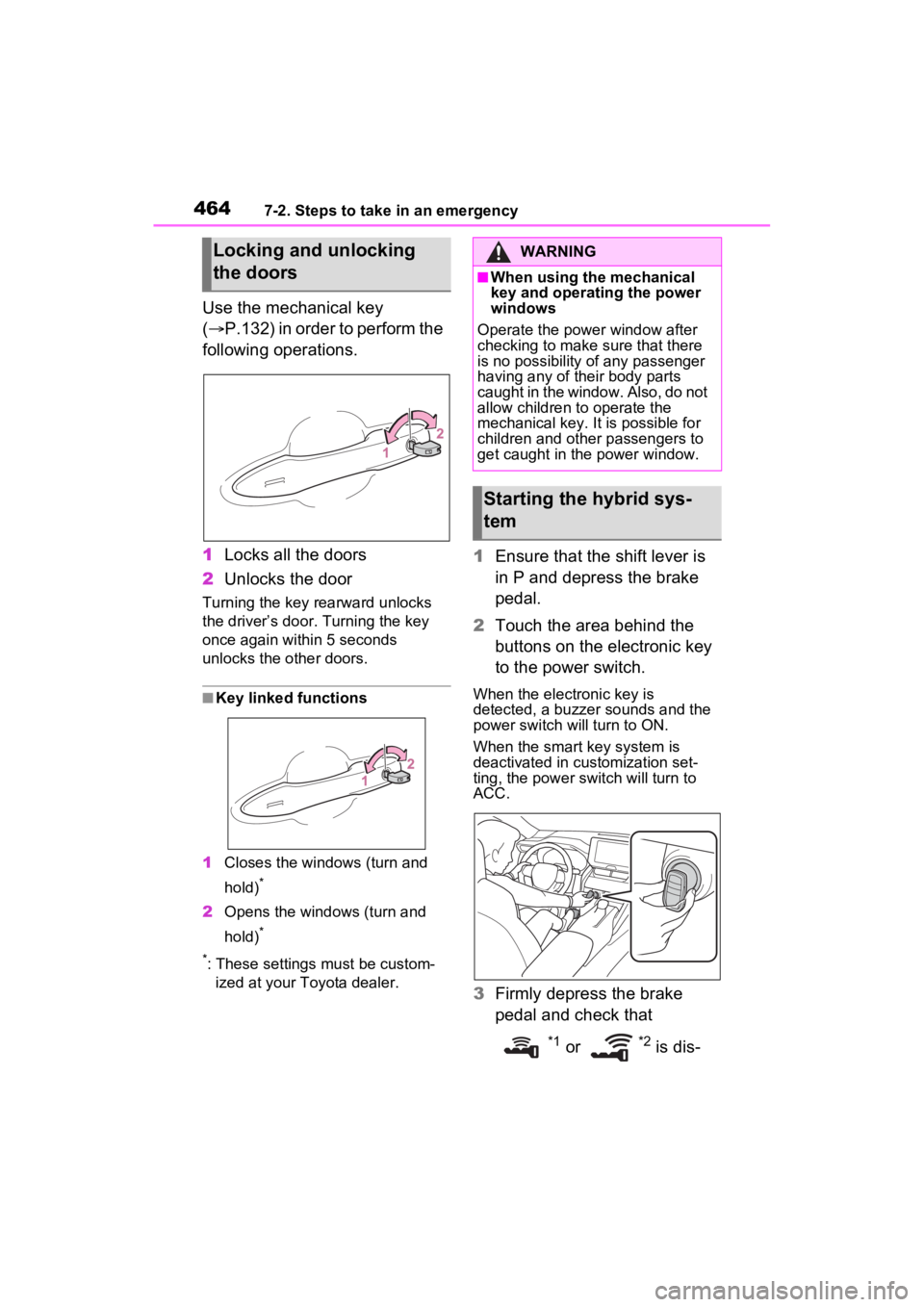
Use the mechanical key
(P.132) in order to perform the
following operations.
1 Locks all the doors
2 Unlocks the door
Turning the key rearward unlocks
the driver’s door. Turning the key
once again within 5 seconds
unlocks the other doors.
■Key linked functions
1 Closes the windo ws (turn and
hold)
*
2 Opens the windows (turn and
hold)
*
*
: These settings must be custom- ized at your To yota dealer.
1Ensure that the shift lever is
in P and depress the brake
pedal.
2 Touch the area behind the
buttons on the electronic key
to the power switch.
When the electronic key is
detected, a buzzer sounds and the
power switch will turn to ON.
When the smart key system is
deactivated in customization set-
ting, the power switch will turn to
ACC.
3Firmly depress the brake
pedal and check that
*1 or *2 is dis-
Locking and unlocking
the doorsWARNING
■When using the mechanical
key and operating the power
windows
Operate the power window after
checking to make sure that there
is no possibility of any passenger
having any of their body parts
caught in the window. Also, do not
allow children to operate the
mechanical key. It is possible for
children and other passengers to
get caught in the power window.
Starting the hybrid sys-
tem